S1J-AJ8-10 - Engraving tool Cotech - Free user manual and instructions
Find the device manual for free S1J-AJ8-10 Cotech in PDF.


| Product Type | Engraving Tool (rotary multi-tool) |
| Model Numbers | Art. no. 18-3028 (UK), Art. no. 30-9128 |
| Voltage | 18 V DC (via included AC/DC adaptor) |
| Speed Range | 0–22,000 RPM (stepless variable speed control) |
| Sound Pressure Level | < 75 dB(A) |
| Vibration Level | 2.8 m/s² (typical) |
| AC/DC Adaptor Input | 230 V ~ 50 Hz |
| AC/DC Adaptor Output | 18 V |
| Functions | Grinding, drilling, polishing, brushing, cutting, engraving (metal, glass, wood, ceramic) |
| Chuck Type | Spring collet chuck (3 collets included) |
| Spindle Lock | Yes, for easy accessory changes |
| Included Accessories | Nylon brush, drive shaft, polishing disc drive shaft, round nylon brush, round brass brush, rotating files (2), diamond-tipped bits (2), grinding bits (5), drill bits (6 sizes), polishing disc, sanding discs (4), cutting discs (10), screwdriver, carry case |
| Safety Features | Insulated gripping surfaces, spindle lock, variable speed; warnings for kickback and flying debris |
| Weight | Approx. 0.4 kg (tool only, estimated) |
| Dimensions (Tool) | Approx. 200 x 40 x 40 mm (estimated) |
| Maintenance | Clean air vents regularly; do not open casing; repair by qualified personnel only |
| Disposal | Follow local regulations for electronic waste |
Frequently Asked Questions - S1J-AJ8-10 Cotech
User questions about S1J-AJ8-10 Cotech
0 question about this device. Answer the ones you know or ask your own.
Ask a new question about this device
Download the instructions for your Engraving tool in PDF format for free! Find your manual S1J-AJ8-10 - Cotech and take your electronic device back in hand. On this page are published all the documents necessary for the use of your device. S1J-AJ8-10 by Cotech.
USER MANUAL S1J-AJ8-10 Cotech
Read the entire instruction manual carefully and make sure that you fully understand it before you use the equipment. Keep the manual for future reference.
Viktig information:
natural_image
Close-up of a black COTECH electric shaver tool with a metallic tip and control buttons (no visible text or symbols on the device body)ART.NO MODEL
18-3028 S1J-AJ8-10-UK
30-9128 S1J-AJ8-10
Ver. 200802
Engraving Tool
ART.NO: 18-3028 MODEL: S1J-AJ8-10-UK
30-9128 S1J-AJ8-10
Please read the entire instruction manual before using and save it for future use. We apologise for any text or photographic errors and any changes in technical data. If you have any questions concerning technical problems please contact our Customer Service Department (see address on reverse.)
Safety Warnings Common for grinding, sanding, wire brushing, polishing or abrasive cutting-off operations
a) This power tool is intended to function as a grinder, sander, wire brush or cut-off tool. Read all safety warnings, instructions, illustrations and specifications provided with this power tool. Failure to follow all instructions listed below may result in electric shock, fire and/or serious injury.
b) Operations such as polishing are not recommended to be performed with this power tool. Operations for which the power tool was not designed may create a hazard and cause personal injury.
c) Do not use accessories which are not specifically designed and recommended by the tool manufacturer. Just because the accessory can be attached to your power tool, it does not assure safe operation.
d) The rated speed of the accessory must be at least equal to the maximum speed marked on the power tool. accessories running faster than their rated speed can break and fly apart.
e) The outside diameter and the thickness of your accessory must be within the capacity rating of your power tool. Incorrectly sized accessories cannot be adequately guarded or controlled.
f) The arbour size of wheels, flanges, backing pads or any other accessory must properly fit the spindle of the power tool. Accessories with arbour holes that do not match the mounting hardware of the power tool will run out of balance, vibrate excessively and may cause loss of control.
g) Do not use a damaged accessory. Before each use inspect the accessory such as abrasive wheels for chips and cracks, backing pad for cracks, tear or excess wear, wire brush for loose or cracked wires. If the power tool or accessory is dropped, inspect for damage or install an undamaged accessory. After inspecting and installing an accessory, position yourself and bystanders away from the plane of the rotating accessory and run the power
tool at maximum no-load speed for one minute. Damaged accessories will normally break apart during this test time.
h) Wear personal protective equipment. Depending on application, use face shield, safety goggles or safety glasses. As appropriate, wear dust mask, hearing protectors, gloves and workshop apron capable of stopping small abrasive or workpiece fragments. The eye protection must be capable of stopping flying debris generated by various operations. The dust mask or respirator must be capable of filtrating particles generated by your operation. Prolonged exposure to high intensity noise may cause hearing loss.
i) Keep bystanders a safe distance away from work area. Anyone entering the work area must wear personal protective equipment. Fragments of workpiece or of a broken accessory may fly away and cause injury beyond the immediate area of operation.
j) Hold power tool by insulated gripping surfaces only, when performing an operation where the cutting accessory may contact hidden wiring or its own cord. Cutting accessory contacting a "live" wire may make exposed metal parts of the power tool "live" and shock the operator.
k) Position the cord clear of the spinning accessory. If you lose control, the cord may be cut or snagged and your hand or arm may be pulled into the spinning accessory.
I) Never lay the power tool down until the accessory has come to a complete stop. The spinning accessory may grab the surface and pull the power tool out of your control.
m) Do not run the power tool while carrying it at your side. Accidental contact with the spinning accessory could snag your clothing, pulling the accessory into your body.
n) Regularly clean the power tool's air vents. The motor's fan will draw the dust inside the housing and excessive accumulation of powdered metal may cause electrical hazards.
o) Do not operate the power tool near flammable materials. Sparks could ignite these materials.
p) Do not use accessories that require liquid coolants. Using water or other liquid coolants may result in electrocution or shock.
Kickback and Related Warnings
Kickback is a sudden reaction to a pinched or snagged rotating wheel, backing pad, brush or any other accessory. Pinching or snagging causes rapid stalling of the rotating accessory which in turn causes the uncontrolled power tool to be forced in the direction opposite of the accessory's rotation at the point of the binding.
For example, if an abrasive wheel is snagged or pinched by the workpiece, the edge of the wheel that is entering into the pinch point can dig into the surface of the material causing the wheel to climb out or kick out. The wheel may either jump toward or away from the operator, depending on direction of the wheel's movement at the point of pinching. Abrasive wheels may also break under these conditions.
Kickback is the result of power tool misuse and/or incorrect operating procedures or conditions and can be avoided by taking proper precautions as given below.
a) Maintain a firm grip on the power tool and position your body and arm to allow you to resist kickback forces. Always use the auxiliary handle, if provided, for maximum control over kickback or torque reaction during start-up. The operator can control torque reactions or kickback forces, if proper precautions are taken.
b) Never place your hand near the rotating accessory. Accessory may kickback over your hand.
c) Do not position your body in the area where power tool will move if kickback occurs. Kickback will propel the tool in direction opposite to the wheel's movement at the point of snagging.
d) Use special care when working corners, sharp edges etc. Avoid bouncing and snagging the accessory. Corners, sharp edges or bouncing have a tendency to snag the rotating accessory and cause loss of control or kickback.
e) Do not attach a saw chain woodcarving blade or toothed saw blade. Such blades create frequent kickback and loss of control.
Product marking with safety symbols

d the entire instruction manual!

ays use ear protection and protective goggles or a visor.
Product description
Engraving Tool for marking, engraving and grinding
- Stepless variable speed control 0-22,000 RPM.
• 230 V/18 V AC/DC Adaptor included. - A range of accessories and handy carry case included.
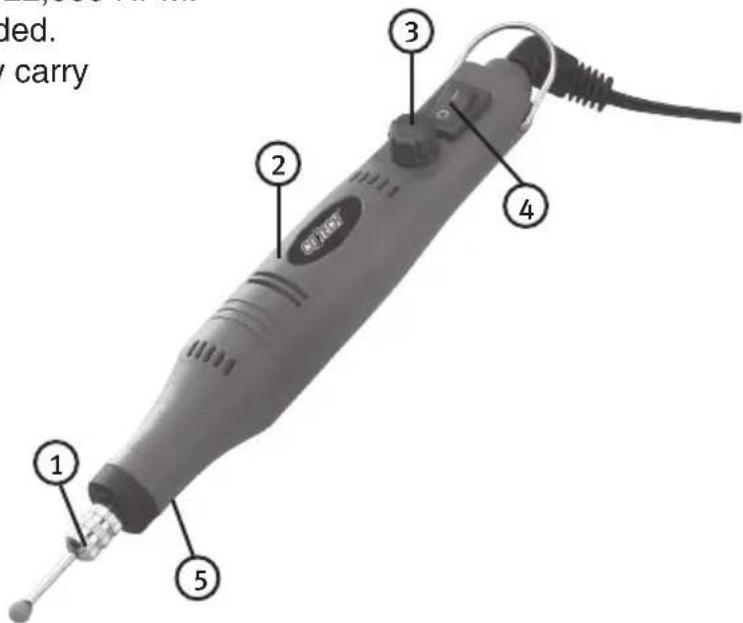
Parts
- Chuck
- Engraving Tool
- Speed Control
- On-Off Switch
- Spindle Lock Button
Contents
• 18 V Engraving Tool
- 18 V Adaptor
- Screwdriver
- Nylon Brush
- Drive Shaft
- Polishing Disc Drive Shaft
- Round Nylon Brush
- Round Brass Brush
- Rotating Files, 1 round (2.0 mm) and 1 conical (3.8 mm)
- Spherical Diamond-Tipped Bits, 1.8 mm and 1.3 mm
- Grinding Bits, 2 conical, 2 cylindrical and 1 spherical
- Drill Bits, 0.8, 1.0, 1.2, 1.4, 1.6 and 1.8 mm
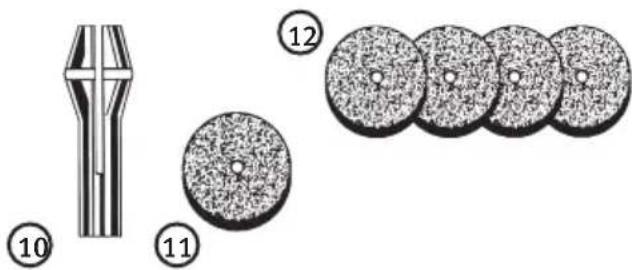
- Spring Collets (3)
- Polishing Disc
- Sanding Discs (4)
- Cutting Discs (10)



natural_image
Sequence of black circular icons arranged in a row, no text or symbols presentWarning
Do not open the casing. Certain components within the product's casing contain dangerous currents. Contact with these may give you an electric shock.
- The product should only be repaired by qualified service personnel.
- The product should not be taken apart or modified.
- Do not place the product where it could fall into water or other type of liquid.
- Do not cover the ventilation valves.
Use
The engraver can be used for grinding, drilling, polishing, brushing, cutting and engraving most types of metal, glass, wood and ceramic.
Warning! Wear safety glasses at all time when using the engraving tool.
- Make sure that the engraving tool is switched off and that the plug of the adapter is removed from the wall socket.
- Press the spindle lock button and turn the spindle by hand until the spindle lock engages.
- Turn the chuck anticlockwise to open it. Insert a suitable tool with as little protrusion as possible.
- Use high speed and low pressure. Work with smooth, even movements.
- Use high speeds for small tools and lower speeds for larger grinding tools. Test the settings yourself!
- Hold the engraver firmly and try to find a working stance that is comfortable yet still gives you complete control over the work. Remember not to look at the tool from the side, if it breaks the pieces will fly sideways!
Specifications
Voltage: 18 V
Speed: 0-22 000 RPM (stepless)
A-weighted sound pressure level: <75 dB(A)
Vibration
for acceleration 2.8 m/s ^4
AC/DC Adaptor:
Input Voltage: 230 V \~ 50 Hz
Output Voltage: 18 V

Disposal
Follow local ordinances when disposing of this product. If you are unsure about how to dispose of this product contact your municipality.
Gravyrpenna
ART.NO: 18-3028 MODEL: S1J-AJ8-10-UK
30-9128 S1J-AJ8-10
Varning!
Advarsel!
Varoitus!
Declaration of Conformity

Hereby, Clas Ohlson AB, declares that the machinery:
Engraving Tool Cotech
Art. no: 18-3028 Model: S1J-AJ8-10-UK
Art. no: 30-9128 Model: S1J-AJ8-10
Complies with the provisions of the following Directives:
98/37/EC MACHINERY
2006/95/EC LOW VOLTAGE EQUIPMENT
89/336/EEC EMC
Insjön, Sweden, February 2008

Klas Balkow
President
Clas Ohlson, 793 85 Insjön, Sweden
CO TECH®
SVERIGE
KUNDTJÄNST Tel: 0247/445 00
Fax: 0247/445 09
E-post: kundtjanst@clasohlson.se
INTERNET www.clasohlson.se
BREV Clas Ohlson AB, 793 85
INSJÖN
NORGE
KUNDESENTER Tlf.: 23 21 40 00
Faks: 23 21 40 80
E-post: kundesenter@clasohlson.no
INTERNETT www.clasohlson.no
POST Clas Ohlson AS, Postboks 485 Sentrum, 0105 OSLO
SUOMI
ASIAKASPALVELU Puh: 020 111 2222
Faksi: 020 111 2221
For consumer contact, please visit www.clasohlson.co.uk and click on customer service.
INTERNET www.clasohlson.co.uk
- Viktig information:
- Engraving Tool
- Safety Warnings Common for grinding, sanding, wire brushing, polishing or abrasive cutting-off operations
- Kickback and Related Warnings
- Product marking with safety symbols
- Product description
- Engraving Tool for marking, engraving and grinding
- Parts
- Contents
- Warning
- Use
- Specifications
- Disposal
- Gravyrpenna
- Varning!
- Advarsel!
- Varoitus!
- Declaration of Conformity
- Engraving Tool Cotech
- CO TECH®
- SVERIGE
- NORGE
- SUOMI
Brand : Cotech
Model : S1J-AJ8-10
Category : Engraving tool