
BTCA518 - Bluetooth Audio System JUNG - Free user manual and instructions
Find the device manual for free BTCA518 JUNG in PDF.


| Product Type | Room Thermostat (KNX) |
| Brand | JUNG |
| Model | BTCA518 |
| Dimensions (HxWxD) | 82 x 82 x 12 mm (flush-mount) |
| Weight | 0.2 kg |
| Power Supply | Bus-powered via KNX (30V DC SELV) |
| Power Consumption | Typical 10 mW |
| Operating Temperature | 0°C to +45°C |
| Protection Rating | IP20 |
| Material | Thermoplastic, white |
| Display | LCD with temperature and setpoint indication |
| Control Element | Touch-sensitive buttons for setting and menu navigation |
| Main Functions | Temperature measurement, setpoint adjustment, heating/cooling mode, fan coil control, presence detection (optional) |
| Communication | KNX TP1 (twisted pair) bus |
| Bus Connection | Via KNX terminal (red/black) |
| Mounting | Flush-mounted in switch box (Ø60mm) |
| Scope of Delivery | Thermostat, mounting frame, KNX connector, user manual |
| Maintenance | Clean with a soft, dry cloth. Do not use abrasive cleaners. |
| Safety | No user-serviceable parts. Disconnect bus power before installation. Observe KNX installation guidelines. |
| Spare Parts / Repairability | No spare parts available. Device must be replaced in case of failure. |
| Certifications | KNX certified, CE |
Frequently Asked Questions - BTCA518 JUNG
User questions about BTCA518 JUNG
0 question about this device. Answer the ones you know or ask your own.
Ask a new question about this device
Download the instructions for your Bluetooth Audio System in PDF format for free! Find your manual BTCA518 - JUNG and take your electronic device back in hand. On this page are published all the documents necessary for the use of your device. BTCA518 by JUNG.
USER MANUAL BTCA518 JUNG
Operating instructions

Description of device
The JUNG Bluetooth Connect BTC... consists of an operating cover and a flush-mounted power supply. The audio source (e.g. smartphone or MP3 player) is connected and the device is operated via the operating cover. The device is operated and set up via 8 sensor buttons.
The connections for mains voltage, loudspeakers and audio output are available on the power supply unit. The Bluetooth Connect can be operated with one or two loudspeaker modules LSM....
The music signal is transmitted via Bluetooth, amplified internally and output to loudspeakers or an external amplifier. The tracks and volume can be changed via sensor buttons. Up to 6 audio sources can be taught in, from which one audio source can be connected actively with the Bluetooth Connect.
Safety instructions
Electrical equipment must only be installed and assembled by qualified electricians. Failure to comply with these instructions may result in damage to the device, fire or other hazards. This product is only intended for use in dry rooms.
These instructions are an integral part of the product and must remain with the end customer.

Operation
The lower half of the cover is used for operation. All operations are made via 8 sensor buttons. In standby mode the buttons are hidden and are displayed each time you touch the lower area.

Switching on / Switching off
The Bluetooth Connect is switched on and off here (standby).
Note: After switching on, the Bluetooth Connect connects automatically to the last audio source if it can be reached. If the source is not available, e.g. because it is not within range, the next audio source is connected. The Bluetooth Connect attempts to reach the taught-in audio sources in the sequence they were taught in.
While searching for the connection, the button illumination dims brighter and darker. The playback starts automatically depending on the device type / device software.

Adjusting the volume
The volume is adjusted using the buttons. The Bluetooth Connect always starts with the volume that was last adjusted.

Teaching in the audio source
With a press of a button, the Bluetooth Connect switches to the learn mode and is then visible for a maximum of 30 seconds for audio players with an integrated Bluetooth interface (e.g. smartphone or MP3 player). A connection can now be established via such a device and it can be taught in on the Bluetooth Connect.
Note: During the 30 seconds, the buttons will flash until the connection has been established.
In some operating systems, a device that has previously been taught-in can only be taught-in again if the existing connection was deleted in this device.

Selecting the audio source
With a long press of a button (> 2 s) the connection to the next taught-in and accessible audio source is established. Afterwards, the playback is started. The search is indicated by dimming the button illumination brighter and darker. This procedure can last up to 40 seconds depending on the number of the taught-in devices.

Selecting a track
The last/next track can be selected by a brief press of a button. The track sequence corresponds to the order of the audio source. The sequence can normally be defined there according to albums, artists, genre or playlists.

Pause
With a press of a button, the playback of the connected audio source is interrupted.

Deleting connections
With a long press of a button (> 10 s), all previously taught-in audio sources are deleted from the Bluetooth Connect.
Intended use
- Installation in a flush-mounted device box according to DIN EN 49073 (recommended: deep box)
- Bluetooth Connect for audio output in conjunction with a playback device and for media control
Product characteristics
- Bluetooth Connect with sensor buttons
- Solid glass front
- Stereo playback
- Connecting terminals for two loudspeakers
- Stereo/mono change-over
- Easy operation
• High reception quality - Integrated amplifier
- Storage of 6 audio sources
- Switching on with the last audio source
- Switching on with the last volume
- Extension unit input
Installation

The Bluetooth Connect BTC... has been designed for installation in device boxes DIN EN 49073.
The connections for mains voltage, loudspeakers and the audio output are located on the flush-mounted power supply unit. The operating cover together with the frame are mounted onto the power supply unit.
Netzanschluss
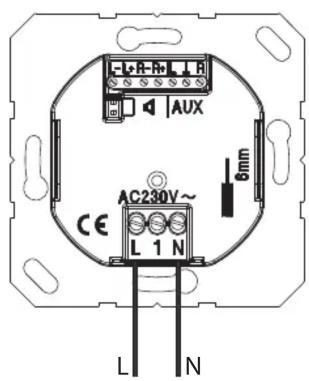
The Bluetooth Connect requires a permanent mains connection. A loopthrough via the connecting terminals is not permitted.
Before carrying out work on the device, disengage all the corresponding circuit breakers. Cover up live parts in the working environment. Within the device box, all the cables carrying low voltages must have an insulating hose in order to guarantee protective separation.
Connecting an extension unit

The extension unit connection (1) is used to switch the Bluetooth Connect on/off via switches, e.g. together with the light. The extension unit input may only be operated on the same phase.
Before carrying out work on the device, disengage all the corresponding circuit breakers. Cover up live parts in the working environment. Within the device box, all the cables carrying low voltages must have an insulating hose in order to guarantee protective separation.
Connecting a loudspeaker

The device is intended for operation with one or two loudspeaker modules LSM... The connection cable can be up to 5 m long.
In stereo mode, both outputs (L+R) are used. The device detects autonomously if only one loudspeaker is used and then changes its operating mode to mono.
The connection of several loudspeakers per output is not permitted.
Loudspeakers of other manufacturers may only be used if the technical data is identical with the JUNG LSM....
Please observe the polarity.
Mono/Stereo change-over
If two loudspeakers are to be operated in mono, e.g. in separate rooms, it is possible to change over by pressing both buttons simultaneously for 10 seconds. The new mode is indicated by tones. One tone corresponds to the mono mode, and two tones correspond to the stereo mode.
Line-out (AUX)
The Line-out (AUX) is used for connecting to an external amplifier or to the JUNG Smart Radio RAD....
Installing the power supply unit
After connecting all cables, the power supply unit must be mounted in the device box in the correct position.
Installing the operating cover
After installing the power supply unit in the device box, the cover incl. the frame is mounted onto the power supply unit.
Technical data
Rated voltage: AC 230 V \~
Frequency: 50/60 Hz
Power consumption in standby: 0.37 W
Power consumption in operation: < 4.00 W
Ambient temperature: 0...+50 °C
Atmospheric humidity: 15% ... 90%
no condensation
Bluetooth: A2DP, AVRCP
Degree of protection: IP 20
Connection: Screw terminals
1 x 1.5 mm² or 1 x 2.5 mm²
Connecting cable loudspeaker:
Twin cable H03VH-H, 2 x 0.75 mm ^4
alternative:
JY-(St)- Y 2x2x0.6
Length: max. 5 m
Loudspeaker LSM... :
Rated load capacity: 2.5 W
Impedance: 4 Ω
Frequency range: 20 ... 15000 Hz (-10 dB)
Line-out (AUX):
Impedance: 470 Ω
Output level: 1 V
The CE-sign is a free trade sign addressed exclusively to the authorities and does not include any warranty of any properties.
Warranty
We reserve the right to make technical and formal changes to the product in the interest of
technical progress.
We provide a warranty as provided for by law. Please send the device with a description of the defect to our central customer service office:
ALBRECHT JUNG GMBH & CO. KG
Service Center
Kupferstr. 17-19
44532 Lünen
Germany

Bluetooth®
SPECIAL INTEREST GROUP Bluetooth SIG, INC.
is a trademark of the
SIG, Inc.

- Operating instructions
- Description of device
- Safety instructions
- Operation
- Switching on / Switching off
- Adjusting the volume
- Teaching in the audio source
- Selecting the audio source
- Selecting a track
- Pause
- Deleting connections
- Intended use
- Product characteristics
- Mono/Stereo change-over
- Line-out (AUX)
- Installing the power supply unit
- Installing the operating cover
- Technical data
- Warranty
Brand : JUNG
Model : BTCA518
Category : Bluetooth Audio System