
PRO 36 V - Charger Cocraft - Free user manual and instructions
Find the device manual for free PRO 36 V Cocraft in PDF.


| Product Type | Battery Charger |
| Brand | Cocraft |
| Model | PRO 36 V |
| Compatible Battery Voltage | 36 V |
| Input Voltage | 220-240 V AC, 50-60 Hz |
| Output Voltage | 36 V DC |
| Output Current | 2 A |
| Charging Time | Approx. 1 hour for 2.0 Ah battery |
| Dimensions (L x W x H) | 180 x 80 x 50 mm |
| Weight | 0.5 kg |
| LED Indicators | Red charging, green fully charged |
| Protection Features | Overcharge, short-circuit, overheat protection |
| Compatible Battery Types | Cocraft 36 V Li-ion battery packs |
| Mounting | Wall-mountable |
| Cable Length | 1.5 m |
| Operating Temperature | 0°C to 40°C |
| Storage Temperature | -20°C to 60°C |
| Safety Certifications | CE, RoHS |
Frequently Asked Questions - PRO 36 V Cocraft
User questions about PRO 36 V Cocraft
0 question about this device. Answer the ones you know or ask your own.
Ask a new question about this device
Download the instructions for your Charger in PDF format for free! Find your manual PRO 36 V - Cocraft and take your electronic device back in hand. On this page are published all the documents necessary for the use of your device. PRO 36 V by Cocraft.
USER MANUAL PRO 36 V Cocraft
Read the entire instruction manual carefully and make sure that you fully understand it before you use the equipment. Keep the manual for future reference.
Viktig information:
Original instructions
Bruksanvisning i original
Originalbruksanvisning
36 V PRO Battery Charger
Art.no 31-9054 Model R3-360-3A-02
Please read the entire instruction manual before using the product and then save it for future reference. We reserve the right for any errors in text or images and any necessary changes made to technical data. In the event of technical problems or other queries, please contact our Customer Services (see address details on the back).
Safety
- The product must not be used by persons under the age of 8 years. The product may be used by children aged 8 or over under adult supervision. The product may be used by persons with reduced physical, sensory or mental capability, lack of experience or knowledge which could jeopardise their safety, provided they have been given supervision or instruction concerning the safe use of the product and understand the hazards involved. Otherwise there is a risk of product misuse and damage.
- Children must be supervised whenever they are close to the product. Never let children play with the charger.
- Cleaning and user maintenance shall not be made by children without supervision.
- Do not subject the charger to impacts or shocks and do not expose it to extremely hot, cold or dusty environments. Never immerse the product in water or other liquid. Water entering the charger will increase the risk of electric shock.
- Only use the charger with 36 V lithium-ion batteries from the Cocraft PRO series. The voltage of the battery must match the voltage of the charger. If the wrong type of battery is charged there is a risk of fire or explosion.
• Always keep the exterior of the charger clean. Dirt can cause electric shocks. - Inspect the charger, mains lead and plug before each use. If the charger is damaged it must not be used.
- Never try to open the housing or modify the charger in any way.
- All repairs must be carried out by qualified service technicians using genuine spare parts. A damaged charger, mains lead or plug will increase the risk of electric shock.
- Do not cover or block the ventilation openings of the charger. The charger could overheat resulting in a fire or damage to the charger.
Product description
- Charger
- Power/Full charge indicator
- Charging indicator
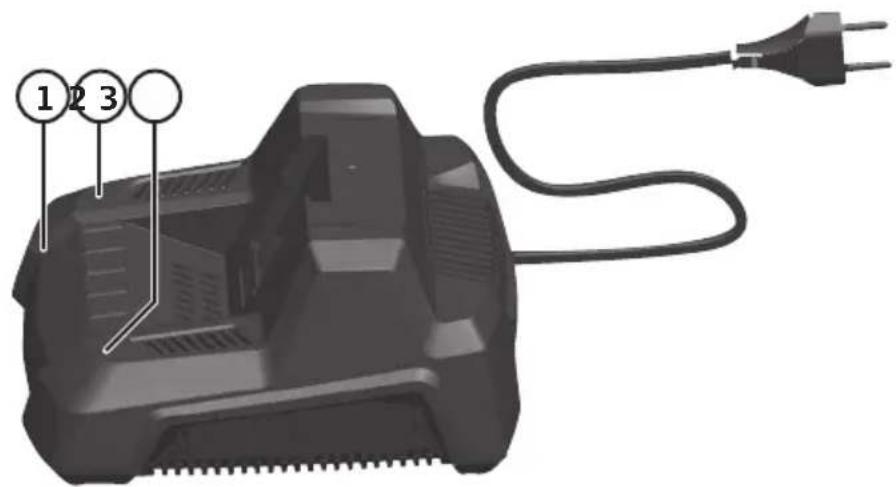
Operating instructions Charging the battery
Temperature range for charging and storing the battery: 0–40 °C.
-
Plug the charger into a wall socket (230 V, 50 Hz). The power indicator (2) will flash green when the charger is connected to the mains.
-
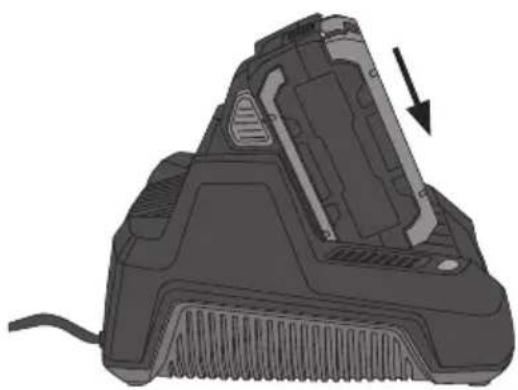
Insert the battery into the charger, making sure that it clicks into place.
-
The charging indicator (3) shines red when charging is in progress.
-
The charging indicator (3) goes out and the full charge indicator (2) shines green when the battery is fully charged.
-
Press in the buttons on the battery and remove it from the charger when it is fully charged.
-
Unplug the charger from the wall socket when it is not in use.
natural_image
3D rendering of a mechanical device with a black arrow indicating a component or feature (no text or symbols visible)Battery charge status indication
Press in the red button on the battery to check the charge status. If all the green lights come on the battery is fully charged. If only one green indicator comes on, the battery is discharged and needs to be charged before you can use it.
Note:
- The lithium-ion battery has a built-in electronic deep discharge protection which prevents partial power from being delivered. Full power is provided at all times until the electronic protection engages, turning off the tool and signifying that the battery needs to be recharged. The tool will be switched off automatically. Do not continue work after this point, as doing so may damage the battery. A battery recharge is now required before any work is resumed.
- The battery also has a built-in electronic overload protection. If the tool is put under too much pressure, the electronics automatically cut the power and the tool stops. Release the power trigger and wait a few seconds before switching the tool on again.
- The lithium-ion battery has no memory which means that it can be charged at any time regardless of battery level.
- Charge the battery for at least 6 hours the first and second time it is charged.
- For long-term storage the battery should be fully charged at least every 6 months.
Care and maintenance
- The charger should be unplugged and vacuumed regularly.
- If the charger is not to be used for an extended period, it should be unplugged and stored in a dry and dust-free location out of reach of children.
Troubleshooting guide
| The battery does not charge. | Check that the mains lead is properly plugged into an electrical socket.Make sure that the electrical socket is live.Check that the battery is inserted correctly into the charger.The battery or charger contacts might need to be cleaned.Note:Unplug the charger from the wall socket before cleaning the contacts.The charger or its cable is damaged.The battery is defective and must be replaced. |
| The battery charge is poor after it has been charged. | The battery is not fully charged. Charge the battery until the full charge indicator (2) shines steadily.The battery needs replacing. |
Responsible disposal
This symbol indicates that this product should not be disposed of with general household waste. This applies throughout the entire EU. In order to prevent any harm to the environment or health hazards caused by incorrect waste disposal, the product must be handed in for recycling so that the material can be disposed of in a responsible manner. When recycling your product, take it to your local collection facility or contact the place of purchase. They will ensure that the product is disposed of in an environmentally sound manner.

natural_image
Symbol of a trash bin crossed out by two crossed lines, with no text or labels present.Specifications
Power supply 230 V, 50–60 Hz
Output voltage 36 V DC
Output current 3.6 A
Size 20 × 16.5 × 10 cm
Weight 750 g
Batteriladdare 36 V PRO
Art.nr 31-9054 Modell R3-360-3A-02
natural_image
3D rendering of a mechanical device with a black arrow indicating a component or feature (no text or symbols visible)natural_image
3D rendering of a mechanical device with a black arrow indicating a component (no text or symbols visible)natural_image
Symbol of a trash bin crossed with no text or labels, accompanied by a black rectangular block below (no readable text or symbols)Spesifikasjoner
Nettspenning 230 V AC, 50–60 Hz
Utspenning 36 V DC
natural_image
Illustration of a hairdryer with a black arrow indicating the component (no text or symbols present)Akun tilan ilmaisin
natural_image
3D rendering of a mechanical device with a downward arrow indicating a component (no text or symbols visible)Postal 10 - 13 Market Place
Kingston Upon Thames
Surrey
KT1 1JZ
Deutschland
Kundenservice

- Viktig information:
- V PRO Battery Charger
- Safety
- Product description
- Operating instructions Charging the battery
- Battery charge status indication
- Note:
- Care and maintenance
- Troubleshooting guide
- Responsible disposal
- Specifications
- Batteriladdare 36 V PRO
- Spesifikasjoner
- Akun tilan ilmaisin
- Deutschland
Brand : Cocraft
Model : PRO 36 V
Category : Charger