
Gaming 998B - PC Case LC-Power - Free user manual and instructions
Find the device manual for free Gaming 998B LC-Power in PDF.


| Product Type | PC Case |
| Brand | LC-Power |
| Model | Gaming 998B |
| Form Factor | Mid Tower |
| Motherboard Support | ATX, Micro-ATX, Mini-ITX |
| Dimensions (L x W x H) | 410 x 210 x 460 mm |
| Weight | 5.2 kg |
| Material | Steel, Tempered Glass |
| Side Panel | Tempered Glass (left) |
| Fan Support (Front) | 3 x 120mm or 2 x 140mm |
| Fan Support (Top) | 2 x 120mm |
| Fan Support (Rear) | 1 x 120mm |
| Radiator Support (Front) | 240mm / 280mm |
| Radiator Support (Top) | 240mm |
| Radiator Support (Rear) | 120mm |
| Drive Bays (3.5") | 2 |
| Drive Bays (2.5") | 2+1 |
| Expansion Slots | 7 |
| I/O Ports | USB 3.0 x 2, USB 2.0 x 1, Audio x 1 |
| Power Supply | Bottom mount, not included |
| Dust Filters | Bottom, Top magnetic |
| LED Lighting | Front RGB strip (remote control) |
| Color | Black |
| Maximum GPU Length | 320 mm |
| Maximum CPU Cooler Height | 165 mm |
Frequently Asked Questions - Gaming 998B LC-Power
User questions about Gaming 998B LC-Power
0 question about this device. Answer the ones you know or ask your own.
Ask a new question about this device
Download the instructions for your PC Case in PDF format for free! Find your manual Gaming 998B - LC-Power and take your electronic device back in hand. On this page are published all the documents necessary for the use of your device. Gaming 998B by LC-Power.
USER MANUAL Gaming 998B LC-Power
natural_image
Exterior view of a black server tower with red LED display and three circular ports (no text or symbols visible)Thank you for purchasing this case from LC-Power.
Please read this manual before usage.
Specifications may be subject to change without prior notice.
- Specification
| Size 523 x 224 x 48 | 8 mm (h x w x d) |
| M/B ATX / micro ATX / mini ITX | |
| HDD 5x 3.5" HDD; | 2x 2.5" HDD/SSD |
| PSU ATX | |
| Fans Front: 3x 120 | mmTop: 2x 120/140 mmInside: 1x 120 mmBack: 1x 120 mm |
| Water cooling(if no fans are mounted) | Front: 360 mmTop: 240 mmRear: 120 mm |
| Expansion Slots 7 (screwable) | |
| Screw bags Cable tie 80mm: 5pcsMB Stand off 6# 5H 8*4.5L==>10pcsM3*5==>6pcs(2.5"HDD*6)Black screws for side panel M4*5==>8pcsM5*10 TP3==>16pcs(FAN*16) | |
6#*4===>27pcs(MB*10,3.5"HDD*13,Power*4)
2. Installation
2-1 Controller board

natural_image
Close-up of a mechanical device with wiring and a central panel, no visible text or symbolsConnect the fan cables to the controller board on the back side of the mainboard tray. Connect the PATA/Molex connector to your power supply.
2-2 Front case fan installation

natural_image
Close-up of a black CPU fan with visible blades and wiring, no text or symbols presentFix the fans with screws to the case chassis.
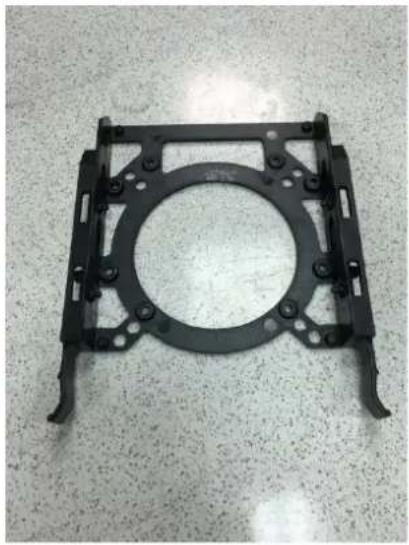
2-3 3.5" HDD installation
Press the HDD into the bracket to fix it
natural_image
Metal mechanical bracket with circular center and mounting holes, placed on a textured surface (no text or symbols visible)

natural_image
Close-up of a hard disk computer case on a workbench, showing internal components and mounting brackets (no visible text or labels)2-4 Fan installation on the back side of the HDD bracket

natural_image
Close-up of a black industrial machine ventilation grille with mounting holes (no visible text or symbols)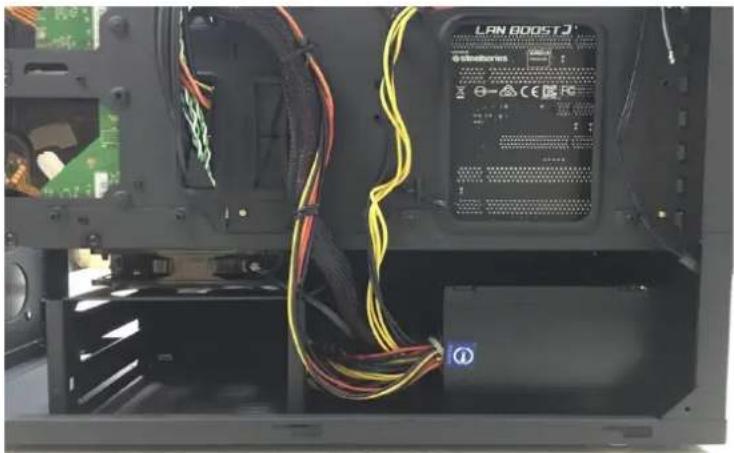
natural_image
Interior view of a computer chassis showing cable wiring and a LAN 8005T device (no readable text or symbols)2-5.2 Mainboard installation with stand-off am screws

natural_image
Interior view of a black server room with visible internal components and wiring (no text or symbols)Additional 3x 3.5" HDD on MB tray

natural_image
Interior view of a black desktop computer case with visible circuitry and ventilation (no text or symbols)Additional 2x 2.5" HDD/SSD on the back side of the MB tray
2-6 Tempered glasses side panel installation
Alight 4 screw holes to washer and fasten screws

natural_image
Close-up of a mechanical component with a circular hole and textured surface (no visible text or symbols)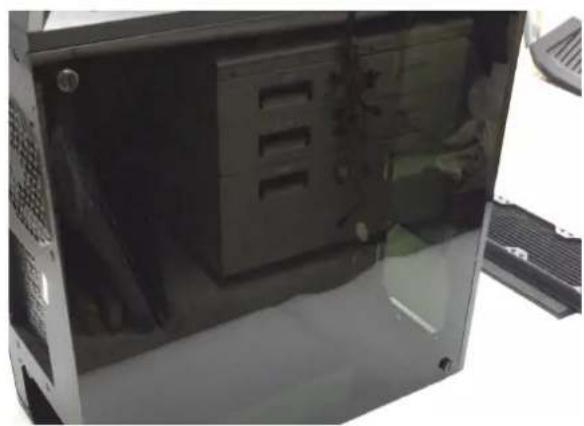
natural_image
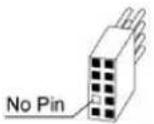
Interior view of a computer tower case showing internal partitioning and ventilation slots (no visible text or labels)Front I/O Connector
| Motherboard Case cable connector | |
| USB 3.0 | |
 |  |
| HD Audio | |
 |  |
The product has a two year warranty period from the date of purchase, service issues will be handled by your dealer. If the case is damaged due to improper operation, the warranty period expires immediately.
Check www.lc-power.com or contact us by e-mail at support@lc-power.com.
Silent Power Electronics GmbH,
Formerweg 8,
47877 Willich,
Germany

POWER

- Installation
- 2-1 Controller board
- 2-2 Front case fan installation
- 2-3 3.5" HDD installation
- 2-4 Fan installation on the back side of the HDD bracket
- 2-5.2 Mainboard installation with stand-off am screws
- Additional 3x 3.5" HDD on MB tray
- Additional 2x 2.5" HDD/SSD on the back side of the MB tray
- 2-6 Tempered glasses side panel installation
Brand : LC-Power
Model : Gaming 998B
Category : PC Case