
RF400 CAM - Car stereo Xblitz - Free user manual and instructions
Find the device manual for free RF400 CAM Xblitz in PDF.


| Product Type | Car Stereo / Multimedia Receiver |
| Brand | Xblitz |
| Model | RF400 CAM |
| Form Factor | 1 DIN |
| Dimensions | 178 x 50 x 120 mm (approx.) |
| Weight | ~0.5 kg |
| Power Supply | 12V DC (negative ground) |
| Power Output | 4 x 50W max |
| Display | 7 inch Touchscreen (approx.) |
| Radio Bands | FM / AM |
| Bluetooth | Yes, for hands-free calling and audio streaming |
| USB Ports | 1 x USB (for music and charging) |
| SD Card Slot | 1 x microSD (for music and video) |
| Camera Input | Yes, for reverse camera (RCA input) |
| Audio Formats | MP3, WMA, WAV, FLAC |
| Video Formats | AVI, MP4, MOV |
| Steering Wheel Control | Compatible (requires adapter) |
| Maintenance | Clean with a soft, dry cloth. Avoid liquids. |
| Safety | Use only specified fuses. Professional installation recommended. |
| Spare Parts | Contact Xblitz support for availability. |
| Warranty | Standard 1-year limited warranty |
Frequently Asked Questions - RF400 CAM Xblitz
User questions about RF400 CAM Xblitz
0 question about this device. Answer the ones you know or ask your own.
Ask a new question about this device
Download the instructions for your Car stereo in PDF format for free! Find your manual RF400 CAM - Xblitz and take your electronic device back in hand. On this page are published all the documents necessary for the use of your device. RF400 CAM by Xblitz.
USER MANUAL RF400 CAM Xblitz
User's manual in English lanugage - EN
natural_image
Black XBlitz smartphone with red neon lights and control buttons, no visible text or symbols on the device body.
natural_image
Abstract geometric shape with diagonal light gray lines on white background (no text or symbols)Xblitz®
[RF400 CAM]
INSTRUKCJA OBSŁUGI
PL
Xblitz®
natural_image
Illustration of a black cable with four circular connectors and an arrow pointing to it (no text or symbols)Xblitz®
natural_image
Diagram showing four different types of audio/video connectors with color-coded wires (red, gray, yellow) and directional arrows indicating connection progression.Producent:
KGK Trade
sp. z o.o. sp. k.
Ujastek 5b
31-752 Kraków
Polska
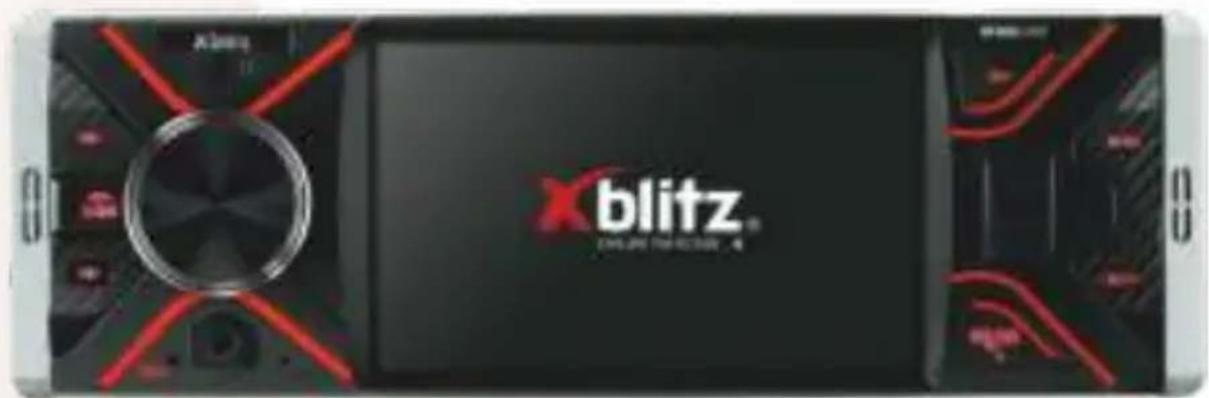
Thank you for purchasing XBLITZ RF400 CAM car radio. This device is a 1-DIN car radio, meant for installation and set-up inside vehicle. The device can receive FM radio stations, as well as open files(e.g. MP3/WMA/JPEG/GIF/MP4/AVI). It has built-in USB port and microSD card slot.
You can also use XBLITZ RF400 CAM as a speakerphone in your car. Additionally, it has a backup camera and a microphone. Before first use please read the following user's manual and preserve it for future use. After unboxing, please check the device for potential damage.
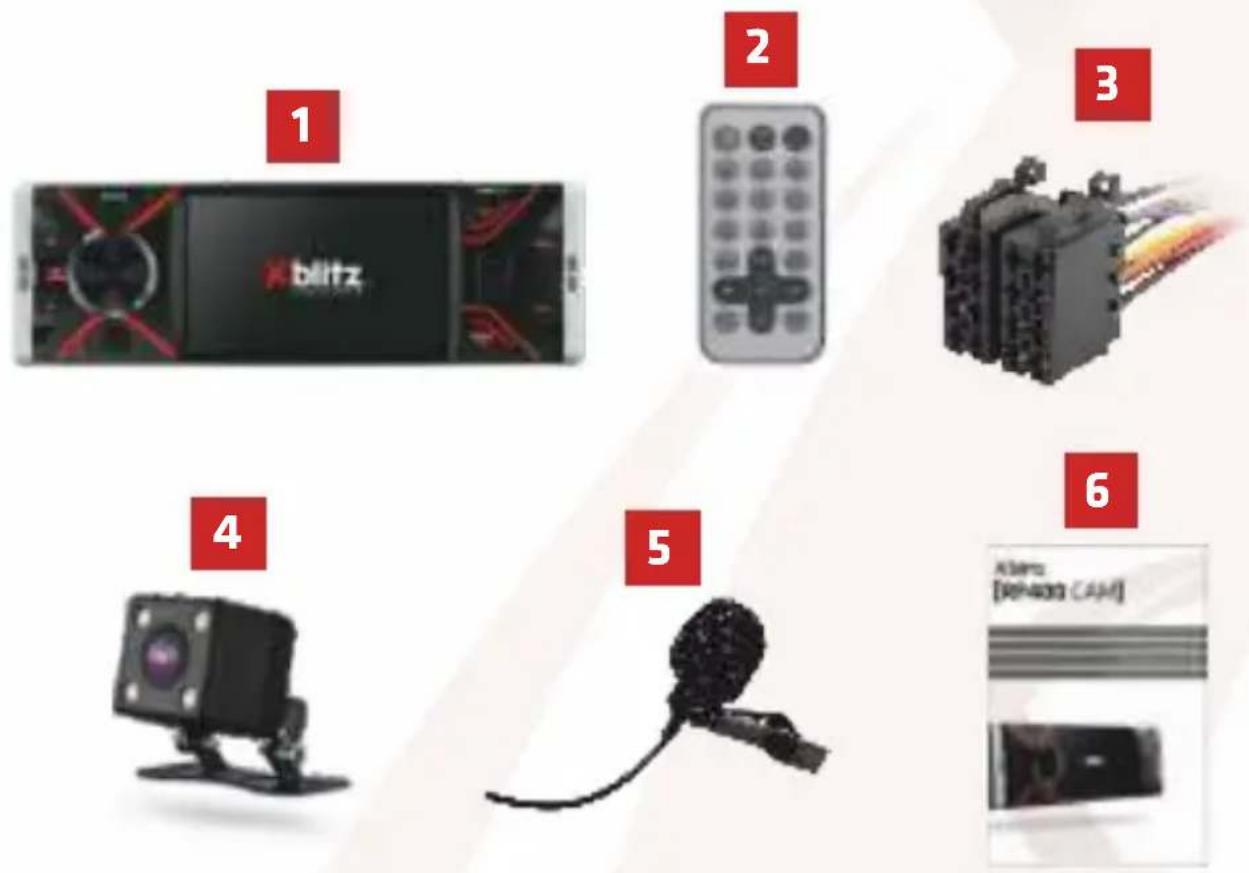
01. PACKAGE CONTENTS
- Radio
- Remote control
- ISO connector
- Backup camera
- Microphone
- User's manual
Xblitz.
02. MAIN FEATURES
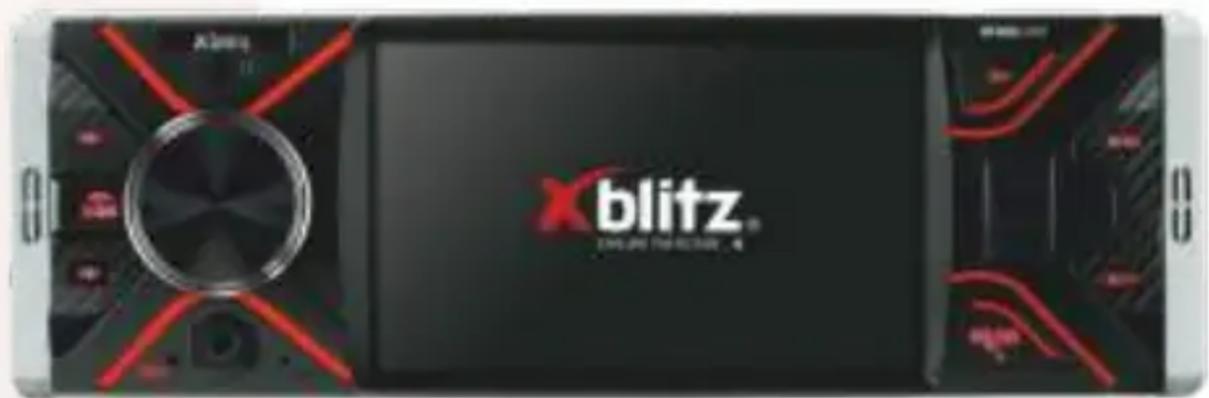
- 4.1" LCD screen.
- 11 menu languages (English, Polish, Spanish, French, Portuguese, Russian, German, Italian, Turkish, Chinese, Arabic).
- Playing radio/ music/ video and showing pictures.
- Playing/showing files from another device via Bluetooth connection.
- The device serves as a speakerphone.
- USB port and microSD slot.
- FM radio with RDS fuction.
- Displaying the names of radio stations.
- Scanning for different radio frequencies.
- 3,5mm AUX port for mobile devices.
- 4 x 50W speakers.
- 2x RCA amplifier/ subwoofer jack.
- Automatic display of backup camera view.
- Video output.
Xblitz
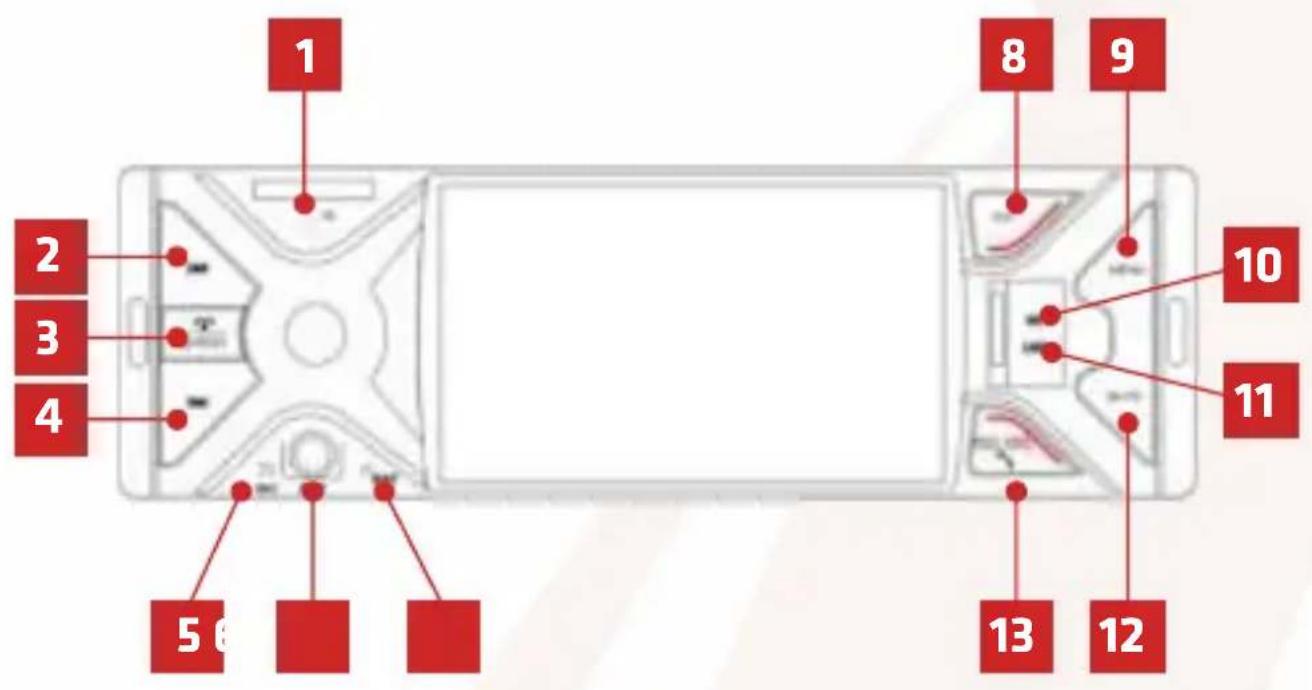
03. BUTTON FUNCTIONS
- Remote control signal receiver.
- Previous track/rewind/automatic radio station tuning.
- Power ON/ OFF/ Mode switch/ End phonecall.
- Next track/ fast forward/ automatic radio station tuning.
- Microphone for phonecalls.
- AUX port.
- Reset.
- Change saved radio stations/ pause-play.
- MENU.
- microSD slot.
- USB port.
- Mute.
- Change broadcast band (AM/ FM)/ receive phonecall.
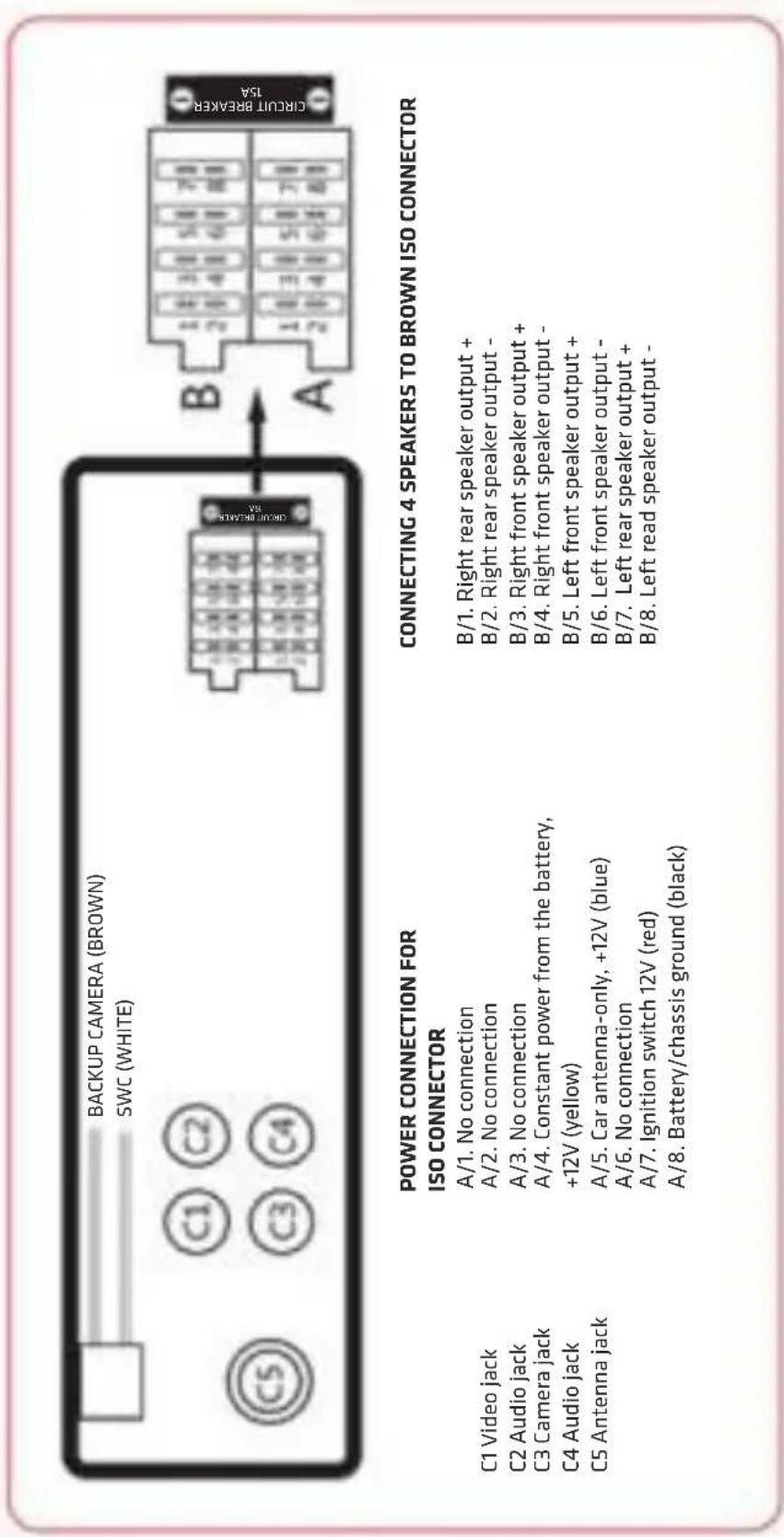
04. INSTALLATION SCHEME
a. diagram
EN
Xblitz®
b. ISO connectors
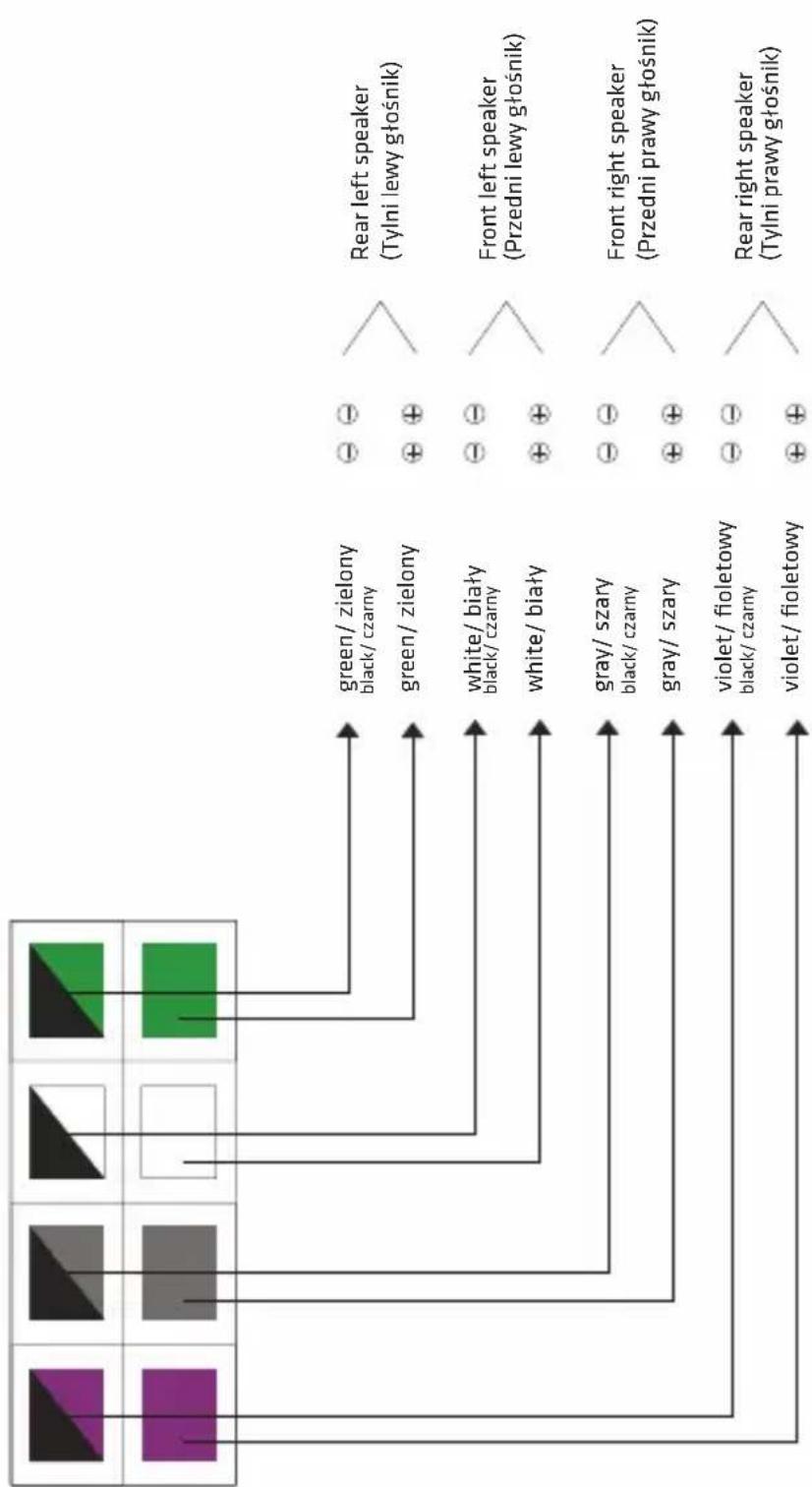
flowchart
graph TD
    A["Green/ zielony black/ czarny"] --> B["Green/ zielony"]
    C["White/ biały black/ czarny"] --> D["White/ biały"]
    E["Gray/ szary black/ czarny"] --> F["Gray/ szary"]
    G["violet/ fioletowy black/ czarny"] --> H["violet/ fioletowy"]
    I["● ⊖"] --> J["Rear left speaker (Tylni lewy głośnik)"]
    K["⊕ ⊕"] --> L["Front left speaker (Przedni lewy głośnik)"]
    M["⊖ ⊖"] --> N["Front right speaker (Przedni prawy głośnik)"]
    O["⊕ ⊕"] --> P["Rear right speaker (Tylni prawy głośnik)"]
Xblitz®
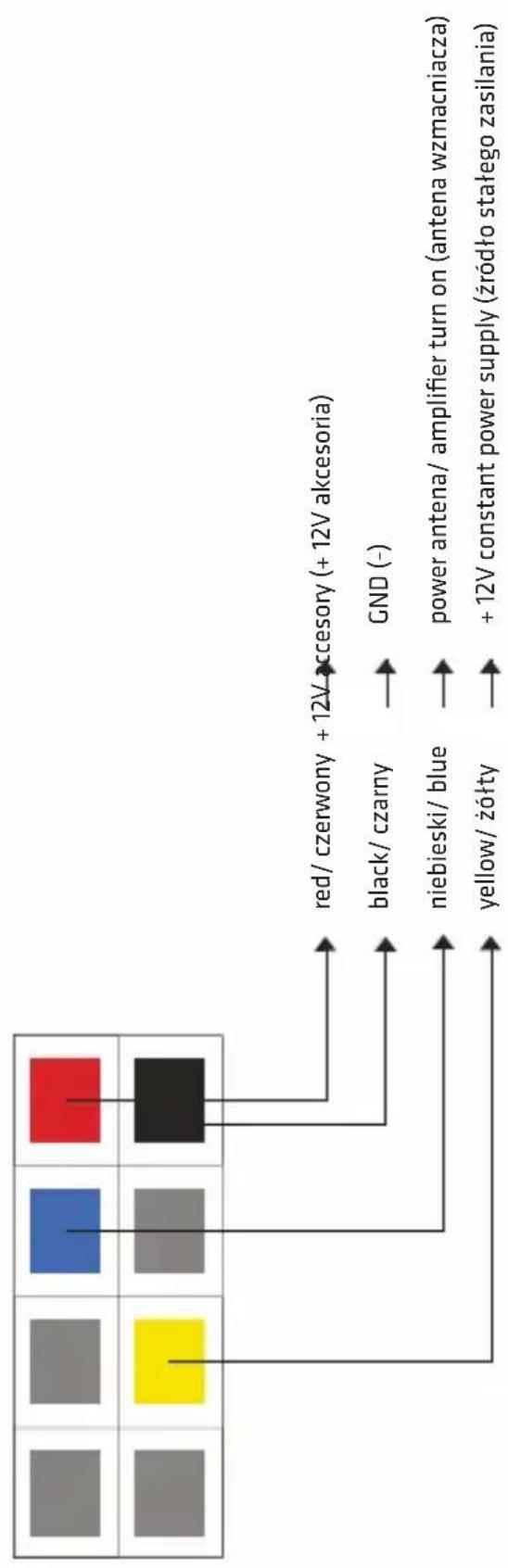
flowchart
graph TD
    A["Red/ black/ blue"] --> B["black/ czarny"]
    C["Yellow/ yellow"] --> D["niebieski/ blue"]
    E["Blue/ gray"] --> F["yellow/ żółty"]
    G["Black/ red"] --> H["red/ czerwony + 12V accesory (+ 12V akcesoria)"]
    I["GND (-)"] --> J["power antenna/ amplifier turn on (antena wzmacniacza)"]
    K["+ 12V constant power supply (źródło stałego zasilania)"] --> L["+ 12V constant power supply (żródło stałego zasilania)"]
EN
Xblitz
05. INSTALLATION
- Take the mounting sleeve off the device and place it in the dashboard.
The perforated metal tabs can be bent into place with a screwdriver.
Bend enough tabs to make sure that the sleeve is firmly secured to the dashboard.
- Carefully insert the device into the mounting sleeve. Depending on the vehicle's size, additional metal clamps or other means of mounting might be necessary.
Depending on the vehicle, the mounting method can differ from the one described in this manual.
- Following the instruction, connect the cables. Check if the connectors in your car are fit the description in the manual. Make sure that all cables are connected properly and that there are no short circuits. Speaker cables should also be properly connected. In case of uncertainty, consult a specialist.
NEVER connect any of the speaker cables to a battery's negative terminal/grounding (e.g. black ground cable in your vehicle).
- Turn the device on and set it up, following the manual.
We wish you a safe and comfortable journey!
- CONNECTING THE MICROPHONE AND BACKUP CAMERA:
a. To connect a microphone, you need to plug it into the cable at the back of the radio device (pictured below).
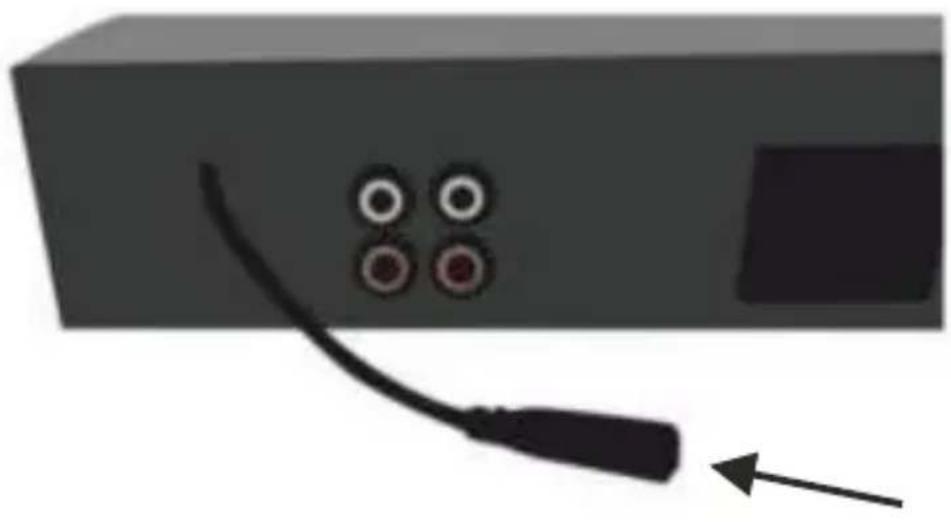
natural_image
Illustration of a black cable with four circular connectors attached to a rectangular device (no text or symbols)Xblitz®
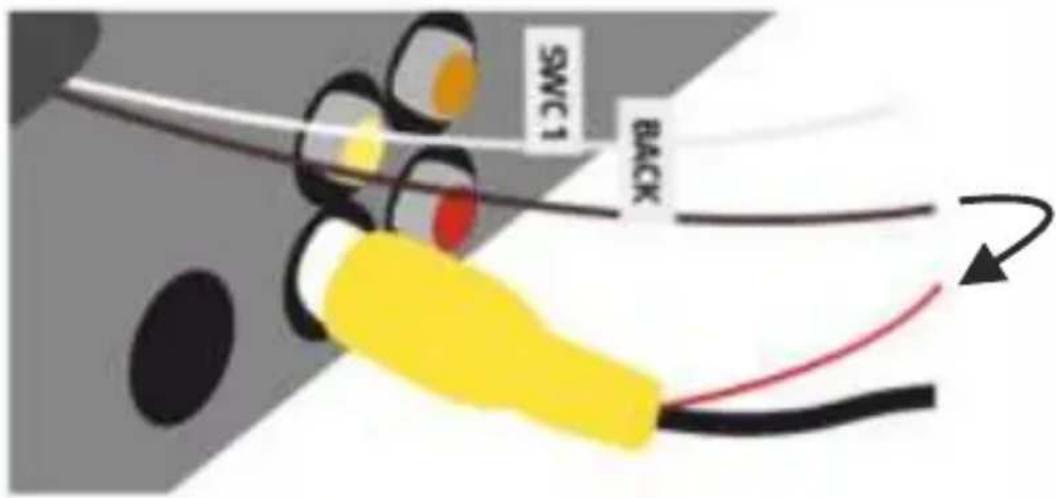
b. To connect the rear camera, put the camera's yellow AV plug into the lower yellow AV socket.
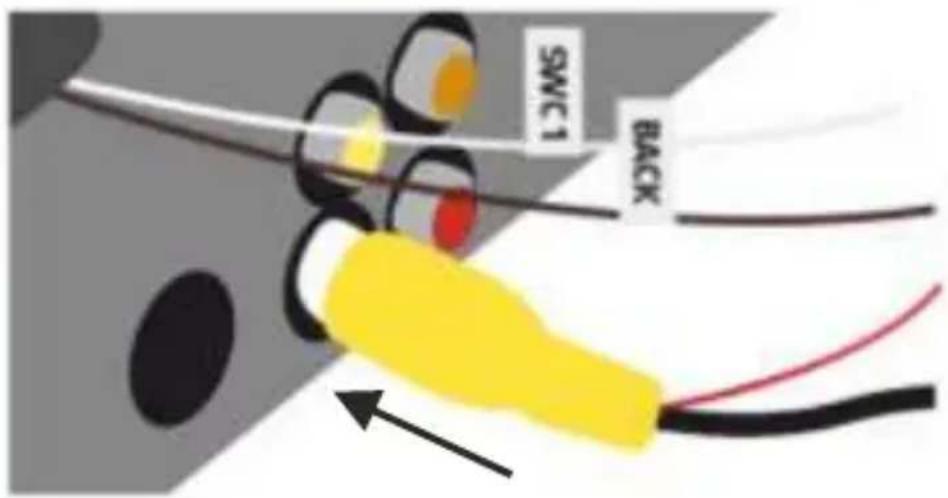
EN
c. The red cable that comes out of the yellow AV plug has to be connected with the brown cable that comes out of the radio (BACK).
Xblitz®
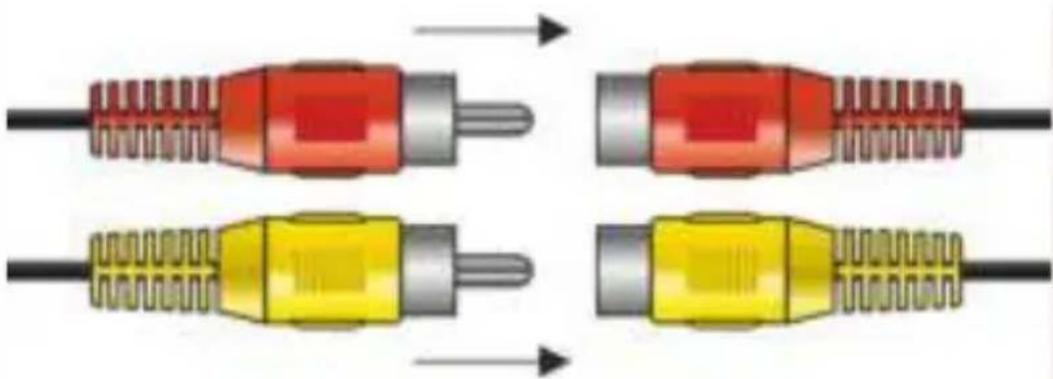
d. The remaining yellow AV cable has to be connected to the yellow socket, and the red cable has to be connected to the red socket.
natural_image
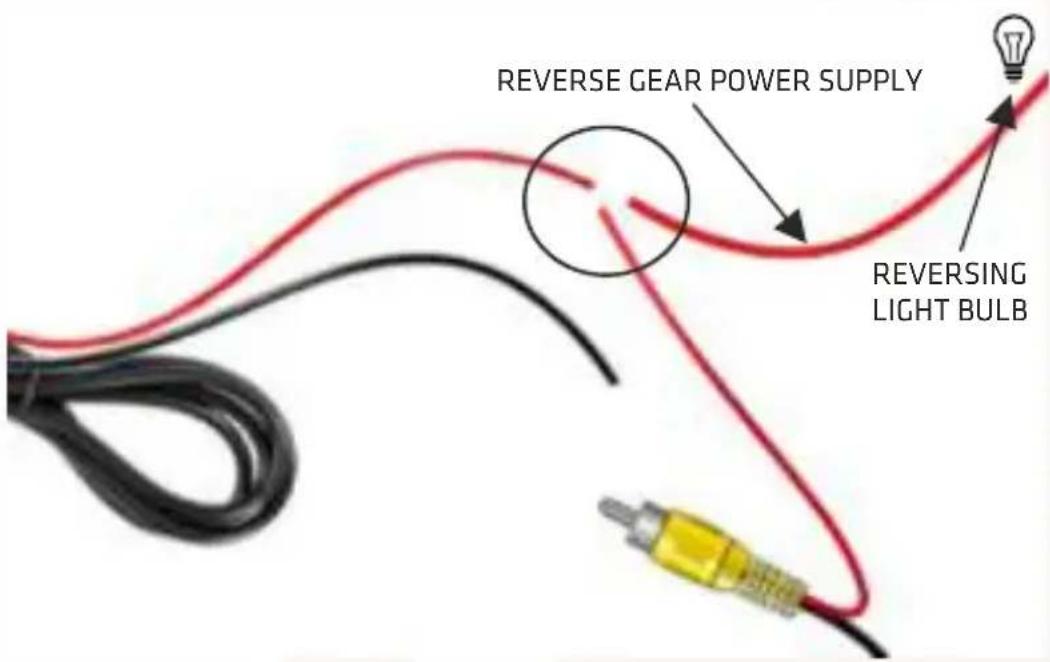
Diagram showing four different types of audio/video connectors with color-coded wires (red, yellow, gray) and directional arrows indicating connection progression.e. The red cable has to be connected to the other rad cable coming out of the second yellow AV plug and reverse gear power supply.
Xblitz®
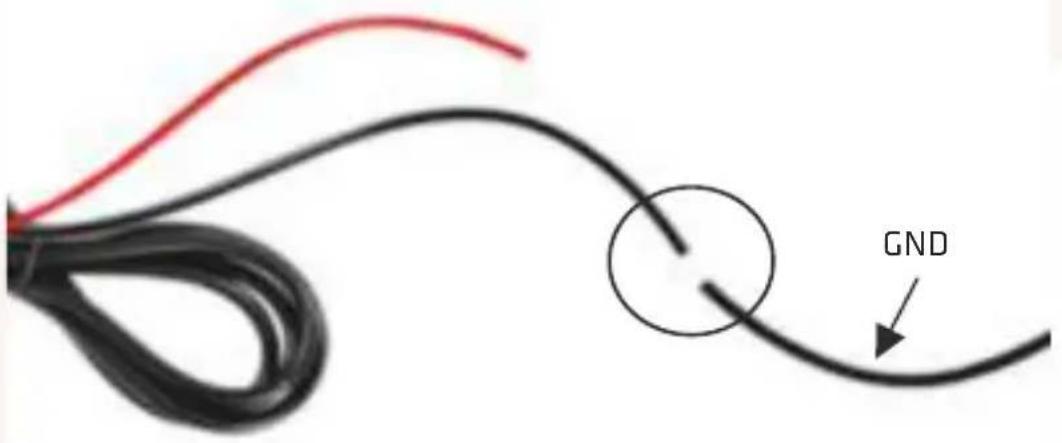
f. Black cable has to be connected to GND - grounding
EN
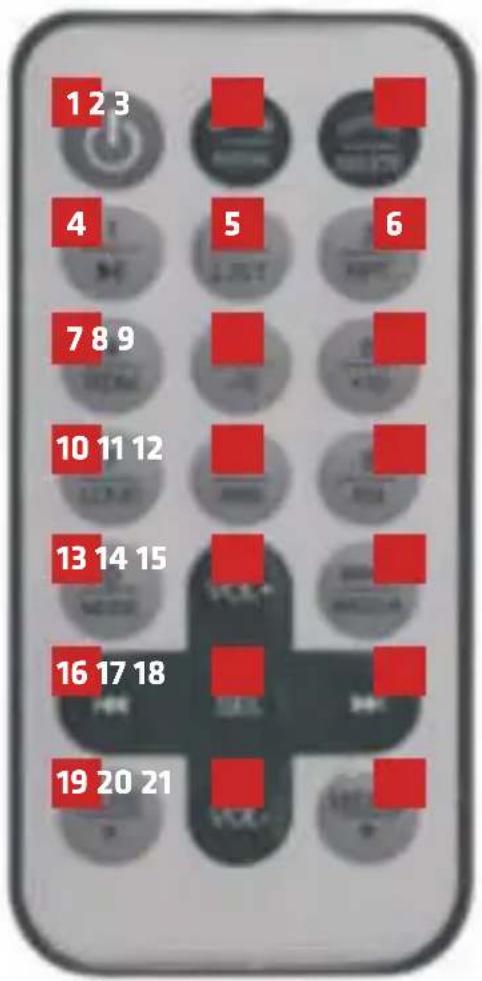
06. REMOTE CONTROL
- ON/ OFF
- Receive call
- End call
- Play/ pause
- File list
- Repeat track/all tracks
- Shuffle tracks
- Go 10 tracks back
- Go 10 tracks forward
- Volume control
- Automatic radio tuning
- EQ settings
- RADIO/ MP3/ VIDEO/ BT/ AV/ AUX
- Volume +
- Choose music/video
- Previous file
- Settings
- Next file
- Mute
- Volume -
- MENU/ making phonecalls function
Xblitz
07. FUNCTIONS
A. TURNING ON AND OFF
- Press the PWR button on the radio or button 1 on the remote to turn the device on. On first startup, the device will turn on the RADIO mode by default.
- On future startups, the device will turn on the last used mode, unless the used external memory drive has been disconnected.
- Due to voltage spikes when turning on engine startup, the device should be turned on after the engine has already been turned on. It should also be turned off before the engine is turned off. To turn off the device, press the PWR button on the radio or button 1 on the remote.
B. RESETTING THE DEVICE
- In case of the device losing power or not functioning properly, its microprocessor needs to be restarted.. To reset the device, hold the RST button, found on the radio under the volume knob, with a thin instrument (e.g. a paperclip) for 3 seconds. The device will turn off and return to factory settings.
C. VOLUME
To set the volume, use the knob on the radio's front panel or VOL+/VOL- buttons on the remote.
- Due to many uses of the knob, if the device has any of the modes turned on (other than the default), first you need to turn said mode off.
- The volume level is visible in the upper right corner: VOL:00-40.
08. BASIC SETTINGS AND LANGUAGE
- Press the MENU button and then turn the knob to choose settings and press the knob to turn the settings on. The following parameters can be set: menu language, date, time, factory settings, 12/24h time format, place of use.
- Choose the correct function by turning the knob. The modifications are made by pressing the knob. After choosing the settings, you need to confirm them by turning the knob before pressing it again.
Xblitz®
A. Language: pick the first option, press the knob, turn the knob to choose the language, confirm your choice by pressing the knob.
B. Date: pick the second option. Then set the month by turning the knob and confirm by pressing the knob. Then set the day and year the same way.
C. Clock: pick the third option. The clock is set the same way as the date.
D. Factory settings: choosing this option will make the device return to factory settings.
E. Time format: allows you to change the way that time is being displayed between 12 and 24 hour modes.
F. Radiowave receiving area: make sure, that this setting is set to „Europe”.
EN
SOURCE SIGNAL CHOICE
The choice is available from the menu (MENU button and knob). Press the MENU button -> turn the knob to go to the choice of source signal(radio, music player, USB/ microSD, music player on a mobile device connected by Bluetooth, external audio-video source/ backup camera view).
WARNING!
- The chosen source signal is unavailable or cannot be chosen, e.g. the chosen memory drive with the files (music, pictures, videos) was not connected, the mobile device was not paired with the radio or Bluetooth connection is not working.
- After reconnecting, the last played file will start playing again, unless the memory drive gets disconnected again in the meantime.
- If an external USB device and microSD memory card are connected at the same time, you can pick between them from the menu.
- After connecting external memory drives, tracks will be played from the last connected device.
- Information on the currently active memory drive are visible in the top left corner of the screen.

Xblitz.
09. AUDIO AND EQ SETTINGS
- With short presses of the knob, pick the parameter you want to adjust:
BAS/TRE/BAL/FAD/EQ/LOUD/SUB/ST/BEEP/LOC. The values are set by turning the knob. Pressing the knob confirms the change.
a. if no setting is changed, the device will automatically return to the previous function after 3 seconds.
b. Turning the knob, by default, changes the volume.
c. Do not turn up low and high sounds too much when listening to loud music, as it can cause sound distortions.
d. EQ function will overwrite the previous settings of low and high sounds.
Volume - volume settings (00-40).
Bass - low sounds settings (-7 ... 0 ... +7).
Treble - high sounds settings (-7 ... 0 ... +7).
Balance - balance between left and right channel settings (L10 ... 0 ... R10).
Fader - balance between front and back channel settings (R10 ... 0 ... F10).
Equalization - EQ settings (OFF/CLASSIC/ROCK/POP).
Loudness – sound alignment (LOUD OFF/LOUD ON). Human hearing is less sensitive to sounds of high and low frequencies when the volume is low. Turning the LOUD function on will make the EQ compensate for this at low volume. We recommend you to turn that option off when the volume is high, as it can cause sound distortions.
- For better sound quality, turn EQ off and set Bass and Treble settings to „0" before turning this option on.
- The higher the volume, the less effective automatic sound alignment is.
Stereo - turn receiving stereo waves by FM radio on/off.
BEEP - turn settings sounds on/off.
LOCAL - switch between local and long-distance radio waves receiving.
10. USING THE RADIO
After turning the device on, radio will activate automatically, if it was the last mode used – or if the previously used USB/ SD drive has been disconnected. If you want to switch to radio mode, press the MODE button and turn the knob.
Xblitz®
A. MANUAL TUNING AND SAVING RADIO STATIONS
- Choose the FM-1 band by pressing the BND button. You can check that on the display. By pressing the >>| and |<< buttons, you will manually tune the radio frequency. The tuning will stop as you find the next transmission. Before that, the word SCAN will be visible on the display. For precise tuning, hold >>| or |<< until the screen says „Manual tuning”. Then, by pressing >>| or |<< you can pick the exact frequency you want. Then you can save it in the device's memory by holding the CH+ button.
EN
B. AUTOMATIC TUNING AND SAVING
Press and hold the AMS button for 2 seconds to automatically find (SCAN) and save radio stations in your area. Progress of scanning for and saving the stations is showed on screen. Every frequency on FM1-FM2-FM3 or AM1-AM2 bands are checked. The better the radio conditions, the more stations can be found.
- After the tuning is finished, the screen will say INTRO and a short excerpt from every station will be played. This function can be turned off by pressing the AMS button.
- The device may omit stations that don't have a strong signal and the stations will not be saved in a sequence of your choice.
- To set everything to your preference, use manual tuning and saving.
C. PICKING FROM THE SAVED RADIO STATIONS
Pick a frequency band by pressing the BAND button and pick a station by pressing the CH+ button. Up to 18 FM stations and 12 AM stations can be saved.
- If too much time passes between pressing both buttons, the radio will return to its previous mode.
- If the ST icon is not shown on screen when you receive a transmission, radio conditions may be not good enough or your antenna is inadequate.
D. FM RDS FUNCTION
Radio Data System is used to send digital data over radio waves. Text information is shown on screen, if both the broadcasting station and receiver have the RDS function turned on. The information displayed can be e.g. name of the radio station, what kind of music is being broadcast etc.
Aside from text information, additional services are publicly available, such as:
Xblitz®
- PS – programme service (shows radio station's name, up to 8 letters at once. Serves as a basic function of RDS).
- AF – alternative frequencies (if the picked radio station can be played at a different frequency with better quality, the device will automatically switch to that frequency. Very useful when travelling, as the device looks for radio stations broadcasting the same programme, but at a better quality.)
- TP - traffic programme. Stations marked as TP regularly broadcast information on traffic. Works constantly, as a basic function if RDS.
- TA – lets you listen to announcements about traffic. When the information is received, TRAFFIC will show on screen. If music or video files were being played from USB/ SD/ Bluetooth, they will stop when the announcement is being played.
E. FILES FROM USB/ MICROSD
If you want to play music from your USB/ microSD drive, just connect it to the device - it will detect the external drive and automatically start playing the files. Filenames, track number, length of track, playtime, amount of tracks, artist's name and additional information will show on screen. Information about the track can only be displayed if the file contains said information.
Additionally, the screen shows additional modes (shuffle, loop) and a 12-band spectrum analyzer.
- CH+ - press to pause/play the track
- |<< >>|: press to jump back/forward. Holding the button will rewind/fast forward the track with the sound muted.
Pressing the MENU button when playing music unlocks the following functions:
-
Turning the knob lets you switch tracks, pressing the knob will play the chosen track.
-
Pressing the |<< button will allow you to choose from files available on the active memory drive, displayed in the lower left corner of the screen. Turning the knob switches between options: MUSIC, VIDEO, FOTO. Pressing the knob confirms the change.
a. Recomended memory drive format is FAT32. Do not use NTFS format drives.
b. If the device doesn't detect the USB/microSD drive, pull the drive out and connect it again. If that doesn't work, press MODE to change file source.
Reset or restart the device if necessary.
c. If the device doesn't recognize files on the memory drive, follow the instructions from the previous point. You can also connect the USB drive to a device when it's turned on. The system should automatically read and update the contents of the drive.
Xblitz®
d. USB/microSD drives should only be disconnected after switching the device to a mode that doesn't use them. Otherwise, the contents of the drive can be damaged.
e. Do not disconnect a memory drive when files from it are being played.
f. Connecting a memory drive will automatically start playing its contents, starting with the first file. If you played a file from this drive that was not deleted, playback will start from where it previously stopped, even if the device was turned off in the meantime.
g. USB drive can be just pulled out. MicroSD card needs to be lightly pressed first. It should also be gently pressed when put into the slot, with the connectors turned to the left. If the card was properly inserted, it should not stick out of the device.
h. USB drive can only be connected in one way. If the drive doesn't fit, turn it over and try again, don't try to insert it by force.
i. Make sure that the drives sticking out of the device do not interfere with your driving. Don't push them by force, bend them or forcefully pull. Using microSD cards is recommended, as their small size enusres that they will not disturb the driver.
j. Leaving the drive in your car during extreme heats/colds can damage it.
k. Certain drives can cause abnormal behaviour from the device, which are not caused by the device.
I. Sometimes, certain letters can be displayed incorrectly or not be displayed at all. This is particularly visible with special signs such as accents and is not a sign of the device malfunctioning.
11. VIDEOS AND PICTURES
The device can open most popular video and picture file formats. A specific list of said formats is included in the following chapters of the manual. File modes can be changed by pressing the MODE button. Modes can also be changed by pressing the MENU button, and then pressing |<< and turning the knob, confirming the choice by pressing the knob. Available modes are MUSIC/VIDEO/PHOTO.
Shortly pressing |<< or >>| will jump to the previous/next track. Holding the button will rewind/fast forward the track with the sound muted.
Xblitz®

WARNING!
The driver should not watch videos on the screen of the device when driving! Because of that, a big warning message will be displayed, covering most of the screen. It will disappear, when the hand brake is pulled – if the device was properly connected (the BRAKE (-12V) cable must be connected to negative terminal to detect the hand brake being pulled).
12. USING BLUETOOTH
The device can be paired with another device that uses Bluetooth connection in a distance of up to 10 meters. This way, you can play music from your phone, tablet, laptop or other such device using the speakers in your car. You can also receive or reject phonecalls without touching your phone. The radio has a built-in microphone that will turn on when somebody calls you.
The device is called XBLITZ RF400CAM.
Pick the BLUETOOTH option by pressing the knob in the MENU. Find the radio on your Bluetooth device and pair them. From that moment onwards, phonecalls and music from the paired device will be redirected to car speakers. Incoming calls (CALL IN notification on screen) can be answered by pressing the BND button (which can also be used to end the call).
- |<< >>|: previous/ next track.
- A NO LINK message means that the device connected by Bluetooth is missing.
- After ending the call, make sure that your phone has disconnected.
- The radio can only be paired with one Bluetooth device at a time.
- The actual operating range of the Bluetooth connection depends on the paired device and surrounding conditions.
Xblitz
13. STEREO AUX JACK
You can connect one device that has a headphone/audio output to the AUX jack on the front panel of the device. You can listen to music from such a mobile device using the car speakers if the AUX mode has been turned on.
Phones, media players, CD/DVD players, GPS etc. can be connected in such a way.
- A purchase of an external adapter might be necessary, if the connected device lacks a 3.5mm audio output.
- For more specific information, consult the instruction manual of the device you want to connect.
EN
14. REMOTE CONTROL
To use the remote control, please remove the foil from the battery slot, if the oroduct has such protection. If the remote's range gets smaller or the device starts functioning irregularly, please change the battery for a new one: CR 2025; 3V.
- Subtitles: txt, srt, ssa, sub.
- Video formats not supported: WMV1, WMV2, WMV3, VC1, VP6, MS MPEG-4 12 ...
- In case of an unsupported format or damaged file, the screen will display a „wrong file” message.
- Supported file formats are not guaranteed to work properly. The hardware and software used by file creator can influence whether it works properly on the device.
- It is recommended, but not necessary, to open videos and pictures that are of the same resolution as the screen. Sometimes, file conversion may be necessary.
- Keeping files with unnecessarily high resolution on your memory drive is not recommended.
- Due to varied parameters of audio and video files, they can vary in volume when played.
CAUTION:
- Before using the device, carefully read the instruction manual and save it for later use.
- Contact the manufacturer's authorised service point if the need arises, to avoid damaging the device or your car.
- The compression of MP3 files, used software and the quality of USB/ SD drive can cause anomalies when playing the files. Said anomalies are not the fault of the device.
- You can connect MP3/MP4 players to the USB port, but do not connect external hard drives to it.
- Do not use the USB port to charge phones, satellite navigation systems or other such devices.
- Do not leave memory drives in your vehicle, if that exposes them to extremely high or low temperatures.
- Do not do anything that could distract you when driving. Handling the device can cause accidents!
- Spend as little time as possible looking at the screen. It can distract you and cause an accident!
- Do not listen to the music too loudly. Set the volume so that you can hear sounds from outside the car as well. High volume can permanently damage your hearing.

Xblitz®
-
Do not disassemble the device. It is a fire and electrocution hazard. Improper use or installation of the device voids the warranty.
-
Use only in cars with 12V power supply and negative ground. Using the device differently is a fire and electrocution hazard and can damage your car. The device was designed only for use in vehicles!
-
Only use circuit breakers that have proper parameters. When changing circuit breakers, make sure that the new one has the same nominal voltage as the previously installed one. Using a different circuit breaker is a fire hazard and can damage your vehicle.
-
Do not block the device's ventilation, as it can lead to circuits overheating and cause a fire. Install the device in a way that ensures proper ventilation. Ventilation openings on the sides of the device should remain uncovered.
-
Make sure that the device is properly connected. Improperly connecting the device is a fire hazard and can damage your vehicle.
-
Before installation, make sure that you took the negative terminal off the battery. This will prevent electrocution, short circuiting and malfunctioning of the device.
-
When connecting the device, to not cut the cables or damage their insulation. It can cause a short circuit and is a fire hazard.
-
Before drilling in your car or putting any screws in, make sure you won't damage any parts inside the casing.
-
Make sure that the cables are not wrapped around other objects. Place cables in a way that makes sure they will not disturb you when driving. Cables that impede your movement or hang loosely next to the gear stick, hand brake etc. can be extremely dangerous(e.g. USB cable connecting an external media player to the device).
-
In case of device malfunctioning, turn it off and immediately contact the authorized service point. Malfunctioning can be easy to spot (e.g. no sound, bad smell, a foreign object in the device etc.).
-
Make sure no unwanted object are in the USB port or the SD card slot, as that can cause irreversible damage.
-
Protect the device dust, moisture, liquids, heat, cold and mechanical damage, as well as direct sunlight.
-
When connecting the device, make sure that the cable insulation is not damaged and that there are no sharp objects near the cables.
-
The warranty does not cover damage caused by improper use or installation of the device.
-
Due to constant improvements, technical specifications and design of the device can change without prior notice.

EN
Xblitz
16. SAFETY MEASURES
1. Cleaning
Use a soft, dry piece of cloth and a brush for regular cleaning of the device.
To get rid of stains, lightly rinse the cloth with water. To avoid scratching the screen: never wipe the screen when it's dry and don't use coarse materials. Do not use detergents. Make sure that no fluids get inside the device or onto the cables.
2. Temperature
Before turning the device on, make sure that the temperature inside your vehicle is between -10 and +50 degrees Celsius, as the device is guaranteed to work only in that temperature range. Extreme weather conditions can damage the product.
3. Placement and installation
When connecting the device, make sure it will not have contact with any of the following: direct sunlight or high temperatures (e.g. from the heating system), moisture, large amounts of dust, strong vibrations.
Warning! The manufacturer is not responsible for any lost or damaged files, even if they were lost when using the device. We recommend making a copy of your files and tracks on your computer.
4. Proper use of USB drives and SD cards
Please follow the following instructions to avoid malfunctioning and errors:
a. carefully read the user's manuals for the device and the USB drive/ SD card,
b. do not touch the connectors with your hands or any other objects; keep the connectors clean,
c. protect the USB port/ SD slot from strong vibrations,
d. do not bend, disassembly, drop or modify these devices and protect them from moisture.
To avoid damaging your hearing, do not listen to music at high volume for long periods of time!
Xblitz
17. SPEZIFIKATION
Display: 4.1", TFT
Memory drive support: USD/microSD up to 32 GB
Supported video formats: RMVB/RM/MP4/MP5/AVI/FLV
Supported picture formats: JPEG/GIF/BMP/PNG
Supported audio formats: MP3/WMA/WAV/APE/OGG/AAC
Radio frequencies: FM/AM/RDS
Modifiable sound settings: bass/treble/balance/fader
EQ: POP/ROCK/CLASSIC/FLAT
Output: 4X50W
Port: AUX
Bluetooth version: 4.0
Highlight: 7 colours
18. GUARANTEE CARD/ COMPLAINTS
The product is covered by a 24-month warranty. The terms of the guarantee can be found at: https://xblitz.pl/warranty/
Complaints should be reported using the complaint form located at: http://reklamacje.kgktrade.pl/
Details, contact and website address can be found at: www.xblitz.pl
Specifications and contents of the kit are subject to change without notice. We apologise for any inconvenience.
KGK Trade declares that this device Xblitz RF400 CAM is compliant with significant requirements of directive 2014/53/EU. The text of this declaration may be found on the website:
The crossed out trash can symbol indicates that unusable electrical or electronic devices, its accessories (such as power supplies, cords) or components (for example batteries, if included) cannot be disposed of alongside with household waste. In order to dispose of the devices or its components (for example, batteries) deliver the device to the collection point, where it will be accepted free of charge. Disposal is subject to the recast version of the WEEE Directive (2012/19/EU) and the Directive on batteries and accumulators (2006/66/EC). Proper disposal of the device prevents degradation of the natural environment. Information about the collection points of the facilities is issued by the competent local authorities. Incorrect disposal of waste is subject to penalties provided for by the law in force in the given area.

Manufacturer:
KGK Trade
sp. z o.o. sp. k.
Ujastek 5b
31-752 Cracow
Poland
Made in P.R.C.
Xblitz®
[RF400 CAM]
BEDIENUNGSANLEITUNG
DE
Xblitz®
natural_image
Illustration of a black cable with four circular connectors and an arrow pointing to it (no text or symbols)Xblitz®
natural_image
Four illustrated images of a red and yellow audio jack connected to a black cable, showing internal structure and wiring (no text or symbols)Hersteller:
KGK Trade
sp. z o.o. sp. k.
Ujastek 5b
31-752 Kraków
Polen
Hergestellt in P.R.C.
Xblitz®
[RF400 CAM]
NÁVOD K POUŽITÍ
CZ
Xblitz®
natural_image
Illustration of a black cable with four circular connectors attached to a rectangular device (no text or symbols)Xblitz®
natural_image
Diagram showing four different types of audio/video connectors with color-coded wires (red, gray, yellow) and directional arrows indicating connection progression.Xblitz®

Xblitz®
EXPLORE THE FUTURE...

- Xblitz®
- [RF400 CAM]
- Producent:
- PACKAGE CONTENTS
- Xblitz.
- MAIN FEATURES
- Xblitz
- BUTTON FUNCTIONS
- INSTALLATION SCHEME
- INSTALLATION
- REMOTE CONTROL
- FUNCTIONS
- TURNING ON AND OFF
- RESETTING THE DEVICE
- VOLUME
- BASIC SETTINGS AND LANGUAGE
- SOURCE SIGNAL CHOICE
- WARNING!
- AUDIO AND EQ SETTINGS
- USING THE RADIO
- MANUAL TUNING AND SAVING RADIO STATIONS
- AUTOMATIC TUNING AND SAVING
- PICKING FROM THE SAVED RADIO STATIONS
- FM RDS FUNCTION
- FILES FROM USB/ MICROSD
- VIDEOS AND PICTURES
- USING BLUETOOTH
- STEREO AUX JACK
- REMOTE CONTROL
- CAUTION:
- SAFETY MEASURES
- Cleaning
- Temperature
- Placement and installation
- Proper use of USB drives and SD cards
- SPEZIFIKATION
- GUARANTEE CARD/ COMPLAINTS
- Manufacturer:
- Hersteller:
Brand : Xblitz
Model : RF400 CAM
Category : Car stereo