
NR05 - Alarm Clock NIKKEI - Free user manual and instructions
Find the device manual for free NR05 NIKKEI in PDF.


| Product Type | Alarm Clock Radio |
| Model | NR05 |
| Brand | NIKKEI |
| Display Type | Digital LED |
| Backlight | LED, activates for 5 seconds via Snooze/Light button |
| Alarm | Single alarm with snooze function (1-20 minutes adjustable) |
| Clock Format | 12-hour or 24-hour selectable |
| Calendar | Displays weekday, month, day, and year |
| Thermometer | Displays temperature in Celsius or Fahrenheit, with min/max memory |
| Power Source | 3 x AAA batteries (1.5V each) |
| Dimensions (L x W x D) | 13.9 x 7.1 x 4.4 cm |
| Weight | 0.124 kg (without batteries) |
| Operating Temperature | 23°F to 122°F (-5°C to 50°C) |
| Controls | Snooze/Light, Set, Alarm Set, Up, Down, Memory buttons |
Frequently Asked Questions - NR05 NIKKEI
User questions about NR05 NIKKEI
0 question about this device. Answer the ones you know or ask your own.
Ask a new question about this device
Download the instructions for your Alarm Clock in PDF format for free! Find your manual NR05 - NIKKEI and take your electronic device back in hand. On this page are published all the documents necessary for the use of your device. NR05 by NIKKEI.
USER MANUAL NR05 NIKKEI
Instruc on manual of Digital Alarm Clock
NIKKEI NR05WE
Congratulas ons on your purchase of the MX6666 Digital Alarm Clock.
Features of model MX6666 include:
- LED Backlight for night viewing
- Single Alarm with Snooze func on
MAIN FEATURE
A. SNOOZE-LIGHT BUTTON
-Press to turn on the backlight for 5 seconds
-Press to ac vate the 5-minute Snooze func on when alarm goes o .(1-20 minutes are available)
B. CLOCK WINDOW
-Displays clock func on
C. ALARM FUCTION
-Press ALM-SET enter Alarm mode
-Press and hold for 2 seconds to enter the alarm me se ng mode when
the respec ve alarm mode is in display
-Press UP “▲” and down “▼” button to your desire hour then press ALM-SET and use same way to set minute,press ALM-SET to nish alarm se ng.
D. SET BUTTON
-Press and hold for 2 seconds to enter the clock setting mode
-Press to toggle among the following displays:
12/24 hour pa ern> hour and minute > year > month and day
A er se ng press SET bu on to jump to next step.
E. UP & DOWN BUTTONS
-Press to increase or decrease the value of a se ng
-Press to ac vate or deac vate the alarm when the respec ve alarm me
is shown
F.MEMORY BUTTON
-Press to switch the maximum and minimum cen grade degree and Fahrenheit degree
G. BATTERY COMPARTMENT
-Uses 3 pieces of "AAA" ba ery
BATTERY INSTALLATION
Insert Three "AAA" Alkaline bary according to the polarity indicated in the
ba ery compartment
HOW TO USE THE LED BACKLIGHT
Press the SNOOZE-LIGHT bu on to turn on the LED backlight for 5 seconds.
How To Set 12 hour or 24 hour Display
Press and hold the SET bu on to 2 seconds. The o set me will appear.
Press the SET bu on again. The 12hr or 24hr display will blink. Press the up
or down bu on to toggle back and forth between 12 hr and 24 hr display
mode. Press bu on SET to exit 12hr or 24 hr se ng mode.
USER MANUAL
- Press and hold the SET button for 2 seconds. The 12hr 24 hr mode will blink. If in 12hr mode the PM indicator will show a ernoon hours. The PM indicator will not show for morning hours. Press the up or down bu on to reach the desired hour.
- Press the SET button again. The hour will begin to blink. Press the up or down button to reach the desired hour.
-
Press SET bu on again, then minute will blink. Press the up or down bu on to reach the desired minutes.
-
Press the SET bu on again. The year will begin to blink. Press the up or down bu on to reach the desired year.
5Press the SET bu on again. The day will begin to blink. Press the up or down bu on to reach the desired day. - Press SET bu on again, then month will blink. Press the up or down bu on to reach the desired month.
- Press the SET bu on again to exit se ng mode.
- Press DOWN bu on to switch irc C and irc F.
NOTE: You may press the SET bu on any me to exit the se ng mode.
HOW TO SET AND ACTIVATE THE ALARM
This unit is equipped with 1 alarm: Single Alarm
For the Single Alarm, it will go o only once at the preset me.
To set the single alarm:
- Press the ALM-SET bu on. The single alarm icon will appear.
- Press and hold the ALM-SET bu on for 2 seconds to enter the se ng mode.
The hour will begin to blink. Press the up or down but on to reach the desired hour.
In 12hr mode the PM indicator will light for a ernoon hours.
- Press the ALM-SET bu on again. The minute will begin to blink. Press the up or down arrow to reach the desired minute. Press the ALM-SET bu on again to exit the single alarm setting mode.
To ac vate or deac vate the alarms:
Press the ALM-SET bu on un l the alarm me will appears at the meantime press the up bu on to ac vate or deac vate the chosen alarm. If alarm sign is disappears, the alarm has been deac vated.
RESETTING THE UNIT
In case of malfunction or abnormal display, take out and re-install the baeries again. All settings will be cleared and reset
to their default values.
MAINTENANCE
When handled properly, this unit is engineered to give you years of
sa sfactory service. Here are a few product care instruc ons:
- Do not immerse the unit in water. If the unit comes in contact with water, dry it immediately with a so lint-free cloth.
- Do not clean the unit with abrasive or corrosive materials. Abrasive cleaning agents may scratch the plas c parts and corrode the electronic circuit.
- Do not subject the unit to excessive: force, shock, dust, temperature, or humidity. Such treatment may result in malfunc on, a shorter electronic life span, damaged ba eries, or distorted parts.
- Do not tamper with the unit's internal components. Doing so will terminate the unit's warranty and may cause damage. The unit contains no user - serviceable parts.
- Only use new ba eries as speci ed in this instruc on manual.
- Read this instruc on manual thoroughly before opera ng the unit.
SPECIFICATIONS
Operating Temperature: 23°F to 122°F
Clock Func ons
thermometer and hygrometer in irc C or irc F.
Calendar : Weekday /Month / Day
Clock Time : 12 / 24 hour format
Hour O set: +/- 1 second
General Speci ca on
Ba ery Type : 3 pieces of "AAA" size 1.5V ba ery
Unit Dimension : 13.9" x 7.1" x 4.4" CM (L x W x T)
Unit Weight : 0.124 kg (without ba ery)
CAUTION
- The content of this manual is subject to change without further no ce.
- Due to prin ng limita on, the displays shown in this manual may di er from the actual display.
Printed in China
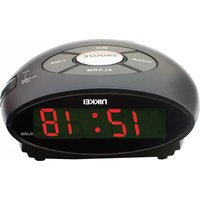
Brand : NIKKEI
Model : NR05
Category : Alarm Clock