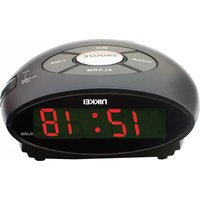
NR10BK - Alarm Clock NIKKEI - Free user manual and instructions
Find the device manual for free NR10BK NIKKEI in PDF.


| Product Type | Alarm clock radio |
| Brand | Nikkei |
| Model | NR10BK |
| Dimensions (approx.) | 10 x 10 x 5 cm (3.9 x 3.9 x 2.0 inches) |
| Weight (approx.) | 300 g (10.6 oz) |
| Power Supply | AC 230V, 50Hz; DC backup: 5V battery (not included) |
| Power Consumption | <200 mA (operating), <4 mA (standby) |
| Display Type | LED (12-hour format with AM/PM indicator) |
| Alarm Function | Yes, with snooze (9 minutes) and alarm on/off switch |
| Clock Setting | Time Set button + Hour/Minute Set buttons |
| Alarm Setting | Alarm Set button + Hour/Minute Set buttons, sliding switch to ON |
| Snooze Control | Touch sensor, repeats every 9 minutes up to 1 hour 59 minutes |
| Battery Backup | Yes (5V battery maintains time during power failure, display off) |
| Radio | Not specified (assumed present as alarm clock radio) |
| Care and Cleaning | Wipe with a dry, soft cloth; do not use liquids |
| Safety Warnings | Do not expose to dripping or splashing; ensure ventilation is not obstructed |
| Spare Parts and Repairability | Contact manufacturer or visit www.nikkei.eu for service information |
| Disposal | Do not dispose as household waste; recycle at designated collection points |
| Compliance | Directive 2014/30/EU (EMC) and 2014/35/EU (LVD) – CE marked |
Frequently Asked Questions - NR10BK NIKKEI
User questions about NR10BK NIKKEI
0 question about this device. Answer the ones you know or ask your own.
Ask a new question about this device
Download the instructions for your Alarm Clock in PDF format for free! Find your manual NR10BK - NIKKEI and take your electronic device back in hand. On this page are published all the documents necessary for the use of your device. NR10BK by NIKKEI.
USER MANUAL NR10BK NIKKEI
| Operator's manual | (GB) | 1 |
| Gebruikaanwijzing | (NL) | 2 |
| Manuel de l'utilisateur | (FR) | 3 |
| Manual de Instrucciones | (ES) | 4 |
| Bedienungsanleitung | (DE) | 5 |
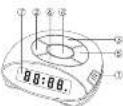
LOCATION OF CONTROLS
1: Alarm On / Off Switch
2. Hour Set Button
3. Minute Set Button
4. Sensor touch Sn
5. Time Eat Dutton
5. Time Set Button
6. Many Set Button
7. Display
- 2014年
POWER SUPPLY
Check the AC current is same as the instruction show on back plate of your unit and plugs the power cord into the AC outlet. A blinking signal will appear indicating the time.
TO SET THE TIME
Press the Time Set Button (5) and Hour Set Button (2) or Minute Button (3) together for hour and minute adjustment of the time. Please make sure setting time is AM or PM has indication (A dot will light in the left upper corner indicating that the time is the PM range if your unit is 12 hour version type).
TO SET THE ALARM
Depress the Alarm Set Button (1) and Hour Set Button (2) or Minute Set Button (3) together and side the Alarm On/Off Switch to "ON" (the alarm indicator dot will appear at the bottom of right corner of the LED Display) for the desired time that you want to wake up.
SNOOZE FUNCTION
When you want a few extra minutes of sleep after the alarm wakes you, touch the Sensor Touch Snooze Control (4) the unit will shut itself off and turn on again in exactly 9 minutes. You may repeat this operation as often as you like within a period of 1 hour 59 minutes after the pre-set wake time.
POWER FAILURE
You can insert a 5 volt battery in the unit. Should there be a power failure the clock will continue to function. You will not see this however because the battery does not illuminate the clock display. When the power is turn on again the display will indicate the correct time. For clarity alarm clock do not work on battery. Replace the battery once a year.
DRIPPING WARNING
The product shall not be exposed to dripping or splashing and that no objects filled with liquids, such as vases, shall be placed on the product
VENTILATION WARNING
The norms ventilation of the product shall not be impeded for intended use.
Power consumption < 200mA
Sandy power consumption: \$4mA
Corrosion, paidation, battery-leakage and any other gradually acidic defect of this nature will invalidate the guarantee.
Disposal of Used Electrical & Electronic Equipment
The meaning of the symbol on the product, its accessory or packaging indicates that this product shall not be treated as household waste. Please, dispose of this equipment at your applicable collection point for the recycling of electrical & electronic equipments waste. In the European Union and Other European countries which there are separate collection systems for used electrical and electronic product. By ensuring the correct disposal of this product, you will help prevent potential hazardous to the environment and to human health, which could either be accepted by unknown use to handle it in this product. The products will help serve for local resources. Please also have a proper scope of your old electrical and electronic equipment with your household waste. For more detailed information about recycling of this product, please contact your local city office, your household waste disposal service or the shop where you purchased the product.
For more information and warranty conditions, please visit: www.nikkei.eu
Additional information
Hersky, Elmerc B.V. declares that this choice is in compliance with the essential requirements and other relevant provisions of Directive 2014/03/EU. A copy of the Declaration of Conformity may be obtained at the following location: Elmerc B.V. - Kolenbrenckenstraat - 2984 AT Redarkirk - Email: Info@elmarc.nl - Tel: 0190 481 919

PLAATSING VAN DE BEDIENINGSORGANEN
-
2017年1月1日
-
Alarm aanuit schakbaar
-
Uremotoz
-
Writembers
-
Squeeze sensorcells
-
Tjo Holo 1085
-
Norm lekto 1085
-
Ann Resellers 7. Diaries
-
Depos
VOEDING

Brand : NIKKEI
Model : NR10BK
Category : Alarm Clock