NR10WE - Alarm Clock NIKKEI - Free user manual and instructions
Find the device manual for free NR10WE NIKKEI in PDF.


Pick your language and provide your email: we'll send you a specifically translated version.
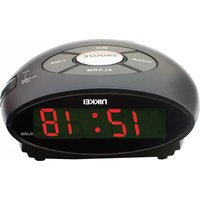
| Product Type | Alarm Clock Radio |
| Brand | Nikkei |
| Model | NR10WE |
| Display | LED digital display with large digits |
| Dimensions (approx.) | 15 cm × 8 cm × 5 cm (W × H × D) |
| Weight (approx.) | 300 g |
| Power Supply | AC adapter (230V ~ 50Hz) |
| Battery Backup | 2 × AAA (not included) for clock and alarm |
| Radio Bands | AM/FM |
| Alarm Function | Radio or buzzer alarm with increasing volume |
| Snooze Function | 9-minute snooze interval |
| Sleep Timer | Automatically turns off radio after 90 minutes |
| Volume Control | Rotary knob for radio volume and alarm volume |
| Headphone Jack | 3.5 mm stereo headphone output |
| Antenna | FM wire antenna, AM built-in ferrite bar |
| Display Backlight | Blue LED backlight |
| Maintenance | Keep in a dry, dust-free place |
| Cleaning | Wipe with a soft, lint-free cloth; do not use solvents |
| Safety | Not waterproof; keep away from water; use only the specified adapter |
| Spare Parts & Repair | Not user-serviceable; contact Nikkei support for spare parts |
Frequently Asked Questions - NR10WE NIKKEI
How do I set the time on my Nikkei NR10WE?
Press and hold the TIME button for 3 seconds until the hour digits blink. Use the HOUR and MIN buttons to adjust, then press TIME again to save.
How do I set the alarm?
Press the ALARM button; the display will show the alarm time. Use HOUR and MIN to adjust. Press ALARM again to confirm. The alarm icon will appear on the display.
How can I wake up to the radio instead of the buzzer?
Set the alarm source by sliding the ALARM MODE switch to RADIO or BUZZER. When set to RADIO, the alarm will play the last tuned station at the set volume.
What happens if the power goes out?
The clock retains the time if backup batteries (2 AAA) are installed. Alarm settings remain in memory, but the alarm may not sound if only battery power is used, and the backlight will be off to save battery.
How does the snooze function work?
Press the SNOOZE bar when the alarm sounds. The alarm will stop and ring again after 9 minutes. You can snooze multiple times.
How do I turn off the alarm completely?
To stop the alarm for the day, press the ALARM RESET button. To disable the alarm entirely, press ALARM until the alarm icon disappears from the display.
How do I clean the alarm clock?
Unplug the device and wipe the surface with a soft, dry cloth. Do not use water, chemical cleaners, or abrasive pads. Keep the vents dust-free.
Why is the radio reception weak?
For FM, fully extend the wire antenna. For AM, rotate the unit to find the best position. Avoid placing the clock near metal objects or other electronic devices that may cause interference.
Can I use headphones with this device?
Yes, plug 3.5 mm headphones into the jack on the back or side. The built-in speaker is automatically muted when headphones are connected.
What should I do if the buttons don't respond?
First, check that the AC adapter is properly connected and batteries are fresh. Try resetting the unit by pressing the RESET button with a pin. If the issue persists, contact Nikkei customer support.
User questions about NR10WE NIKKEI
0 question about this device. Answer the ones you know or ask your own.
Ask a new question about this device
No questions yet. Be the first to ask one.
Download the instructions for your Alarm Clock in PDF format for free! Find your manual NR10WE - NIKKEI and take your electronic device back in hand. On this page are published all the documents necessary for the use of your device. NR10WE by NIKKEI.
USER MANUAL NR10WE NIKKEI

Manual assistant
Powered by Anthropic
Waiting for your message
Product information
Brand : NIKKEI
Model : NR10WE
Category : Alarm Clock