
55376 - Keyboard InLine - Free user manual and instructions
Find the device manual for free 55376 InLine in PDF.


| Product Type | Wireless Smart-TV Keyboard |
| Model | 55376 |
| Brand | InLine |
| Keyboard Layout | German QWERTZ |
| Interface | USB Type A (via USB dongle) |
| Power Supply | 2 x 1.5V AAA batteries (included) |
| Dimensions (W x D x H) | Approx. 36 x 13 x 2 cm |
| Weight (incl. batteries) | 337 g |
| Color | Black |
| Touchpad | Multi-touch with gesture control (single tap, scroll, pinch zoom, three-finger swipe) |
| Media Keys | Smart Hub, Source select, Channel list, Mute, Volume +/-, Channel up/down |
| Radio Frequency | 2.4 GHz (2400-2483.5 MHz) |
| Compatibility | Smart-TVs (supporting mouse/keyboard), PCs, notebooks |
| Scope of Delivery | Keyboard, USB dongle, 2x AAA batteries, operating instructions |
| Intended Use | Input device for Smart-TVs; also usable with PC/notebook |
| Improper Use | Do not use outdoors or disassemble |
| Maintenance | Clean with dry, lint-free cloth |
| Safety Warning | Keep away from children; risk of suffocation from small parts |
| Disposal | Electronic devices and batteries must not be disposed with household waste |
| Additional Equipment | InLine Alkaline High Energy Battery AAA (ref. 01291) |
Frequently Asked Questions - 55376 InLine
- Single finger slide: move cursor
- Single tap: click
- Two fingers slide: horizontal/vertical scroll
- Pinch open/close: zoom in/out
- Three fingers swipe up: show windows menu
- Three fingers swipe down: show desktop
- Three fingers swipe left/right: forward/back
User questions about 55376 InLine
0 question about this device. Answer the ones you know or ask your own.
Ask a new question about this device
Download the instructions for your Keyboard in PDF format for free! Find your manual 55376 - InLine and take your electronic device back in hand. On this page are published all the documents necessary for the use of your device. 55376 by InLine.
USER MANUAL 55376 InLine
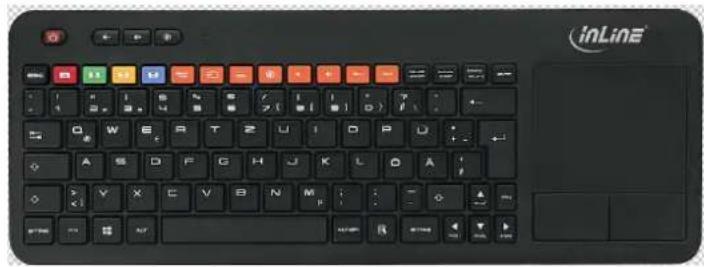
InLine® Wireless Smart-TV Tastatur
Artikelnummer: 55376
natural_image
Black inLine computer keyboard with colorful keys and a mouse on the right (no readable text or symbols)Inhalt
Operating instructions
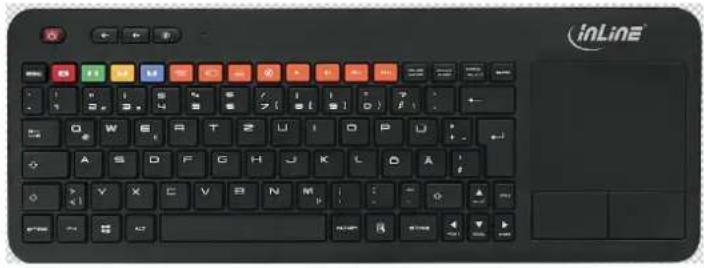
InLine® Wireless Smart-TV Keyboard
Article Number: 55376
natural_image
Black inLine keyboard with colorful function keys and a handle (no readable text or symbols)Table of Contents
-
General 1
-
Scope of delivery 1
-
Explanation of warning symbols and notes 2
-
Engineering property 2
-
Intended use 2
-
Improper use....2
-
Radio frequency reference....2
-
Use 3
-
Control....3
-
Maintenance and Cleaning....4
-
Further Equipment....4
-
Disposal 5
1. General
Validity This operating instructions is valid for following product:
55376 InLine® Wireless Smart-TV Keyboard, black
Manufacture INTOS ELECTRONIC AG
Siemensstraße 11
D-35394 Gießen
Date July 2016
2. Scope of delivery
x 1 InLine® Wireless Smart-TV Keyboard
www.inline-info.com
x 1 USB-Dongle
x 2 AAA-Battery
x 1 Operating instructions
Check the delivery for completeness. Should any components be missing, please contact your reseller.
3. Explanation of warning symbols and notes


This symbol indicates information which contributes to a better understanding.
DANGER!
This symbol indicates major danger for human health.
4. Engineering property
Interface USB type A
Color black
Power supply 1.5V AAA Battery x2
Size approx. 36 x 13 x 2 cm (w x d x h)
Weight 337g incl. batteries
5. Intended use
The InLine® Wireless-TV Keyboard is an input device for Smart-TVs. The wireless Keyboard comes with media keys which makes controlling of different functions like source, channel and volume easier as well as the navigation through multimedia applications. A multi touchpad allows easy and intuitive navigation through menus and the internet via gesture control.
- For all TVs which support a mouse and keyboard function
- Also useable with notebook and PC
• German QWERTZ keyboard layout
General Warning
- Do not expose the InLine® Wireless Smart-TV keyboard to high temperatures.
- Protect keyboard from dust and moisture.
NOTE!
Due to the wide variety of TVs and the firmware and installed apps; a full compatibility of 100% at any given point in time cannot be guaranteed.
DANGER!
Components of the product could be dangerous for children.
Risk of suffocation by absorbing of small parts!
6. Improper use
As improper use within the meaning of foreseeable misuse obtains:
- Do not use the keyboard outdoor.
- Do not disassemble the keyboard.
7. Radio frequency reference
General allocation of frequencies for use in local area networks, wireless local area networks (WLAN applications)
Pursuant to § 55 of the Telecommunications Law (TKG) hereby frequencies
www.inline-info.com
are allocated in the range from 2400.0 to 2483.5 MHz for the use by the general public in local networks and wireless local networks.
This general assignment comes with the mandatory implementation of the European commission to harmonize used frequency spectrum by short-range devices from November 9 ^th 2006 (2006/771/EG), as last amended by the implementing decision of commission on December 8 ^th 2011 (2011/829/EU), published in the official journal of the European Union L 329, page 10 et seq. on December 13 ^th 2011 in Germany.
If you plan to use the product outside Germany please inform yourself previously about the legal regulations of each country.
8. Use
1
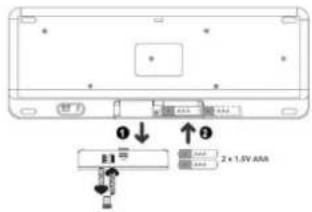
Remove the battery cover and insert 2X 1.5V AAA batteries (included in delivery).
Remove the Mini-USB dongle from the allocated space.
2
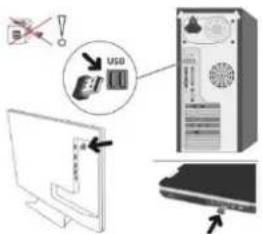
Plug the Mini-USB dongle into the USB port of the TV, PC or notebook. Do not use a hub.
3
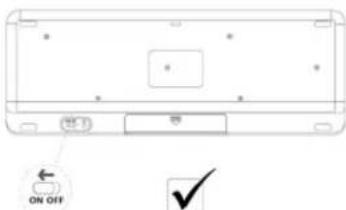
Turn on the wireless keyboard by sliding the slider to "On", which also generates wireless connection.
Make sure that the mini USB dongle is plugged into the device and it is switched on.
9. Control
Multi touchpad

Single finger slide
Mouse cursor manipulation
Single tap
Click at cursor location
www.inline-info.com

Two fingers slide (Horizontally or vertically)
Horizontal or vertical scroll
Pinch on the touchpad with two fingers for zooming
Pinch open to zoom in or pinch close to zoom out
Three fingers swipe up
Show windows menu
Three fingers swipe down
Show desktop
Three fingers swipe left
Forward
Three fingers swipe right
Back
Media keys

Global function keys
Smart Hub
Source select
Channel list
Mute
Volume -
Volume +
Channel down
Channel up
The hotkeys for special use of Samsung smart TV, H and J series, are generally
not supported by TVs of other manufacturers. The standard keys work on all televisions that support a mouse and keyboard function, regarding compatibility please contact the manufacturer of your TV. Due to the variety of TVs, installed firmware and apps, 100% compatibility is not guaranteed at any time.
10. Maintenance and Cleaning
- Clean the keyboard a dry and lint-free cloth.
11. Further Equipment
01291 InLine® Alkaline High Energy Battery, Micro (AAA), 4pcs blister
12. Disposal
Electric and electronic devices as well as batteries must not be disposed of with household waste. Consumers are obliged by law to return electrical and electronic devices as well as batteries at the end of their service lives to the public collecting points set up for this purpose or point of sale.
Brand : InLine
Model : 55376
Category : Keyboard