
TT-501 - Turntable Krüger&Matz - Free user manual and instructions
Find the device manual for free TT-501 Krüger&Matz in PDF.


| Product Type | Belt-drive Turntable with USB |
| Drive System | Belt drive |
| Speeds | 33 and 45 rpm selectable |
| Anti-Skating | 0-4 g adjustable |
| Wow and Flutter | <0.3% WRMS (JIS WTD) |
| Starting & Braking Time | <1 s |
| Frequency Response | 100 Hz - 12 kHz |
| Signal-to-Noise Ratio | 50 dB |
| Power Consumption | 6 W |
| Power Supply | 100-240 V; 50/60 Hz |
| Outputs | Line level RCA (built-in preamp), USB 1.1, AUX to PC |
| USB Port | USB 1.1 for PC/Mac connection |
| Ground Terminal | Yes, for turntable grounding |
| Dust Cover | Included, removable |
| Headshell | Standard with locking nut, accepts cartridge |
| Cartridge Included | Not specified, headshell supports standard cartridge |
| Tonearm | Fully manual with lift and counterweight |
| Slip Mat | Equipped for scratch performance |
| Software Included | Audacity recording software |
| Compatible OS | Windows XP, Vista, 7; Mac OS X |
| Dimensions | Not specified, standard turntable size likely |
| Weight | Not specified |
| Construction | Belt-drive platter, rubber belt, aluminum counterweight |
| Replacement Parts | Belt, stylus, cartridge user-serviceable; headshell available |
| Repairability | No user-serviceable parts inside; refer to qualified service |
Frequently Asked Questions - TT-501 Krüger&Matz
User questions about TT-501 Krüger&Matz
0 question about this device. Answer the ones you know or ask your own.
Ask a new question about this device
Download the instructions for your Turntable in PDF format for free! Find your manual TT-501 - Krüger&Matz and take your electronic device back in hand. On this page are published all the documents necessary for the use of your device. TT-501 by Krüger&Matz.
USER MANUAL TT-501 Krüger&Matz
Deutsch
- Taste Start/Stopp Tonarmheber
natural_image
Technical line drawing of a mechanical component with an arrow indicating direction (no text or symbols)- Tonarm
natural_image
Diagram of a CD or DVD disc with a triangular blade and circular base, no text or symbols present
natural_image
Circular diagram with arrows and icons, no readable text or symbols2. Aufnehmen
Read this instruction manual carefully before use, and keep it for future reference. Producer does not claim liability for inappropriate use and handling.
- Protect the product from water and humidity.
- The product should be located away from heat sources such as radiators, heat vents, or other devices that produce heat.
- The product should be connected to a power supply only of the type described in the operating instructions or as marked on the product.
- This appliance may be used by children who are above 8 years old and by persons with reduced physical, sensory or mental capabilities, or lack of experience and knowledge, if they are supervised and guided by a person who is responsible for their safety in a cautious manner, and all the safety precautions are understood and followed. Children should not play with this device. Children should not perform cleaning and servicing of the device unsupervised.
- Fixed power cable may only be replaced in an authorized service point.
- Never use this device if the power supply cord is damaged.
- When you disconnect the power cord of the device, grasp and pull the plug, not the cord/cable.
- Keep the device and its cord/cable away from heat, water, moisture, sharp edges and any other factor which may damage the appliance or its cord.
- Disconnect the device from the power supply if it is not going to be used for a long time.
• This lightning flash with
arrowhead symbol, within an equilateral triangle is intended to alert the user to the presence of uninstalled


"dangerous voltage" within the product's enclosure that may be of sufficient magnitude to constitute a risk of electric shock to persons.
- The exclamation point within an equilateral triangle is intended to alert the user to the presence of important operating and maintenance (servicing) instructions in the literature accompanying the appliance.
- ALWAYS disconnect this device from power supply mains before cleaning. Clean it with soft, slightly damp cloth only. Do not use any chemical agents to clean the product.
- Make sure to place this product on flat, dry and stable surface.
- Do not use unauthorized accessories as they may damage the unit.
- CAUTION: To reduce the risk of electric shock, do not remove the cover. No user-serviceable parts inside. Refer servicing to qualified service personnel only.
- Do not disassemble the device, as it may cause risk of electric shock. The product has no user-serviceable parts inside.
- Clean this device with soft, slightly damp damp cloth.
- Do not block any of the ventilation openings.
- For added protection for this product during a thunderstorm, or when it is left unattended and unused for long period of time, unplug it from the wall outlet.
PRODUCT DESCRIPTION
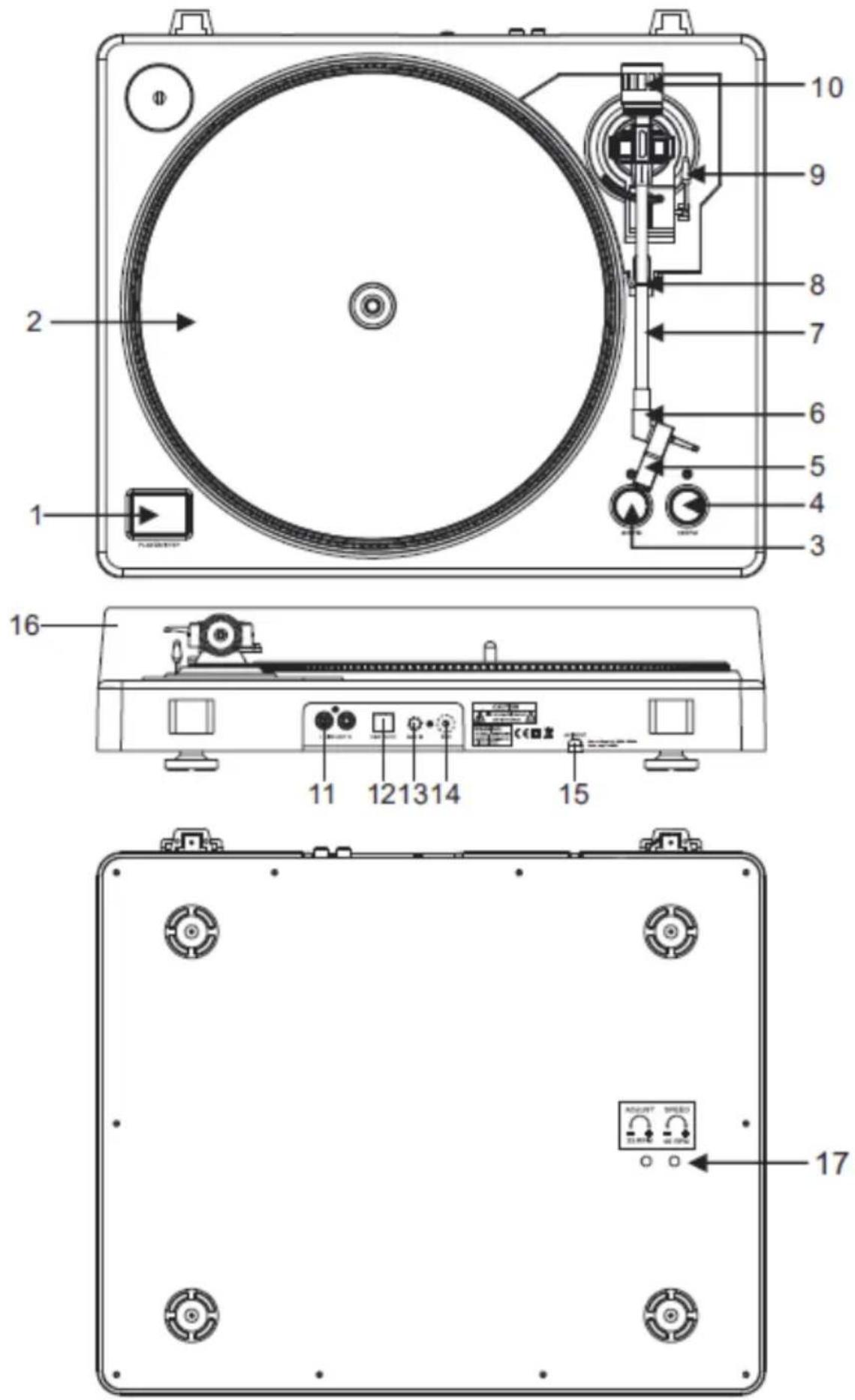
- Start/stop buttons Tonearm lift
Press this button to start or stop the platter.
- Platter
Note: the platter is equipped with a slip mat. This makes it easier to manipulate the record for scratch performances.
- 33 rpm speed selection button
- 45 rpm speed select buttons
- Headshell
Install cartridge here. During installation, attach the stylus protector to guard the stylus tip from damage. Attach wires as follows:
- White (L+) Left channel +
- Blue (L-) Left channel -
• Red (R+) Right channel+ -
Green (R-) Right channel -
-
Headshell locking nut
Attach the head shell by inserting it into the front end of the tone arm and then turn the locking nut clockwise.

natural_image
Technical line drawing of a mechanical component with an arrow indicating direction (no text or symbols)- Tone arm
Fully manual tone arm. To start playback, gently place the stylus on the record using head shell finger support OR use the tone arm lifter.
- Tone arm stand with lock
Aluminum nut is used to secure the head shell and cartridge assembly to the tone arm tube.
- Tonearm lift
Controls the up and down action of the tone arm.
- Counterweight
Adjustment creates the proper downward pressure of the stylus to the record. We have installed the counterweight at our factory and it should be perfectly adjusted. If this is not the case, twist it lightly until the tone arm is perfectly balanced.
- Output L & R
This is the standard analog output (RCA jacks) which can be connected either to phono or line input on any DJ mixer, depending on the setting of the phono/line selector.
- USB SOCKET
Plug USB device. The USB lead length is limited to 3m.
- AUX TO PC
Audio input for connection of an iPod, MP2 player, etc. to a PC.
- Ground
Ground lug for turntable connection. Always use this connection when using turntables (your turntable cable should have a grounding wire).
- Power cable
This power cable should be plugged into a wall receptacle AFTER all audio connections have been made.
- Dust cover
Close the dust cover when not in use to protect the unit against dust. Open and remove during use.
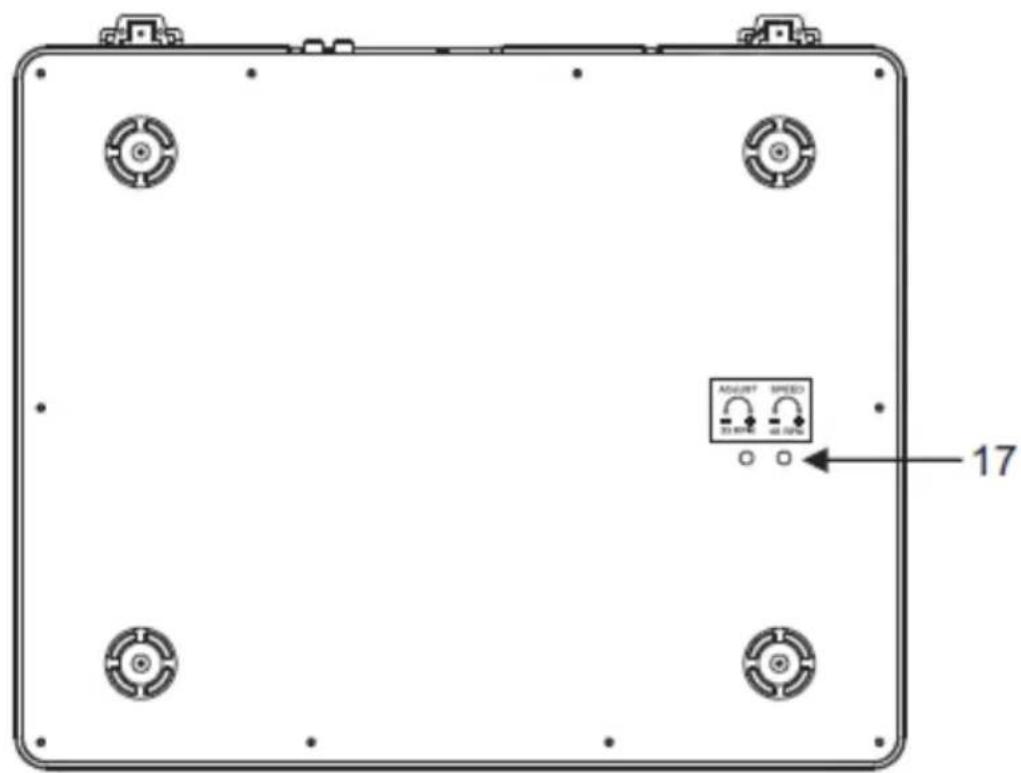
- Adjustments
The unit has already been adjusted at works. However if you need to adjust the rotation speed, use these controls.

flowchart
graph TD
    A["Circle"] --> B["Arrow"]
    B --> C["Grid Pattern"]
    style A fill:#fff,stroke:#000
    style C fill:#fff,stroke:#000


natural_image
Diagram of a CD or DVD disc with a triangular cover and mechanical components (no text or symbols)
natural_image
Circular diagram with directional arrows and icons, no readable text or symbolsWarning: Incorrect platter setup can lead to poor turntable performance, platter instability or permanent motor damage.
-
The rubber belt has been pre-installed onto the turntable platter. However, please turn the platter over and make sure that the belt is attached and is not twisted. If the belt has come off during shipping, please place it around the inner bottom ring of the turntable platter, as shown above (no. 1).
-
Place the platter on the center spindle and press it down firmly. Rotate the platter until the brass motor spindle is visible through one of the holes. Check to make sure that it rotates uniformly and does not wobble excessively.
-
Pass your fingers through the hole, grip the rubber drive belt and install it over the motor spindle. Be careful not to twist the rubber drive belt during this step. Check to make sure the platter rotates uniformly. If the drive belt is properly installed, there should be a slight amount of tension that brings the platter to a stop after spinning it freely.
AUDACITY SOFTWARE OVERVIEW
Note: Please ensure you have installed the software before starting.
Setting up your PC to work with Audacity
- Connect an input source to the unit
- Connect the USB lead to your computer
- Install the Audacity recording software
- Open the Audacity program
- Select Preference from the Edit tab in the Audacity menu

Recording Albums with Audacity
1. Saving a project
- Audacity write all the changed and recorded audio to directory called projefcftname_data, which is located right where you saved the project file itself
- Thus, select Save project as from your Audacity File tab and choose a location and filename for your project
- Please note that when you startup Audacity fresh, only the "Save As..." menu option is available.

2. How to record
- Set your USB turntable up to play the song or album you want to record
- Click on the red RECORD button to start the recording.
- Lower tone arm on USB Turntable onto album and track you want to record.
- Click on the blue Pause continue button to pause the recording. Press it again to
- Click on the yellow Stop button.
That's it. You can now play around with your recording and explore the editing capabilities of Audacity.
Remember that you can use the Undo function almost without limits while the project is open. Note: CD'S cannot be burned directly from the Audacity application. Other CD burning applications should be used.
TROUBLESHOOTING
| Problem Suggested solution | |
| Software | |
| can not listen to record while recording | ·activate "software playthrough" in audacity·check the record source (USB Audio Codec)·check volume settings of your computer |
| can not store songs as MP3 | download LAME MP3-Codec from the internet |
| can not record · first the player has to be connected with the computer, then AUDACITY may be started. | |
| can only record MONO | ·mostly this occurs with VISTA. please select in Windows config recording source as "stereo" not "mono" or "microphono" |
| Player | |
| sound is crackling | ·make sure this player is connected to a high-level-input of your amplifier. High-level inputs are: CD, AUX, TAPE. The input PHONO is not suitable. The player has a built-in pre-amplifier.·clean the stylus and the vinyl·check for correct counterweight setting·check for correct anti-skating-level |
| direct recoding is not possible | ·USB-Stick/Card is write-protected·check correct file system (FAT16) |
SPECIFICATIONS
• Power consumption: 6 W
• Frequency response: 100 Hz-12 kHz
• S/N ratio: 50 dB
• 2 selectable speeds (33/45 rpm)
- Anti-skating (0-4 g)
- Wow and flutter: <0.3% WRMS (JIS WTD)
- Audacity software included
- Starting & braking time: < 1 s.
- Belt drive
- USB port 1.1 (Windows XP, Vista, 7; Mac OS X)
• Line level RCA outputs with built-in preamp
- Dust cover
• Power supply: 100-240 V; 50/60 Hz
- USB compatible turntable; vinyl digitizing function (record to PC or MAC)
LEARN MORE
For more information on this product, go to www.krugermatz.com.
Visit www.krugermatz.com website for more products and accessories.
In case of any doubts or questions reach out to our Frequently Asked Questions section.
Specifications are subject to change without prior notice.
English
Correct Disposal of This Product
(Waste Electrical & Electronic Equipment)

(Applicable in the European Union and other European countries with separate collection systems) This marking shown on the product or Its literature, indicates that It should not be disposed with other household wastes at the end of its working life. To prevent possible harm to the environment or human health from uncontrolled waste disposal, please separate this from other types of wastes and recycle it responsibly to promote the sustainable reuse of material resources. Household users should contact either the retailer where they purchased this product, or their local government office, for details of where and how they can take this item for environmentally safe recycling. Business users should contact their supplier and check the terms and conditions of the purchase contract This product should not be mixed with other commercial wastes for disposal.
Made in China for LECHPOL Zbigniew Leszek, Miętne, 1 Garwolińska Street, 08-400 Garwolin.
KWESTIE BEZPIECZEŃSTWA
natural_image
Technical line drawing of a mechanical component with an arrow indicating direction (no text or symbols)2. Nagrywanie
natural_image
Technical line drawing of a mechanical component with an arrow indicating direction (no text or symbols)- Brat pick-up
- Ridicare brat pick-up
2. Cum se inregistreaza
programului Audacity.
natural_image
Completely black image with no visible content, text, or symbols.

www.krugermatz.com
Krüger&Matz is a registered trademark
Brand : Krüger&Matz
Model : TT-501
Category : Turntable