
HZ-3 - Light effect machine Qtx - Free user manual and instructions
Find the device manual for free HZ-3 Qtx in PDF.


| Product Type | Haze Machine |
| Brand | Qtx |
| Model | HZ-3 |
| Power Supply | 230Vac, 50Hz |
| Power Consumption | 700W |
| Fuse Rating | F5A |
| Heat-up Time | Approx. 2–3 minutes |
| Re-heat Time | Approx. 3 minutes |
| Haze Output | 2,400 Cu Ft (68 m³) per minute |
| Tank Capacity | 1.6 Litres |
| Dimensions | 310 x 330 x 263mm |
| Weight | 5.5kg |
| DMX Channels | 2 (Fan Speed and Haze Output) |
| DMX Address Range | A001–A512 |
| Control Options | Standalone, Timer Remote, DMX (2-channel) |
| Fan Speed Settings | 5 levels (1 slow – 5 high) |
| Haze Output Settings | 5 levels (0 off – 5 high) |
| Timer Remote Control | Included (interval, duration, manual override) |
| Fluid Level Sensor | Yes (low fluid indicator) |
| Removable Fluid Tank | Yes |
| Adjustable Output Angle | Yes (via output flap) |
| Recommended Fluid | QTX Haze Fluid (e.g., 160.591UK, 5L) |
| Housing | Durable metal with carry handle |
| Mounting | Via bracket with thumb screw |
| Indoor Use Only | Yes |
Frequently Asked Questions - HZ-3 Qtx
User questions about HZ-3 Qtx
0 question about this device. Answer the ones you know or ask your own.
Ask a new question about this device
Download the instructions for your Light effect machine in PDF format for free! Find your manual HZ-3 - Qtx and take your electronic device back in hand. On this page are published all the documents necessary for the use of your device. HZ-3 by Qtx.
USER MANUAL HZ-3 Qtx
Order ref: 160.451UK
User Manual

Please read through this manual thoroughly before use, any damage Caused by misuse of product will not be covered by warranty.
INTRODUCTION:
HZ-3 Haze Machine
The HZ-3 haze machine features a range of upgrades to ensure it remains the top haze machine in its class. An improved 700W heater ensures all fluid is vaporised quickly as well as decreasing the warm up time. The LED digital display allows for standalone operation whilst still allowing for the use of a timer remote or 2 channel DMX operation. There is a fluid level sensor which indicates when the machine needs refilling so as not to damage the pump. This product has been specifically developed for professional installations and high-end DJ applications.
• 2,400 CU Ft (68m³) per minute (approx.)
• Relay temperature controlled for constant temperature control and longer life
• Uniquely designed nozzle for reduced condensation build-up in the pipes
- Easy to use digital display operation
• True constant haze output
• Variable output angle
- Low fluid indicator
- Removable fluid tank
- Timer output remote control included
- Easy to transport and portable
• 2-channel DMX (output level and fan speed)
PACKAGE CONTENTS:
Please check the contents to ensure that the product has been received in good condition.
| HZ-3 Haze Machine x 1pc | User Guide x 1pc |
| Power Cord x 1pc | Remote Control x 1pc |
If you find any accessory is missing or the machine has arrived with any problems, please contact your local dealer at once. Do not try to fix this item yourself or you will invalidate the warranty. Please keep the original packaging and invoice for any possible replacement or return demand.
RECOMMENDED FLUID:
For the HZ-3 haze machine we strongly recommend the following fluid which has been specifically formulated to perform best with any heater-based haze machines.
| QTX Ref Code | Description | Size | Results |
| High quality professional Haze fluid | High quality ultra fine mist | ||
| 160.591UK | 5 Litre |
SETUP:
- Unpack the haze machine
- Unscrew the top cap of the tank and remove to fill with the recommended haze fluid
- Replace the bottle and screw the cap securely ensuring the pipe is fed down to the bottom of the bottle so a consistent flow of fluid is supplied to the machine
- Connect the remote control
- Connect the IEC mains plug and power up
- Heat up time is usually between 2-3 minutes. Please ensure no button is pressed during the heat up time. When the machine is ready the LED light on the machine and remote control will illuminate
- After heat up, please refer to page 8 "Operation for HZ-3"

Please do not open cover, contains high voltage. This product is not serviceable or repairable by the end user. Please refer to qualified personnel for service and repair.

For your safety, please kindly pay attention to all the warnings listed below:
■ Always plug in the power last and disconnect from the mains when the device is not in use or before cleaning
■ Do not install and operate the unit in rain or extreme heat, moisture or dusty environments
■ This unit is for indoor use and dry environments only
■ Do not switch on immediately but wait until the unit reaches room temperature if it has been exposed to drastic temperature fluctuations
■ Do not shake the unit and avoid brute force when installing or operating
■ Do not use during thunderstorms and please disconnect the power
■ Do not use solvents or aggressive detergent to clean the unit. Use a soft and clean cloth
QUICK TROUBLESHOOTING
If the unit is not functioning properly
■ Check if main power is on
■ Check the fuse hasn't blown
■ Check the unit isn't in DMX mode
■ Check there is fluid in the tank and the pipe is pushed down to the bottom of the bottle
■ If there is blockage use distilled water or haze machine cleaning fluid
REPLACING FUSE
Disconnect from the main power supply first, then remove the fuse holder above the IEC Socket to reveal the fuse. Replace the correct fuse rating as stated on lighting or user guide. Then, lock the fuse holder cover back into place.
GENERAL MAINTENANCE
To maintain optimum performance and minimize wear, the item should be cleaned frequently. Usage and environment are contributing factors in determining frequency. As a rule, fixtures should be cleaned after use to avoid dust build-up and blockages, which can result in poor performances, overheating and breakages. Be sure to power off fixture before conducting maintenance.
Unplug fixture from power. Use a vacuum or air compressor and a soft brush to remove dust collected on external vents and internal components. Clean the external case when the fixture is cold with a dry cloth or tissue and drag dirt and grime to the outside case.
LAYOUT HZ-3:
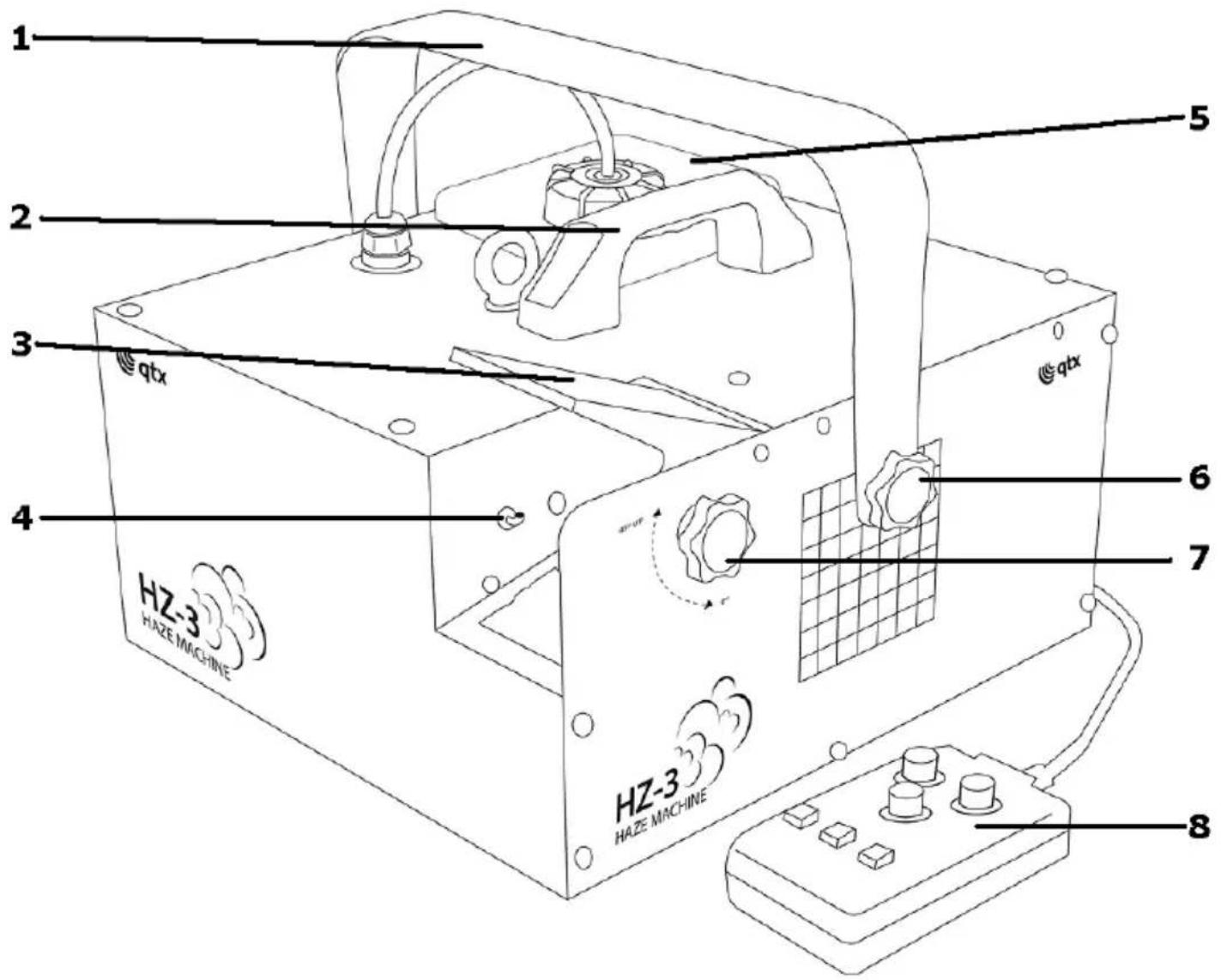
- Mounting Handle
- Carry handle
- Adjustable output flap
- Haze nozzle output
- Removable bottle
- Thumb screw for mounting bracket
- Thumb screw for adjustable out put flap.
- Handheld Remote controller
LAYOUT AND CONNECTIONS:
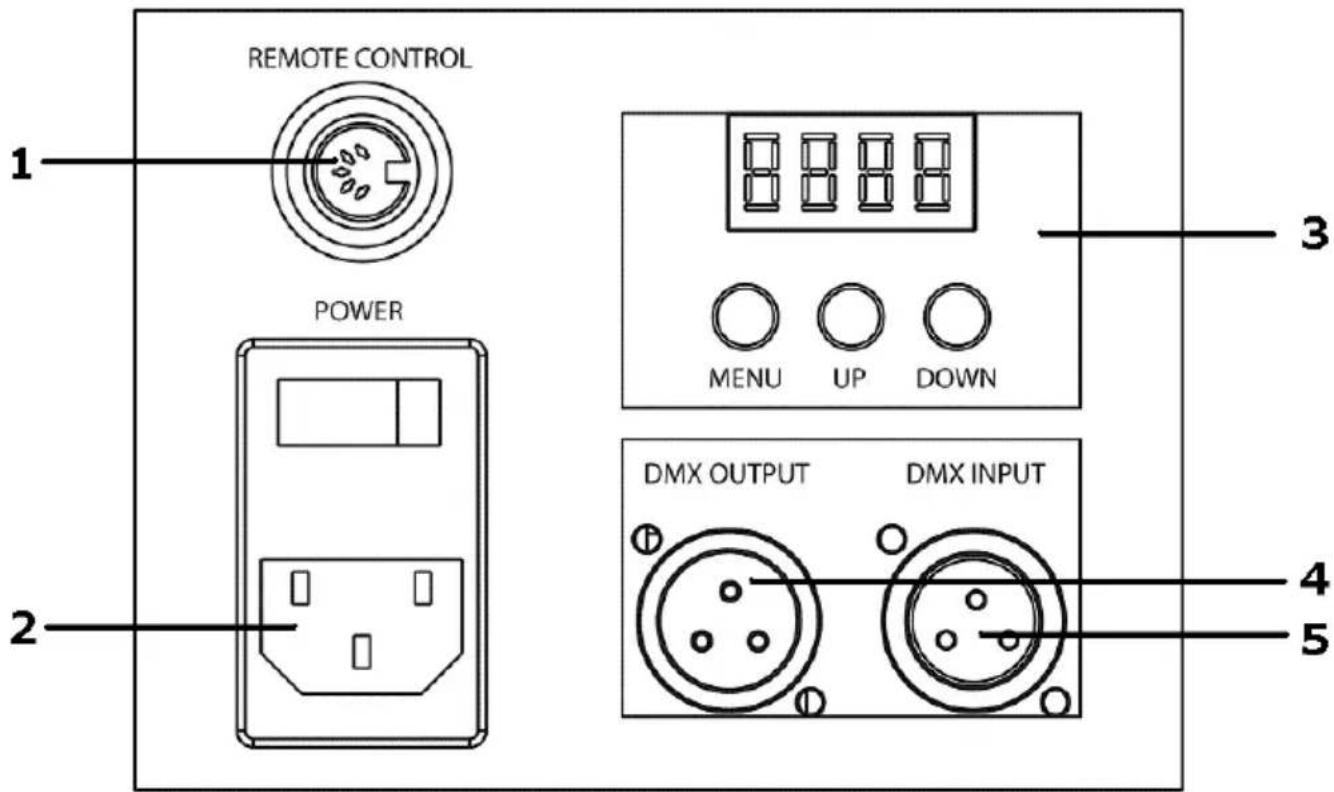
- Remote connection
- Power IN (Use IEC lead provided)
- LED Digital controller (see next section)
- DMX Out
- DMX In
OPERATION FOR HZ-3

When you first turn on the Haze machine it will display "HEAt" for around 2-3 minutes while the unit warms up. When completed you will have access to various options if the wired remote control is not connected
Press menu to scroll through the various options listed below. Use the up and down keys to set the secondary function.
| Display | Function |
| HEAt | Unit is warming up no function available |
| A001-A512 | DMX address |
| FS-1 to 5 | Manual Fan Speed 1=slow, 5=high |
| HO-0 to 5 | Manual Haze output 0 = off, 1 = low, 5 = high |
FS (Fan Speed) and HO (Haze Output) are settings for continuous stand-alone operation and will override any remote control of the HZ-3
DMX MODE
When in DMX mode there are two channels with the following functions:
| DMX channel | DMX Scale | Detail function |
| CH 1 | 000 - 255 | 0% - 100% Fan Speed |
| CH 2 | 000 - 255 | 0% - 100% Haze Output |
TIMER CONTROLLER
The timer controller can be used to control the HZ-3 remotely.
Please note Fan Speed (FS) and Haze Output (HO) must be set to zero for the remote timer controller to operate.

- Timer on/off button
- Continuous output
- Manual override button
- Timer LED indicator (Illuminated Yellow when timer active)
- Manual ready indicator (Illuminates Green when ready)
- Power indicator (Illuminates red when power is on)
- Adjust the amount of Haze released (between 0 - 100%)
NOTE: The below controls are only used when in timer mode -
Adjust the interval gap between each release of Haze (between 0 - 30 Min approximately)
-
Adjust the duration the Haze / Haze is released at each interval (between 0 – 15 seconds approximately)
For best results select "continuous" and adjust output to achieve desired effect, note it can take around 30 seconds for the machine to produce the correct output.
TECHNICAL SPECIFICATION
| Power supply | 230Vac, 50Hz |
| Fuse | F5A |
| Power | 700W |
| Re-heat time | 3 min (approx) |
| Haze Output | 2,400 Cu Ft ( 68m3 ) per minute |
| Tank capacity | 1.6 Litres |
| Dimensions | 310 x 330 x 263mm |
| Weight | 5.5kg |

This product is classed as Electrical or Electronic equipment and should not be disposed with other household or commercial waste at the end of its useful life. The goods must be disposed of according to your local council guidelines.


Brand : Qtx
Model : HZ-3
Category : Light effect machine