
Convey - Telephone JPL - Free user manual and instructions
Find the device manual for free Convey JPL in PDF.


| Product Type | Landline Phone |
| Brand | JPL |
| Model | Convey |
| Dimensions (approx.) | 200 x 150 x 80 mm |
| Weight (approx.) | 450 g |
| Power Supply | AC adapter (input: 220-240V, 50/60Hz) and 2x AAA batteries for backup |
| Display | Backlit LCD screen, 1.8 inch |
| Keypad | Standard alphanumeric keypad with dedicated function keys |
| Main Functions | Make and receive calls, speed dial, caller ID, call log, phonebook up to 50 entries, handsfree speakerphone |
| Additional Features | Clock, alarm, adjustable ringtone volume and melody, mute, redial, flash key |
| Connection | RJ11 telephone line jack |
| Battery | 2x AAA alkaline batteries for backup (not included) |
| Care & Cleaning | Wipe with a soft, dry cloth. Do not use liquid or aerosol cleaners. |
| Safety | Keep away from water and moisture. Do not disassemble. Use only approved accessories. |
| Spare Parts & Repairability | Contact JPL customer service for spare parts. Repairs should be done by qualified personnel. |
| Environmental Information | Compliant with RoHS and WEEE directives. Dispose of batteries separately. |
| Package Contents | Phone base, handset, handset cord, line cable, AC adapter, user manual |
Frequently Asked Questions - Convey JPL
User questions about Convey JPL
0 question about this device. Answer the ones you know or ask your own.
Ask a new question about this device
Download the instructions for your Telephone in PDF format for free! Find your manual Convey - JPL and take your electronic device back in hand. On this page are published all the documents necessary for the use of your device. Convey by JPL.
USER MANUAL Convey JPL
natural_image
Blue rectangular electronic device with four circular buttons and ventilation slots (no visible text or symbols)JPL Convey
User Guide
Unpacking
Remove your speakerphone from its packaging and ensure you have the correct specified accessories. Retain the speakerphone box for storage, and also in the unlikely event that it needs to be returned for servicing or repair.
Warning
Ensure that all electrical connections (including extension leads and interconnections between pieces of equipment) are properly made and in accordance with the relevant manufacturer's instructions.
- Do not continue to operate the equipment if you are in any doubt about it working normally, or if it is damaged in any way. If this is the case, disconnect the unit from your PC equipment and consult your dealer.
- Do not allow electrical equipment to be exposed to rain or moisture.
- Never push anything into holes, slots or any other opening on your speakerphone as this could result in a fatal electrical shock.
- Do not open the speakerphone housing as doing so will void the warranty.
- Never guess or take chances with electrical equipment.
Safety
For your own safety, this product should only be used with UKCA, CE, FCC, and RoHS approved equipment. Using this speakerphone with non-approved equipment can void this products warranty.
Unplug this product from the power outlet before cleaning. Do not use liquid cleaners or aerosol cleaners. Use a damp cloth for cleaning.
Do not overload outlets and extension cords as this can result in risk of fire or electric shock.
Environmental Notice
This speakerphone has been made to UKCA, CE, FCC, RoHS, and WEEE standards. In the interest of recycling raw materials, please do not dispose of this speakerphone in the household waste at the end of its useful life. Disposal can take place at approved recycling or disposing locations in accordance with local regulations.
Consult your responsible authority for information about the professional and environment-friendly disposal of your device. If you want that we handle the disposal for you, you can send the device at your costs to JPL Telecom Limited.
General Limitation of Liability
The device is not designed, manufactured, or intended for use or resale, in environments that require fail-safe performance, such as in the operation of life-support systems and/or nuclear facilities. The device may only be used for these purposes with prior written permission from the manufacturer in each individual case.
Declaration of Conformity
This device complies with the basic health, safety and environmental requirements in all relevant directives. You will find the Declaration of Conformity on our website. www.jpltele.com

Contents
What's Included 4
Overview 5
Features 6
Installation 7
Technical Information 8
Trouble Shooting 9
Conditions of Warranty 10
Thank you for choosing the JPL Convey Portable USB Speakerphone.

natural_image
Line drawing of a rectangular electronic device with five labeled buttons (no text or symbols beyond basic icons)Portable USB Speakerphone

natural_image
Line drawing of a multi-core cable with USB connectors (no text or symbols)USB-A to USB-C Connection Cable
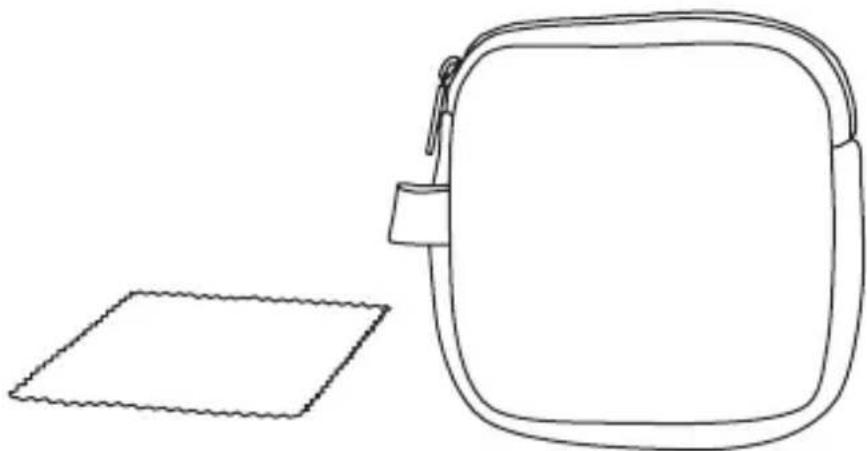
natural_image
Line drawing of a backpack and a square frame (no text or symbols)Soft Pouch Carry Case
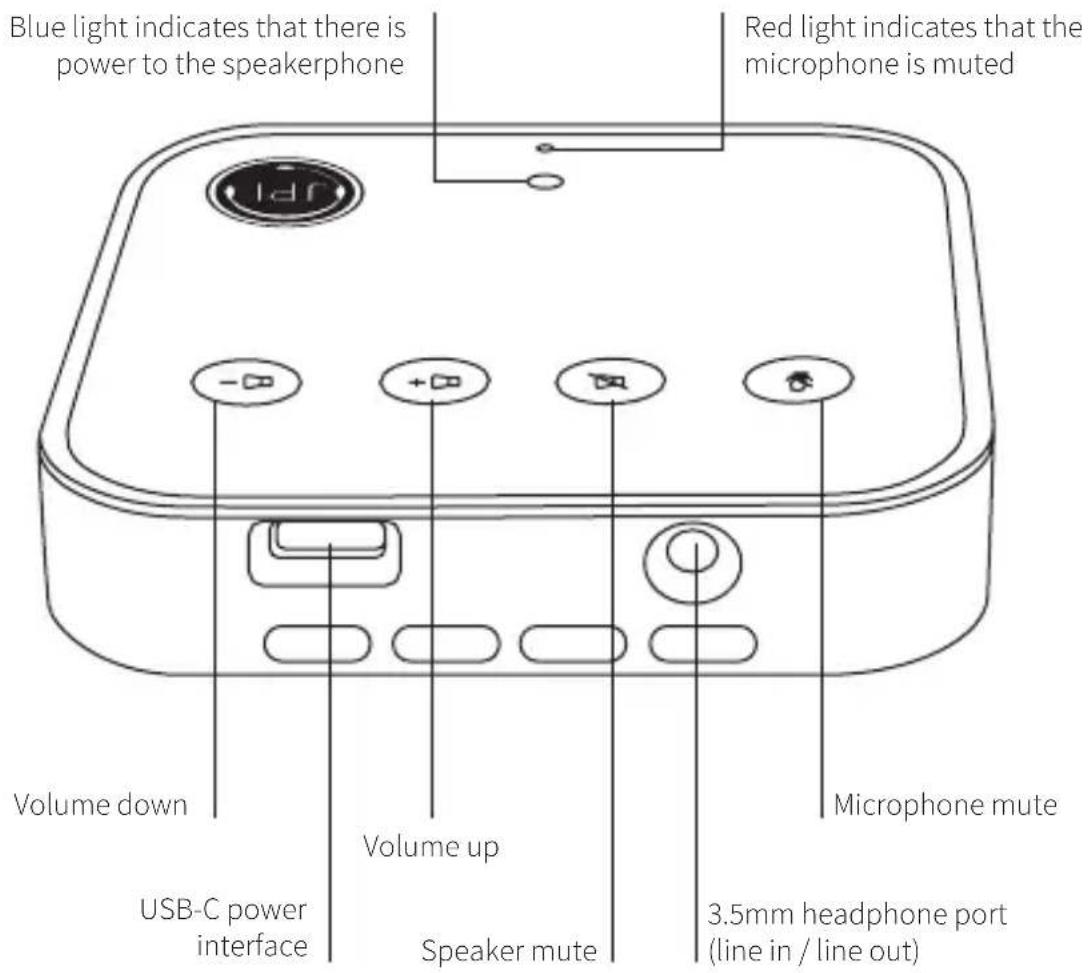
Features
- Plug & play solution - No software download needed
• Talk and listen hands free while using your softphone - Compatible with all major softphones
• USB-C/USB-A to USB-C universal interface (2m cable) - Omnidirectional high quality microphone with 360^ voice pick-up
• 3-5m voice pick-up
• Built-in speaker - Compatible with Windows XP / 7 / 8 / 10 & MAC OS
• Supports external 3.5mm interface for headset
• Unit dimensions 80 x 80 x 15mm
• 24 month warranty
- Multifunctional touch sensitive panel for speaker and microphone mute, and volume controls
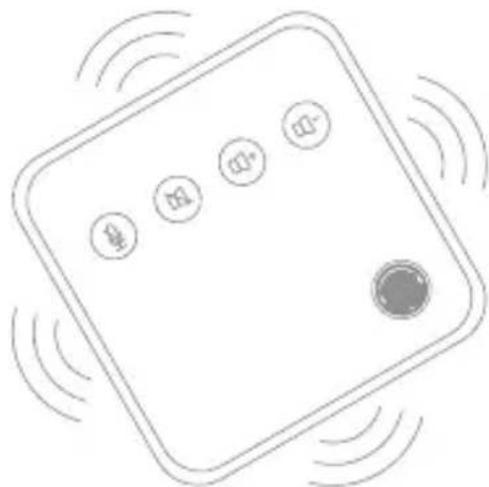
natural_image
Simple line drawing of a square electronic device with four circular buttons and a central button, surrounded by radiating waves (no text or symbols)- Communicate clearly - Perfect for team briefings and pitches to clients. The JPL Convey is ideal for any small office or meeting room with up to 4 people. The high quality speaker is loud enough for your whole team to hear.
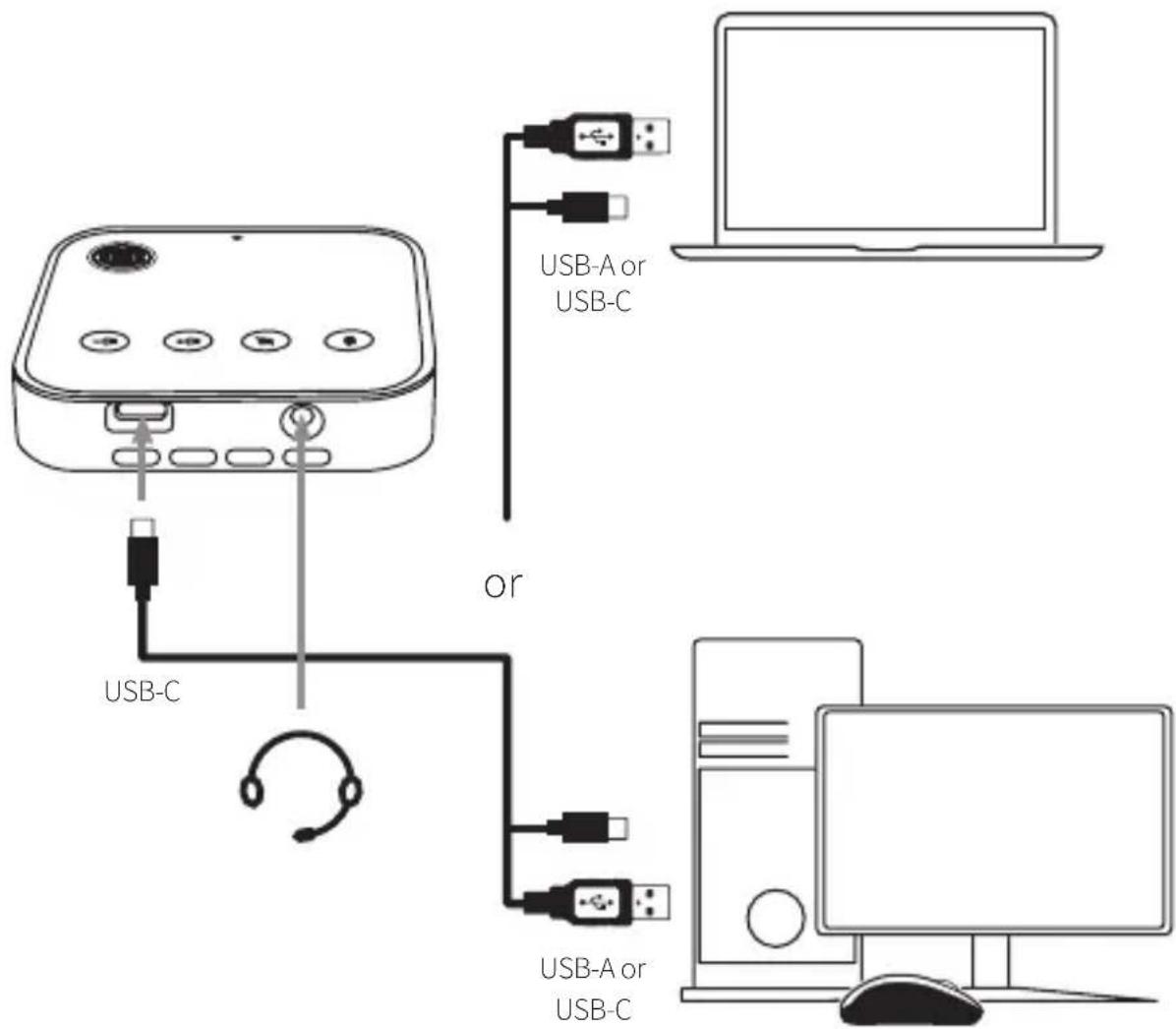
Connecting your speakerphone is a simple Plug & Play. No additional software or downloads are required. Connect the speakerphone to your PC or laptop using the USB cable supplied.
Note: The speakerphone must be connected to a PC or laptop USB port or power-supplied hub, and not a bus-powered USB port (such as a keyboard with an integrated USB).
Speaker and Microphone Activation
The JPL Convey should activate automatically. If the speakerphone has no sound you can select the JPL Convey in your "Sound settings".
Speakerphone parameters:
| Sampling rate: 48KHz | |
| Directivity: Omnidirectional high quality microphone | |
| Output Impedance: 75Ω | |
| Sensitivity: -40dB ± 2dB | |
| Radio Distance: 300cm | |
| Signal to noise ratio: >36dB | |
| Mic Rate: 20kHz HD Voice | |
| Codec = PMC Wideband Audio / HD Audio | |
| AEC Acoustic Echo Cancellation | |
| LEC Line Echo Cancellation | |
| NC Noise Cancelling | |
| ALC Automatic Level Control | |
| Connectivity: 2m Type-C USB 2.0 | |
| Voltage: 5V / 500mA | |
| OS Support: | Compatible with Windows XP / 7 / 8 / 10 & MAC OS |
| Speaker power: | 3W |
Trouble Shooting
- Can I use a USB extension cable?
This is not recommended.
- The speakerphone is connected to the computer but there is no sound?
Make sure that the speaker and microphone are set as the default devices in your "Sound settings".
- Does it support mobile phone use?
The speakerphone supports mobile phones with USB-C port.
For further support you can visit our website https://www.jpltele.com/product/jpl-convey/ and chat via Live Chat with one of our technical team or email us on support@jpltele.com.
Conditions of Warranty
-
JPL Telecom Limited, Head Office: Units 1 & 2 Church Close Business Park, Church Close, Todber, Sturminster Newton, Dorset DT10 1JH, England, grants a 2 Year Manufacturer's Warranty from the date of purchase, as the manufacturer of this product.
-
For you, as a consumer, this means: We guarantee that our devices are error-free when supplied. If a manufacturing error is identified within 24 months of the delivery date we will repair or replace the device free of charge without you, as the consumer, having to provide the usual legally required proof that this fault was present when you received the device. We either use new parts or parts in mint condition for the repair or replacement delivery. Any parts removed from the device become our property and can be destroyed by us.
-
In addition to this warranty, you have the unlimited legal right to claim against the supplier on the basis of the terms of the warranty for defects on the basis of the purchase contract. However, in contrast to our Manufacturer's Warranty, the legal warranty for defects only applies to the device's state when sold.
-
You can only claim against this warranty if you return the faulty device to JPL Telecom Limited or our local general importer or distributor, outside England, at your own cost, with a valid proof of purchase (invoice or till receipt). When you return it to us, please provide a detailed description of the fault that has occurred, and also tell us your telephone number, in case we need to contact you. To prevent shipping damage, provide suitable transport packaging (e.g. original packaging with a secondary shipping box).
-
The Manufacturer's Warranty excludes damage caused by mishandling, operating errors, misuse, external influences, lightning strikes/power surges, modifications to the product and extensions. Shipping damage, consequential damage, and costs arising from down times and travel times are also excluded.
-
Do not open the speakerphone housing as doing so will void the warranty. The warranty is cancelled if repairs are carried out by unauthorised agents.
REGISTERED ADDRESS
UK Office: JPL Telecom Limited
Units 1 & 2, Church Close Business Park, Church Close, Todber, Sturminster Newton, Dorset, DT10 1JH, England
USA Office: JPL Telecom Holdings LLC
445 W Merritt Ave, Merritt Island, FL 32953, USA
Brand : JPL
Model : Convey
Category : Telephone