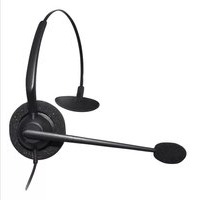
100 - Headphones JPL - Free user manual and instructions
Find the device manual for free 100 JPL in PDF.


Pick your language and provide your email: we'll send you a specifically translated version.
| Product Type | Headphones |
| Brand | JPL |
| Model | 100 |
| Form Factor | Over-ear |
| Dimensions (W x H x D) | 7.9 x 5.9 x 2.0 in (20 x 15 x 5 cm) |
| Weight | 7.1 oz (200 g) |
| Connectivity | Wired 3.5 mm jack |
| Cable Length | 3.9 ft (1.2 m) |
| Driver Size | 1.6 in (40 mm) |
| Impedance | 32 Ω |
| Frequency Response | 20 Hz – 20 kHz |
| Microphone | Yes, inline |
| Controls | Volume and playback on cable |
| Compatibility | Devices with 3.5 mm audio jack |
| Color | Black |
| Warranty | 1 year limited |
| Cleaning | Wipe with a dry, soft cloth |
| Storage | Store in a cool, dry place |
| Safety Warning | Listen at moderate volume to prevent hearing damage |
| Spare Parts | Replacement ear pads available |
| Repairability | Replaceable cable |
| Power Source | No battery required (passive) |
Frequently Asked Questions - 100 JPL
How do I connect the JPL 100 headphones to my device?
Plug the 3.5 mm jack into the headphone port of your device. Ensure the connection is secure.
Do these headphones work with smartphones?
Yes, they are compatible with any device that has a standard 3.5 mm audio jack, including smartphones, tablets, and laptops.
How do I control volume and playback?
Use the inline remote on the cable. There are buttons for volume up, volume down, and play/pause. Some models may support track skipping.
Can I use the microphone for calls?
Yes, the inline microphone allows you to make and receive calls hands-free. Press the play/pause button to answer or end calls.
How do I clean the headphones?
Wipe the exterior with a dry, soft cloth. Do not use water or cleaning solvents. For the ear pads, gently dab with a slightly damp cloth and allow to air dry.
What should I do if the sound is distorted or low?
Check the volume on your device and ensure the headphone jack is fully inserted. Also test with another device to rule out a source issue.
Are the ear pads replaceable?
Yes, replacement ear pads are available. To replace, gently pull off the old pads and snap on the new ones. Make sure they are oriented correctly.
Is it safe to use these headphones at high volume?
Listening at high volume for extended periods can damage your hearing. It is recommended to keep the volume at a moderate level, especially for prolonged use.
Can the cable be replaced?
Yes, the cable is detachable. If damaged, you can purchase a replacement 3.5 mm audio cable. Ensure the connector type matches the headphone input.
How should I store the headphones when not in use?
Store them in a cool, dry place away from direct sunlight. Avoid wrapping the cable tightly around the headphones to prevent damage.
User questions about 100 JPL
0 question about this device. Answer the ones you know or ask your own.
Ask a new question about this device
No questions yet. Be the first to ask one.
Download the instructions for your Headphones in PDF format for free! Find your manual 100 - JPL and take your electronic device back in hand. On this page are published all the documents necessary for the use of your device. 100 by JPL.
USER MANUAL 100 JPL
Manual assistant
Powered by Anthropic
Waiting for your message
Product information
Brand : JPL
Model : 100
Category : Headphones