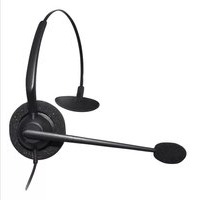
100-M - Headphones JPL - Free user manual and instructions
Find the device manual for free 100-M JPL in PDF.


| Product Type | Wired telephone headset |
| Brand | JPL |
| Model | 100-M |
| Connectivity | Desk phone with dedicated headset port (requires compatible bottom lead, sold separately) or external amplifier |
| Quick Disconnect | Yes, allows moving away from desk without dropping call |
| Earpiece | Single ear (monaural) or binaural? (not specified; likely single ear based on images) |
| Microphone | Adjustable boom microphone, position within 30 mm of mouth |
| Microphone Side Switching | Yes, rotate boom 300 degrees |
| Headband | Adjustable, can be worn on either side |
| Compliance | CE, ACA, RoHS, WEEE |
| Warranty | 12 months from date of purchase |
| Maintenance | Replace ear foam cushions, microphone foam, and microphone filter every 6 months |
| Cleaning | Wipe with dry cloth; do not use liquids or solvents |
| Safety Warnings | Do not expose to rain/moisture, do not open housing, avoid prolonged high volume listening |
| Spare Parts / Repairability | Replaceable ear cushions and microphone windscreens; other repairs by JPL authorized service |
| Power Source | Powered by telephone line; no external power required |
| Accessories Included | Clothing clip, user guide; bottom lead sold separately |
Frequently Asked Questions - 100-M JPL
User questions about 100-M JPL
0 question about this device. Answer the ones you know or ask your own.
Ask a new question about this device
Download the instructions for your Headphones in PDF format for free! Find your manual 100-M - JPL and take your electronic device back in hand. On this page are published all the documents necessary for the use of your device. 100-M by JPL.
USER MANUAL 100-M JPL
Your JPL Telecom product has been carefully manufactured and 100% tested using high quality assured components. It is guaranteed against faulty workmanship and materials for a period of 12 months from the date of purchase. In the unlikely event that a failure should occur, please contact the JPL Telecom dealer from which you purchased this product or visit www.jpltele.com and follow our product returns procedure. You will be given a RMA number and instructions on how to return your headset.
Further help can be found on-line at www.jpltele.com on our FAQs page.
Note: Removing the factory-applied warranty label on the in-line wire will void the warranty. Specifically exempt from warranty are limited-life consumable components subject to normal wear and tear, such as microphone windscreens, ear cushions and other accessories. Your statutory rights under common law are in no way affected by this guarantee. The warranty does not cover cosmetic damage or damage due to misuse, abuse, negligence, acts of nature, accident, disassembling or modification of, or to any part of, the product. The warranty does not cover damage due to improper operation, maintenance or installation, or attempted repair by anyone other than JPL Telecom. Any unauthorised repairs will void this warranty.
LIMITED WARRANTY
Consequential and incidental damages, including without limitation, loss of property and those arising from breach of any express or implied warranty, are not the responsibility of JPL Telecom and to the extent permitted by law, are excluded.
In accordance with its policy of progressive product design, JPL Telecom reserves the right to change product specifications without prior notice.
* Repair or replacement is at the discretion of the manufacturer.
REGISTERED ADDRESS
USA Office: JPL Telecom Holdings LLC
Box 12, Suite 310, 8910 Astronaut Blvd., Cape Canaveral, FL 32920, USA
Mexico Office: JPL Telecom Mexico
Buffon 46-604, Col. Nueva Anzures, Delg. Miguel Hidalgo C.P. 11590
UK Office: JPL Telecom Limited
Unit 1, Church Close Business Park, Church Close, Todber, Sturminster Newton,
Dorset, DT10 1JH England
Registered in England No. 5250754
(NB. For product returns, please follow instructions and returns department address provided on our website.
Returned products received at the registered addresses are likely to be returned to sender).


natural_image
Two black professional headsets with earplands and a 'USER GUIDE' vertical text on the right (no other signage or symbols)www.jpltele.com


2014/30/EU
Introduction
Thank you for purchasing this product.
Your new headset has been developed using the latest technology, designed for comfort and freedom of movement.
This headset is very easy to use and setup, although to get the best from your new purchase, we recommend you read this user guide carefully before using the headset for the first time.
Unpacking
Remove your headset from its packaging and ensure that along with this user guide, you have the correct specified accessories.
Retain the headset box for storage of your unit, and also in the unlikely event that it needs to be returned for servicing or repair.
Warning
Ensure that all electrical connections (including extension leads and interconnections between pieces of equipment) are properly made and in accordance with the relevant manufacturers instructions.
Do not continue to operate the equipment if you are in any doubt about it working normally, or if it is damaged in any way. Disconnect from your telephone equipment and consult your dealer.
Do not allow electrical equipment to be exposed to rain or moisture.
Never push anything into holes, slots or any other opening on your headset as this could result in fatal electrical shock.
Do not open the headset housing as doing so will void the warranty.
Never guess or take chances with electrical equipment.
Telephone headsets are capable of producing high levels of sound.
Prolonged exposure to high sound levels can cause damage to hearing.
Safety
For your own safety, this product should only be used with CE ACA and RoHS approved equipment. Using this headset with non approved equipment can void this products warranty.
Maintenance
To gain optimal performance, hygiene and life-span from you headset, replace all consumable items; - ear foam cushion, microphone foam (if applicable) and microphone filter every 6 months.
Environmental notice
This headset has been made to CE, RoHS and WEEE standards. In the interest of recycling raw materials, please do not dispose of this headset in the household waste at the end of its useful life. Disposal can take place at approved recycling or disposing locations in accordance with local regulations.
Connecting Your Headset
Does your desk phone have a dedicated headset connection port?
If it does, simply connect your headsets Quick Disconnect cable to your chosen bottom lead (not supplied), then connect the bottom lead to the dedicated port on your desk phone.
If you find that when the headset is connected to the phone it is not working as expected then it is very likely you are using an incompatible bottom lead.
There are various bottom leads available, these are all designed to connect your headset to specific brands of desk phone, ensuring whatever your setup, your headset will be compatible.
Please contact your dealer to attain the correct bottom lead for your desk phone, or see the compatibility table on our website:
http://www.jpltele.com/jpl-compatibility.aspx
Note: All bottom leads are supplied as an accessory at additional cost.
Using the Quick Disconnect Lead
Your headset may be equipped with a Quick Disconnect allowing you to move away from your desk (disconnecting the 2 connectors) without losing the call.
What to do if your desk phone does not support a dedicated headset connection port:
Your desk phone requires an external headset amplifier. If you already have a headset amplifier, read through the units setup guide and connect your headset accordingly.
In the event that you do not have a headset amplifier, please contact the supplier of this headset. They will be able to provide the correct amplifier for your headset and desk phone.

Adjusting the Headband
Adjusting the Headband
Place the headset receiver to your ear(s), if using a single ear headset you should set the T-bar above your other ear.
Adjust the headband until it is comfortable, ideally ensuring there is virtually no pressure felt on the ear(s)
Most headsets can be worn on either side. To change the microphone side, simply rotate the microphone boom 300 degrees to the other side.
Adjusting the Microphone Boom
To avoid low or distorted sound, and to provide clear and crisp telephone calls, the microphone should be positioned within 30mm of your mouth.
The microphone boom arm will move in a variety of directions to ensure the best fit.
Adjusting the Clothing clip
Your new headset is supplied with a clothing clip to allow comfortable fitting of your headset without the cable getting caught or inadvertently pulled.
The clothing clip should be fastened at a comfortable level, ensuring there is sufficient slack on the cable allowing free movement of your head without disturbing the headset position.

natural_image
Technical diagram of a mechanical device with a 300-degree angle标注 (no text or symbols beyond the angle indicator)
natural_image
Line drawings of a human head with earphones, shown from front and side views (no text or symbols)In the interests of hygiene it is advisable to replace the ear cushions of your headset every 6 months

- Further help can be found on-line at www.jpltele.com on our FAQs page.
- LIMITED WARRANTY
- REGISTERED ADDRESS
- USA Office: JPL Telecom Holdings LLC
- Mexico Office: JPL Telecom Mexico
- UK Office: JPL Telecom Limited
- Introduction
- Thank you for purchasing this product.
- Unpacking
- Warning
- Safety
- Maintenance
- Environmental notice
- Connecting Your Headset
- Does your desk phone have a dedicated headset connection port?
- Using the Quick Disconnect Lead
- What to do if your desk phone does not support a dedicated headset connection port:
- Adjusting the Headband
- Adjusting the Microphone Boom
- Adjusting the Clothing clip
Brand : JPL
Model : 100-M
Category : Headphones