
RMC-M96 - Frying Pan Redmond - Free user manual and instructions
Find the device manual for free RMC-M96 Redmond in PDF.


| Product Type | Multicooker |
| Model | RMC-M96 |
| Brand | Redmond |
| Power | 860 W |
| Voltage | 220-240 V, 50/60 Hz |
| Bowl Capacity | 5 L |
| Bowl Coating | Non-stick Dalkin |
| Display | LED |
| Control Type | Touch sensor |
| Number of Programs | 19 automatic programs |
| Functions | MASTERCHEF LITE, Keep Warm, Reheat, Time Delay |
| Dimensions (W × D × H) | 288 × 245 × 385 mm |
| Net Weight | 3.9 kg |
| Power Cord Length | 1 m |
| Removable Steam Valve | Yes |
| Removable Power Cord | Yes |
| Keep Warm Duration | Up to 12 hours |
| Time Delay Range | Up to 24 hours |
| Included Accessories | Bowl, steam container, measuring cup, serving spoon, stirring paddle, spoon/paddle holder, power cord, recipe book |
| Safety Class | Class I (grounded) |
| Cleaning Instructions | Wipe housing with damp cloth; wash removable parts in warm water. Do not immerse the appliance. |
| Spare Parts Availability | Compatible bowls and accessories at www.redmond.company |
Frequently Asked Questions - RMC-M96 Redmond
User questions about RMC-M96 Redmond
0 question about this device. Answer the ones you know or ask your own.
Ask a new question about this device
Download the instructions for your Frying Pan in PDF format for free! Find your manual RMC-M96 - Redmond and take your electronic device back in hand. On this page are published all the documents necessary for the use of your device. RMC-M96 by Redmond.
USER MANUAL RMC-M96 Redmond
User manual


A2
A3


1


2

4
3
REDMOND

Carefully read all instructions before operating and save them for future reference. By carefully following these instructions you can considerably prolong the service life of your appliance.
The safety measures and instructions contained in this manual do not cover all possible situations that may arise during the operation of the appliance. When operating the device the user should be guided by common sense, be cautious and attentive.
IMPORTANT SAFEGUARDS
- The manufacturer is not responsible for any failures arising from the use of this product in a manner inconsistent with the technical or safety standards.
- This appliance is intended to be used in household and similar applications.
- Before installing the appliance, check that the device voltage corresponds with the supply voltage in your home (refer to the rating plate or technical data).
- While using the extension cord, make sure that its voltage is the same as specified on the device. Using different voltage may result in a fire or another accident, causing appliance damage or short circuit.
- The appliance must be grounded. Connect only to a properly installed wall socket. Failure to do so may result in the risk of an electrical shock. Use only grounded extension cords.

CAUTION! During use the appliance becomes hot! Care should be taken to avoid touching the housing, the bowl, or any other metal parts while operating. Make sure your hands are protected before handling the device. To avoid possible burns, do not lean above the open appliance.
- Always unplug the device after use, before cleaning or moving. Never handle the plug with wet hands. Do not pull the power cord to disconnect from an outlet; instead, grasp the plug and pull to disconnect.
- Keep the power cord away from hot surfaces (gas or electric ovens) or sharp edges. Do not let the cord hang over the edge of a table or a counter.

REMEMBER: damaging the cord may lead to a failure that will not be covered by the warranty. If the cable is damaged or requires
replacement, contact an authorized service centre only to avoid all risks.
- Never place the device on soft surfaces to keep ventilation slots clear of any obstruction.
- Do not operate the appliance outdoors, to prevent water or any foreign object or an insect from getting into the device. Doing so may result in a serious damage of the appliance.
- Use the appliance at an altitude of no more than 2000 m.
- Always unplug the device and let it cool down before cleaning. Follow cleaning and general maintenance guidelines when cleaning the unit.

DO NOT immerse the device in water or wash it under running water!
- This appliance can be used by children aged from 8 years and above and persons with reduced physical, sensory or mental capabilities or lack of experience and knowledge if they have been given supervision or instruction concerning use of the appliance in a safe way and understand the hazards involved. Children shall not play with the appliance. Keep the appliance and its cord out of reach of children aged less than 8 years. Cleaning and user maintenance shall not be made by children without supervision.
- Keep packaging (film, foam plastic and other) out of reach of children as they may choke on them.
- Any modifications or adjustments to the product are not allowed. All the repairs should be carried out by an authorized service centre. Failure to do so may result in device and property damage or injury.

CAUTION! Do not use the appliance in case of any malfunctions.
Specification
Model....RMC-M96
Power 860 W
Voltage 220-240 V, 50/60 Hz
Electrical safety......class I Bovyl capacity......5 L
Bowl capacity....5 L
Bowl coating....non-stick Dalkin®
Display......LED
Type of control...... sensor
Steam valve ...... removable
Power cord ...... removable
Power cord lenght 1 m
Dimensions....288 × 245 × 385 mm
Net weight 3,9 kg
Programmes
- ЭКСПРЕСС (EXPRESS) 11. ПЛОВ (PILAF)
- РИС/КРУПЫ (RICE/GRAIN) 12. ЙОГУРТ (YOGURT)
- СУП (SOUP) 13. ХЛЕБ (BREAD)
- ПАР (STEAM) 14. ПАСТА (PASTA)
- ВАРКА (ВОИЛ) 15. МОЛОЧНАЯ КАША (ОАТМЕАЛ)
- ТУШЕНИЕ (STEW) 16. ВАКУУМ (VACUUM)
- ТОМЛЕНИЕ (SLOW COOK) 17. ФРИТЮР (DEEP FRYER)
- ЖАРКА (FRY) 18. ЧИЗКЕЙК (CHEESECAKE)
- ВЫПЕЧКА (ВАКЕ) 19. МУЛЬТИПОВАР (MULTICOOK)
- ПИЦЦА (PIZZA)
Functions
"MASTERCHEF LITE" (to set cooking time and temperature during operation)......available
Keep Warm function (automatic heating) up to 12 hours
Preliminary disabling the Keep Warm (automatic heating)......available
Reheat function up to 12 hours
Time Delay function....up to 24 hours
Audible signals disable .......available
Control panel lock....available
Package includes
Multicooker....1 pc.
Bowl....1 pc.
Steam container 1 pc.
Measuring cup 1 pc
Serving spoon....1 pc.
Stirring paddle....1 pc.
Spoon/paddle holder....1 pc.
Power cord 1 pc.
Recipe book 1 pc
User manual 1 pc.
Service booklet....1 pc.
Manufacturer reserves the right to make any modifications to design, packaging, or technical specifications of the product without prior notice. The specification allows an error of ± 10% .
Multicooker parts (scheme A1, p. 2)
- Main lid 10. Stirring paddle
- Lid release button 11. Serving spoon
- Removable steam valve 12. Measuring cup
- Sealing ring 13. Steam container
- Bowl 14. Removable inner lid
- Appliance housing 15. Condensate collector
- Carrying handle 16. Power cord
-
Control panel with display 17. Spoon/paddle holder
-
Connector for power cord
Control panel (scheme A2, p. 3)
-
"Разогрев/Отмена" to enable/disable the Reheat function, interrupts the program and cancels all settings
-
"Отсрочка" – to enable the Time delay function
-
"Температура" – to set the cooking temperature
-
—reducing parameter value, switching between parameters, disables audible signals
-
-increasing parameter value, switching between parameters, control panel lock
-
"Время" — to set the cooking time
-
"Мультиповар" – "Мультиповар" programme quick start
-
"Старт" — to enable/disable the Keep warm function, to start the selected cooking programme
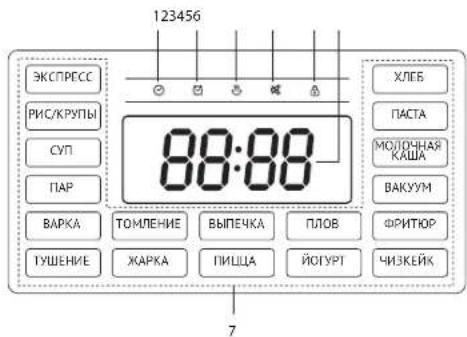
Display (scheme A3, p. 3)
-
Cooking time indicator
-
Time Delay indicator
-
Reheat / Keep Warm function indicator
-
Indicator for disabling audio
-
Control panel lock indicator
-
Digital indicator
-
Cooking program indicators
REDMOND
I. PRIOR TO FIRST USE
Carefully remove the unit and its accessories from the packaging. Dispose of all packaging materials and promotional stickers.

Keep all warning labels, warning stickers (if any), and the serial number identification label located on the housing.
After transportation or storage at low temperature allow the appliance to stay at room temperature for at least 2 hours before use.
Wipe the housing with a damp cloth, removable parts rinse with warm water. Dry thoroughly before operating.
Place the appliance on a flat, stable, and horizontal surface away from wallpaper, decorative coatings, electronic appliances, or any other objects or cabinets that could be damaged by steam, humidity, or high temperature.
Before operating, make sure that the outer and inner parts of the pressure multicooker have no dents, cracks or any other visible damages. There should not be any obstructions between the heating element and the bowl.

ATTENTION! It is forbidden to lift the device with the filled bowl by the handle. ATTENTION! It is forbidden to lift the device by the handles of the bowl!
Do not switch the device on without the inside of the bowl or empty bowl – in case of accidental start of the cooking program it will lead to a critical overheating of the device or damage the non-stick coating. Before frying products, pour a little vegetable or sunflower oil into the bowl.
II. OPERATION
Disabling audible signals
You can turn audio on and off in any mode, apart from when setting the programme up before starting.
To do this, press and hold the button for a few seconds. The <> light will switch on. To enable audio, press and hold the button again. The beep will be supplied, the indicator will turn off.
Control panel lock
The REDMOND RMC-M96 multicooker is equipped with a control panel lock function to prevent misuse.
You can lock and unlock the control panel in any mode, apart from when setting the programme up before starting. To do this, press and hold the + button for a few seconds. If the control panel is locked, then will be lit on the display.
Standard Operating Procedure for Automatic Programmes

IMPORTANT! When using the water boiling device (for example, when boiling products), DO NOT set the cooking temperature above 100°C. It may result in overheating and failure of the
device. For the same reason, DO NOT use the "ЖАРКА", "ХЛЕБ", "ВЫПЕЧКА", "ПИЦША", "ФРИТЮР" and "ЧИЗКЕЙК" programs to boil water.
-
Measure the ingredients according to the recipe.
-
Put them into the bowl. Make sure that all the ingredients including liquid are below the scale mark indicating maximum capacity. Place the bowl inside the device. The bowl and the heating element must fit tightly.

Use only the bowl supplied or compatible with this model when using the multicooker. See www.redmond.company for compatible bowls. DO NOT use any other utensils!
DO NOT process food directly in the bowl! This may damage the non-stick coating, deform the bowl and damage the appliance.
- Close the lid of appliance.

When using some programmes, cooking can be done with the cover off, follow the instructions in the recipe book.
ATTENTION! If you cook at high temperatures using a large amount of vegetable oil, always leave the lid of the device open.
-
Connect the power cord to the connector on the device.
-
Plug in the appliance. The appliance will go into the standby mode (the display shows - - - - ).
-
Repeatedly press and buttons to select the cooking program. Switching programs is carried out in a circle, the selected program indicator and "CrapT" button indicator will flash.
-
If necessary, change the default cooking time (see "Setting Cooking Time"). The "МУЛЬТИПОВАР" program also provides the ability to adjust the cooking temperature before starting (see "МУЛЬТИПОВАР" programme – setting cooking temperature before starting").
-
If necessary, set the delay start time (see "Time Delay Function").

When setting cooking parameters, the value being changed will flash on the display. After 5 seconds of inaction, the changed value will be saved automatically.
After 1 minute of inaction while setting up a programme, the device will go into waiting mode. Pressing the "Раззерее/Оммено" button while setting the cooking programme will switch the device to automatic programme selection mode. Pressing the button again will switch the device to waiting mode
At any stage of setting up, pressing and holding the "Cmapm" button will cause the cooking programme to begin with the current settings. Unchanged parameters will stay as the default.
- Press and hold the "Crapr" button to start the cooking program.
While the programme is underway, there will be a timer counting down the time remaining. The selected program indicator, ◎ indicator, the "Crapr" button indicator is lit. If the auto-heating function is active, the light will be lit (see "Keep Warm Function (automatic
heating)). Depending on the selected programme, the timer will begin countdown immediately or upon reaching the required temperature in the bowl.
In certain automatic programs countdown starts only when the device reaches its operating parameters. E.g. in "IAP" program the countdown of the program begins only when the water comes to a full boil providing enough steam. The Indicator will flash on the display when the device reaches the operating parameters
- An audible signals will be produced to indicate that cooking cycle is complete. When the programme or auto-heating function ends, the display will show the word "End" for a few seconds and then the device will go into waiting mode, then the appliance will go into the standby mode.
To interrupt cooking process at any stage, to cancel set program or the Keep Warm function press and hold down "Разогрев/Отмена" button.
To achieve a good result refer to the recipes included in the REDMOND RMC-M96 cookbook, designed specifically for this model. You can also find corresponding recipes on www.redmond company.
Setting Cooking Time
The multicooker allows manually adjusting the cooking time, set by default for each program (except EXPRESS). Time adjustment range and interval depend on the program of cooking selected (see "Summary Table of Cooking Programs (Default Settings)").
- Press the "Время" button, the hour value will start flashing on the display.
- Set the hour value with the — and + buttons. Switching takes place in a circle. Press and hold the corresponding button down to scroll through the digits.
- To save the changes and set the minute timer, press the "Время" button.
- In the same way set the minute value. If you do not press the buttons on the panel for a few second, the changes will be saved automatically (the numbers on the display will stop flashing). To return to setting hours, press the "Время" button before it auto-saves.
"МУЛЬТИПОВАР" programme – setting cooking temperature before starting
When using the "МУЛЬТИПОВАР" programme you can adjust both time and temperature before the start. Temperature range - 35 to 180°C with a 5°C interval.
- Press the "Temnepatypa" button, the default temperature value will start flashing on the display.
- Set the temperature value with the — and + buttons. Switching takes place in a circle. Press and hold the corresponding button down to scroll through the digits.
- Do not press the buttons on the control panel a few seconds, settings will be saved automatically (the display will start showing the cooking time again).
For overheat protection when setting the cooking temperature higher than 150° C the maximum programme operating time is limited to two hours
STOP If you use the "МУЛЬТИПОВАР" program for boiling the water (for example, when cooking products), it is FORBIDDEN to set the cooking temperature above 100°C.
Time Delay Function
This function allows you to set the time after which the selected cooking program will start.
-
Press the "Отсрочка" button. The ✅ indicator will come on, the hour value will start flashing on the display.
-
Set the hour value with the — and + buttons. Switching takes place in a circle. Press and hold the corresponding button down to scroll through the digits.
- To save the changes and set the minute timer, press the "Отсрочка" button.
- In the same way set the minute value. If you do not press the buttons on the panel for a few second, the changes will be saved automatically (the Indicator will switch off and the display will start showing the cooking time again). To return to setting hours, press the "Отсрочка" button before it auto-saves.
This function is not available on all programmes (see "Summary Table of Cooking Programs (Default Settings)").
While the Time Delay function is operating, the display will show a countdown timer to the time the programme begins, the selected program indicator and 📄 indicator, "Разогрев/Отмена" and "Сразр" button indicators is lit. If the auto-heating function is active, the 📄 light will be lit (see "Keep Warm Function (automatic heating)").
While the Time Delay function is operating, the display will show a countdown timer to the time the programme begins. Press the "Омсрочка" button, on the display for a few seconds to show the set cooking time.
The device will emit a sound when the time is up, and indicators will turn off. The chosen cooking programme will begin.
It is not recommended to use Time Delay function if dairy and other perishable products are being used (eggs, fresh milk, meat, cheese etc.).
MASTERCHEF LITE function
Open even more opportunities for culinary creativity with the new MASTERCHEF LITE feature! If the "МУЛЬТИПОВАР" program allows you to set the parameters of the program before it starts, then using the MASTERCHEF LITE function, you can change the settings directly in the cooking process.
You can always configure the work of any program so that it corresponds to your wishes. Does the soup boil away? Does the milk porridge "runs away"? Are the steamed vegetables cooked for too long? Change the temperature or cooking time without interrupting the program, as if you were cooking on the stove or in the oven.
The MASTERCHEF LITE function allows you to change the cooking time and temperature while any automatic programme is operating (excluding "ЭКСПРЕСС" programme).
REOMOND

The MASTERCHEF LITE function can be especially useful if you prepare dishes according to complex recipes that require a combination of different cooking programs (for example, when preparing cabbage rolls, beef Stroganoff, soups and pasta according to different recipes, jam, etc.).
Changing the temperature during cooking
Range of cooking temperature changes – 35 to 180°C with a 1°C interval. Adjusting temperature while cooking is exactly like setting the temperature before the start in the "МУЛЬТИПОВАР" programme.
- During the operation press the "Temnepatypa" button, the default temperature value will start flashing on the display.
- Set the temperature value with the — and + buttons. Switching takes place in a circle.
- Do not press the buttons on the control panel a few seconds, settings will be saved automatically (the display will start showing the cooking time again).

For overheat protection when setting the cooking temperature higher than 150°C the maximum programme operating time is limited to two hours
Changing the time during cooking
The cooking time range and interval depends on the chosen programme (see "Summary Table of Cooking Programs (Default Settings)"). Adjusting the cooking time while cooking is just like setting cooking time before the programme begins.
- Press the "Время" button twice while cooking is in progress, the digital indicator on the display will start flashing.
-
Set the hour value with the — and + buttons. Switching takes place in a circle. Press and hold the corresponding button down to scroll through the digits.
-
To save the changes and set the minute timer, press the "Время" button.
-
In the same way set the minute value. If you do not press the buttons on the panel for a few second, the changes will be saved automatically (the numbers on the display will stop flashing). To return to setting hours, press the "Время" button before it auto-saves.

If you set the cooking time to 00:00, the program will be stopped. While the Time Delay function is running, the MASTERCHEF LITE function is not available. When changing cooking time and temperature before the device reaches the right temperature or cooking has finished (if they are provided for in the factory settings), then the preliminary heating will be interrupted and a programme countdown timer will begin.
Keep Warm Function (automatic heating)
This function automatically activates at the end of cooking, and keeps the food warm at 70-75°C for 12 hours. The "Разогрев/Отмена" indicator and 📞 button indicator is lit with the enabled Keep Warm, the direct counting of the program time in this mode is displayed. To disable Keep Warm function press and hold "Разогрев/Отмена" button. The appliance will go into the standby mode.

This function is not available on all programmes (see "Summary Table of Cooking Programs (Default Settings)").
Preliminary Disabling the Keep Warm Function (automatic heating)
Automatic activation of the Keep Warm function at the end of the program may sometimes be undesirable. The multicooker allows disabling the function in advance. To do this, while the cooking program or Time Delay function is running, press the "Crapr" button: the indicator will turn off. To turn on the automatic heating again, press the "Crapr" button again.

For your convenience, in case of cooking at temperatures up to 80° C, the automatic heating function will be disabled by default. If a temperature higher than 80° C is set while a programme is in progress, the auto-heating will turn on.
Reheat Function
The multicooker can be used for warming up cold meals. To reheat: 1. Fill the bowl with food and position it inside the multicooker.
-
Close the lid and plug in the appliance.
-
Press the "Разогрев/Отмена" button. The "Разогрев/Отмена" button indicator and indicator will come on, the display will show a countdown timer until it has finished heating. The appliance will reheat food up to 70–75°C and will keep it warm during 12 hours.
-
To turn off the reheat function press the "Разогрев/Отмена" button again. The appliance will go into the standby mode.

The Keep Warm and Reheat functions enable the appliance to maintain the temperature of a dish for 12 hours, however it is not recommended to keep a meal warm for more than 2-3 hours, because this may affect its flavour.
Summary Table of Cooking Programs (Default Settings)
| Program Recommendations for use | Default time | Adjustment range/ increments | Waiting to access operating parameters | Time Delay | Keep Warm, h | |
| МУЛЬТИПОВАР | Adjust cooking time and temperature to cook any dish of your choice | 0:30 2 min - 12 h / 1 min | √ | 12 | ||
| ЭКСПРЕСС | Quick cook rice, fluffy water porridge. During operation, the indicator is displayed | Auto shut-off after complete boiling water | ||||
| РИС/КРУПЫ* | Cooking grains and other side dishes | 0:25 | 1 min - 4 h / 1 min | √ | 12 | |
| Program Recommendations for use | Default time | Adjustment range/ increments | Waiting to access operating parameters | Time Delay | Keep Warm.h |
| СУП | Cooking jellied meat and aspic, preparation of broths, filling, vegetable and cold soups | 1:00 5 min - 8 h / 1 min | √ | 12 | |
| ПАР | Preparation of meat, fish, vegetables and multicomponent dishes. Use the adjustable steam container (included in the set), if you do not use automatic time settings in this program, refer to the "Recommended steaming time" table | 0:35 5 min - 2 h / 1 min | √ | √ | 12 |
| ВАРКА | Cooking meat, fish, poultry, vegetables and other products | 0:40 5 min - 8 h / 1 min | √ | 12 | |
| ТУШЕНИЕ | Making meat, fish, vegetable, side and multicomponent dishes stews, cooking jellied meat and aspic, preparation of broths, filling, vegetable and cold soups | 1:00 5 min - 12 h / 1 min | √ | 12 | |
| ТОМЛЕНМЕ Making stewed meat 3:00 5 min - 12 h / 5 min | √ | 12 | |||
| ХАРКА | Cook fried meat, fish and vegetable. When cooking with this programme the device's cover should be left open. After the appliance reaches the operating parameters, two short beeps will sound, put the Ingredients in the bowl, the countdown of the cooking time will begin | 0:18 1 min - 2 h / 1 min | √ | 12 | |
| ВЫПЕЧКА | Baking biscuits, casseroles, cakes of yeast and puff pastry | 1:00 1 min - 4 h / 1 min | √ | 4 | |
| ГИЦЦА Making pizza 0:20 1 min - 1 h / 1 min | √ | 4 | |||
| ПЛОВ Cooking different types of pialaf 1:00 5 min - 2 h / 1 min | √ | 12 | |||
| ЙОГУРТ Cooking different types of yogurt 8:00 10 min - 12 h / 5 min | √ | ||||
| ХЛЕБ | Making bread from rye and wheat flour. Note that dough is prooofed within the first hour of the programme and then starts baking. If cooking time is set less than an hour after the programme starts the baking process will begin | 3:00 5 min - 4 h / 1 min | √ | 3 | |
| ПАСТА | Cooking different types of pasta. An audible signal will inform you of water boiling and the necessity of adding the ingredients. The time starts to countdown after repressing "Стар" | 0:08 1 min - 1 h / 1 min | √ | ||
| Program Recommendations for use | Default time | Adjustment range/ increments | Waiting to access operating parameters | Time Delay | Keep Warm.h | |
| МОЛОЧНАЯ КАША | Preparing oatmeal using semi-skimmed pasteurized milk | 0:30 1 min - 4 h / 1 min | √ | 12 | ||
| ВАКУУМ Cooking vacuum-packed ingredients 2:30 10 min - 12 h / 5 min | √ | |||||
| ФРИТЮР | Cooking Ingredients in the deep fryer. When cooking with this programme the device's cover should be left open. After the appliance reaches the operating parameters, two short beeps will sound, put the ingredients In the oil | 0:16 | 1 min - 40 min / 1 min | |||
| ЧИЗКЕЙК | Preparing cheese pies and cottage cheese casseroles | 1:00 1 min - 3 h / 1 min | ||||
* The function of automatic shutdown of the program after boiling of water for preparation of crumbly groats is realized in the "ЭКСПРЕСС" program.
III. COOKING TIPS
General recommendations
- To steam vegetables or another ingredients, fill the bowl with of water and place the steaming container. Measure ingredients following the recipe provided, and put them into the container. Follow the directions in the recipe book.
- To make porridge, use the pasteurized semi-skimmed milk, using whole milk dilute it by half with water. Grease the sides of the bowl with butter before cooking. Rinse grain (rice, millet, etc.) thoroughly until water runs clear. Follow proportions suggested in the recipe book, increase or reduce the amount of ingredients proportionately.
- During the preparation of bread and baking ensure that the ingredients take no more than half of the useful volume of the bowl. Time Delay function is not recommended for this program, as it can affect the quality of baking. Remove baked goods out of the appliance immediately after cooking is complete, to prevent them from getting extra-moist or soggy, or leave on Keep Warm for a short period of time only.
- Do not open the lid during dough proofing! Product quality depends on it.
- When cooking ingredients in the deep fryer, place the basket (sold separately) with the ingredients in hot oil. Only use refined vegetable oil in the deep fryer. Cook with the cover open. Remember, the oil will be very hot! To avoid burns, use oven gloves and do not bend over the device. Do not re-use oil.
- Let the appliance cool down thoroughly, before restarting the "ЖАРКА" program.
REDOMOND
Common Cooking Mistakes and Ways of Solving Them
This table familiarizes you with the practical tips and solutions to some common problems you may experience when using the multicooker.
| Possible causes Solutions | ||
| The lid of the device was open or was not closed properly, so the cooking temperature was not high enough | Try to avoid opening the lid while cookingClose the lid until it clicks into place. Make sure that the rubber sealing ring located on the inner side of the lid is not defomed or damaged in any way | |
| Cooking temperature was not observed because the bowl and the heating element did not fit tightly | There should not be any foreign objects between the lid and the housing of the device, remove if any.Always make sure that the heating element is clean and fits tightly with the bowl before cooking | |
| Wrong Ingredients or settings were chosenGeneral proportions were not observed, the foods were cut into pieces that are a bit too bigWrong time settingsChosen recipe is not appropriate for the appliance | We recommend that you use recipes adapted for the device.Choose proven recipes onlySet the time and cooking programme, choose ingredients, proportions, and the size of pieces according to the recipe | |
| Steaming: the amount of water In the bowl Is not enough to provide enough steam density | Use the amount of water recommended. If in doubt, check the water level while steaming | |
| Frying | Too much vegetable oil was added | For regular frying add an amount of vegetable oil just enough to cover the bottom of the bowl.Follow recommendations given in the recipe while deep frying |
| Too much liquid inside the bowl | Do not close the lid of the device while frying unless specified in the recipe. Defrost and let drain the ingredients before frying | |
| Boiling: the broth boiled away while cooking acidic foods | Certain foods need to be washed or sautéed before cooking.Follow recommendations given in the recipe | |
| Baking (dough failed to bake through) | While proving the dough has reached the inner lid and covered the steam valve | Use a smaller amount of dough |
| Too much dough in the bowl | Take the product out of the bowl, turn it over and place back.Bake until readyNext time use smaller amount of dough | |
| Wrong ingredients or time settings, the foods were cut into pieces that are a bit too small. | We recommend that you use the recipes adapted for your model. Set the time and cooking programme, choose ingredients, proportions and the size of the pieces according to the recipe |
| The dish was in the bowl on "Keep Warm" mode for too long after being cooked | We recommend that you use "Keep Warm" mode moderately. If your device enables you to switch "Keep Warm" off in advance, use it to avoid the problem |
LIQUID BOILS AWAY DURING COOKING
| Milk boils away | Depending on both quality and properties of the milk used, it may boil away. To avoid this, we recommend that you use only ultra-pasteurized skimmed milk. Mix the milk with some water if needed |
| Foods were not properly processed (were not rinsed well, etc.)Wrong general proportions or ingredients | We recommend that you use the recipes adapted for the device. Try choosing proven recipes only. Set the time and cooking programme, choose ingredients, proportions, and the size of the pieces according to the recipeWhole grains, meat, fish, and seafood need to be thoroughly rinsed before cooking |
THE DISH GETS BURNT
| The bowl was not properly washed before cookingNon-stick coating is damaged | Before cooking ensure that the bowl is clean and has no coating defects |
| General amount of ingredients is smaller than recommended | Use proven recipes adapted for the device |
| Cooking time was too long | Reduce the cooking time or follow recommendations given in the recipe adapted for your model |
| Frying: oil was not added; the ingredients have not been stirred or turned over | For regular frying add an amount of vegetable oil just enough to cover the bottom of the bowl.For proper frying stir or turn the ingredients occasionally in the bowl while cooking |
| Stewing: not enough liquid Add more liquid. Avoid opening the lid while cooking | |
| Boiling: not enough liquid in the bowl (proportions were not observed) | Follow recommended amounts of liquids and solids while cooking |
| Baking: the bowl was not greased before baking | Grease the bottom and sides of the bowl with butter or vegetable oil before baking (do not pour oil inside) |
INGREDIENTS LOSE THEIR SHAPE WHEN COOKED
| The ingredients have been stirred a bit too often | While frying foods, it is enough to stir the ingredients every 5-7 minutes |
| Cooking time was too long | Reduce cooking time or follow recommendations given in the recipe adapted for the device |
PASTRY IS DAMP
| Improper ingredients were used (juicy fruit or vegetables, frozen berries, sour cream, etc.) | Use ingredients according to the recipe. Avoid using ingredients that contain excess moisture or use them in smaller amounts |
| The baked product has been left in the multicooker with the closed lid for too long | We recommend that you take the baked product out of the bowl right after the baking cycle is over or leave it on "Keep Warm" mode for a short period of time only |
PASTRY WON'T RISE
| Eggs and sugar were not whisked well. | Use proven recipes adapted for the device. Choose, measure and process the ingredients according to the recommendations given in the recipe. |
| The dough sat for too long before being baked | |
| The flour wasn't sifted or the dough was not kneaded well | |
| Wrong Ingredients | |
| Wrong recipe |
Certain REDMOND multicookers feature overheat protection in the "TYШЕНИЕ" and "СУП" programmes. In case there is not enough liquid in the bowl, the appliance activates overheat protection, automatically interrupts the programme, and switches to "Keep Warm".
Recommended steaming time
| Foods Weight, g/pcs Water, ml Cooking time, mln | |||
| 1 Pork/beef fillet (cut into 1.5-2 cm cubes) 500 800 30/40 | |||
| 2 Mutton fillet (cut into 1.5-2 cm cubes) 500 800 40 | |||
| 3 Chicken fillet (cut into 1.5-2 cm cubes) 500 800 20 | |||
| 4 Meatballs/cutlets 500 800 25/40 | |||
| 5 Fish (fillet) | 300 800 15 | ||
| 6 Seafood mix (frozen) | 300 800 | 5 | |
| 7 Dumplings | 5 pcs | 800 25/30 | |
| 8 Potatoes (cut into 4 pieces) | 500 800 20 | ||
| 9 Carrots (cut into 1.5-2 cm cubes) | 500 800 35 | ||
| 10 Beet (cut into 4 pieces) | 500 | 1500 90 | |
| 11 Vegetables (frozen) | 500 800 | 5 | |
| 12 Eggs | 5 pcs | 800 10 | |
Please note that these are only approximate guidelines. Steaming times may vary, depending on the quality of foods and your personal preferences.
Recommendations for using temperature modes
| Operating temperature, °C | Recommendations for use (you may also refer to the recipe book) |
| 35 | Proofing dough, making vinegar |
| 40 | Making yogurt |
| 45 | Leavening |
| 50 | Fermentation |
| 55 | Fondant |
| 60 | Making green tea and preparing baby food |
| 65 | Cooking vacuum sealed meat |
| 70 | Making punch |
| 75 | Pasteurizing, making white tea |
| 80 | Preparing mulled wine |
| 85 | Making cottage cheese and other dishes requiring long cooking time |
| 90 | Making red tea |
| Operating temperature, °C | Recommendations for use (you may also refer to the recipe book) |
| 95 | Cooking porridges using milk |
| 100 | Cooking meringues and jams |
| 105 | Cooking jellied meat |
| 110 | Sterilisation |
| 115 | Making sugar syrup |
| 120 | Cooking foreshank |
| 125 | Stewing meat |
| 130 | Making puddings |
| 135 | Browning cooked foods |
| 140 | Smoking foods |
| 145 | Baking fish and vegetables (in foil) |
| 150 | Baking meat (in foil) |
| 155 | Baking yeast dough |
| 160 | Frying poultry |
| 165 | Frying steaks |
| 170 | Frying in batter |
| 175 | Cooking chicken nuggets |
| 180 | Cooking French fries |
You can also refer to the recipe book provided with the appliance
IV. ADDITIONAL CAPABILITIES
- Making cheese
- Sterilization
- Making cottage cheese
• Pasteurization of liquid products
- Cooking fondue
Recipes listed in the section of dishes can be found in the recipe book or on the website www.redmond.company.
V. ADDITIONAL ACCESSORIES
Additional accessories for the multicooker and information on the innovations are available through www.redmond.company and our authorized dealers.
VI. CLEANING AND MAINTENANCE
ATTENTION! Before you start cleaning the appliance, make sure that it is unplugged and has completely cooled down.
REDMOND
General Guidelines
- Before the first use of the multicooker or to eliminate smell of food after cooking, it is recommended to pour 0.5 l of water into the bowl and process half of the lemon cut into slices inside the bowl for 15 minutes using the "TAP" program.
- Do not leave the cooking bowl with meals or liquids inside a closed multicooker for over 24 hours. Store cooked meals in a refrigerator and reheat them when required, using the Reheat function.
- If not in use for long time, unplug the appliance. The cooking chamber, heating disc, cooking bowl, inner lid, steam valve, safety valve, and condensation collector must be dry and clean.

DO NOT use a sponge or tissue with hard or abrasive surface or abrasive pastes. Do not use any chemically aggressive substances or any other agents that are not recommended for cleaning items that contact food.
DO NOT immerse the appliance in water or wash under running water!
- Be careful when cleaning silicone parts of the multicooker, because damaged or deformed parts may lead to malfunction of the unit.
To Clean the Housing
Use soft damp cloth or sponge to clean the housing. If necessary, use a mild soap solution. Wipe the surface dry to remove soap residue and water spots.

WARNING! Be careful when cleaning the rubber band seal, the device may not work properly if it loses its shape.
To Clean Removable Steam Valve
Clean the removeable steam valve after every use.
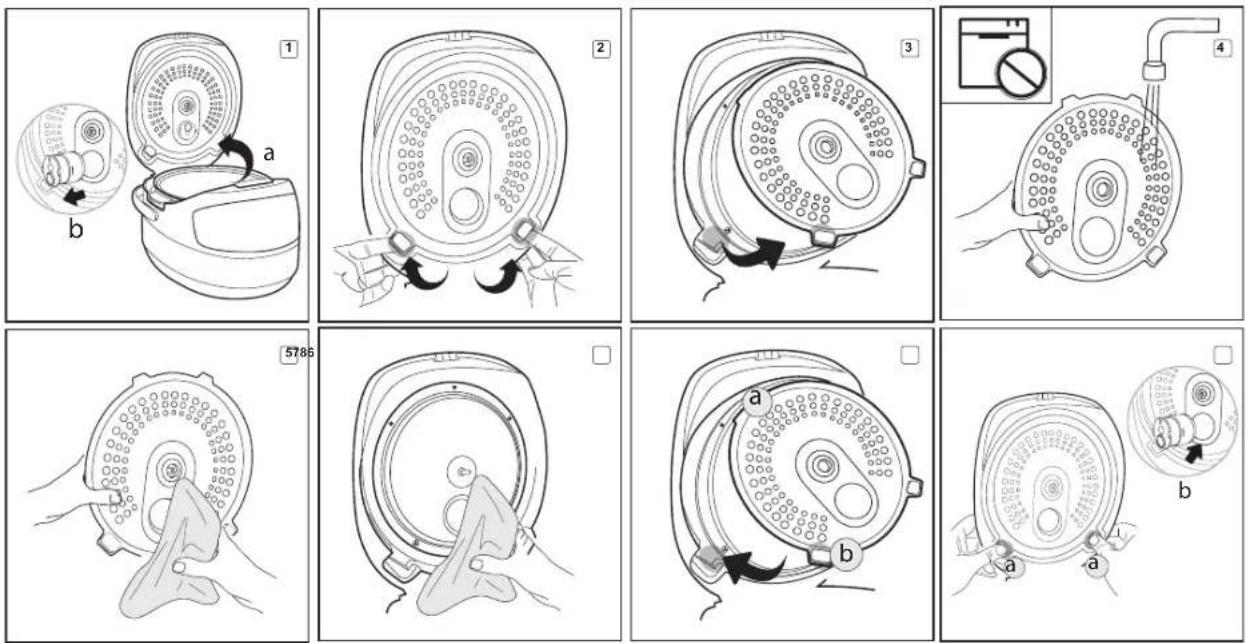
- Pull the valve towards yourself and remove it carefully
- Disassemble the steam valve as shown in image A4 (p. 4).
- Rinse all parts of the steam valve under running water. Carefully dry before assembling
- Place the steam valve in the device as shown in image A4 (p. 4).
To Clean the Bowl
The appliance bowl must be cleaned after each use. You can clean the bowl by hand, using a soft sponge and dishwashing detergent, or in the dishwasher (according to the manufacturer's recommendations).
If heavily dirty, fill the bowl with warm water and leave to soak for a while, then clean. Wipe the outer surface of the bowl dry before positioning it back inside the multicooker
When the bowl is used regularly, it is possible to completely or partially change the color of the internal non-stick coating. This in itself is not a sign of a defect.
To Clean Inner Lid
To see the order of removal and adjustment of the inner aluminium lid ref to the scheme A.5 (p. 5). To clean the main and removable inner lids use a damp kitchen cloth or a sponge. Before adjusting the inner lid wipe the surfaces of both lids dry.
To Remove Condensate
Condensate accumulates in the special cavity on the housing around the bowl and flows into a special container in the back of the appliance. To clean the container rinse it under running water, following above mentioned rules. Remove the remaining condensate using a kitchen cloth.
To Clean Cooking Chamber
Compliance with the user manual guidelines minimizes the risk of food particles or liquids accumulating inside the cooking chamber.
However, if the inside of the chamber gets dirty, clean it to prevent improper operation or malfunction of the appliance.
Walls of the cooking chamber, surface of the heating disk, and the casing of central thermal sensor (located in the middle of the heating disk) can be cleaned with a damp (not wet!) sponge or cloth. Remove any traces of soap or detergent if using any to prevent unwanted odors during cooking.
If there is a foreign object in the cavity around central thermal sensor, carefully remove it using tweezers, trying to avoid pressing on the casing of the sensor.
Clean heating disk with a damp medium-hard sponge or synthetic brush, if necessary.

When the multicooker is used on a regular basis, heating disk may partially or completely change color, which does not indicate a defect and does not affect proper operation of the unit.
Storage and Transportation
Before repeated operation or storage completely dry all parts of the appliance. Store the assembled appliance in a dry, ventilated place away from heating appliances and direct sunlight.
During transportation and storage, do not expose the device to mechanical stress, that may lead to damage of the device and/or violation of the package integrity.
Keep the device package away from water and other liquids.
VII. BEFORE CONTACTING SERVICE CENTER
| Problem Possible cause Solution | |||
| Display shows the error code: E*, the device will make 6 short sounds | System error, possible failure of the control board or heating element | Unplug the appliance from the mains and let it cool down. Plug in the appliance again | |
| Error message is dis-played on the screen:E5-E7 | The automatic overheating protection was triggered | Do not start cooking with an empty bowl! Disconnect the appliance from the mains, open the lid and let it cool for 10-15 min-utes, then continue cooking | |
| Do not add water to the bowl during operation of "MYBTHIPIOBAP" (when the temperature is set above 100°C) and "KAPA" programs | |||
| If the temperature is set above 120°C within the "KAPA" program and above 130°C in the "MYBTHIPIOBAP" program, cook with the lid open | |||
| In the "KAPA" program, add the ingredients to the bowl only after the appliance has reached operating parameters. | |||
| The appliance does not switch on | Power cord is not connected to the socketWall socket is not working properly or power supply failure | Check the appliance is plug in to the work-ing socket | |
| The meal is taking too long to cook | There is a foreign object or particles between the bowl and the heating element,(litter, grain, pieces of food) | Unplug the appliance and let it cool down. Remove the foreign object or particles. | |
| The bowl is installed with the distortion install the | bowl properly | ||
| Heating element is dirty | Unplug the appliance and let it cool down. Clean the heating element. | ||
| The steam comes off from under the lid during cooking process | The tightness of connection between the bowl and inner lid is broken. | The bowl is improperly installed into the housing | Install the bowl properly |
| The lid is loosely closed or there is a foreign object under it | Check for any foreign objects (litter, grain, pieces of food) between the lid and the housing, remove them. Always close the multicooker lid until it clicks into place. | ||
| Sealing rubber on the inner lid is dirty, de-formed or damaged | Check the condition of the sealing rubber on the inner lid. Probably it needs to be replaced. | ||

In case you didn't manage to eliminate the defects, please, refer to the authorized service centre.

Environmentally friendly disposal (WEEE)
The packaging, user manual and the device itself shall be taken to the applicable collection point for the recycling of electrical and electronic equipment. Do not throw away the electronic waste to help protect the environment.
Old appliances must not be disposed with other household waste but must be collected separately. Municipal disposal of recyclable wastes is free of charge. The owners of old appliances are required to bring it to a waste facility centre. With this little extra effort, you can help to ensure that valuable raw materials are recycled and pollutants are treated as appropriate.
This appliance is labelled in accordance with European Directive 2012/19/EU — concerning used electrical and electronic appliances (waste electrical and electronic equipment WEEE). The guideline determines the framework for the return and recycling of used appliances as applicable throughout the EU.
Manufacturer: "Power Point Inc Limited" N°1202 Hai Yun Ge (B1) Lin Hai Shan Zhuang Xiameilin Futian Shenzhen China 518049 Under license of REDMOND® Importer (EU): SIA "SPILVA TRADING" Address: Jelgava, Meiju cels 43 - 62, LV-3007 Reg. Nr. 43603078598. Importer Cyprus (CY): ASBIS Kypros Limited; 26, Spyrou Kyprianou Str, 4040, Germa-sogeia, Limassol, Cyprus. Tel: +357 25 257 350; Fax: +357 25 322 432, e-mail: info@asbis.com.cy; www.asbis.com.cy
www.redmond.company
www.multicooker.com
www.store.redmond.company
www.smartredmond.com
Made in China
RMC-M96-GBR-UM

- REDMOND
- IMPORTANT SAFEGUARDS
- SPECIFICATION
- PROGRAMMES
- FUNCTIONS
- PACKAGE INCLUDES
- MULTICOOKER PARTS (SCHEME A1, P. 2)
- CONTROL PANEL (SCHEME A2, P. 3)
- DISPLAY (SCHEME A3, P. 3)
- PRIOR TO FIRST USE
- OPERATION
- DISABLING AUDIBLE SIGNALS
- CONTROL PANEL LOCK
- STANDARD OPERATING PROCEDURE FOR AUTOMATIC PROGRAMMES
- SETTING COOKING TIME
- МУЛЬТИПОВАР" PROGRAMME – SETTING COOKING TEMPERATURE BEFORE STARTING
- TIME DELAY FUNCTION
- MASTERCHEF LITE FUNCTION
- REOMOND
- CHANGING THE TEMPERATURE DURING COOKING
- CHANGING THE TIME DURING COOKING
- KEEP WARM FUNCTION (AUTOMATIC HEATING)
- PRELIMINARY DISABLING THE KEEP WARM FUNCTION (AUTOMATIC HEATING)
- REHEAT FUNCTION
- COOKING TIPS
- GENERAL RECOMMENDATIONS
- REDOMOND
- COMMON COOKING MISTAKES AND WAYS OF SOLVING THEM
- ADDITIONAL CAPABILITIES
- ADDITIONAL ACCESSORIES
- CLEANING AND MAINTENANCE
- GENERAL GUIDELINES
- TO CLEAN THE HOUSING
- TO CLEAN REMOVABLE STEAM VALVE
- TO CLEAN THE BOWL
- TO CLEAN INNER LID
- TO REMOVE CONDENSATE
- TO CLEAN COOKING CHAMBER
- STORAGE AND TRANSPORTATION
- BEFORE CONTACTING SERVICE CENTER
- ENVIRONMENTALLY FRIENDLY DISPOSAL (WEEE)
Brand : Redmond
Model : RMC-M96
Category : Frying Pan