ITVS-550B - Turntable Victrola - Free user manual and instructions
Find the device manual for free ITVS-550B Victrola in PDF.


| Product Type | Vintage 3-Speed Bluetooth Turntable |
| Brand | Victrola |
| Model | ITVS-550B |
| Power Supply | AC/DC adaptor 100-240V, 50-60Hz, output DC 5V 1A |
| Max Power Consumption | 6W |
| Speaker Impedance | 4 Ohm, 3W |
| Speeds | 33 1/3, 45, 78 RPM |
| Bluetooth | Yes, pairing name 'Vintage Turntable' |
| Line-In | Yes, 3.5mm aux input |
| Headphone Jack | Yes, 3.5mm |
| Built-in Speakers | Yes, stereo |
| Cartridge / Stylus | Replaceable stylus |
| Auto Stop | Selectable ON/OFF |
| Function Modes | Phono, Bluetooth, Line-In |
| RCA Output | Yes |
| Included Accessories | Turntable, instruction manual, operation sheet, 5V 1A adaptor, 45 RPM adaptor |
| Safety Class | Class II (double insulated) |
| Warranty | 90 days labor, 1 year parts |
| FCC Compliance | Class B digital device |
| California Prop 65 | Warning: contains chemical known to cause birth defects |
| Country of Origin | Made in China |
Frequently Asked Questions - ITVS-550B Victrola
User questions about ITVS-550B Victrola
0 question about this device. Answer the ones you know or ask your own.
Ask a new question about this device
Download the instructions for your Turntable in PDF format for free! Find your manual ITVS-550B - Victrola and take your electronic device back in hand. On this page are published all the documents necessary for the use of your device. ITVS-550B by Victrola.
USER MANUAL ITVS-550B Victrola
innovative technology.
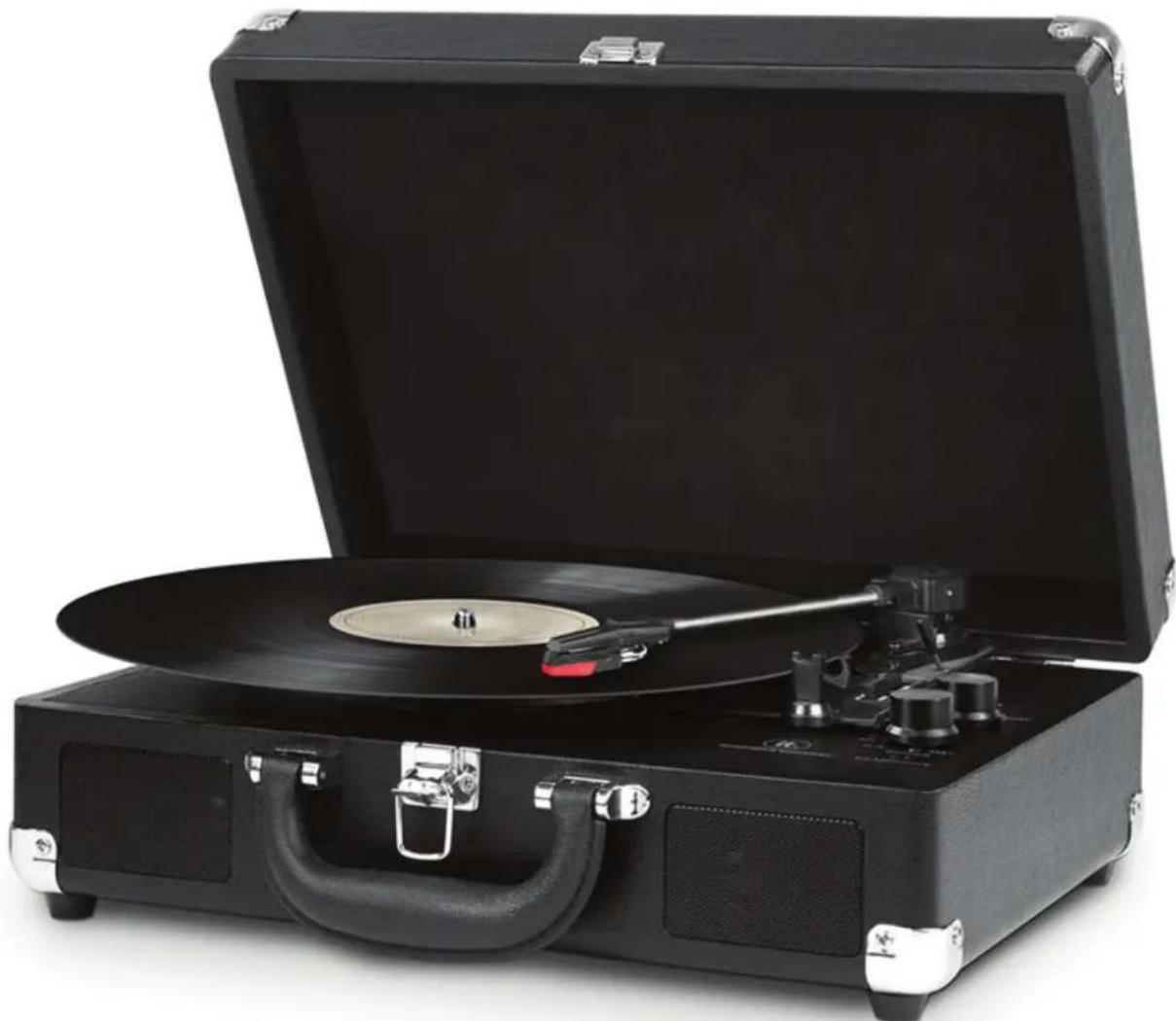
Vintage 3-Speed Bluetooth® Turntable
Model: ITVS-550BT
natural_image
Black convertible vintage gramophone with open case and metal handle (no visible text or symbols)Instruction Manual
PLEASE READ THIS INSTRUCTION MANUAL CAREFULLY BEFORE USE AND KEEP IT FOR FUTURE REFERENCE.
CONTENTS
SAFETY INSTRUCTIONS 2
SPECIFICATIONS ...... 3
TURNTABLE LAYOUT......4
-
Read these instructions – All the safety and operating instructions should be read before this product is operated.
-
Keep these instructions – The safety and operating instructions should be retained for future reference.
-
Heed all warnings – All warnings on the appliance and in the operating instructions should be adhered to.
-
Follow all instructions – All operating and use instructions should be followed.
-
Do not use this apparatus near water – The appliance should not be used near water or moisture – for example, in a wet basement, near a swimming pool, or near other wet areas.
-
Clean only with a dry cloth.
-
Do not block any ventilation openings. Keep at least 5 cm around the apparatus for sufficient ventilations. Install in accordance with the manufacturer's instructions.
-
Do not install near any heat sources such as radiators, heat registers, stoves, or other apparatus (including amplifiers) that produce heat.
-
Do not defeat the safety purpose of the polarized or grounding plug. A polarized plug has two blades with one wider than the other. A grounding plug has two blades and a third grounding prong. The wide blade or the third prong is provided for your safety. If the provided plug does not fit into your outlet, consult an electrician for replacement of the obsolete outlet.
-
Protect the power cord from being walked on or pinched particularly at the plugs, convenience receptacles, and at the point where they exit from the apparatus.
-
Only use attachments/accessories specified by the manufacturer.
-
Use only with the cart, stand, tripod, bracket, or table specified by the manufacturer, or sold with the apparatus. When a cart or rack is used, use caution when moving the cart/apparatus combination to avoid injury from tip-over.

-
Unplug the apparatus during lightning storms or when unused for long periods of time.
-
Refer all servicing to qualified personnel. Servicing is required when the apparatus has been damaged in any way, such as power supply cord or plug is damaged, liquid has been spilled or objects have fallen into the apparatus, the apparatus has been exposed to rain or moisture, does not operate normally, or has been dropped.
-
Please keep the unit in a well ventilated environment.
-
Only use attachments/accessories specified or provided by the manufacturer
-
To reduce the risk of fire or electric shock, do not expose this apparatus to rain or moisture. The apparatus shall not be exposed to dripping or splashing and no objects filled with liquids, such as vases, shall not be placed on apparatus.
-
The main plug is used as disconnect device, the disconnected device shall remain readily operable.
-
This product is not intended for commercial use. Household Use Only.
21.

equipment is a Class II or double insulated electrical appliance.
It has been designed in such a way that it does not require a safety connection to electrical earth.
22.

The lightning flash with arrowhead within an equilateral triangle is intended to alert the user to the presence of uninsulated “dangerous voltage” within the product’s enclosure that may be of sufficient magnitude to constitute a risk of electric shock.
CAUTION
RISK OF ELECTRIC SHOCK DO NOT OPEN
CAUTION: TO PREVENT RISK OF ELECTRIC SHOCK,
DO NOT REMOVE COVER (OR BACK). NO USER-SERVICEABLE PARTS INSIDE. REFER SERVICING TO QUALIFIED SERVICE PROFESSIONAL.

The exclamation point within an equilateral triangle is intended to alert the user to the presence of important operating and maintenance (servicing) instructions in the literature accompanying the appliance.
Warning: To reduce the risk of fire or electrical shock, do not exposed the apparatus to rain or moisture. No naked flame sources such as candles shall be placed on top of the apparatus.
Caution: Changes or modifications not expressly approved by the manufacturer could void the user's authority to operate this device. Usage of controls or adjustments or performance of procedures other than those specified herein may result in hazardous exposure.
SPECIFICATIONS
Power Supply: AC Adaptor: 100-240, 50-60Hz DC-5V 1A
Speaker Impedance: 4ohm, 3W
Max Power Consumption: 6W
Included: Turntable, Instruction Manual, Turntable Operation Sheet, 5V, 1A switching power supply, and 45 RPM adaptor
Design and specification are subject to change without notice.
Bluetooth is a registered trademark of Bluetooth SIG, Inc.
Other trademarks and trade names are those of their respective owners
TURNTABLE LAYOUT
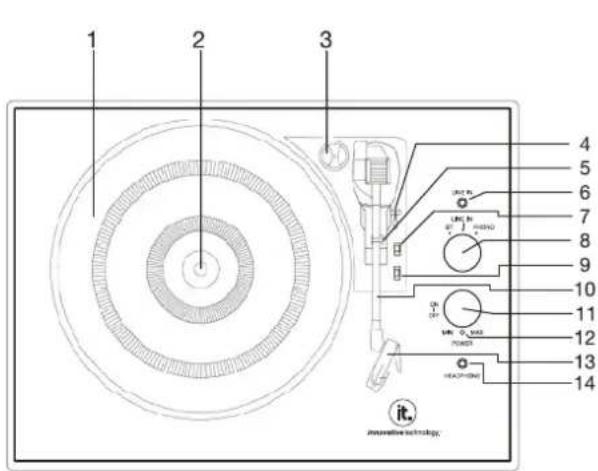
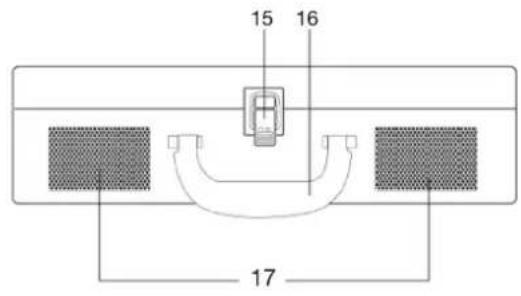
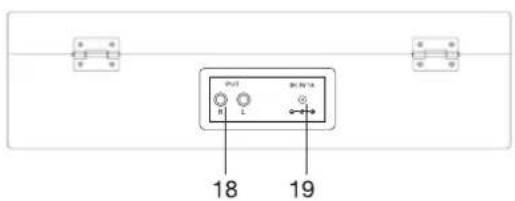
- TURNTABLE PLATTER
- TURNTABLE SHAFT
- 45 RPM ADAPTOR
- LIFT LEVER
- TONE ARM CLIP
- LINE-IN JACK
- SPEED SELECTION SWITCH
- FUNCTION (BT (BLUETOOTH), LINE-IN, PHONO) KNOB
- AUTO AND MANUAL STOP SELECTION SWITCH
- TONE ARM
- POWER ON/OFF AND VOLUME CONTROL KNOB
- POWER/BLUETOOTH LIGHT INDICATOR
- STYLUS CARTRIDGE
- HEADPHONE JACK
- BUCKLE
- HANDLE
- SPEAKERS
- RCA OUTPUT JACK
- POWER ADAPTOR JACK
TURNTABLE OPERATION
POWER SUPPLY
Insert the adaptor plug into the DC IN jack on the rear of the unit, then connect the AC/DC adaptor (5V, 1A AC100-240V, 50-60Hz) to a AC/DC wall outlet.
BASIC OPERATION
- Lift the BUCKLE on the front of the turntable and open the lid.
- Turn the FUNCTION KNOB to the PHONO position. Power ON the unit by turning the VOLUME CONTROL KNOB clockwise. The red LED will light to show that the turntable is turned ON.
- Place a record on the TURNTABLE PLATTER and select the desired speed (33 1/3 / 45 / 78) by sliding the SPEED SELECTION SWITCH according to the record.
NOTE: When playing a 45 rpm record, use the included 45 RPM ADAPTOR located in the holder near the tone arm. - Open the TONE ARM CLIP to release the TONE ARM. Push the LIFT LEVER backwards to raise the arm. Gently move the tone arm to the desired position over the record. The turntable will begin to spin when the arm is moved toward the record. Push the lift lever forward and lower the arm slowly onto the desired position on the record to begin playing.
Please Note: The record will begin to spin only when the tone arm is moved over the record if the Auto Stop is turned ON. - If the AUTO AND MANUAL STOP SELECTION SWITCH is turned ON, the record will stop automatically when finished. If this switch is OFF the record will NOT stop automatically when finished.
- To select the volume level, turn the VOLUME CONTROL KNOB to adjust the volume.
HOW TO REPLACE THE TURNTABLE NEEDLE
Removing the Stylus from the Cartridge
-
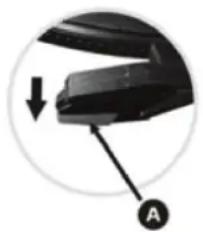
Place a screwdriver at the tip of the stylus and push downward as shown in direction "A". WARNING: when applying force to stylus, too much may damage or break the stylus.
-
Remove the stylus by pulling the stylus forward and pushing downward.
Installing the Stylus
-
Hold the tip of the stylus and insert the stylus by pressing as shown in direction "B".
-
Push the stylus upward as in direction "C" until the stylus locks into the tip position.
natural_image
Close-up of a black mechanical component with a downward arrow and labeled point A (no text or symbols beyond label)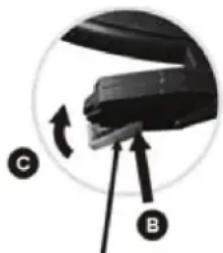
natural_image
Close-up of a mechanical component with labeled parts C and B, showing a rotating arrow (no text or symbols beyond labels)Guide Pins (Inside)
BLUETOOTH OPERATION
An external device with Bluetooth Connectivity can be wirelessly connected to this turntable using the Bluetooth function.
- Power ON the unit by turning the VOLUME CONTROL KNOB clockwise.
- Turn the FUNCTION KNOB to the BT (Bluetooth ^® ) position, the blue LED light will begin to flash.
- Turn your external device's Bluetooth Setting ON. Wait a moment, then look for the Bluetooth pairing name "Vintage Turntable".
- Select the Bluetooth pairing name, to connect the unit. Once connected, the blue LED light will stop flashing.
- You are now connected to your external device via Bluetooth!
- Rotate the VOLUME CONTROL KNOB to adjust the sound level.
AUX-IN OPERATION
An external (auxiliary) audio source (i.e. personal CD/MP3 Player/Mobile phone or computer) can be connected to this apparatus via the LINE-IN JACK.
- Plug a detachable Aux Cable (not provided) into the LINE-IN socket on the function panel of the apparatus.
- Turn the FUNCTION KNOB to the LINE-IN position, the LED will turn purple.
- Plug the other end of the Aux Cable into the Headphone or Line Out socket of your External Source.
- Power ON the unit by turning the VOLUME CONTROL KNOB clockwise.
- Rotate the VOLUME CONTROL KNOB to adjust the sound level.
EARPHONE OPERATION
Plug the earphone jack into the earphone port on the function panel to listen to the record. The built-in speaker will stop playing once the earphones are plugged in.
NOTE: For best performance and product maintenance, unplug the turntable when not in use.
FCC STATEMENT
Warning: Changes or modifications to this unit not expressly approved by the party responsible for compliance could void the user authority to operate the equipment.
NOTE: This equipment has been tested and found to comply with the limits for Class B digital device, pursuant to part 15 of the FCC Rules. These limits are designed to provide reasonable protection against harmful interference in a residential installation. This equipment generates, uses and can radiate radio frequency energy and, if not installed and used in accordance with the instructions, may cause harmful interference to radio or television reception, which can be determined by turning the equipment off and on, the user is encouraged to try to correct the interference by one or more of the following measures:
- Reorient or relocate the receiving antenna.
- Increase the separation between the equipment and the receiver.
- Connect the equipment into an outlet on a circuit different from that to which the receiver is connected.
- Consult the dealer or an experienced radio/TV technician for help.
CALIFORNIA PROP 65 WARNING
"WARNING" This product contains a chemical known to the State of California to cause birth defects or other reproductive harm. For more information on these regulations and a list of chemicals, log on the following website address: http://www.oehha.ca.gov/prop65.html
WARRANTY
Innovative Technology Electronics Corp.
Limited Warranty: 90 Days Labor, One Year Parts
Innovative Technology Electronics Corp. (IT) warrants the product to be free from “Defects” in materials under normal use for a period of “One Year” from the date of the original purchase. The Warranty is “Not” transferable. IT agrees, within the initial “90 Day” period, to repair or replace the product if it is determined to be defective at “No Charge”. It is further agreed that IT will cover the cost to repair or replace damaged “Parts” only for a total period of “One Year” from the date of the original purchase. The warranty does not cover cosmetic damage, antennas, AC cords, cabinets, headbands, ear-pads, or damage due to line power surges, connection to improper voltage supply or settings, misuse, mishandling, accident, acts of God or attempted repair by an unauthorized service agent.
To obtain service, the purchaser MUST present an original sales receipt / proof of purchase. Please contact us at www.ithomeproducts.com to request an RMA (Return Material Authorization) number to return products for service or replacement. Returns without an RMA number on the package will be refused and returned to sender. Upon receipt of the returning item and our full inspection (IT) may issue a replacement to customer for the same item or of one that has equivalent value and features. To return an item, supply full name, return address, phone number, item purchased, receipt of purchase and reason for return to obtain RMA number.
All returns must be in the original packaging or reasonable substitute to prevent damage. Customer "Must" include full name, shipping address and telephone number inside of package. No return will be shipped back to a PO Box or APO address.
Please include your check or money order in the amount of:
- USD \5.00 for items \10.00 to \$39.99 (Price Paid Per Unit)
- USD \10.00 for items \40.00 to \$99.99. (Price Paid Per Unit)
- USD \16.00, for items \100.00 and up. (Price Paid Per Unit)
- Shipping fees are non-refundable
to be payable to Innovative Technology Electronics Corp. (for handling and return shipping charges) (IT) will not be responsible for delays or unprocessed claims resulting from a purchaser's failure to provide any / all of the necessary information. Send all inquiries or RMA request via our website www.ithomeproducts.com/support.
Innovative Technology Electronics Corp.
1 Channel Drive
Port Washington, NY 11050
Toll free: 1-877-483-2497
Website for support: www.ithomeproducts.com/support
There are no express warranties except as listed above.
REPAIR OR REPLACEMENT AS PROVIDED UNDER THIS WARRANTY IS THE EXCLUSIVE REMEDY OF THE CUSTOMER, (IT) SHALL NOT BE LIABLE FOR ANY INCIDENTAL OR CONSEQUENTIAL DAMAGES FOR BREACH OF ANY EXPRESS OR IMPLIED WARRANTY ON THIS PRODUCT EXCEPT TO THE EXTENT PROHIBITED BY APPLICABLE LAW. ANY IMPLIED WARRANTY OF MERCHANTABILITY OR FITNESS FOR A PARTICULAR PURPOSE ON THIS PRODUCT IS LIMITED IN DURATION TO THE DURATION OF THIS WARRANTY.
Some states do not allow the exclusion or limitation of incidental or consequential damages, or limitations on how long an implied warranty lasts, so the above exclusions or limitations may not apply to you. This warranty gives you specific legal rights and you may also have other rights, which vary from state to state.
Made In China.
- Vintage 3-Speed Bluetooth® Turntable
- Instruction Manual
- CONTENTS
- CAUTION
- SPECIFICATIONS
- TURNTABLE LAYOUT
- TURNTABLE OPERATION
- POWER SUPPLY
- BASIC OPERATION
- HOW TO REPLACE THE TURNTABLE NEEDLE
- Removing the Stylus from the Cartridge
- Installing the Stylus
- BLUETOOTH OPERATION
- AUX-IN OPERATION
- EARPHONE OPERATION
- FCC STATEMENT
- CALIFORNIA PROP 65 WARNING
- WARRANTY
- Innovative Technology Electronics Corp.
Brand : Victrola
Model : ITVS-550B
Category : Turntable