The Mayfield VJB-130 - Turntable Victrola - Free user manual and instructions
Find the device manual for free The Mayfield VJB-130 Victrola in PDF.


User questions about The Mayfield VJB-130 Victrola
0 question about this device. Answer the ones you know or ask your own.
Ask a new question about this device
Download the instructions for your Turntable in PDF format for free! Find your manual The Mayfield VJB-130 - Victrola and take your electronic device back in hand. On this page are published all the documents necessary for the use of your device. The Mayfield VJB-130 by Victrola.
USER MANUAL The Mayfield VJB-130 Victrola
natural_image
Illustration of a Victorian uickel with ornate silver frame and digital display (no text or symbols)THE
MAYFIELD
MODEL: VJB-130
INSTRUCTION MANUAL
PLEASE READ THIS INSTRUCTION MANUAL CAREFULLY
BEFORE USE AND KEEP IT FOR FUTURE REFERENCE.

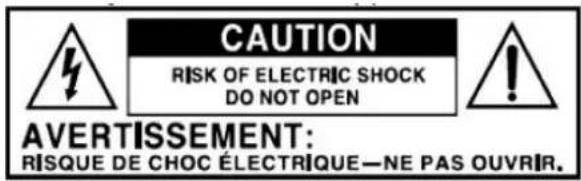
The lightning flash with arrowhead within an equilateral triangle is intended to alert the user to the presence of uninsulated "dangerous voltage" within the product's enclosure that may be of sufficient magnitude to constitute a risk of electric shock to persons.
CAUTION
RISK OF ELECTRIC SHOCK DO NOT OPEN
CAUTION: TO PREVENT RISK OF ELECTRIC SHOCK, DO NOT REMOVE COVER (OR BACK). NO USER-SERVICEABLE PARTS INSIDE. REFER SERVICING TO QUALIFIED SERVICE PERSONNEL.

The exclamation point within an equilateral triangle is intended to alert the user to the presence of important operating and maintenance (servicing) instructions in the literature accompanying the appliance.
CAUTION: To reduce the risk of fire or electric shock, do not expose this appliance to rain or moisture.
WARNING: To prevent electric shock, do not use this (polarized) plug with an extension cord, receptacle, or other outlet unless the blades can be fully inserted to prevent blade exposure
IMPORTANT SAFETY INSTRUCTIONS
- Read these instructions – All the safety and operating instructions should be read before this product is operated.
- Keep instructions – The safety and operating instructions should be retained for future reference.
- Heed all warnings – All warnings on the appliance and in the operating instructions should be adhered to.
- Follow all instructions – All operating and use instructions should be followed.
- Do not use this apparatus near water – The appliance should not be used near water or moisture – for example, in a wet basement or near a swimming pool, and the like.
- Clean only with dry cloth.
- Do not block any ventilation openings. Install in accordance with the manufacturer's instructions.
- Do not install near any heat sources such as radiations, heat registers, stoves, or other apparatus (including amplifiers) that produce heat.
- Do not defeat the safety purpose of the polarized or grounding plug. A polarized plug has two blades with one wider than the other. A grounding plug has two blades and a third grounding prong. The wide blade or the third prong is provided for your safety. If the provided plug does not fit into your outlet, consult an electrician for replacement of the obsolete outlet.
-
Protect the power cord from being walked on or pinched particularly at the plugs, convenience receptacles, and at the point where they exit from the apparatus.
-
Only use attachments/accessories specified by the manufacturer.
-
Use only with the cart, stand, tripod, bracket, or table specified by the manufacturer, or sold with the apparatus. When a cart or rack is used, use caution when moving the cart/apparatus combination to avoid injury from tip-over.

-
Unplug the apparatus during lighting storms or when unused for long periods of time.
-
Refer all servicing to qualified personnel. Servicing is required when the apparatus has been damaged in any way, such as power supply cord or plug is damaged, liquid has been spilled or objects have fallen into the apparatus has been exposed to rain or moisture, does not operate normally, or has been dropped.
15.
text_image
CAUTION RISK OF ELECTRIC SHOCK DO NOT OPEN AVERTISSEMENT: RISQUE DE CHOC ÉLECTRIQUE—NE PAS OUVRIR.- The lightning flash with arrowhead symbol within an equilateral triangle is intended to alert the user to the presence of non-insulated "dangerous voltage" within the product's enclosure that may be of sufficient magnitude to constitute a risk of electric shock.
- Warning: To reduce the risk of electric shock, do not remove cover (or back) as there are no user-serviceable parts inside. Refer servicing to qualified personnel.
- The exclamation point within an equilateral triangle is intended to alert the user to the presence of important operating and maintenance instructions in the literature accompanying the appliance.
-
⏚ Protective earthing terminal. The apparatus should be connected to a mains socket outlet with a protective earthing connection.
-
The main plug is used as disconnect device, the disconnect device shall remain readily operable.
-
WARNING
To reduce the risk of fire or electric shock, do not expose this apparatus to rain or moisture. The apparatus shall not be exposed to dripping or splashing. Objects filled with liquids, such as vases, shall not be placed on apparatus.
-
The equipment should always be used in a moderate climate.
-
The ventilation should not be impeded by covering the ventilation openings with items, such as newspapers, tablecloths, curtains, etc.
-
No naked flame sources, such as lighted candles, should be placed on the apparatus.
-
The symbol with Indicates AC voltage.
-
CAUTION, The servicing instructions are for qualified service personnel only. To reduce the risk of electric shock, do not perform any services other than that stated in the operation manual unless you are qualified to do so.
-
Cells or batteries should not be disassembled, crushed, punctured, opened, or otherwise mutilated.
-
Always take care to correctly insert cells and batteries observing the positive (+) and negative (-) polarity marks on the product and the device for which it is intended.
-
Do not short circuit the cells or batteries. Store cells and batteries in their original packaging and away from metal objects which may short-circuit them.
-
Batteries should not be heated or exposed to temperatures exceeding the manufacturer's recommended maximum temperature. Such thermal exposure may lead to leakage, fire, or explosion / dis-assembly.
-
Do not drop or subject the cell or battery to strong mechanical shock.
- Use the cell or battery with equipment that specifies its use.
- Keep cells and batteries out of reach of children.
- Seek medical advice immediately if a cell or battery has been swallowed.
- In the event that the electrolyte comes into contact with the skin or eyes, immediately flush with fresh water for at least 15 minutes and seek medical advice.
- Do not mix cells or batteries of different sizes, brands, capacities, or chemical.
- Consult the cell manufacturer for the maximum number of cells to be assembled in a battery.
- Batteries should not be placed into a fire except under conditions of controlled incineration.
- Failure to observe this precaution may result in an explosion/dis-assembly.
- Do not ingest battery, Chemical Burn Hazard. This product contains a button cell battery. If the button cell battery is swallowed, it can cause severe internal burns in just 2 hours and can lead to death.
- Keep new and used batteries away from children.
- If the battery compartment does not close securely, stop using the product and keep it away from children.
- If you think batteries might have been swallowed or placed inside any part of the body, seek immediate medical attention.
- CAUTION: RISK OF EXPLOSION IF BATTERY IS REPLACED BY AN INCORRECT TYPE.DISPOSE OF USED BATTERIES ACCORDING TO THE INSTRUCTIONS.
INCLUDED
- JUKEBOX
• INSTRUCTION MANUAL
• WARRANTY (BACK OF MANUAL) - REMOTE CONTROL
- PLASTIC CRADLE
- RCA LINE OUT CABLE
• 45 RPM ADAPTOR
PRODUCT OVERVIEW
FRONT VIEW:

text_image
1 ON/OFF POWER/FUNC VOL- VOL+ MI/PAIR/MEM IHT 2 3 4 5 6 7 8 9 10 11- ON/OFF: Turn the unit's power on or off.
- Power/Func: Long press to enter Standby Mode. Short press to select between the different functions such as the FM Tuner, AUX IN, Bluetooth, and Phonograph.
- VOL-: Reduce Volume, press the button repeatedly or press once and hold down until you reach the desired volume level.
-
VOL+: Increase Volume, press the button repeatedly or press once and hold down until you reach the desired volume level.
-
LED
-
LCD DISPLAY
-
RM: Remote sensor
-
◀◀PREVIOUS TRACK/ TUNE - : In Bluetooth mode, press to skip to the previous track. / In Radio mode, press to manually tune to a desired station or press and hold this button to auto search a station.
-
▶▶NEXT TRACK/ TUNE +: In Bluetooth mode, press to skip to the next track. In Radio mode, press to manually tune to a desired station or press and hold this button to auto search a station.
-
▶ / PAIR / MEM: Pause/play the music. In Bluetooth mode, long press to disconnect Bluetooth device. In FM radio mode, press to add a station to the Memory.
-
LIGHT: Press to turn on / off the light.
REAR VIEW:
-
FM ANT: While tuned to a station in FM mode, extend the wire and re-position to adjust for best reception.
-
AUX IN jack: Connect an external source.
-
Light Mode Switch: Single
light mode or mixed light mode for LED Tubes.
-
Line out Socket: Plug the included RCA cable into this socket.
-
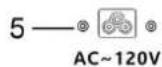
AC Power Socket: Plug the AC power cord into this socket and plug into a power outlet.
-
LINE OUT ON/OFF switch
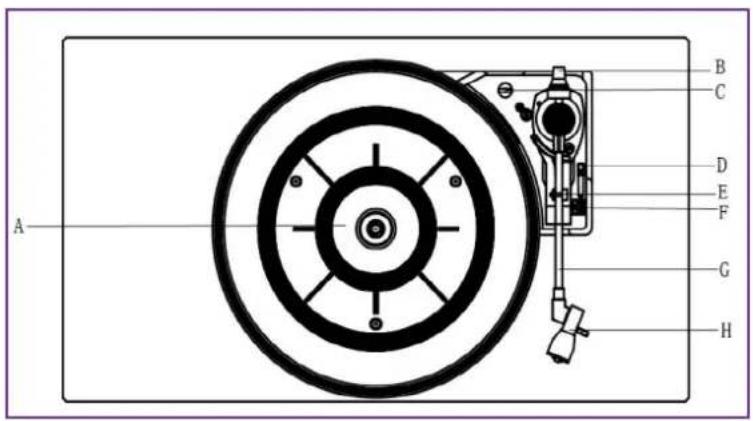
PARTS OF THE TURNTABLE
A. Turntable.
B. Counter weight
C. Safety Screw (for transport) Before using the unit, turn the screw clockwise using a coin or screwdriver.
Important:
When you transport the unit, turn the screw counterclockwise to secure the turntable.
D. Cue-lever. Use this lever to lift the tone arm.
E. Tone Arm holder.
F. Speed Selector.
G. Tone Arm. Before use, completely loosen the twist-tie on the tone arm and lift the tone arm up.
H. STYLUS.
text_image
A B C D E F G H
text_image
AUX IN CONNECTION 2 LIGHT MODE 3 PLAY HOLD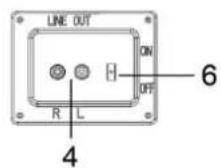
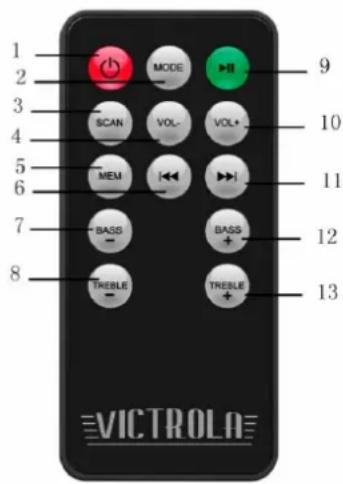
- ⏻ ON / Standby: Push to turn the unit on or off.
- MODE: Press to select between the different functions such as the FM Tuner, AUX, Bluetooth, and Phonograph.
- SCAN: Press to automatically search and save radio stations.
- VOL-: Reduce Volume, press the button repeatedly or press once and hold down until you reach the desired volume level.
- MEM: Press to use the Memory Function while using the Radio.
- ◀◀PREVIOUS TRACK: In Bluetooth mode, press to skip to the previous track. / In Radio mode, press to
manually tune to a desired station or press and hold this button to auto search a station.
- BASS -: Press to reduce the bass
- Treble -: Press to reduce the treble
- ▶PLAY/PAUSE: In Bluetooth mode, press to play or pause playback
- VOL-: Increase Volume, press the button repeatedly or press once and hold down until you reach the desired volume level.
- ▶▶ NEXT TRACK: In Bluetooth mode, press to skip to the next track. / In Radio mode, press to manually tune to a desired station or press and hold this button to auto search a station.
- BASS +: Press to increase the bass
- Treble +: Press to increase the treble
- Even if the remote control unit is operated within the effective range, remote control operation may be impossible if there are any obstacles between the unit and the remote control.
- If the remote control unit is operated near other appliances which generate infrared rays, or if other remote control devices using infrared rays are used near the unit, it may operate incorrectly. Conversely, the other appliances may operate incorrectly.
TO ACTIVATE THE REMOTE CONTROL:
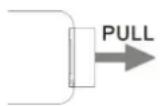
The remote control is built with cell battery before shipment. To activate the battery, remove the transparent tab at the bottom of the remote control.
Now the remote control is ready to use.
BATTERY REPLACEMENT: If the distance required between the remote control unit and main unit decreases, the battery is exhausted. In this case, please replace the battery with new one.
text_image
1 2 3 4 5 6 7 8 MODE SCAN MEM BASS TREBLE 9 10 11 12 13 =VICTROLATO REPLACE WITH A NEW BATTERY:
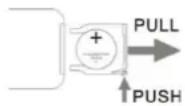
- Remove the battery compartment cover as per illustration on the right.
- Observing the correct polarity and put a 3Vdc lithium battery (CR2025).
- Close the cover.
BATTERY PRECAUTIONS:
- Be sure to insert the battery with correct positive + and negative - polarities.
- Refer to the precautions on the battery labels.
- When the remote control unit is not to be used for a long time (more than a month), remove the battery from the remote control unit to prevent it from leaking. If it leaks, wipe away the liquid inside the battery compartment and replace the battery with new one.
- Do not heat or disassemble batteries and never dispose of old batteries by throwing them in a fire.
- Purchase the correct size and grade of cell or battery most suitable for the intended use.
- Keep cells or batteries clean and dry both during use and storage. Wipe metal terminals with a soft, dry cloth if they become dirty.
- Retain original product literature for future reference.
- Only use the cell or battery in the application for which it was intended.
GENERAL OPERATION
GETTING STARTED
- Plug the AC power cord into the unit and plug into a power outlet.
- Press ON/OFF button to turn on the unit.
- Press POWER/FUNC button to select between the different functions such as the FM Tuner, AUX IN, Bluetooth and Phonograph.
LED LIGHTING EFFECTS
- To turn on/off the LED lighting effects simply press the LIGHT button located on the front of the unit.
- Light Mode Switch located on the back of the unit can be positioned on PLAY to have the colors gradually change or to HOLD to have one steady

LINE OUT OPERATION (FOR EXTERNAL SPEAKERS ONLY)
NOTE: Line out on the back of the unit should be switched to the "off" position to use the unit's built-in stereo speakers.
- Switch Line Out to "ON" position.
- Use the left/right channel to connect your external, more powerful speakers.
NOTE: When Line Out is ON, no sound will play from the unit's speakers
LISTENING TO A VINYL RECORD
MUST READ!!!
***The Counter Weight on the tone arm MUST be properly set-up before first use!
Adjustment of the Counter Weight

natural_image
Close-up of a mechanical device with a metallic handle and a small protrusion, set against a textured background (no visible text or symbols)Transportation Screw

text_image
Counter Weight Black Number Ring Tone Arm-
Remove all packing material and remove the clear needle protector. Identify the transportation screw and turn clockwise until it is all the way down (This is not an adjustment, the purpose of this screw is for transportation protection only).
-
Identify the silver counter weight at the back of the tone arm.
-
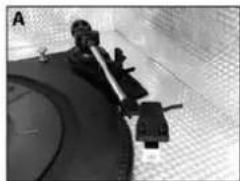
With your hand, lift the tone arm up and move the tone arm away from the tone arm rest but not over the black record platter (see photo A). Be careful that the needle does not hit anything. Rotate the silver counter weight (clockwise OR counterclockwise) until the tone arm floats naturally. (NOTE: the black number ring will also rotate as you turn the silver counter weight).
natural_image
Close-up of a mechanical device with a circular base and mounted components (no visible text or symbols)- With the tone arm floating and the stylus protector removed, the goal is create a state of equilibrium in the arm by rotating the counter weight so that the tone arm is perfectly balanced with the counter weight (see photos B and C).
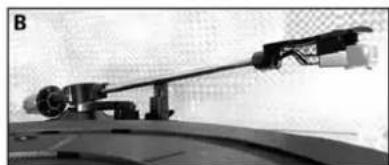
natural_image
Close-up of a precision optical instrument mounted on a curved surface (no visible text or symbols)Uneven Tone Arm
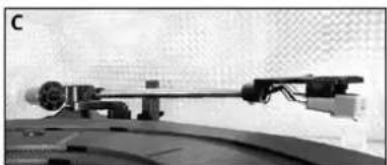
natural_image
Mechanical device with articulated arm mounted on a curved surface, no visible text or symbolsBalanced Tone Arm
-
Now that the tone arm is resting in a level / balanced position, you must set the proper weight for the needle on this tone arm. Identify the black number ring attached to the counter weight.
-
Carefully rotate only the black number ring so that "0" is at the 12 o'clock position. Be sure to hold the silver rear portion of the counterweight to prohibit its movement. DO NOT let the silver counter weight turn, the black number dial will turn separately.
-
Finally, from this "0" reference position, grasp BOTH parts of the counterweight and black number ring and rotate the weight counter-clockwise so that the "0.5" marking on the dial is in the 12 o'clock position.
This will set the tone arm to 3.5 grams of downward force, the recommended tracking weight for this needle (cartridge).
NOTE: The counter weight adjusts the pressure of the needle. If the pressure is too much, the sound will become distorted. If the pressure is too little, track skipping will happen more frequently. At this point, any fine tuning adjustments can be made by simply turning the balance weight very slightly clockwise or counter-clockwise.
-
Press MODE button to select PHONO Function.
-
Gently open the PHONO door. Make sure the silver transportation screw has been turned clockwise all the way down.
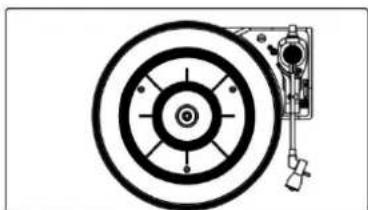
natural_image
Technical diagram of a mechanical component with concentric circles and a hanging knob (no text or symbols)-
Place a vinyl record on the turntable. When playing a 45 RPM record, please use the included adaptor.
-
Select the appropriate speed.

- Gently push tone arm clip to the right to release the tone arm.
- Raise the cue lever to lift the tone arm off the tone arm support.
- Move the tone arm gently to the edge of the record (or the starting point of a track). The turntable will begin to turn.
- Gently lower the tone arm by slowly releasing the cue lever.
- When the record reaches to its end, tone arm and rotation stop. Lift the tone arm and place it to tone arm rest manually.
IMPORTANT:
- Closing the PHONO door will help prevent dust from settling on the turntable.
- Always relock the tone arm clip before transporting the unit.
- Do not place anything on top of the PHONO door, especially while playing a record.
- Remove the needle cover before you balance the tone arm
- Hold tone arm whenever you make any adjustment or action so as to protect the tonearm.
- Do not try to adjust the balance weight while playing a record as this could break the needle and scratch the record.
- Remove the balance weight before transportation to prevent damage or breakage to the unit.
HOW TO REPLACE THE TURNTABLE STYLUS (#ATN3600L)
Please note: The stylus should last about 300 hours under normal use. It is recommended that the stylus be replaced as soon as you notice a change in sound quality. 78 RPM records may accelerate stylus wear and may have to be changed sooner.
Removing the Stylus from the Cartridge
- Set a small screwdriver (or use your finger) at the tip of the stylus and carefully push down to the direction "A".
WARNING: When applying force to stylus, too much may damage or break the stylus.
- Pull the stylus out toward the direction "B".
Installing the Stylus
- Hold the tip of the stylus and insert the other edge by pressing toward direction "C".
- Push the stylus up toward direction "D" until it locks at the tip.
Caution:
- Do not remove/bend the stylus needle and do not touch the needle to avoid injury.
- Turn off the unit's power before you replace the stylus and keep out of reach of children

text_image
Technical diagram showing three-step installation of a mechanical component with labeled parts A, B, and C.LISTENING TO FM RADIO
- Press ON/OFF button to turn on the unit.
- Press the POWER/FUNC button to select the FM tuning function.
- Press the ◀◀ / TUNE- or ▶◀ / TUNE + button to manually tune to a desired station
- You may also press and hold the ↔ / TUNE- or ▶ / TUNE + button to auto scan for a station.
- Press VOL-/VOL + adjust the volume.
ADJUSTING FOR BEST RECEPTION
FM broadcast: Extend and re-position the FM antenna located on the back of the unit.
PRESET TUNING
You can preset and store up to 20 FM radio stations.
- Select your desired FM station.
- Press and hold ▶ / PAIR / MEM button CH__ will be displayed.
- Press ←/TUNE-or →/TUNE+button to select the preset number.
-
Press ▶ / PAIR / MEM button to confirm.
-
You can press ▶ / PAIR / MEM button to view and choose to listen to stored stations.
Also, you can automatically search for and save radio stations with your remote control:
- Press and hold the SCAN button on the remote, it will be automatically search for and save radio station.
- When the auto save is over, you can press MEM to view and listen to the saved station.
LISTENING TO AN EXTERNAL AUDIO DEVICE (AUXILIARY MODE)
In AUX (auxiliary) mode, this unit can play audio from an external audio device (MP3 Player, Portable CD Player, etc.)
CONNECTING VIA AUXILIARY
- Press the POWER/FUNC button to select the AUX-IN function.
- Plug the AUX Cord located on back of the unit into your external device.
NOTE: Playback functions and operations are only available on your external device.
LISTENING TO AN EXTERNAL AUDIO DEVICE (BLUETOOTH MODE)
CONNECTING VIA BLUETOOTH
- Press POWER/FUNC button to select the Bluetooth mode.
- Turn ON the Bluetooth function on your external device.
NOTE: The effective distance between your external device and this apparatus is 10 meters. - Wait a moment until "Victrola Mayfield" appears on the paired devices list, then select "Victrola Mayfield" and allow it to connect. If a window appears and asks for a password, simply type "0000", then press OK on your external device.
- Once the pairing is completed, an audible beep will sound.
- Control playback from the unit/remote control or Bluetooth device.
- Long press ▶ / PAIR / MEM button to disconnect the currently connected external Bluetooth device and restart the Bluetooth pairing.
SPECIFICATIONS
GENERAL
Power Requirements.....AC 120 V\~ 60 Hz
Power Consumption.....50W
Dimensions (W x H x D) ....670mm(26.4") x 1088mm(42.8") x 379mm(15") approx.
Weight....37.55 kgs (83 lbs) approx.
AMPLIFIER
Output Power.....10W+10W+30W(subwoofer)
Frequency Response......60 to 20,000 Hz
SPEAKER SYSTEM
Type....2-way
Impedance....8 ohms (tweeter), 8 ohms (L&R)
4ohms (subwoofer)
FM Radio
Range....87.5 to 108 MHz
BLUETOOTH
Bluetooth Version......Bluetooth V5.0
Bluetooth Profiles.....A2DP, AVRCP
Bluetooth Frequency range.....2.402GHz-2.480GHz
Operating Distance.....10m (33ft.)
TURNTABLE
Turntable Stylus.....ATN3600L
TROUBLESHOOTING GUIDE
| GENERAL | Symptom | Possible Cause | Solution |
| Unit will not power on. | Unit is unplugged. | Connect the unit to the AC power supply. | |
| No sound output from speakers. | The volume level is set too low.The input selector does not match the playback source. | Adjust the volume.Select the correct input source.Check Rear Line-Out Switch | |
| Noise/Distortion in sound output. | The unit is too close to a TV set or another interfering device. | Turn off the TV or other appliance, and relocate the unit. | |
| Unit fails to respond. | It might result from external factors such as ESD (Electrostatic discharge). | Disconnect the power cord and external audio device.Re-plug the power cord after one minute. | |
| FM RADIO | Cannot listen to any station, or signal appears weak. | The station is not tuned-in properly.A TV set is being used nearby and is interfering with the radio reception. | Properly tune-in the desired station.Turn-off the interfering TV set. |
| The sound is distorted. | The antenna is not oriented properly. | Re-orient the antenna until reception improves. | |
| AUX | No sound output with external audio device plugged into rear AUX in jack. | AUX in jack is unplugged.Unit is not in proper Mode | Make sure the Auxiliary Cable is plugged into your sources.Select proper AUX mode |
| BLUETOOTH | No sound | The unit is not switched to Bluetooth modeYour device's and/or the unit's volume is not turned up.Your device is too far from the unit or there're some obstacle between your device and the unit | Ensure the unit is switched to BT mode.Move your Bluetooth device closer to unitTurn up the volume on your portable device and/or the unit.Turn OFF your Bluetooth device and unit.Then power them both back ON |
| Sound has a lot of static | Your device is too far away | Bring your device closer to the Jukebox | |
| Unable to pair with a Bluetooth device | Your device doesn't have Bluetooth connectivity.The Bluetooth pairing is not successful | Confirm that your device is Bluetooth compatible.Re-pair the unit and device again. | |
| PHONO | Decline in turntable audio performance | The turntable stylus is worn out | Replace the stylus. |
Please note: As a result of continual improvements, the design and specifications of this product are subject to change without notice.
Bluetooth is a registered trademark of Bluetooth SIG, Inc. Other trademarks and trade names are those of their respective owners.
Made in China.
FCC STATEMENT
This device complies with Part 15 of the FCC Rules. Operation is subject to the following two conditions: (1) This device may not cause harmful interference, and (2) this device must accept any interference received, including interference that may cause undesired operation.
NOTE: This equipment has been tested and found to comply with the limits for a Class B digital device, pursuant to Part 15 of the FCC Rules. These limits are designed to provide reasonable protection against harmful interference in a residential installation. This equipment generates uses and can radiate radio frequency energy and, if not installed and used in accordance with the instructions, may cause harmful interference to radio communications. However, there is no guarantee that interference will not occur in a particular installation. If this equipment does cause harmful interference to radio or television reception, which can be determined by turning the equipment off and on, the user is encouraged to try to correct the interference by one of the following measures:
- Reorient or relocate the receiving antenna.
- Increase the separation between the equipment and receiver.
- Connect the equipment into an outlet on a circuit different from that to which the receiver is connected.
- Consult the dealer or an experienced radio/TV technician for help.
WARNING: Any changes or modifications not expressly approved by the party responsible for compliance could void the user's authority to operate this equipment.
The device must not be co-located or operating in conjunction with any other antenna or transmitter.
To maintain compliance with the FCC's RF exposure guidelines, place the product at least 20cm from nearby persons.
IC STATEMENT
This device complies with RSS247 of Industry Canada. Cet appareil se conforme à RSS247 de Canada d'Industrie. This device complies with Industry Canada license-exempt RSS standard(s). Operation is subject to the following two conditions: (1) this device may not cause interference, and (2) this device must accept any interference, including interference that may cause undesired operation of the device. appareils radio exempts de licence. Son fonctionnement est sujet aux deux conditions suivantes: (1) le dispositif ne doit pas produire de brouillage prejudiciable, et (2) ce dispositif doit accepter tout brouillage recu, y compris un brouillage susceptible de provoquer un fonctionnement indesirable.
Victrola is a registered trademark of Innovative Technology Electronics, LLC.
United States
Victrola (Innovative Technology Electronics, LLC) warrants to the original retail purchaser that this product will be free from defective materials and workmanship for one (1) year from the date of purchase, subject to the limitations below. This warranty period is not extended if we replace the product.
To obtain a replacement under the terms of this warranty, you must contact the dealer from which it was purchased with your original receipt. If assistance from the dealer from which it was purchased is impossible, you may contact our customer service for warranty assistance at victrola.com/contact.
Except as limited below, if the product proves defective in either material or workmanship within one (1) year from the date of purchase, Victrola will replace the product at no charge. If the product model is no longer available and cannot be replaced with an identical model, Victrola will issue a merchandise credit for the purchase price to be redeemed at victrola.com.
Limitations:
- This limited warranty does not cover failure of the product arising, in whole or in part, from improper installation, storage, transportation, misuse, abuse, accident, neglect, mishandling, unauthorized repair, modification, or wear from ordinary use or environmental deterioration.
- This limited warranty does not cover cosmetic damage, including paint damage, or consequential damage to other components or premises which may result for any reason from the failure of the product.
- This limited warranty is null and void for products not used in accordance with Victrola's instructions.
- This limited warranty terminates if the original retail purchaser sells o otherwise transfers this product.
- This limited warranty is null and void for defects or damage caused by installation or repair performed by any person or entity other than a Victrola authorized installer or dealer.
This warranty gives you specific legal rights, and you may also have other rights which vary from state to state, jurisdiction to jurisdiction or country to country. All express and implied warranties for the product, including but not limited to any implied warranties of merchantability and fitness for a particular purpose, are limited in time to the term of this warranty. Some states, jurisdictions or countries do not allow the exclusion of certain implied warranties or conditions, or limitations on how long an implied warranty or condition lasts, so this limitation may not apply to you. Victrola's responsibility for malfunctions and defects in hardware is limited to replacement or repair as set forth in this warranty statement. Victrola does not accept liability for special, punitive, consequential, or incidental damages or losses, whether direct or indirect, including without limitation, any liability for third party claims against you for damages or losses or for products not being available for use. The maximum liability for which Victrola may be responsible will be no more than the amount you paid for the product that is the subject of the claim. Some states, jurisdictions or countries do not allow the exclusion or limitation of special, indirect, incidental, or consequential damages, so the above limitation or exclusion may not apply to you.
Canada and US Territories
The Warranty on this product shall comply with applicable law when sold to a consumer in Canada or a US Territory. To obtain any applicable warranty service, please contact the dealer from which you purchased the product, or the distributor that supplied the product, with your original receipt. If assistance from the dealer from which it was purchased is impossible, you may contact our customer service for warranty assistance at victrola.com/contact.
If this product proves defective in either material or workmanship, Victrola will replace the product at no charge. If the product model is no longer available and cannot be repaired effectively or replaced with an identical model, Victrola at its sole option may replace the unit with a current model of equal or greater value.
Outside the U.S, Canada, and US Territories
The Warranty on this product shall comply with applicable law when sold to a consumer outside of the United States, Canada, and US Territories. To obtain any applicable warranty service, please contact the dealer from which you purchased the product, or the distributor that supplied the product, with your original receipt.
VJB130210728E