
premium VC 70 DC - Fan FAKIR - Free user manual and instructions
Find the device manual for free premium VC 70 DC FAKIR in PDF.


| Type | Pedestal fan (cooling fan) |
| Model | premium VC 70 DC |
| Brand | Fakir |
| Color | White |
| Dimensions (W x D x H) | Approx. 140 x 45 x 42 cm (assembled) |
| Net weight | 7.5 kg |
| Power supply | 100-240 V~, 50/60 Hz |
| Maximum power consumption | 36 W |
| Grille diameter | 450 mm |
| Blade diameter | 400 mm |
| Number of speeds | 22 (including soft wind notch) |
| Operating modes | General, Natural, Sleeping, Soft |
| Oscillation (horizontal) | Up to approx. 70° |
| Vertical tilt adjustment | 3 levels (by tilting grille) |
| Timer | 1–15 hours (on/off presets) |
| Remote control | Included, requires 2× AAA batteries |
| Auto-off function | After 15 h of inactivity |
| Memory function | Remembers last settings after power off |
| Recommended cleaning | Dismantle grilles and blades, wipe with damp cloth; dry before reassembly |
| Safety features | Overheating protection, automatic shut-off, child safety lock (no explicit lock but warnings) |
| Warranty | 24 months (EU residents, from date of purchase) |
| Included accessories | Base plate, metal tube, lower case, motor case, rear/front grilles, blades, grille ring, lock catch, control panel, remote control, user manual |
| Product code | 69 65 009 |
Frequently Asked Questions - premium VC 70 DC FAKIR
User questions about premium VC 70 DC FAKIR
0 question about this device. Answer the ones you know or ask your own.
Ask a new question about this device
Download the instructions for your Fan in PDF format for free! Find your manual premium VC 70 DC - FAKIR and take your electronic device back in hand. On this page are published all the documents necessary for the use of your device. premium VC 70 DC by FAKIR.
USER MANUAL premium VC 70 DC FAKIR
natural_image
Exterior view of a modern electric fan with radial blades and a black handle (no text or symbols visible)14
natural_image
Simple line drawing of an open box with a black upward arrow on the lid (no text or symbols)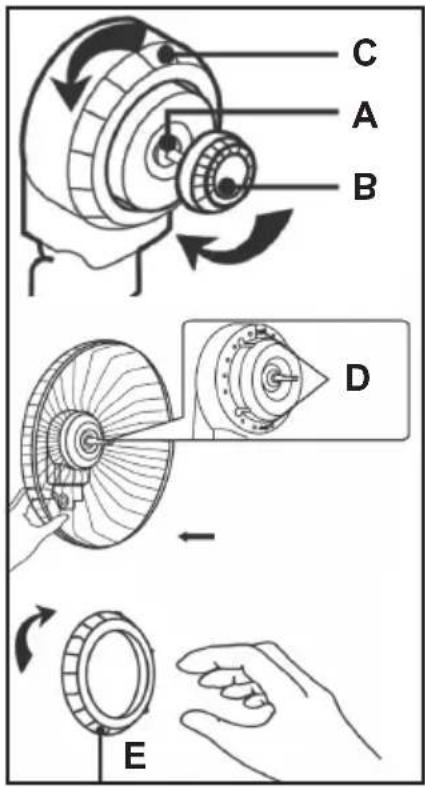
Hinteres Schutzgitter:
Windflügel:
natural_image
Line drawing of a fan with hands holding a cable, showing internal blades and a magnified inset labeled I and H (no text or symbols on the fan itself)natural_image
Simple line drawing of a rectangular object connected to a curved wire (no text or symbols)flowchart
graph TD
    A["General wind"] --> B["Natural wind"]
    B --> C["Sleeping wind"]
    C --> D["Soft wind"]
    D --> A
Geschwindigkeit

Oszillation

natural_image
Symbol of a trash bin with crossed lines indicating no waste or restriction (no text or numbers present)
natural_image
Recycling symbol with three chasing arrows forming a triangle (no text or labels)
natural_image
Modern Fakir air conditioner with radial fan and black handle (no visible text or symbols)EN User manual
Pedestal fan
Table of Contents
General
General 23
Information on the manual 23
Liability 23
Notices in the user manual 23
Safety Warnings
CE Declaration of Conformity 24
Intended Use 24
Using against instructions 24
WARNING! Children 25
Attention! Electrical current 27
Transferring 28
In case of failure 28
Overview
Scope of delivery 29
Technical information 30
Assembly
Unpacking 31
Assembly 31
Operation
On / Off 33
Mode / Speed / Oscillation / Timer.... 33
Display off / Auto off / Memory function.... 34
Remote control 34
Cleaning and Maintenance
Cleaning 35
Troubleshooting 36
Recycling 38
Warranty 39
General
EN
Information on the manual
Thank you for choosing a Fakir cooling fan. It was designed and constructed for many years of trouble-free operation.
These operating instructions are intended to enable the safe and proper handling and operation of the appliance.
Read these operating instructions carefully before using the appliance for the first time.
Keep the operating instructions in a safe place. Include these operating instructions when passing the appliance on to another user.
Liability
We will accept no liability for damage resulting from failure to comply with the operating instructions.
We cannot assume any liability for damage resulting from use other than as intended, or from incorrect operation or unauthorized repairs or maintenance.
Notices in the user manual

WARNING!
Indicates notices which, if ignored, can result in risk of injury or death.

CAUTION!
Indicates notices of risks that can result in damage to the appliance.

NOTE!
Specifies tips and other useful information in the user manual.
EN
Safety Warnings
CE Declaration of Conformity
This appliance fulfils the requirements of the Product Safety Law -ProdSG-, as well as the EU Directives 2014/30/EU, 2014/35/EU, 2001/95/EG, 2011/65/EU, 2009/125/EG.
This appliance bears the CE-Mark on the rating plate. Fakir reserves the right to change the design and equipment.
Intended Use
This cooling fan may only be used for its intended purpose – ventilating homes or offices.
The cooling fan is not suitable for commercial use.
Anyother use is considered unauthorized and is prohibited
Use the appliance with original Fakir accessories only. Any other use is considered unauthorized and is prohibited.
Using against instructions
Using the appliance against the instructions specified above may cause damage to the appliance or personal injuries.

WARNING! Children
- This appliance may be used only by children from the age of 8 years and over, persons with limited physical, sensory or mental capacities or by persons lacking in experience, if they will be supervised, or they have been properly instructed with regard to safe use of the appliance and they are aware of the possible resulting risks.
• Children should not play with this appliance. - Cleaning and maintenance shall not be carried out by children without supervision.
- Keep plastic packaging foils away from children - danger of suffocation!

WARNING! Children
• Children younger than 3 years shall be kept away from the appliance if they are not supervised constantly.
- This appliance may be used by persons (including children) with limited physical, sensory or mental capabilities, or with limited experience and/or knowledge, only under the supervision of a person responsible for their safety, or in accordance with the instructions of that person.
• Children shall be supervised to ensure that they do not play with the appliance.
- Suffocation risk due to packaging foils. This appliance shall not be used for play.
EN
Safety Warnings
- Children older than 3 years and younger than 8 years may switch the appliance on and off only if they are under supervision or are informed of the safe use of the appliance and if they understand the hazards that may be caused by the appliance. In this respect, it is a prerequisite for the appliance to be in normal usage position or that it is installed properly.
- Children older than 3 years and younger than 8 years shall not plug the appliance to the electrical outlet, adjust the appliance, and do not perform any cleaning or maintenance operations.
- The appliance shall not be used without supervision.

WARNING! Danger from overheating!
Always keep the openings on the appliance free.

WARNING! Damage to appliance due to rain and dirt may occur!
Never use or store the appliance outdoors.

Attention! Electrical current
- Incorrect voltage may cause damage to the appliance. Operate the appliance only if the voltage specified on the rating plate corresponds to the voltage in your household.
- The outlet used shall be secured with a fuse switch of 16A.
- Use extension cords designed for the power input of the appliance only.

WARNING! Risk of electrocution!
- Never touch the plug with wet hands.
- When unplugging the appliance, always pull directly on the plug and never on the power cord.
- Do not kink, pinch or run over the power cord and do not expose it to heat sources.
- If the power cord of this appliance is damaged, it shall be replaced by the manufacturer or the manufacturer's customer service department or a person with similar qualifications to prevent any hazards.
- Do not put the appliance in operation if you detect any visible damage on the housing, if the power cord is defective or if you suspect a defect (e.g. after a fall).
- Do not use any damaged power cords

WARNING! In case of danger!
In case of danger or an accident, unplug the appliance immediately.
EN
Safety Warnings
Transferring
Pack the appliance with its original package or with similar packaging materials with proper filling to prevent damage to the appliance.
In case of failure

WARNING!
Never operate a defective appliance or an appliance with a defective power cord. Risk of electric shock.
Before contacting our Hotline, check to see if you can eliminate the problem yourself.

Note!
Please contact our Hotline first, if you cannot trouble-shoot a problem by yourself or in case of an intentional product return.
Hotline (Germany)
+49 7042 912 0
Always keep the serial number of the product and appliance/model name at hand before calling. You may find these information on the type label of the appliance.

WARNING!
Repairs and maintenance shall be carried out only by trained specialists (e.g. an authorized Fakir service center). Use genuine Fakir replacement parts for these procedures. Appliances that are repaired by unauthorized persons or that are not maintained properly pose a risk for the user.
Scope of delivery
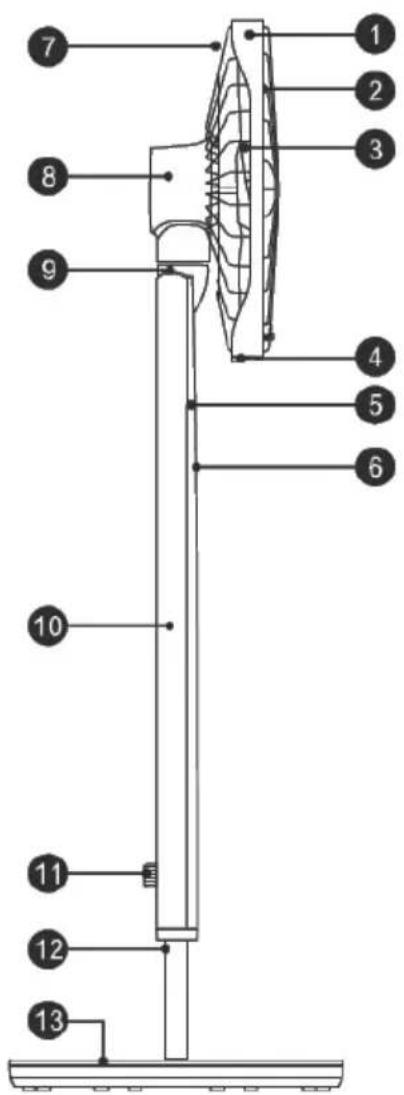
14
- Grille ring
- Blades
- Front grille
- Lock catch
- Front case
- Control panel
- Rear grille
- Motor case
- Joint
- Lower case
- Knob
- Metal tube
- Bottom plate
- Remote control
Technical information
premium | VC 70 DC
Article number 69 65 009
Colour white
Voltage 100-240V\~50/60Hz
Maximum power consumption 36 W
Grille diameter 450 mm
Diameter of blades 400 mm
Speeds 22
Mode General, natural, sleeping, soft
Oscillates up to approx. 70^ (horizontal)
Vertical adjustment levels 3
Measurement W x D approx. 140 x 45 x 42 cm
Weight 7,5 kg
Remote control batteries 2 x AAA
Assembly
EN
Unpacking
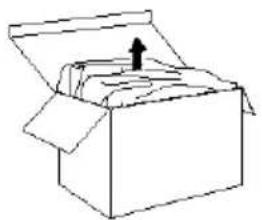
Unpack the appliance and check the contents for completeness (see „scope of delivery“).
If you notice any transportation damage, please contact your dealer immediately.
natural_image
Simple line drawing of an open box with a black upward arrow on the lid (no text or symbols)
Note!
Keep the packaging material for storage or transfer of the appliance (e.g. changing household, service operations).

Warning!
Never use a faulty appliance.
Assembly
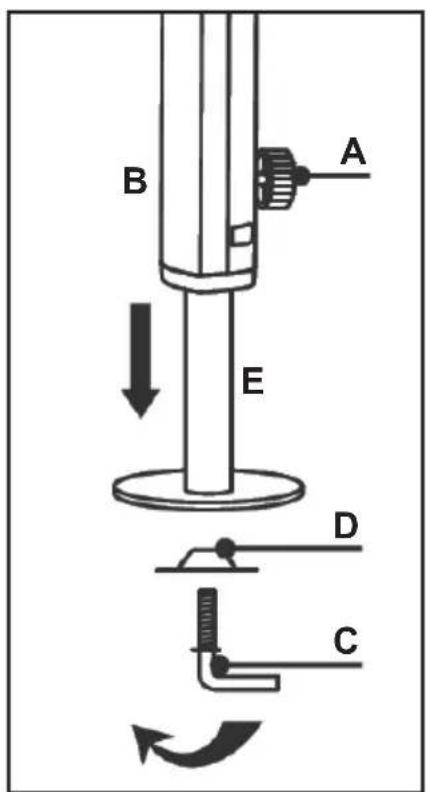
- Loose the body knob (A) in an anticlockwise direction, draw the lower tube (E) from the unit body to a certain length, and then tighten the body knob in clockwise direction to make sure that the unit body (B) won't be pulled out from the lower tube.
- Rotate out connecting sheet (D) and connecting bar (C).
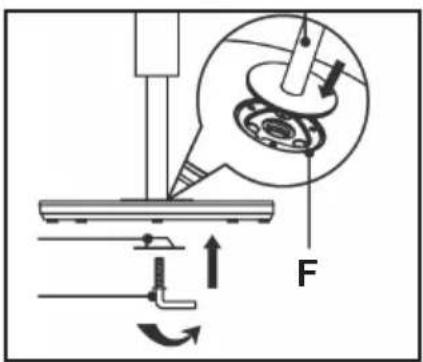
- Align the lower tube with the chassis hole (F) and then insert the tube.
- Rotate connecting sheet and connecting bar, connection the chassis and lower tube together tightly.
Rear grille:
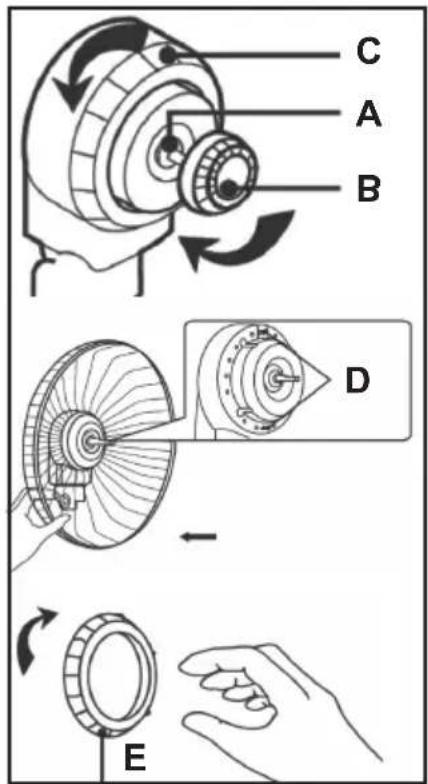
- Fix the motor shaft (A) with one hand, and rotate out the blade knob (B) in clockwise direction with the other hand. After that, rotate the grille knob (C) in a counterclockwise direction.
- Aim the hole on the rear grille at the locating pole (D) of the motor cover, push it backwards to make sure the locating pole comes out of the hole.
- Hold the rear grille with one hand, and rotate the grille knob (E) into the motor cover in clockwise direction with the other hand to make rear grille to be fixed on the motor cover.
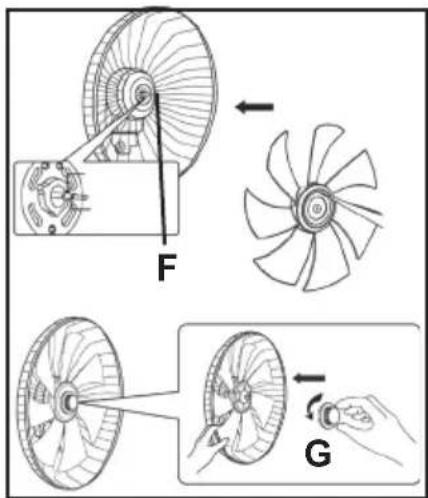
Blade:
- Aim the blade shaft hole at the motor shaft (F) and then push it to the blocking ring.
- Hold the blade with hand, and then rotate the blade knob (G) into the motor shaft in an counterclockwise direction until it's tightened.
natural_image
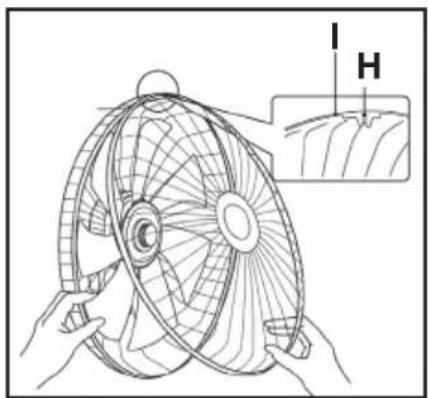
Line drawing of a fan with hands holding a propeller, showing internal blades and a magnified inset labeled 'I H' (no text or symbols on the fan itself)Front grille:
- Twist off screws on the grille ring (I) and then keep them well.
- Form the front grille and the rear grille to an angle, push the transparent plastic pins from the grille ring latch (H) through the grill and tighten the screw again.
natural_image
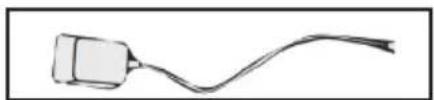
Simple line drawing of a cable or wire connecting a rectangular object (no text or symbols)Insert the plug of adaptor into the power socket of rear case.
! CAUTION!!
Do not place the appliance directly next to any heat sources and avoid exposure to direct sunlight. Heat may cause damage to the cooling fan.
On / Off

Mode

flowchart
graph TD
    A["General wind"] --> B["Natural wind"]
    B --> C["Sleeping wind"]
    C --> D["Soft wind"]
    D --> A
Press the on/off Button to start the appliance.
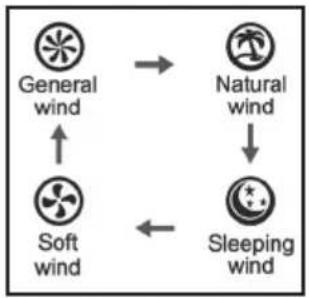
Press the mode button until the desired mode is set. The mode symbol will light up at the display.
General wind: constant speed.
Natural wind: simulates the natural wind
Sleeping wind: speed will change naturally with auto decrease function, according to the preset program.
Soft wind: the wind is soft and comfortable.
Speed
01
Oscillation
OSC
The fan has 22 notches (only 1 notch of soft wind) of fan speed to be adjusted. Rotate the knob on the control panel or press "+/-" button to increase or decrease the fan speed.
Press "OSC" button to turn on or turn off oscillation function.
(If you need the fan supply wind upwards or downwards, please lift or press the grille slightly.)
Timer
Timer Preset
Timer OFF:
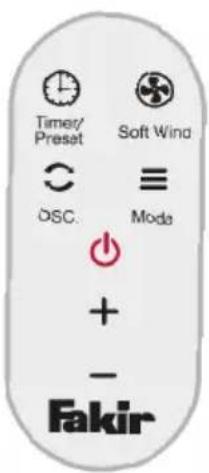
Under on status, press "Timer/Preset" button on the control panel or remote control and the timer icon flashes. Rotate the knob or press "+/-" on the remote control to set timer OFF. Rotate the knob or press "+/-" button on the remote controller and the time setting will change in the sequence of "1h, 2h ... 15h" circularly.
EN
Operation
Timer
Hold “+”, “-” button to switch the time continuously. When setting proper time, press “Timer/Preset” button to confirm. The indicator will be on. When the timer is reached, the fan will enter into standby status.
Timer ON:
Under standby status, press "Timer/Preset" button on the control panel or remote controller and then Timer/Preset indicator will flash. Press "+" , "-" button on the control panel or remote controller can set preset ON. When setting proper time, press "Timer/ Preset" button to confirm. Follow the same steps as described above.
(During timer setting process, when there's no operation for consecutive 5s., it will exit the timer setting mode. The digital tube display the notch and "Timer/preset" indicator will be off. When timer function is turned on, the nixie tube displays the time. 5s. later, it switches to display the notch. When the nixie tube displays the notch, press "Timer/Preset" button and the nixie tube will change the time. Hold "Timer/Preset" button for 2s to cancel the timer. The indicator will be off.)
Display off
Under working status, if there is no operation for 40s, all the indicators will turn off. Press any button (except "ON/OFF" button) can reactivate the indicator.
Auto off
If there's no operation (including control panel and remote controller) for consecutive 15h under any working status, the fan will be turned off automatically.
Memory function
When the unit is turned off (but it's still energized), it will memorize current operation status. When the unit is turned on again, it will operate in memorized operation status.
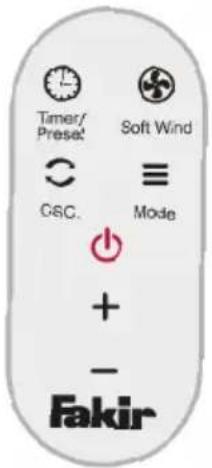
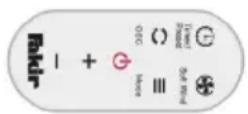
Remote control All functions can also be operated via the remote control.
Cleaning
! WARNING!
Switch off and unplug the appliance before cleaning. This will prevent the appliance from accidentally being switched on.
CAUTION!
Do not use cleaning solutions, abrasive cleaners or alcohol. This would damage the housing.
Make sure the fan is switched off when you are ready to clean. To dismount follow the reverse process in the installation section.
Clean the blades and grilles with a moist cloth and dry thoroughly before reassembling.
Dust accumulations inside the appliance can also be removed with a vacuum cleaner or by blowing with compressed air. Protect from dust during storage.
Appliances that have not been in use for an extended period of time must be checked by a trained technician before being put back in operation. The same applies if the appliance shows dirt on the inside.
Dear Customer,
our products are subjected to stringent quality controls.
If this appliance should nevertheless fail to function properly, this is a matter of regret for us. Before contacting our Customer Services, check to see if you can eliminate the problem yourself.

Warning!
Turn off the appliance and unplug it before troubleshooting after cooling period. Thus, you may prevent unintentional operation of the appliance.

Information!
Please contact our Hotline first, if you cannot troubleshoot a problem by yourself or in case of an intentional product return.
Hotline (Germany)
+49 7042 912 0
Before calling, always have
the 7-digit product number with appliance/model name,
e.g. 69 65 009 and the date of production, e.g. 2019-05,
(you may find these information on the type label of the appliance.) or the 7-digit spare part number at hand.

Attention!
Repairs and maintenance shall be carried out only by trained specialists (e.g. an authorized Fakir service center). Use genuine Fakir replacement parts for these purposes. Appliances that are repaired by unauthorized persons or that are not maintained properly pose a risk for the user.
Troubleshooting
| Problem Probable Cause | Remedy | |
| Appliance does not operate | Plug is not inserted or the appliance is not switched on. | Insert the plug into a mains socket and switch on the appliance.Call service hotline. |
| There is no power in the socket. | Test the appliance at another socket which you are sure carries current. | |
| Pwer cord is damaged. Have the power cord replaced by Fakir Customer Services. | ||
| No oscillation Oscillation is | not switched on.Motor or gear unit is defective. | Switch on oscillationCall service hotline. |
| Appliance is unusually loud | Foreign particles may be stuck | Remove foreign particles. |
natural_image
Symbol of a trash bin with crossed lines indicating no waste or restriction (no text or numbers present)
When the cooling fan has reached the end of its service life, especially in the event of malfunctions, render the appliance unserviceable by first unplugging and then cutting the power cord.
Dispose of the appliance in accordance with the applicable environmental regulations for your country.
Do not dispose of electrical equipment with the household refuse.
The packaging of the appliance is made of recyclable materials. Sort the packaging material and recycle accordingly.
For information about recycling, please contact your local authorities or your retail dealer.
Unserviceable electrical and electronic appliances and batteries contain hazardous substances, which were previously necessary for the proper functioning and safety of the appliances.
Never dispose of unserviceable appliances or batteries with the household refuse!
In household refuse, or if handled incorrectly, these substances are hazardous to human health and the environment.
Unserviceable electrical and electronic appliances and batteries often contain valuable materials.
Dispose of batteries separately!
Make use of your local recycling facilities for recycling of electrical and electronic appliances and batteries.
This appliance fulfills the requirements of the 2012/19/EU – WEEE Directive
We offer a warranty under the following conditions for this appliance:
- Your reseller's residential address / company address shall be located in the EU or the appliance shall be purchased from an authorized reseller in Germany.
- We guarantee to ensure that you may send the appliance to us free of charge and to repair the faults which have been reported within 24 months due to material or assembly errors that occur within 24 months (12 months for industrial and professional uses).
Proper use of the appliance is a pre-requisite for fulfilling the warranty obligation. The warranty period begins with the date of sale.
- Parts included in natural wear parts (drive belt, batteries, brushes, filters) are not covered under warranty.
- Warranty claims shall be void in case of intervention or repair by persons who are not authorized us. In addition, aftermarket spare parts or accessories shall not be installed.
- Warranty service consists of repair or replacement of defective parts. On-site repairs may only be requested for fixed large appliances. In order to document warranty claims, it is necessary to present the invoice or voucher with the date of purchase, stemp and signature from the dealer.
- If the repair operation fails and the fault or defect can not be remedied after service, the appliance shall be replaced with an equivalent appliance. If a repair or replacement is not possible, you are entitled the right to return the appliance and to demand a refund of the sales value of the appliance. A fee may be requested for the period of use in case of a request for an exchange or refund of the sales value.
- Warranty services do not cause an extension of the warranty period or start of a new warranty period. The warranty period for the parts installed inside the appliance ends with the end of the total warranty period of the appliance.
- Contractual or statutory clauses for repair of faults remain in effect regardless of warranty terms.
Applies as of July 1st, 2017
Fakir Customerservice: Technik Service Profi GmbH
Ahltener Str. 4-8
D-31275 Lehrte (Germany)
Tel.: +49 51 32 / 88 73 858
Fax: +49 51 32 / 58 87 23
service@fakir.de

Rights to make changes are reserved.
Subject to revision
69 65 994 - 9912 en

- Hinteres Schutzgitter:
- Windflügel:
- Geschwindigkeit
- Oszillation
- Table of Contents
- General
- Safety Warnings
- Overview
- Assembly
- Operation
- Cleaning and Maintenance
- EN
- Information on the manual
- Liability
- Notices in the user manual
- WARNING!
- CAUTION!
- NOTE!
- CE Declaration of Conformity
- Intended Use
- Using against instructions
- WARNING! Children
- WARNING! Danger from overheating!
- WARNING! Damage to appliance due to rain and dirt may occur!
- Attention! Electrical current
- WARNING! Risk of electrocution!
- WARNING! In case of danger!
- Transferring
- In case of failure
- Scope of delivery
- Technical information
- premium | VC 70 DC
- Unpacking
- Rear grille:
- Blade:
- Front grille:
- ! CAUTION!!
- Timer OFF:
- Timer
- Timer ON:
- Display off
- Auto off
- Memory function
- Cleaning
- ! WARNING!
- Information!
- Before calling, always have
- Attention!
- Troubleshooting
- We offer a warranty under the following conditions for this appliance:
- Fakir Customerservice: Technik Service Profi GmbH
Brand : FAKIR
Model : premium VC 70 DC
Category : Fan