
BRS1 00004628 - Télécommande à distance HAMA - Free user manual and instructions
Find the device manual for free BRS1 00004628 HAMA in PDF.


| Product Type | Remote Control |
| Model | BRS1 00004628 |
| Brand | Hama |
| Category | Remote Control |
| Dimensions | Approximately 16 x 5 x 2.5 cm |
| Weight | About 50 g (without batteries) |
| Power Supply | 2 x AAA batteries (1.5 V) |
| Transmission Technology | Infrared (IR) |
| Range | Up to 8 meters |
| Compatible Devices | TV, audio systems, and other IR-controlled devices |
| Main Functions | Power on/off, volume control, channel selection, input source switching, menu navigation |
| Programming | May require code setup for different brands |
| Maintenance | Clean with a dry, soft cloth. Avoid liquids. |
| Safety Precautions | Do not expose to moisture or extreme temperatures. Remove batteries if not used for long periods. |
| Spare Parts | Only batteries are user-replaceable. No other spare parts available. |
| Repairability | Not intended for repair; replace if defective. |
| General Information | Model: BRS1 00004628, Brand: Hama, Type: Universal Remote Control (likely) |
Frequently Asked Questions - BRS1 00004628 HAMA
User questions about BRS1 00004628 HAMA
0 question about this device. Answer the ones you know or ask your own.
Ask a new question about this device
Download the instructions for your Télécommande à distance in PDF format for free! Find your manual BRS1 00004628 - HAMA and take your electronic device back in hand. On this page are published all the documents necessary for the use of your device. BRS1 00004628 by HAMA.
USER MANUAL BRS1 00004628 HAMA
BluetoothRemoteShutterBRS1
OperatingInstructions
Bedienungsanleitung
GB
D
A
B
natural_image
Simple line drawing of a stopwatch with an arrow indicating clockwise motion (no text or symbols)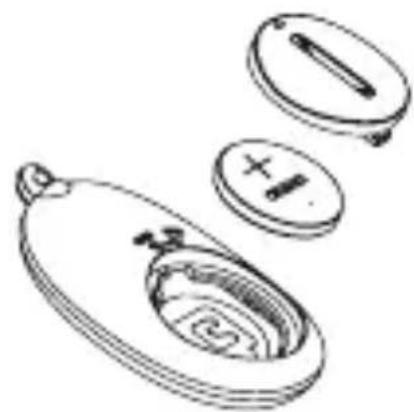
natural_image
Line drawing of a mechanical component with multiple views (top, front, side, and internal cross-sections) showing internal structure without any text or symbols.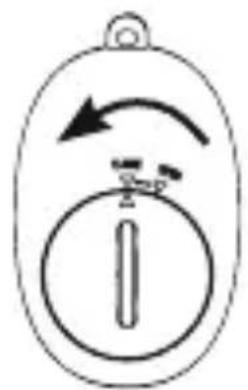
natural_image
Simple line drawing of a device with an arrow indicating rotation and a circular symbol inside (no text or labels)OpenBatteryCoverChangeBatteryCoverCloseBatteryCover
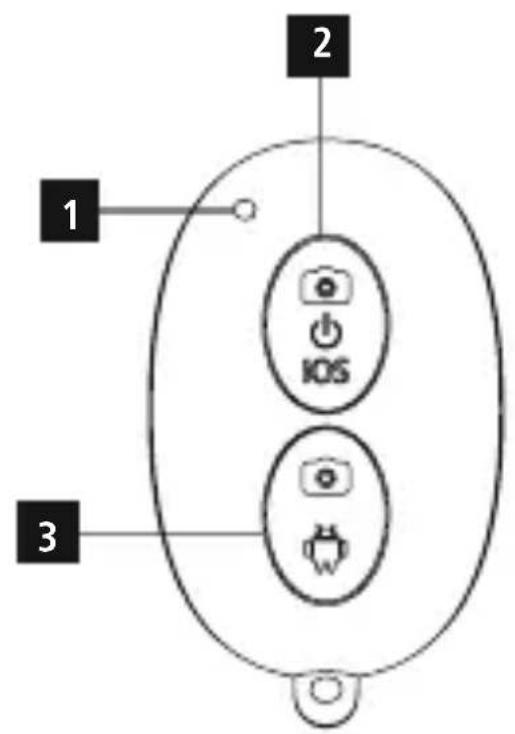
ControlsandDisplays
- LEDindicatorlight
- CAMERA 360 / iOS power / release button = photo / video / continuous shooting
- ANDROID release button = photo / video / continuous shooting
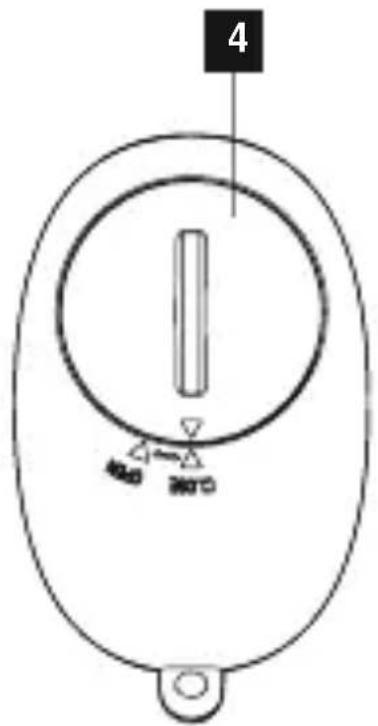
- Batterycompartmentcover
1. ExplanationofWarningSymbolsandNotes

Warning
This symbol is used to indicate safety instructions to draw your attention to specific hazards and risks.

Note
This symbol is used to indicate additional information or important notes.
2.PackageContents
• B IuetoothRemoteShutterBRS1
- 1 handstrap
- 1 battery(CR2032)
• Theseoperatinginstructions
3. SafetyNotes
- Protect the product from dirt, moisture and overheating, and only use it in a dry environment.
- Do not use the product in areas where the use of electronic devices is not permitted.
- Do notusetheproductinmoistenvirnmentsandavoidsplashes.
- D o n otdroptheproductanddonotexposeittoanymajorshocks.
- D isposeofpackagingmaterialimmediatelyaccordingtolocallyapplicable regulations.
- Do not modify the product in any way. Doing so voids the warranty.

Warning-Batteries
- I immediately remove and dispose of dead batteries from the product.
- Only use batteries (or rechargeable batteries) that match the specified type.
- When inserting batteries, note the correct polarity (+ and - markings) and insert the batteries accordingly. Failure to do so could result in the batteries leaking or exploding.
• D o n otoverchargebatteries. - Do not throw batteries in a fire.
- Keepbatteriesoutofthereachofchildren.
- K eepbatteriesoutofthereachofchildren.Ifswallowed,batteriescanbelethal. Ifa b arteryisswallowed,seekmedicalassistanceimmediately.
- Do not short circuit the batteries/rechargeable batteries and keep them away from uncoated metal objects.
4. SystemRequirements
- The Selfie Bluetooth remote release supports Bluetooth-capable terminal devices such as smartphones and tablet PCs that run the iOS 6 or Android 4.2.2 (or newer) operatingsystems.

Note
- N otethatsupportoftheBluetoothremotereleasedependsonyourterminal device.
- Please refer to the operating instructions for the device you are using.
5. Getting Started
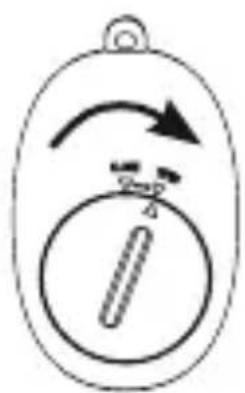
- O penthebatterycompartmentbyturningthebatterycompartmentcover(4) clockwise to the "OPEN" position using a coin. (B)
- Alternatively, remove the battery compartment cover (4) and insert a CR2032 battery with the correct polarity(B).
- C losethebatterycompartmentbyturningthebatterycompartmentcover(4) anticlockwisetothe"CLOSE"positionusinga coin.(B)
6.Operation

Note
- The functions described in this section are only available for Bluetooth-capable terminaldevices.
- N otethatthemaximumrangeforBluetoothis10metreswithoutobstacles suchaswalls,people,etc.
6.1. Bluetoothpairing

Note- Pairing
- Make sure that your Bluetooth-capable terminal device is on and Bluetooth isactivated.
- Make sure that your Bluetooth-capable terminal device is visible for other Bluetoothdevices.
-
For more information, please refer to the operating instructions of your terminal device.
-
Press and hold the Power/Release button (2) for about 3 seconds to switch on the Bluetooth selfie remote release. The LED indicator light (1) will begin to flash.
- This means the Selfie Bluetooth remote release is searching for a Bluetooth connection.
- Open the Bluetooth settings on your terminal device and wait until Hama BRS1 appearsinthelistofBluetoothdevicesfound.
- Select Hama BRS1 and wait until the Seflie Bluetooth remote release is listed as connected in the Bluetooth settings on your terminal device. The LED indicator light (1) switches off.
- You can now use the Selfie Bluetooth remote release.
6.2.AutomaticBluetoothconnection(aftersuccessfulpairing)

Note
- Make sure that your Bluetooth-capable terminal device is on and Bluetooth isactivated.
- Make sure that your Bluetooth-capable terminal device is visible for other Bluetoothdevices.
-
For more information, please refer to the operating instructions of your terminal device.
-
The Selfie Bluetooth remote release remains connected to the Bluetooth device it was lastpaired with.
- Press and hold the Power/Release button (2) for about 3 seconds to switch on the Bluetooth selfie remote release. The LED indicator light (1) will begin to flash.
- YoucannowusetheBluetoothremoterelease.

Note- Connectionimpaired
After the devices have been paired once, the connection is then established automatically. If the Bluetooth connection is not established automatically, check the following:
- Check the Bluetooth settings of your terminal device to see whether Hama BRS1isconnected.Ifnot,repeatthestepslistedunder6.1.Bluetooth pairing.
- Check whether obstacles are impairing the range. If so, move the devices closertogether.
- The performance can also be affected by a weak battery. Change the battery if necessary.
- Only one Bluetooth device can be connected at a time. If there is an active connection to another device, deactivate this connection and try again.
6.3. Remotereleasefunction
- After successful Bluetooth connection, open the camera function on your terminal device.
- Set your device such that it uses the camera on the front, so that you can take a selfie, or use the camera on the back to take pictures or record videos normally.
- If using a terminal device with the iOS 6 operating system or a later version: Press the CAMERA 360 / iOS release button (2) to trigger the selected function (selfie, photo, video).
- If using a terminal device with the Android 4.2.2 operating system or a later version: Press the ANDROID release button (3) to trigger the selected function (selfie, photo, video).

Note- R emotereleasefunction
A d irectline-of-sightconnectionbetweentheterminaldeviceandtheBluetooth remote release is not necessary. You can, for instance, take a picture by pressing thereleasebutton(2/3)inyourcoatpocket.

Note- Camera a p p
- The standard camera apps of certain terminal devices do not support the Selfie Bluetoothremoterelease.
- You can install the Camera 360 app on your terminal device to use in place of the standard camera app.
- If you use this app, press the CAMERA 360 / iOS release button (2) to trigger theselectedfunction(selfie, photo, video).
- Press and hold the Power/Release button (2) for about 3 seconds to switch off the Bluetooth selfie remote release.
6.4.Replacingthebatteries
The battery has been designed to last for up to 2,000 shots, although this depends on the condition so fuse. If the Bluetooth remoter released does not respond after you press there lease button (2/3), or does not connect to the terminal device, etc., can get the battery as follows: See(B).
7. Care and Maintenance
Only clean this product with a slightly damp, lint-free cloth and do not use aggressive cleaningagents. Makesure that water does not get into the product.
8.WarrantyDisclaimer
Hama GmbH & Co. KG assumes no liability and provides no warranty for damage resulting from improper installation/mounting, improper use of the product from failure to observe the operating instructions and/or safety notes.
9.TechnicalData
 | BluetoothRemoteShutter |
| Bluetoothversion3.0 | |
| BluetoothClassClass2 | |
| RangeMax.10m | |
| Dimensions(WxLxH)50x 3 3 x 13mm | |
| WeightApprox.10g | |
| BatterytypeCR2032 |
10. Declaration of Conformity

Hereby, Hama GmbH & Co KG declares that the radio equipment type [00004628] is incompliance with Directive 2014/53/EU. The full text of the EU declaration of conformity is available at the following internet
address: www.hama.com/00004628/Downloads.
| Frequencyband(s)2.402GHz~ 2 .480GHz | |
| Maximumradio-frequency powertransmitted | 0.15mWE.I.R.P. |
86652Monheim/Germany
Service& Support

www.hama.com

+499091502-115
D
GB
The Bluetooth® word mark and logos are registered trademarks owned by Bluetooth SIG, Inc. and any use of such marks by HamaGmbH & Co KG is under license. Other trademarks and trade names are those of their respective owners.
CE
www.hama.com/nep
All listed brands are trademarks of the corresponding companies. Errors and omissions excepted, and subject to technical changes. Our general terms of delivery and payment are applied.
- BluetoothRemoteShutterBRS1
- ControlsandDisplays
- ExplanationofWarningSymbolsandNotes
- Warning
- Note
- 2.PackageContents
- SafetyNotes
- Warning-Batteries
- SystemRequirements
- Getting Started
- 6.Operation
- Bluetoothpairing
- Note- Pairing
- 6.2.AutomaticBluetoothconnection(aftersuccessfulpairing)
- Note- Connectionimpaired
- Remotereleasefunction
- Note- R emotereleasefunction
- Note- Camera a p p
- 6.4.Replacingthebatteries
- Care and Maintenance
- 8.WarrantyDisclaimer
- 9.TechnicalData
- Declaration of Conformity
- 86652Monheim/Germany
- Service& Support
Brand : HAMA
Model : BRS1 00004628
Category : Télécommande à distance