
Galaxis - Vacuum Cleaner FAKIR - Free user manual and instructions
Find the device manual for free Galaxis FAKIR in PDF.


| Product Type | Canister Vacuum Cleaner |
| Brand | Fakir |
| Model | Galaxis |
| Dimensions (L x W x H) | 25.6 x 11.8 x 10.6 inches (65 x 30 x 27 cm) |
| Weight | 11 lbs (5 kg) |
| Power Supply | 220-240 V, 50/60 Hz |
| Power Consumption | 1200 W |
| Dust Capacity | 3.5 L (dust bag) |
| Filtration | HEPA filter |
| Suction Control | Electronic slider on handle |
| Cord Length | 26.2 ft (8 m) |
| Operating Radius | 32.8 ft (10 m) |
| Noise Level | 72 dB(A) |
| Accessories Included | Floor nozzle, crevice tool, dusting brush, upholstery nozzle |
| Maintenance | Replace dust bag when indicator lights; clean filter every 3 months |
| Safety Features | Thermal overload protection, automatic cord rewind |
| Repairability | Spare parts available: dust bags, filters, brush roll, hose |
| Certifications | CE, WEEE |
| Color | Black and silver |
Frequently Asked Questions - Galaxis FAKIR
User questions about Galaxis FAKIR
0 question about this device. Answer the ones you know or ask your own.
Ask a new question about this device
Download the instructions for your Vacuum Cleaner in PDF format for free! Find your manual Galaxis - FAKIR and take your electronic device back in hand. On this page are published all the documents necessary for the use of your device. Galaxis by FAKIR.
USER MANUAL Galaxis FAKIR
natural_image
Line drawing of a mechanical component with liquid pouring from a cup onto a base (no text or symbols)natural_image
Line drawing of a symmetrical abstract shape with internal compartments and decorative elements (no text or symbols)On the Operating Instructions....18
Meanings of the Symbols 18
Liability 18
EC Conformity Declaration....19
Intended Use 19
Unauthorized Use....19
Safety is Important 21
Safety Warnings 21
Unpacking....23
Technical Information....24
Parts Description 24
Utilization....25
Cleaning and Maintenance of the Appliance 28
Anti-Scaling System....28
Anti-Dripping System....29
Storage 29
Recycling 29
Dispatch....29
EN
Dear Customer,
We hope you'll enjoy your product and we thank you for choosing Fakir Hausgeräte, who has its signature on innovative technologies.
We wish you the best yield from Fakir GALAXIS produced with high quality and technology. Therefore, before using the product, we kindly ask you to read this User Guide carefully and keep it for future reference.
On the Operating Instructions
These operating instructions are intended to enable the safe and proper handling and operation of the appliance. Read these operating instructions carefully before using the appliance for your safety and others'. Keep this manual in a safe place for future use.
Meanings of the Symbols
In this manual, you will see the symbols below.

WARNING!
This sign identifies hazards that could result in injury or death.

CAUTION!!!
Indicates notices of risks that can result in damage to the appliance.

NOTE!
Emphasizes tips and other useful information in the operating manual.
Liability
In case of any damage that may occur as a result of use not in compliance with the instructions in this manual and the appliance is used in a place outside of its own area of use, and is repaired elsewhere other than the authorized services of Fakir does not assume any responsibility.
EC Conformity Declaration
This appliance is fully compatible with Europe Union's 2014/30/EU Electromagnetic Compliance and 2014/35/EU Voltage Directives. The appliance bears the CE mark on the rating plate. Fakir reserves the right to change the design and equipment.
Intended Use
Product model is designed for household use. It is not suitable for business or industrial use. In case of any failure arising from otherwise use, our authorized services will provide out of warranty service.
Unauthorized Use
In cases of unauthorized use specified below, the appliance may be
damaged or cause injuries;
- This device is not suitable for people who are not mentally stable or who do not have enough information to use such devices. Please do not let these people use the appliance.
- This electric appliance is not a toy. So please never let children play with the appliance and be more careful when there are children.
- Keep small items of packaging and plastic bags away from children. Otherwise they may harm themselves by swallowing them, especially packaging bags may cause danger of suffocation.

WARNING!
- This appliance can be used by children aged from 8 years and above and persons with reduced physical, sensory or mental capabilities or lack of experience and knowledge if they have been given supervision or instruction concerning use of the appliance in a safe way and understand the hazards involved.
• Children should not play with this appliance - Cleaning and maintenance shall not be carried out by children without supervision.
- Keep the packing materials away from the children. Choking risk!
- Children under 3 years old must be kept away from the appliance if they are continuously unattended.
- This appliance may be used by persons (including children) with limited physical, sensory or mental capabilities, or with limited experience and/or knowledge, only under the supervision of a person responsible for their safety, or in accordance with the instructions of that person.
- Children shall be supervised to ensure that they do not play with the appliance.
- This appliance shall not be used for play.
- Children older than 3 years and younger than 8 years may switch the appliance on and off only if they are under supervision or are informed of the safe use of the appliance and if they understand the hazards that may be caused by the appliance. In this respect, it is a prerequisite for the appliance to be in normal usage position or that it is installed properly.
- Children older than 3 years and younger than 8 years shall not plug the appliance to the electrical outlet, adjust the appliance, and do not perform any cleaning or maintenance operations.
- The appliance shall not be used without supervision.
Safety is Important
- Read these operating instructions carefully before using the appliance for your safety and others'. Keep this manual in a safe place for future use.
- Following measures must always be taken when using an electrical appliance. In order to prevent fire, electric shock and personal injuries;
- Before using the appliance, make sure your mains voltage is compatible with the appliance voltage.
- This appliance is not a toy. So please never let your children play with the appliance and be more careful when there are children.
- Before the first use, check the appliance for damages and malfunctions. If there is any malfunction or damage to the equipment, do not use the appliance and get in contact with Fakir Authorized Service.
Safety Warnings
Following measures must always be taken when using an electrical appliance. In order to prevent fire, electric shock and personal injuries;
- Read this manual before using your device and keep this manual for future reference.
- Before using the iron for the first time, check that the rated voltage indicated on the rating plate is suitable for the voltage at your home.
- This appliance is intended only for domestic use. Not suitable for industrial use.
- Do not use outside the building and in rooms with high humidity.
- Do not immerse the iron and the cord in water or other liquids.
- The iron shall be used and stored on a stable surface.
- As the iron is placed on its base, ensure that the surface that the base is placed on is stable.
- If the iron shows damages of falling or there is a leak, the appliance shall not be utilized.
- The appliance cable shall be kept away from children up to 8 years
old as it is energized or cooling down. This device may be used by children aged 8 years and older and persons with a lack of physical, sensory or mental abilities, or with a lack of experience and knowledge, provided that they have been supervised or instructed for the safe use and that the hazards involved are understood by them. Children must not play with the appliance. Cleaning and user maintenance of the appliance should not be performed by unattended children.
- Unplug power cords by pulling the plug straight out. Do not pull the cord.
- Keep the cord away from hot surfaces and sharp edges.
- Always unplug the iron from the outlet when it is being filled or emptied and when it is not being used.
- Do not use an appliance with a damaged electrical cord or plug, or that is immersed in water or damaged in some way.
- Do not attempt to remove and repair the components of the iron to prevent the risk of electrocution.
- If the cord is damaged, it shall be replaced by the authorized service to avoid any risk of hazard.
- Contact your nearest service center to have the iron inspected, repaired or adjusted.
- Children shall be kept under supervision when the appliance is used in the vicinity of children.
- Do not allow the children to play with the iron.
- Do not leave the iron unattended when it is plugged or when it is placed on the ironing board.
- Carefully place the iron on the ironing board so that the base plate is not damaged.
- Be careful not to touch the hot metal parts of the iron.
- Carefully iron around the zippers and similar items to avoid scratching the soleplate.
- Do not put iron on hard metal or hard surfaces.
- This device is not intended for use by persons who are physically, perceptually or mentally incapacitated, and who have no
experience or knowledge, provided that they are not under the supervision of persons responsible for their safety or instructions for use of the appliance are not provided (including children).
- The children should be supervised to avoid them from playing with the appliance.
- Do not leave the appliance unattended during operation.

CAUTION!!!
To prevent overloading of the power circuit, do not operate another high power appliance at the same circuit.
If the appliance is exposed to temperatures under 0^ C for some period of time, it shall be kept at room temperature for 2 hours at least before operating.

CAUTION!!!
Please read the safety rules and operation instructions written in the user manual. Keep this user manual for future use.
Unpacking
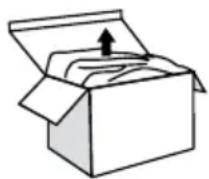
Before first use, unpack the appliance end its accessories, check for damages and defects. If there is any malfunction or damage to the equipment, do not use the appliance and get in contact with Fakir Authorized Service.
- Repair works shall only be undertaken by Fakir authorized service. Repairs that are inadequate or carried out by unauthorized personnel may pose harm to the user.
-Do not punch a hole or a tear on the section where the on/off button is.

WARNING!
Never use a defective appliance.
Technical Information
Functions: Dry / Steam / Water Spray / Strong Steam / Vertical Steam / Self-Cleaning / Scaling Prevention / Drip Prevention
Nominal Parameters: AC220-240V, 50/60Hz, 1800-2200W

NOTE!
The values provided with the appliance or its accompanying documents are laboratory readings in accordance with the respective standards. These values may differ depending on the use and ambient conditions.
Parts Description
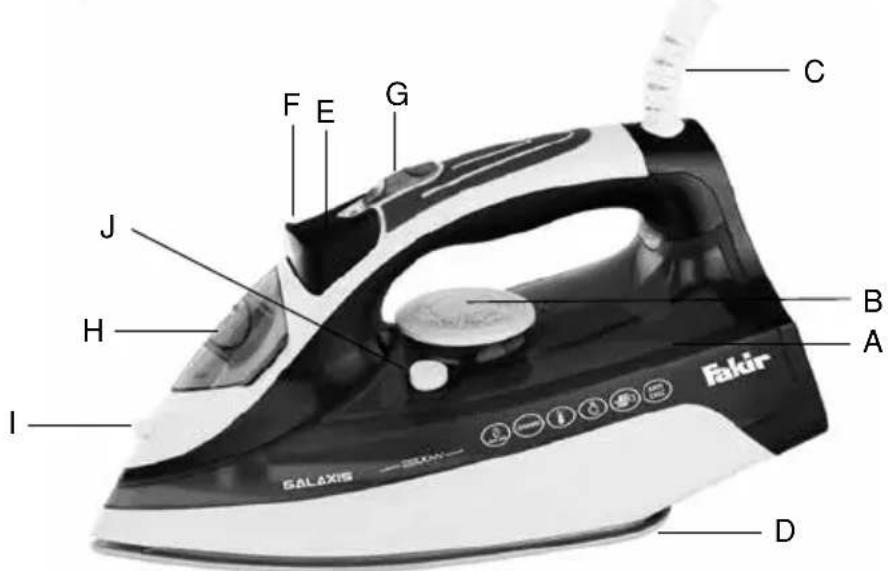
A. Water compartment
B. Temperature adjustment button
C. Power cord protector
D. Soleplate
E. Spraying button
F. Strong steam button
G. Steam Control
H. Water inlet lid
I. Sprayer
J. Self-cleaning button
Before first use
Remove the protective cover of the soleplate and clean the soleplate with a soft cloth. Some parts of the steam iron are lightly lubricated and therefore some smoke may be released when operating for the first time. This situation will pass after a short time.
Utilization
Temperature Adjustment:
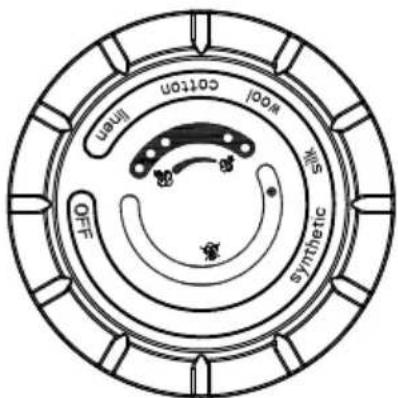
Always check the ironing explanations on the shirt tag of the product which is to be ironed. In any case, follow these explanations. Turn the temperature adjusting knob to set the appropriate temperature value indicated in the ironing instructions or on the label of the fabric.
| LABEL FABRIC TYPE | |
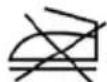 | Do not iron this product |
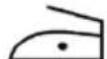 | Synthetics, Nylon, Acrylics, Polyester, Artificial Silk |
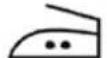 | Wool, Silk |
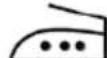 | Cotton, Linen |
Plug in the appliance. Indicator lamp shall be lit. When the indicator lamp is turned off, you may start ironing. If you set the temperature adjustment knob to a lower temperature after ironing a piece with high temperature, we do not recommend ironing until the pilot lamp turns off again.
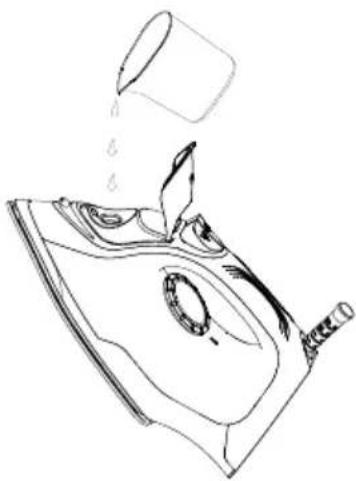
Filling The Water Reservoir
natural_image
Line drawing of a mechanical component with liquid pouring from a cup onto a base (no text or symbols)Before filling the water reservoir with water, unplug the appliance. Hold the steam iron in horizontal position. Pour water slowly from the water inlet. Do not add water more than the mark on the water reservoir to prevent overflowing of the water.
NOTE!
Steam iron is designed for use with tap water, but if your water is very hard, it is recommended to use purified water. The water reservoir must be drained after each use.

NOTE!
If you shall empty the water reservoir after cooling the steam iron, bring the iron to the upright position by laying it on its back, plug the iron and wait for 2 minutes until it heats by bringing the temperature adjustment knob to maximum position. Unplug the steam iron.
Steam Ironing
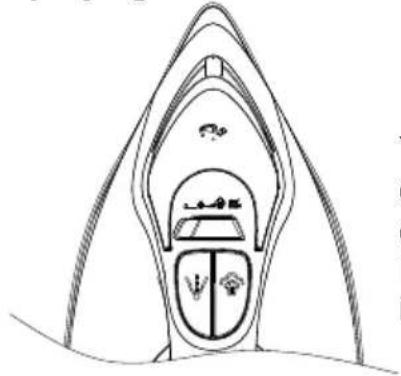
Bring the temperature adjustment knob to “..” or “...” position. Set the variable steam control to the desired position.

CAUTION!!!
Avoid coming in contact with the sprayed steam.
Spraying
natural_image
Line drawing of a boat hull with decorative elements and no visible text or symbolsYou may use the spraying button at any temperature setting during steam or dry ironing as long as there is adequate amount of water in the water reservoir.
Press the spraying button a few times to operate the pump while ironing.
Steam Spraying
Strong steam feature provides additional steam to remove persistent wrinkles. Rotate the temperature adjustment knob to “..” or “...” position. Rotate the variable steam control to the maximum position. Press the strong steam button to blow a strong steam.
NOTE!
To prevent water leaks from the soleplate, do not press the strong steam button for more than 5 seconds.
Vertical Steam
Check that adequate amount of water is present in the water reservoir. Bring the steam iron to vertical position by leaning it on its back and plug the iron. Bring the temperature adjustment knob and vertical steam control to the maximum position. Keep the iron at vertical position and press the strong steam button.
Dry Ironing
Steam iron may be used in dry ironing setting even if there is no water inside the water reservoir; it is better that water reservoir is not filled during dry ironing. Set the variable steam control to the minimum position. Bring the temperature adjustment knob to the best suitable position for the fabric to be ironed.

CAUTION!!!
If the steam iron is used for a long period, it becomes very hot and no water is left in it. Do not fill water until the steam iron is cooled.
Self-Cleaning
Ensure that you have unplugged the appliance, fill the water reservoir up to MAX position after ensuring that the steam selector is at "O" position. Do not add vinegar or similar materials in the water reservoir. Set the maximum ironing temperature. Plug the appliance, and remove the plug when the power indication lamp of the iron turns off. Bring the iron above the sink. Bring the steam control button to self-cleaning position and wait until boiling hot water, steam and dirt comes out of the soleplate. Release the steam control button when all water in the reservoir is used. If dirt remains on the iron after this procedure, repeat the self-cleaning procedure. After the self-cleaning process, plug the appliance and heat the iron so that the soleplate dries. Unplug the appliance when the specified ironing temperature is reached. Clean the water stains that occur on the soleplate by moving the hot iron on a used cloth. Leave the iron until it is cooled before storing.
Bring the temperature adjustment knob to minimum position.
Unplug the appliance from the outlet. Lay the iron on its back to the upright position.
Before cleaning the steam iron, the plug must be unplugged and it must fully cooled. Do not use corrosive cleaning agents.
A special resin filter inside the water reservoir softens the water and prevents scaling on the plate. There is no need to replace the resin filter.
When You Are Done With Ironing
Bring the temperature adjustment knob to minimum position. Unplug the appliance from the outlet. Lay the iron on its back to the upright position.
Cleaning and Maintenance of the Appliance
Before cleaning the steam iron, the plug must be unplugged and it must fully cooled. Do not use corrosive cleaning agents.
Anti-Scaling System
A special resin filter inside the water reservoir softens the water and prevents scaling on the plate. There is no need to replace the resin filter.
NOTE!
Use only tap water. Filtered and demineralized water causes “Zero Scale”, anti-scaling system shall fail when the physical and chemical properties of the water are changed. Do not use chemical additives, odourous materials or descaling agents. Warranty shall be void when the instructions provided above are not followed.
Anti-Dripping System
You may iron most delicate fabric perfectly with the anti-dripping system. Always iron these fabrics at low temperatures. Plate may be cooled to a temperature that shall not allow steam, but boiling water may drip and leave stains or marks. In this case, anti-dripping system shall activate automatically to prevent vaporization so that you may iron without the risk or staining or ruining the delicate fabrics.
Storage
Unplug the appliance, empty the water reservoir (after each operation) and wait until the steam cools completely. Wrap the cord on the back of the iron. Store the iron by laying it on its back at the upright position to protect the soleplate.
Recycling
In case the usage life of the appliance expires, cut the electric cable and make it unusable. According to the applicable laws in your country, leave the appliance to the waste bins identified specially for such devices.
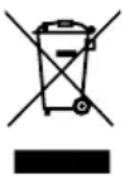
Electrical waste must not be disposed of together with household waste.
Throw out the appliance in waste bins determined for electrical wastes.
The packaging of the appliance consists of recycling-capable materials. Throw out them in suitable recycling bins.

The device complies with AEEE Regulation.
Dispatch
Carry the appliance in the original package or a similar, well-padded package to prevent damage to the appliance.
NOT / NOTES
natural_image
Line drawing of a mechanical component with liquid pouring from a cylindrical container (no text or symbols)natural_image
Line drawing of a symmetrical abstract shape with internal compartments and decorative elements (no text or symbols)natural_image
Line drawing of a mechanical component with liquid pouring from a cup onto a surface (no text or symbols)natural_image
Line drawing of a boat hull with decorative elements and no text or symbolsأ. خزان الماء
natural_image
Line drawing of a mechanical component with liquid pouring from a cup onto a base (no text or symbols)ملاحظة:
Fakir customer service/
Kundenservice:
Rights to make changes are
reserved. Subject to revision
48 35 994 - 9911



- EN
- Dear Customer,
- On the Operating Instructions
- Meanings of the Symbols
- WARNING!
- CAUTION!!!
- NOTE!
- Liability
- EC Conformity Declaration
- Intended Use
- Unauthorized Use
- Safety is Important
- Safety Warnings
- Unpacking
- Technical Information
- Parts Description
- Before first use
- Utilization
- Temperature Adjustment:
- Filling The Water Reservoir
- Steam Ironing
- Steam Spraying
- Vertical Steam
- Dry Ironing
- Self-Cleaning
- When You Are Done With Ironing
- Cleaning and Maintenance of the Appliance
- Anti-Scaling System
- Anti-Dripping System
- Storage
- Recycling
- Dispatch
- NOT / NOTES
Brand : FAKIR
Model : Galaxis
Category : Vacuum Cleaner