
Imitor Versio - Audio effect pedal Noise Engineering - Free user manual and instructions
Find the device manual for free Imitor Versio Noise Engineering in PDF.


| Product Type | Eurorack Synthesizer Module |
| Model | Imitor Versio |
| Brand | Noise Engineering |
| Width | 10 HP |
| Depth | 26 mm |
| Power Supply | +12V / -12V (Eurorack standard) |
| Current Draw | +12V: 80 mA, -12V: 20 mA |
| Audio Inputs | 2 (L/R) stereo, 3.5 mm jacks |
| Audio Outputs | 2 (L/R) stereo, 3.5 mm jacks |
| CV Inputs | Multiple (e.g., Time, Feedback, Mix) |
| Main Functions | Stereo delay, reverb, pitch shifting, freeze |
| Controls | Knobs, buttons, LED indicators |
| Display | None |
| Processing | Digital, 24-bit / 48 kHz |
| Latency | ~1 ms |
| Firmware | Field-updatable via USB |
| Dimensions (W×H×D) | 50.5 × 128.5 × 26 mm |
| Weight | 140 g |
| Material | PCB, aluminum faceplate |
| Included Accessories | Power cable, screws |
| Safety Notices | Do not expose to liquids, use only with Eurorack case |
| Maintenance | Wipe with dry cloth; avoid solvents |
| Reparability | Contact manufacturer for spare parts |
| Warranty | 2 years |
Frequently Asked Questions - Imitor Versio Noise Engineering
User questions about Imitor Versio Noise Engineering
0 question about this device. Answer the ones you know or ask your own.
Ask a new question about this device
Download the instructions for your Audio effect pedal in PDF format for free! Find your manual Imitor Versio - Noise Engineering and take your electronic device back in hand. On this page are published all the documents necessary for the use of your device. Imitor Versio by Noise Engineering.
USER MANUAL Imitor Versio Noise Engineering
Stereo in, stereo out 12-tap multimode delay with clock sync and tap tempo
Overview
| Type St | Stereo reverb/DSP platform |
| Size 10 | HP |
| Depth 1 | -5 inches |
| Power 2 | x5 Eurorack |
| +12 mA | 70 |
| -12 mA | 70 |
| +5 mA 0 |

Imitor Versio is a delay designed for experimentation. With 12 delay taps and a slew of parameters designed to make the delay perform in unfathomable ways, IV is perfect for creating unusual echoes, experimenting with different delay shapes and patterns, adding vintage flare to an atmosphere, and more.
Ask your doctor if Imitor Versio is right for you.
Etymology
Imitor -- from Latin: "Imitate"
Versio -- from Latin: "Versatile"
"Versatile imitation"
Color code
On boot, the IV's LEDs will shine with this color pattern to indicate that it is running the current IV firmware:


Power
To power your Noise Engineering module, turn off your case. one end of your ribbon cable into your power board so that the stripe on the ribbon cable is aligned to the side that says -12v each pin on the power header is plugged into the connector of ribbon. Make sure no pins are overhanging the connector! If there are, unplug it and realign.
Line up the red stripe on the ribbon cable so that it matches white stripe and/or -12v indication on the board and plug in the connector.
Screw your module into your case BEFORE powering on the module. You risk bumping the module's PCB against somethin metallic and damaging it if it's not properly secured when pow on.
You should be good to go if you followed these instructions. No go make some noise!
A final note. Some modules have other headers -- they may have a different number of pins or may say NOT POWER. In general, unless a manual tells you otherwise, DO NOT CONNECT THOSE TO POWER.

Warranty
Noise Engineering backs all our products with a product warranty: we guarantee our products to be free from manufacturing defects (materials or workmanship) for one year from the date of the original retail purchase (receipt or invoice required). The cost of shipping to Noise Engineering is paid by the user. Modules requiring warranty repair will either be repaired or replaced at Noise Engineering's discretion. If you believe you have a product that has a defect that is out of warranty, please contact us.
This warranty does not cover damage due to improper handling, storage, use, or abuse, modifications, or improper power or other voltage application.
Technical specifications
All CV inputs expect 0-5 V. All pots act as offsets and sur with the input CV. The Tap gate input responds to signals above +2 V. The audio inputs clip around 16 V peak to peak. Imitor Versio operates at an internal and external sample rate of 96khz.
Patch Tutorial
With 12 taps, IV's control layout is rather unique. We recommend reading through the parameters, and then starting with the "Super Simple" patch outlined below. Consider referencing that as a starting "init" patch when learning the module. Bear in mind that since IV is a 12-tap delay, the lowest number of repeats you can get is 12.
Patch 1: Super Simple
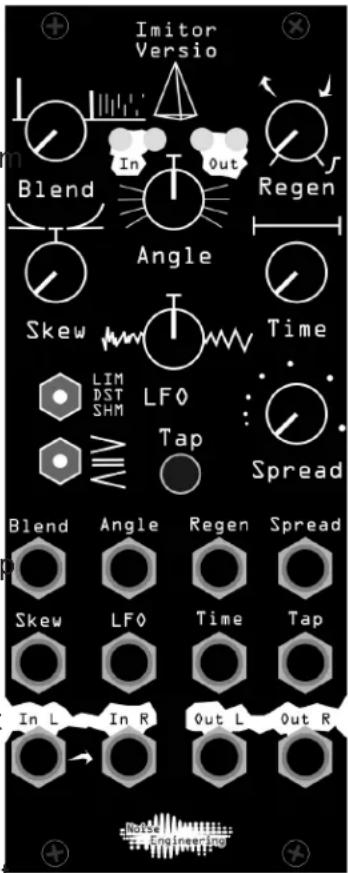
Set Regen to minimum and Time and Spread to 9:00. Set all other knobs to 12:00. Set both switches to the leftmost position. Send a simple, slow, plucky sequence in to hear what the most basic form of delay sounds like.
Try changing the LIM/DST/SHM switch to hear the different delay types.
Try gently increasing Regen to increase the length of the delay effect.
Tap in a tempo to change the timing of the delay with the Tap button.
The rest of the parameters can be explored past this point. With the IV, it's easy to get long and wild results. While you learn how the parameters interact, feel free to reset to the initial patch described above and begin your explorations anew.
Patch 2: Ping Pong Bouncing Ball
Clear any tap tempo by holding Tap. Set Regen to minimum. Set Spread, LFO, and Blend to 12 o'clock, Time to 11 o'clock, Skew to 1:00, and Angle to 7:00. Send in a single plucky sound and hear it bounce around the room.
More patches coming soon in the upcoming Imitor Versio Patchbook.
Interface
IV's parameters are described below, followed by the corresponding Desmodus Versio parameter in parentheses for ease of use when reflashing.
Blend (Blend): Wet/dry mix between the input signal and the resulting delay.
Regen (Regen): Feedback amount for the delay lines. Turning this control past 3:00 ducks the delay line based on the input, creating sidechain-type effects. Regen is a sensitive control and while you are learning the module you may have best results if you keep it relatively low.
Skew (Speed) [bipolar]: Changes the relative timing of the delay taps. In the center, the spacing between taps is equal. To the left, the spacing starts fast and gets slower. To the right, the spacing starts slow and gets faster. Useful for a variety of effects like bouncing ball to the left and dying clock to the right.
Angle (Tone) [bipolar]: Imagine that the delay taps are arranged in a circle in the L/R space. This control sets the amount that each tap is offset in that circle relative to the previous tap. For instance, at 1:00, the second tap will be rotated slightly further right than the previous, and the tap after that would be rotated even more, eventually looping back to the left side of the circle. At extreme clockwise/
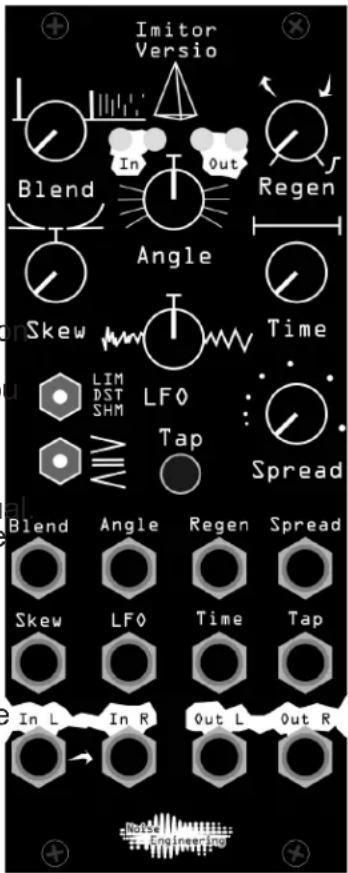
counterclockwise values, taps bounce around the stereo field wildly.
LFO (Index) [bipolar]: Adds modulation and wide bandpass filtering to the delay line. To the left the modulation is random, to the right it is triangular. Think of LFO as a "warble" control with two flavors of warbliness.
Time (Size): How much time there is before the first delay as a fraction of the Spread setting.
Spread (Dense): Base delay time. This sets the time from now until the last tap. When using a tap or external clock, this acts as a clock divider/multiplier.
LIM/DST/SHM: Delay mode that changes how the feedback path is processed: clean, slightly distorted, and pitch-shifted shimmer.
/=/< (BND/LRP/JMP): Changes how the 12 delay taps behave. To the left, the taps decrescendo. To the right, the taps crescendo. In the center, all taps are equal volume.
Tap (FSU): Tap tempo. Output LEDs flash purple each time a clock pulse/tap is received. Holding down the button for 2 seconds clears the tapped tempo (LEDs flash orange) and the Size and Dense knobs then control timing entirely. Holding down the button for 5 seconds clears the delay lines completely (LEDs flash white). The corresponding jack acts as a clock input.
Updating Firmware
Imitor Versio's firmware can be updated by the user via our firmware webapp. In the unlikely event that the need arises, firmware patches will be available on that site. Alternate firmwares are also available on the webapp to transform your IV into a completely different module.
Webapp link: https://portal.noiseengineering.us/
To update the firmware on your Imitor Versio:
- Turn off the power to your case and unscrew IV.
- Remove the power connector on the back of IV.
- Plug a micro USB connector into the port on the pack of the module, and the other end into your computer.
- Follow the instructions in the webapp.
Design Notes
The main design goal of Imitor was to push the limits of what a multitap delay could do on our new audio platform. The final architecture was stereo 12 tap delay. The taps are a stereo pair that simulates interaural time difference for a first-order binaural effect. Most of the focus of Imitor is on the spacing and timing of the taps.
Take care when you're using IV: we're pretty sure it's cursed. While testing it, we ran into problem after problem after problem. Then, when we finally moved to bring IV into production, the panels that were made had unexplainable mistakes on them and had to be reprinted at the last minute. When we finally had a correct version of the module in hand, we sent a pre-production unit to Patrick O'Brien to record a demo... But its audio outputs were defective. On the way to drop a replacement on POB's doorstep, Stephen's car blew a tire.
Maybe it's got something to do with that pyramid on the panel?
Special Thanks
René Boscio
Erwin Coumans
Rob Vonderheide


Brand : Noise Engineering
Model : Imitor Versio
Category : Audio effect pedal