
LX4 - Loudspeaker M-AUDIO - Free user manual and instructions
Find the device manual for free LX4 M-AUDIO in PDF.


| Product Type | 3-way studio reference monitor with subwoofer (2.1 system, expandable to 5.1) |
| Satellite Speaker Dimensions (Each) | 8.5" (H) × 5.75" (W) × 6.75" (D) |
| Subwoofer Dimensions | 15.75" (H) × 9.75" (W) × 12.25" (D) |
| Satellite Speaker Weight (Each) | 4.5 lbs |
| Subwoofer Weight | 21.9 lbs |
| Cabinet Material | Vinyl-laminated MDF |
| Power Requirement | Selectable 120V/60Hz or 230V/50Hz via rear switch |
| Total Amplifier Power | 60W (subwoofer) + 5 × 27W (satellites) = 195W |
| Frequency Response | 40 Hz – 20 kHz |
| Crossover Frequencies | 2.9 kHz (satellite) and 140 Hz (subwoofer) |
| Input Connectors | 6 × TRS balanced/unbalanced (L, R, SL, SR, C, LFE) |
| Input Impedance | 20 kΩ balanced, 10 kΩ unbalanced |
| Maximum SPL | 105 dB RMS @ 1 m |
| Dynamic Range | >100 dB |
| Signal-to-Noise Ratio | >100 dB below full output, 20 kHz bandwidth |
| Protection Features | RF interference, output current limiting, over-temperature, turn-on/off transient, subsonic filter, external main fuse |
| Indicators | Power/Protect LED: Green (normal), Orange (protection, output reduced by 12 dB) |
| Magnetic Shielding | All drivers are magnetically shielded for desktop use |
| Included Accessories | Satellite speakers (2), subwoofer (1), speaker wires (2), AC power cord, user manual |
| Maintenance | Do not touch speaker cones. Keep away from reflective surfaces and obstacles. Ensure proper ventilation. |
| Safety Warning | Set voltage selector correctly before connecting to power. Use only detachable AC cable provided. |
| Reparability | External fuse holder allows easy replacement. Contact M-Audio support for service. |
Frequently Asked Questions - LX4 M-AUDIO
User questions about LX4 M-AUDIO
0 question about this device. Answer the ones you know or ask your own.
Ask a new question about this device
Download the instructions for your Loudspeaker in PDF format for free! Find your manual LX4 - M-AUDIO and take your electronic device back in hand. On this page are published all the documents necessary for the use of your device. LX4 by M-AUDIO.
USER MANUAL LX4 M-AUDIO
What's in the Box? 2
Studiophile LX4 Surround System Features ....3
Speaker Enclosure Front and Rear Panel Features ....4
LX4-2.1 Subwoofer, Rear 4
LX4-2.1 Subwoofer, Front 5
LX4 Satellite Speaker, Rear 6
LX4 Satellite Speaker, Front 6
Installation - LX4-2.1 System 6
Precautions 6
Speaker Wire Connections 7
TRS Balanced/Unbalanced Connections 7
Connecting to Preamp, Computer or Game Console Outputs . . .8
Installation - LX4-5.1 Expander 8
Precautions 8
Speaker Wire Connections 9
Placing the Speakers - LX4-2.1 System 9
Placing the Speakers - LX4-5.1 Expander .....
Technical Support & Contact Information 12
Warranty Terms 13
Appendix A - Technical Specifications .....14
Appendix B - Block Diagram 15
Introduction
Thank you for choosing the Studiophile Series LX4-2.1 / 5.1 studio nearfield monitor speakers. M-Audio is well known for digital audio interface technology, digital converters, audio preamps and mixers. Now, born from extensive research and development, the Studiophile LX4-2.1 System and 5.1 Expander is changing the concept of studio reference monitoring in 2.1 / 5.1 systems.
The LX4-2.1 System is designed with the option to add the LX4-5.1 Expander package, thereby upgrading to the LX4 Surround System, a 5.1 system for music production or playback of 5.1 music and sound tracks. This feature makes the LX4 system extremely flexible, fitting into all modern digital music production and playback applications.
The LX4 Surround System was designed to overcome the size limitations of conventional studio reference monitors within the digital audio environment. The compact system delivers wide-range frequency response by employing two extraordinary drivers, both of which are magnetically shielded for desktop music production, and a unique crossover and equalization technology, licensed by M-Audio. The LX4-2.1's Subwoofer provides extended low frequency down to 40Hz, making it possible for the LX4 Surround System to use much smaller Satellite Speakers and offer both ultimate convenience for desktop production and highly accurate 40 to 20Khz frequency response range.
Designed and tested by veteran audio engineers to meet your needs in the studio monitoring environment, the LX4 Surround System's goal is focused on delivering pure, original sound without any additional coloration. The LX4 Satellite monitors are self-powered from amplifiers contained in the Subwoofer enclosure, which directly accepts a line level signal from a variety of sources.
For pro engineers at commercial studios to home studio owners, the Studiophile LX4 Surround System sets a new affordable standard in studio monitoring.
What's in the Box?
Your Studiophile LX4 box contains:
- LX4 Satellite Speakers (2), (three for 5.1 Expander)
- LX4 Subwoofer Speaker (2.1 System only)
- Speaker Wires (2), (three for 5.1 Expander)
- AC Power Cord, detachable (2.1 System only)
• Actual test results of your LX4 system - This manual
Studiophile LX4 Surround System Features
I. Satellite Woofer - the Satellite Speaker's woofer units are 4 inches in diameter with a magnetically shielded mineral-filled polypropylene cone, high-temperature voice coil and damped closed cell foam surround. It is designed to deliver balanced mid- and low-frequency response. Polypropylene is used to react against the input signals accurately, and to deliver even minimal input precisely while minimizing distortion.
-
Satellite Tweeter - by employing a specially developed 1-inch mylar dome with magnetic shielding, the Satellite Speaker's tweeters can deliver distortion-free original sound and offer extremely natural response. It minimizes reaction time by using a uniquely shaped mylar dome for excellent delivery, and also minimizes resonance by adapting a unique internal damping technology.
-
Sub-Woofer (LX4-2.1 System) - the Sub-woofer unit is 8 inches in diameter with a specially developed curved profile pulp cone, high-temperature voice coil and damped closed cell foam surround. It is designed to deliver subwoofer sound pressure at very high efficiency with extremely low distortion.
-
Enclosure - just as other components do, the LX4 Surround System enclosures have an important role to play. In order to provide more stable performance, these enclosures employs a special high-density MDF and unique interior reinforcement designed to absorb vibration and impact generated under extreme conditions.
-
Network & Power Amplifiers - the LX4 Surround System's active equalization and crossover networks, as well as the power amplifiers housed in the 2.1 Sub-woofer are specially designed for the specific carefully-chosen woofer, tweeter and sub-woofer drivens. The network properly distributes low, mid, and high frequencies to the components in order to reduce distortion and loss of signal, thereby achieving a naturally balanced sound.
In order to generate powerful, ultra-crisp sound, there are six separate power amplifiers inside the LX4-2.1 Subwoofer module. These separately drive the Sub-Woofer, Left, Right, Center and Surround Left and Right speakers in a high-end multiple-amplifier structure. The power delivered to the sub-woofer driver is 60W, while 27W each is delivered to the Satellite Speakers.
- Expandable System - LX4-2.1 System is designed with the option to add the LX4-5.1 Expander package, thereby upgrading to a 5.1 system for music production of 5.1 music and sound tracks. The feature makes the LX4 system extremely flexible, able to fit all modern digital music production and playback applications.
Speaker Enclosure Front and Rear Panel Features
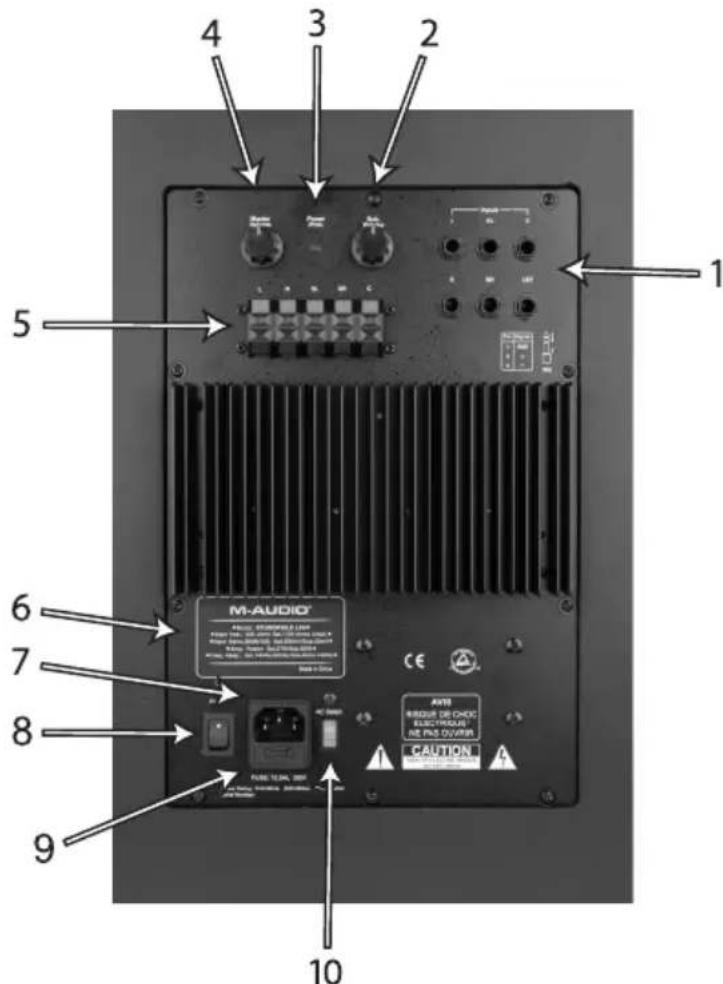
LX4-2.1 Subwoofer, Rear
I. TRS Inputs: These jacks accept 1/4" connections with either balanced or unbalanced wiring. For balanced wiring, a three-conductor TRS plug is necessary. The input wiring of a TRS connector should be as follows:
TRS TIP - Signal positive (+)
TRS RING - Signal negative (−)
TRS SLEEVE - Signal ground (Shield)
Unbalanced 1/4" wiring can be done with either a two- or three-conductor (TS or TRS) plug. A two-conductor (TS) plug automatically grounds the signal negative input, whereas a three-conductor (TRS) plug, wired unbalanced, provides the option of leaving the negative input open or grounded. We recommend that you ground the unused negative input (this can be done by wiring the ring and sleeve of the TRS plug together).
There are 6 TRS Inputs, as follows:
L - Left Ch. Input R - Right Ch. Input
SL - Surround Left Ch. Input SR - Surround Right Ch. Input
C - Center Ch. Input LFE- Low Frequency Effect Input
-
Sub Volume: Use the Sub Volume to set the Subwoofer output sound pressure level relative to other output channels as required. Once the subwoofer to satellite balance is achieved, use the Master Volume to control overall listening levels.
-
Power / Protect. LED: When the power switch is switched to ON, the LED will glow “Green.” When the Protection circuitry of the power amplifiers has turned on because of any abnormal conditions, including overdriving the speakers into heavy clipping for too long, the LED will glow “Orange” and the output level will reduce by 12dB.
-
Master Volume: Use the Master Volume to set the output sound pressure of all channels from the LX4 system to proper level as required.
-
Speaker Outputs: (5) spring-type Speaker Output terminals for connecting (5) Channel Amplifier Outputs to all speaker channels, as follows:
L: Use Speaker wire included in the LX4-2.1 package to connect the L channel amplifier output to the Left Speaker.
R: Use Speaker wire included in the LX4-2.1 package to connect the R channel amplifier output to the Right Speaker.
SL: Use Speaker wire included in the optional LX4-3.0 package to connect the Surround Left channel amplifier output to the Surround Left Speaker.
SR: Use Speaker wire included in the optional LX4-3.0 package to connect the Surround Right channel amplifier output to the Surround Right Speaker.
C: Use Speaker wire included in the optional LX4-3.0 package to connect the Center channel amplifier output to the Center Speaker.
-
Product Label: This label contains the model and serial number information.
-
Power Receptacle: Accepts a detachable 3-circuit line cord in order to apply AC power to the entire LX4 system.
-
Power Switch: This switch turns the LX4 system on and off. The "On" position is indicated by a white dot.
-
Fuse Holder: Holds the external main fuse.
-
Voltage-select Switch: Provides 2 selections, 115VAC (120VAC) and 230VAC. This switch should be set to match the “house supply” (receptacle) voltage of the country or location in which the speaker is used. The 115VAC (120VAC) setting is correct for the USA, while the 230V setting is correct for most of the UK and Europe.
LX4-2.1 Subwoofer, Front
The front panel of the Subwoofer houses the Subwoofer driver and Sub-Frequency Port.
LX4 Satellite Speaker, Rear
The rear panel of each Satellite Speaker houses a single pair of spring-type speaker terminals.
LX4 Satellite Speaker, Front
The front panel of each LX4 Satellite Speaker houses single Woofer and Tweeter drivers.
Installation - LX4-2.1 System
For optimal performance of the LX4-2.1, please read the following thoroughly and carefully prior to installation.
Precautions
Handling: Please do not touch the speaker cones. The LX4-2.1 speaker set is packaged in the box tightly, so your attention is required when taking the monitors out of the box. To avoid possible damage to the speaker units, hold both sides of the monitor in order to pull it out of the box. The speaker cones should not be touched in order to avoid damage even after they are out of the box.
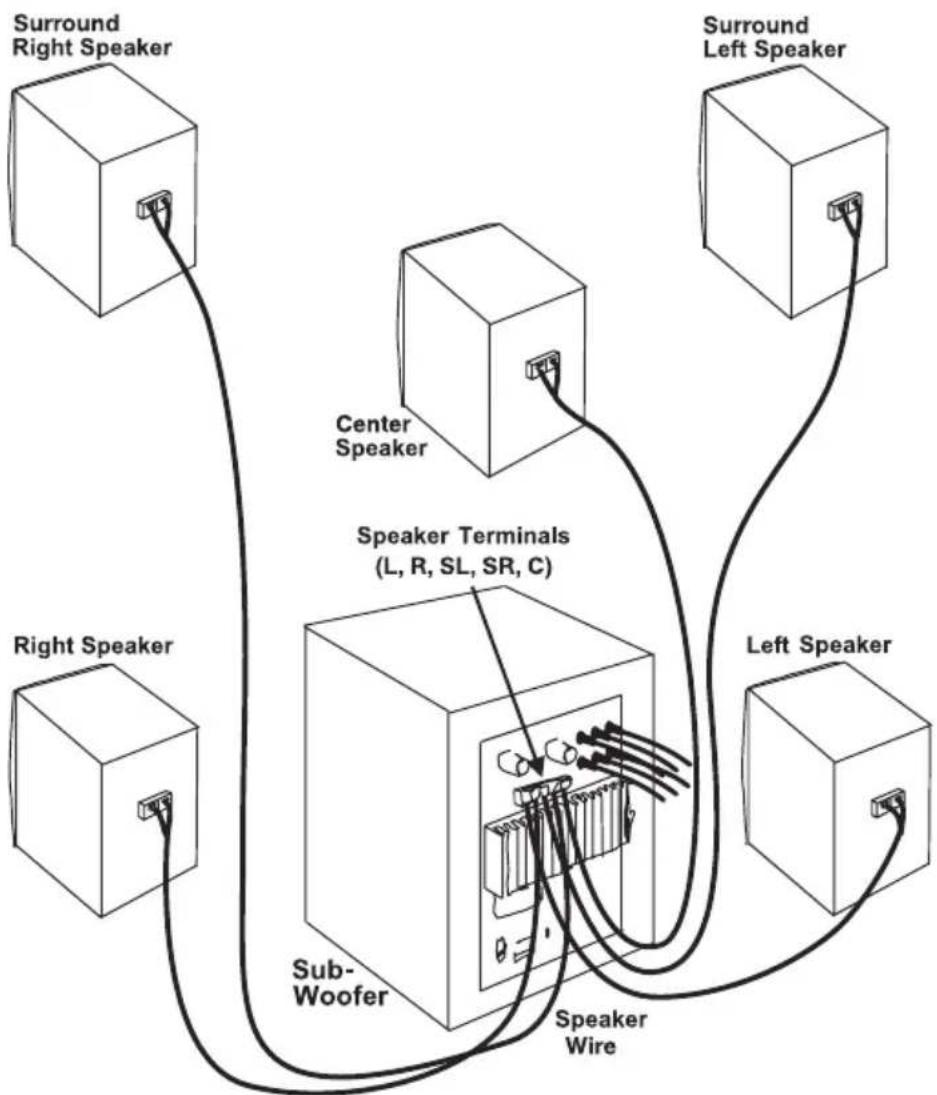
Connections: Using the included Speaker Wires, connect the Left and Right Speaker inputs to the corresponding speaker terminals on the rear panel of the subwoofer. Then, connect the TRS balanced/unbalanced inputs of the LX4 subwoofer unit to the desired corresponding pre-amp, computer or game console outputs (see the following diagrams). We recommend that you use high-quality balanced or unbalanced cables for these input connections. Also, turn off the power of the LX4 and turn the volume of the LX4 down to a minimum before making the necessary connections.
Correct Power Operation: Since the LX4-2.1 System contains amplifiers, it must be connected to a power outlet using the detachable AC cable provided. Before connecting power, please make sure that the Voltage-Select Switch located on the speaker's rear panel is set to the appropriate position, as described in the rear-panel features list appearing earlier in this manual.
WARNING! - Use of improper Voltage-Select Switch combinations may result in hazardous conditions and/or damage to speaker components not covered by speaker warranty.
Speaker Wire Connections
Use speaker wires included in LX5-2.1 package to connect the Left and Right Speaker output terminals, found on the Subwoofer's rear panel, to the Left and Right Speakers.

TRS Balanced/Unbalanced Connections
Assure that the LX4's power switch is turned to the off position and that it's Master Volume is turned all the way down. Connect the male end of a TRS balanced or TS unbalanced cable to the TRS inputs on the Sub-woofer's rear panel.

Connecting to Preamp, Computer or Game Console Outputs
Before connecting, make sure the output device's power has been turned off. Plug the TRS balanced or TS unbalanced cable to the corresponding output connectors of a pre-amplifier, computer or game console.

For optimal performance of the LX4-5.1 Expander, please read the following thoroughly and carefully prior to installation.
Precautions
Handling: Please do not touch the speaker cones. The LX4-5.1 expander set is packaged in the box tightly, so your attention is required when taking the monitors out of the box. To avoid possible damage to the speaker units, hold both sides of the monitor in order to pull it out of the box. The speaker cones should not be touched in order to avoid damage even after they are out of the box.
Speaker Wire Connections
Use speaker wires included in LX4-5.1 Expander package to connect the SL (Surround Left), SR (Surround Right) and C (Center) Speaker output terminals, found on the Subwoofer's rear panel, to the SL, SR and C Speakers.
flowchart
graph TD
    A["Surround Right Speaker"] --> B["Center Speaker"]
    C["Left Speaker"] --> D["Speaker Terminals (L, R, SL, SR, C)"]
    E["Right Speaker"] --> F["Sub-Woofer"]
    G["Left Speaker"] --> H["Speaker Wire"]
    I["Center Speaker"] --> J["Speaker Terminals (L, R, SL, SR, C)"]
Placing the Speakers - LX4-2.1 System
Placing the speakers is one of the most important procedures. To monitor with the LX4s performing to their maximum capability, an appropriate listening environment and correct placement are required. Please refer to the following for correct LX4-2.1 placement.
I. As a subwoofer is non-directional, you can place the subwoofer box at any convenient location, and then use the speaker wires to hook the Left and Right Speakers to the L & R Speaker Output terminals on the rear panel of subwoofer enclosure.
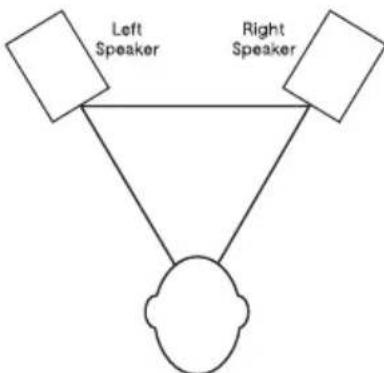
- The two Left and Right speaker units and the listener should basically align to form a regular, or equilateral triangle. Refer to the following diagram.
flowchart
graph TD
    A["Left Speaker"] --> C["Central Node"]
    B["Right Speaker"] --> C["Central Node"]
    A --> C
    B --> C
- Position the monitors so that the tops of the woofers are level with your ears in a normal listening environment. Refer to the following diagram.

natural_image
Illustration of a person sitting on a platform facing two speakers (no text or symbols present)- Place the LX4's Left and Right units vertically with the woofer on the bottom. Placing the LX4 monitors horizontally is not recommended.

natural_image
Simple line drawing of two blocks with circular eyes on a flat base, crossed by two black X marks (no text or symbols)Note: DO NOT place any obstacles that may block the flow of air in front or between the LX4s monitors. Also remove reflective materials such as glass, mirrors or metal from the monitoring environment. PLACE THOSE MATERIALS AWAY FROM THE PATH OF THE SOUND FROM THE LX4s.
Placing the Speakers - LX4-5.1 Expander
Placing the speakers is one of the most important procedures in order to monitor sound accurately. To monitor with the LX4s performing to their maximum capability, an appropriate listening environment and correct placement are required. Please refer to the following for correct LX4-5.1 placement.
I. The Center Speaker - For best directional effect, try to have the center speaker at the same height as the L & R speakers. The front of the center speaker should also be aligned with, or slightly behind the L & R speakers. Avoid having it forward of the left and right speakers.
-
The SL & SR Speakers - Properly conveying both directional effects and diffuse ambience requires an evenly distributed surround sound field comprising both directional and reflected sound. This is achieved in movie theatres by means of many direct-radiating surround speakers (typically ten of twenty) along the sides and rear of the auditorium. Listening tests have also confirmed that it is the side speakers that contribute the spaciousness or “openness” associated with good surround sound. Theatres use speakers at the rear only because without them, the surround sound field would appear to be in front of, rather than around, those seated in the back rows. In monitoring environments, just two surround speakers, one to each side, are usually enough to achieve proper results. Too much direct sound from the surround speakers can make their location too obvious, or create an earphone-like, “in-the-head” sound image. On the other hand, too much diffusion may disperse the image such that it utterly directionless seemingly everywhere at once. Finding the right balance of direct and reflected sound means considering speaker placement, room design, and the acoustics characteristics of both.
-
Location - If it is possible, place surround speakers to either side of sitting position.
- Height - If space permits, install surrounds 2-3 feet above sitting position. This helps to minimize localization effects.
- Aiming - Aiming surround straight across the room, not down at sitting position, helps create a more open, spacious surround sound field.
Experiment with placement until surround sounds seem to envelop you, rather than coming from behind. As a general rule, do not aim the surround speakers directly at the sitting position.
Remarks: DO NOT place any obstacles that may block the flow of air in front or between the LX4s monitors. Also remove reflective materials such as glass, mirrors or metal from the monitoring environment. PLACE THOSE MATERIALS AWAY FROM THE PATH OF THE SOUND FROM THE LX4s.
Technical Support & Contact Information
For additional help, contact M-Audio Technical Support by telephone (626-445-8495, 9-5 PST M-F), by fax (626-445-7564) or by e-mail (techsupt@m-audio.com).
If you have any questions, comments or suggestions about this or any M-Audio product, we invite you to contact us directly at:
M-AUDIO U.S.
5795 Martin Road, Irwindale, CA 91706-6211, U.S.A.
Sales Information: 626-633-9050
Sales Information (email): info@m-audio.com
Tech Support: 626-633-9055
Tech Support (email): techsupt@m-audio.com
Fax: 626-633-9060
Internet Home Page: http://www.m-audio.com
M-AUDIO Deutschland (Germany)
Kuhallmand 34, D-74613 Ohringen, Germany
Sales Information: 49 7941 98 7000
Sales Information (email): info@m-audio.de
Technical Support: 49 7941 98 70030
Technical Support (email): support@m-audio.de
Fax: 07941 98 70070
Internet Home Page: http://www.m-audio.de
M-AUDIO U.K.
Unit 5, Saracen Industrial Estate, Mark Road,
Hemel Hempstead, Herts HP2 7BJ, England
Sales Information (phone): 44 (0) 1442 416590
Sales Information (fax): 44 (0) 1442 246832
Sales Information (email): info@maudio.co.uk
Technical Support (PC): 44 (0) 1309 671301
Technical Support (Mac): 44 (0) 1765 650072
Technical Support (email): richard@maudio.freeserve.co.uk
Internet Home Page: http://www.maudio.co.uk
M-AUDIO Canada
1400 St-Jean Baptiste Ave. #150
Quebec City, QC G2E 5B7, Canada
Tel: 418-872-0444
Fax: 418-872-0034
Email: midimancanada@m-audio.com
M-AUDIO France
Unit 5, Saracen Industrial Estate, Mark Road
Hemel Hempstead, Herts HP2 7BJ, England
Sales Information: 0810 001 105
Sales Information (email): info@m-audio-france.com
Technical Support: 0820 00 731
Technical Support (email): support@m-audio-france.com
Fax: 44 (0) 144 224 6832
Internet Home Page: http://www.maudio.co.uk
M-AUDIO Japan
Annex Buliding 6F, 2-18-10 Marunouchi
Naka-Ku, Nagoya 460-0002, Japan
Tel: 81 52 218 3375
Fax: 81 52 218 0875
Technical Support: 0820 00 731
Email: info@m-audio.co.jp
Internet Home Page: http://www.m-audio.co.jp
Warranty Terms
M-Audio warrants products to be free from defects in materials and workmanship, under normal use and provided that the product is owned by the original, registered user. Visit www.m-audio.com/warranty for terms and limitations applying to your specific product.
Warranty Registration
Thank you for registering your new M-Audio product. Doing so immediately both entitles you to full warranty coverage and helps M-Audio develop and manufacture the finest quality products available. Register online at www.m-audio.com/register to receive FREE product updates and for the chance to win FREE M-Audio gear.
Appendix A - Technical Specifications
Type: 3-way studio reference with subwoofer (2.1 System), expandable to 5.1
Subwoofer Driver: 8 inch diameter, specially-developed curved-profile pulp cone, high-temperature voice coil and damped closed cell foam surround - designed for sub-frequency pressure levels with very high efficiency and extremely low distortion
LF Driver: 4-inch dia., magnetically-shielded with curved mineral-filled polypropylene cone, high temperature voice coil and damped closed cell foam surround
HF Driver: 1-inch dia., magnetically-shielded; specially-shaped mylar dome
Frequency Response: 40Hz - 20kHz
Crossover Frequencies: 2.9kHz and 140Hz
RMS SPL @ I meter: 105dB
Subwoofer Amplifier Power: 60W
Sat Amplifier Power: 27W (Five Sat Amplifiers)
Dynamic Range: >100dB
S/N Ratio: >100dB below full output, 20kHz bandwidth
Input Connectors: Six TRS balanced/unbalanced input connectors (L, R, SL, SR, C & LFE)
Polarity: Positive signal at + input produces outward low-frequency cone displacement
Input Impedance: 20k ohms balanced, 10k ohms unbalanced
Input Sensitivity, Sat: Input 100 mV pink-noise produces 90dBA output SPL @ lmeter w/ vol ctl at max setting
Input Sensitivity, LFE: input 50mV pink-noise produces 90dBA output SPL @ Imeter w/ vol cntrl at max setting
Protection: RF interference, output current limiting, over temperature, turn on/off transient, subsonic filter, external main fuse
Indicators: Green-Orange Power/Protection indicator (Back Panel). When the power switch is switched to ON, the LED will glow “Green”. When the Protection circuitry of power amplifiers is turned on, the LED will glow “Orange.” At the same time, the output level will reduce 12dB.
Power Requirements: Dual-voltage (selectable by rear-panel switch) for either 120V/\~60Hz, 230V/\~50Hz; powered via detachable 3-circuit line cord
Cabinets: vinyl-laminated MDF
Dimensions - L, R, SL, SR & C: 8.5" (H) × 5.75" (W) × 6.75" (D)
Dimensions - Subwoofer: 15.75" (H) × 9.75 " (W) × 12.25" (D)
Weight - L, R, SL, SR & C: 4.5 lbs. each
Weight - Subwoofer: 21.9 lbs.
* All specifications subject to change without notice
Appendix B - Block Diagram

flowchart
graph TD
    A["Balanced Input Amp"] --> B["EQ"]
    B --> C["140Hz"]
    C --> D["27W Amp"]
    D --> E["2.9KHz"]
    E --> F["11 HF Driver"]
    G["R-TRS IN"] --> H["EQ"]
    H --> I["140Hz"]
    I --> J["27W Amp"]
    J --> K["2.9KHz"]
    K --> L["41 LF Driver"]
    M["SL-TRS IN"] --> N["EQ"]
    N --> O["140Hz"]
    O --> P["27W Amp"]
    P --> Q["2.9KHz"]
    Q --> R["11 HF Driver"]
    S["SR-TRS IN"] --> T["EQ"]
    T --> U["140Hz"]
    U --> V["27W Amp"]
    V --> W["2.9KHz"]
    W --> X["41 LF Driver"]
    Y["C-TRS IN"] --> Z["EQ"]
    Z --> AA["140Hz"]
    AA --> AB["27W Amp"]
    AB --> AC["2.9KHz"]
    AC --> AD["11 HF Driver"]
    AE["LFE-TRS IN"] --> AF["EQ"]
    AF --> AG["+10dB"]
    AG --> AH["Sub Volume"]
    AH --> AI["81 Subwoofer Driver"]
    AJ["L-TRS IN"] --> AK["EQ"]
    AL["Master Volume"] --> AM["EQ"]
    AM --> AN["140Hz"]
    AN --> AO["27W Amp"]
    AO --> AP["2.9KHz"]
    AP --> AQ["41 LF Driver"]
    AR["Master Volume"] --> AS["EQ"]
    AS --> AT["140Hz"]
    AT --> AU["27W Amp"]
    AU --> AV["2.9KHz"]
    AV --> AW["41 LF Driver"]
- Introduction
- What's in the Box?
- Studiophile LX4 Surround System Features
- Speaker Enclosure Front and Rear Panel Features
- LX4-2.1 Subwoofer, Rear
- LX4-2.1 Subwoofer, Front
- LX4 Satellite Speaker, Rear
- LX4 Satellite Speaker, Front
- Installation - LX4-2.1 System
- Precautions
- Speaker Wire Connections
- TRS Balanced/Unbalanced Connections
- Connecting to Preamp, Computer or Game Console Outputs
- Placing the Speakers - LX4-2.1 System
- Placing the Speakers - LX4-5.1 Expander
- Technical Support & Contact Information
- Warranty Terms
- Warranty Registration
- Appendix A - Technical Specifications
- Appendix B - Block Diagram
Brand : M-AUDIO
Model : LX4
Category : Loudspeaker