
AR5EA30W - Fan ARDES - Free user manual and instructions
Find the device manual for free AR5EA30W ARDES in PDF.


| Product Type | Pedestal Fan |
| Brand | Ardes |
| Model | AR5EA30W |
| Power Supply | 220-240 V ~ 50/60 Hz |
| Power Consumption | 30 W |
| Speed Settings | 3 (Low, Medium, High) |
| Oscillation | Yes, 90° wide angle |
| Timer | Yes, up to 8 hours |
| Remote Control | Yes, included |
| Height Adjustment | Adjustable from 100 cm to 130 cm |
| Fan Diameter | 40 cm (16 inches) |
| Weight | 5.5 kg |
| Base Diameter | 35 cm |
| Noise Level | ≤55 dB |
| Safety Features | Overheat protection, tip-over switch |
| Material | ABS plastic |
| Cleaning | Use a soft, dry cloth; do not use water or solvents |
| Warranty | 2 years |
| Included Items | Fan, remote control, user manual |
Frequently Asked Questions - AR5EA30W ARDES
User questions about AR5EA30W ARDES
0 question about this device. Answer the ones you know or ask your own.
Ask a new question about this device
Download the instructions for your Fan in PDF format for free! Find your manual AR5EA30W - ARDES and take your electronic device back in hand. On this page are published all the documents necessary for the use of your device. AR5EA30W by ARDES.
USER MANUAL AR5EA30W ARDES
AR5EA23 - AR5EA30 - AR5EA30W
AR5EA40 - AR5EA40W
AR5AM30 - AR5AM40


5EA30 / 5EA30W / 5EA40 / 5EA40W / 5AM30 / 5AM40


Assemblaggio
5EA23
natural_image
Diagram of a rotating fan with magnetic field lines around its tip, showing rotational motion (no text or symbols)Manutenzione
This appliance may be used by children 8 years of age and older and people with reduced physical, sensory or mental capacities or with a lack of experience and knowledge if they are adequately supervised or have been instructed on the safe use of the appliance and are aware of the related dangers.
Children must not play with the appliance.
Cleaning and maintenance must not be performed by children unless they are under supervision.
Cleaning and maintenance operations must not be performed by children without supervision.
If the power cable gets damaged, it has to be replaced only at a service centre approved by the manufacturer.
Ensure that the fan is switched off from the supply mains before removing the guard.
Warnings
ATTENTION : read this booklet carefully it contains important instructions for a safe installation, use and maintenance. Important instructions to be kept for future reference.
It is forbidden for the children to play with the device.
This device must be used only for the purpose it was expressly designed; any use not complying with the instructions contained in the manual is considered inappropriate and dangerous. The manufacturer is not responsible for possible damages caused by the inappropriate and/or unreasonable use.
This device is NOT suitable to use it in an explosive environment (in the presence of flammable substances such as gas, vapor, mist or dust, in atmospheric conditions when, after ignition, the combustion is spread in the air).
The packing materials (plastic bags, expanded polystyrene, etc.) must be
kept out of the reach of children or disabled persons since they represent potential sources of danger.
The installation/assembly of the device will be made/ or according to the indications of the manufacturer. A wrong procedure may cause damages to persons, animals or objects, for which the manufacturer cannot be considered responsible.
Place and use the device on a horizontal and stable surface.
Before use check the integrity of the device and power cable. In case you are not sure contact a qualified person.
Before powering the device make sure the rating (voltage and frequency) corresponds to the grid and the socket is suitable for the plug of the device. Make sure the power system is equipped with proper protection according to the law in force.
DO NOT power the device using multiple sockets.
If possible, avoid the use of adapters and/or extension cables; if their use is absolutely necessary, use only materials in compliance with the current safety regulations and according to the electrical parameters of the adapters.
The device must not be switched on using external timers and/or other remote control devices which are not specified in this manual.
DO NOT use or store the device near heat sources (heaters, stoves etc.).
DO NOT dip the device in water or other liquids; in case the accidental fall in the water DO NOT try to take it out, but first of all unplug immediately the power cable from the socket.
If you use the device for the first time, make sure to remove any label or protective sheet which blocks its proper functioning.
Plug and unplug the power cable with dry hands and hold it firmly.
Before plugging make sure the start button of the device is in the "OFF" position (turned off).
Always unplug the power cable to avoid the overheating and avoid stretching it (do not pull it, tug it or use it to drag the device to which is connected).
Avoid placing the power cable on abrasive or sharp surfaces or in positions where it can be damaged easily.
DO NOT obstruct totally nor partially the air vents or inserts objects inside.
During the functioning do not touch the device with wet body parts, and in any case it is recommended to have between you and the standing surface, an isolating element (for example wearing shoes with rubber soles).
During the use the device must be keep at a safety distance from any object and/or flammable or potentially explosive substance.
In case of malfunction or anomalies during the functioning, switch off the device immediately, turn off the power and check the cause of the anomalies, if possible, with the support of a qualified person.
Avoid carrying out operations which are not specified in this manual (such as disassembling and/or altering).
Always remember to unplug the power cable of the device if it is not used for a long period, before storing, cleaning or performing any maintenance operation.
Store and use the device only indoor or in any case protected from weathering such as rain, direct radiation of the sun and dust. The device is not design for the external use or storage.
The cleaning and maintenance of the device MUST NOT be done by children without the supervision of an adult.
Before unplugging the device, switch it off, using the proper command on the control panel.
DO NOT hang the fan on the wall or ceiling unless this type of installation is provided and explained in this manual.
Place the device at a proper distance from the objects or surrounding walls making sure that its functioning will not cause accidental damages.
DO NOT use the device near gas stoves or open flames in general.
DO NOT use the device near curtains or textiles.
DO NOT hang the fan on the wall or ceiling unless this type of installation is provided and explained in this manual.
DO NOT cover the device during functioning.
DO NOT insert objects or body parts inside the protection grille of the fan.
DO NOT leave the device unsupervised for a long period during functioning.
DO NOT expose yourself for a long period to the air flow generated by the device because it can cause damage to the health.
If the fan must be stored for a long period and is not used regularly, place the fan in its original packaging in a dry place. When you use it for the first time after a long period of inactivity, make sure the fan is clean and the motor blades turn feely (with the device not powered) without any restraint.
Technical informations
5EA23
- Base
- Main body
- Control panel
- Motor shaft
- Oscillation knob
- Safety screw
- Front grille
- Fan
-
Lock ring of the back
-
Back grille
-
Motor
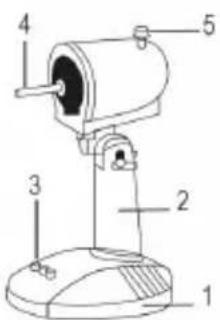


- Screws (4 pieces)
- Base
- Main body
- Control panel
- Motor shaft
- Oscillation knob
- Safety screw
- Front grille
- Lock ring of the fan
- Fan
- Lock ring of the back grille
- Back grille
- Motor
A-B. Locking pin for the rear grille


Assembling
5EA23
- Unscrew the lock ring of the back grille (9) of the motor shaft (4).
- Insert the rear grille (10) on the motor shaft (4) making sure that the handle on the back is facing upwards and the locking pins (A-B) are in the vertical holes of the rear grille. Screw the locking ring (9) by turning it clockwise.
- Insert the fan (8) on the motor shaft (4).
- Open the clips of the front grille (7) and place it on the back grille (10) making sure that the logo on the central stud is placed horizontally, parallel with the floor.
- Find the proper position to lock the clips and insert the safety screw of the grille (6).
5EA30 / 5EA30W / 5EA40 / 5EA40W / 5AM30 / 5AM40
- Mount the base on the main body fixing it with the
4 screws provided as shown in figure. - Unscrew the locking ring of the rear grille (11) from the motor shaft (5) by turning it counterclockwise.
-
Insert the rear grille (12) on the motor shaft (5) making sure that the handle on the back is facing upwards and the locking pins (A-B) are in the vertical holes of the rear grille. Screw the locking ring (11) by__turning it clockwise.
-
Insert the fan (10) on the motor shaft (5) and fasten the proper lock ring (9) by rotating counterclockwise.
-
Open the clips of the front grille (8) and place it on the back grille (12) making sure that the logo on the central stud is placed horizontally, parallel with the floor.
-
Find the proper position to lock the clips and insert the safety screw of the grille (7).

Instructions for use
5EA23
Place the fan on a flat, dry and stable surface, and insert the plug of the fan in a socket. Select the desired speed by pressing the buttons on the control panel (3):
0 = off 1 = minimum speed 2 = maximum speed
5EA30 / 5EA30W / 5EA40 / 5EA40W / 5AM30 / 5AM40
Place the fan on a flat, dry and stable surface, and insert the plug of the fan in a socket. Select the desired speed by pressing the buttons on the control panel (4):
0 = off 1 = minimum speed 2 = medium speed 3 = maximum speed
OSCILLATION:
5EA23
For the automatic oscillation from right to left press the knob (5) placed on top of the motor. To disable it, pull up the knob.
5EA30 / 5EA30W / 5EA40 / 5EA40W / 5AM30 / 5AM40
For the automatic oscillation from right to left press the knob (6) placed on top of the motor. To disable it, pull up the knob.
VERTICAL SLOPE:
5EA23 / 5EA30 / 5EA30W / 5EA40 / 5EA40W / 5AM30 / 5AM40
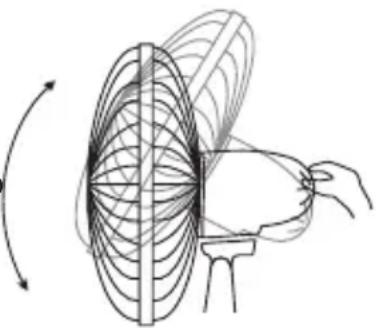
You can vertically point the front of the fan choosing the desired angle. It is sufficient to move the front of the fan up or down according to the desired slope.
natural_image
Diagram of a rotating fan with internal blades and a handle, showing motion lines (no text or symbols)Maintenance
Before carrying out the regular cleaning operations turn off the fan and unplug i.
For external cleaning use a soft and dry cloth.
DO NOT disassemble the fan: this fan cannot be disassembled.
DO NOT dip the device in water, or splash it with any other liquids.
DO NOT use solvents or any other chemical products for cleaning it.
When you do not use it, after cleaning it, store the fan in a dry place.


GERÄT MOTNAGE
Terms and Conditions
The guarantee is valid for 24 months.
This guarantee applies only if it has been duly filled in and is submitted with the receipt showing the date of purchase.
The guarantee covers the replacement or repair of parts making up the appliance which were faulty at source due to manufacturing faults.
After the guarantee has expired, the appliance will be repaired against payment.
The manufacturer declines any responsibility for damage to persons, animals or property due to misuse of the appliance and failure to observe the directions contained in the instructions.
Limits
All rights under this guarantee and any responsibility on our part will be voided if the appliance has been:
- mishandled by unauthorized persons
- improperly used, stored or transported.
The guarantee does not cover damage to the outward appearance or any other that does not prevent regular operation.
If any faults should be found despite the care taken in selecting the materials and in creating the product, or if any information or advice are required, please contact your local dealer.

USER INFORMATION
"Implementation of Directive 2012/19/EU on Waste Electrical and Electronic Equipment (WEEE)", pertaining to reduced use of hazardous substances in electrical and electronic equipment, as well as to waste disposal".
The symbol of the crossed-out wheelie bin on the equipment or on its packaging indicates that the product must be disposed of separately from other waste at the end of its service life.
The user must therefore take the dismissed equipment to suitable separate collection centres for electrical and electronic waste, or return it to the dealer in case they purchase a new device of equivalent type, at a one-to-one-ratio.
Suitable segregated collection of the equipment for subsequent recycling, treatment or environmentally-friendly disposal helps prevent damage to the environment and to human health, and encourages the re-use and/or recycling of the materials that make up the equipment.
Abusive disposal of the product by the user shall result in the application of administrative fines in accordance with the laws in force.
Garantiebedingungen:



- AR5EA23 - AR5EA30 - AR5EA30W
- AR5EA40 - AR5EA40W
- AR5AM30 - AR5AM40
- 5EA30 / 5EA30W / 5EA40 / 5EA40W / 5AM30 / 5AM40
- Assemblaggio
- 5EA23
- Manutenzione
- Warnings
- Technical informations
- Assembling
- Instructions for use
- OSCILLATION:
- VERTICAL SLOPE:
- 5EA23 / 5EA30 / 5EA30W / 5EA40 / 5EA40W / 5AM30 / 5AM40
- Maintenance
- GERÄT MOTNAGE
- Terms and Conditions
- The guarantee is valid for 24 months.
- Limits
- USER INFORMATION
- Garantiebedingungen:
Brand : ARDES
Model : AR5EA30W
Category : Fan