
HSB 75 - Loudspeaker XORO - Free user manual and instructions
Find the device manual for free HSB 75 XORO in PDF.


| Product Type | Soundbar with Wireless Subwoofer |
| Brand | XORO |
| Model | HSB 75 |
| Dimensions (Soundbar) | 750 x 75 x 45 cm (BxHxT) |
| Dimensions (Subwoofer) | 13.5 x 35 x 25 cm (BxHxT) |
| Weight (Soundbar) | 1.90 kg |
| Power Supply | AC100-240V, 50/60Hz |
| Power Consumption (Soundbar) | 50W (Max. Volume) |
| Power Consumption (Subwoofer) | 46W |
| Standby Power Consumption | 0.5W |
| Autostandby | After 5 minutes |
| Audio Channels | 2.1 Channels |
| Total RMS Power | 48W (2x12.5W + 23W Subwoofer) |
| Frequency Response | 48Hz - 20KHz |
| Bluetooth Version | V4.2 |
| Connectivity Inputs | Optical, Coaxial, AUX, LINE IN, USB |
| FM Radio | Yes, with Auto Scan and up to 40 presets |
| USB Playback | Yes, supports MP3, WMA (FAT32, up to 320GB) |
| Remote Control | Yes, IR with range up to 8m |
| Wireless Subwoofer | Yes, 2.4GHz wireless connection |
| Speaker Impedance (Soundbar) | 8 Ohm |
| Speaker Impedance (Subwoofer) | 4 Ohm |
| Supported Audio Formats | MP3, WMA |
| Cleaning Instructions | Unplug device, clean with a light damp wipe. Do not use liquids. |
| Safety | Read safety instructions before use. Do not expose to water or heat. |
| Warranty | Limited warranty; contact customer service for repairs and spare parts. |
Frequently Asked Questions - HSB 75 XORO
User questions about HSB 75 XORO
0 question about this device. Answer the ones you know or ask your own.
Ask a new question about this device
Download the instructions for your Loudspeaker in PDF format for free! Find your manual HSB 75 - XORO and take your electronic device back in hand. On this page are published all the documents necessary for the use of your device. HSB 75 by XORO.
USER MANUAL HSB 75 XORO
FREE TO CHOOSE INNOVATIONS
XORO®
Soundbar
HSB 50 / HSB 75

Anschlüsse & Tasten....6
Fernbedienung 7
FREE TO CHOOSE INNOVATIONS
XORO®
Soundbar
HSB 50 / HSB 75

USER MANUAL (EN)
Safety Information
Electrical Safety 4
Electrical Safety, Package Contents, Characteristics 5
First Steps
Ports & Keys 6
Remote Control....7
Get Started / How to Connect
Connect with the TV via the digital inputs 8
Other Connections 8
Bluetooth & USB 9
Hints & FM Radio....10
Technical Data.... 11
Troubleshooting.... 12
Warranty 13
Recycling Information.... 14
EG-Declaration 14
Electrical Safety

The lightning flash with an arrowhead symbol within an equilateral triangle is intended to alert the user of the presence of un-insulated "dangerous voltage" within the product's enclosure that may be of sufficient magnitude to constitute a risk of electric shock to persons.
The exclamation point within an equilateral triangle is intended to alert the user of the presence of important operating and maintenance (servicing) instructions in the literature accompanying the appliance. This device complies with part 15 of the FCC rules.
User Manual
• All the safety and operating instructions should be read before the product is operated.
- Retain instructions - The safety and operating instructions should be retained for future reference.
- All warnings on the product and in the operating instructions should be adhered to.
- All operating and use instructions should be followed.
Safety Instructions
• Never touch the plug with wet hands.
- Only operate the machine if the electrical voltage stated on the type plate beneath the machine agrees with the voltage on your plug socket. The wrong voltage can destroy the machine.
- Do not place this device near water or wet areas.
- Do not place this product on an unstable cart, stand, tripod, bracket, or table. The product may fall, causing serious injury to a child or adult, and serious damage to the product.
• Make sure that the power cable is not wound around the device while in operation.
- If you want to pull the plug out of the plug socket, always pull directly on the plug. Never pull on the cable as it could tear.
• Pull out the mains plug if the appliance is not to be used over a longer period of time.
- Only use extension cables that are designed for the power consumption level of the machine.
- Never stick any kind of illegal objects such as needles for example in the openings. This could cause electrical shocks or fire.
- For cleaning the device, pull the power cable out of the socket and device.
- Do not use any kind of liquids for cleaning the device. Do only use a light wet wipe.
- Do not connect accessories on the device which are not defined by the manufacture.
- Slots and openings in the cabinet are provided for ventilation and to ensure reliable operation of the product and to protect it from overheating, and these openings must not be blocked or covered.
Electrical Safety
- Make sure that the power cable is not bent, caught or run over and that it does not come into contact with heat sources.
- Do not place vases etc. on the appliance (neither empty nor filled with any liquids).
- Do not operate the device near heat sources such as heaters or ovens.
- Do not use the device in dusty environments. Strong cigarette smoke can cause damage at electrical devices. Damage caused due to cigarette smoke, is not covered by the legal warranty and will be at your expose for the repair.
- Keep the appliance away from rain and any moisture
- Do not expose the device to direct sunlight.
Package Contents
The following components are included:
• XORO HSB 50 or XORO HSB 75
- Power cable
- Remote control
- User manual
If any of these items is missing, please contact your dealer as soon as possible. Keep the original packaging in the event the unit needs to be returned to the dealer.
Characteristics
- Bluetooth - Stream and enjoy music wireless from any bluetooth-enabled device
• 2.1Ch Surround Sound Bar - full reach, true movie surround sound - Wireless Subwoofer - easy single stage wireless connection provides deep widebass
- Optical Input - digital improvement of the soundeffects, audio- and spoken records
• FM Radio - digitale FM tuner with Auto Scan and up to 40 presets - Simple Setup - simple Plug-and-Play-Connection, the setup takes only a couple of minutes
- IR-Remote control - full control via the remote control
Ports & Keys


| Designation Description | ||
| 1 DC IN | Power supplyNote: do only use the original power cable. | |
| 2 FM Antenna | Antenna. | |
| 3 Coaxial Input | Coaxial Input. | |
| 4 AUX Input | AUX Input. | |
| 5 Optical Input | Optical Input. | |
| 6 | Power | Power ON/OFF. |
| 7 | Play | For playing the music. |
| 8 | Source | Switches the input source: FM, Bluetooth, USB, Optical, AUX and Coxial. |
| 9 | Next & V+ | One Step forward or increase the volume. |
| 10 Previous & V- One Step backward or decrease the volume. | ||
| 11 | LINE IN | For external audio sources e.g smartphone/MP3-Player. |
| 12 USB | Port For external USB-devices. | |
Remote Control
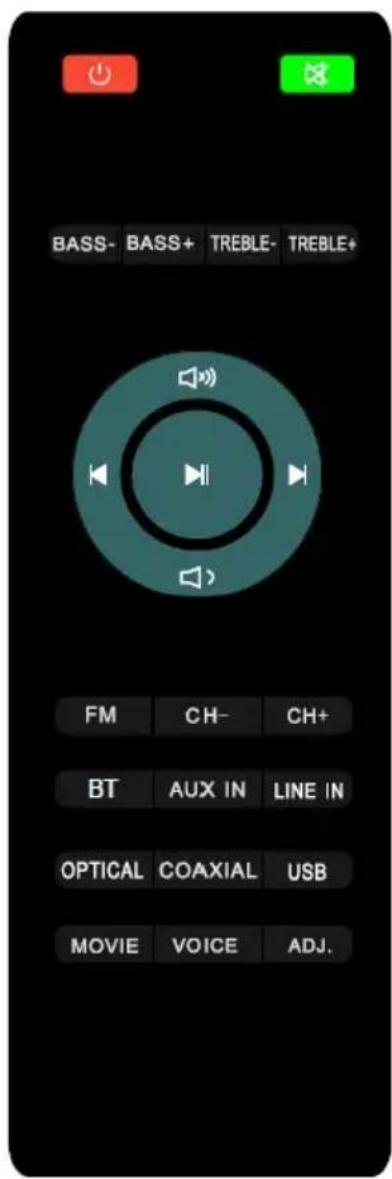
| Designation Description | |
| Power Button | Power ON/OFF. |
| Mute | Mute the device. |
| BASS- BASS+ | BASS decrease or BASS increase.(Works only under ADJ. See below) |
| TREBLE - TREBLE+ | TREBLE decrease or TREBLE increase.(Works only under ADJ. See below) |
| +/- Volume. | |
| One Step backward. | |
| One Step forward. | |
| Play/Pause. | |
| FM FM Radio as Audio Input. | |
| CH - Previous music file / radio station. | |
| CH+ Next music file / radio station. | |
| BT Choose | Bluetooth as Audio Input. |
| AUX IN AUX | IN as Audio Input. |
| LINE IN LINE | IN as Audio Input. |
| OPTICAL OPTICAL as Audio Input. | |
| COAXIAL COAXIAL as Audio Input. | |
| USB USB as Audio Input. | |
| MOVIE VOICE ADJ. | Direct selection buttons for the equalizer.ADJ.: bass and treble changeable |
Remote control
Insert the batteries into the remote control. Point the remote control at the sensor. The remote control is working properly within a range of 8m and an angle within 30 degrees from left and right.
Connect with the power supply
Connect the soundbar to the power cable that is supplied with a power outlet and position the soundbar below or above your TV set.
On the HSB75, connect the subwoofer to the main power supply using the supplied power cord. The connection between the soundboard and subwoofer is wireless.
There is a power switch on the back of the subwoofer, please turn it on.
Connect with the TV via the digital inputs
You can use the Digital Optical or Digital Coaxial connector to connect to the HSB50 / HSB75. These 2 connectors are located on the back of the HSB50 / HSB75.
To do this, connect the XORO HSB50 / HSB75
- an optical cable (not included) with the optical jack
- a coaxial cable (included) with the coaxial jack
Connect the other end of the cable to the optical-out or coaxial-out jack on your TV set. To select the optical / coaxial source, press the OPTICAL / COAXIAL button on the remote control briefly until OPTI or COAX appears on the display.
In this way, other audio sources, e.g. DVD or Blu-ray players can be connected too.
Other Connections
If your TV set does not have a digital input jack, you can use the analog sound input AUX IN from the HSB50 / HSB75. The AUX IN input is located on the back of the HSB50 / HSB75.
Use the supplied RCA audio cable and connect the other end of the cable to the AUX-OUT socket on your TV set.
To select the AUX IN source, press the AUX IN button briefly until AUX IN appears on the display.
You can connect the HSB50 / HSB75 to your mobile phone, TabletPC or MP3 / PM4 player using the LINE IN jack located on the right side of the unit. Connect the supplied jack <-> jack cable (3,5mm) with the LINE IN socket and plug the other side into the headphone connection of your mobile phone, tablet PC or MP3 / MP4 player.
To select the LINE IN input, press the LINE IN button on the remote control briefly until LINE IN appears on the display.
Bluetooth
To control the sound of a Bluetooth player, e.g. a smartphone or tabletPC on the XORO HSB 50/75, it must be paired with the XORO HSB 50/75.
Press the BT-Key on the remote control of the HSB50/HSB75 briefly, until "blue" is shown at the display.
Press and hold the Bluetooth button on the remote control until "blue dots" is displayed on the left. Locate the "XORO HSB50" or "XORO HSB75" entry on your music playback device in the Bluetooth settings or in the Bluetooth device search.
If the pairing process is completed successfully, "blue dots" will light continuously in the display.
Start the music playback from your music playback source.
You can use the Play / Pause or Next Title / Previous Title buttons on the HSB50 / HSB75 remote control to control music playback (only on supported Bluetooth devices).
During Bluetooth playback, the battery of the music source (smartphone / tablet) can be charged via the USB jack of the HSB50 / HSB75 (max. 5V / 500mA).
The maximum range of the Bluetooth connection is 10m. In addition, there may be interference in the music playback. Decrease the range if necessary.
If an already paired music source is within range, when the Bluetooth mode is selected, the connection is established automatically.
To conserve power, the HSB50 / HSB75 automatically goes into standby mode after a while if no music is played or the music source is set too low.
USB
You have the option to play MP3 music tracks on a USB flash drive on the HSB50 / HSB75.
Insert the USB stick with the MP3 music tracks into the socket marked "USB" on the right side of the HSB50 / HSB75.
Select the USB playback mode by pressing the USB button on the remote control until "USB" appears on the display.
Playback starts automatically with the first music track and the playback time is displayed.
You can control the music playback by pressing the Play / Pause or Next Title / Previous Title buttons on the HSB50 / HSB75 remote control.
Use only USB sticks formatted in FAT32 format. Maybe not every USB-Stick will be detected. In this case, use a different USB stick.
To conserve power, the HSB50 / HSB75 automatically goes into standby mode after a while if no music is played or the music source is set too low.
Hints
A variety of different USB storage media are currently being sold, and not all specifications for USB Mass Storage Devices may be applicable. If your USB storage device is not recognized by the HSB50 / HSB75, try another USB memory. USB devices that require a current higher than 500mA (0.5A) violate the USB specifications and may not be connected to the HSB50 / HSB75. USB memory up to 320GB is supported, with higher capacity the compatibility with the HSB50 / HSB75 can not be guaranteed. Only FAT, FAT32, or NTFS file systems are supported. If a medium is formatted with another file system, it is not recognized. Always back up all data from the USB memory when used on the device.
FM Radio
Press the Source button until the speaker switches to the FM mode or press FM on the IR remote control. Press the Play / Pause button long, to automatically scan up to 40 preset stations. To scroll to a specific preset station, use the arrow keys "| <>" and ">> |" in FM mode.
Technical Data
| Power supply: AC100-240V 50/60Hz | |
| Power consumption Soundbar : 50 W (Max. Volume) | |
| Power consumption Subwoofer(HSB75): 46W | |
| Power Consumption Standby 0.5 W | |
| Autostandby: after 5 minutes | |
| Speaker Impedance Soundbar: 8 Ohm | |
| Speaker Impedance Subwoofer(HSB75): 4 Ohm | |
| Noise ratio: 80dB | |
| Music Power RMS (HSB50): 25Watt (2x12.5W ) | |
| Music Power RMS (HSB75): | 48Watt (2x12.5W Soundbar + 23W Subwoofer) |
| Distortion Factor (1KHz, 1W): 0,80% | |
| Frequency response: 48Hz ~ 20KHz | |
| Dimensions Soundbar (HSB50): | 512x75x45cm (BxHxT) |
| Dimensions Soundbar (HSB75): | 750x75x45cm (BxHxT) |
| Dimensions Subwoofer (HSB75): | 13.5x35x25cm (BxHxT) |
| Weight of the soundbar (HSB50): | 1.36 Kg |
| Weight of the soundbar (HSB75): | 1.90 Kg |
| Weight of the soundbar (HSB50): | 3.36 Kg |
| Bluetooth Version: | V4.2 |
| Radio radius | 10m |
| Transmission Frequency: | 2.402 ~ 2.480GHz |
| Protocol: | A2DP/AVRCP |
| Power supply USB socket: | 5V/500mA |
| Supported formats: | MP3, WMA |
| USB-Typ: | 2.0 |
| wireless between soundbar and subwoofer (HSB 75) | 2.4GHz |
TROUBLESHOOTING
Please read the following information to find out the possible cause of a problem before contacting service.
| Problem Solution | |
| Device does not turn on | Check that the power supply is plugged in properly.Check that the power cable is properly connected to the unit.Pull out the plug, wait 1 minute, and then reconnect the plug. |
| No Sound | Make sure the audio cables are properly connected to the correct inputs.Increase the volumePress MUTE on the remote control to turn on the sound.Press Play / Pause |
| The Keys have no function | Turn off the power supply and unplug the power cord. Then reconnect the plug to the power supply and turn it on again |
| Remote Control defect | Replace the batteries.Use the remote control within the specified range (max 5 meters and 30 degrees). |
| USB Device not found | Please refer to the instructions on page 9, USB connection |
More questions?
Our customer service is available on weekdays from 11:00 -17.30 clock:
MAS Elektronik AG
In case the products delivered are not free from defects in material or workmanship, MAS Electronic AG has the right to either repair or replace the defective product at its choice. MAS Electronic AG manufactures and repairs goods using components which are new or equivalent to new in accordance with industry standards and practice. The warranty for wearing parts (e.g. rechargeable batteries) is limited to 6 months. In case the device is equipped with internal data storage (e.g. hard disc drive, Flash drive), the customer is responsible to backup his data before sending the device. MAS Elektronik AG is not liable for any data loss on returned devices. MAS Electronic AG reserves the right to reset returned devices to factory defaults. Please note your personal settings for this reason.
MAS Electronic AG is not liable for any accessories not belonging to original package content such as DVDs, hard disc drives, Flash storage devices, batteries, etc. This limited warranty covers the warranty requirements set by authorities in your country.
This limited warranty does not cover finishes, accessories or batteries, nor does it cover damage resulting from accident, misuse, abuse, dirt, water, battery leakage, tampering, servicing performed or attempted by unauthorized service agencies. This limited warranty does not cover damages resulting from firmware upgrades. Only in case of firmware upgrades needed to add functions promised at time of purchase, such damages are covered by this limited warranty. For a correct and frictionless completion of warranty or repairs you need a RMA No. You may obtain a RMA on the internet at www.mas.de/FAQ or by telephone.
Please send the device in its original packing material, all standard accessories and a copy of the invoice, a description of defect and the RMA No. to following address. Please note the RMA number clear and in large numbers on the outer package.
Recycling Information
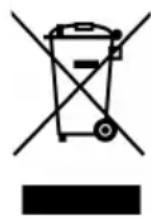
Recycling of electronic devices
This product is designed and manufactured with high quality materials and components which can be recycled and reused. This symbol means that electrical and electronic equipment, at their end-of-life, should be disposed of separately from your household waste. Please, dispose of this equipment at your local community waste collection/recycling centre. In the European Union there are separate collection systems for used electrical and electronic product. Please, help us to conserve the environment we live in!
Recycling of paper and carton
The material recycling symbol on the carton and user manual denotes that they are recyclable. Dispose them not with the normal household waste.

Recycling of plastic parts
The material recycling symbol on the plastic parts denotes that they are recyclable. Do not dispose them in household waste.

Green Dot
The “Grüne Punkt” denotes that the MAS Elektronik AG pays a duty to the “Society for Waste Prevention and Secondary Resource Generation”.

EC Declaration
EC Declaration
With the CE mark declares XORO, a registered trademark of the MAS Elektronik AG that this product meets the essential requirements and guidelines of the European regulations.


- XORO®
- Soundbar
- HSB 50 / HSB 75
- Safety Information
- First Steps
- Get Started / How to Connect
- Electrical Safety
- User Manual
- Safety Instructions
- Package Contents
- Characteristics
- Ports & Keys
- Remote Control
- Connect with the power supply
- Connect with the TV via the digital inputs
- Other Connections
- Bluetooth
- USB
- Hints
- FM Radio
- TROUBLESHOOTING
- Recycling Information
- Recycling of electronic devices
- Recycling of paper and carton
- Recycling of plastic parts
- Green Dot
- EC Declaration
Brand : XORO
Model : HSB 75
Category : Loudspeaker