
Core 5200 - Processor QSC - Free user manual and instructions
Find the device manual for free Core 5200 QSC in PDF.


| Product Type | Enterprise Processor |
| Model | Core 5200-G2 |
| Brand | QSC |
| Platform | Dell PowerEdge R740 (14th Generation) |
| Storage | 960 GB 2.5" SATA SSD (Q-SYS Media Drive) + Redundant Boot Media |
| Audio Playback | MTP-16 16-track audio player (upgradable to 32, 64, 128 tracks) |
| Network Ports | 2x Q-SYS LAN (RJ45), 2x Q-SYS AUX (RJ45), 1x iDRAC9 Enterprise (RJ45) |
| USB Ports | 2x USB 2.0 (front), 2x USB 3.0 (rear) |
| Video Output | VGA (female HD-15) front and rear |
| Serial Port | RS232 male DE-9 |
| Power Supply | Dual redundant 750W hot-plug with active hot-spare |
| Front Panel Display | LCD with navigation buttons and status indicator |
| Bezel | Removable active bezel with lock |
| Software | Q-SYS firmware pre-installed; compatible with Q-SYS Designer Software |
| Monitoring | iDRAC9 Enterprise for remote monitoring |
| Cleaning Instructions | Clean only with a dry cloth; do not use sprays or liquids |
| Safety | Do not install near water; refer servicing to qualified personnel |
| Support | Q-SYS Customer Support (business hours) and 24/7 emergency support |
Frequently Asked Questions - Core 5200 QSC
User questions about Core 5200 QSC
0 question about this device. Answer the ones you know or ask your own.
Ask a new question about this device
Download the instructions for your Processor in PDF format for free! Find your manual Core 5200 - QSC and take your electronic device back in hand. On this page are published all the documents necessary for the use of your device. Core 5200 by QSC.
USER MANUAL Core 5200 QSC
Q-SYS Core Processor
Quick Start Guide
Core 5200-G2 Enterprise Processor

Q-SYS Core Processor
Quick Start Guide
Core 5200-G2 Enterprise Processor

IMPORTANT SAFETY INSTRUCTIONS

- Read these instructions and keep a copy for future reference. Strictly follow and heed all instructions and warnings. Install the device only as instructed.
- Do not use or submerge this device in or near water or liquids.
- Clean only with a dry cloth. Do not use any aerosol spray, cleaner, disinfectant or fumigant on, near, or into the device.
- Do not install the device near any heat sources, such as radiators, heat registers, stoves, or other apparatus (including amplifiers).
• Refer all service to qualified personnel. - Observe all applicable local codes. Consult a licensed professional engineer when devising an equipment installation to ensure compliance.
Maintenance and Repair
Advanced technology—e.g., the use of modern materials and powerful electronics—requires specially adapted maintenance and repair methods. To avoid subsequent damage to the equipment, personal injury, and/or creation of additional safety hazards, have all maintenance or repair work on the equipment performed only by a QSC authorized service station or an authorized QSC international distributor. QSC is not responsible for any injury, harm, or related damages that arise from any failure of the customer, owner, or user of the equipment to facilitate those repairs.
Hardware description
The Q-SYS Core 5200 is a high-performance Enterprise Processor built on the PowerEdge™ R740 enterprise server platform from Dell™. The PowerEdge R740 is Dell's 14th generation enterprise server platform and is one of the most trusted server platforms on the market today. The Core 5200 hardware is uniquely configured to meet the processing demands and low-latency, real-time performance of Q-SYS. The Core 5200 ships with the latest Q-SYS firmware and feature set pre-installed and with support for local and remote monitoring via familiar IT tools that only Q-SYS and the PowerEdge R740 can offer.
The Q-SYS Core 5200 comes with redundant boot media and with redundant hot-plug power supplies with active hot-spare technology as standard features. Also standard is QSC's 2.5" SATA SSD Q-SYS Media Drive for ample storage of media files.
Figures 1 through 3 illustrate the front and rear panels of the Q-SYS Core 5200.
For additional information regarding hardware specifications, regulatory compliance, or iDRAC9, visit the Dell server website at: www.Dell.com/servers.
For additional information regarding the Q-SYS Core 5200 and other software feature specifications, Q-SYS Designer and other Q-SYS Systems products or solutions, visit the QSC website at www.qsc.com.
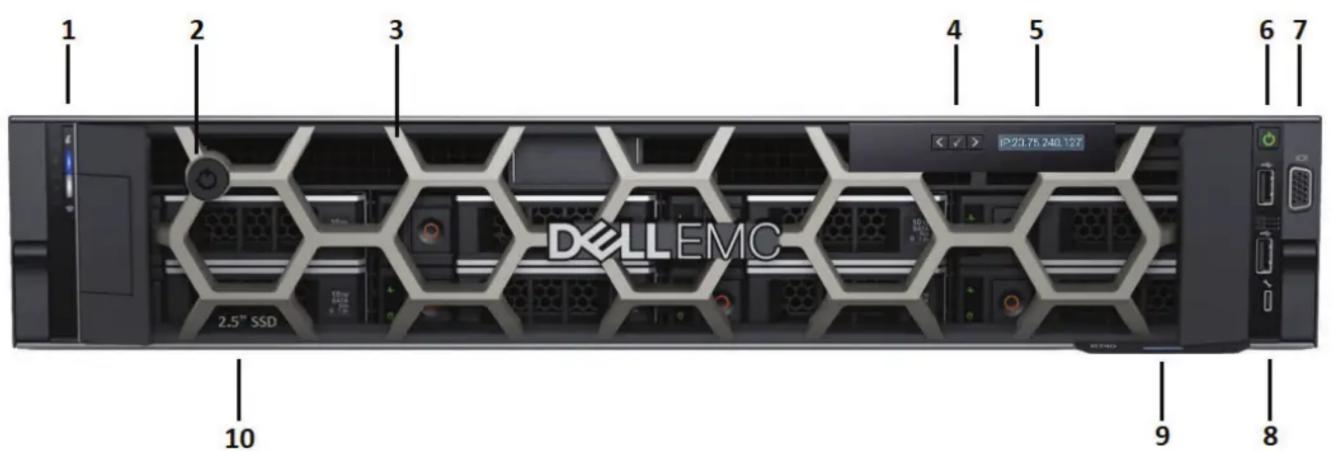
– Figure 1 – Front panel with bezel
- Status and ID indicator (enabled via Q-SYS Designer Software)
- Bezel lock
- Removable active bezel
- LCD navigation buttons
- LCD (displays Q-SYS Core name, status, or health alerts)
1 Includes the product serial number and Q-SYS support contact information.
2 The Q-SYS Core 5200 Enterprise Processor comes with an MTP-16 16-track audio player as a standard feature. Upgrades to 32, 64, and 128 tracks are available.
- Power button
- VGA video output (female HD-15)
- USB 2.0 host ports
- Slide-out information tag ^1
- Q-SYS 960 GB Media Drive ^2

– Figure 2 – Front panel with bezel removed
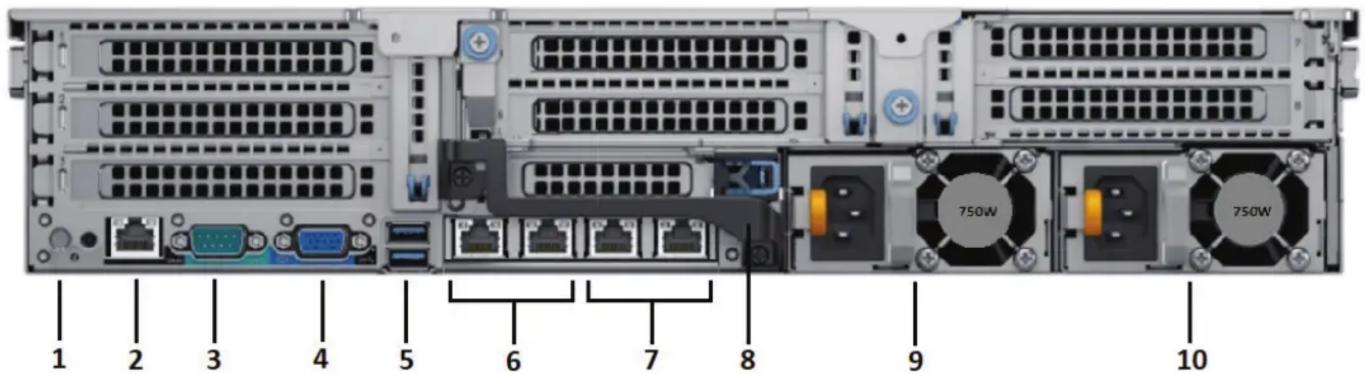
– Figure 3 – Rear panel features
- ID indicator (enabled via Q-SYS Designer Software)
- iDRAC9™ Enterprise Port (RJ45)1
- Serial communications RS232 (male DE-9)
- VGA video output (female HD15)
- USB 3.0 host ports
1 The iDRAC9 port is configured with the default IP address 192.168.0.120.
Default username: root Default password calvin
- Q-SYS LAN A and LAN B multimedia ports (two RJ45)
- Q-SYS AUX ports (two RJ45)
- Rear handle
- Power supply unit 1 (750 W, universal AC voltage)
- Power supply unit 2 (750 W, universal AC voltage)
QSC™
Mailing Address:
QSC, LLC
1675 MacArthur Boulevard
Costa Mesa, CA 92626-1468 USA
Main Number: +1 (714) 754-6175
World Wide Web: www.qsc.com
Sales & Marketing:
Voice: +1 (714) 957-7100 or toll free (US only) (800) 854-4079
FAX: +1 (714) 754-6174
E-mail: info@qsc.com
Q-SYS™ Customer Support
Application Engineering and Technical Services
Monday - Friday 7 AM to 5 PM Pacific Time (Excludes holidays)
Tel. 800-772-2834 (US only)
Tel. +1 (714) 957-7150
Q-SYS 24/7 Emergency Support\*
Tel: +1-888-252-4836 (US/Canada)
Tel: +1-949-791-7722 (non-US)

Q-SYS™ Customer Support
*Q-SYS 24/7 Support is only for emergency assistance with Q-SYS systems. 24/7 support guarantees a call back within 30 minutes after a message is left. Please include your name, company, call back number, and a description of the Q-SYS emergency for prompt call back. During business hours, however, please use the Application Engineering and Technical Services numbers at left.
Q-SYS Support Email
qsyssupport@qsc.com
(Immediate email response times not guaranteed)
QSC
Technical Services
1675 MacArthur Blvd.
Costa Mesa, CA 92626 USA
Tel: 800-772-2834 (US only)
Tel: +1 (714) 957-7150
FAX: +1 (714) 754-6173
- Q-SYS Core Processor
- Quick Start Guide
- Core 5200-G2 Enterprise Processor
- IMPORTANT SAFETY INSTRUCTIONS
- Maintenance and Repair
- Hardware description
- QSC™
- Mailing Address:
- Sales & Marketing:
- Q-SYS™ Customer Support
- Application Engineering and Technical Services
- Q-SYS 24/7 Emergency Support\*
- Q-SYS Support Email
- QSC
Brand : QSC
Model : Core 5200
Category : Processor