
MA-10D - Uncategorized ROLAND - Free user manual and instructions
Find the device manual for free MA-10D ROLAND in PDF.


| Product Type | Compact Powered Monitor Amplifier |
| Model | MA-10D |
| Brand | Roland |
| Dimensions (W x H x D) | 250 mm x 180 mm x 150 mm |
| Weight | 2.5 kg |
| Power Supply | AC 100-240 V, 50/60 Hz (external power adapter recommended) |
| Power Consumption | 30 W (max) |
| Inputs | 2x 1/4" TS unbalanced, 1x RCA stereo |
| Outputs | 1x Speaker output (1/4" TS), 1x Headphones (1/4" stereo) |
| Amplifier Power | 10 W per channel (stereo) / 20 W mono bridged |
| Frequency Response | 50 Hz - 20 kHz |
| Controls | Volume, Tone (Bass/Treble), Power switch |
| Indicators | Power LED, Signal LED |
| Key Functions | Personal monitoring for practice or small PA, line-level output for recording |
| Maintenance & Cleaning | Wipe with dry soft cloth; avoid solvents; keep vents clear |
| Safety | Do not expose to water or heat; use only recommended power adapter; operating temperature 0-40°C |
| Spare Parts & Repairability | Contact Roland authorized service; user-replaceable fuse (internal) |
| General Information | Designed for musicians and presenters requiring a compact, portable monitor solution |
Frequently Asked Questions - MA-10D ROLAND
User questions about MA-10D ROLAND
0 question about this device. Answer the ones you know or ask your own.
Ask a new question about this device
Download the instructions for your Uncategorized in PDF format for free! Find your manual MA-10D - ROLAND and take your electronic device back in hand. On this page are published all the documents necessary for the use of your device. MA-10D by ROLAND.
USER MANUAL MA-10D ROLAND
Before using this unit, carefully read the sections entitled: "IMPORTANT SAFETY INSTRUCTIONS" (p. 2), "USING THE UNIT SAFELY" (pp. 3–4), and "IMPORTANT NOTES" (p. 5). These sections provide important information concerning the proper operation of the unit. Additionally, in order to feel assured that you have gained a good grasp of every feature provided by your new unit, Owner's manual should be read in its entirety. The manual should be saved and kept on hand as a convenient reference.
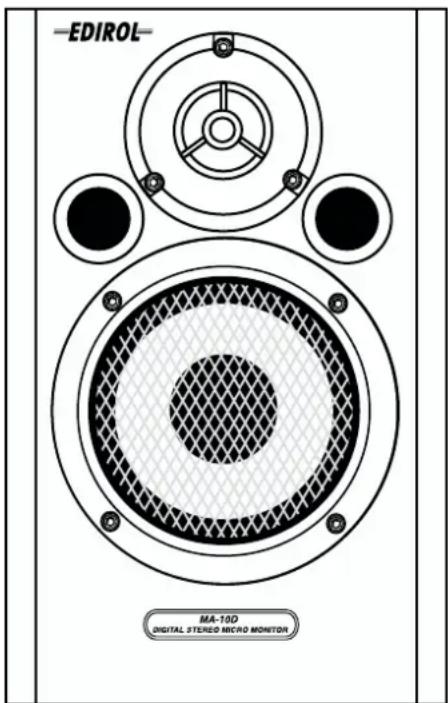
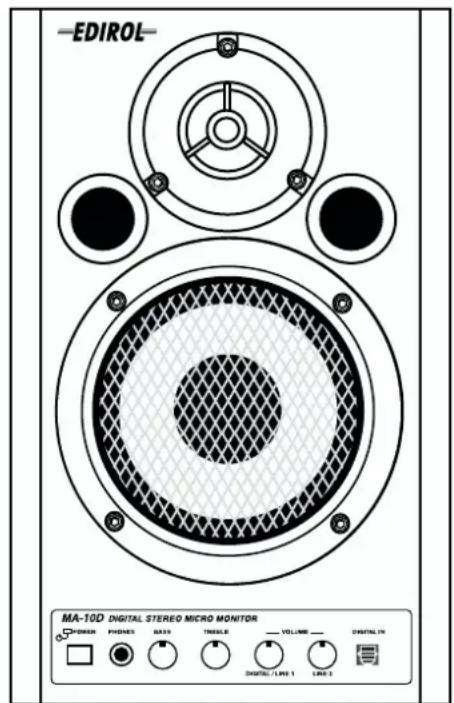

CAUTION
RISK OF ELECTRIC SHOCK DO NOT OPEN

ATTENTION
RISQUE DE CHOC ELECTRIQUE NE PAS OUVRIR
CAUTION: TO REDUCE THE RISK OF ELECTRIC SHOCK, DO NOT REMOVE COVER (OR BACK).
NO USER-SERVICEABLE PARTS INSIDE.
REFER SERVICING TO QUALIFIED SERVICE PERSONNEL.

The lightning flash with arrowhead symbol, within an equilateral triangle, is intended to alert the user to the presence of uninsulated "dangerous voltage" within the product's enclosure that may be of sufficient magnitude to constitute a risk of electric shock to persons.

The exclamation point within an equilateral triangle is intended to alert the user to the presence of important operating and maintenance (servicing) instructions in the literature accompanying the product.
INSTRUCTIONS PERTAINING TO A RISK OF FIRE, ELECTRIC SHOCK, OR INJURY TO PERSONS.
IMPORTANT SAFETY INSTRUCTIONS SAVE THESE INSTRUCTIONS
WARNING - When using electric products, basic precautions should always be followed, including the following:
- Read these instructions.
- Keep these instructions.
- Heed all warnings.
- Follow all instructions.
- Do not use this apparatus near water.
- Clean only with a damp cloth.
- Do not block any of the ventilation openings. Install in accordance with the manufacturers instructions.
- Do not install near any heat sources such as radiators, heat registers, stoves, or other apparatus (including amplifiers) that produce heat.
-
Do not defeat the safety purpose of the polarized or grounding-type plug. A polarized plug has two blades with one wider than the other. A grounding type plug has two blades and a third grounding prong. The wide blade or the third prong are provided for your safety. When the provided plug does not fit into your outlet, consult an electrician for replacement of the obsolete outlet.
-
Protect the power cord from being walked on or pinched particularly at plugs, convenience receptacles, and the point where they exit from the apparatus.
- Only use attachments/accessories specified by the manufacturer.
- Never use with a cart, stand, tripod, bracket, or table except as specified by the manufacturer, or sold with the apparatus. When a cart is used, use caution when moving the cart/apparatus combination to avoid injury from tip-over.
- Unplug this apparatus during lightning storms or when unused for long periods of time.
- Refer all servicing to qualified service personnel. Servicing is required when the apparatus has been damaged in any way, such as power-supply cord or plug is damaged, liquid has been spilled or objects have fallen into the apparatus, the apparatus has been exposed to rain or moisture, does not operate normally, or has been dropped.

For the U.K.
IMPORTANT: THE WIRES IN THIS MAINS LEAD ARE COLOURED IN ACCORDANCE WITH THE FOLLOWING CODE.
BLUE: NEUTRAL
BROWN: LIVE
As the colours of the wires in the mains lead of this apparatus may not correspond with the coloured markings identifying the terminals in your plug, proceed as follows:
The wire which is coloured BLUE must be connected to the terminal which is marked with the letter N or coloured BLACK.
The wire which is coloured BROWN must be connected to the terminal which is marked with the letter L or coloured RED.
Under no circumstances must either of the above wires be connected to the earth terminal of a three pin plug.
USING THE UNIT SAFELY
INSTRUCTIONS FOR THE PREVENTION OF FIRE, ELECTRIC SHOCK, OR INJURY TO PERSONS
About ⚠️ WARNING and ⚠️ CAUTION Notices
 | Used for instructions intended to alert the user to the risk of death or severe injury should the unit be used improperly. |
 | Used for instructions intended to alert the user to the risk of injury or material damage should the unit be used improperly.* Material damage refers to damage or other adverse effects caused with respect to the home and all its furnishings, as well to domestic animals or pets. |
About the Symbols
| [0443] | The △ symbol alerts the user to important instructions or warnings. The specific meaning of the symbol is determined by the design contained within the triangle. In the case of the symbol at left, it is used for general cautions, warnings, or alerts to danger. |
| [1967] | The ⊗ symbol alerts the user to items that must never be carried out (are forbidden). The specific thing that must not be done is indicated by the design contained within the circle. In the case of the symbol at left, it means that the unit must never be disassembled. |
| [21W2] | The ● symbol alerts the user to things that must be carried out. The specific thing that must be done is indicated by the design contained within the circle. In the case of the symbol at left, it means that the power-cord plug must be unplugged from the outlet. |
ALWAYS OBSERVE THE FOLLOWING
WARNING
- Before using this unit, make sure to read the instructions below, and the Owner's Manual.

- Do not open or perform any internal modifications on the unit.

- Do not attempt to repair the unit, or replace parts within it (except when this manual provides specific instructions directing you to do so). Refer all servicing to your retailer, the nearest EDIROL/Roland Service Center, or an authorized EDIROL/Roland distributor, as listed on the "Information" page.

- Never use or store the unit in places that are:
- Subject to temperature extremes (e.g., direct sunlight in an enclosed vehicle, near a heating duct, on top of heat-generating equipment); or are

- Damp (e.g., baths, washrooms, on wet floors); or are

- Humid; or are
- Exposed to rain; or are
- Dusty; or are
- Subject to high levels of vibration.
• Make sure you always have the unit placed so it is level and sure to remain stable. Never place it on stands that could wobble, or on inclined surfaces.

- The unit should be connected to a power supply only of the type described in the operating instructions, or as marked on the unit.

WARNING
- Do not excessively twist or bend the power cord, nor place heavy objects on it. Doing so can damage the cord, producing severed elements and short circuits. Damaged cords are fire and shock hazards!

- This unit, either alone or in combination with an amplifier and headphones or speakers, may be capable of producing sound levels that could cause permanent hearing loss. Do not operate for a long period of time at a high volume level, or at a level that is uncomfortable. If you experience any hearing loss or ringing in the ears, you should immediately stop using the unit, and consult an audiologist.

- Do not allow any objects (e.g., flammable material, coins, pins); or liquids of any kind (water, soft drinks, etc.) to penetrate the unit.

• In households with small children, an adult should provide supervision until the child is capable of following all the rules essential for the safe operation of the unit.

- Protect the unit from strong impact. (Do not drop it!)


WARNING
- Do not force the unit's power-supply cord to share an outlet with an unreasonable number of other devices. Be especially careful when using extension cords—the total power used by all devices you have connected to the extension cord's outlet must never exceed the power rating (watts/amperes) for the extension cord. Excessive loads can cause the insulation on the cord to heat up and eventually melt through.

- Before using the unit in a foreign country, consult with your retailer, the nearest EDIROL/Roland Service Center, or an authorized EDIROL/Roland distributor, as listed on the "Information" page.

CAUTION
- The unit should be located so that its location or position does not interfere with its proper ventilation.

• Always grasp only the plug on the power-supply cord when plugging into, or unplugging from, an outlet or this unit.

- Try to prevent cords and cables from becoming entangled. Also, all cords and cables should be placed so they are out of the reach of children.

- Never climb on top of, nor place heavy objects on the unit.

- Never handle the power cord or its plugs with wet hands when plugging into, or unplugging from, an outlet or this unit.

- Before moving the unit, disconnect the power plug from the outlet, and pull out all cords from external devices.

- Before cleaning the unit, turn off the power and unplug the power cord from the outlet (Maintenance → p. 5).

- Whenever you suspect the possibility of lightning in your area, pull the plug on the power cord out of the outlet.

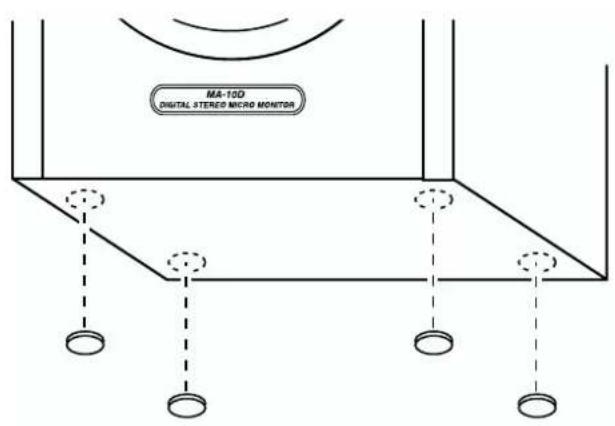
• Take care not to allow children to swallow the included rubber feet during handling. Also be sure to attach the feet to the speakers' underside to protect the surfaces on which they are placed.

IMPORTANT NOTES
In addition to the items listed under "IMPORTANT SAFETY INSTRUCTIONS" and "USING THE UNIT SAFELY" on pages 2–4, please read and observe the following:
Power Supply
- Do not use this unit on the same power circuit with any device that will generate line noise (such as an electric motor or variable lighting system).
- Before connecting this unit to other devices, turn off the power to all units. This will help prevent malfunctions and/or damage to speakers or other devices.
- When it is necessary to switch off the power completely, first switch off the unit's power switch, then unplug its power cord from the outlet. To facilitate doing this, you should plug the power cord into an outlet that is as close to the unit as possible, and can be easily reached when necessary.
Placement
- Using the unit near power amplifiers (or other equipment containing large power transformers) may induce hum. To alleviate the problem, change the orientation of this unit; or move it farther away from the source of interference.
- This device may interfere with radio and television reception. Do not use this device in the vicinity of such receivers.
- Do not expose the unit to direct sunlight, place it near devices that radiate heat, leave it inside an enclosed vehicle, or otherwise subject it to temperature extremes. Also, do not allow lighting devices that normally are used while their light source is very close to the unit (such as a piano light), or powerful spotlights to shine upon the same area of the unit for extended periods of time. Excessive heat can deform or discolor the unit.
- To avoid possible breakdown, do not use the unit in a wet area, such as an area exposed to rain or other moisture.
- Do not allow rubber, vinyl, or similar materials to remain on the unit for long periods of time. Such objects can discolor or otherwise harmfully affect the finish.
- Do not put anything that contains water (e.g., flower vases) on the unit. Also, avoid the use of insecticides, perfumes, alcohol, nail polish, spray cans, etc., near the unit. Swiftly wipe away any liquid that spills on the unit using a dry, soft cloth.
- Do not paste stickers, decals, or the like to this instrument. Peeling such matter off the instrument may damage the exterior finish.
- Do not allow objects to remain on top of the unit while it is in operation. Placing heavy objects on this unit may result in injury if it overturns or falls.
Maintenance
- To clean the unit, use a dry, soft cloth; or one that is slightly dampened. Try to wipe the entire surface using an equal amount of strength, moving the cloth along with the grain of the wood. Rubbing too hard in the same area can damage the finish.
- Never use benzine, thinners, alcohol or solvents of any kind, to avoid the possibility of discoloration and/or deformation.
Additional Precautions
- Use a reasonable amount of care when using the unit's buttons, sliders, or other controls; and when using its jacks and connectors. Rough handling can lead to malfunctions.
- When connecting / disconnecting all cables, grasp the connector itself—never pull on the cable. This way you will avoid causing shorts, or damage to the cable's internal elements.
- A small amount of heat will radiate from the unit during normal operation.
- To avoid disturbing your neighbors, try to keep the unit's volume at reasonable levels. You may prefer to use headphones, so you do not need to be concerned about those around you (especially when it is late at night).
- When you need to transport the unit, package it in the box (including padding) that it came in, if possible. Otherwise, you will need to use equivalent packaging materials.
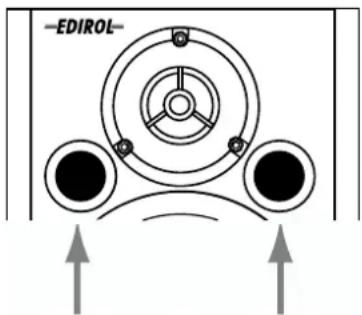
- Be sure to avoid inserting your fingers in the bass reflex ports when transporting or moving the speakers, as your fingers may become wedged and stuck in the ports.
- Use a cable from Roland to make the connection. If using some other make of connection cable, please note the following precautions.
- Some connection cables contain resistors. Do not use cables that incorporate resistors for connecting to this unit. The use of such cables can cause the sound level to be extremely low, or impossible to hear. For information on cable specifications, contact the manufacturer of the cable.
Panel Description
Left Channel
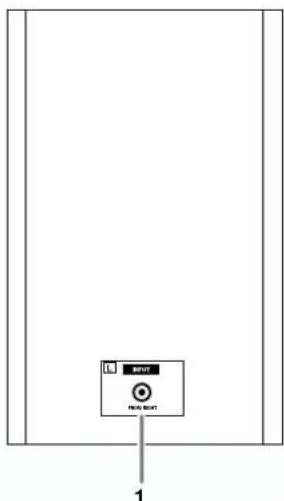
1. L Channel Input Jack
Connect this to L Channel Output Jack 10 on the right-side unit. For the connection, use the included speaker cable.
2. POWER Switch, POWER/STANDBY Indicator
The POWER/STANDBY Indicator lights up in red during standby, and lights up in green when power is on.
3. PHONES Jack
When you connect headphones to this jack, no sound will be heard from the speakers.
4. BASS Control Knob
5. TREBLE Control Knob
These adjust the tones of the bass and treble. Set to center to make the tones flat.
6. VOLUME Knob (LINE 1)
7. VOLUME Knob (LINE 2)
These adjust the volume of devices connected to LINE 1 Input Jack 8, and to LINE 2 Input Jacks 9, respectively.
8. LINE 1 Input Jack (stereo mini type)
9. LINE 2 Input Jacks (L, R) (RCA pin type)
10. L Channel Output Jack
Connect this to L Channel Input Jack 1 on the left-side unit.
11. AC Inlet
Connect the included Power cord here (p. 17). Plug it firmly in, so that the cable does not accidentally become disconnected.
Right Channel
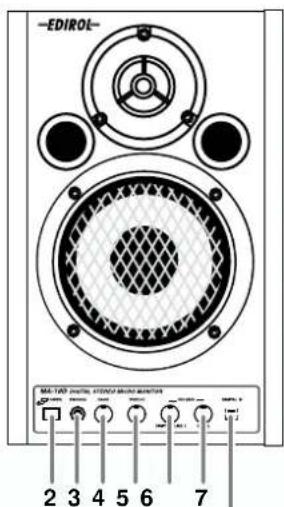
(A) B
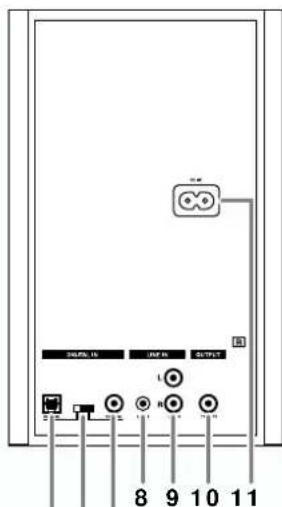
C D E
The features below apply only to the MA-10D.
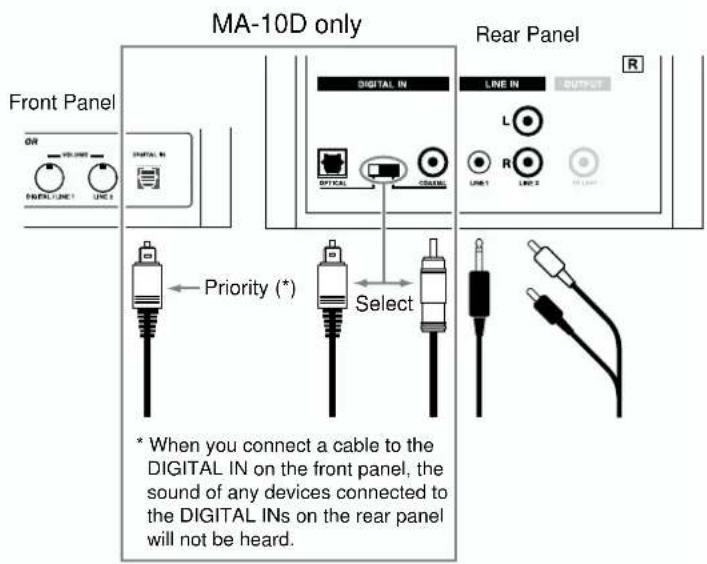
A. VOLUME Knob (DIGITAL/LINE 1)
This adjusts the volume of devices connected to digital input connectors B, C, E, and LINE 1 Input Jack 8.
B. Digital Input Connector (Optical)
This is the digital input connector for optic-fiber cable.
* When you connect a cable to this connector, the sound of devices connected to digital input connector C or E will not be heard.
C. Digital Input Connector (Optical)
This is the digital input connector for optic-fiber cable.
D. Digital Input Select Switch
This switch selects digital input connector C or E on the rear panel. Select the connector used for the input signal.
* When you connect a cable to digital input connector B on the front panel, the sound of the device connected to B will be heard independently of this switch.
E. Digital Input Connector (Coaxial)
This is the digital input connector for coaxial cable.
Connections
Attaching the Rubber Feet (Included)
Precautions When Connecting and Turning on the Power
• To prevent malfunction and/or damage to speakers or other devices, always turn down the volume, and turn off the power on all devices before making any connections.
- Using a connection cable that contains a resistor can cause the sound level to be low. Use a connection cable that does not contain a resistor.
- Once the connections have been completed, turn on power to your various devices in the order specified. By turning on devices in the wrong order, you risk causing malfunction and/or damage to speakers and other devices. (When turning the power off, reverse this procedure.)
• Always make sure to have the volume level turned down before switching on power. Even with the volume all the way down, you may still hear some sound when the power is switched on, but this is normal, and does not indicate a malfunction.
Connection Example
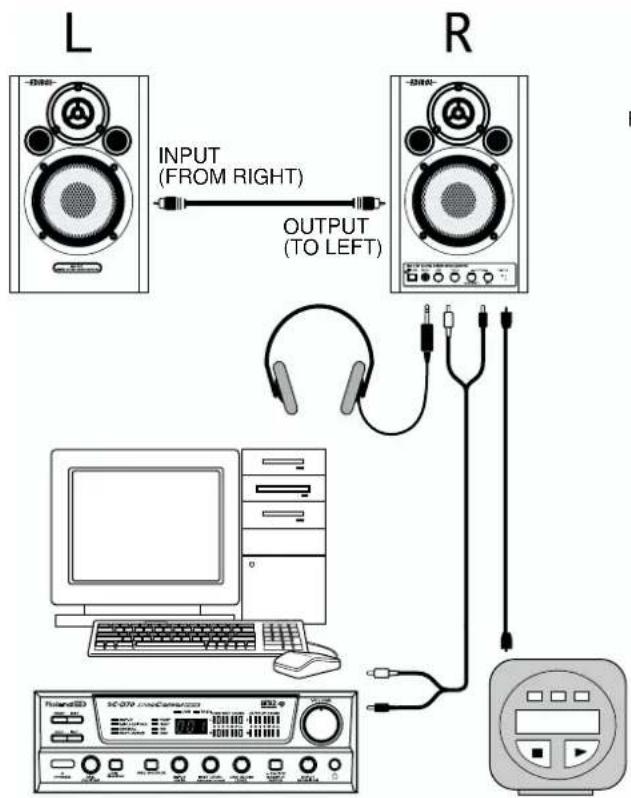
flowchart
graph TD
    L["Speaker L"] -->|INPUT (FROM RIGHT)| R["Speaker R"]
    R -->|OUTPUT (TO LEFT)| Hone1["Headphones"]
    Hone1 -->|USB| Computer["Computer"]
    Computer -->|USB| Audio["Audio Recorder"]
    Audio -->|USB| Display["Display"]
    Display -->|USB| Audio
    style L fill:#f9f,stroke:#333
    style R fill:#f9f,stroke:#333
    style Hone1 fill:#ccf,stroke:#333
    style Computer fill:#cfc,stroke:#333
    style Audio fill:#fcc,stroke:#333
    style Display fill:#ffc,stroke:#333
Sound Module, CD Player, MD Player, etc.
A. Bouton VOLUME (DIGITAL/LINE 1)
flowchart
graph TD
    A["Speaker with 'ENREE' label"] -->|ENTREE (DE LA DROITE)| B["Speaker with 'ENRIE' label"]
    B -->|SORTIE (VERS LA GAUCHE)| C["Computer with headphones"]
    C --> D["Scotv Audio Cameroon"]
    D --> E["Monitor with USB cable"]
    E --> F["Audio device"]
A. Manopola VOLUME (DIGITAL/LINE 1)
-
Control VOLUME (LÍNEA 1)
-
Control VOLUME (LÍNEA 2)
A Control VOLUME (DIGITAL/LÍNEA 1)
3-5/8" (Magnetically-Shielded)
Tweeter: 5 cm /
2" (Magnetically-Shielded)
Frequency Range
45 Hz to 35 kHz
Nominal Input Level
Line: -10 dBu
Stereo: -10 dBu
Input Impedance
18 k ohms
Controls
BASS Control Knob
TREBLE Control Knob
VOLUME Knob x 2
• VOLUME 1 (stereo mini)
(MA-10D: digital inputs + stereo mini)
• VOLUME 2 (RCA phono)
POWER Switch
Digital Input Select Switch (MA-10D only)
Indicator
Power/Standby Indicator
Connectors
Front: PHONES Jack (stereo miniature phone type)
Optical Input Connector (MA-10D only)
Rear: LINE 1 Jack (stereo miniature phone type)
LINE 2 Jacks (L, R) (RCA phono type)
L Channel Output Jack (RCA phono type)
Optical Input Connector (MA-10D only)
Coaxial Input Connector (MA-10D only)
Rear: L Channel Input Jack (RCA phono type)
Digital Input Section (MA-10D)
Sampling Rate: 32/44.1/48/96 kHz, 24-bit
D/A Converter: 24-bit
Enclosure
2 way Bass-reflex type (Wooden Cabinet)
Power Supply
AC 117 V, AC 230 V or AC 240 V
Power Consumption
230 mA (AC 117 V)
120 mA (AC 230 V)
110 mA (AC 240 V)
Dimensions
6-3/16 (W) x 7-13/16 (D) x 9-3/8 (H) inches
Weight
3.5 kg / 7 lbs 12 oz
2.3 kg / 5 lbs 2 oz
Accessories
Owner's Manual
Conversion Cable
(stereo miniature phone type RCA phono type)
Speaker Cable (RCA phono type)
Power Cord
* 0 dBu = 0.775 V rms
* In the interest of product improvement, the specifications and/or appearance of this unit are subject to change without prior notice.
For 230 V (English)
This box contains continental and British power cables. Please select the correct type for your country.
Für 230 V (Deutsch)
EDIROL
EUROPE
EDIROL (Europe) Ltd.
Studio 3.4 114 Power Road
London W4 5PY
U.K.
TEL: +44 (0)20 8747 5949
FAX:+44 (0)20 8747 5948
http://www.edirol.com/europe
Deutschland
TEL: 0700 33 47 65 20
France
TEL: 0810 000 371
Italia
TEL: 02 93778329
Roland
NORTH AMERICA
CANADA
Roland Canada Music Ltd.
(Head Office)
5480 Parkwood Way Richmond
B. C., V6V 2M4 CANADA
TEL: (604) 270 6626
Roland Canada Music Ltd.
(Toronto Office)
170 Admiral Boulevard
Mississauga On L5T 2N6
CANADA
TEL: (905) 362 9707
U. S. A.
Roland Corporation U.S.
5100 S. Eastern Avenue
Los Angeles, CA 90040-2938,
U.S.A.
TEL: (323) 890 3700
AFRICA
EGYPT
Al Fanny Trading Office
9, EBN Hagar A1 Askalany
Street,
ARD E1 Golf, Heliopolis,
Cairo 11341, EGYPT
TEL: 20-2-417-1828
REUNIÓN
Royal Cape Park, Unit 24
Londonderry Road, Ottery 7800
Cape Town, SOUTH AFRICA
TEL: (021) 799 4900
ASIA
CHINA
Roland Shanghai Electronics
Co., Ltd.
5F. No.1500 Pingliang Road
Shanghai 200090, CHINA
TEL: (021) 5580-0800
Roland Shanghai Electronics
Co,Ltd.
(BEIJING OFFICE)
10F. No.18 3 Section Anhuaxili
Chaoyang District Beijing
100011 CHINA
TEL: (010) 6426-5050
Roland Shanghai Electronics
Co., Ltd.
(GUANGZHOU OFFICE)
2/F., No.30 Si You Nan Er Jie
Yi Xiang, Wu Yang Xin Cheng
Guangzhou 510600, CHIN
TEL: (020) 8736-0428
HONG KONG
Parsons Music Ltd.
8th Floor, Railway Plaza, 39
Chatham Road South, T.S.T,
Kowloon, HONG KONG
TEL: 2333 1863
INDIA
Rivera Digitec (India) Pvt. Ltd.
409, Nirman Kendra
Mahalaxmi Flats Compound
Off. Dr. Edwin Moses Road,
Mumbai-400011, INDIA
TEL: (022) 2493 9051
INDONESIA
PT Citra IntiRama
J1. Cideng Timur No. 15J-150
Jakarta Pusat
INDONESIA
TEL: (021) 6324170
KOREA
Cosmos Corporation
1461-9, Seocho-Dong,
Scocho Ku, Seoul, KOREA
TEL: (02) 3486-8855
MALAYSIA/
SINGAPORE
Roland Asia Pacific Sdn. Bhd.
45-1, Block C2, Jalan PJU 1/39,
Dataran Prima, 47301 Petaling
Jaya, Selangor, MALAYSIA
TEL: (03) 7805-3263
PHILIPPINES
G.A. Yupangco & Co. Inc.
339 Gil J. Puyat Avenue
Makati, Metro Manila 1200,
PHILIPPINES
TEL: (02) 899 9801
TAIWAN
ROLAND TAIWAN
ENTERPRISE CO., LTD.
Room 5, 9fl. No. 112 Chung
Shan N.Road Sec.2, Taipei,
TAIWAN, R.O.C.
TEL: (02) 2561 3339
THAILAND
Theera Music Co., Ltd.
330 Soi Verng NakornKasem,
New Road, Sumpantawongse,
Bangkok 10100, THAILAND
TEL: (02) 224-8821
VIETNAM
SAIGON MUSIC
DISTRIBUTOR
(TAN DINH MUSIC)
138 Tran Quang Khai Street
Dist. 1, Ho Chi Minh City
VIETNAM
TEL: (08) 848-4068
AUSTRALIA/ NEW ZEALAND
AUSTRALIA/
NEW ZEALAND
Roland Corporation
Australia Pty., Ltd.
38 Campbell Avenue
Dee Why West. NSW 2099
AUSTRALIA
For Australia
Tel: (02) 9982 8266
For New Zealand
Tel: (09) 3098 715
CENTRAL/LATIN AMERICA
ARGENTINA
Instrumentos Musicales S.A.
Av.Santa Fe 2055
(1123) Buenos Aires
ARGENTINA
TEL: (011) 4508-2700
BARBADOS
A&B Music Supplies LTD
12 Webster Industrial Park
Wildey, St.Michael, Barbados
TEL:(246)430-1100
BRAZIL
Roland Brasil Ltda.
Rua San Jose, 780 Sala B
Parque Industrial San Jose
Cotia - Sao Paulo - SP, BRAZIL
TEL:(011)4615 5666
CHILE
Comercial Fancy II S.A.
Rut.: 96.919.420-1
Nataniel Cox #739, 4th Floor
Santiago - Centro, CHILE
TEL: (02) 688-9540
COLOMBIA
Centro Musical Ltda.
Cra 43 B No 25 A 41 Bododega 9
Medellin, Colombia
TEL: (574)3812529
CURACAO
Zeelandia Music Center Inc.
Orionweg 30
Curacao, Netherland Antilles
TEL:(305)5926866
DOMINICAN REPUBLIC
Instrumentos Fernando Giraldez
155, New National Road
Patras 26442, GREECE
TEL: 2610 435400
HUNGARY
Roland East Europe Ltd.
Warehouse Area 'DEPO' Pf.83
II-2046 Torokbalint,

For EU Countries
This product complies with the requirements of European Directives EMC 89/336/EEC and LVD 73/23/EEC.
-For the USA
FEDERAL COMMUNICATIONS COMMISSION RADIO FREQUENCY INTERFERENCE STATEMENT
This equipment has been tested and found to comply with the limits for a Class B digital device, pursuant to Part 15 of the FCC Rules. These limits are designed to provide reasonable protection against harmful interference in a residential installation. This equipment generates, uses, and can radiate radio frequency energy and, if not installed and used in accordance with the instructions, may cause harmful interference to radio communications. However, there is no guarantee that interference will not occur in a particular installation. If this equipment does cause harmful interference to radio or television reception, which can be determined by turning the equipment off and on, the user is encouraged to try to correct the interference by one or more of the following measures:
- Reorient or relocate the receiving antenna.
- Increase the separation between the equipment and receiver.
- Connect the equipment into an outlet on a circuit different from that to which the receiver is connected.
— Consult the dealer or an experienced radio/TV technician for help.
This device complies with Part 15 of the FCC Rules. Operation is subject to the following two conditions:
(1) This device may not cause harmful interference, and
(2) This device must accept any interference received, including interference that may cause undesired operation.
Tested To Comply With FCC Standards
FOR HOME OR OFFICE USE
Unauthorized changes or modification to this system can void the users authority to operate this equipment. This equipment requires shielded interface cables in order to meet FCC class B Limit.
For Canada
NOTICE
This Class B digital apparatus meets all requirements of the Canadian Interference-Causing Equipment Regulations.
AVIS
- CAUTION
- IMPORTANT SAFETY INSTRUCTIONS SAVE THESE INSTRUCTIONS
- USING THE UNIT SAFELY
- INSTRUCTIONS FOR THE PREVENTION OF FIRE, ELECTRIC SHOCK, OR INJURY TO PERSONS
- ALWAYS OBSERVE THE FOLLOWING
- WARNING
- IMPORTANT NOTES
- Power Supply
- Placement
- Maintenance
- Additional Precautions
- Panel Description
- Left Channel
- L Channel Input Jack
- POWER Switch, POWER/STANDBY Indicator
- PHONES Jack
- BASS Control Knob
- TREBLE Control Knob
- VOLUME Knob (LINE 1)
- VOLUME Knob (LINE 2)
- LINE 1 Input Jack (stereo mini type)
- LINE 2 Input Jacks (L, R) (RCA pin type)
- L Channel Output Jack
- AC Inlet
- Right Channel
- The features below apply only to the MA-10D.
- VOLUME Knob (DIGITAL/LINE 1)
- Digital Input Connector (Optical)
- Digital Input Connector (Optical)
- Digital Input Select Switch
- Digital Input Connector (Coaxial)
- Connections
- Precautions When Connecting and Turning on the Power
- Frequency Range
- Nominal Input Level
- Input Impedance
- Controls
- Indicator
- Connectors
- Digital Input Section (MA-10D)
- Enclosure
- Power Consumption
- Dimensions
- Weight
- Accessories
- For 230 V (English)
- Für 230 V (Deutsch)
- EDIROL
- EUROPE
- Roland
- NORTH AMERICA
- CANADA
- S. A.
- AFRICA
- EGYPT
- REUNIÓN
- ASIA
- CHINA
- HONG KONG
- INDIA
- INDONESIA
- KOREA
- MALAYSIA/
- SINGAPORE
- PHILIPPINES
- TAIWAN
- THAILAND
- VIETNAM
- AUSTRALIA/ NEW ZEALAND
- AUSTRALIA/
- NEW ZEALAND
- CENTRAL/LATIN AMERICA
- ARGENTINA
- BARBADOS
- BRAZIL
- CHILE
- COLOMBIA
- CURACAO
- DOMINICAN REPUBLIC
- HUNGARY
- FEDERAL COMMUNICATIONS COMMISSION RADIO FREQUENCY INTERFERENCE STATEMENT
- FOR HOME OR OFFICE USE
- NOTICE
- AVIS
Brand : ROLAND
Model : MA-10D
Category : Uncategorized