
KIT-7RNG - Car kit ALPINE - Free user manual and instructions
Find the device manual for free KIT-7RNG ALPINE in PDF.


| Product Type | Steering Wheel Control Interface Installation Kit |
| Brand | Alpine |
| Model | KIT-7RNG |
| Compatible Vehicles | Jeep Renegade (2014 and later) with VP2/VP2 NAV original radio |
| Kit Contents | SWC interface, wiring harness, FM antenna adapter, DAB antenna adapter |
| Supported Steering Wheel Functions | Source, Seek up/down, Volume up/down, Mute, Accept/reject call, Voice |
| Interface Settings | Date & time, language, follow me, delayed reverse, camera guide lines, measure/temperature/pressure units, ambient light, courtesy lights, cornering light, automatic high beam, door auto close, passive entry, parking brake, anticollision, parking sensors, lane assist, blind spot, rain sensor, HVAC (AC profile) |
| Antenna Adapters | FM and DAB antenna adapters included |
| Wiring Harness Details | Red wire (underkey, max 500 mA), Yellow wire (permanent, max 500 mA), Black wire (GND), plus antenna and camera connections |
| Special Feature | ESD protection: Wheel remote jack must be connected before car connectors |
| Buzzer Placement | Recommended behind air grille area near steering wheel |
| Vehicle Settings Addressed | Parking sensors displayed in dashboard, active only when moving |
| Installation Requirement | Must be performed by a qualified professional installer only |
| Manual Languages | English (original), other languages available on request |
| Document Format | PDF, 4 pages |
Frequently Asked Questions - KIT-7RNG ALPINE
User questions about KIT-7RNG ALPINE
0 question about this device. Answer the ones you know or ask your own.
Ask a new question about this device
Download the instructions for your Car kit in PDF format for free! Find your manual KIT-7RNG - ALPINE and take your electronic device back in hand. On this page are published all the documents necessary for the use of your device. KIT-7RNG by ALPINE.
USER MANUAL KIT-7RNG ALPINE
Steering wheel control interface installation kit for:
JEEP
Model: Renegade with VP2/VP2 NAV original RADIO;
Year: 2014>
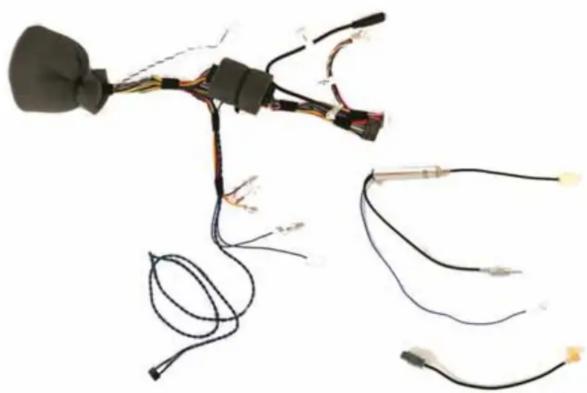
Kit content: SWC interface
wiring harness
FM antenna adapter
DAB antenna adapter
Customer code:
INSTALLATION MANUAL
All installation work must be performed by a qualified professional installer only.
The manufacturer / dealer is not liable for any kind of incidental or indirect damages.
10/2018 ALL RIGHTS RESERVED. Technical changes possible. No liability for misprints.
All installation work must be performed by a qualified professional installer only.
The manufacturer / dealer is not liable for any kind of incidental or indirect damages.
10/2018 ALL RIGHTS RESERVED. Technical changes possible. No liability for misprints.
ATTENTION!
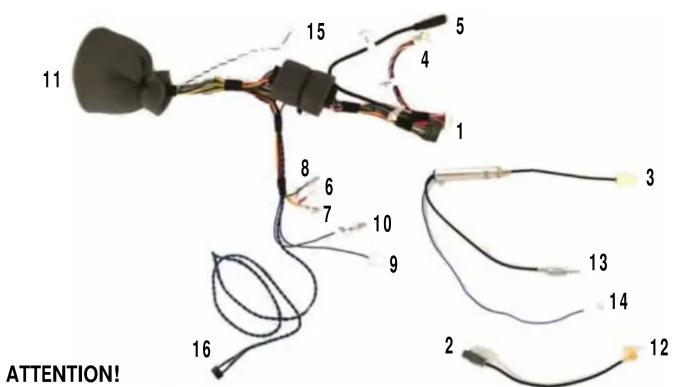
In order to prevent ESD damage, the WHEEL REMOTE JACK must be connected before plugging in the connectors on car side.
Connect cables as follows:
1- to RADIO CONNECTOR
2- to CAR ANTENNA CONNECTOR
3- to CAR ANTENNA CONNECTOR (with iLX-702D, X802D-U, INE-W710D, iLX-F903D Radio)
4- to CAMERA IN
5- to AUX IN
6- Red wire UNDERKEY - available for external accessories MAX 500 mA
7- Yellow wire PERMANENT - available for external accessories
8- Black wire GND - available for external accessories
9- AUT ANTENNA SIGNAL
10- to CAMERA CONTROL
11- to CAR CONNECTOR
12- to RADIO ANTENNA CONNECTOR
13- to RADIO ANTENNA CONNECTOR (with iLX-702D, X802D-U, INE-W710D, iLX-F903D Radio)
14 - to the point n°9 (AUT ANTENNA SIGNAL)
NOTE: 15- Connect to point n°3 only if original RVC installed
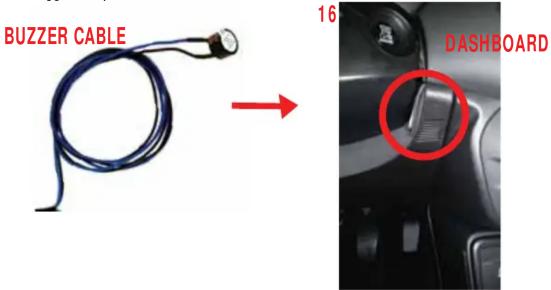
NOTE: 16- Find near the steering wheel the area where air grille is placed (highlighted in the picture).
We suggest to place the buzzer behind this area for a better sound diffusion.
copy for the vehicle owner
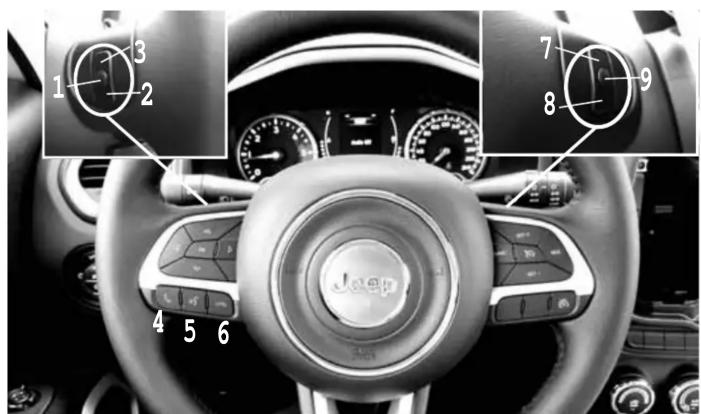
The steering wheel buttons perform the following functions (if supported by the radio):
1- Source 2- Seek down 3- Seek up 4- Accept incoming call 5- Voice 6- Reject incoming call 7- Volume up 8- Volume down 9- Mute
If your vehicle has the configuration shown in the picture, the buttons can carry out the functions listed below:
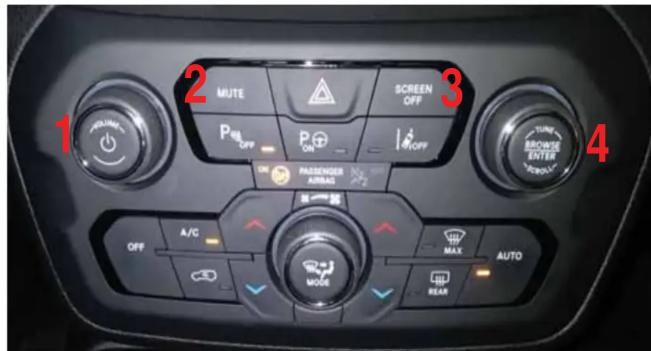
• 1 Left => decrease Volume • 1 Right => increase Volume - 1 Press => toggle ignition - 2 Press => mute - 3 Press => toggle ignition - 4 Left => seek - - 4 Right => seek + - 4 Press => toggle ignition
NOTE: Access the interface setting menu as shown in the pictures.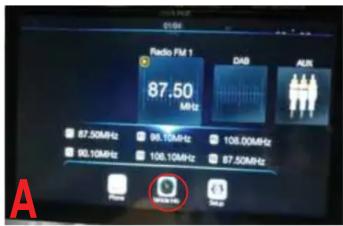
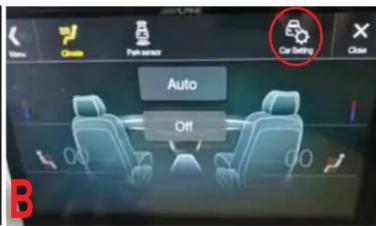
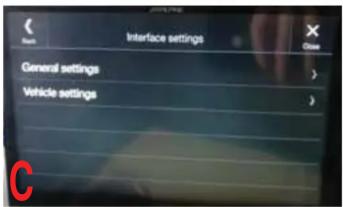
The available settings are (if the related optional is equipped by the car):
- Date & Time change
- Language change
- Follow me settings
- delayed reverse • delayed reverse timing • camera guide lines visualization • measure unit change • temperature unit change
- pressure unit change
- ambient light intensity change • courtesy lights setting • cornering light setting • light management at shutdown • automatic high beam • doors automatic closing setting • passive entry setting • door unlock selection • automatic parking brake management • anticollision warning setting
- parking sensor setting • radio mute on park sensor setting
- lane assist settings
- lane assist strength
- blind spot warning management • side sense management
- rain sensor settings
AUTO HVAC (Heat Ventilation Air conditioning and Cooling) ONLY
MAX AC: this function is not carried out by the vehicle buttons.
- The user must set the desired function MAX AC manually, by using the wheel
and the buttons on the vehicle;
DUAL: this function is not carried out by the vehicle buttons.
- The user must press the OFF button twice to use the sync command;
Alpine H/U displays AC profile. This information cannot be changed.
- Middle is displayed. Choices are: Low, Middle, High.
NOTE
Jeep Renegade parking sensors can be displayed in the dashboard display.
Parking Distance Control is active and emits sounds only if the vehicle is moving.
Brand : ALPINE
Model : KIT-7RNG
Category : Car kit