
Precision 3450 Small Form Factor - Desktop computer DELL - Free user manual and instructions
Find the device manual for free Precision 3450 Small Form Factor DELL in PDF.


User questions about Precision 3450 Small Form Factor DELL
0 question about this device. Answer the ones you know or ask your own.
Ask a new question about this device
Download the instructions for your Desktop computer in PDF format for free! Find your manual Precision 3450 Small Form Factor - DELL and take your electronic device back in hand. On this page are published all the documents necessary for the use of your device. Precision 3450 Small Form Factor by DELL.
USER MANUAL Precision 3450 Small Form Factor DELL
Precision 3450 Small Form Factor
Setup and Specifications
Notes, cautions, and warnings
NOTE: A NOTE indicates important information that helps you make better use of your product.
CAUTION: A CAUTION indicates either potential damage to hardware or loss of data and tells you how to avoid the problem.
WARNING: A WARNING indicates a potential for property damage, personal injury, or death.
Set up your computer
Steps
- Connect the keyboard and mouse.
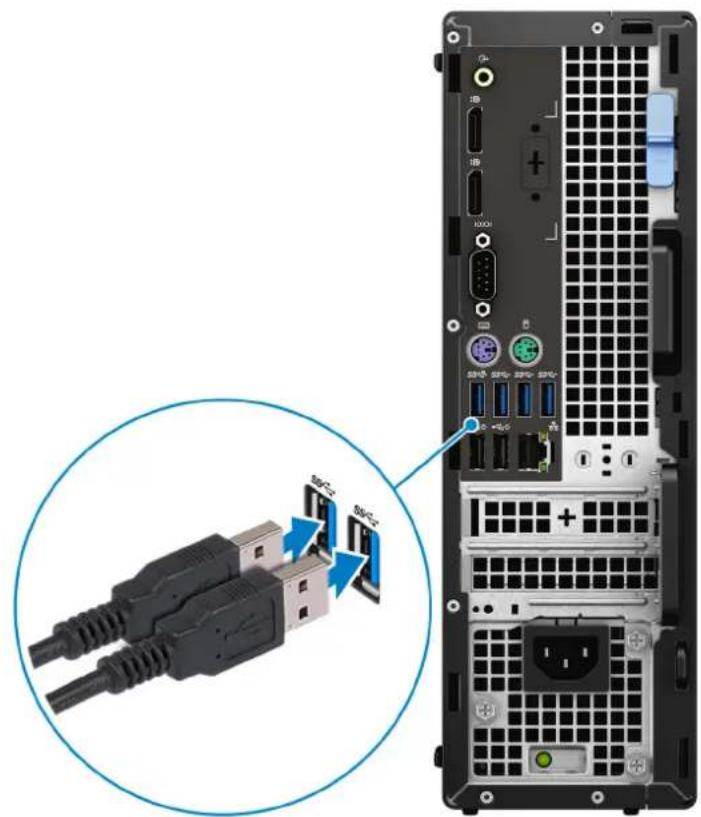
natural_image
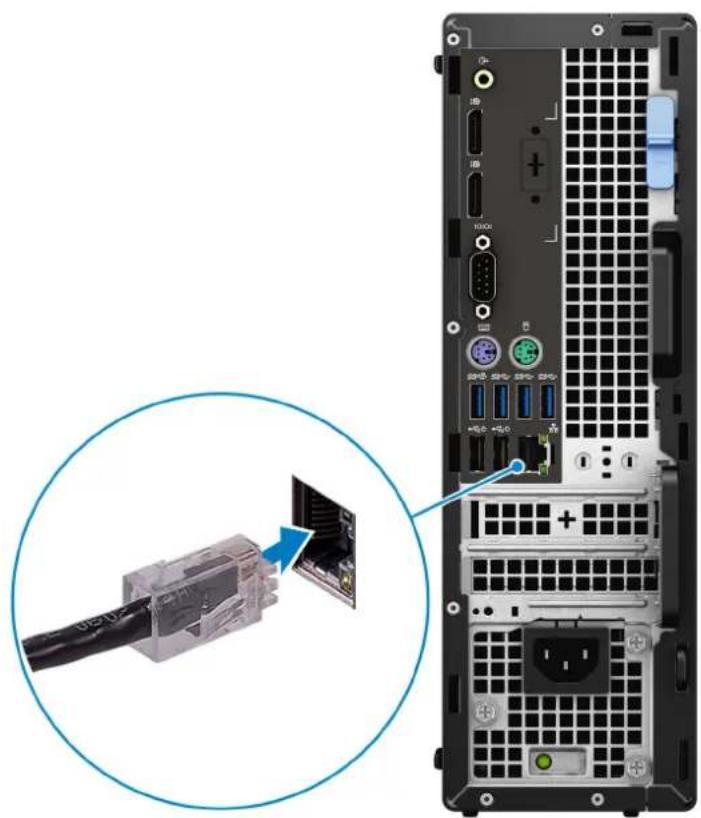
Back view of a server rack with connected USB connectors and ports, showing internal wiring (no text or symbols visible)- Connect to your network using a cable, or connect to a wireless network.
natural_image
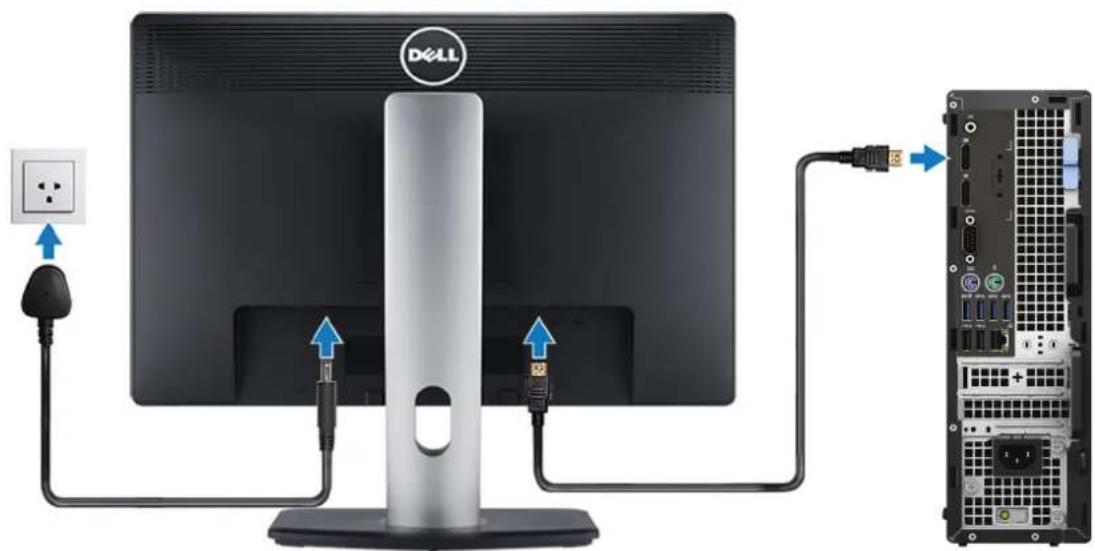
Back view of a server rack with an attached network device showing internal components and a magnified inset (no text or symbols visible)- Connect the display.
text_image
Diagram showing connections between a Dell monitor and an external server, with labeled cable and port ports.
NOTE: If you ordered your computer with a discrete graphics card, connect the display cable to the discrete graphics card connectors.
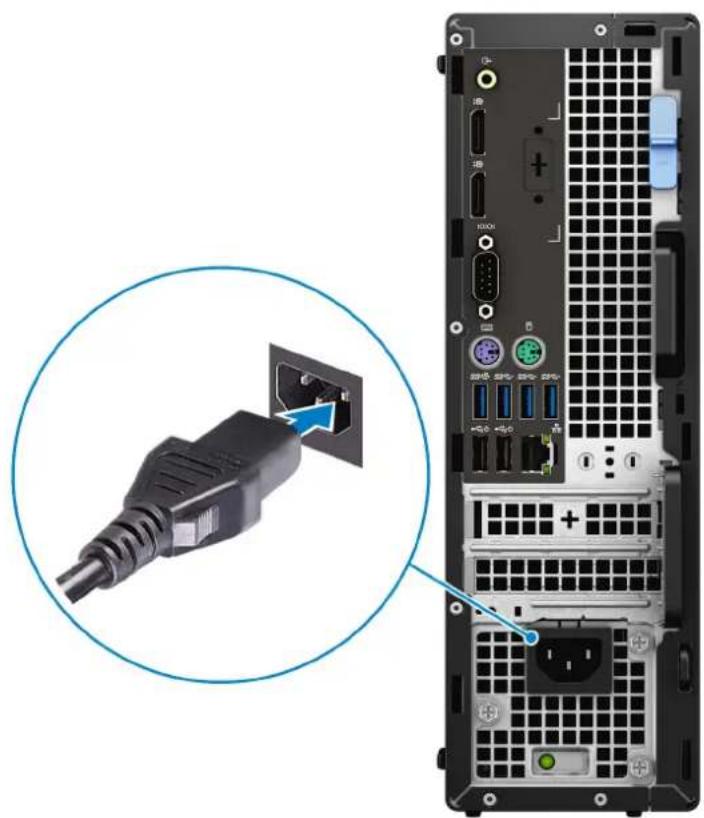
- Connect the power cable.
natural_image
Back view of a server rack with an attached black cable connector, showing port labels and status indicators (no readable text or symbols)- Press the power button.
natural_image
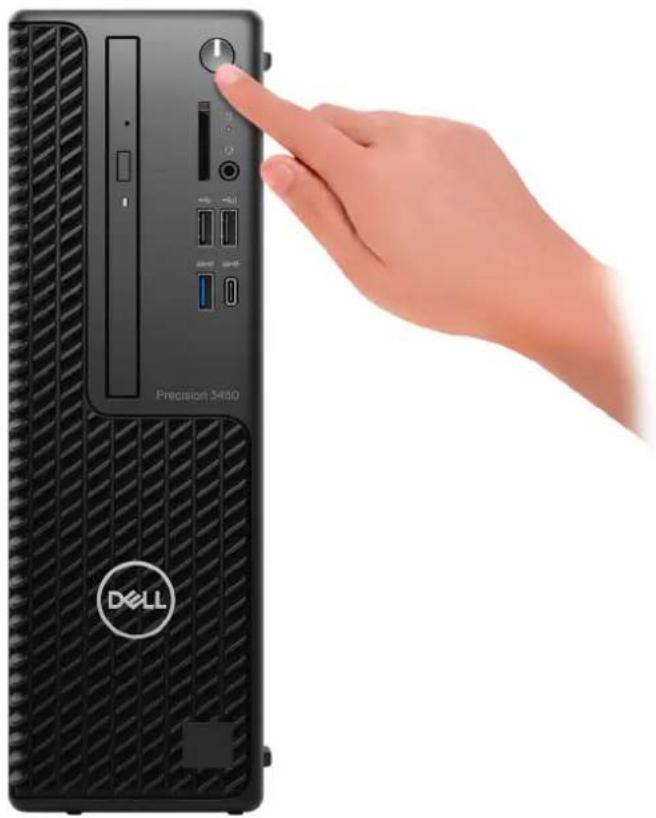
Hand pointing at a Dell 3400 precision tower front panel (no visible text or symbols on main body)- Finish operating system setup.
For Windows: Follow the on-screen instructions to complete the setup. When setting up, Dell recommends that you:
- Connect to a network for Windows updates.

NOTE: If connecting to a secured wireless network, enter the password for the wireless network access when prompted.
- If connected to the internet, sign in with or create a Microsoft account. If not connected to the Internet, create an offline account.
- On the Support and Protection screen, enter your contact details.
a. Connect to a network.
b. Sign-in to your Microsoft account or create a new account.
- Locate and use Dell apps from the Windows Start menu.
Table 1. Locate Dell apps
 | Dell Product RegistrationRegister your computer with Dell. |
 | Dell Help & SupportAccess help and support for your computer. |
 | SupportAssistProactively checks the health of your computer's hardware and software. |
Table 1. Locate Dell apps (continued)
| NOTE: Renew or upgrade your warranty by clicking the warranty expiry date in SupportAssist. | |
 | Dell UpdateUpdates your computer with critical fixes and important device drivers as they become available. |
 | Dell Digital DeliveryDownload software applications including software that is purchased but not preinstalled on your computer. |
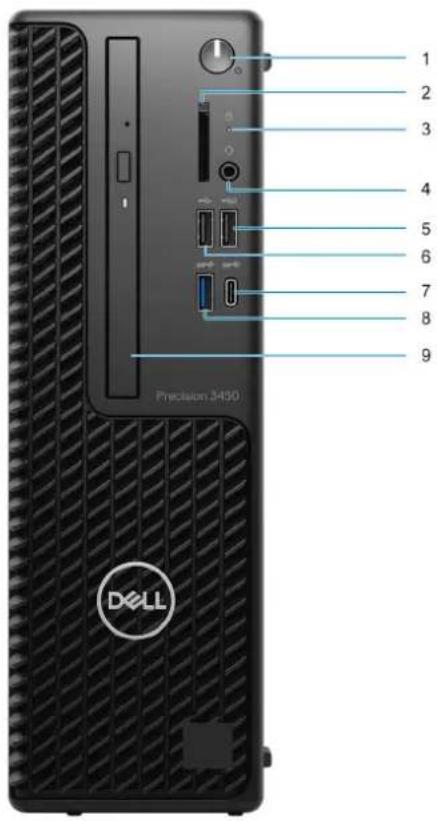
Views of Precision 3450 Small Form Factor
Front
text_image
1 2 3 4 5 6 7 8 9 Precision 3490 DELL- Power button and power light
- SD card reader (Optional)
- Hard drive activity light
- Universal audio jack port
- USB 2.0 port with PowerShare
- USB 2.0 port
- USB 3.2 Gen2x2 capable Type-C® port
- USB 3.2 Gen2 port
- Optical disk drive (Optional)
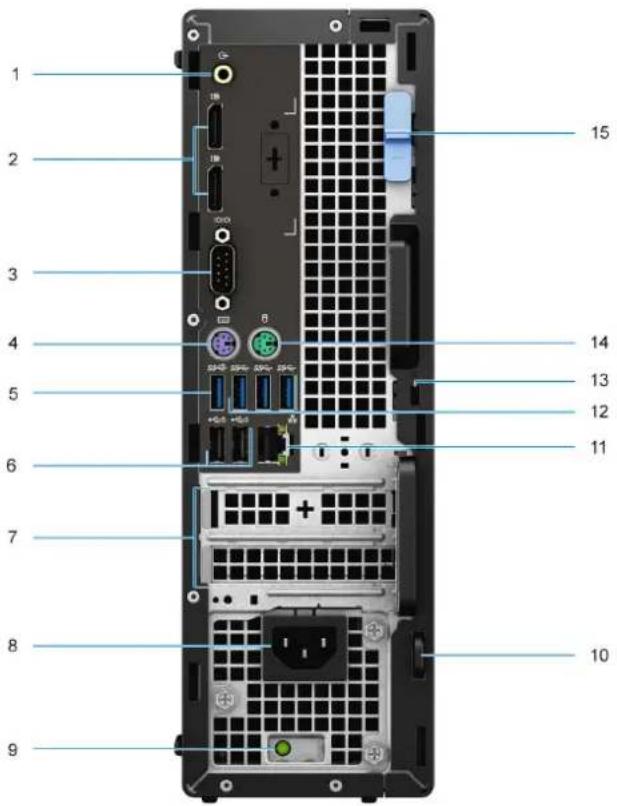
Back
text_image
1 2 3 4 5 6 7 8 9 10 11 12 13 14 15- Line -in/out retasking
- Two DisplayPort 1.4 ports
- Serial Port
- PS/2 Keyboard port
- USB 3.2 Gen 2 port
- Two USB 2.0 ports with Power On
- Expansion card slots
- Power connector port
- Power supply diagnostic light
- Padlock loop
- Network port
- Three USB 3.2 Gen 1 ports
- Kensington security-cable slot
- PS/2 Mouse port
- Release latch
Specifications of Precision 3450 Small Form Factor
Dimensions and weight
Table 2. Dimensions and weight
| Description Values | ||
| Height: | ||
| Front | 290 mm (11.42 in.) | |
| Rear | 290 mm (11.42 in.) | |
| Width | 92.6 mm (3.65 in.) | |
| Depth | 292.8 mm (11.53 in.) | |
| Weight (maximum) | 5.956 kg (13.131 lb)i|NOTE:The weight of your computer depends on the configuration ordered and the manufacturing variability. | |
Processors
The following table lists the details of the processors supported by your Precision 3450 Small Form Factor
NOTE: Global Standard Products (GSP) are a subset of Dell's relationship products that are managed for availability and synchronized transitions on a worldwide basis. They ensure the same platform is available for purchase globally. This allows customers to reduce the number of configurations managed on a worldwide basis, thereby reducing their costs. They also enable companies to implement global IT standards by locking in specific product configurations worldwide.
Device Guard (DG) and Credential Guard (CG) are the new security features that are only available on Windows 10 Enterprise today.
Device Guard is a combination of enterprise-related hardware and software security features that, when configured together, will lock a device down so that it can only run trusted applications. If it is not a trusted application, it cannot run.
Credential Guard uses virtualization-based security to isolate secrets (credentials) so that only privileged system software can access them. Unauthorized access to these secrets can lead to credential theft attacks. Credential Guard prevents these attacks by protecting NTLM password hashes and Kerberos Ticket Granting Tickets.
NOTE: Processor numbers are not a measure of performance. Processor availability is subject to change and may vary by region/country.
Table 3. Processors
| Processors Wattage Core | count | Thread count | Speed Cache Integrated graphics GSP DG/CG | Ready | |||
| 10^th GenerationIntel Corei3-10105 | 65 W 4 8 3.7 GHz to | 4.4 GHz | 6 MB Intel UH | HD Graphics630 | No Yes | ||
| 10^th GenerationIntel Corei5-10505 | 65 W 6 12 3.1 GHz to | 4.5 | GHz | 12 MB Intel U | HD Graphics630 | No Yes | |
| 10^th GenerationIntel Corei5-10600 | 65 W 6 12 3.3 GHz to | 4.8 GHz | 12 MB Intel U | HD Graphics630 | No Yes | ||
| 10^th GenerationIntel Corei7-10700 | 65 W 8 16 2.9 GHz to | 4.7 GHz | 16 MB Intel U | HD Graphics630 | No Yes | ||
| 10^th GenerationIntel Corei9-10900 | 65 W 10 20 2.9 GHz to | 4.7 GHz | 20 MB | Intel UHD Graphics630 | No Yes | ||
| 11^th GenerationIntel Corei5-11500 | 65 W 6 12 2.7 GHz to | 4.6 GHz | 12 MB Intel U | HD Graphics750 | Yes | Yes | |
| 11^th GenerationIntel Corei5-11600 | 65 W 6 12 2.8 GHz to | 4.8 GHz | 12 MB Intel U | HD Graphics750 | Yes | Yes | |
| 11^th GenerationIntel Corei7-11700 | 65 W 8 16 2.5 GHz to | 4.9 GHz | 16 MB Intel U | HD Graphics750 | Yes | Yes | |
| 11^th GenerationIntel Corei9-11900 | 65 W 8 16 2.5 GHz to | 5.2 GHz | 16 MB Intel U | HD Graphics750 | Yes | Yes | |
| Intel XeonW-1250 | 80 W 6 12 3.3 GHz to | 4.4 GHz | 12 MB Intel U | HD Graphics630 | Yes | Yes | |
| Intel XeonW-1270 | 80 W 8 16 3.2 GHz to | 4.7 GHz | 16 MB Intel U | HD Graphics630 | Yes | Yes | |
| Intel XeonW-1290 | 80 W 10 20 3.7 GHz to | 4.9 GHz | 20 MB | Intel UHD Graphics630 | Yes | Yes | |
| Intel XeonW-1350 | 80 W 6 12 3.3 GHz to | 5.0 GHz | 12 MB Intel U | HD GraphicsP750 | Yes | Yes | |
Table 3. Processors (continued)
| Processors Wa | ttage Core | count | Thread count | Speed Cache | Integrated graphics | GSP DG/CG | Ready | |
| Intel Xeon W-1370 | 80 W 8 16 2 | .9 GHz to | 5.1 | GHz | 16 MB Intel U | HD Graphics P750 | Yes Yes | |
| Intel Xeon W-1390 | 80 W 8 16 2 | .8 GHz to | 5.2 GHz | 16 MB Intel U | HD Graphics P750 | Yes Yes |
Chipset
Table 4. Chipset
| Description Values | |
| Chipset | Intel W580 |
| Processor | 10^th Generation Intel Core i3/5/i7/i9/Xeon/11 ^th Generation Intel Core/i5/i7/i9/Xeon |
| DRAM bus width | Two channels, 128-bit |
| Flash EPROM | 32 MB |
| PCIe bus | Upto Gen 3 |
| Non-volatile memory Yes | |
| BIOS Configuration Serial Peripheral Interface (SPI) 256 Mbit (32 MB) located at SPI_FLASH on chipset | |
| Trusted Platform Module (Discrete TPM Enabled) 24 KB located at TPM 2.0 on chipset | |
| Firmware TPM (Discrete TPM Disabled) | By default the Platform Trust Technology feature is visible to the OS |
| NIC EEPROM | LOM configuration contained within SPI flash ROM instead of LOM e-fuse |
Operating system
Your Precision 3450 Small Form Factor supports the following operating systems:
• Windows 10 Home, 64-bit
• Windows 10 Professional, 64-bit
• Windows 10 Pro National Academic, 64-bit
- Ubuntu Linux 20.04 LTS, 64-bit
Memory
The following table lists the memory specifications of your Latitude 5320:
Table 5. Memory specifications
| Description | Values |
| Slots | 4 DIMM slots |
| Description Values | |
| Type | DDR4 |
| Speed | 2666 MHz for 10th Generation Intel® CoreTM i3processors, 3200 MHz for 11th Generation Intel® CoreTMi5/i7/i9/W-1350/W-1370/W1390 processors |
| Maximum memory | 128 GB |
| Minimum memory | 8 GB |
| Memory size per slot | 4 GB, 8 GB, 16 GB, 32 GB |
| Configurations supported | 8 GB, 2 x 4 GB, DDR4, 2666 MHz for 10thGeneration Intel Core i3 processors, 2933 MHz for 10thGeneration Intel Core i5/i7/i9/Xeon W-1250/W-1270/W1290 processors,3200 MHz for 11th Generation IntelCore i5/i7/i9/Xeon W-1350/W-1370/W1390 processors8 GB, 1 x 8 GB, DDR4, 2666 MHz for 10thGeneration Intel Core i3 processors, 2933 MHz for 10thGeneration Intel Core i5/i7/i9/Xeon W-1250/W-1270/W1290 processors,3200 MHz for 11th Generation IntelCore i5/i7/i9/Xeon W-1350/W-1370/W1290 processors16 GB, 2 x 8 GB, DDR4, 2666 MHz for 10thGeneration Intel Core i3 processors, 2933 MHz for 10thGeneration Intel Core i5/i7/i9/Xeon W-1250/W-1270/W1290 processors,3200 MHz for 11th Generation IntelCore i5/i7/i9/Xeon W-1350/W-137O/W1390 processors16 GB, 4 x 4 GB, DDR4, 2666 MHz for 10thGeneration Intel Core i3 processors, 2933 MHz for 10thGeneration Intel Core i5/i7/i9/Xeon W-1250/W-1270/W1290 processors,3200 MHz for 11th Generation IntelCore i5/i7/i9/Xeon W-1350/W-137O/W1290 processors32 GB, 2 x 16 GB, DDR4, 2666 MHz for 10thGeneration Intel Core i3 processors, 2933 MHz for 10thGeneration Intel Core i5/i7/i9/Xeon W-1250/W-1270/W1290 processors, 2933 MHz/3200 MHz for 11thGeneration Intel Core i5/i7/i9/Xeon W-1350/W-1370/W1390 processors32 GB, 4 x 8 GB, DDR4, 2666 MHz for 10thGeneration Intel Core i3 processors, 2933 MHz for 10thGeneration Intel Core i5/i7/i9/Xeon W-1250/W-1270/W1290 processors, 2933 MHz/3200 MHz for 11thGeneration Intel Core i5/i7/i9/Xeon W-1350/W -1370/W1390 processors64 GB, 4 x 16 GB, DDR4, 2666 MHz for 10thGeneration Intel Core i3 processors, 2933 MHz for 10thGeneration Intel Core i5/i7/i9/Xeon W-1250/W-1270/W1290 processors, 2933 MHz/3200 MHz for 11thGeneration Intel Core i5/i7/i9/Xeon W-1250/W-1270/W1290 processors128 GB, 4 x 32 GB, DDR4, 2666 MHz for 10thGeneration Intel Core i3 processors, 2933 MHz for 10thGeneration Intel Core i5/i7/i9/Xeon W-1250/W-1270/W1290 processors, 2933 MHz/3200 MHz for 11thGeneration Intel Core i5/i7/i9/Xeon W-1350/W.1370/W1390 processorsNOTE: Memory speed varies by different type of DPC(DIMM per Channel) installation |
Memory configuration matrix
Table 6. Memory configuration matrix
| Configuration | Slot | |||
| XMM1 XMM2 XMM3 XM4 | ||||
| 4 GB DDR4 4 GB | ||||
| 8 GB DDR4 4 GB 4 GB | ||||
| 8 GB DDR4 8 GB | ||||
| 16 GB DDR4 8 GB 8 GB | ||||
| 16 GB DDR4 16 GB | ||||
| 32 GB DDR4 8 GB 8 GB 8 GB 8 GB | ||||
| 32 GB DDR4 16 GB 16 GB | ||||
| 32 GB DDR4 32 GB | ||||
| 64 GB DDR4 16 GB 16 GB 16 GB 16 GB | ||||
| 64 GB DDR4 32 GB 32 GB | ||||
| 64 GB DDR4 64 GB | ||||
| 128 GB DDR4 32 GB 32 GB 32 GB 32 GB | ||||
NOTE: Memory speed varies by different type of DPC (DIMM per Channel) installation.
NOTE: Systems configured with 128 GB memory will only run at 2933MHz.
NOTE: Memory on systems configured with 11 ^th Generation Intel processors will run at 2933 MHz clock speed when in Dual-channel mode.
Table 7. Dual-channel mode
| Channel A Channel B Memory speed | ||
| 2 UDIMM None 2933/3200 MHz | ||
| None 2 UDIMM 2933/3200 MHz | ||
| 2 UDIMM 2 UDIMM 2933/3200 MHz |
External ports
The following table lists the external ports of your Precision 3450 Small Form Factor.
Table 8. External ports
| Description Values | |
| Network port | 1 RJ-45 |
| USB ports | One USB 2.0 Type-A port (front)One USB 2.0 Type-A with PowerShare (front)One USB 3.2 Gen 2 (front)One USB 3.2 Gen 2x2 capable Type-C® port (front)Two USB 2.0 ports with SmartPower On (rear)Three USB 3.2 Gen 1 ports (rear)●One USB 3.2 Gen 2 port (rear) |
| Audio port | ●One Universal Audio Jack (front)●One Line -in/out retasking (rear) |
| Video port | ●Two DisplayPort 1.4 port (rear)●One VGA port (rear, optional)●One HDMI 2.0 port (rear, optional)●One Type-C w/DP-Alt mode (rear optional) |
| Legacy port | ●One serial port (rear)●Two PS/2 ports (rear) |
| Media-card reader | One SD-card 4.0 slot |
| Power-adapter port | AC-in |
| Security | ●One Wedge-shaped lock●One Padlock Loop●One Lockable Port Cover●One Intrusion switch |
Internal slots
The following table lists the internal slots of your Precision 3450 Small Form Factor.
Table 9. Internal slots
| Description Values | |
| PCIe Expansion | ●One Half-height Gen 3 PCIe x16 slot●One Half-height PCIe x4 slots |
| SATA | ●Two SATA 3.0 slot for 3.5-inch/2.5-inch hard drive●One SATA 2.0 slot for slim optical drive |
| M.2 | ●Two M.2 2280 slot for solid-state drive●One M.2 2280/2230 slot for PCIe solid-state drive/Intel Optane●One M.2 2230 slot for WiFi/Bluetooth cardNOTE:To learn more about the features of different types of M.2 cards, see the knowledge base articleSLN301626 at www.dell.com/support. |
Ethernet
Table 10. Ethernet specifications
| Description Values | |
| Model number | Intel i219-LM |
| Transfer rate | 10/100/1000 Mbps |
Wireless module
The following table lists the Wireless Local Area Network (WLAN) modules supported on your Precision 3450 Small Form Factor.
Table 11. Wireless module specifications
| Description Option one Option two | ||
| Model number | Qualcomm QCA61x4a (DW1820) Intel AX201 | |
| Transfer rate | Up to 867 Mbps Up to 2400 Mbps | |
| Frequency bands supported | 2.4 GHz/5 GHz 2.4 GHz/5 GHz | |
| Wireless standards | ●WiFi 802.11a/b/g●Wi-Fi 4 (WiFi 802.11n)●Wi-Fi 5 (WiFi 802.11ac) | ●Wi-Fi 802.11a/b/g●Wi-Fi 4 (Wi-Fi 802.11n)●Wi-Fi 5 (Wi-Fi 802.11ac)●Wi-Fi 6 (Wi-Fi 802.11ax) |
| Encryption | ●64-bit/128-bit WEP●AES-CCMP●TKIP | ●64-bit/128-bit WEP●AES-CCMP●TKIP |
| Bluetooth | Bluetooth 5.0 Bluetooth 5.1 |
GPU—Integrated
The following table lists the specifications of the integrated Graphics Processing Unit (GPU) supported by your Precision 3450 Small Form Factor.
Table 12. GPU—Integrated
| Controller External display support Memory size Processor | |||
| Intel UHD Graphics 630 Two DisplayPort 1.4 Shared system memory | 10 | ^th Generation Intel Core i3 | |
| Intel UHD Graphics 750 Two DisplayPort 1.4 Shared system memory | 11 | ^th Generation Intel Core i5/i7/i9 | |
| Intel UHD Graphics P750 Two DisplayPort 1.4 Shared system memory | 11 | ^th Generation Intel Xeon |
GPU - Discrete
Table 13. GPU - Discrete
| Controller | External display support | Memory size | Memory Type |
| AMD Radeon 550 | ●Two DisplayPort 1.2 | 2 GB | GDDR5 |
| AMD Radeon 540 | ●Two DisplayPort 1.2 | 4 GB | GDDR5 |
| AMD Radeon Pro WX 2100 | ●One DisplayPort 1.4●Two Mini DisplayPort 1.4 | 2 GB | GDDR5 |
| AMD Radeon Pro WX 3200 | ●Four Mini DisplayPort 1.4 | 4 GB | GDDR5 |
| NVIDIA Quadro P400 | ●Three Mini DisplayPort 1.4 | 2 GB | GDDR5 |
| Controller External display support Memory size Memory Type | |||
| NVIDIA Quadro P630 | ●Four Mini DisplayPort 1.4 | 3 GB GDDR5 | |
| NVIDIA Quadro P1000 | ●Two DP 1.2 | 4 GB GDDR5 | |
Audio and Speaker
Table 14. Audio and speaker specifications
| Description Values | |
| Type | 4 Channel High Definition Audio |
| Controller | Realtek ALC3246 |
| Stereo conversion | Supported |
| Internal interface | High definition audio interface |
| External interface | Universal Audio Jack |
| Speakers | 2 |
| Internal speaker amplifier | Integrated in ALC3246 (Class-D 2 W) |
| External volume controls | Keyboard shortcut controls |
| Speaker output average | 2 W |
| Speaker output peak | 2.5 W |
| Subwoofer output | Not Supported |
| Microphone | Not Supported |
Storage
Your computer supports one of the following configurations:
●One 2.5-inch hard-disk drive
● Two 2.5-inch hard-disk drives
●One 3.5-inch hard-disk drive
●One 2.5-inch hard-disk drive and one 3.5-inch hard-disk drive
●One 2280 solid-state drive (class 40)
●One M.2 2280 solid-state drive (class 40) and one 3.5-inch hard-disk drive
●One M.2 2280 solid-state drive (class 40) and one 2.5-inch hard-disk drive
●One M.2 2280 solid-state drive (class 40) and two 2.5-inch hard-disk drives
Table 15. Storage specifications
| Storage type Interface type Capacity | ||
| 2.5 in. hard-disk drive, 5400 RPM SATA Upto 2 TB | ||
| 2.5 in. hard-disk drive, 7200 RPM SATA Upto 1 TB | ||
| 2.5 in, hard-disk drive, 7200 RPM, FIPS Self Encrypting Opal 2.0 | SATA Upto 500 GB | |
| 3.5 in, hard-disk drive, 5400 RPM SATA Upto 4 TB | ||
| 3.5 in, hard-disk drive, 7200 RPM SATA Upto 2 TB | ||
| M.2 2280 solid-state drive Gen 3 PCIe x4 NVMe, Class 40 Upto 2 TB | ||
| M.2 2280 Opal Self-Encrypting solid-state drive Gen 3 PCIe x4 NVMe, Class 40 Upto 1 TB |
HDD Preloaded bracket table
Media-card reader
Table 16. Media-card reader specifications
| Type | SD-card 4.0 (Optional) |
| Cards supported | SD cardmicroSecure Digital (mSD)microSecure Digital High Capacity (mSDHC)microSecure Digital Extended Capacity (mSDXC) |
Power supply
Table 17. Power supply
| Input voltage | 100–240 VAC, 50–60 Hz |
| Wattage | ●200 W 100V-240V Full range●260 W 100V-240V Full range |
Multiple display support matrix
Table 18. Integrated - Multiple display support matrix
| Graphics Card Intel 610 | Intel 630 Intel 730 Intel | 750 | ||
| Memory | UMA UMA UMA UMA | |||
| Video Ports on Graphics Card | 2 x DisplayPorts 2 x DisplayPorts 2 x DisplayPorts 2 x DisplayPorts | |||
| Max Displays (direct connect) | 2 | 2 | 2 | 2 |
| Max Displays (DP multi-stream) | 1 | 1 | 1 | 1 |
| Number of displays | 3 | 3 | 3 | 3 |
| Supported Resolution | DP: 4096 x 2304 @60 Hz, 24 bpp | DP: 4096 x 2304 @60 Hz, 24 bpp | DP: 4096 x 2304 @60 Hz, 24 bpp | DP: 4096 x 2304 @60 Hz, 24 bpp |
| Total Power | 65 W 65 W 65 W 65 W | |||
Table 19. Integrated - Multiple display support matrix
| Graphics Card Intel 630 Intel | 730 Intel 750 | ||
| Memory | UMA UMA UMA | ||
| Video Ports on Graphics Card | 2 x DisplayPorts 2 x DisplayPorts | 2 x DisplayPorts | |
| Max Displays (direct connect) | 2 2 2 | ||
| Max Displays (DP multi-stream) | 1 1 1 | ||
| Number of displays | 3 3 3 | ||
| Supported Resolution | DP: 4096 x 2304 @60 Hz, 24 bpp | DP: 4096 x 2304 @60 Hz, 24 bpp | DP: 4096 x 2304 @60 Hz, 24 bpp |
| Total Power | 65 W 65 W 65 W |
Table 20. Discrete - Multiple display support matrix
| Graphics Card Radeon RX 640 | Radeon RX 550 | Radeon RX 540 | |
| Memory | 4 GB GDDR5 | 4 GB GDDR5 | 4 GB GDDR5 |
| Video Ports on Graphics Card | 2 x Mini DisplayPorts1 x DisplayPort | 2 x Mini DisplayPorts1 x DisplayPort | 1 x HDMI 1.4 port1 x DisplayPort |
| Max Displays (direct connect) | 3 | 3 | 3 |
| Max Displays (DP multi-stream) | 1 | 1 | 1 |
| Number of displays | 3 | 3 | 2 |
| Supported Resolution | 3 x FHD (1920 x 1080) | 3 x FHD (1920 x 1080) | 2 x FHD (1920 x 1080) |
| Total Power | 50 W | 50 W | 50 W |
Security Software
Table 21. Security Software
| Features | Description |
| Dell Endpoint Security Suite Enterprise | Optional |
| Dell Data Guardian | Optional |
| Dell Encryption (Enterprise or Personal) | Optional |
| Dell Threat Defense | Optional |
| Features Description | |
| RSA SecurlD Access Optional | |
| RSA NetWitness Endpoint Optional | |
| MozyPro or MozyEnterprise Optional | |
| VMware Airwatch/WorkspaceONE Optional | |
| Absolute Data & Device Security Optional |
Add-in cards
Table 22. Add-in cards
| Add-in cards |
| USB 3.1 Gen 2 Type-C PCIe card |
| USB 3.1 Gen 2 PCIe card |
| Serial and parallel port PCIe card |
| Intel Gigabit NIC PCIe card |
| Aquantia AQtion AQN-108 5/2.5 GbE NIC adapter |
CAC/PIV Module
Table 23. CAC/PIV Module
| Features Tower/Small Form Factor/Micro | |
| Connector Type ISO 7816 compliant contact smart card NFC | forum 2.0 |
| PCB | |
| Dimensions (W x L x T) 74.5 mm x 45.7 mm | |
| Layer 6 | |
| Controller Details | |
| Controller bus architecture (example PCIe 1.0a x1) USB 2.0 | |
| Data transfer mode (example Bus-Master DMA) USB 2.0 | |
| Power consumption (full operation per data rate connection speed) | 288.08 mA x 3.3 V |
| Power consumption (standby operation) 8.9 mA x 3.3 V | |
| Standard compliance (example 802.1P) NFC Forum 2.0, ISO7816 | |
| Hardware Certifications (example FCC, B, GS mark...) FIPS201, FIPS140-2 | |
| Boot ROM Support | Integrated inside Lynx SoC |
| Processor/Chipset | |
| NFC Broadcom Cortex-M3 BC58102 | |
| Card reader driver NXP TDA8034HN/C2 | |
| USB 2.0 Hub GENESYS GL850G-OHY50 | |
| PROM WINBOND W25Q32JVSSIQ 32M/bit | |
| Power IC RICHTEK RT5796AHGJ5 | |
| Power LDO (NFC VBAT) GMT G9141T11U | |
| Environmental | |
| Operating System Driver Support Dell ControlVault2 Driver | |
| Manageability (examples WOL, PXE) No, this is not a LAN controller chipset. | |
| Management Capabilities Alerting (example ASF 2.0) No, this is not a LAN controller chipset. | |
| Add-in Slots | |
| Card reader connector 1 (10 PIN) | |
| USB 2.0 header 1 (5 PIN) | |
| NFC header 1 (6 PIN) | |
Environmental
Table 24. Environmental specifications
| Feature Precision 3450 Small Form Factor | |
| Recyclable packaging Yes | |
| BFR/PVC—free chassis | No |
| MultiPack packaging | Yes (US only) (optional) |
| Energy-Efficient Power Supply Standard | |
| ENV0424 compliant | Yes |

NOTE: Wood-based fiber packaging contains a minimum of 35% recycled content by total weight of wood-based fiber. Packaging that contains without wood-based fiber can be claimed as Not Applicable.
Energy Star, EPEAT and Trusted Platform Module (TPM)
Table 25. Energy Star, EPEAT and TPM
| Features Specifications | |
| Energy Star 8.0 Compliant configurations available | |
| EPEAT Gold and Silver compliant configurations available | |
| Trusted Platform Module (TPM) 2.01,2 | Integrated on system board |
| Firmware-TPM (Discrete TPM disabled) Optional |

NOTE:
^1 TPM 2.0 is FIPS 140-2 certified.
^2 TPM is not available in all countries.
Out of Band Systems Management Intel Standard Manageability
Intel Standard Manageability (ISM) must be configured in our factory at the time of purchase, as it is NOT
field upgradable. ISM offers out-of-band management and DASH compliance https://registry.dmtf.org/registry/results/field_initiative_name%3A%22DASH%201.0%22. ISM offers a limited set of out-of-band features like remote power on/off, Serial-over-LAN redirect, Wake-on-LAN, etc. ISM leverages the same capabilities that were available with Intel's Active Management Technology (AMT) version 5.0.
To learn more about Intel ISM, visit Intel's website at: https://software.intel.com/en-us/blogs/2009/03/27/what-is-standard-manageability
Computer environment
Airborne contaminant level: G1 as defined by ISA-S71.04-1985
Table 26. Computer environment
| Description Operating Storage | ||
| Temperature range | 10°C-35°C (50°F-95°F) -40°C-65°C (-40°F-149°F) | |
| Relative humidity (maximum) | 20% to 85% (non-condensing) 5% to 95% (non-condensing) | |
| Vibration (maximum) * | 0.52 GRMS random at 5 Hz to 350 Hz 2.0 GRMS random at 5 Hz to 350 Hz | |
| Shock (maximum) | Bottom half-sine pulse with a change in velocity of 50.8 cm/sec (20 in./sec) | 105G half-sine pulse with a change in velocity of 133 cm/sec (52.5 in./sec) |
| Altitude (maximum) | 3048 m (10,000 ft) 10,668 m (35,000 ft) | |
* Measured using a random vibration spectrum that simulates user environment.
† Measured using a 2 ms half-sine pulse when the hard drive is in use.
Service and support
NOTE: For more details on Dell Service Plans, see https://www.dell.com/learn/us/19/services/warranty-support-services.
Table 27. Warranty
| Warranty |
| 1 Year Basic Warranty with Hardware Service on site service after remote diagnosis |
| 2 Years Basic Warranty Extension |
| 3 Years Basic Warranty Extension |
| 4 Years Basic Warranty Extension |
| 5 Years Basic Warranty Extension |
| 1 Year ProSupport and Next Business Day on-site service |
| 2 Years ProSupport and Next Business Day on-site service |
| 3 Years ProSupport and Next Business Day on-site service |
| 4 Years ProSupport and Next Business Day on-site service |
| 5 Years ProSupport and Next Business Day on-site service |
| 1 Year ProSupport Plus for Client with Next Business Day on-site service |
| 2 Years ProSupport Plus for Client with Next Business Day on-site service |
| 3 Years ProSupport Plus for Client with Next Business Day on-site service |
| 4 Years ProSupport Plus for Client with Next Business Day on-site service |
| 5 Years ProSupport Plus for Client with Next Business Day on-site service |
Table 28. Accidental damage services
| Accidental Damage Services |
| 1 Year Accidental Damage Service |
| 2 Years Accidental Damage Service |
| 3 Years Accidental Damage Service |
| 4 Years Accidental Damage Service |
| 5 Years Accidental Damage Service |
Getting help and contacting Dell
Self-help resources
You can get information and help on Dell products and services using these self-help resources:
Table 29. Self-help resources
| Self-help resources Resource location | |
| Information about Dell products and serviceshttps://www.dell.com/ | |
| Dell Support |  |
| Tips |  |
| Contact Support In Windows search, type Contact Support, and pressEnter. | |
| Online help for operating system | ●Windows: https://www.dell.com/support/windows●Linux: https://www.dell.com/support/linux |
| Troubleshooting information, user manuals, set up instructions, product specifications, technical help blogs, drivers, software updates, and so on. | https://www.dell.com/support/home/ |
| Dell knowledge base articles for various of system concerns: | 1. Go tohttps://www.dell.com/support/home/?app=knowledgebase.2. Type the subject or keyword in theSearchbox.3. ClickSearchto retrieve the related articles. |
| Learn and get more information about your product:●Product specifications●Operating system●Setting up and using your product●Data backup●Troubleshooting and diagnostics●Factory and system restore●BIOS information | Dell provides several online and telephone-based support and service options. If you do not have an active Internet connection, you can find contact information about your purchase invoice, packing slip, bill, or Dell product catalog.●SelectDetect Product.●Locate your product through the drop-down menu under View Products.●Enter theService Tag numberorProduct IDin the search bar.●Once on product support page, scroll down to Manuals and Documents section to preview all the Manuals, documents, and other information for your product. |
Contacting Dell
Dell provides several online and telephone-based support and service options. If you do not have an active Internet connection, you can find contact information about your purchase invoice, packing slip, bill, or Dell product catalog. Availability varies by country/region and product, and some services may not be available in your area. To contact Dell for sales, technical support, or customer service issues:
-
Go to https://www.dell.com/support/.
-
Select your country/region from the drop-down menu on the lower right corner of the page.
-
For customized support:
a. Enter your system Service Tag in the Enter your Service Tag field.
b. Click submit.
●The support page that lists the various support categories is displayed.
- For general support:
a. Select your product category.
b. Select your product segment.
c. Select your product.
- The support page that lists the various support categories is displayed.
- For contact details of Dell Global Technical Support, see https://www.dell.com/contactdell.
NOTE: The Contact Technical Support page is displayed with details to call, chat, or email the Dell Global Technical Support team.
NOTE: Availability varies by country/region and product, and some services may not be available in your area.