
MX-0404-HDBT-H2A-KIT - Hi-Fi System WyreStorm - Free user manual and instructions
Find the device manual for free MX-0404-HDBT-H2A-KIT WyreStorm in PDF.


| Product Type | HDBaseT Matrix Switcher 4x4 with 4 PoC Receivers |
| Dimensions (Matrix) | 482.6 mm x 300.1 mm x 43.5 mm (19" x 11.82" x 1.72") |
| Dimensions per Receiver | 135 mm x 74.2 mm x 15 mm (5.32" x 2.93" x 0.6") |
| Weight (Matrix) | 4.06 kg (8.93 lbs) |
| Weight per Receiver | 0.22 kg (0.48 lbs) |
| Power Supply | 100~240V AC 50/60Hz |
| Max Power Consumption | 54W (184.25 BTU/hr) |
| Video Inputs (Matrix) | 4x HDMI 19-pin Type A Female |
| Video Outputs (Matrix) | 1x HDMI (loop out), 4x HDBaseT RJ-45 Female |
| Audio Outputs (Matrix) | 4x S/PDIF RCA Coax, 4x Analog Stereo RCA |
| Video Resolutions (Max via HDMI) | 3840x2160p @60Hz 8bit 4:2:0, 4096x2160p @60Hz 8bit 4:4:4 |
| Video Resolutions (Max via HDBaseT Cat6) | 3840x2160p @30Hz 4:4:4 8bit (35 m), 4K@60Hz 4:2:0 (35 m) |
| Audio Formats Supported | HDMI: up to Dolby Atmos and DTS:X; S/PDIF: up to 5.1; Analog: 2ch PCM |
| HDCP Version | 2.2 |
| Control Methods | IR (Front & Ext), RS-232, Ethernet (Web UI, IP Control) |
| Power over Cable (PoC) | Yes, 12V 5W per HDBaseT output to receiver |
| Warranty | 5 years limited |
| Safety & Certifications | CE, FCC, RoHS |
Frequently Asked Questions - MX-0404-HDBT-H2A-KIT WyreStorm
User questions about MX-0404-HDBT-H2A-KIT WyreStorm
0 question about this device. Answer the ones you know or ask your own.
Ask a new question about this device
Download the instructions for your Hi-Fi System in PDF format for free! Find your manual MX-0404-HDBT-H2A-KIT - WyreStorm and take your electronic device back in hand. On this page are published all the documents necessary for the use of your device. MX-0404-HDBT-H2A-KIT by WyreStorm.
USER MANUAL MX-0404-HDBT-H2A-KIT WyreStorm
WyreStorm recommends reading through this document in its entirety to become familiar with the product's features prior to starting the installation process.

CHDBT TM HDMI TM HDCP 2.2 POH

IMPORTANT! Installation Requirements
- Visit the product page to download the latest firmware, document version, additional documentation, and configuration tools.
• Install the latest firmware (if available) to ensure that all features described in this document are available during and after installation. - Read through the Wiring and Connections section for important wiring guidelines before creating or choosing premade cables.
In the Box
1 x MX-0404-HDBT-H2A-KIT HDBaseT Matrix Switcher
4 x HDBaseT PoC display receivers
1 x Handheld IR Remote (CR2025 Battery not Included)
4 x IR emitters
4 x IR Broadband Receiver (30KHz to 50KHz)
1 x IR Extension Cable
1x AC Power Cord with US Plug
1x AC Power Cord with UK Plug
1x AC Power Cord with EU Plug
2x Mounting Brackets and accessories (matrix)
1x Quickstart Guide (this document)
Basic Wiring Diagram
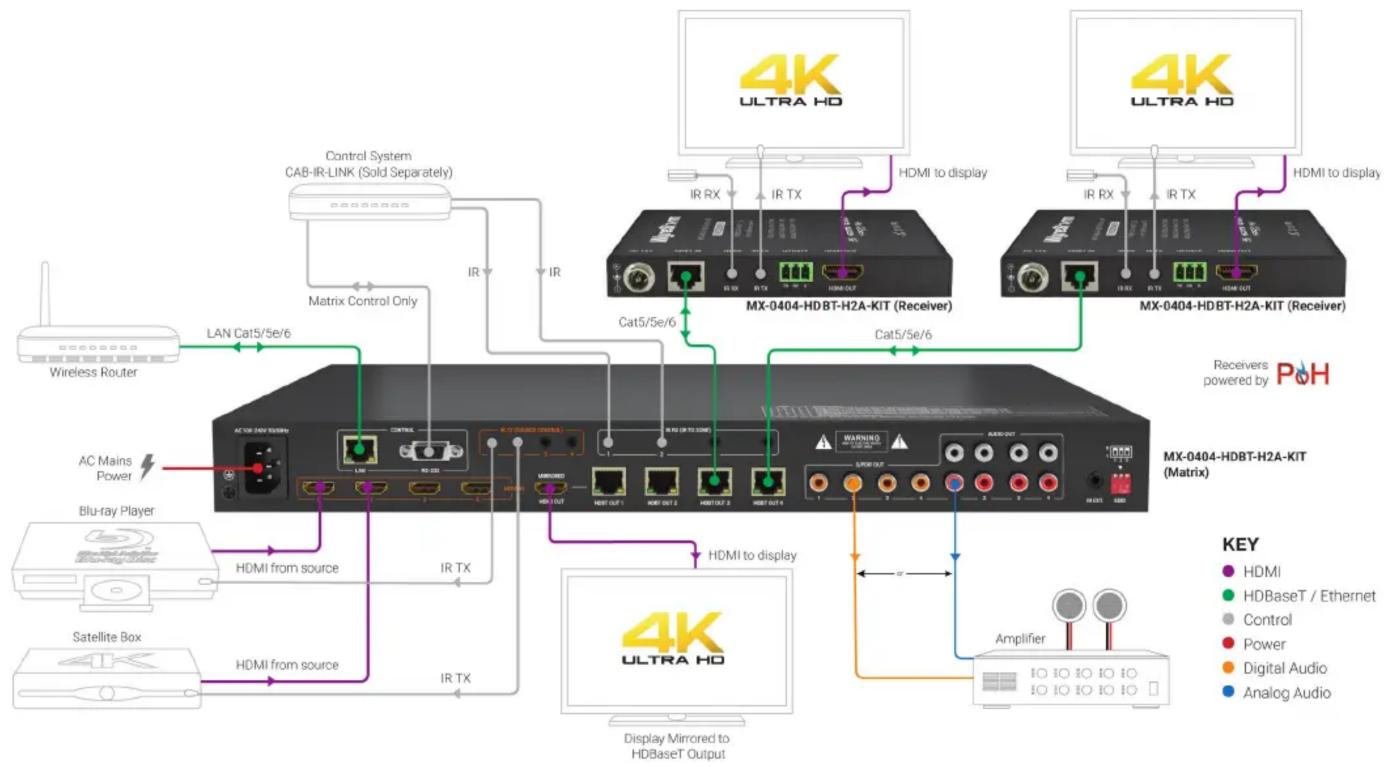
flowchart
graph TD
    A["Wireless Router"] -->|LAN Cat5/5e/6| B["AC 108.24V HSBMI"]
    A -->|LAN Cat5/5e/6| C["Control"]
    A -->|LAN Cat5/5e/6| D["ICU"]
    A -->|LAN Cat5/5e/6| E["ICU"]
    A -->|LAN Cat5/5e/6| F["ICU"]
    A -->|LAN Cat5/5e/6| G["ICU"]
    A -->|LAN Cat5/5e/6| H["ICU"]
    A -->|LAN Cat5/5e/6| I["ICU"]
    A -->|LAN Cat5/5e/6| J["ICU"]
    A -->|LAN Cat5/5e/6| K["ICU"]
    A -->|LAN Cat5/5e/6| L["ICU"]
    A -->|LAN Cat5/5e/6| M["ICU"]
    A -->|LAN Cat5/5e/6| N["ICU"]
    A -->|LAN Cat5/5e/6| O["ICU"]
    A -->|LAN Cat5/5e/6| P["ICU"]
    A -->|LAN Cat5/5e/6| Q["ICU"]
    A -->|LAN Cat5/5e/6| R["ICU"]
    A -->|LAN Cat5/5e/6| S["ICU"]
    A -->|LAN Cat5/5e/6| T["ICU"]
    A -->|LAN Cat5/5e/6| U["ICU"]
    A -->|LAN Cat5/5e/6| V["ICU"]
    A -->|LAN Cat5/5e/6| W["ICU"]
    A -->|LAN Cat5/5e/6| X["ICU"]
    A -->|LAN Cat5/5e/6| Y["ICU"]
    A -->|LAN Cat5/5e/6| Z["ICU"]
    A -->|LAN Cat5/5e/6| AA["ICU"]
    A -->|LAN Cat5/5e/6| AB["ICU"]
    A -->|LAN Cat5/5e/6| AC["ICU"]
    A -->|LAN Cat5/5e/6| AD["ICU"]
    A -->|LAN Cat5/5e/6| AE["ICU"]
    A -->|LAN Cat5/5e/6| AF["ICU"]
    A -->|LAN Cat5/5e/6| AG["ICU"]
    A -->|LAN Cat5/5e/6| AH["ICU"]
    A -->|LAN Cat5/5e/6| AI["ICU"]
    A -->|LAN Cat5/5e/6| AJ["ICU"]
    A -->|LAN Cat5/5e/6| AK["ICU"]
    A -->|LAN Cat5/5e/6| AL["ICU"]
    A -->|LAN Cat5/5e/6| AM["ICU"]
    A -->|LAN Cat5/5e/6| AN["ICU"]
    A -->|LAN Cat5/5e/6| AO["ICU"]
    A -->|LAN Cat5/5e/6| AP["ICU"]
    A -->|LAN Cat5/5e/6| AQ["ICU"]
    A -->|LAN Cat5/5e/6| AR["ICU"]
    A -->|LAN Cat5/5e/6| AS["ICU"]
    A -->|LAN Cat5/5e/6| AT["ICU"]
    A -->|LAN Cat5/5e/6| AU["ICU"]
    A -->|LAN Cat5/5e/6| AV["ICU"]
    A -->|LAN Cat5/5e/6| AW["ICU"]
    A -->|LAN Cat5/5e/6| AX["ICU"]
    A -->|LAN Cat5/5e/6| AY["ICU"]
    A -->|LAN Cat5/5e/6| AZ["ICU"]
    A -->|LAN Cat5/5e/6| BA["ICU"]
    A -->|LAN Cat5/5e/6| BB["ICU"]
    A -->|LAN Cat5/5e/6| BC["ICU"]
    A -->|LAN Cat5/5e/6| BD["ICU"]
    A -->|LAN Cat5/5e/6| BE["ICU"]
    A -->|LAN Cat5/5e/6| BF["ICU"]
    A -->|LAN Cat5/5e/6| BG["ICU"]
    A -->|LAN Cat5/5e/6| BH["ICU"]
    A -->|LAN Cat5/5e/6| BI["ICU"]
    A -->|LAN Cat5/5e/6| BJ["ICU"]
    A -->|LAN Cat5/5e/6| BK["ICU"]
    A -->|LAN Cat5/5e/6| BL["ICU"]
    A -->|LAN Cat5/5e/6| BM["ICU"]
    A -->|LAN Cat5/5e/6| BN["ICU"]
    A -->|LAN Cat5/5e/6| BO["ICU"]
    A -->|LAN Cat5/5e/6| BP["ICU"]
    A -->|LAN Cat5/5e/6| BQ["ICU"]
    A -->|LAN Cat5/5e/6| BR["ICU"]
    A -->|LAN Cat5/5e/6| BS["ICU"]
    A -->|LAN Cat5/5e/6| BT["ICU"]
    A -->|LAN Cat5/5e/6| BU["ICU"]
    A -->|LAN Cat5/5e/6| BV["ICU"]
    A -->|LAN Cat5/5e/6| BW["ICU"]
    A -->|LAN Cat5/5e/6| BX["ICU"]
    A -->|LAN Cat5/5e/6| BY["ICU"]
    A -->|LAN Cat5/5e/6| BZ["ICU"]
    A -->|LAN Cat5/5e/6| CA["ICU"]
    A -->|LAN Cat5/5e/6| CB["ICU"]
    A -->|LAN Cat5/5e/6| CC["ICU"]
    A -->|LAN Cat5/5e/6| CD["ICU"]
    A -->|LAN Cat5/5e/6| CE["ICU"]
    A -->|LAN Cat5/5e/6| CF["ICU"]
    A -->|LAN Cat5/5e/6| CG["ICU"]
    A -->|LAN Cat5/5e/6| CH["ICU"]
    A -->|LAN Cat5/5e/6| CI["ICU"]
    A -->|LAN Cat5/5e/6| CJ["ICU"]
    A -->|LAN Cat5/5e/6| CK["ICU"]
    A -->|LAN Cat5/5e/6| CL["ICU"]
    A -->|LAN Cat5/5e/6| CM["ICU"]
    A -->|LAN Cat5/5e/6| CN["ICU"]
    A -->|LAN Cat5/5e/6| CO["ICU"]
    A -->|LAN Cat5/5e/6| CP["ICU"]
    A -->|LAN Cat5/5e/6| COB["ICU"]
Wiring and Connections
WyreStorm recommends that all wiring for the installation is run and terminated prior to making connections to the switcher. Read through this section in this entirety before running or terminating the wires to ensure proper operation and to avoid damaging equipment.
HDMI/HDBaseT Wiring

IMPORTANT! Wiring Guidelines
- The use of patch panels, wall plates, cable extenders, kinks in cables, and electrical or environmental interference will have an adverse effect on HDMI and Ethernet transmission limiting performance. Steps should be taken to minimize or remove these factors completely during installation for best results.
- WyreStorm recommends using high quality HDMI cables such as WyreStorm Express to ensure the highest content performance available.
- The type of category cable and length used can restrict the available video resolution. While Cat5e can be used, WyreStorm recommends using Cat6 or higher to ensure the highest content performance available. See Video Resolutions in the Specifications table before determining cable type and length.
IR TX/RX Wiring

IMPORTANT! IR TX/RX Guidelines
- WyreStorm IR ports function differently than standard IR ports. For this reason only WyreStorm IR emitters and receivers can be used.
- WyreStorm IR emitter and receiver cables cannot be spliced as cutting into the cables will short the shield. While an extension cable may be used, WyreStorm assumes no responsibility for operation using an extension cable.
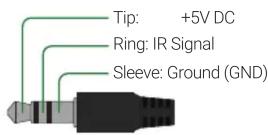
- When connecting the IR TX to an IR connecting blocks or control system with different plugs, a cable must be made following the IR TX Port Pinout diagram.
- When connecting to an IR control system use the WyreStorm CAB-IR-LINK cable. This cable compensates for differences between the WyreStorm RX and the control systems TX connection. Visit the CAB-IR-LINK product page for details.
RS-232 Wiring
Most control systems and computers are DTE where pin 2 is RX, this can vary from device to device. Refer to the documentation for the connected device for pin functionally to ensure that the correct connections can be made.
Cat6 Cable Performance Guide

bar
| Time (ft) | 4K Transmission (ft) | HD Transmission (ft) | |---|---|---| | 0 | 32 | 65 | | 10 | 98 | 131 | | 20 | 131 | 164 | | 30 | 40 | 50 | | 40 | 50 | 60 | | 50 | 60 | 70 | | 60 | 70 | 80 | | 70 | 80 | 90 | | 80 | 90 | 100 | | 90 | 100 | 328 | | 100 | 328 | 328 |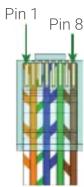
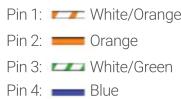
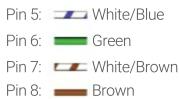
Wire colors shown follow EIA/TIA-568B standard.
IR TX Port Pinout

IR RX/Ext Port Pinout

Outside of DB9 chassis port shown.
Unidnetified pins have no function and should not be connected.
EDID Settings
EDIDs can be configured to resolve issues with video output on displays that may not accept the maximum resolution available from the source.
- When set to Smart EDID (default) the matrix will scan all selected displays for the lowest resolution.
- When EDID Copy or a direct EDID is being used, SmartEDID is turned Off.
• Power to the matrix must be cycled (Off/On) after changing dip switches in order for the setting to take effect.
- Ensure that a display is connected and powered On to the selected output before copying EDIDs or the copy will fail. When this occurs, EDID will be set to 4K@30Hz 2ch.
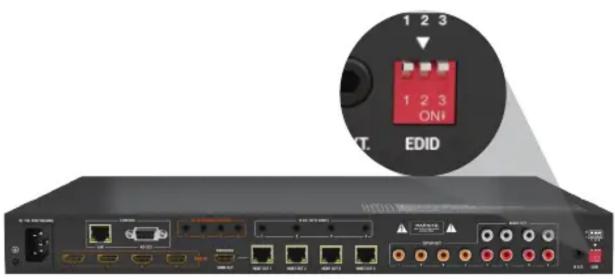
Smart EDID –
Display Lowest
Resolution - 2ch
only (default)

Front Panel, Web UI
or API EDID Control

4K@30Hz 2ch with
HDR Support

4K@30Hz (8bit
only) 2ch with HDR
Support

4K@30Hz 5.1ch with
HDR Support

4K@30Hz 7.1ch with
HDR Support

4K @60Hz 2ch

1080p @60Hz 2.0ch
audio

Accessing the Web UI
Note: This matrix is set to a default static IP Address (192.168.11.143). In order to communicate with it initially the PC must be set to a 192.168.11.xxx address. This can be changed back once a static IP is set within a different range.
- Connect the matrix to the same network as a PC.
- Open a web browser and enter the IP Address of the matrix.
Default: 192.168.11.143 | Password: admin
Note: The installer password and general password are the same by default.
WyreStorm recommends changing the password for installer login to avoid any unwanted changes being made to the matrix configuration.
Troubleshooting
No or Poor Quality Picture (snow or noisy image)
- Verify that power is being supplied to all devices in the system and that they are powered on.
- Verify that all source and HDBaseT connections are not loose and are functioning properly.
- Verify that the HDBaseT cable is properly terminated per the HDMI/HDBaseT Wiring section.
- Verify that the matrix, receiving device, and display support the output resolution of the source.
- Refer to Video Resolutions in the Specifications table for the max distance based on resolution.
- If transmitting 3D or 4K, verify that the HDMI cables used are 3D or 4K rated.
Copying EDIDs
- Set the EDID dipswitch to the Front Panel, Web UI or API EDID Control (all switches up).
- Reboot the matrix.
- Using the front navigation buttons, select the input port for the output. Example: Input 2 for Output 2
- Once the output port indicator blinks, press and hold Enter for 5 seconds. OK indicates that the copy was successful, FL-2 indicates that the copy failed.
- Reboot the matrix
Note: EDID settings may also be configured using the Web UI. Refer to the Accessing the Web UI section.
No or Intermittent 3 rd party Device Control
- Verify that the IR cable(s) is properly terminated.
See IR TX/RX Wiring. - Verify that the IR emitter is located near the IR receiver on the device.
Troubleshooting Tips:
- WyreStorm recommends using a cable tester or connecting the cable to other devices to verify functionality.
- Use a flashlight to locate the IR receiver behind any tinted panels on the device being control
Specifications
| Audio and Video | |
| Inputs Matrix: 4x HDMI 19-pin type A female | Receiver: 1x HDBaseT 8-pin RJ-45 female | |
| Outputs | Matrix:1x HDMI In 19-pin type A female | 4x HDBaseT 8-pin RJ-45 female4x S/PDIF Out RCA Digital Coax | 4x Audio Out Stereo Pairs RCA Analog Coax (Audio from Source or HDMI Output)Receiver:1x HDMI 19-pin type A female |
| Audio Formats | HDMI/HDBaseT: 2ch PCM | Multichannel: LPCM and Up to DTS-X and Dolby AtmosS/PDIF: 2ch PCM | Multichannel: Up to 5.1 DTS and Dolby DigitalAnalog: 2ch Analog |
| Video Resolutions (Max) | HDMI1920x1080p @60Hz 12bit (15m/50ft) | @60Hz 16bit (7m/23ft)3840x2160p @30Hz 4:4:4 8bit (7m/23ft) | @24Hz 4:2:0 HDR 10bit per channel (3m/9.8ft)4096x2160p @60Hz 8bit 4:2:0 (7m/23ft) | @60Hz 8bit 4:4:4 (7m/23ft) |
| Using Cat61920x1080p @60Hz 12bit (70m/230ft) | 16bit (70m/230ft)3840x2160p @30Hz 4:4:4 8bit (35m/115ft) | @24Hz 4:2:0 HDR 10bit (35m/115ft)4096x2160p @60Hz 4:2:0 8bit (35m/115ft) | |
| Using Cat6a/71920x1080p @60Hz 12bit (70m/230ft) | @60Hz 16bit (70m/230ft)3840x2160p @30Hz 4:4:4 8bit (40m/131ft) | @24Hz 4:2:0 HDR 10bit (40m/131ft)4096x2160p @60Hz 4:2:0 8bit (40m/131ft) | |
| Color Depth 1080p: 16bit | 4K UHD: 8bit | HDR @24p: 10bit BT.2020 | |
| Maximum Pixel Clock HDMI: 600MHz | HDBaseT: 297MHz | |
| Communication and Control | |
| HDMI HDMI | HDCP 2.2 | EDID | DVI-D with adapter (not included) | |
| HDBaseT | HDMI | HDCP 2.2 | EDID | CEC | 1-way PoC to receiver | Bidirectional IR |
| Ethernet | Matrix Only: 1x 8-pin RJ-45 female | 10/100 Mbps auto-negotiating | Built-in Web UI | IP Control |
| IR | Matrix:1x Front Panel IR Sensor | 1x IR Ext 3.5mm (1/8in) TRS Stereo | Matrix Control4x IR TX 3.5mm (1/8in) TS Mono | 4x IR RX 3.5mm (1/8in) Stereo | Transmits via HDBaseTReceiver:1x IR TX 3.5mm (1/8in) TS Mono | 1x IR RX 3.5mm (1/8in) TRS Stereo | Transmits via HDBaseT |
| RS-232 | Matrix Only: 1x 9-pin DB9 Female | Matrix Control (Telnet commands supported) |
| Power | Dimensions and Weight Matrix Receivers |
| Power Supply 100~240V AC 50/60Hz | Rack Units/Wall Box 1U 0.34U |
| PoC 12V 5W(each HDBT output) | Height With | 51.3mm/2.02in | N/A |Without Feet 43.5mm/1.72in 15mm/0.6in |
| Max Power Consumption 54W | Width With | 482.6mm/19in | N/A |Without Brackets 440mm/17.33in 135mm/5.32in |
| Environmental | Depth With | N/A | Without Handles 300.1mm/11.82in 74.2mm/2.93in |
| Operating Temperature | Weight 4.06kg/8.93lbs 0.22kg/0.48lbs |
| Storage Temperature | Regulatory |
| Maximum BTU 184.25 BTU/hr | Safety and Emission CE | FCC | RoHS |
Note: WyreStorm reserves the right to change product specification, appearance or dimensions of this product at any time without prior notice.
Warranty Information
WyreStorm Technologies LLC warrants that its products to be free from defects in material and workmanship under normal use for a period of five (5) years from the date of purchase. Refer to the Product Warranty page on wyrestorm.com for more details on our limited product warranty.


- IMPORTANT! Installation Requirements
- In the Box
- Wiring and Connections
- HDMI/HDBaseT Wiring
- IMPORTANT! Wiring Guidelines
- IR TX/RX Wiring
- IMPORTANT! IR TX/RX Guidelines
- RS-232 Wiring
- IR TX Port Pinout
- EDID Settings
- Accessing the Web UI
- Troubleshooting
- No or Poor Quality Picture (snow or noisy image)
- Copying EDIDs
- No or Intermittent 3 rd party Device Control
- Troubleshooting Tips:
- Warranty Information
Brand : WyreStorm
Model : MX-0404-HDBT-H2A-KIT
Category : Hi-Fi System