
MSP3A - Monitor YAMAHA - Free user manual and instructions
Find the device manual for free MSP3A YAMAHA in PDF.


| Product Type | Powered Nearfield Studio Monitor |
| Brand | Yamaha |
| Model | MSP3A |
| Woofer | 3-inch cone |
| Tweeter | 0.75-inch dome |
| Amplifier Power | 10 W + 10 W (bi-amp) |
| Frequency Response | 70 Hz – 20 kHz |
| Maximum SPL | 103 dB SPL (peak) |
| Input Connectors | XLR-1/4" combo, RCA |
| Input Impedance | 10 kΩ (balanced/unbalanced) |
| Controls | Volume, high trim, low trim switches |
| Enclosure | Bass-reflex with rear port |
| Dimensions (W x H x D) | 120 x 181 x 120 mm (4.7" x 7.1" x 4.7") |
| Weight | 2.0 kg (4.4 lbs) |
| Power Consumption | 15 W (standby <0.5 W) |
| Power Supply | AC 100-240 V, 50/60 Hz |
| Magnetically Shielded | Yes |
| Accessories Included | Power cord, owner's manual |
| Cleaning Instructions | Wipe with soft dry cloth; do not use solvents |
| Safety Features | Overheat protection, power switch on rear |
| Repairability | Contact Yamaha service; no user-serviceable parts |
Frequently Asked Questions - MSP3A YAMAHA
User questions about MSP3A YAMAHA
0 question about this device. Answer the ones you know or ask your own.
Ask a new question about this device
Download the instructions for your Monitor in PDF format for free! Find your manual MSP3A - YAMAHA and take your electronic device back in hand. On this page are published all the documents necessary for the use of your device. MSP3A by YAMAHA.
USER MANUAL MSP3A YAMAHA
Powered Monitor Speaker
MSP7 STUDIO
MSP5 STUDIO
Powered Subwoofer
SW10 STUDIO
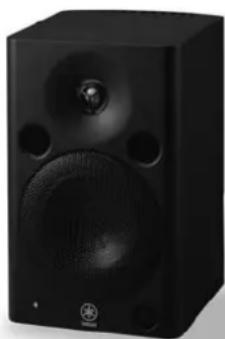
natural_image
Black studio microphone speaker with visible sound waves and buttons (no text or symbols)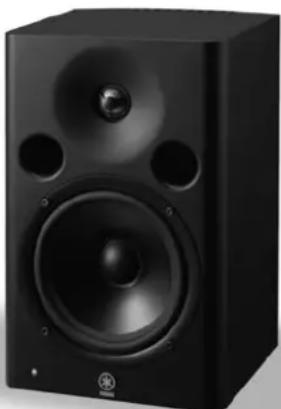
natural_image
Black studio speaker with large speaker and two circular ports (no visible text or symbols)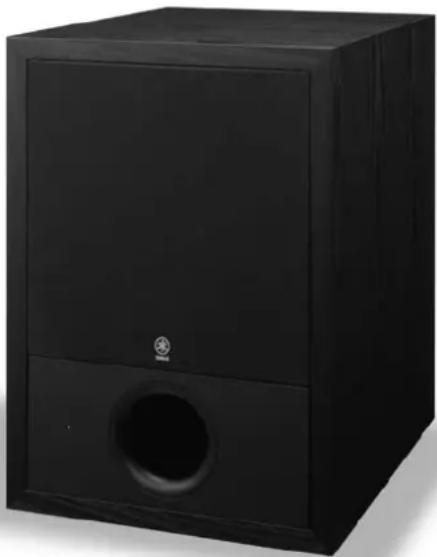
natural_image
Black audio player studio speaker with a circular vent and logo (no visible text or symbols)Powered Near-field Reference Monitors & Subwoofer
OWNER'S MANUAL
BEDIENUNGSANLEITUNG
MODE D'EMPLOI
The above warning is located on the rear of the unit.
Explanation of Graphical Symbols
The lightning flash with arrowhead symbol within an equilateral triangle is intended to alert the user to the presence of uninsulated “dangerous voltage” within the product’s enclosure that may be of sufficient magnitude to constitute a risk of electric shock to persons.

The exclamation point within an equilateral triangle is intended to alert the user to the presence of important operating and maintenance (servicing) instructions in the literature accompanying the product.
IMPORTANT SAFETY INSTRUCTIONS
1 Read these instructions.
2 K eep these instructions.
3 Heed all warnings.
4 Follow all instructions.
5 Do not use this apparatus near water.
6 Clean only with dry cloth.
7 Do not block any ventilation openings. Install in accordance with the manufacturer's instructions.
8 Do not install near any heat sources such as radiators, heat registers, stoves, or other apparatus (including amplifiers) that produce heat.
9 Do not defeat the safety purpose of the polarized or grounding-type plug. A polarized plug has two blades with one wider than the other. A grounding type plug has two blades and a third grounding prong. The wide blade or the third prong are provided for your safety. If the provided plug does not fit into your outlet, consult an electrician for replacement of the obsolete outlet.
10 Protect the power cord from being walked on or pinched particularly at plugs, convenience receptacles, and the point where they exit from the apparatus.
11 Only use attachments/accessories specified by the manufacturer.
12 Use only with the cart, stand, tripod, bracket, or table specified by the manufacturer, or sold with the apparatus. When a cart is used, use caution when moving the cart/apparatus combination to avoid injury from tip-over.
13 Unplug this apparatus during lightning storms or when unused for long periods of time.
14 Refer all servicing to qualified service personnel. Servicing is required when the apparatus has been damaged in any way, such as power-supply cord or plug is damaged, liquid has been spilled or objects have fallen into the apparatus, the apparatus has been exposed to rain or moisture, does not operate normally, or has been dropped.

WARNING
TO REDUCE THE RISK OF FIRE OR ELECTRIC SHOCK, DO NOT EXPOSE THIS APPARATUS TO RAIN OR MOISTURE.
(98-6500)
IMPORTANT
Please record the serial number of this unit in the space below. Model:
Serial No.:
The serial number is located on the bottom or rear of the unit. Retain this Owner's Manual in a safe place for future reference.
IMPORTANT NOTICE FOR THE UNITED KINGDOM Connecting the Plug and Cord
WARNING: THIS APPARATUS MUST BE EARTHED
IMPORTANT. The wires in this mains lead are coloured in accordance with the following code:
GREEN-AND-YELLOW : EARTH
BLUE : NEUTRAL
BROWN : LIVE
As the colours of the wires in the mains lead of this apparatus may not correspond with the coloured markings identifying the terminals in your plug proceed as follows:
The wire which is coloured GREEN-and-YELLOW must be connected to the terminal in the plug which is marked by the letter E or by the safety earth symbol or colored GREEN or GREEN-and-YELLOW.
The wire which is coloured BLUE must be connected to the terminal which is marked with the letter N or coloured BLACK.
The wire which is coloured BROWN must be connected to the terminal which is marked with the letter L or coloured RED.
(3 wires)

Thank you for choosing a YAMAHA powered monitor speaker or powered subwoofer. In order to take maximum advantage of the speaker's features and ensure maximum performance and longevity, please read this manual carefully before using powered monitor speaker or powered subwoofer. Keep the manual in a safe place for future reference.

* Please keep this manual in a safe place for future reference.

WARNING
Always follow the basic precautions listed below to avoid the possibility of serious injury or even death from electrical shock, short-circuiting, damages, fire or other hazards. These precautions include, but are not limited to, the following:
Power supply/Power cord
- Only use the voltage specified as correct for the device. The required voltage is printed on the name plate of the device.
- Use only the included power cord.
- Do not place the power cord near heat sources such as heaters or radiators, and do not excessively bend or otherwise damage the cord, place heavy objects on it, or place it in a position where anyone could walk on, trip over, or roll anything over it.
- Be sure to connect to an appropriate outlet with a protective grounding connection. Improper grounding can result in electrical shock.
Do not open
- Do not open the device or attempt to disassemble the internal parts or modify them in any way. The device contains no user-serviceable parts. If it should appear to be malfunctioning, discontinue use immediately and have it inspected by qualified Yamaha service personnel.
Water warning
- Do not expose the device to rain, use it near water or in damp or wet conditions, or place containers on it containing liquids which might spill into any openings.
- Never insert or remove an electric plug with wet hands.
If you notice any abnormality
- If the power cord or plug becomes frayed or damaged, or if there is a sudden loss of sound during use of the device, or if any unusual smells or smoke should appear to be caused by it, immediately turn off the power switch, disconnect the electric plug from the outlet, and have the device inspected by qualified Yamaha service personnel.
- If this device should be dropped or damaged, immediately turn off the power switch, disconnect the electric plug from the outlet, and have the device inspected by qualified Yamaha service personnel.

CAUTION
Always follow the basic precautions listed below to avoid the possibility of physical injury to you or others, or damage to the device or other property. These precautions include, but are not limited to, the following:
Power supply/Power cord
- Remove the electric plug from the outlet when the device is not to be used for extended periods of time, or during electrical storms.
- When removing the electric plug from the device or an outlet, always hold the plug itself and not the cord. Pulling by the cord can damage it.
Location
- Before moving the device, remove all connected cables.
- When setting up the device, make sure that the AC outlet you are using is easily accessible. If some trouble or malfunction occurs, immediately turn off the power switch and disconnect the plug from the outlet.
- Do not use the device in a confined, poorly-ventilated location. Make sure that there is adequate space between the device and surrounding walls or other devices: for MSP7 STUDIO and MSP5 STUDIO at least 15cm at the sides, 15cm behind and 15cm above, and for SW10 STUDIO at least 50cm at the sides, 50cm behind and 50 above. Inadequate ventilation can result in overheating, possibly causing damage to the device(s), or even fire.
- Do not expose the device to excessive dust or vibrations, or extreme cold or heat (such as in direct sunlight, near a heater, or in a car during the day) to prevent the possibility of panel disfiguration or damage to the internal components.
- Do not place the device in an unstable position where it might accidentally fall over.
Connections
- Before connecting the device to other devices, turn off the power for all devices. Before turning the power on or off for all devices, set all volume levels to minimum.
Handling caution
- When turning on the AC power in your audio system, always turn on the device LAST, to avoid speaker damage. When turning the power off, the device should be turned off FIRST for the same reason.
- Do not insert your fingers or hands in any gaps or openings on the device (ports, etc.).
- A void inserting or dropping foreign objects (paper, plastic, metal, etc.) into any gaps or openings on the device (ports, etc.) If this happens, turn off the power immediately and unplug the power cord from the AC outlet. Then have the device inspected by qualified Yamaha service personnel.
- Do not use the device for a long period of time at a high or uncomfortable volume level, since this can cause permanent hearing loss. If you experience any hearing loss or ringing in the ears, consult a physician.
- Do not operate the device if the sound is distorting. Prolonged use in this condition could cause overheating and result in fire.
- Do not rest your weight on the device or place heavy objects on it, and avoid use excessive force on the buttons, switches or connectors.
- When removing the speaker from the box or handling it at any time, be careful not to touch the tweeter dome with your fingers. Otherwise, the speaker can be damaged.
XLR-type connectors are wired as follows (IEC60268 standard): pin 1: ground, pin 2: hot (+), and pin 3: cold (-).
Even though this speaker system is magnetically shielded, you may need to move the speaker further away from the video monitor, if a nearby video monitor exhibits any distortion or unnatural color shift.
Interference From Cell Phones
Using a cell phone near the speaker system can induce noise. If this occurs, move the cell phone further away from the speaker system.
The rubber feet included in this package can be attached to the MSP5 STUDIO and MSP7 STUDIO to prevent slippage when it is to be used on a slippery surface.
Air blowing out of the bass reflex ports is normal, and often occurs when the speaker is handling program material with heavy bass content.
Yamaha cannot be held responsible for damage caused by improper use or modifications to the device.
Always turn the power off when the device is not in use.
The performance of components with moving contacts, such as switches, volume controls, and connectors, deteriorates over time. Consult qualified Yamaha service personnel about replacing defective components.
- Illustrations in this manual are for explanatory purposes only, and may not match the actual appearance of the product during operation.
- Company names and product names used in this Owner's Manual are trademarks or registered trademarks of their respective owners.
- Specifications and descriptions in this owner's manual are for information purposes only. Yamaha Corp. reserves the right to change or modify products or specifications at any time without prior notice. Since specifications, equipment or options may not be the same in every locale, please check with your Yamaha dealer.
Setting Up for Superior Monitor Sound
Unlike most other audio and production gear, the way speakers are set up in a room has a dramatic effect on the final sound. This short tutorial provides a basic guide to help you maximize the performance of your Yamaha MSP-series monitor speakers.
Listening vs. Monitoring
You'd think that the requirements for "listening" and "monitoring" would be the same, but that is not always the case. A great listening system can be a great monitoring system, and vice-versa, but in most cases you'll miss details that are essential to producing the best possible mix on a system that's set up purely for musical enjoyment. The difference is somewhat similar to the difference between a retouched glamour portrait and the original in which every blemish is clearly visible. The model looks a lot better in the retouched photo, but the reality is in the original un-enhanced version. As mixing engineer, or producer, or sonic artist, you'll want to hear the details so that you can create a perfectly balanced mix that will sound good on the widest possible range of audio systems — and that can mean anything from high-ticket boutique audio compo-
nents in a properly-designed listening room right down to the boom box on top of the fridge in the kitchen. You don't want problems hidden by poor monitor performance to sabotage your sound on other systems.
The legendary Yamaha NS10M became a standard monitor in the music and sound industry (and is still in use in many studios throughout the world) for precisely that reason: it offered flat response and excellent resolution that allowed engineers and producers to hear subtle details that make the difference between good and great sound. The MSP-series monitors carry on the tradition with accuracy and detail that can help you make great mixes, while letting you monitor for long stretches with minimum fatigue.
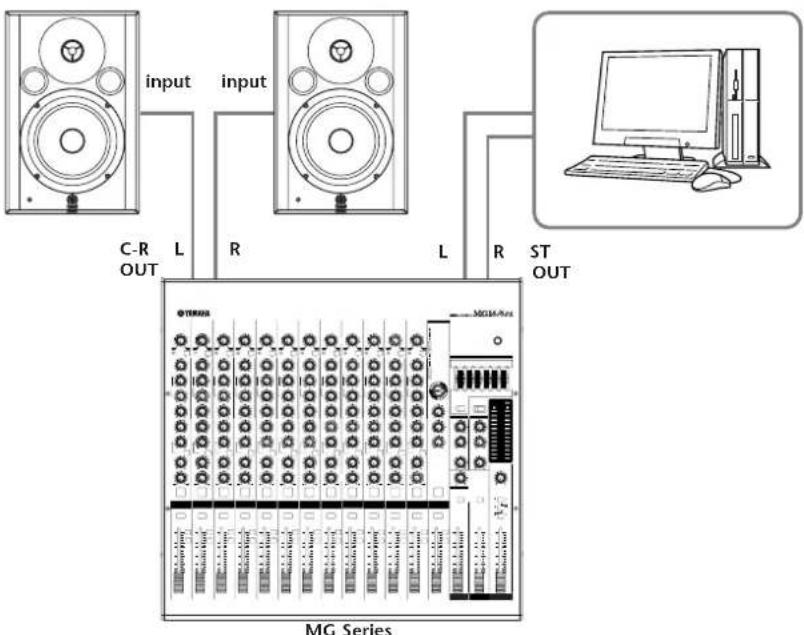
If you're connecting your MSP speakers directly to a mixer such as one of the Yamaha MG-series mixers, they should usually be connected to the mixer's "C-R" outputs or MONITOR outputs so that you can control the monitor level without affecting the level of the signal sent to the mixer's main bus, which will usually be feeding your recorder or DAW (Digital Audio Workstation) in a production type setup.
flowchart
graph TD
    A["Speaker 1"] -->|input L| B["Speaker 2"]
    C["Speaker 3"] -->|input R| B
    D["Computer"] -->|R ST OUT| E["MG Series"]
    style A fill:#f9f,stroke:#333
    style C fill:#f9f,stroke:#333
    style D fill:#ccf,stroke:#333
    style E fill:#cff,stroke:#333
Speaker Placement
Speaker placement is one of the most important considerations when setting up a monitor system, but it is all too often overlooked with the result that performance is seriously compromised. Admittedly the obstacles to perfect speaker positioning in the small studio are formidable. Having the space available to place your speaker system so that it can provide optimum performance is a luxury, but it
is definitely worth the time spent doing a little experimentation and measuring to make the most of limited resources. The difference can be astounding. The basics are the same whether you're setting up a stereo or 5.1 surround system.
Proximity to Walls and Corners
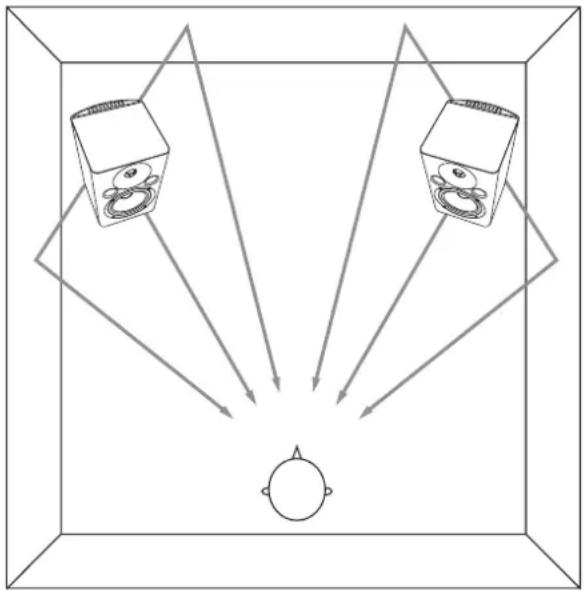
For the most accurate response your speakers should be positioned away from walls and especially corners, which can play havoc with a speaker's frequency characteristics. A minimum of about 1.5 meters (about 5 feet) away from walls would be ideal, but in reality they'll probably end up being placed on a desktop and pushed up against a wall.
Just keep in mind that fact that the closer you get to walls and corners the more exaggerated the speaker's bass response is likely to become, and some compensation — whether you compensate mentally or use some equalization — will probably be required.
natural_image
Diagram showing two speakers projecting off a circular object, with arrows indicating direction (no text or symbols)Symmetry
As we've just learned, the response of a speaker can change drastically according to where it is placed in relation to surfaces. So what happens if one of your speakers is up against a wall and the other is out in the open? Rest assured that the results will not be good, and will definitely not be conducive to producing good mixes.
You'll have totally different response from your left and right speakers, making it next to impossible to create a well-balanced mix, or even position tracks accurately in the stereo sound field. So whatever you do, if you're serious about your sound make sure that your speakers are located
as symmetrically within your listening environment as possible. Use a tape measure to ensure that your speakers are the same distance from the side and rear walls. Large objects can throw the acoustic symmetry of a room off balance, too. It's also important to be aware of the location of doors and windows. It is not always possible to achieve ideal symmetry, but it's worth getting as close as possible.
The "Sweet Spot"
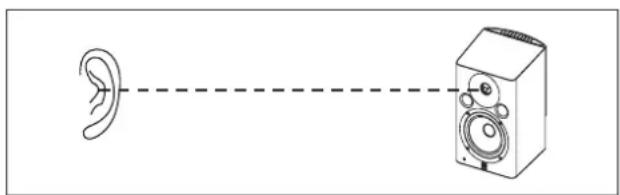
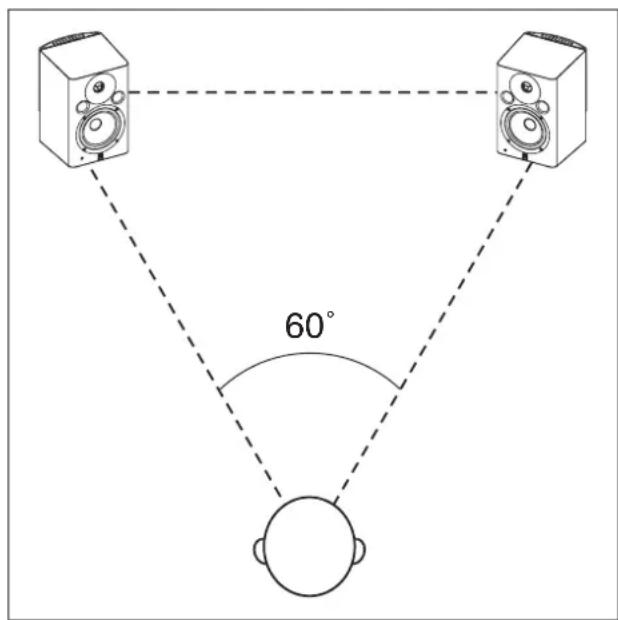
For both stereo and surround mixing your position in relation to the main front speakers — the "sweet spot" as it's often called — should be one apex of an equilateral triangle. In other words your distance from either speaker should be the same as the distance between the two speakers. The speakers should also be "toed in" to the corresponding 60° angle so that the drivers are aimed directly at the listening position. The height of the speakers should be such that the tweeters are roughly aligned with your ears (this is because high frequencies are the most directional).
Fine-tuning for Stereo (MSP7 STUDIO or MSP5 STUDIO x 2)
- The speaker LEVEL controls should be set to the same level. A setting of about 12 o'clock corresponds to a nominal input level.
- Since no subwoofer is being used in this setup, if your speakers have a LOW CUT switch, set it to "FLAT" (the MSP7 STUDIO has a LOW CUT switch).
- For accurate monitoring set the LOW TRIM switch to "0". If you want to reduce the low-frequency level a bit set the switch to "-1.5".
- For accurate monitoring set the HIGH TRIM switch to "0". This switch can be set to "-1.5 dB" to attenuate the highs slightly if you find the sound too bright.
Adding a Subwoofer
Even if you don't plan to set up a surround system, adding a subwoofer can be a real advantage for stereo mixing. If you can't hear the extreme low end there's not much you can do to make it sound great. The extended bass response provided by a good subwoofer can indeed help you to improve the overall quality of your mixes.
The location of your subwoofer is not as critical as the main speakers, because frequencies below around 200 Hz — the region your subwoofer will be working in — aren't direc-
tional. To say it another way, the ear can't locate the source of such low frequencies, so in theory the subwoofer can be placed anywhere in the room. In reality it's a good idea to place the subwoofer on the floor somewhere between the main front speakers at the same distance from the listening position as the main speakers, but it doesn't have to be dead center.
Fine-tuning for Stereo + Subwoofer (MSP7 STUDIO or MSP5 STUDIO x 2, SW10 STUDIO x 1)
- Set the MSP7 STUDIO or MSP5 STUDIO LEVEL control to about 12 o'clock for nominal input level. If you're using the MSP7 STUDIO set the SW10 STUDIO LEVEL control to about 12 o'clock, and if you're using the MSP5 STUDIO set it to about 10 o'clock. You can then fine-adjust the SW10 STUDIO LEVEL control as required. Another approach would be to adjust the MSP7 STUDIO/MSP5 STUDIO output level to achieve the desired relative balance with the subwoofer.
- Start with the SW10 STUDIO HIGH CUT control set at its center click position, which corresponds to a HPF frequency of about 80 Hz. The HIGH CUT frequency can be adjusted later to achieve the smoothest integration with the MSP7 STUDIO or MSP5 STUDIO speakers.
- If you are using the MSP7 STUDIO, set the LOW CUT switch to "80".
- úFor accurate monitoring set the MSP7 STUDIO/MSP5 STUDIO LOW TRIM switch to "0". If you want to reduce the level of the low-frequency range, set the switch to "-1.5".
- For accurate monitoring set the MSP7 STUDIO/MSP5 STUDIO HIGH TRIM switch to "0". This switch can be set to "-1.5 dB" to attenuate the highs slightly if you find the sound too bright.
Setting Up for Surround
If you're going to be mixing for surround, obviously you'll need a surround monitoring system. For a 5.1 surround system, for example, you only need to add a center speaker and two rear speakers to the stereo + subwoofer system described in the previous section. Let's see ... two main speakers plus one center speaker plus two rear speakers is a total of five speakers, and ".1" refers to the subwoofer. All present and accounted for!
According to the ITU (International Telecommunications Union) specifications for 5.1 surround setup, the main front speakers are positioned in the 60° equilateral triangle relationship to the listening position described earlier, and the rear speakers should be located at the same distance from the listening position, but at an angle of between 100° and 120°, as shown in the diagram above. The center speaker should be placed precisely midway between the main front speakers, at the same distance from the listen-
ing position as the other speakers (which means that ideally it will be a bit behind the main left and right speakers).
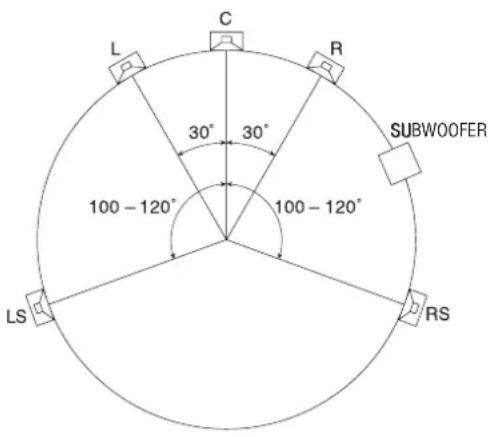
As you may have deduced by now, the main left and right, center, and rear speakers are all located on the circumference of a circle with its center at the listening position. An easy way to get all the distances right is to use a piece of string cut or marked to the exact distance between the main left and right speakers. Attach the string to a mic stand or other convenient object at the listening position and use it to measure the distance from the listening position to each of the speakers. Stretched from the listening position to the speaker position the string will also provide a convenient guide for aligning the speakers so that they point directly at the listening position.
MG-series Mixer Setup
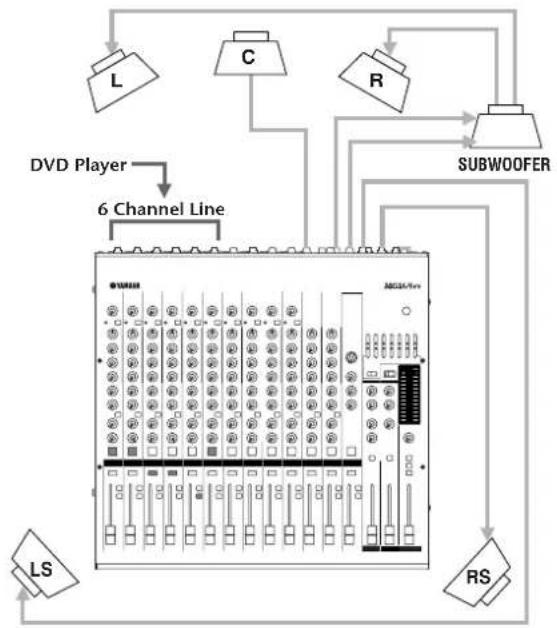
If you're connecting to a standard mixer that is not specifically designed for surround production, your main L and R speakers can be connected to any convenient stereo output pair via the SW10 STUDIO subwoofer, while the center and rear speakers will be connected to individual output channels.
Example: MG16/6FX
| DVD Player | Input Channel | Output Connector | Speaker |
| L | Ch1 (ST=ON, PAN → L) | ST OUT (L) | L |
| R | Ch2 (ST=ON, PAN → R) | ST OUT (R) | R |
| LS | Ch3 (GRP1-2, PAN → L) | GROUP OUT 1(L) | LS |
| RS | Ch4 (GRP1-2, PAN → R) | GROUP OUT 2(R) | RS |
| C | Ch5 (GRP3-4, PAN → L) | GROUP OUT 3 | C |
| LFE → | Ch6 (ST=ON, PAN→Center,Fader→+10 dB Boost) | ST OUT → | SUBWOOFER |
flowchart
graph TD
    A["LD"] --> B["DVD Player"]
    C["C"] --> B
    D["R"] --> E["6 Channel Line"]
    F["SUBWOOFER"] --> E
    G["RS"] --> E
    H["LS"] --> I["6 Channel Line"]
    I --> J["MDGA/Fin"]
    J --> K["Grid of modules"]
    K --> L["Grid of modules"]
    L --> M["Grid of modules"]
    M --> N["Grid of modules"]
    N --> O["Grid of modules"]
    O --> P["Grid of modules"]
    P --> Q["Grid of modules"]
    Q --> R["Grid of modules"]
    R --> S["Grid of modules"]
    S --> T["Grid of modules"]
    T --> U["Grid of modules"]
    U --> V["Grid of modules"]
    V --> W["Grid of modules"]
    W --> X["Grid of modules"]
    X --> Y["Grid of modules"]
Digital Mixer Setup
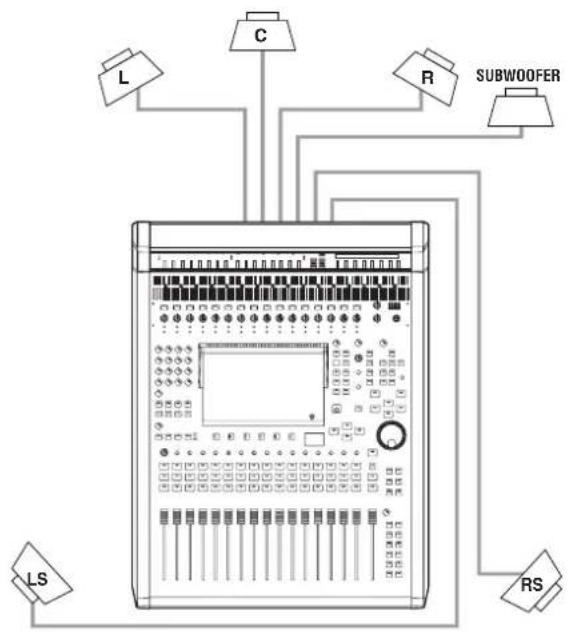
If you're connecting your MSP-series speakers to a mixing console that features built-in surround handling capability — such as the Yamaha DM2000, DM1000, or 02R96 — each speaker will be connected directly to the console output dedicated to handling that particular surround channel. In this type of setup you can take full advantage of the console's advanced surround mixing and bass management facilities.
flowchart
graph TD
    L["Input"] --> C["C"]
    C --> R["R"]
    R --> Subwoofer["Subwoofer"]
    Subwoofer --> RS["Output"]
    RS --> LS["Input"]
    L --> C
    C --> R
    R --> Subwoofer
    Subwoofer --> RS
Fine-tuning for Surround (MSP7 STUDIO or MSP5 STUDIO x 5, SW10 STUDIO x 1)
- Set the MSP7 STUDIO or MSP5 STUDIO LEVEL control to about 12 o'clock for nominal input level. If you're using the MSP7 STUDIO set the SW10 STUDIO LEVEL control to about 1 o'clock*, and if you're using the MSP5 STUDIO set it to about 11 o'clock*. You can then fine-adjust the SW10 STUDIO LEVEL control as required. Another approach would be to adjust the MSP7 STUDIO/MSP5 STUDIO output level to achieve the desired relative balance with the subwoofer.
* If you're using the MSP7 STUDIO with a digital mixer, set the SW10 STUDIO LEVEL control to about 12 o'clock. If you're using the MSP5 STUDIO with a digital mixer set the SW10 STUDIO LEVEL control to about 10 o'clock. - Start with the HIGH CUT control set at about 2:30, which corresponds to a HPF frequency of about 100Hz^* . The HIGH CUT frequency can be adjusted later to achieve the smoothest integration with the MSP7 STUDIO or MSP5 STUDIO speakers.
* Set to 80 Hz if you're using a digital mixer. - If you are using the MSP7 STUDIO set the LOW CUT switch to "100 Hz"*.
* Set to 80 Hz if you're using a digital mixer. - For accurate monitoring set the MSP7 STUDIO/MSP5 STUDIO HIGH TRIM switch to "0". This switch can be set to "-1.5 dB" to attenuate the highs slightly if you find the sound too bright.
Maintain a Consistent Monitoring Level
Another difference between listening and monitoring is that when you're listening for enjoyment you probably listen at significantly different levels at different times: from soft and unobtrusive for background music, right though room-shaking for involved listening or dancing. This is definitely not the case for serious monitoring. The response of your ears changes so drastically according to level, especially in the soft to medium-loud region, that is essential to maintain a consistent monitoring level otherwise you simply won't get consistent mixing results. You'll undoubtedly need to turn up or down a bit at certain points during the production process when listening for specific problems or effects — in fact it is important to listen to your mix at different levels as a final checking process, bringing the levels down very low to check if any elements of the mix disappear and make sure that the vocal continues to maintain its balance in the mix at very low levels — but in general you should stay within a fairly small range.
Just what is the best level to monitor at? Although there is a "standard" monitoring level specification, ^* the answer for most small studios is "whatever is most comfortable for you." You need to monitor at a level that's loud enough so that you don't miss any soft details, but not so loud that your ears become fatigued (or your neighbors complain). If
you find yourself turning up the volume after monitoring for a short while, your ears are probably starting to get tired and losing sensitivity. This is obviously bad for your music as well as your ears. So find that "comfort zone" and prepare to make some great music.
*For you techies, the SMPTE RP 200 standard monitoring level is 83 dB SPL (RMS average) at the listening position, or if you're mixing for film you'll need to know that the standard Dolby monitoring level for surround is 85 dB SPL.
Controls and Functions
natural_image
Line drawing of a speaker with multiple speakers and a circular component, connected to a numbered connection point (no text or symbols)MSP5 STUDIO (Rear Panel)
(Front Panel)
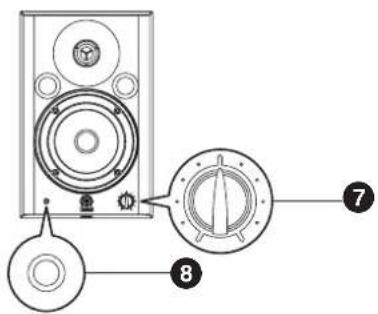
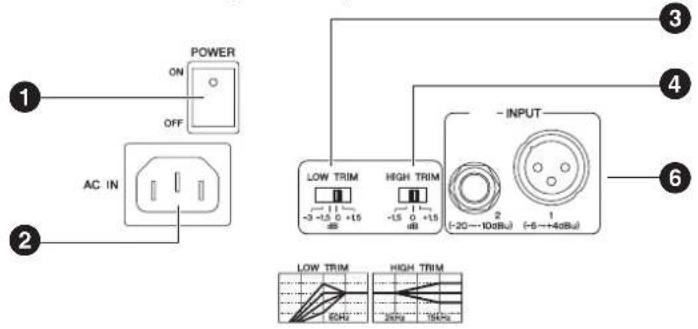
1 POWER switch
Tums power to the speaker on or off. When the power is turned on the POWER indicator (8) on the front panel will light green.
② AC IN Connector
Connect the supplied power cable here. First connect the power cord to the speaker, then insert the power cord plug into the AC outlet.
③ LOW TRIM switch
Adjusts the level of low-frequency range.
MSP7 STUDIO:
With the "+1.5" setting, low frequencies around 45 Hz are boosted by 1.5 dB. With the "-1.5" and "-3" settings the same frequency range is cut by 1.5 dB or 3 dB, respectively.
MSP5 STUDIO:
With the "+1.5" setting, low frequencies around 60 Hz are boosted by 1.5 dB. With the "-1.5" and "-3" settings, the same frequency range is cut by 1.5 dB and 3 dB, respectively.
4 HIGH TRIM switch
Adjusts the level of high-frequency range.
With the "+1.5" setting, the range around 15 kHz is boosted by 1.5 dB. With the "-1.5" setting, the range around 15 kHz is cut by 1.5 dB.
⑤ LOW CUT switch (MSP7 STUDIO)
Cuts the low-frequency range. With the "80 Hz" setting the range below 80 Hz is cut. With the "100 Hz" setting the range below 100 Hz is cut.
6 INPUT 1/2 connector
These are balanced XLR-type and unbalanced phone-type input connectors.
The MSP7 STUDIO only has an XLR-type input connector.

Do NOT use both the XLR and Phone type connector at the same time. Please connect to only one of these connectors.
7 LEVEL control
Adjusts the overall output level.
8 POWER indicator
When the power is turned on the POWER indicator will light green. The power indicator will flash red to indicate clipping.
SW10 STUDIO
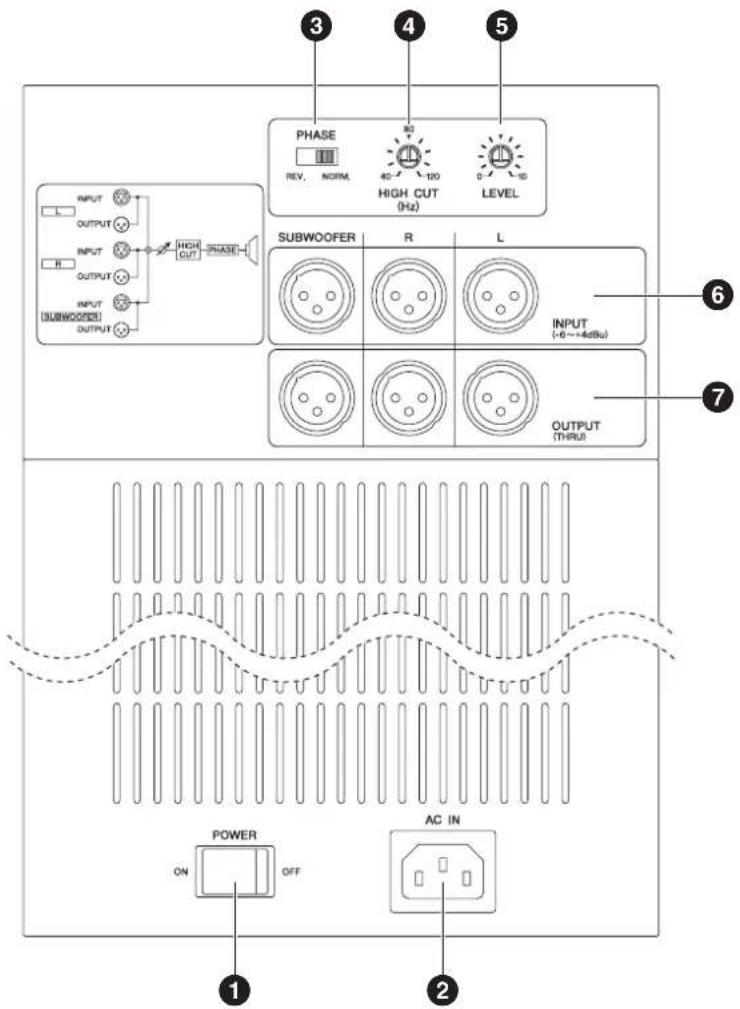
SW10 STUDIO (Rear Panel)
(Front Panel)
natural_image
Simple line drawing of a refrigerator with a circular vent and a numbered label (8) at the bottom right corner (no text or symbols on the diagram itself)① POWER switch
Tums power to the speaker on or off. When the power is turned on the POWER indicator (8) on the front panel will light green.
② AC IN Connector
Connect the supplied power cable here. First connect the power cord to the subwoofer, then insert the power cord plug into the AC outlet.
③PHASE switch
Selects a phase of output sound from the SW10 STUDIO. You will usually set this switch to "NORM". However, the "REV." setting may improve low-range response, depending on the type and location of the entire speaker system. Try both settings and select the one that produces the best low-end sound.
4 HIGH CUT control
Use the HIGH CUT control to set the cutoff frequency of the signal output from the SW10 STUDIO from 40 Hz to 120 Hz.
⑤ LEVEL control
Adjusts the overall output level.
6 INPUT L/R/SUBWOOFER connector
These are balanced XLR-type input connectors. Three different signals can be simultaneously input via these connectors. The input signals are mixed before being sent to the subwoofer.
7 OUTPUT L/R/SUBWOOFER connector
These XLR-type balanced output connectors output the signals received at the INPUT L/R/SUBWOOFER connectors, respectively.
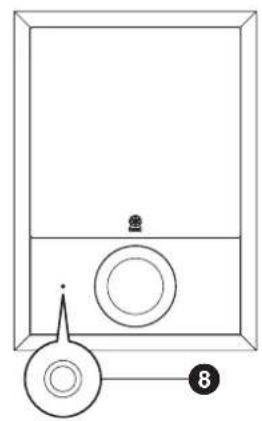
8 POWER indicator
When the power is turned on the POWER indicator will light green. The power indicator will flash red to indicate clipping.
| MODEL MSP7 STUDIO | MSP5 STUDIO SW10 STUDIO | |||
| GENERAL | ||||
| Type Biamp 2-way Powered Speaker Biamp 2-way Powered speaker Powered subwoofer | ||||
| Crossover Frequency | 2.5 kHzLF: 30 dB/oct, HF: 30 dB/oct | 2.5 kHzLF: 24 dB/oct, HF: 24 dB/oct | — | |
| Overall Frequency Response 45 Hz - 40 kHz (-10 dB) 50 Hz - 40 kHz (-10 dB) 25 Hz - 150 Hz (-10 dB) | ||||
| Maximum Output Level 106 dB, 1 m on Axis 101 dB, 1 m on Axis 111 dB, 1 m on Axis | ||||
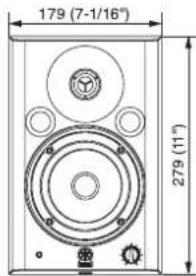
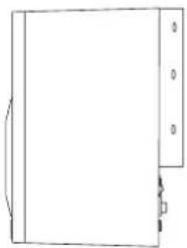
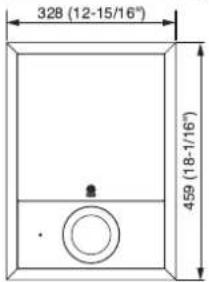
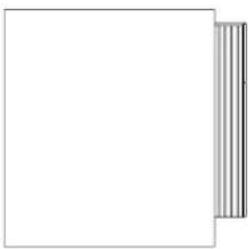
| Demensions (W x H x D) 218 x 330 x 235 mm 179 x 279 x 208 mm 328 x 459 x 476 mm | ||||
| Weight | 12.2 kg | 7.9 kg | 26.5 kg | |
| Magnetic Shielding | Yes | Yes | Yes (None covered type) | |
| SPEAKER SECTION | ||||
| Components | LF | 6.5" cone | 5" cone | 10" cone |
| HF | 1.0" dome | 1.0" dome | ||
| Enclosure | Type | Bass-Reflex | Bass-Reflex | Bass-Reflex |
| Material | PP | PP | MDF | |
| AMPLIFIER SECTION | ||||
| Output Power * | LF: 80 WTHD = 0.05 %, RL = 4 Ω | LF: 40WTHD = 0.02 %, RL = 4 Ω | 180Wf = 100 Hz, THD = 1 %, RL = 8 Ω | |
| HF: 50 WTHD = 0.05 %, RL = 6 Ω | HF: 27 WTHD = 0.02 %, RL = 6 Ω | |||
| S/N, IHF-A filter | ≥ 99 dB, LEVEL = Max | ≥ 94 dB, LEVEL = Max | ≥ 100 dB, LEVEL = Max | |
| Input Sensitivity | XLR-3-31 | +4 dBu, LEVEL = Center | +4 dBu, LEVEL = Center | +4 dBu, LEVEL = Center |
| -6dBu, LEVEL = Max | -6 dBu, LEVEL = Max | -6 dBu, LEVEL = Max | ||
| PHONE | — | -10 dBu, LEVEL = Center | — | |
| — | -20 dBu, LEVEL = Max — | |||
| Input Connectors, Impedance XLR-3-31 (balanced), 10 k Ω | XLR-3-31 (balanced), 10 kΩPHONE (unbalanced), 10 kΩ | XLR-3-31 x 3 (balanced), 10 kΩ | ||
| Output Connectors | — | — | XLR-3-32 x 3 (balanced),Parallel connection with Input | |
| Controls | LEVEL control | 31 Positions Detent type VR(Min = -∞ Attenuation) | 31 Positions Detent type VR(Min = -∞ Attenuation) | Center Click VR(Min = -∞ Attenuation) |
| LOW CUT switch | FLAT/80 Hz (12 dB/oct)/100 Hz (12 dB/oct) | — | ||
| HIGH TRIM | +1.5/0/-1.5 dB at 15 kHz | +1.5/0/-1.5 dB at 15 kHz | — | |
| LOW TRIM | +1.5/0/-1.5/-3 dB at 45 Hz | +1.5/0/-1.5/-3 dB at 60 Hz | — | |
| POWER switch | on/off | on/off | on/off | |
| PHASE switch | — | — | Normal/Reverse | |
| LPF control | — | — | 40-120 Hz, 80 Hz at Center Click | |
| Indicators | LED | Green: Power OnRed: Clipping | Green: Power OnRed: Clipping | Green: Power OnRed: Clipping |
| Power Consumption | 100 W | 60 W | 160 W | |
| AC CORD | ||||
| Length | 2.5 m | 2.5 m | 2.5 m | |
* These specifications apply to rated power supplies of 100, 120, 230 and 240 V.
MSP7 STUDIO
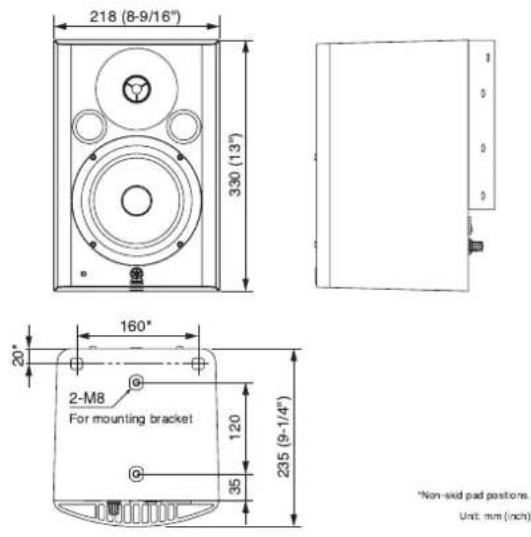
Non-skid pad positions.
Unit: mm (inch)
MSP5 STUDIO
natural_image
Simple line drawing of a rectangular object with a vertical side and a small square mark at the bottom right corner (no text or symbols)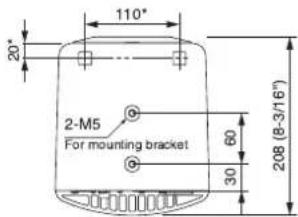
*Non-sided pad positions. Unit: mm (inch)
SW10 STUDIO
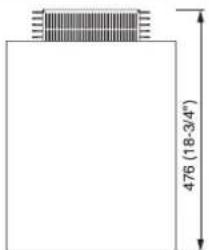
Unit mm (inch)
natural_image
Simple line drawing of a blank rectangular area with a vertical strip on the right side (no text or symbols)For details of products, please contact your nearest Yamaha representative or the authorized distributor listed below.
Yamaha Canada Music Ltd.
135 Milner Avenue, Scarborough, Ontario,
M1S 3R1, Canada
Tel: 416-298-1311
U.S.A.
Yamaha Corporation of America
6600 Orangethorpe Ave., Buena Park, Calif. 90620,
U.S.A.
Tel: 714-522-9011
CENTRAL & SOUTH AMERICA
MEXICO
PANAMA AND OTHER LATIN
AMERICAN COUNTRIES/
CARIBBEAN COUNTRIES
Yamaha Music Latin America, S.A.
Sherbourne Drive, Tilbrook, Milton Keynes,
MK7 8BL, England
Tel: 01908-366700
GERMANY
Yamaha Music Europe GmbH
Siemensstraße 22-34, 25462 Rellingen, Germany
Tel: 04101-3030
Branch Switzerland in Zürich
Seefeldstrasse 94, 8008 Zürich, Switzerland
Tel: 044-387-8080
AUSTRIA/BULGARIA
Yamaha Music Europe GmbH Branch Austria
Schleiergasse 20, A-1100 Wien, Austria
Tel: 01-60203900
CZECH REPUBLIC/HUNGARY/
ROMANIA/SLOVAKIA/SLOVENIA
Yamaha Music Europe GmbH
Branch Austria (Central Eastern Europe Office)
Schleiergasse 20, A-1100 Wien, Austria
Tel: 01-602039025
POLAND/LITHUANIA/LATVIA/ESTONIA
Yamaha Music Europe GmbH
Yamaha Music Europe GmbH, Branch Italy
Viale Italia 88, 20020 Lainate (Milano), Italy
Tel: 02-935-771
SPAIN/PORTUGAL
Yamaha Music Europe GmbH Ibérica, Sucursal
en España
Ctra. de la Coruna km. 17, 200, 28230
Las Rozas (Madrid), Spain
Tel: +34-902-39-8888
GREECE
Philippos Nakas S.A. The Music House
147 Skiathou Street, 112-55 Athens, Greece
Tel: 01-228 2160
SWEDEN/FINLAND/ICELAND
Yamaha Music Europe GmbH Germany filial
Scandinavia
J. A. Wettergrens Gata 1, Box 30053
S-400 43 Göteborg, Sweden
Tel: 031 89 34 00
DENMARK
Yamaha Music Europe GmbH, Tyskland – filial
Denmark
Generatorvej 6A, DK-2730 Herlev, Denmark
Tel: 44 92 49 00
NORWAY
Yamaha Music Europe GmbH Germany -
Norwegian Branch
Grini Næringspark 1, N-1345 ∅sterås, Norway
Tel: 67 16 77 70
RUSSIA
Yamaha Music (Russia)
Room 37, bld. 7, Kievskaya street, Moscow,
- Russia
Tel: 495 626 5005
OTHER EUROPEAN COUNTRIES
Yamaha Music Europe GmbH
Siemensstraße 22-34, 25462 Rellingen, Germany
Tel: +49-4101-3030
AFRICA
Yamaha Corporation,
Asia-Pacific Sales & Marketing Group
Nakazawa-cho 10-1, Naka-ku, Hamamatsu,
Japan 430-8650
Tel: +81-53-460-2303
MIDDLE EAST
TURKEY/CYPRUS
Yamaha Music Europe GmbH
Siemensstraße 22-34, 25462 Rellingen, Germany
Tel: 04101-3030
OTHER COUNTRIES
Yamaha Music Gulf FZE
LOB 16-513, P.O.Box 17328, Jubel Ali,
Dubai, United Arab Emirates
Tel: +971-4-881-5868
ASIA
THE PEOPLE'S REPUBLIC OF CHINA
Yamaha Music & Electronics (China) Co., Ltd.
2F, Yunhedasha, 1818 Xinzha-lu, Jingan-qu.
Shanghai, China
Tel: 021-6247-2211
INDIA
Yamaha Music India Pvt. Ltd.
5F Ambience Corporate Tower Ambience Mall Complex
Ambience Island, NH-8, Gurgaon-122001, Haryana, India
Tel: 0124-466-5551
INDONESIA
PT. Yamaha Musik Indonesia (Distributor)
PT. Nusantik
Gedung Yamaha Music Center, Jalan Jend. Gatot
Subroto Kav. 4, Jakarta 12930, Indonesia
Tel: 021-520-2577
KOREA
Yamaha Music Korea Ltd.
8F, 9F, Dongsung Bldg. 158-9 Samsung-Dong.
Kangnam-Gu, Seoul, Korea
Tel: 02-3467-3300
MALAYSIA
Yamaha Music (Malaysia) Sdn., Bhd.
Lot 8, Jalan Perbandaran, 47301 Kelana Jaya,
Petaling Jaya, Selangor, Malaysia
Tel: 03-78030900
SINGAPORE
Yamaha Music (Asia) Pte., Ltd.
03-11 A-Z Building
140 Paya Lebor Road, Singapore 409015
Tel: 6747-4374
TAIWAN
Yamaha KHS Music Co., Ltd.
3F, #6, Sec.2, Nan Jing E. Rd. Taipei.
Taiwan 104, R.O.C.
Tel: 02-2511-8688
THAILAND
Siam Music Yamaha Co., Ltd.
4, 6, 15 and 16th floor, Siam Motors Building,
891/1 Rama 1 Road, Wangmai,
Pathumwan, Bangkok 10330, Thailand
Tel: 02-215-2622
OTHER ASIAN COUNTRIES
Yamaha Corporation,
Asia-Pacific Sales & Marketing Group
Nakazawa-cho 10-1, Naka-ku, Hamamatsu,
Japan 430-8650
Tel: +81-53-460-2303
OCEANIA
AUSTRALIA
Yamaha Music Australia Pty. Ltd.
Level 1, 99 Queensbridge Street, Southbank,
Victoria 3006, Australia
Tel: 3-9693-5111
COUNTRIES AND TRUST
TERRITORIES IN PACIFIC OCEAN
Yamaha Corporation,
Asia-Pacific Sales & Marketing Group
Nakazawa-cho 10-1, Naka-ku, Hamamatsu,
Japan 430-8650
Tel: +81-53-460-2303
HEAD OFFICE
Yamaha Corporation, Pro Audio Division
Nakazawa-cho 10-1, Naka-ku, Hamamatsu, Japan 430-8650
Tel: +81-53-460-2441
C.S.G., Pro Audio Division
© 2006-2011 Yamaha Corporation
109 MW-02B0
Printed in China

- Explanation of Graphical Symbols
- IMPORTANT SAFETY INSTRUCTIONS
- WARNING
- IMPORTANT
- IMPORTANT NOTICE FOR THE UNITED KINGDOM Connecting the Plug and Cord
- Power supply/Power cord
- Do not open
- Water warning
- If you notice any abnormality
- CAUTION
- Location
- Connections
- Handling caution
- Interference From Cell Phones
- Setting Up for Superior Monitor Sound
- Listening vs. Monitoring
- Speaker Placement
- Proximity to Walls and Corners
- Symmetry
- The "Sweet Spot"
- Fine-tuning for Stereo (MSP7 STUDIO or MSP5 STUDIO x 2)
- Adding a Subwoofer
- Fine-tuning for Stereo + Subwoofer (MSP7 STUDIO or MSP5 STUDIO x 2, SW10 STUDIO x 1)
- Setting Up for Surround
- MG-series Mixer Setup
- Digital Mixer Setup
- Fine-tuning for Surround (MSP7 STUDIO or MSP5 STUDIO x 5, SW10 STUDIO x 1)
- Maintain a Consistent Monitoring Level
- Controls and Functions
- POWER switch
- ② AC IN Connector
- ③ LOW TRIM switch
- MSP7 STUDIO:
- MSP5 STUDIO:
- HIGH TRIM switch
- ⑤ LOW CUT switch (MSP7 STUDIO)
- INPUT 1/2 connector
- LEVEL control
- POWER indicator
- SW10 STUDIO
- ① POWER switch
- ③PHASE switch
- HIGH CUT control
- ⑤ LEVEL control
- INPUT L/R/SUBWOOFER connector
- OUTPUT L/R/SUBWOOFER connector
- U.S.A.
- CENTRAL & SOUTH AMERICA
- MEXICO
- PANAMA AND OTHER LATIN
- AMERICAN COUNTRIES/
- CARIBBEAN COUNTRIES
- GERMANY
- AUSTRIA/BULGARIA
- CZECH REPUBLIC/HUNGARY/
- ROMANIA/SLOVAKIA/SLOVENIA
- POLAND/LITHUANIA/LATVIA/ESTONIA
- SPAIN/PORTUGAL
- GREECE
- SWEDEN/FINLAND/ICELAND
- DENMARK
- NORWAY
- RUSSIA
- OTHER EUROPEAN COUNTRIES
- AFRICA
- MIDDLE EAST
- TURKEY/CYPRUS
- OTHER COUNTRIES
- ASIA
- THE PEOPLE'S REPUBLIC OF CHINA
- INDIA
- INDONESIA
- KOREA
- MALAYSIA
- SINGAPORE
- 03-11 A-Z Building
- TAIWAN
- THAILAND
- OTHER ASIAN COUNTRIES
- OCEANIA
- AUSTRALIA
- COUNTRIES AND TRUST
- TERRITORIES IN PACIFIC OCEAN
Brand : YAMAHA
Model : MSP3A
Category : Monitor