D:fine 88 - Microphone DPA - Free user manual and instructions
Find the device manual for free D:fine 88 DPA in PDF.


User questions about D:fine 88 DPA
0 question about this device. Answer the ones you know or ask your own.
Ask a new question about this device
Download the instructions for your Microphone in PDF format for free! Find your manual D:fine 88 - DPA and take your electronic device back in hand. On this page are published all the documents necessary for the use of your device. D:fine 88 by DPA.
USER MANUAL D:fine 88 DPA
All d:fine™ Headset Microphones provide a uniquely natural and open sound. Ultra-lightweight and adjustable, these mics ensure a secure and comfortable fit in live performance environments. To ensure optimal performance of your d:fine Headset Microphone, please follow the simple instructions below.
Placement of microphone
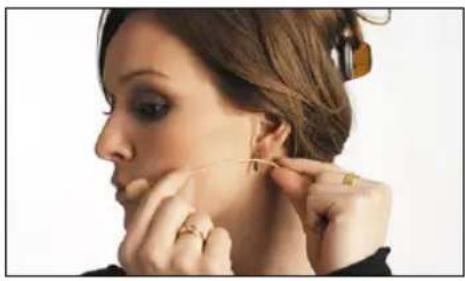
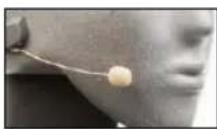
For discreet placement, you can bend the microphone boom slightly so that the capsule is placed in the desired position. Do not hold the capsule while bending; bend the wire boom, making a smooth curve with your thumb to best fit the profile of the face.
natural_image
Close-up of a woman applying makeup to her ear with a curling iron (no text or symbols visible)Mount a directional mic 2-3 cm (1 in) from the corner of the mouth to ensure optimal sound quality compared to an omnidirectional mic that can be placed further away from the mouth.
Omnidirectional characteristics
• The mic is sensitive to sound from all directions
- The sound remains more or less the same regardless of the distance between the sound source and the mic
- The positioning of mic with omni characteristics is less critical than with directional
- An omnidirectional microphone is generally not very sensitive to wind, breathing, pop and handling noises
Directional characteristics
- Rejects background noise and creates higher separation
• The mic is most sensitive to sound on one side (marked on some variants) - The positioning of mics with directional characteristics is essential as the low frequency level will change according to the distance to the mouth, known as proximity effect
- Choose a distance that yields the desired amount of bass
- Care should be taken to protect against wind and pop noise e.g. by using a windsseen
How to tell the difference between d:fine™ Headset Microphone capsules
d:fine™ CORE 4166
d:fine™ CORE 4188
d:fine™ CORE 4066, CORE 4266
d:fine™ CORE 4088, CORE 4288
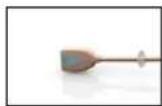
Omnidirectional
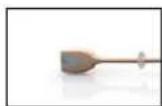
Directional
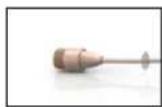
Omnidirectional
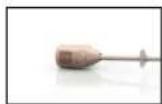
Directional

See the mark on the capsule

See the mark on the capsule
Adjusting the d:fine™ 4066 & 4088
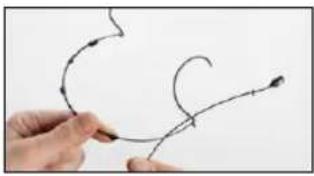
The size of the headset mount can easily be adjusted. Change the standard bend by carefully expanding the distance between the earhooks.
To change sides, simply click the boom out of the clips and switch it over to the other side.
The remaining two clips are not used. The soft cable must not be attached into the clips.
natural_image
Hand holding a pen with curved lines and arrows, pointing at a small object (no text or symbols visible)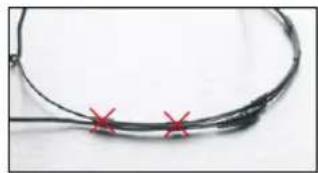
natural_image
Close-up of a black cable with three red X marks at the bottom (no text or symbols visible)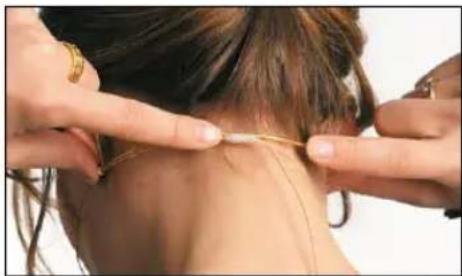
natural_image
Close-up of hands performing a neck massage technique on a person (no text or symbols visible)Adjusting the d:fine™ 4266 & 4288
For the single-ear, just open the spring hook lightly, first place the slide behind your ear-lobe (Pic. 1) and let go of the spring over your ear (Pic. 2). For the dual-ear, place the headset behind your ears and place the springs like for the single-ear. Adjust the headset mount by pulling or pushing the wires until it fits tightly (Pic. 3).
A directional headset should be mounted 2-3 cm (1 in) from the corner of the mouth to ensure optimal sound quality.
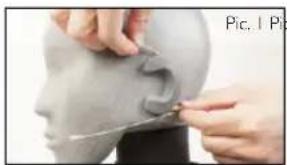
natural_image
Close-up of hands sculpting a human head with a curved object, no visible text or symbols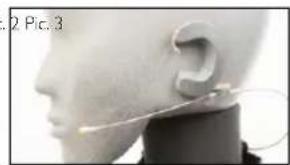
natural_image
Side profile of a human head and neck with a medical or surgical wire, no visible text or symbols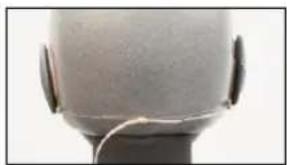
natural_image
Close-up of a human head with earband and white cable, no visible text or symbolsCorrect placement behind the earlobe
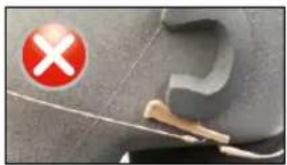
natural_image
Close-up of a car interior with a red 'X' symbol and a white tool near the door (no readable text or symbols)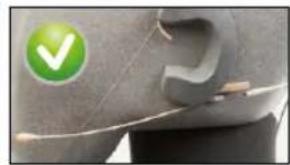
natural_image
Close-up of a car's side panel with a green checkmark icon (no text or symbols on the panel itself)See instruction video at
dpamicrophones.com/dfine
text_image
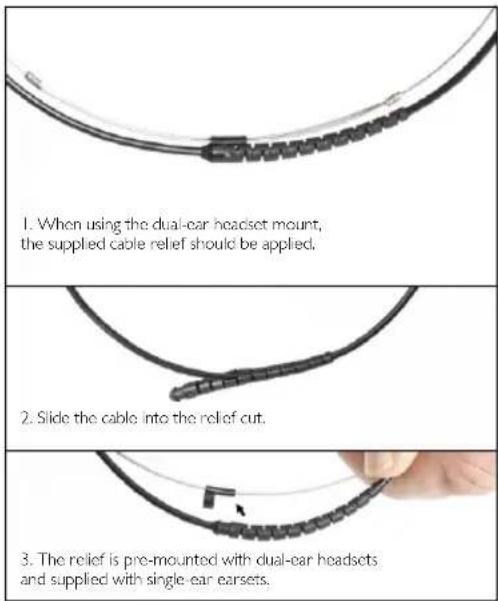
1. When using the dual-car headset mount, the supplied cable relief should be applied. 2. Slide the cable into the relief cut. 3. The relief is pre-mounted with dual-ear headsets and supplied with single-ear earsets.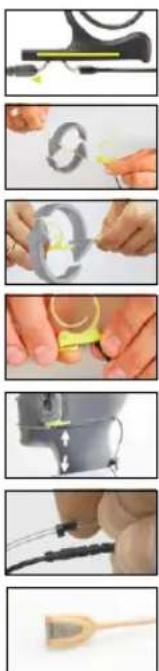
flowchart
graph TD
    A["Raw Material Inspection"] --> B["Step 1: Inspection"]
    B --> C["Step 2: Finishing"]
    C --> D["Step 3: Rolling"]
    D --> E["Step 4: Finishing"]
    E --> F["Step 5: Finishing"]
    F --> G["Final Product Inspection"]
Position the microphone properly by pulling or pushing the boom along the slide.
Switch between left and right ear wearing style simply by rotating the microphone boom. Hold on to the earhook while gently turning the boom.
For the dual-ear versions, also rotate the two earhooks.
Adjust the microphone boom to follow the shape of your face by gently bending the soft steel on the cable hanger.
Adjust the angle of the cable run, also by gently bending the soft steel (see arrows). Position the cable as shown on the picture for securing the position of the microphone.
The cable relief on the dual-ear version should be fixed in the clip that also holds the two wires on the mount.
Always leave the protection grid on the d:fine™ 4166 Omnidirectional & 4166 Directional capsules, as it protects the inner grid and offers protection against wind and breathing noise. The protection grid is replaceable.
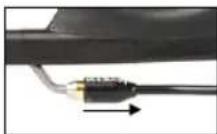
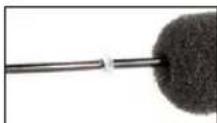
Service connector to exchange cables or booms on d:fine™ 4166, 4266, 4188 and 4288 Headsets
These d:fine™ Flex Headset Microphones offer exchange of cables or microphone booms. Simply locate the service access point, pull back the small locking cap and gently pull the boom away from the cable hanger.
Windscreens
The enclosed windscreens offer additional protection against wind and pop noise. Gently draw the windscreen over the microphone head. For even better protection, bigger windscreens are available.
Sweat stop
The microphone is equipped with a transparent sweat stop around the microphone boom to prevent sweat running along the microphone boom to the microphone head.
Accessories (see more at dpamicrophones.com/accessories)
Grids and windscreens, cables, adapters, booms and earhooks.
Protection cap
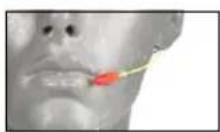
The dfine™ 4166 Omnidirectional & 4188 Directional Microphones come with a red plastic cap which serves to protect the microphone head when putting on makeup, hairspray and more. Remove the cap before use.
Color codes & cable steer
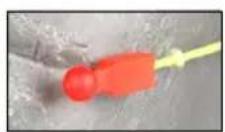
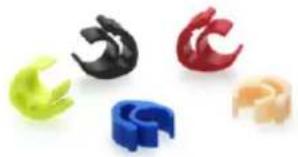
d:fine™ 4166 Omnidirectional & 4188 Directional Microphone types come with a number of cable steer clips in different colors. Mounted on the cable relief, this clip allows for quick recognition of a specific headset microphone.
natural_image
Five colorful plastic clip inserters arranged on a white background (no text or symbols visible)Clothing clip for d:fine™ 4266 & 4288 Headset types
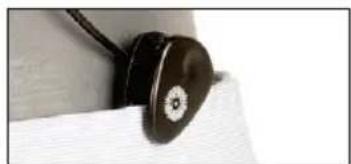
The supplied clothing clip allows you to attach the cable to your clothes, thus relieving the cable draw to the headset mic. This is essential on especially the single-ear headset mic.
natural_image
Close-up of a black circular mechanical component mounted on a white textured surface (no visible text or symbols)Cleaning d:fine™ 4066 & 4266 mic grids
Remove the mic grid from the mic element and clean the grid using a soft cloth and demineralized water only. Make sure the grid is dry before remounting it on the mic element. This is not possible on the dfine™ 4088 and 4288 types as the diaphragm is protected inside the mic housing and the protection grids are not removable. Therefore, for these two mics, no attempt should be made to clean the grid surface and extreme care should be taken not to clog the grids with makeup e.g.
Cable maintenance
The cable is usually longer than required. Make sure that superfluous cable is wound up in soft figure-of-eight loops (preferably 6-8 cm (2.5-3 in) diameter) and avoid kinks in the cable.
Use Ecotech2 Multi Degreaser from Finish Line to remove residue from tape, glue, or makeup on the cable. Do not bend the cable or rub it harshly, it may stress the inner cores of the cable and cause them to break over time.
General maintenance
The d:fine™ Headset Microphones are resistant to high levels of humidity. However, care must be taken to keep the mic away from exposure to water and cleaning fluids and to keep the mic head dry at all times. Do not use spray or use fluid containing chemicals that could remove static electricity on or close to the microphone. This could cause permanent damage.
MicroDot connectors and adapters
To provide users with safe and compact mounting of connectors, all headsets from DPA are fitted with the MicroDot connector as standard. A broad range of connection adapters is offered as optional accessories for most wireless systems for professional use. See dpamicrophones.com/adapters.
Please also note that standard hardwired solutions are available for popular wireless systems;
03 : 3 pin LEMO
10: TA-4F Switchcraft
34: Mini-Jack
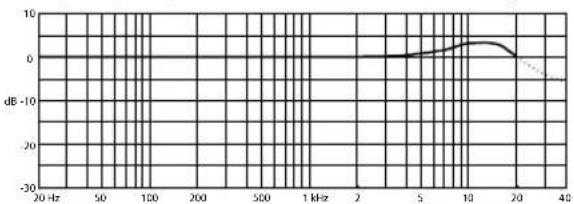
Frequency Response of dfine™ 4166 Omnidirectional types
line
| Frequency | Value (dB) | | --------- | ---------- | | 20 Hz | 0 | | 50 | 0 | | 100 | 0 | | 200 | 0 | | 500 | 0 | | 1 kHz | 0 | | 2 kHz | 0 | | 5 kHz | 0 | | 10 kHz | 0 | | 20 kHz | 0 | | 40 kHz | -10 |Polar Pattern of dfine™ 4166 Omnidirectional types
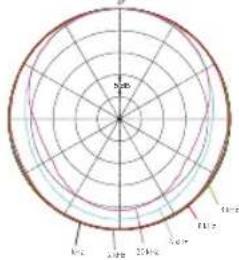
text_image
100° 90° 80° 70° 60°
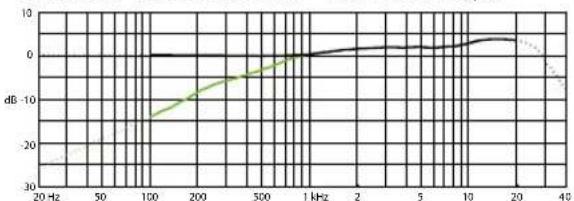
Frequency Response of d:fine ^TM 4188 Directional types
line
| Frequency | dB (Solid Line) | dB (Dashed Line) | | --------- | --------------- | ---------------- | | 20 Hz | -20 | -25 | | 50 Hz | -15 | -20 | | 100 Hz | -10 | -15 | | 200 Hz | -5 | -10 | | 500 Hz | 0 | -5 | | 1 kHz | 5 | 0 | | 2 kHz | 10 | 5 | | 5 kHz | 15 | 10 | | 10 kHz | 20 | 15 | | 20 kHz | 25 | 20 | | 40 kHz | 30 | 25 |Black line is near field (2 - 3 cm/0.6 - 1.2 in). Green line is far field (more than 30 cm/12 in).
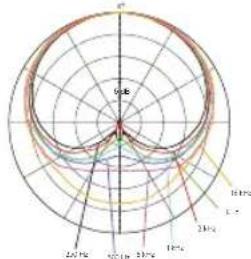
Polar Pattern d:fine™ 4188 Directional types
radar
| Angle (°) | Value | | --------- | ----- | | 0 | 0 | | 30 | 5 | | 60 | 10 | | 90 | 15 | | 120 | 20 | | 150 | 25 | | 180 | 30 |
Frequency Response (dfine™ 4066 & 4266 Omni Headset types)
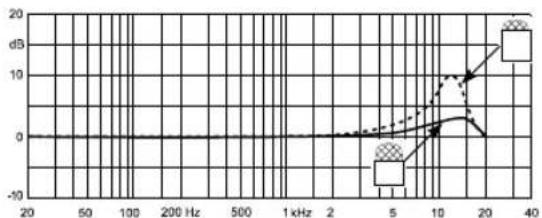
line
| Frequency (Hz) | Value (dB) | | -------------- | ---------- | | 20 | 0 | | 50 | -5 | | 100 | 0 | | 200 | 0 | | 500 | 0 | | 1 kHz | 0 | | 2 kHz | 0 | | 5 kHz | 0 | | 10 kHz | 5 | | 20 kHz | 10 | | 40 kHz | 15 |Frequency Response (dfine™ 4088 & 4088 Directional Headset types)
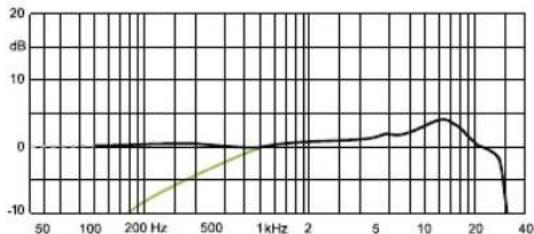
line
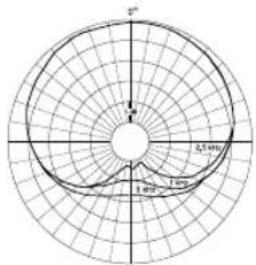
| Frequency | Value (dB) | | --------- | ---------- | | 50 | 0 | | 100 | 0 | | 200 | -10 | | 500 | 0 | | 1kHz | 0 | | 2 | 0 | | 5 | 0 | | 10 | 5 | | 20 | 0 | | 30 | -5 | | 40 | -10 |Polar Pattern (d:fine™ 4066 & 4266 Omni Headset types)
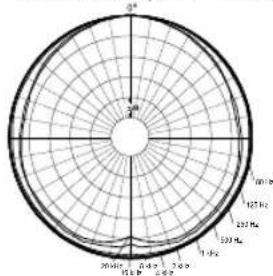
radar
| Angle (°) | Value | |---|---| | 0 | 100 | | 30 | 125 | | 60 | 150 | | 90 | 175 | | 120 | 200 | | 150 | 225 | | 180 | 250 | | 210 | 275 | | 240 | 300 | | 270 | 325 | | 300 | 350 | | 330 | 375 | | 360 | 400 | | 390 | 425 | | 420 | 450 | | 450 | 475 | | 480 | 500 | | 510 | 525 | | 540 | 550 | | 570 | 575 | | 600 | 600 | | 630 | 625 | | 660 | 650 | | 690 | 675 | | 720 | 700 | | 750 | 725 | | 780 | 750 | | 810 | 775 | | 840 | 800 | | 870 | 825 | | 900 | 850 | | 930 | 875 | | 960 | 900 | | 990 | 925 | | 1020 | 950 | | 1050 | 975 | | 1080 | 1000 | | 1110 | 1025 | | 1140 | 1050 | | 1170 | 1075 | | 1200 | 1100 | | 1230 | 1125 | | 1260 | 1150 | | 1290 | 1175 | | 1320 | 1200 | | 1350 | 1225 | | 1380 | 1250 | | 1410 | 1275 | | 1440 | 1300 | | 1470 | 1325 | | 1500 | 1350 | | 1530 | 1375 | | 1560 | 1400 | | 1590 | 1425 | | 1620 | 1450 | | 1650 | 1475 | | 1680 | 1500 | | 1710 | 1525 | | 1740 | 1550 | | 1770 | 1575 | | 1800 | 1600 | | 1830 | 1625 | | 1860 | 1650 | | 1890 | 1675 | | 1920 | 1700 | | 1950 | 1725 | | 1980 | 1750 | | 2010 | 1775 | | 2040 | 1800 | | 2070 | 1825 | | 2100 | 1850 | | 2130 | 1875 | | 2160 | 1900 | | 2190 | 1925 | | 2220 | 1950 | | 2250 | 1975 | | 2280 | 2000 | | 2310 | 2025 | | 2340 | 2050 | | 2370 | 2075 | | 2400 | 2100 | | 2430 | 2125 | | 2460 | 2150 | | 2490 | 2175 | | 2520 | 2200 | | 2550 | 2225 | | 2580 | 2250 | | 2610 | 2275 | | 2640 | 2300 | | 2670 | 2325 | | 2700 | 2350 | | 2730 | 2375 | | 2760 | 2400 | | 2790 | 2425 | | 2820 | 2450 | | 2850 | 2475 | | 2880 | 2500 | | 2910 | 2525 | | 2940 | 2550 | | 2970 | 2575 | | 3000 | 2600 | | Note: The values in the 'Value' column are estimated based on the provided code format. The 'Angle' label is not explicitly provided in the image. The 'Radial Axis' label is not present in the chart.
Polar Pattern (d:fine™ 4088 & 4088 Omni Headset types)
text_image
5° 2.54m 1.40m
Specifications
dfine™ CORE 4066, 4166 & 4266 Omnidirectional Headset Microphone types
Directional pattern
Omnidirectional
Principle of operation
Pressure
Frequency range
20 Hz - 20 kHz
Frequency range, ±2 dB
d:fine™ CORE 4166;
20 Hz - 20 kHz with 3 dB soft boost at 8 - 15 kHz
dfine™ CORE 4066 Act & Flex:
20 Hz - 20 kHz with 3 dB soft boost at 8 - 20 kHz
Sensitivity, nominal, ±3 dB at 1 kHz
6 mV/Pa; -44 dB re. 1 V/Pa
Equivalent noise level, A-weighted
Typ. 26 dB(A) re. 20 μPa (max. 28 dB(A))
S/N ratio (A-weighted),
re. 1 kHz at 1 Pa (94 dB SPL)
Typ. 68 dB(A)
Total harmonic distortion (THD)
<1% up to 137 dB SPL peak
Dynamic range
Typ. III dB
Max. SPL, peak before clipping
144 dB
Power supply (for full performance)
Min. 5 V - max. 50 V through DPA adapter for
wireless systems.
Current consumption
Typ. 1.5 mA (microphone)
3.5 mA with DAD6001-BC XLR adapter
Connector
MicroDot
Color (microphone, cable and earhook)
Black, beige, brown
Cable length
1.25 m (4.1 ft)
Cable diameter
1.6 mm (0.06 in)
Temperature range
-40°C to 45°C (-40°F to 113°F)
Relative humidity (RH)
Up to 90%
Specifications
dfine™ CORE 4088, 4188 & 4288 Directional Headset Microphone types
Directional characteristics
Cardioid
Principle of operation
Pressure gradient
Frequency range
20 Hz - 20 kHz
Frequency range, ±2 dB,
Near field 2-3 cm (0.8-1.2 in)
dfine™ CORE 4188:
100 Hz-20 kHz with 3 dB soft boost
100 Hz - 20 kHz with 4-6 dB soft boost at 15 kHz
Sensitivity, nominal, ±3 dB at 1 kHz
6 mV/Pa: -44 dB re. 1 V/Pa
Equivalent noise level, A-weighted
Typ. 28 dB(A) re. 20 μPa (max. 30 dB(A))
S/N ratio (A-weighted),
re. 1 kHz at 1 Pa (94 dB SPL)
Typ. 66 dB(A)
Total harmonic distortion (THD)
<1% up to 137 dB SPL peak
Dynamic range
Typ. 111 dB
Max. SPL, peak before clipping
144 dB
Power supply (for full performance)
Min. 5 V - max. 50 V through DPA adapter for
wireless systems
Current consumption
Typ. 1.5 mA (microphone)
3.5 mA with DAD6001-BC XLR adapter
Connector
MicroDot
Color (microphone, cable and carhook)
Black, beige, brown
Cable length
1.2 m (3.9 ft)
Cable diameter
1.6 mm (0.06 in)
Temperature range
-40°C to 45°C (-40°F to 113°F)
Relative humidity (RH)
Up to 90%


© Copyright 2017
Service & repair
If you are not satisfied with the characteristics exhibited by this product, please contact your nearest DFA Microphones representative for support.
Warranty
cfre™COR. Headset. Microphones are covered by a two-year limited warranty.
CE marking
This product conforms to all relevant directives approved by the European Commission.
Product features and specifications are subject to change without notice

d:fine™
Headset Microphones
core
by DPA
d p a m i c r o p h o n e s . c o m / d f i n e