
D:fine 4065 - Microphone DPA - Free user manual and instructions
Find the device manual for free D:fine 4065 DPA in PDF.


| Product Type | Subminiature Condenser Microphone |
| Directional Pattern | Omnidirectional |
| Frequency Range | 20 Hz - 20 kHz |
| Equivalent Noise Level (A-weighted) | Typ. 23 dB(A) re. 20 µPa (max. 26 dB(A)) |
| Total Harmonic Distortion (THD) | < 1% THD up to 123 dB SPL peak |
| Dynamic Range | Typ. 100 dB |
| Max SPL | 144 dB SPL peak |
| Sensitivity | 6 mV/Pa; -44 dB re. 1 V/Pa |
| Output Impedance | 30 - 40 Ω |
| Cable Drive Capability | Up to 300 m (984 ft) with DAD6001 or DAD4099 preamp |
| Power Supply | For DAD6001: 48 V phantom power ±4 V (PSM 1-4) |
| Dimensions (Microphone Cap) | Diameter 5.4 mm, Height 10.5 mm |
| Weight (Microphone Cap) | Approx. 0.75 g |
| Color | Black (standard) / White (optional) |
| Connector | MicroDot (to suit various wireless systems) |
| Main Functions | High-quality audio capture for speech, vocals, and instruments; designed for discreet placement in headsets, lavalier, and instrument mounting |
| Maintenance & Cleaning | Clean with a soft, damp cloth; avoid solvents; dry before storage; use included protective cap when not in use |
| Safety | Complies with relevant EU and FCC standards; do not expose to extreme temperatures or moisture |
| Spare Parts & Repairability | Replaceable microphone cap, cable, and MicroDot connector; service by authorized DPA center |
| General Information | Designed for professional audio; compatible with DPA preamplifiers and most wireless systems with MicroDot adapter |
Frequently Asked Questions - D:fine 4065 DPA
User questions about D:fine 4065 DPA
0 question about this device. Answer the ones you know or ask your own.
Ask a new question about this device
Download the instructions for your Microphone in PDF format for free! Find your manual D:fine 4065 - DPA and take your electronic device back in hand. On this page are published all the documents necessary for the use of your device. D:fine 4065 by DPA.
USER MANUAL D:fine 4065 DPA
www.dpamicrophones.com
www.dpamicrophones.com/dfine
Introduction
All the define™ Headset Microphones provide a unique natural and open sound. Ultra-lightweight and adjustable, define™ Headset Mics ensure a secure and comfortable fit in live performance environments. To ensure optimal performance of your define Headset Mics please follow the simple instructions below.
Placement of microphone
For discreet placement, you can bond the microphone boom slightly so that the capsule is as close to the cheek as positive. Do not hold the capore while bending bend

the wire boom, making a smooth curve with your thumb to best fill the profile of the face.
Mount a directional mic 2–3 cm (1 in) from the corner of the intake to ensure optimal sound quality compared to an omnidirectional mic that can be placed. Further away from the mouth
Omnidirectional characteristics
• The telephone receiver will stand from 2.15 words
The following table is provided in the image.
The following table provides the original text:
• The positioning of membrane with some wire
[Unreadable]
A. 2016年1月1日
in the world, an existing and more new
Directional characteristics
• Surgees hectgouse nate and melaigher aetanlon
• In the presence of a cell line, we are used to define
- 2017年1月1日
• 10.2.1.1.1
in the low coverage and all states according to this plan to the result
Choose a set with field, θ + δ and a set of b.
• Can should be done to provide a way to pay more for the cost.
-
2017年
-
2017年
How to tell the difference between d:fine™ Headset Microphone capsules
dfinch Omnidirectional

Omnidirectional

See the mark on the capsule
d-finc™ Directiona

Directional

See the mark on the capsule
d'ine" 4965
dino 6066
1.12. 45.05
d'ine" 4067
:Line TM 66
dion TH 6068
the 00
d. Inc. 88

Omnidirectional

Directional
Adjusting the d:fine™ 4065
4065 is pre-formed but may require adjustment in order to get a tight. Fixed position to the back of the neck. Adjust the steel tube carefully at the curve
A protection grid is mounted over the microphone head. If clogged with dirt or make-up, gently remove it and clean it with distilled water.
Adjusting the define TM 4066, 4067, and 4088
The size of the "excessive" mount can easily be adjusted. Change the standard bed by carefully expanding the distance between the schools.
to change sides, simply click the boom out of the clips and switch it over to the other side.
The remaining two clips are not used, the soft cable must no, be attached into the clips.
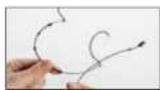
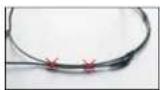

Adjusting the d:fine™ Omnidirectional, d:fine™ Directional, d:fine™ 66 and d:fine™ 88.
The directional characteristics of the microphone is indicated on the flat microphone head with ⏻ for omnicirectional and ➤ for directional as shown on page 3. This marking should always point towards the mouth Mount a directional headset 2 - 3 cm (1 m) from the corner of the mouth to ensure optimal sound quality
For the single-ear, just open the spring hook lightly, first place the side behind your ear lose (Pic. 1) and let go of the spring over your ear (Pic. 2). For the dual-ear, place the headset behind your ears and place the springs like for the single-ear. Adjust the headset mount by pulling or pushing the wires until it fits tight (Pic. 3).

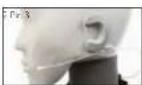

Correct placement behind the varLobe


See instruction video at
democropres.com/dine

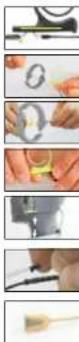
Position the microphone properly by pulling or pushing the boom along the side.
Sw an between left and right ear wearing style smosy by rotating the microphone boom. Hold on to the sarbook while gently turning the boom.
For the dual-ear versions, also rotate the two earcocks.
Adjust the microphone boom to follow the shape of your face by gently bending the soft sales on the scale hanger.
Adjust the angle of the cable run also by gently bending the soft vessel (see arrows). Position the cable as shown on the picture for securing the position of the microphone.
The cable relief on the dual ear verson should be fixed in the clip that also holds the two wires on the mount.
Always leave the protection grid on the define Omnidirectional and refine™ Directions, as it protects the inner grid and offers protection against wind and breathing noise. The protection grid is replaccable.

Service connector for exchange of cables or booms on the dfine™ Omnidirectional, define™ Directional, define™ 66 and dfine™ 88
Present line [1] Breaklet. Microphones offer exchange of cables or microphone zooms. Simply locate the service access point, pull back the small protection gap and gently pull the zoom away from the table hanger.
Windscreens
The enclosed windscreens offer additional protection against wind and top noise. Generally draw the windscreen over the microphone head. For even better protection, bigger windscreens are available.
Sweat stop
The microphone is equipped with a transparent sweat stop around the microphone boom to prevent sweet running along the microphone boom to the microphone head.
Accessories (see note at www.panicophore.com) Grids and windscreens, cables and adapters, banners and earbuds
Protection cap
The d'aire ™ Orn-directional and saline ™ Directional micropones come with a red plastic cap which serves to protect the microphone head when putting on make-p. harspray and more. Remove the cap before use.


Color codes & cable steer
The dline 18 Onndirectional and define Directional microphones come with a number of cable steer clips in different colours. Mounted on the cable relief, this clip allows for quick recognition of a specific headset microphone.

Clothing clip for d:fine™ Omnidirectional, d:fine™ Directional, d:fine™ 66 and d:fine™ 88.
The supplied clothing do allows you to attach the cable to your clothes, thus relieving the cable draw to the headset mic. This is essential on the single-car headset mic.
Correct use of microphone grids
The two different protection grids that are supplied with 4066, 4067, and defnee are for acoustical equalization, depending on the placement on the performer. Remove the premounted soft-boost grid before replacing it with the high-boost grid.


Cleaning the mic grid of dfine™ 4065, 4066, 4067 and dfine™ 66
Remove the microphone grid from the microphone element and clean the grid using as soft cloth and distilled water only. Make sure the grid is dry before mounting it on the microphone element. This is not possible on the 4088 and cfine® 86 as the dipragm is protected inside the microphone housing and the protection grids are not removable. Therefore, no attempts should be made to clean the grid surface and extreme care should be taken not to dig the grids with makeup eq.
Cable maintenance
The cable is usually longer than required. Make sure that superfluous cable is wound up in soft figure of eight loops (preferably 5–3 cm (2.5–3 m) diameter) and avoid kins in the tube.
Use organic oil (e.g., olive oil) or lukewarm distilled water to remove rescue from tape, gluc, or make-up on the cable. Do not send the cable or rub it harshly, it may stress the inner cores of the cable and cause them to break over time.
General Maintenance
The define Headsets are resistant to high levels of humidity. However, care must be taken to keep the headset microphone away from exposure to water and cleaning fluids, and to keep the microphone head dry at all times. Do not use spray or use fluid containing chemicals that could remove static electricity on or close to the microphone. This could cause permanent damage.
MicroDot connectors and adapters
To provide users with sale and compact mounting of connectors, all neckets from DPA are fitted with the MicroDot connector as standard. A broad range of connection adapters is offered as optional accessories for most wireless systems for professional use. See www.pamikrophones.com/adapters
Use the supplied connector-tightening too whenever the MicroDot connector needs to be fastened to the adaptor for long periods of time.


Polar Pattern of dire ™ On directedal

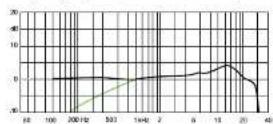
Frequency Response (cfine 31 4065, 4066, 4067 and d fine 31 66)

Polar Pattern (cfire™ 4053, 4066, 4267 and eTM 65)


Polar Pattern crine 16 Directional

Frequency Response (if in 1438 and c2m10 RS)
Polar Pattern (diam 31 5088 and diam 32 RR)

Specifications
dfine™ Omnidirectional Headset Microphones
Directional characteristics
Omnidirectional
Principle of operation
Pressure
Frequency range
20 Hz - 20 kHz
Frequency range, ± 2 dB
d:fine omnidirectional
20 Hz - 20 kHz with 3 dB soft boost at 8 - 15 kHz
4065, 4066, 4067 and dfine 66:
20 Hz - 20 kHz with 3 dB soft boost at 8 - 20 kHz
Sensitivity, nominal, ± 3 dB at 1 kHz
6 mV/Pa; -44 dB re. 1 V/Pa
Equivalent noise level, A-weighted
Typ. 26 dB(A) re. 20 μPa (max. 28 dB(A))
S/N ratio (A-weighted),
re. 1 kHz at 1 Pa (94 dB SPL)
Typ. 68 dB(A)
Total Harmonic Distortion (THD)
<1 % up to 123 dB SPL peak
<1% up to 120 dB SPL RMS sine
Dynamic range
Typ. 97 dB
Max. SPL, peak before clipping
144 dB
Power supply (for full performance)
Min. 5 V - max. 50 V through DPA adapter for
wireless systems, 48 V phantom power ± 4 V
with DAD6001-BC XLR adapter
Current consumption
Typ. 1.5 mA (microphone)
3.5 mA with DAD6001-BC XLR adapter
Connector
MicroDot
Color (microphone, cable and earhook)
Black, beige, brown
Microphone head size (h x w x d)
9.5×5.3×2.9mm(0.37×0.21×0.11in)
Cable length
1.3 m (4.3 ft)
Cable diameter
1.6 mm (0.06 in)
Temperature range
-40 °C to 45 °C (-40 °F to 113 °F)
Relative Humidity (RH)
Up to 90%
Specifications
d.fine™ Directional Headset Microphones
Directional characteristics
Cardioid
Principle of operation
Pressure gradient
Frequency range
20 Hz - 20 kHz
Frequency range, ± 2 dB,
Near field 2-3 cm (0.8-1.2 in)
define directional
100 Hz - 20 kHz with 3 dB soft boost at 8 - 20 kHz
4088 and dfine 88
100 Hz - 20 kHz with 4-6 dB soft boost at 15 kHz
Sensitivity, nominal, ±3 dB at 1 kHz
6 mV/Pa: -44 dB re. | V/Pa
Equivalent noise level, A-weighted
Typ. 28 dB(A) re. 20 μPa (max. 30 dB(A))
S/N ratio (A-weighted),
re. 1 kHz at 1 Pa (94 dB SPL)
Typ. 66 dB(A)
Total Harmonic Distortion (THD)
<1 % up to 123 dB SPL peak
<1 % up to 120 dB SPL RMS sine
Dynamic range
Typ. 95 dB
Max. SPL, peak before clipping
144 dB
Power supply (for full performance)
Min. 5 V - max. 50 V through DPA adapter for
wireless systems. 48 V phantom power ± 4 V
with DAD6001-BC XLR adapter
Current consumption
Typ. 1.5 mA (microphone)
3.5 mA with DAD6001-BC XLR adapter
Connector
MicroDot
Color (microphone, cable and earhook)
Black, beige, brown
Cable length
1.3 m (4.3 l)
Cable diameter
1.5 mm (0.06 in)
Temperature range
-40 °C to 45 °C (-40 °F to 113 °F)
Relative Humidity (RH)
Up to 90%
Service & repair
If you are not satisfied with the characteristics achieved by this product, please go to
www.dpanmicrophones.com/service-for-instructors
Warranty
The d-line 'headset microphone is covered by a two-year limited warranty.
CE marking
This product conforms with all relevant directives approved by the European Commission.
Product features and specifications are subject to change without notice.


© Copyright 2014
- INTRODUCTION
- PLACEMENT OF MICROPHONE
- OMNIDIRECTIONAL CHARACTERISTICS
- DIRECTIONAL CHARACTERISTICS
- HOW TO TELL THE DIFFERENCE BETWEEN D:FINE™ HEADSET MICROPHONE CAPSULES
- ADJUSTING THE D:FINE™ 4065
- ADJUSTING THE DEFINE TM 4066, 4067, AND 4088
- ADJUSTING THE D:FINE™ OMNIDIRECTIONAL, D:FINE™ DIRECTIONAL, D:FINE™ 66 AND D:FINE™ 88
- WINDSCREENS
- SWEAT STOP
- PROTECTION CAP
- COLOR CODES & CABLE STEER
- CLOTHING CLIP FOR D:FINE™ OMNIDIRECTIONAL, D:FINE™ DIRECTIONAL, D:FINE™ 66 AND D:FINE™ 88
- CORRECT USE OF MICROPHONE GRIDS
- CLEANING THE MIC GRID OF DFINE™ 4065, 4066, 4067 AND DFINE™ 66
- CABLE MAINTENANCE
- GENERAL MAINTENANCE
- MICRODOT CONNECTORS AND ADAPTERS
- SPECIFICATIONS
- PRINCIPLE OF OPERATION
- FREQUENCY RANGE
- FREQUENCY RANGE, ± 2 DB
- SENSITIVITY, NOMINAL, ± 3 DB AT 1 KHZ
- EQUIVALENT NOISE LEVEL, A-WEIGHTED
- S/N RATIO (A-WEIGHTED)
- RE. 1 KHZ AT 1 PA (94 DB SPL)
- TOTAL HARMONIC DISTORTION (THD)
- DYNAMIC RANGE
- MAX. SPL, PEAK BEFORE CLIPPING
- POWER SUPPLY (FOR FULL PERFORMANCE)
- CURRENT CONSUMPTION
- CONNECTOR
- MICROPHONE HEAD SIZE (H X W X D)
- CABLE LENGTH
- CABLE DIAMETER
- TEMPERATURE RANGE
- RELATIVE HUMIDITY (RH)
- NEAR FIELD 2-3 CM (0.8-1.2 IN)
- SENSITIVITY, NOMINAL, ±3 DB AT 1 KHZ
Brand : DPA
Model : D:fine 4065
Category : Microphone