
Pot System Bar 48 x 1W - Lighting Fun Generation - Free user manual and instructions
Find the device manual for free Pot System Bar 48 x 1W Fun Generation in PDF.


User questions about Pot System Bar 48 x 1W Fun Generation
0 question about this device. Answer the ones you know or ask your own.
Ask a new question about this device
Download the instructions for your Lighting in PDF format for free! Find your manual Pot System Bar 48 x 1W - Fun Generation and take your electronic device back in hand. On this page are published all the documents necessary for the use of your device. Pot System Bar 48 x 1W by Fun Generation.
USER MANUAL Pot System Bar 48 x 1W Fun Generation
natural_image
Illustration of four hanging circular objects with white spherical patterns, suspended by a striped horizontal bar (no text or symbols)fungeneration
LED Pot System Bar RGBW
LED lighting set
Musikhaus Thomann
Thomann GmbH
1.1 Further information.... 6
1.2 Notational conventions.... 7
1.3 Symbols and signal words.... 7
2 Safety instructions.... 10
3 Features.... 18
4 Installation.... 19
5 Setup.... 24
6 Connections and controls.... 27
7 Operating.... 33
7.1 Starting the device.... 33
7.2 Device functions.... 33
7.3 Foot switch.... 33
7.4 Remote control.... 34
7.5 Operating on the unit.... 37
LED Pot System Bar RGBW
th·mann MUSIC IS OUR PASSION
Table of contents
7.6 Menu overview.... 44
7.7 Functions in 2-channel DMX mode.... 45
7.8 Functions in 4-channel DMX mode.... 48
7.9 Functions in 5-channel DMX mode.... 49
7.10 Functions in 8-channel DMX mode.... 49
7.11 Functions in 10-channel DMX mode 53
7.12 Functions in 18-channel DMX mode 54
8 Technical specifications.... 57
9 Plug and connection assignments.... 60
10 Troubleshooting.... 61
11 Cleaning.... 63
12 Protecting the environment.... 64
th·mann MUSIC IS OUR PASSION
LED lighting set
1 General information
This user manual contains important information on the safe operation of the device. Read and follow all safety notes and all instructions. Save this manual for future reference. Make sure that it is available to all persons using this device. If you sell the device to another user, be sure that they also receive this manual.
Our products and user manuals are subject to a process of continuous development. We therefore reserve the right to make changes without notice. Please refer to the latest version of the user manual which is ready for download under www.thomann.de.
LED Pot System Bar RGBW

1.1 Further information
On our website (www.thomann.de) you will find lots of further information and details on the following points:
| Download This manual is also available as PDF file for you to download. | |
| Keyword search | Use the search function in the electronic version to find the topics of interest for you quickly. |
| Online guides | Our online guides provide detailed information on technical basics and terms. |
| Personal consultation For personal consultation please contact our technical hotline. | |
| Service | If you have any problems with the device the customer service will gladly assist you. |
1.2 Notational conventions
This manual uses the following notational conventions:
Letterings
The letterings for connectors and controls are marked by square brackets and italics.
Examples: [VOLUME] control, [Mono] button.
Displays
Texts and values displayed on the device are marked by quotation marks and italics.
Examples: '24ch', 'OFF'.
1.3 Symbols and signal words
In this section you will find an overview of the meaning of symbols and signal words that are used in this manual.
LED Pot System Bar RGBW

| Signal word Meaning | |
| DANGER! This combination of symbol and signal word indicates an immediate dangerous situation that will result in death or serious injury if it is not avoided. | |
| WARNING! This combination of symbol and signal word indicates a possible dangerous situation that can result in death or serious injury if it is not avoided. | |
| NOTICE! This combination of symbol and signal word indicates a possible dangerous situation that can result in material and environmental damage if it is not avoided. | |
| Warning signs Type of danger | |
 | Warning – high-voltage. |
 | Warning – dangerous optical radiation. |
Warning signs Type of danger

Warning – danger zone.
LED Pot System Bar RGBW
th·mann MUSIC IS OUR PASSION
2 Safety instructions
Intended use
This device is intended for use as an electronic lighting effect by means of LED technology. The device is designed for professional use and is not suitable for use in households. Use the device only as described in this user manual. Any other use or use under other operating conditions is considered to be improper and may result in personal injury or property damage. No liability will be assumed for damages resulting from improper use.
This device may be used only by persons with sufficient physical, sensorial, and intellectual abilities and having corresponding knowledge and experience. Other persons may use this device only if they are supervised or instructed by a person who is responsible for their safety.
Extend the life of the device by regular breaks in operation and avoid switching it on and off frequently. This device is not suitable for continuous use.
Safety

DANGER!
Danger for children
Ensure that plastic bags, packaging, etc. are disposed of properly and are not within reach of babies and young children. Choking hazard!
Ensure that children do not detach any small parts (e.g. knobs or the like) from the unit. They could swallow the pieces and choke!
Never let children unattended use electrical devices.

DANGER!
Electric shock caused by high voltages inside
Within the device there are areas where high voltages may be present. Never remove any covers.
There are no user-serviceable parts inside.
Do not use the device if covers, protectors or optical components are missing or damaged.
LED Pot System Bar RGBW
th·mann MUSIC IS OUR PASSION
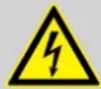
DANGER!
Electric shock caused by short-circuit
Always use proper ready-made insulated mains cabling (power cord) with a protective contact plug. Do not modify the mains cable or the plug. Failure to do so could result in electric shock/death or fire. If in doubt, seek advice from a registered electrician.
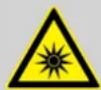
WARNING!
Eye damage caused by high light intensity
Never look directly into the light source.
WARNING!
Risk of epileptic shock
Strobe lighting can trigger seizures in photosensitive epilepsy. Sensitive persons should avoid looking at strobe lights.

NOTICE!
Risk of fire
Do not block areas of ventilation. Do not install the device near any direct heat source. Keep the device away from naked flames.
LED Pot System Bar RGBW
th·mann MUSIC IS OUR PASSION

NOTICE!
Operating conditions
This device has been designed for indoor use only. To prevent damage, never expose the device to any liquid or moisture. Avoid direct sunlight, heavy dirt, and strong vibrations.
Only operate the device within the ambient conditions specified in the chapter 'Technical specifications' of this user manual. Avoid heavy temperature fluctuations and do not switch the device on immediately after it was exposed to temperature fluctuations (for example after transport at low outside temperatures).
Dust and dirt inside can damage the unit. When operated in harmful ambient conditions (dust, smoke, nicotine, fog, etc.), the unit should be maintained by qualified service personnel at regular intervals to prevent overheating and other malfunction.
NOTICE! Power su Before cc
NOTICE! Power supply
Before connecting the device, ensure that the input voltage (AC outlet) matches the voltage rating of the device and that the AC outlet is protected by a residual current circuit breaker. Failure to do so could result in damage to the device and possibly injure the user.
Unplug the device before electrical storms occur and when it is unused for long periods of time to reduce the risk of electric shock or fire.
NOTICE! Risk of fire due to incorrect polarity Incorrectly inserted batteries may dest
Incorrectly inserted batteries may destroy the device or the batteries. Ensure that proper polarity is observed when inserting batteries.
LED Pot System Bar RGBW


NOTICE!
Possible damage by leaking batteries
Leaking batteries can cause permanent damage to the device.
Take batteries out of the device if it is not going to be used for a longer period.

NOTICE!
Possible damage due to installation of a wrong fuse
The use of different types of fuses can cause serious damage to the unit. Fire hazard!
Only fuses of the same type may be used.

NOTICE!
Damages due to disconnection during operation
Only operate the unit when all spotlights are connected.
The disconnection of LED spotlights during operation may damage the unit. Disconnect the unit from the power supply before disconnecting LED spotlights.
LED Pot System Bar RGBW

3 Features
The LED lighting set is particularly suitable for lighting applications in clubs and discotheques, on rock stages, in theatres and musicals.
Special features of the device:
4 LED pots with 48 × 1 W RGBW LEDs ( 12 × per spot, each 3 red, 3 green, 3 blue, 3 white)
Control via DMX (6 different modes), buttons and display on the unit or via remote control (not included)
■ 14 preprogrammed automatic shows
Sound control
Master / Slave mode
■ Easy transport, easy mounting
■ An additional carrying bag is included
For technological reasons, the light output of LEDs decreases over their lifetime. This effect increases with higher operating temperature. You can extend the service life of the illuminants by providing adequate ventilation and operating the LEDs with the lowest possible brightness.
4 Installation
Unpack and check carefully there is no transportation damage before using the unit. Keep the equipment packaging. To fully protect the product against vibration, dust and moisture during transportation or storage use the original packaging or your own packaging material suitable for transport or storage, respectively.

NOTICE!
Damages due to disconnection during operation
Only operate the unit when all spotlights are connected.
The disconnection of LED spotlights during operation may damage the unit. Disconnect the unit from the power supply before disconnecting LED spotlights.
LED Pot System Bar RGBW


NOTICE!
Risk of overheating
The distance between light output and the illuminated surface must be more than 1.5 m (19.7in).
Provide sufficient ventilation.
The ambient temperature must always be below 40 °C (104 °F).

NOTICE!
Use of stands
When mounting the device onto a stand, ensure that the stand is in a safe and stable position and that the weight of the device does not exceed the maximum permissible load capacity of the stand.

NOTICE!
Possible data transmission errors
For error-free operation make use of dedicated DMX cables and do not use ordinary microphone cables.
Never connect the DMX input or output to audio devices such as mixers or amplifiers.

Please note that this device must not be connected to a dimmer.
LED Pot System Bar RGBW
th·mann MUSIC IS OUR PASSION
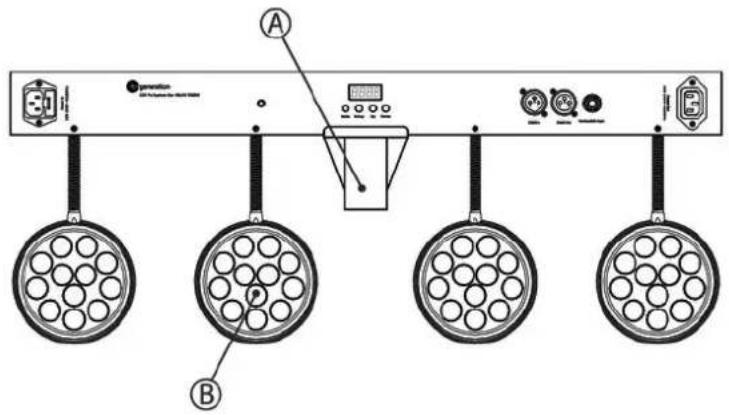
Pre-mounted spots
The four spots are pre-mounted on the T-bar.
text_image
Diagram of a control panel with labeled components including display, buttons, and circular indicatorsA Flange 36 mm to mount the T-bar on a stand.
B Spot.
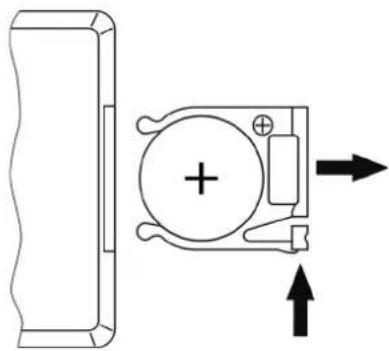
Inserting the battery into the remote control
natural_image
Pure mechanical diagram showing a bracket and a circular component with directional arrows, no text or symbols present.Press the lock of the battery holder to the centre of the housing and pull out the battery holder like a drawer. Insert the battery. The battery is correct if the positive pole points to the housing base of the remote control. Slide the battery holder back into the remote until it clicks into place.
When shipping, the battery is already installed in the remote and protected against discharge by a transparent plastic foil. Remove the plastic foil prior to first use.
5 Setup
Create all connections while the device is off. Use the shortest possible high-quality cables for all connections. Take care when running the cables to prevent tripping hazards.
Connections in DMX mode
Connect the DMX input of the device to the DMX output of a DMX controller or another DMX device. Connect the output of the first DMX device to the input of the second one, and so on to form a daisy chain. Always ensure that the output of the last DMX device in the daisy chain is terminated with a resistor (110 Ω, ¼ W).
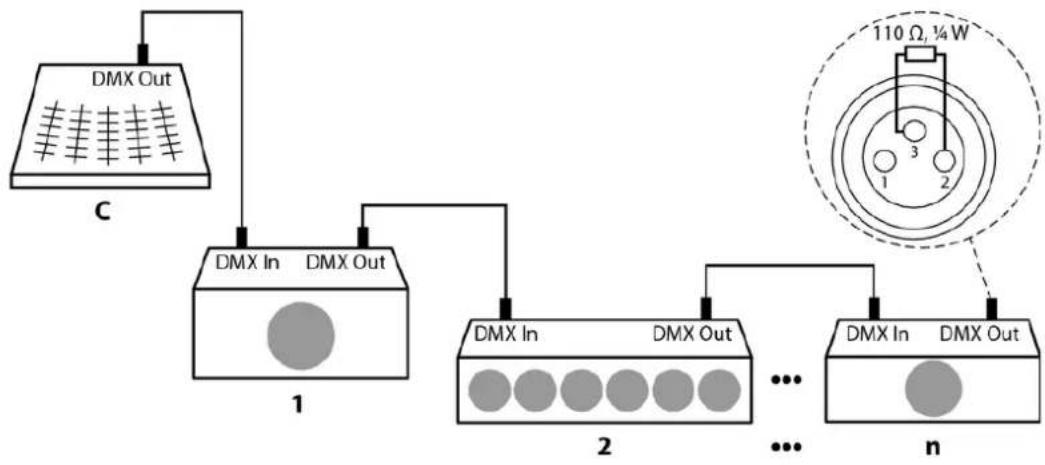
flowchart
graph TD
    A["DMX Out"] --> B["DMX In"]
    B --> C["DMX Out"]
    C --> D["1"]
    D --> E["DMX In"]
    E --> F["DMX Out"]
    F --> G["..."]
    G --> H["DMX In"]
    H --> I["DMX Out"]
    I --> J["n"]
    J --> K["110 Ω, ¼W"]
    K --> L["3"]
    K --> M["2"]
LED Pot System Bar RGBW

DMX indicator
If the dot behind the first character of the display is flashing in the DMX mode, no DMX signal is received. Maybe the DMX controller is not switched on or there is a cabling error. If the indicator lights permanently, the device receives a valid DMX signal.
Connections in master/slave mode
When you configure a group of devices in master/slave mode, the first unit will control the other units for an automatic, sound-activated, synchronized show. This function is ideal when you want to start a show immediately. Connect the DMX output of the master device to the DMX input of the first slave device. Then connect the DMX output of the first slave device to the DMX input of the second slave device and so on.
6 Connections and controls
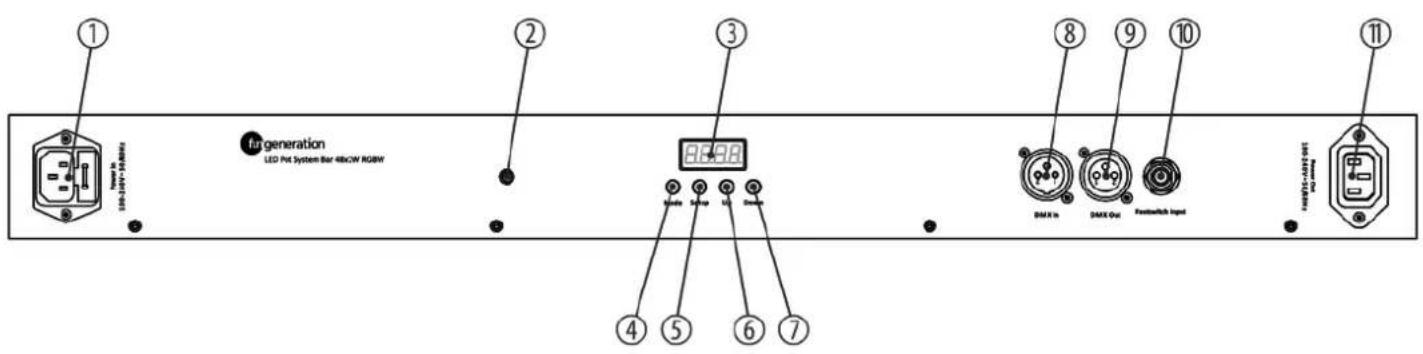
text_image
① LED-POT System Bar 48kCW RGBW ② fugeneration LED Pot System Bar 48kCW RGBW ③ 8 9 10 ④ 5 6 7 DMX In DMX Out Fusinswitch Input ⑪ 11LED Pot System Bar RGBW
th·mann MUSIC IS OUR PASSION
1 [Power In]
IEC chassis plug for operating voltage supply with fuse holder.
2 Infrared sensor for the remote control signals. Make sure that the IR sensor is not obstructed.
3 Display.
4 [Mode]
Activates the main menu and toggles between menu items. Closes an opened sub menu.
5 [Setup]
Selects an option of the respective operating mode, confirms the set value.
6 [Up]
Increases the displayed value by one.
7 [Down]
Decreases the displayed value by one.
8 [DMX In]
DMX input.
9 [DMX Out]
DMX output.
10 [Foot switch Input]
1/4" phone socket to connect the foot controller unit
11 [Power Out]
text_image
Diagram of a remote control with numbered buttons and function keys arranged in a grid layout
LED lighting set
12 [ON/OFF]
Button to turn the device on and off.
13 [AUTO]
Activates the 'Automatic' mode.
14 [PRG]
Activates the operating mode 'Preprogrammed automatic show'.
15 [SOUND]
Activates the sound-control.
16 [SPEED]
Adjusts the process speed in 'Preprogrammed automatic show' mode.
17 [STROBE]
Activates the strobe effect in 'Preprogrammed automatic show' mode.
18[+]
Increases the displayed value by one.
LED Pot System Bar RGBW
th·mann MUSIC IS OUR PASSION
19 [Dimming]
Brightness control.
20 [-]
Decreases the displayed value by one.
21 [0] ... [9]
Numeric keys.
22 Buttons for colour selection.
Use
[W] for white light,
[A] for amber light,
[R], [G], or [B] for primary colours red, green and blue,
the coloured buttons for directly selecting a mixed colour.
7 Operating
7.1 Starting the device
Connect the device to the power supply to start operation.
7.2 Device functions
All functions are controlled via the keys and the display on the unit, via infrared remote control or via foot switch (both not included).
7.3 Foot switch
You can also control several device functions using an optional foot switch. Please note the following table for the function assignment.
LED Pot System Bar RGBW

| Auto Run | Press the button repeatedly until the display shows ‘AUTO’ to activate the ‘Automatic’ mode (14 programmes run automatically in sequence).Press the switch in a running programme to jump into the next one. If you press the switch in programme 14, the sequence restarts with programme 1. |
| Sound Active Press the button once to activate the ‘Sound-control’ mode.Press the button again to toggle between the various sound modes. | |
| Freeze Press the button once to pause a running programme.Press the button again to let the programme continue. | |
| Blackout Press the button once to turn off a running programme.Press the button again to return to the previous mode. | |
7.4 Remote control
If the device neither is working as Slave in a Master / Slave configuration nor is not controlled via DMX you can control it using the remote control.
| Switching on / off | Use [ON/OFF]to turn the device on or off. |
| Operating mode ‘Automatic’ | Press [AUTO]. The playback of ‘Pr02’ to ‘Pr14’ starts automatically. |
| Operating mode ‘Preprogrammed automatic show’ | Press [PRG]. Use [+] and [-] to select a value between ‘Pr.01’ and ‘Pr.14’.In the ‘Preprogrammed automatic show’ mode, you can activate the strobe effect. To do so, press [STROBE] and then use [+] and [-] to select a value between ‘FS00’ (slow) and ‘FS99’ (fast). Press [STROBE] again to disable the Strobe effect.For the programmes ‘Pr.01’ and ‘Pr.09’, it is possible to adjust the process speed. To do so, press [SPEED] and then use [+] and [-] to select a value between ‘SP01’ (slow) and ‘SPFL’ (fast). |
| Sound control | Press [SOUND]. This activates a sound controlled automatic show.Use [+] and [-] to adjust the sensitivity for the sound control in a range from ‘SV.00’ to ‘SV.31’. |
| Dimming | Press [Dimming]to adjust the brightness of the primary colours. Press [R] (red), [G] (green) or [B] (blue) and then use [+] and [-] to select a value between 0 and 255. |
LED Pot System Bar RGBW

Colour selection
Use the coloured buttons to select a colour tone in any mode. The following assignment applies:
| Button Colour Button Colour Button Colour | ||||
| 0 Cyan 5 Bright red R Red | ||||
| 1 Purple 6 Bright green G Green | ||||
| 2 Magenta 7 Bright blue B Blue | ||||
| 3 Orange 8 Yellow A Amber | ||||
| 4 Cold white 9 Warm white W | White | |||
Resetting to factory defaults
To reset the device to factory default settings, press [Mode] repeatedly until the display shows 'Set'. Press [Setup].
7.5 Operating on the unit
Press [Mode] to activate the main menu and select an operating mode. Use [Setup] to select further options. Use [Up] and [Down] to change the respectively indicated value. When the display shows the desired value press [Mode].
If you do not press any key for about 30 seconds, the display will be blanked. It will be reactivated to display the previously shown menu by pressing any button.
The set values are retained even when the device is disconnected from the mains power supply.
LED Pot System Bar RGBW

Operating mode 'Preprogrammed automatic show'
A preprogrammed automatic show can only be activated when the unit is operating in standalone mode or as master in a master / slave combination. This setting is only relevant if the device is not controlled via DMX.
Press [Mode] repeatedly until the display shows 'Pr.xx'. Now you can select one of the preprogrammed automatic shows. Use [Up] and [Down] to select a value between 'Pr.01' and 'Pr.14'.
Settings for programme 01:
For 'Pr.01', you can choose from 14 colours, white or blackout. Press [Setup]. With [Up] and [Down] you can now select one of the colours.
To adjust the strobe frequency, press again [Setup]. The display shows 'FS00'. With [Up] and [Down] you can now select a value between 'SPFS00' (slow) and 'FS99' (fast).
Settings for programmes 02 to 14:
To adjust the programme process speed, press again [Setup]. The display shows 'SPxx'. With [Up] and [Down] you can now select a value between 'SP01' (slow) and 'SPFL' (fast).
To adjust the strobe frequency, press again [Setup]. The display shows 'FS00'. With [Up] and [Down] you can now select a value between 'SPFS00' (slow) and 'FS99' (fast).
Operating mode 'Automatic'
Automatic operation can only be activated when the unit is operating in stand alone mode or as master in a master / slave combination. This setting is only relevant if the device is not controlled via DMX.
Press [Mode] repeatedly until the display shows 'AUTO'. The playback of 'Pr02' to 'Pr14' starts automatically.
LED Pot System Bar RGBW

DMX mode
This setting is only relevant when the device is controlled via DMX.
Press [Mode] repeatedly until the display shows 'd.001'.
Now you can set the number of the first DMX channel to be used by the device (DMX address). Use [Up] and [Down] to select a value between 1 and 512 (the display shows 'd.001' ... 'd.510').
Make sure that this number matches the configuration of your DMX controller. The following table shows the highest possible DMX address for the various DMX modes
| Mode Highest possible DMX address | |
| 2-channel 511 | |
| 4-channel 509 | |
| 5-channel 508 | |
| 8-channel 505 | |
| 10-channel 503 | |
| 18-channel 495 | |
Press [Setup]. With [Up] and [Down] you can now select one of the following DMX operating modes:
- '4-ch' (four channels)
■ '5-ch' (five channels)
'10ch' (ten channels)
'18ch' (18 channels) - '2-ch' (two channels)
■ '8-ch' (eight channels)
Operating mode 'Slave'
This setting is only relevant if the device is serving as Slave in a Master / Slave configuration and is not controlled via DMX.
Press [Mode] repeatedly until the display shows 'SLAv'.
LED Pot System Bar RGBW

Sound control
A sound controlled automatic show can only be activated when the unit is operating in stand alone mode or as master in a master / slave combination. This setting is only relevant if the device is not controlled via DMX.
Press [Mode] repeatedly until the display shows 'Soud'. This activates a sound controlled automatic show.
Press again [Setup] and use [Up] and [Down] to adjust the sensitivity for the sound control in a range from 'SV.00' to 'SV.31'.
Constant unicoloured pattern
A constant unicoloured pattern can only be activated when the unit is operating in stand alone mode or as master in a master / slave combination. This setting is only relevant if the device is not controlled via DMX.
Press [Mode] repeatedly until the display shows 'Colr'. Press [Setup]. The display shows 'r.xxx', 'G.xxx', or 'b.xxx'. Press [Setup] to switch between the colours.
With [Up] and [Down] to set the colour intensity:
| Display Meaning | |
| 'r.000' ... 'r.255' Red | |
| 'G.000' ... 'G.255' Green | |
| 'b.000' ... 'b.255' Blue | |
| 'W.000' ... 'W.255' White |
LED Pot System Bar RGBW

7.6 Menu overview
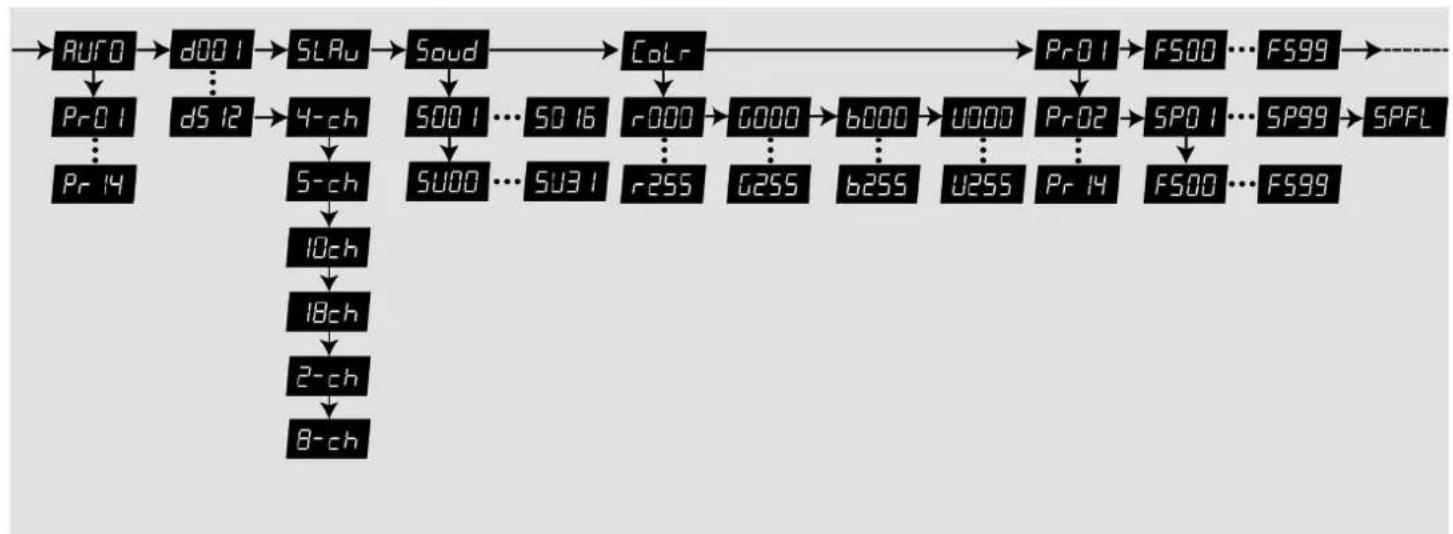
flowchart
graph TD
    A["AURO"] --> B["d001"]
    B --> C["SLRu"]
    C --> D["Soud"]
    D --> E["Colr"]
    E --> F["Pr01"]
    F --> G["F500"]
    G --> H["FS99"]
    H --> I["SPFL"]

    subgraph Inputs
        J["Pr01"] --> K["d512"]
        K --> L["4-ch"]
        L --> M["5-ch"]
        M --> N["10ch"]
        N --> O["18ch"]
        O --> P["2-ch"]
        P --> Q["8-ch"]
        K --> L
        M --> R["500"]
        R --> S["5001"]
        S --> T["5016"]
        T --> U["5000"]
        U --> V["5001"]
        V --> W["5016"]
        W --> X["5000"]
        X --> Y["5000"]
        Y --> Z["5000"]
        Z --> AA["5000"]
        AA --> AB["5000"]
        AB --> AC["5000"]
        AC --> AD["5000"]
        AD --> AE["5000"]
        AE --> AF["5000"]
        AF --> AG["5000"]
        AG --> AH["5000"]
        AH --> AI["5000"]
        AI --> AJ["5000"]
        AJ --> AK["5000"]
        AK --> AL["5000"]
        AL --> AM["5000"]
        AM --> AN["5000"]
        AN --> AO["5000"]
        AO --> AP["5000"]
        AP --> AQ["5000"]
        AQ --> AR["5000"]
        AR --> AS["5000"]
        AS --> AT["5000"]
        AT --> AU["5000"]
        AU --> AV["5000"]
        AV --> AW["5000"]
        AW --> AX["5000"]
        AX --> AY["5000"]
        AY --> AZ["5000"]
        AZ --> BA["5000"]
        BA --> BB["5000"]
        BB --> BC["5000"]
        BC --> BD["5000"]
        BD --> BE["5000"]
        BE --> BF["5000"]
        BF --> BG["5000"]
        BG --> BH["5000"]
        BH --> BI["5000"]
        BI --> BJ["5000"]
        BJ --> BK["5000"]
        BK --> BL["5000"]
        BL --> BM["5000"]
        BM --> BN["5000"]
        BN --> BO["5000"]
        BO --> BP["5000"]
        BP --> BQ["5000"]
        BQ --> BR["5000"]
        BR --> BS["5000"]
        BS --> BT["5000"]
        BT --> BU["5000"]
        BU --> BV["5000"]
        BV --> BW["5000"]
        BW --> BX["5000"]
        BX --> BY["5000"]
        BY --> BZ["5000"]
        BZ --> CA["5000"]
        CA --> CB["5000"]
        CB --> CC["5000"]
        CC --> CD["5000"]
        CD --> CE["5000"]
        CE --> CF["5000"]
        CF --> CG["5000"]
        CG --> CH["5000"]
        CH --> CI["5000"]
        CI --> CJ["5000"]
    end
7.7 Functions in 2-channel DMX mode
| Channel Value Function | |
| 1 Operating mode | |
| 1 ... 17 Constant pattern, colour is defined via channel 2 | |
| 18 ... 35 Preprogrammed automatic show no. 2 | |
| 36 ... 53 Preprogrammed automatic show no. 3 | |
| 54 ... 71 Preprogrammed automatic show no. 4 | |
| 72 ... 89 Preprogrammed automatic show no. 5 | |
| 90 ... 107 Preprogrammed automatic show no. 6 | |
| 108 ... 125 Preprogrammed automatic show no. 7 | |
| 126 ... 143 Preprogrammed automatic show no. 8 | |
| 144 ... 161 Preprogrammed automatic show no. 9 | |
| 162 ... 179 Preprogrammed automatic show no. 10 |
LED Pot System Bar RGBW

| Channel Value Function | ||
| 180 ... 197 Preprogrammed automatic show no. 11 | ||
| 198 ... 215 Preprogrammed automatic show no. 12 | ||
| 216 ... 233 Preprogrammed automatic show no. 13 | ||
| 234 ... 251 Preprogrammed automatic show no. 14 | ||
| 252... 255 Sound-controlled show | ||
| 2 Function depending on setting of channel 1 | ||
| Channel Value Function | |
| 102 ... 118 Magenta | |
| 119 ... 135 Pastel red | |
| 136 ... 152 Cyan | |
| 153 ... 169 Pastel green | |
| 170 ... 186 Pastel blue | |
| 187 ... 203 RGB white | |
| 204 ... 220 Warm white | |
| 221 ... 237 Pink | |
| 238 ... 254 Light blue | |
| 255 Full intensity of all LEDs RGBW | |
| Channel 1 = 18 ... 251: | |
| 0 ... 255 Auto shows speed (slow to fast) |
LED Pot System Bar RGBW

| Channel Value Function | |
| Channel 1 = 252 ... 255: | |
| 0 ... 255 No function |
7.8 Functions in 4-channel DMX mode
| Channel Value Function | |
| 1 0...255 Intensity red (0 % to 100 %), for all LEDs together | |
| 2 0...255 Intensity green (0 % to 100 %), for all LEDs together | |
| 3 0...255 Intensity blue (0 % to 100 %), for all LEDs together | |
| 4 0...255 Intensity white (0 % to 100 %), for all LEDs | |
7.9 Functions in 5-channel DMX mode
| Channel Value Function | |
| 1 0...255 Dimmer (0 % to 100 %) | |
| 2 0...255 Intensity red (0 % to 100 %), for all LEDs together | |
| 3 0...255 Intensity green (0 % to 100 %), for all LEDs together | |
| 4 0...255 Intensity blue (0 % to 100 %), for all LEDs together | |
| 5 0...255 Intensity white (0 % to 100 %), for all LEDs |
7.10 Functions in 8-channel DMX mode
| Channel Value Function | |
| 1 0...255 Dimmer (0 % to 100 %) | |
| 2 0...255 Intensity red (0 % to 100 %) for all LEDs if channel 6 = 0 | |
LED Pot System Bar RGBW

| Channel Value Function | ||
| 3 0...255 Intensity green (0 % to 100 %) for all LEDs if channel 6 = 0 | ||
| 4 0...255 Intensity blue (0 % to 100 %) for all LEDs if channel 6 = 0 | ||
| 5 0...255 Intensity white (0 % to 100 %) for all LEDs if channel 6 = 0 | ||
| 6 Operating mode | ||
| 0 Colour mixing of primary colours with channels 2, 3, 4 and 5 | ||
| 1 ... 17 Constant pattern, colour is defined via channel 7 | ||
| 18 ... 35 Preprogrammed automatic show no. 2 | ||
| 36 ... 53 Preprogrammed automatic show no. 3 | ||
| 54 ... 71 Preprogrammed automatic show no. 4 | ||
| 72 ... 89 Preprogrammed automatic show no. 5 | ||
| 90 ... 107 Preprogrammed automatic show no. 6 | ||
| 108 ... 125 Preprogrammed automatic show no. 7 | ||
| 126 ... 143 Preprogrammed automatic show no. 8 | ||
| 144 ... 161 Preprogrammed automatic show no. 9 | ||
| 162 ... 179 Preprogrammed automatic show no. 10 | ||
| 180 ... 197 Preprogrammed automatic show no. 11 | ||
| 198 ... 215 Preprogrammed automatic show no. 12 | ||
| 216 ... 233 Preprogrammed automatic show no. 13 | ||
| 234 ... 251 Preprogrammed automatic show no. 14 | ||
| 252... 255 Sound-controlled show | ||
| 7 Function depending on setting of channel 6 | ||
LED Pot System Bar RGBW

| Channel Value Function | |
| 68 ... 84 Orange | |
| 85 ... 101 Cold white | |
| 102 ... 118 Light red | |
| 119 ... 135 Light green | |
| 136 ... 152 Light blue | |
| 153 ... 169 Yellow | |
| 170 ... 186 Warm white | |
| 187 ... 203 Red | |
| 204 ... 220 Green | |
| 221 ... 237 Blue | |
| 238 ... 254 Amber | |
| 255 Full intensity of all LEDs | |
| Channel 6 = 18 ... 251: | |
| 0 ... 255 Auto shows speed (slow to fast) | |
| Channel 6 = 252 ... 255: | |
| 0 ... 255 No function |
7.11 Functions in 10-channel DMX mode
| Channel Value Function | |
| 1 0...255 Dimmer (0 % to 100 %) | |
| 2 0...255 Intensity red (0 % to 100 %) all LEDs spot 1 and 2 | |
| 3 0...255 Intensity green (0 % to 100 %) all LEDs spot 1 and 2 | |
| 4 0...255 Intensity blue (0 % to 100 %) all LEDs spot 1 and 2 | |
| 5 0...255 Intensity white (0 % to 100 %) for all LEDs of spots 1 and 2 |
LED Pot System Bar RGBW

| Channel Value Function | |
| 6 0...255 Intensity red (0 % to 100 %) all LEDs spot 3 and 4 | |
| 7 0...255 Intensity green (0 % to 100 %) all LEDs spot 3 and 4 | |
| 8 0...255 Intensity blue (0 % to 100 %) all LEDs spot 3 and 4 | |
| 9 0...255 Intensity white (0 % to 100 %) for all LEDs of spots 3 and 4 | |
| 10 0...255 Flash effect, increasing speed for all LEDs | |
7.12 Functions in 18-channel DMX mode
| Channel Value Function | |
| 1 0...255 Dimmer (0 % to 100 %) | |
| 2 0...255 Intensity red (0 % to 100 %) for all LEDs of spot 1 | |
| 3 0...255 Intensity green (0 % to 100 %) for all LEDs of spot 1 |
Channel Value Function
| 4 0...255 Intensity blue (0 % to 100 %) for all LEDs of spot 1 |
| 5 0...255 Intensity white (0 % to 100 %) for all LEDs of spot 1 |
| 6 0...255 Intensity red (0 % to 100 %) for all LEDs of spot 2 |
| 7 0...255 Intensity green (0 % to 100 %) for all LEDs of spot 2 |
| 8 0...255 Intensity blue (0 % to 100 %) for all LEDs of spot 2 |
| 9 0...255 Intensity white (0 % to 100 %) for all LEDs of spot 2 |
| 10 0...255 Intensity red (0 % to 100 %) for all LEDs of spot 3 |
| 11 0...255 Intensity green (0 % to 100 %) for all LEDs of spot 3 |
| 12 0...255 Intensity blue (0 % to 100 %) for all LEDs of spot 3 |
| 13 0...255 Intensity white (0 % to 100 %) for all LEDs of spot 3 |
| 14 0...255 Intensity red (0 % to 100 %) for all LEDs of spot 4 |
| 15 0...255 Intensity green (0 % to 100 %) for all LEDs of spot 4 |
| 16 0...255 Intensity blue (0 % to 100 %) for all LEDs of spot 4 |
LED Pot System Bar RGBW

Channel Value Function
17 0...255 Intensity white (0 % to 100 %) for all LEDs of spot 4
18 0...255 Flash effect, increasing speed for all LEDs
8 Technical specifications
| Light source 48 × RGBW LED, 1 W(12 × per spot, each 3 red, 3 green, 3 blue, 3 white) | |
| Light source properties Light power 5520 Lux @ 1 m/LED Pot | |
| Optical properties Beam angle 25° | |
| Strobe effect0 Hz ... 20 Hz | |
| Control DMX | |
| Remote control | |
| Number of DMX channels 2, 4, 5, 8, 10, 18 | |
| Input connections Voltage supply IEC chassis plug C14 | |
| DMX control XLR chassis socket, 3-pin | |
| Foot controller unit 1/4" jack socket | |
LED Pot System Bar RGBW

| Output connections Voltage supply of further devices | IEC chassis plug C13 |
| DMX control XLR chassis socket, 3-pin | |
| Power consumption 58 W | |
| Supply voltage | 100 – 240 V ~50/60 Hz |
| Fuse 5 mm × 20 mm, 1 A, 250 V, slow-blow | |
| Battery remote control Battery type Lithium button cell, 3 V, CR | 2025 |
| Degree of protection IP20 | |
| Mounting options Hanging, stand | 36 mm flange for stand mounting |
| Dimensions (W × H × D) 680 mm × 58 mm × 260 mm | |
| Weight 2.98 kg | |
| Ambient conditions Temperature range –10 °C...40 °C | |
| Relative humidity 50 %, non condensing | |
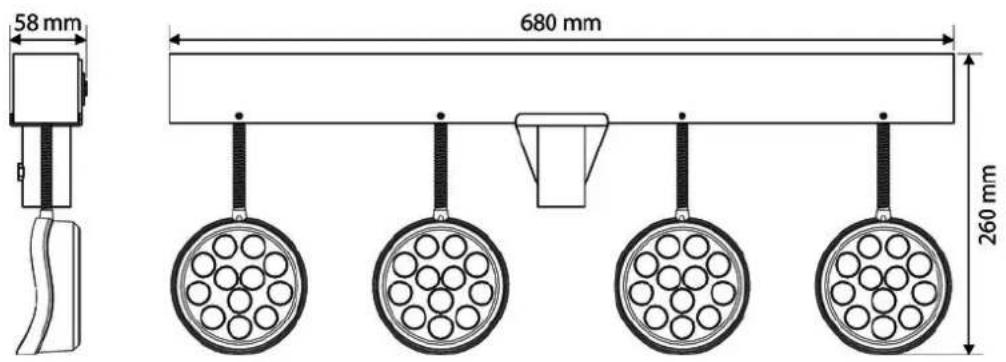
text_image
58 mm 680 mm 260 mmFurther information
| Spotlight included Yes | |
| Effect devices included No | |
| LED bars included No | |
| Stand included No | |
| Case/bag included Yes |
LED Pot System Bar RGBW

9 Plug and connection assignments
Introduction
This chapter will help you select the right cables and plugs to connect your valuable equipment so that a perfect light experience is guaranteed.
Please take our tips, because especially in 'Sound & Light' caution is indicated: Even if a plug fits into a socket, the result of an incorrect connection may be a destroyed DMX controller, a short circuit or 'just' a not working light show!
DMX connections
natural_image
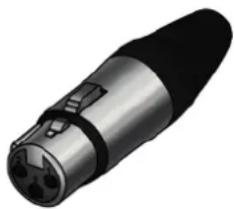
3D rendering of a metallic connector with three ports (no text or symbols visible)The unit offers a 3-pin XLR socket for DMX output and a 3-pin XLR plug for DMX input. Please refer to the drawing and table below for the pin assignment of a suitable XLR plug.
Pin Configuration
1 Ground, shielding
2 Signal inverted (DMX-, 'cold signal')
3 Signal (DMX+, 'hot signal')
th·mann
For error-free operation make use of dedicated DMX cables and do not use ordinary microphone cables.
Never connect the DMX input or output to audio devices such as mixers or amplifiers.
In the following we list a few common problems that may occur during operation. We give you some suggestions for easy troubleshooting:
LED Pot System Bar RGBW

| Symptom Remedy | |
| The unit does not work, no light Check the mains connection and the fuse. | |
| No response to the DMX controller | 1. If the dot behind the first character of the display is flashing in the DMX mode, no DMX signal is received. Make sure that the DMX controller is turned on. Check the DMX ports and cables for proper connection. |
| 2. If the display does not flash and still no response, check the address settings and the DMX polarity. | |
| 3. Try using another DMX controller. | |
| 4. Check to see if the DMX cables run near or alongside to high voltage cables that may cause damage or interference to DMX interface circuits. | |
If the procedures recommended above do not succeed, please contact our Service Center. You can find the contact information at www.thomann.de.
11 Cleaning
Optical lenses
Clean the optical lenses, that are accessible from the outside, regularly in order to optimize the light output. The frequency of cleaning depends on the operating environment: wet, smoky or particularly dirty surroundings can cause more accumulation of dirt on the optics of the device.
■ Clean with a soft cloth using our lamp and lens cleaner (item no. 280122).
■ Always dry the parts carefully.
LED Pot System Bar RGBW

12 Protecting the environment
Disposal of the packaging material

For the transport and protective packaging, environmentally friendly materials have been chosen that can be supplied to normal recycling.
Ensure that plastic bags, packaging, etc. are properly disposed of.
Do not just dispose these materials with your normal household waste, but make sure that they are fed to a recovery. Please follow the notes and markings on the packaging.
Disposal of batteries
Batteries must not be disposed of as domestic waste or thrown into fire. Dispose of the batteries according to national or local regulations regarding hazardous waste. To protect the environment, dispose of empty batteries at your retail store or at appropriate collection sites.
Disposal of your old device
This product is subject to the European Waste Electrical and Electronic Equipment Directive (WEEE) in its currently valid version. Do not dispose with your normal household waste.
Dispose this device through an approved waste disposal firm or through your local waste facility. When discarding the device, comply with the rules and regulations that apply in your country. If in doubt, consult your local waste disposal facility.
LED Pot System Bar RGBW
th·mann MUSIC IS OUR PASSION
Notes
th·mann MUSIC IS OUR PASSION
LED lighting set
