
AT-UHD-EX-70-2PS - Hi-Fi System Atlona - Free user manual and instructions
Find the device manual for free AT-UHD-EX-70-2PS Atlona in PDF.


| Product Type | 4K/UHD HDMI Over 100M HDBaseT Transmitter |
| Brand | Atlona |
| Model | AT-UHD-EX-70-2PS (based on AT-UHD-EX-100CE-TX) |
| Dimensions (H x W x D) | 25 x 109 x 127 mm (0.98 x 4.29 x 5.00 inch) |
| Weight (Device) | 0.39 kg (0.86 lbs) |
| Power Supply Input | AC 100~240V, 50/60Hz |
| Power Supply Output | DC 48V, 0.83A |
| Power Consumption | 12W (when paired with RX) |
| Video Resolution Support | Up to 4K UHD (3840x2160) @ 60Hz with 4:2:0 8-bit |
| Audio Support | Pass through up to Dolby TrueHD, DTS-HD Master Audio, Dolby Atmos |
| Maximum Distance (4K) | CAT5e/6: up to 70m (230 ft); CAT6a/7: up to 100m (328 ft) |
| Maximum Distance (1080p) | Up to 100m (328 ft) over CAT5e/6 |
| HDCP Compliance | HDCP 2.2 |
| Ethernet Pass-through | Bi-directional, up to 100 Mbps |
| Control | IR (in/out), RS-232 (bi-directional) |
| Power over Ethernet (PoE) | Yes, power to compatible receivers |
| Firmware Update | Field updatable via Mini-B USB |
| Operating Temperature | 0°C to 50°C (32°F to 122°F) |
| Storage Temperature | -20°C to 60°C (-4°F to 140°F) |
| Certifications | CE, FCC, cULus, RoHS, CCC, RCM |
| Included Accessories | 48V DC power supply, 2x female captive screw connectors, wall/table mount ears, IR emitter, user manual |
Frequently Asked Questions - AT-UHD-EX-70-2PS Atlona
User questions about AT-UHD-EX-70-2PS Atlona
0 question about this device. Answer the ones you know or ask your own.
Ask a new question about this device
Download the instructions for your Hi-Fi System in PDF format for free! Find your manual AT-UHD-EX-70-2PS - Atlona and take your electronic device back in hand. On this page are published all the documents necessary for the use of your device. AT-UHD-EX-70-2PS by Atlona.
USER MANUAL AT-UHD-EX-70-2PS Atlona
4K/UHD HDMI Over 100M HDBaseT Transmitter with Ethernet, Control, and PoE
AT-UHD-EX-100CE-TX
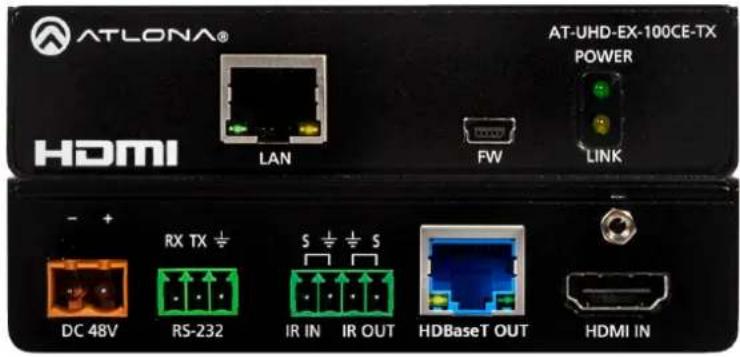
Please check
http://www.atlona.com/AT-UHD-EX-100CE-TX/
for the most recent firmware update or manuals
Table of Contents
- Introduction 3
- Package Contents 3
- Features
- Category Cable 4
- Panel Descriptions
a. Front Panel 5
b. Rear Panel 5 - Captive Screw Connectors 6
- Power Chaining 7
- Connection Diagram 8
- Specifications 9
- Safety Information 10
- Warranty 11-12
- Atlona Product Registration 12
Introduction
Pass through support of 4K (UHD), 2560x2048, IR, RS-232, bi-directional Ethernet, and lossy/lossless audio signals up to 328ft (100m). The 100CE extenders provide an affordable, high quality, solution for your audio and video needs.
Package Contents
- 1 x AT-UHD-EX-100CE-TX
- 1 x 48V DC power supply
- 2 x Female captive screw connector (3 pin: RS-232 and 5 pin: IR)
- 1 x Pair of wall/table mount ears
- 1 x Pair of screws for wall/mount ears
- 1 x IR emitter (AT-IR-CS-TX)
- 1 x User manual
Features
- Extends IR, RS-232, Ethernet, and audio/visual content up to 328ft over a single category cable
• Supports resolutions up to 4K (UHD) 60Hz @ chroma sub-sampling 4:2:0 8-bit - IR ports for use with IR remote controls and 3rd party IR controllers
• Bi-directional Ethernet pass through - Provides PoE (Power over Ethernet)
- Multichannel audio pass through up to Dolby TrueHD, DTS-HD Master Audio, and Dolby Atmos
• Full 3D pass through
• HDCP 2.2 compliant
• Field updatable firmware
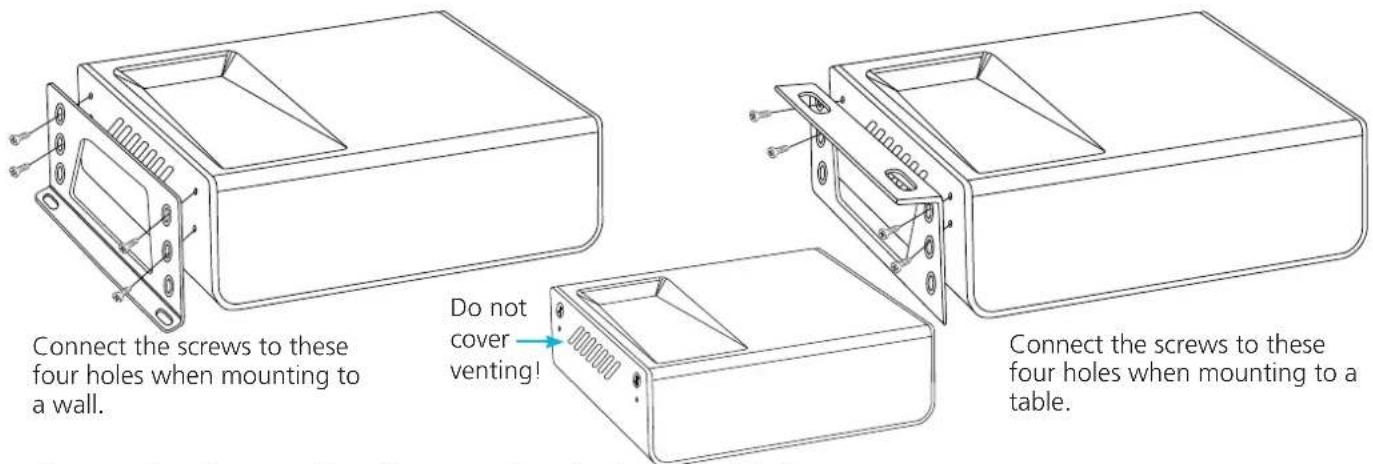
*Remove the side screws from the case and use for bracket installation
Category Cable
For the category cables used in the installation of these products, please be sure to use a 568B termination as pictured below:
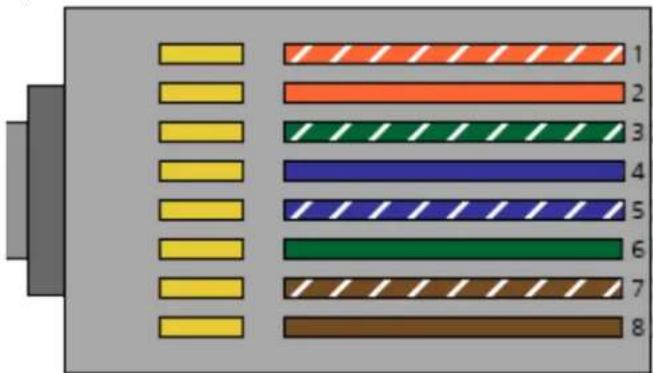
- White - Orange
- Orange
- White - Green
- Blue
- White - Blue
- Green
- White - Brown
- Brown
Use the table below to verify the best category cable for the installation.
| Performance Rating Type of LAN cable | |||
| Wiring Shielding CAT | 5e/6 CAT6a/7 | ||
| Solid | Shielded (STP/FTP) | *** **** | |
| UnShielded (UTP) ** N/A | |||
| Stranded - Patch cable(Not recommended) | Unshielded (UTP) * N/A | ||
| Shielded (STP/FTP) | * N/A | ||
| Termination Please use EIA/TIA-568-B termination | |||
Important! 4K (UHD) signals are sensitive to cable quality and installation technique. It is recommended to use CAT6a/7 solid core cables for best results.
Note: For cable distances see the specifications on page 10
Connector
Connector type and size is very important to ensure extenders work correctly. Please use the matching cable type with the correct RJ45 connector.
CAT5e and CAT 6 cables should use only CAT5e RJ45 connectors
CAT6a cables should use only CAT6a connectors
CAT7 cables should use only CAT7 connectors
Using the wrong size of connectors may result in interference causing loss of signal.
Important! "EZ RJ45 connectors" are not recommended with HDBaseT extenders. Doing so may result in stray EMI/RFI signals to be picked up and interfere with audio and video transmission.
Panel Description
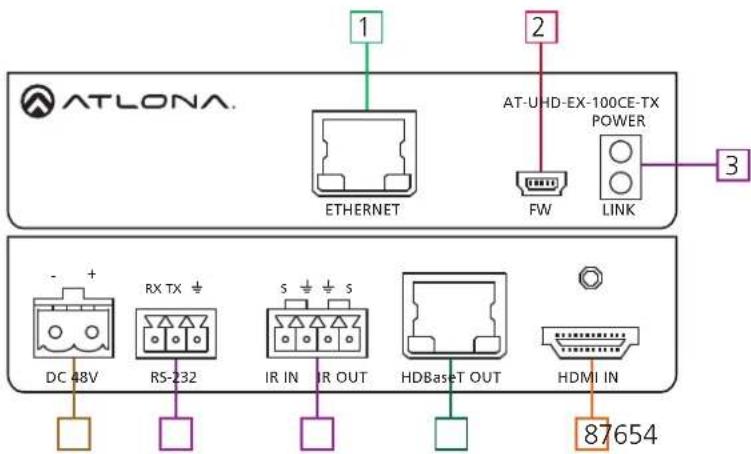
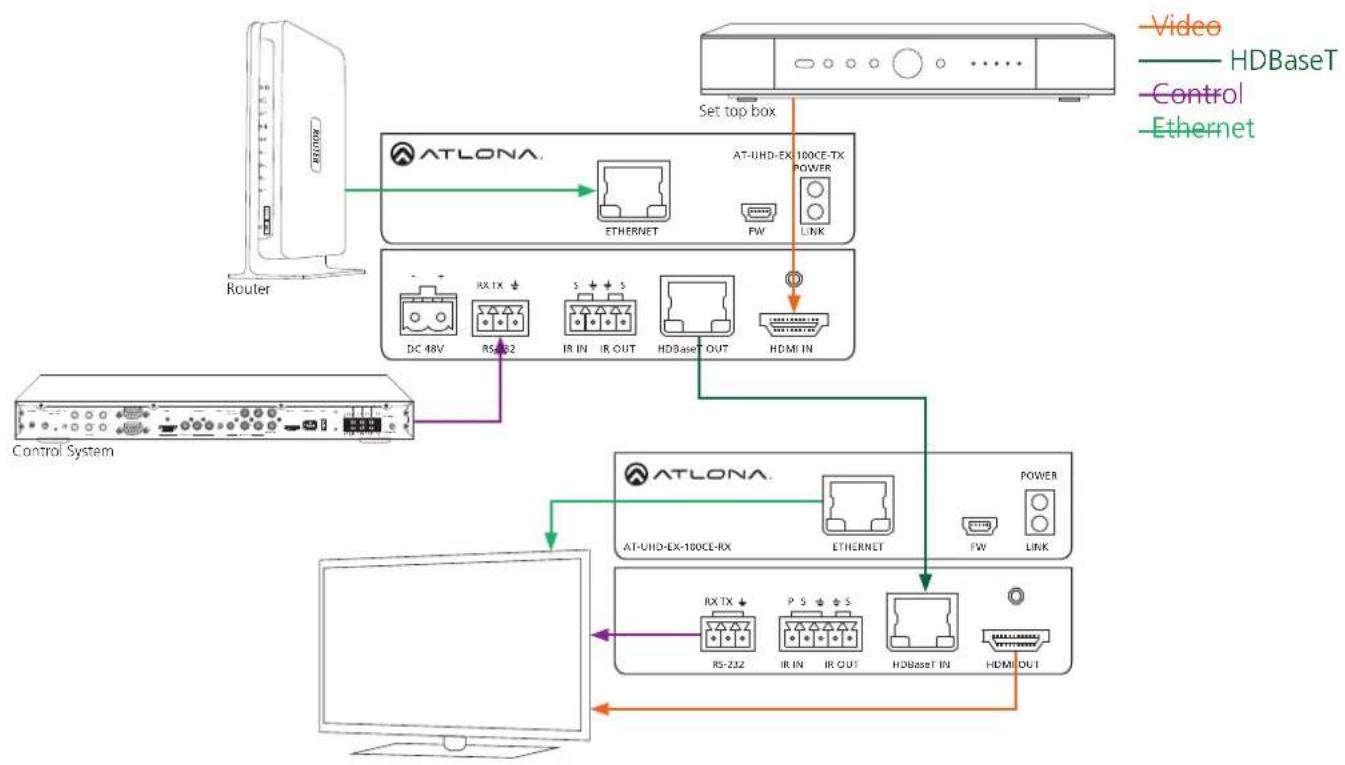
- Ethernet - Connect to a router to send Ethernet signals
-
Firmware - Use a Mini-B USB to USB A cable to connect to a Windows computers for updating
-
Yellow Link LED: Signal indicator for the HDBaseT OUT port
Solid - Good signal from the CAT port
Blinking - Category cable is disconnected or not receiving signals
No Light - No signal is being received from the CAT port
Green Power LED: Power indicator
Solid - Plugged in and receiving power
Blinking - Power is intermittent or there is a problem with the cable
No Light - No power is passing from the wall outlet to the transmitter (check the cable or outlet)
- DC 48V - Connect included captive screw power adapter here
- RS-232 - Bidirectional RS-232, send signal to or from a control system, PC, source, or display
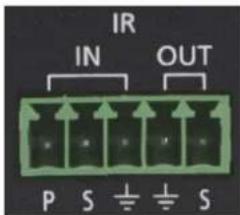
- IR - Connect IR emitter (included) or 3rd party control box to this port
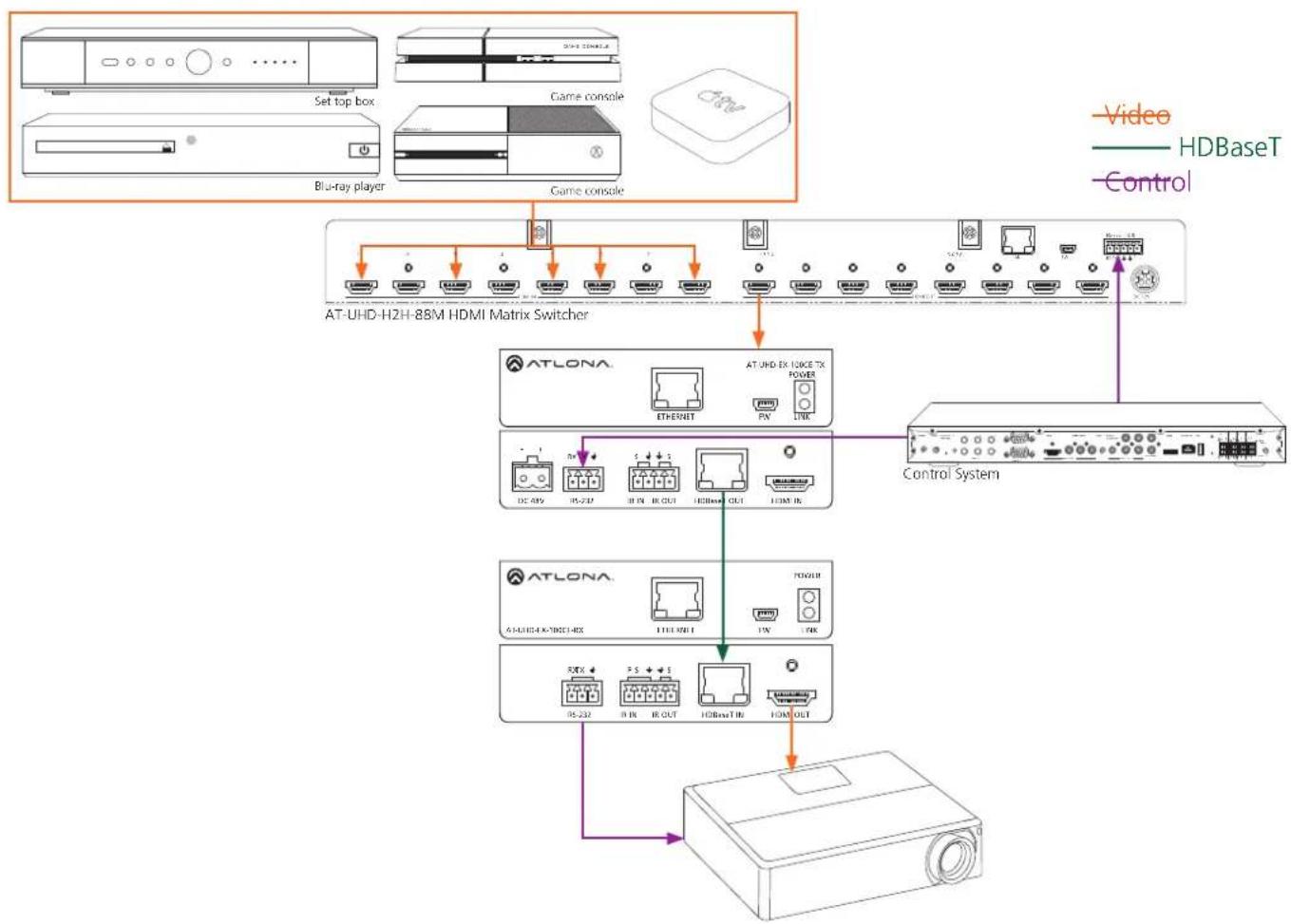
- HDBaseT OUT - Connect a category cable from here to an AT-UHD-EX-100CE-RX (not included)
- HDMI IN - Connect HDMI or DVI (with adapter) source here
Ex. Blu-ray player, cable box, HDDA series, H2H series, etc
Captive Screw
Captive screw connectors are an added feature on the UHD extender. The captive screw connectors allow you to cut cables down to a suitable length, reduce cable clutter, while providing a more reliable connection.
Connecting
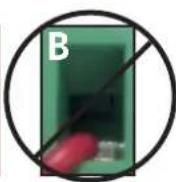
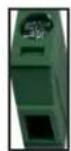
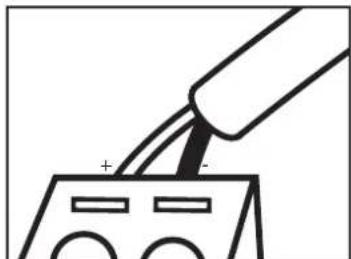
When connecting the cables to the female captive screw connector it is important that the wires be terminated correctly. The female captive screw connector has a contact plate at the top and must have the wires touching it for signal to pass. When wired correctly (see picture A) the signal will pass, incorrectly (see picture B) no signal will pass.

The captive screw connectors have a contact bar that is adjusted to compress the wire against the top contact plate. Use the screws at the top of the connector to compress the wire against the contact plate.

Clockwise
Turn the screws clockwise to raise the contact bar to the upper contact plate and hold the wires in place.

Counter Clockwise
Turn the screws counter clockwise to lower the contact bar to release the wires.
Power
RS-232
IR
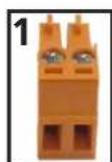
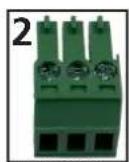
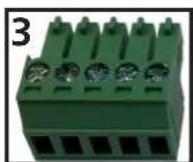
Female captive screw connectors are included: Power (see picture 1), RS-232 (see picture 2), and IR (see picture 3).
Black: - White: +
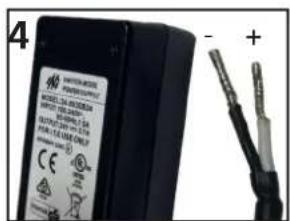
The power cable (picture 4) will have exposed wires. Each wire is encased in a different colored cover.
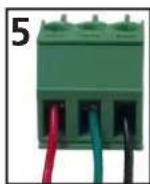
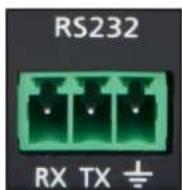
RS-232 pin out will be determined by the RS-232 cable and will connect as Rx (receiver), Tx (transmitter), and ± (ground). (See picture 5)
Pin out color will differ
per RS-232 cable.
Note: The IR receiver is optional for the UHD-EX-100CE-KIT and RX box. The compatible IR receiver (AT-IR-CS-RX) can be purchased through atlona.com.
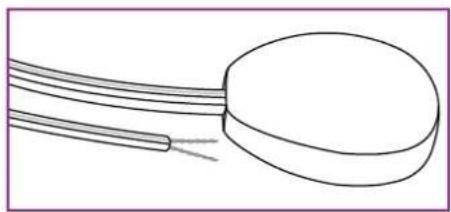
The wires of the emitter and receiver have been marked to differentiate the pin outs.
natural_image
Simple line drawing of a cylindrical object with two parallel wires extending from it (no text or symbols)
natural_image
Simple line drawing of a coiled cable or wire with two strands (no text or symbols)—— Signal (S) Ground (±)
The included IR emitter has two wires: signal and ground. Signal will have a solid line and ground will be blank. The IR emitter will plug into the IR OUT ports.

natural_image
Pure 3D schematic of a rectangular block with a small horizontal bar on the left side (no text or symbols)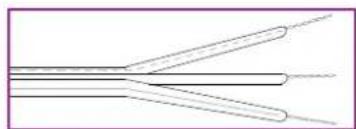
natural_image
Pure electrical circuit lines without any symbols— — Signal (S) Ground ( 12 ) Power (P)
There are three wires on the IR receiver (AT-IR-CS-RX sold separately): signal, ground, and power. Signal has a dotted line, ground will be blank, and power will have a solid line. The IR receiver will plug into the IR IN ports.
Power Chaining
Multiple kits can be powered by one power supply. The included power supply can support up to 3 kits. To power four kits use the optional power supply AT-PSU-48V1.25A (purchase through atlona.com).
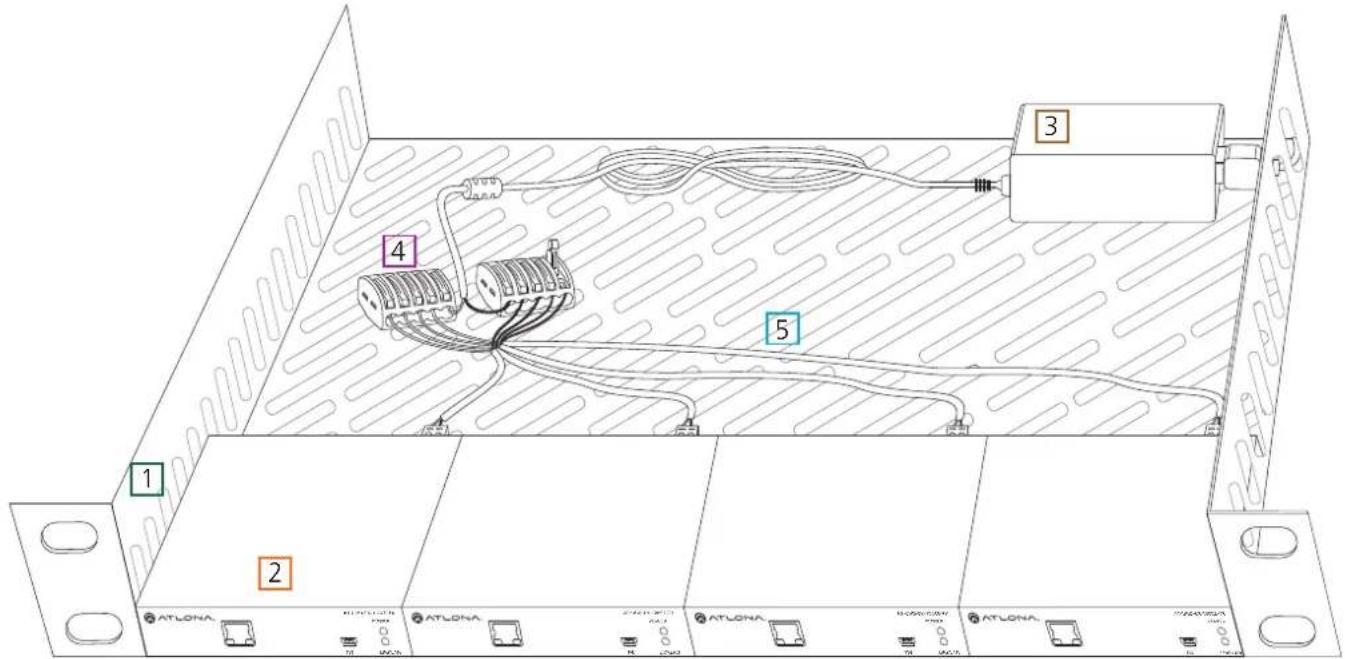
To chain one power supply to three transmitters (four when using AT-PSU-48V1.25A), use two wago splicing connectors, 18/2 AWG stranded wire, a ventilated 1 RU rack shelf, zip ties, and high temperature hook and loop (velcro) strips will be needed.
- 1 RU rack shelf - Should be at least 10in / 254mm deep, fit in a standard 19" rack, and must be well ventilated. Use the rack screws (included with 19" racks) to secure the rack shelf to the back/front of the rack after power chaining set up is completed.
- Transmitters - Place 3 or 4 units on the rack shelf. Use high temperature (up to 185°F / 85°C) hook and loop (velcro) to secure the transmitters to the rack.
- Power supply - Place the included power supply (or the AT-PSU-48V1.25A) on the rack with enough room to connect the included IEC power cable. Use twist ties to secure the power supply and cable to the rack.
- Wago splicing connectors - Connect the wires from the power supply cable to the wago splicers. Connect (model #: 222-415) the white wire (power/+) to one splicer and the black wire (ground/-) to the second splicer.
Note: Only one wire per port.
- 18/2 AWG stranded wire - Connect the individual wires to the wago splicers and the transmitter captive screw connectors. There will be two colors of wires (black/red) which will need
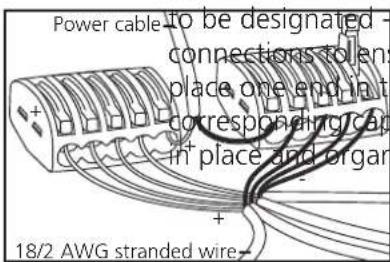
and +. Each color will need to be the same across all sure no signals are crossed. Strip the ends of each wire and the appropriate wago connector and the other to theitive screw connector. Use the zip ties to keep all wires
natural_image
Simple line drawing of a tool tip pressing into a component with a plus and minus signs (no text or symbols)Connection Diagram
flowchart
graph TD
    A["Router"] --> B["ATLONA."]
    B --> C["AT-UHD-EX-100CE-TX POWER"]
    C --> D["Set top box"]
    D --> E["HDBaseT"]
    D --> F["Power"]
    G["Control System"] --> H["ATLONA."]
    H --> I["AT-UHD-EX-100CE-RX"]
    I --> J["HDBaseT IN"]
    I --> K["HDMI OUT"]
    L["Video"] --> M["HDBaseT"]
    N["Control"] --> O["RS-232"]
    P["Ethernet"] --> Q["IR IN"]
    R["Link"] --> S["HDBaseT IN"]
    T["Link"] --> U["HDBaseT IN"]
    V["Link"] --> W["HDBaseT IN"]
    X["Link"] --> Y["HDBaseT IN"]
    Z["Link"] --> AA["HDBaseT IN"]
    AB["Link"] --> AC["HDBaseT IN"]
    AD["Link"] --> AE["HDBaseT IN"]
    AF["Link"] --> AG["HDBaseT IN"]
    AH["Link"] --> AI["HDBaseT IN"]
    AJ["Link"] --> AK["HDBaseT IN"]
    AL["Link"] --> AM["HDBaseT IN"]
    AN["Link"] --> AO["HDBaseT IN"]
    AP["Link"] --> AQ["HDBaseT IN"]
    AR["Link"] --> AS["HDBaseT IN"]
    AT["DC 48V"] --> AU["RX TX ↓"]
    AU --> AV["RS-232"]
    AW["IR IN"] --> AX["IR OUT"]
    AY["HDBaseT IN"] --> AZ["HDMI OUT"]
flowchart
graph TD
    A["AT-UHD-H2H-88M HDMI Matrix Switcher"] --> B["AT-LONA"]
    B --> C["Control System"]
    A --> D["Video"]
    A --> E["HDBaseT"]
    A --> F["Control"]
    B --> G["AT-UHD EX ISOKE TX POWER"]
    B --> H["ETHERNET"]
    B --> I["FOX LINK"]
    B --> J["DC 48V"]
    B --> K["RS-23D"]
    B --> L["IR PN IR OUT"]
    B --> M["HDBase OUT"]
    B --> N["HDMI IN"]
    B --> O["AT-LONA"]
    O --> P["POWER"]
    O --> Q["RS-23D"]
    O --> R["IR IN IR OUT"]
    O --> S["HDBase T IN"]
    O --> T["HDMI OUT"]
Specifications
Video Resolutions
| Video | 4096x2160@24/25/30/50*/60Hz*, 3840x2160@24/25/30/50*/60Hz*(UHD), 2048x1080p, 1080p@23.98/24/25/29.97/30/50/59.94/601080i@50/59.94/60Hz, 720p@50/59.94/60Hz, 576p, 576i, 480p, 480i |
VESA 2560x2048, 2560x1600, 2048x1536, 1920x1200, 1680x1050,
1600x1200, 1600x900,
1440x900, 1400x1050, 1366x768, 1360x768, 1280x1024, 1280x800,
1280x768, 1152x768, 1024x768, 800x600, 640x4
Colorspace YCbCr, RGB
Chroma Subsampling 4:4:4, 4:2:2, 4:2:0
Color depth 8-bit, 10-bit, 12-bit
Audio
Format - pass through PCM 2Ch, LPCM 5.1, LPCM 7.1, Dolby Digital, DTS 5.1, Dolby Digital
Plus, Dolby TrueHD, DTS-HD Master Audio, Dolby Atmos
Sample Rate 32kHz, 44.1kHz, 48kHz, 88.2kHz, 96kHz, 176.4kHz, 192kHz
Bit rate up to 24-bit
Distance
CAT5e/6 @ 4K up to 70M up to 230 ft
CAT6a/7 @ 4K up to 100M up to 328 ft
CAT5e/6 @ 1080p up to 100M up to 328 ft
HDMI IN/OUT @ 4K up to 5M up to 15 ft
HDMI IN/OUT @ 1080p up to 10M up to 30 ft
Signal
| Bandwidth | 10.2 | Gbps | ||
| CEC | Yes | |||
| HDCP | supports | up | to | 2.2 |
Temperature
| Operating | 0°C | to | 50°C | 32°F | to | 122°F |
| Storage | -20°C | to | 60°C | -4°F | to | 140°F |
Humidity 20 to 90% non-condensing
Power
| Consumption Supply | 12W (when paired with RX) | ||
| Input: | AC100~240V | 50/60Hz | |
| Output: | DC48V | 0.83A | |
Dimension
| H x W x D | 25 x 109 x 127 (mm) | 0.98 x 4.29 x 5.00 (inch) |
| s 27 x 119 x 127 (mm) | 1.06 x 4.69 x 5.00 (inch) |
Weight
Device 0.39 kg 0.86 lbs
Certification
| Power Supply Product | CE, FCC, cULus, RoHS, CCC, RCM CE, FCC |
**4096x2160@50/60Hz & 3840x2160@50/60Hz supported @ chroma subsampling 4:2:0 8-bit only
Safety Information
Safeguards

To reduce the risk of electric shock, do not expose this product to rain or moisture

If the wall plug does not fit into your local power socket, hire an electrician to replace your obsolete socket.

Do not modify the wall plug. Doing so will void the warranty and safety features.
This equipment should be installed near the socket outlet and the device should be easily accessible in the case it requires disconnection.
Precautions
FCC regulations state that any unauthorized changes or modifications to this equipment, not expressly approved by the manufacturer, could void the user's authority to operate this equipment.
Operate this product using only the included external power supply. Use of other power supplies could impair performance, damage the product, or cause fires.
In the event of an electrostatic discharge this device may automatically turn off. If this occurs, unplug the device and plug it back in.
Protect and route power cords so they will not be stepped on or pinched by anything placed on or against them. Be especially careful of plug-ins or cord exit points from this product.
Avoid excessive humidity, sudden temperature changes or temperature extremes.
Keep this product away from wet locations such as bathtubs, sinks, laundries, wet basements, fish tanks, and swimming pools.
Use only accessories recommended by Atlona to avoid fire, shock, or other hazards.
Unplug the product before cleaning. Use a damp cloth for cleaning and not cleaning fluid or aerosols. Such products could enter the unit and cause damage, fire, or electric shock. Some substances may also mar the finish of the product.
Never open, remove unit panels, or make any adjustments not described in this manual. Attempting to do so could expose you to dangerous electrical shock or other hazards. It may also cause damage to your product. Opening the product will void the warranty.
Do not attempt to service the unit. Disconnect the product and contact your authorized Atlona reseller or contact Atlona directly.
Atlona, Inc. ("Atlona") Limited Product Warranty Policy
Coverage
Atlona warrants its products will substantially perform to their published specifications and will be free from defects in materials and workmanship under normal use, conditions and service.
Under its Limited Product Warranty, Atlona, at its sole discretion, will either:
A) repair or facilitate the repair of defective products within a reasonable period of time, restore products to their proper operating condition and return defective products free of any charge for necessary parts, labor and shipping OR
B) replace and return, free of charge, any defective products with direct replacement or with similar products deemed by Atlona to perform substantially the same function as the original products
OR
C) refund the pro-rated value based on the remaining term of the warranty period, not to exceed MSRP, in cases where products are beyond repair and/or no direct or substantially similar replacement products exist.
Repair, replacement or refund of Atlona's products is the purchaser's exclusive remedy and Atlona's liability does not extend to any other damages, incidental, consequential or otherwise.
This Limited Product Warranty extends to the original end-user purchaser of Atlona's products and is non-transferrable to any subsequent purchaser(s) or owner(s) of these products.
Coverage Periods
Atlona's Limited Product Warranty Period begins on the date of purchase by the end-purchaser. The date contained on the end-purchaser 's sales or delivery receipt is the proof purchase date.
Limited Product Warranty Terms – New Products
• 10 years from proof of purchase date for hardware/electronics products purchased on or after June 1, 2013
• 3 years from proof of purchase date for hardware/electronics products purchased before June 1, 2013
• Lifetime Limited Product Warranty for all cable products
Limited Product Warranty Terms – Refurbished (B-Stock) Products
- 3 years from proof of purchase date for all Refurbished (B-Stock) hardware and electronic products purchased on or after June 1, 2013
Remedy
Atlona recommends that end-purchasers contact their authorized Atlona dealer or reseller from whom they purchased their products. Atlona can also be contacted directly. Visit www.atlona.com for Atlona's contact information and hours of operation. Atlona requires that a dated sales or delivery receipt from an authorized dealer, reseller or end-purchaser is provided before Atlona extends its warranty services. Additionally, a return merchandise authorization (RMA) and/or case number, is required to be obtained from Atlona in advance of returns.
Atlona requires that products returned are properly packed, preferably in the original carton, for shipping. Cartons not bearing a return authorization or case number will be refused. Atlona, at its sole discretion, reserves the right to reject any products received without advanced authorization. Authorizations can be requested by calling 1-877-536-3976 (US toll free) or 1-408-962-0515 (US/international) or via Atlona's website at www.atlona.com.
Exclusions
This Limited Product Warranty excludes:
- Damage, deterioration or malfunction caused by any alteration, modification, improper use, neglect, improper packing or shipping (such claims must be presented to the carrier), lightning, power surges, or other acts of nature.
- Damage, deterioration or malfunction resulting from the installation or removal of this product from any installation, any unauthorized tampering with this product, any repairs attempted by anyone unauthorized by Atlona to make such repairs, or any other cause which does not relate directly to a defect in materials and/or workmanship of this product.
- Equipment enclosures, cables, power supplies, batteries, LCD displays, and any accessories used in conjunction with the product(s).
- Products purchased from unauthorized distributors, dealers, resellers, auction websites and similar unauthorized channels of distribution.
Disclaimers
This Limited Product Warranty does not imply that the electronic components contained within Atlona's products will not become obsolete nor does it imply Atlona products or their electronic components will remain compatible with any other current product, technology or any future products or technologies in which Atlona's products may be used in conjunction with. Atlona, at its sole discretion, reserves the right not to extend its warranty offering in instances arising outside its normal course of business including, but not limited to, damage inflicted to its products from acts of god.
Limitation on Liability
The maximum liability of Atlona under this limited product warranty shall not exceed the original Atlona MSRP for its products. To the maximum extent permitted by law, Atlona is not responsible for the direct, special, incidental or consequential damages resulting from any breach of warranty or condition, or under any other legal theory. Some countries, districts or states do not allow the exclusion or limitation of relief, special, incidental, consequential or indirect damages, or the limitation of liability to specified amounts, so the above limitations or exclusions may not apply to you.
Exclusive Remedy
To the maximum extent permitted by law, this limited product warranty and the remedies set forth above are exclusive and in lieu of all other warranties, remedies and conditions, whether oral or written, express or implied. To the maximum extent permitted by law, Atlona specifically disclaims all implied warranties, including, without limitation, warranties of merchantability and fitness for a particular purpose. If Atlona cannot lawfully disclaim or exclude implied warranties under applicable law, then all implied warranties covering its products including warranties of merchantability and fitness for a particular purpose, shall provide to its products under applicable law. If any product to which this limited warranty applies is a "Consumer Product" under the Magnuson-Moss Warranty Act (15 U.S.C.A. §2301, ET SEQ.) or other applicable law, the foregoing disclaimer of implied warranties shall not apply, and all implied warranties on its products, including warranties of merchantability and fitness for the particular purpose, shall apply as provided under applicable law.
Other Conditions
Atlona's Limited Product Warranty offering gives legal rights, and other rights may apply and vary from country to country or state to state. This limited warranty is void if (i) the label bearing the serial number of products have been removed or defaced, (ii) products are not purchased from an authorized Atlona dealer or reseller. A comprehensive list of Atlona's authorized distributors, dealers and resellers can be found at www.atlona.com.
Atlona, Inc Product Registration
Thank you for purchasing this Atlona product. - We hope you enjoy it and will take an extra few moments to register your new purchase.
Registration creates an ownership record if your product is lost or stolen and helps ensure you'll receive notification of performance issues and firmware updates.
At Atlona we respect and protect your privacy, assuring you that your registration information is completely secure. Atlona product registration is completely voluntary and failure to register will not diminish your limited warranty rights.
To register go to: http://www.atlona.com/registration
- 4K/UHD HDMI Over 100M HDBaseT Transmitter with Ethernet, Control, and PoE
- Table of Contents
- Introduction
- Package Contents
- Features
- Category Cable
- Connector
- Panel Description
- Captive Screw
- Connecting
- Power Chaining
- Specifications
- Audio
- Distance
- Signal
- Power
- Weight
- Certification
- Safety Information
- Safeguards
- Precautions
- Atlona, Inc. ("Atlona") Limited Product Warranty Policy
- Coverage
- OR
- Coverage Periods
- Limited Product Warranty Terms – New Products
- Limited Product Warranty Terms – Refurbished (B-Stock) Products
- Remedy
- Exclusions
- Disclaimers
- Limitation on Liability
- Exclusive Remedy
- Other Conditions
- Atlona, Inc Product Registration
Brand : Atlona
Model : AT-UHD-EX-70-2PS
Category : Hi-Fi System