
Mono X 300 Signature - Receiver CYRUS - Free user manual and instructions
Find the device manual for free Mono X 300 Signature CYRUS in PDF.


| Product Type | Mono power amplifier |
| Dimensions (W x H x D) | 215 x 75 x 365 mm |
| Weight | 6.4 kg |
| Power Supply Voltage | As marked on rear panel (e.g., 220-240V or 110-120V) |
| Power Consumption (Standby) | < 1 W |
| Power Consumption (Idle) | 23 W |
| Maximum Power Consumption | 750 W |
| Output Power (Continuous into 8 Ω) | 225 W rms |
| Total Harmonic Distortion + Noise (20 Hz-20 kHz, 8 Ω) | < 0.05% |
| Signal-to-Noise Ratio (ref. 225 W, 8 Ω) | 116 dBA |
| Frequency Response (-3 dB) | 0.1 Hz - 300 kHz |
| Input Sensitivity (RCA, 225 W) | 890 mV |
| Input Sensitivity (Balanced, 225 W) | 1.78 V |
| Input Impedance (RCA) | 47 kΩ |
| Input Impedance (Balanced) | 20 kΩ |
| Inputs | 1 x Balanced (XLR), 1 x Unbalanced (RCA) |
| Outputs | 1 x Chain output (buffered), 2 x Speaker outputs (BFA) |
| Remote Control | MC-BUS, RS232, 12V trigger |
| Cooling | Forced air with intelligent fan speed control |
| Standby Power Consumption (Music sense off) | < 1 W |
| Standby Power Consumption (Music sense on) | Significantly higher (details not specified) |
| Enclosure Material | Die-cast chassis |
| Warranty | 2 years (subject to online registration) |
Frequently Asked Questions - Mono X 300 Signature CYRUS
User questions about Mono X 300 Signature CYRUS
0 question about this device. Answer the ones you know or ask your own.
Ask a new question about this device
Download the instructions for your Receiver in PDF format for free! Find your manual Mono X 300 Signature - CYRUS and take your electronic device back in hand. On this page are published all the documents necessary for the use of your device. Mono X 300 Signature by CYRUS.
USER MANUAL Mono X 300 Signature CYRUS
natural_image
Close-up of a piano keyboard with slats and a handle, no visible text or symbolsCONTENTS
IMPORTANT! Read before operating this equipment! .... 1
Power supply: 1
Servicing: 1
Product service centres: 1
WELCOME TO THE WORLD OF CYRUS! 2
Preparations for Installation 2
Model Differences 2
INSTALLATION 2
Key to the rear panel drawing 2
Placement 3
Connecting to the AC Mains Supply 3
Identifying System Channels 3
Connecting a Pre-Amplifier or Surround Decoder .... 3
Input Connection via phono (RCA) interconnects 3
Input Connection using Balanced XLR cables 3
Connecting Loudspeakers 3
CAUTION: Choice of speaker cables 3
Fitting the loudspeaker plugs.... 3
Connecting the cables 3
Chain Output 4
Bi-Amplification 4
Gain Matching 4
Remote Power Control (MC-BUS, RS232 or 12V Trigger) .... 5
Connecting to an MC-BUS equipped Cyrus system 5
Connecting to a 12V trigger equipped system 5
Connecting to an RS232 equipped system 5
OPERATION 6
Power Control 6
Power control from the front panel 6
Music sensing automatic power control....6
Input Indicator 6
Selecting an Input 6
Cooling 7
Cooling in use 7
Cooling in standby 7
TROUBLESHOOTING GUIDE 7
SPECIFICATIONS 8
Power Supply 8
Power Consumption 8
Enclosure 8
Audio Performance (Mono X 300 Signature) 8
Audio Performance (Mono X 200 Signature) 8
WARRANTY 9
WEEE 9
IMPORTANT! Read before operating this equipment!
CAUTION: The exclamation mark is to draw your attention to important instructions and safety procedures in this manual.
ATTENTION: The lightning flash warns you of the risk of electrical shock presented by components inside this product. Unauthorised personnel must not open this unit.


WARNING: To reduce the risk of electrical shock do not remove any unit covers or panels. There are no user serviceable parts in this product.
WARNING: To reduce the risk of electric shock, do not expose this equipment to rain or moisture.
HEED WARNINGS: All warnings on the product and in the operating instructions should be adhered to.
READ ALL THE INSTRUCTIONS: All the safety and operating instructions should be read before the product is operated.
RETAIN INSTRUCTIONS: The safety and operating instructions should be retained for future reference.
FOLLOW INSTRUCTIONS: All operating and use instructions should be followed.
CLEANING: Unplug this product from the mains before cleaning. Do not use liquid or aerosol cleaners. Use a damp cloth for cleaning.
WATER AND MOISTURE: Do not use this product near water - for example, near a bath tub, wash bowl, kitchen sink, or laundry tub, in a wet basement; or near a swimming pool and the like. The product must not be exposed to dripping or splashing and no objects filled with liquids, such as vases, shall be placed on the product.
HEAT: The product should be situated away from heat sources such as radiators, stoves, or any other products (including amplifiers) that produce heat.
VENTILATION: Slots and openings in the cabinet are provided for ventilation, to ensure reliable operation of the product and to protect it from overheating and these openings must not be blocked or covered. The openings should never be blocked by placing the product on a bed, sofa, rug or similar surface. This product should not be placed in a built-in installation such as a bookcase or rack unless proper ventilation is provided or the manufacturer's instructions have been adhered to.
OBJECT OR LIQUID ENTRY: Never push objects of any kind into this product through openings as they may touch dangerous voltage points or short-out parts that could result in a fire or electric shock.
ACCESSORIES: Do not place this product on an unstable cart, stand, tripod, bracket, or table. The product may fall, causing serious injury to a child or adult, and serious damage to the product. Use only with cart, stand, tripod, bracket or table recommended by the manufacturer, or sold with the product. Any mounting of the product should follow the manufacturer's instructions, and should use a mounting accessory recommended by the manufacturer.
ATTACHMENTS: Do not use attachments not recommended by the product manufacturer as they may cause hazards.
MOVING THE PRODUCT: A product and cart combination should be moved with care. Sudden stops, excessive force, and uneven surfaces may cause the product and cart to overturn.

POWER SOURCES: This product should be operated only from the type of power source indicated on the marking label. If you are not sure of the type of power supply to your home, consult your product dealer or local power company. For products intended to operate from battery power, or other sources, refer to the operating instructions.
OVERLOADING: Never overload wall outlets, extension cords, or integral convenience receptacles. This can result in an increased risk of fire or electric shock.
POWER CORD PROTECTION: Power supply cords should be routed so that they are not likely to be walked on or pinched by items placed upon or against them, paying particular attention to cords at plugs, convenience receptacles, and the point where they exit from the product.
NAKED FLAMES: No naked flame sources, such as candles, must be placed on this product.
LIGHTNING: For added protection for this product during a lightning storm, or when it is left unattended or unused for long periods of time, unplug it from the wall outlet and disconnect the antenna or cable system. This will prevent damage to the product due to lightning and power-line surges.
BATTERIES: Warning : Batteries shall not be exposed to excessive heat such as sunshine, fire or the like.
CAUTION! POLARISED CONNECTOR (CANADA and USA): To prevent electrical shock, match wide blade of plug to wide slot, fully insert.
Do not alter or remove this plug if it does not fit your mains power socket. Have a suitable socket installed by a competent electrician.
Power supply:
Connect the moulded IEC connector of the AC cord supplied plugs into the power inlet ⑧ on the rear of the unit.
The mains supply requirement for your Cyrus Mono X Signature is marked on a label on the rear panel. Before connecting, check that this voltage is the same as your mains supply.
230V Products: Voltage Range 220V-240V
115V Products: Voltage Range 110V-120V
If you move to an area with a different mains voltage, contact your local Cyrus distributor to have your product converted.
There are no user replaceable fuses in this unit.
Servicing:
Do not attempt to service this product yourself as opening or removing covers may expose you to dangerous voltage or other hazards. Refer all servicing to qualified service personnel.
CONDITIONS REQUIRING SERVICE: Unplug this product from the wall outlet and refer servicing to qualified service personnel when:
When the power supply cord or plug is damaged.
• If liquid has been spilled, or objects have fallen into the product.
• If the product has been exposed to rain or water.
• If the product has been dropped or damaged in any way.
- If the product does not operate normally by following the operating instructions. (Adjust only those controls that are covered by the operating instructions. Improper adjustment of other controls may result in damage requiring extensive work by a qualified technician to restore the product to its normal operation).
- When the product exhibits a distinct change in performance.
REPLACEMENT PARTS: When replacement parts are required, be sure the service technician has used replacements specified by the manufacturer or have the same characteristics as the original part. Unauthorised substitutions may result in fire, electric shock, or other hazards.
SAFETY CHECK: Upon completion of any service or repairs to this product, ask the service technician to perform safety checks to determine that the product is in proper operating condition.
Product service centres:
For product service or technical advice, contact only authorised Cyrus service centres. Contact details for Cyrus distributors may be found on the Cyrus website at www.cyrusaudio.com.
Cyrus Mono X 200 Signature & Mono X 300 Signature User Instructions
WELCOME TO THE WORLD OF CYRUS!
Congratulations on your choice of Cyrus Hi-fi products. Our state-of-the-art design technology and outstanding quality of manufacture has won countless awards around the world. We are confident that you will derive great pleasure from owning a product from one of the most recognised and respected manufacturers of hi-fi equipment.
Now is a good time to register your new Cyrus product. Registration takes only a few minutes, brings the added benefit of a full two year factory warranty and adds you to our mailing list for future product updates and upgrades. To register, visit www.cyrusaudio.com and click the 'Login/Register' link.
Please read these instructions carefully before commencing installation. They provide full guidance to help you install your amplifier safely and correctly.
Preparations for Installation
Before installing the Mono X Signature check that the following items are included in the accessory box.
Power Cable
4 Loudspeaker plugs (certain markets only)
2 MC-BUS cables•
After removing these items, please retain the packaging.
Install the Mono X Signature in a well ventilated location away from sources of high temperature, dust or humidity. Never stand the Mono X Signature under another unit or on any surface likely to hamper its cooling or ventilation.
Model Differences
There are two amplifiers in the series –
The Cyrus Mono X 200 Signature power amplifier.
The Cyrus Mono X 300 Signature power amplifier.
This handbook includes instructions for the connection and operation of both products in the series. Model differences are shown in the text, where necessary.
INSTALLATION
text_image
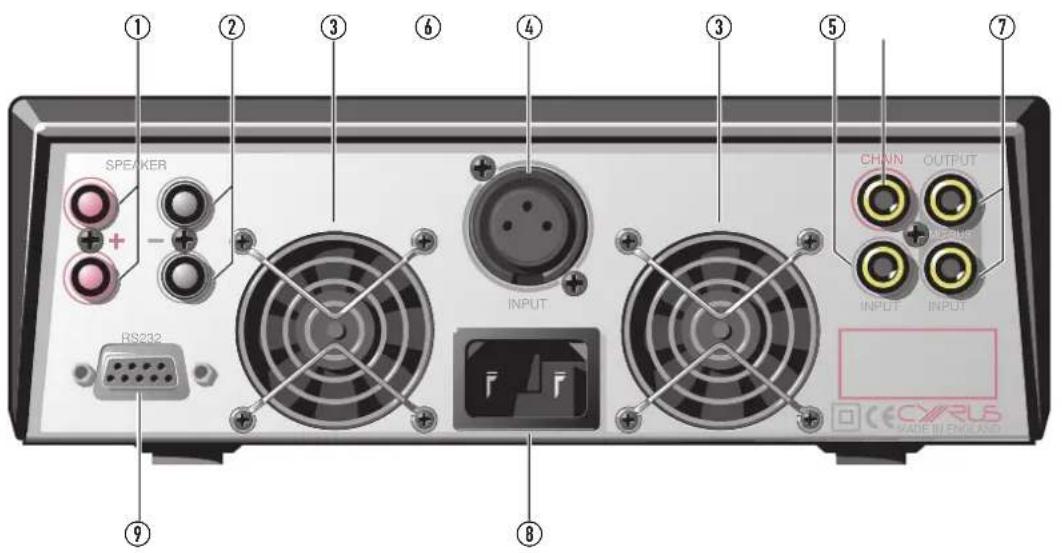
SPEAKER RS232 ① ② ③ ⑥ ④ ③ ⑤ ⑦ INPUT CHAIN OUTPUT INPUT INPUT ⑧ ⑨ CECVRLS MADE IN ENSAOSKey to the rear panel drawing
- Speaker Outputs1.
- Speaker Outputs 2.
Cooling Fans 3.
- Balanced (BAL) Input
- Unbalanced RCA (phono) Input
- Chain Output
- MC-BUS connections
- IEC Power Inlet
- RS232/12V trigger D-type
Placement
When installing Mono X Signature amplifiers, choose a position where there is at least 3cm clearance from the sides and top of the amplifier to allow cooling air to circulate. Never stand the amplifier on a soft or carpeted surface or install the amplifier in an enclosed space or cabinet where cool air cannot enter.
Connecting to the AC Mains Supply
Connect the socket on the AC Power cable to the Power inlet ⑧ on the rear panel of the Mono X Signature. Now connect the cable to a suitable AC power point.
The mains plug is the disconnect device for this product. Ensure that the mains plug is always readily accessible.
Identifying System Channels
Each Mono X Signature drives a single speaker. In a stereo system two Mono X Signatures are necessary, in an AV system, a Mono X Signature amplifier will be necessary for each channel. Before proceeding to connect your amplifiers, take some time to organise your system so that you can easily identify which amplifier will be connected to each speaker.
Connecting a Pre-Amplifier or Surround Decoder
Phono (RCA) ⑤ and Balanced input connectors ④ are available to link the Mono X Signature to a pre-amplifier or surround decoder.
If your amplifiers are a long distance from the pre-amplifier/decoder, or beside a loudspeaker, then balanced XLR connections ④ may give improved performance.
Input Connection via phono (RCA) interconnects
Connect a single phono interconnect from the phono input e of each Mono X Signature to the corresponding output of the pre-amplifier/decoder.
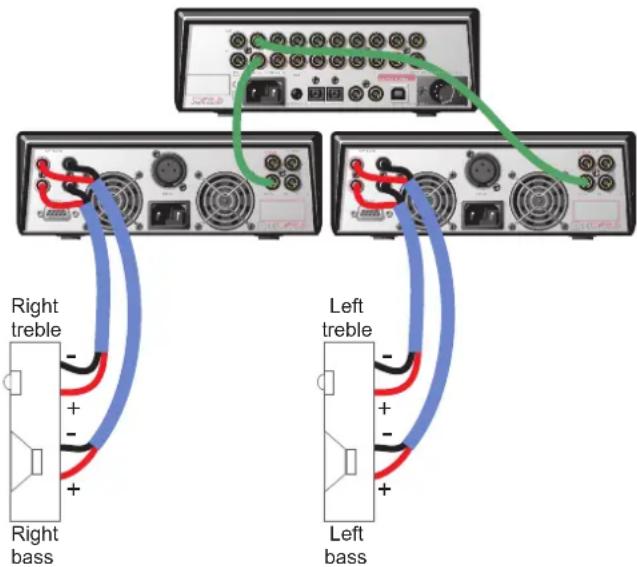
In the system illustration on this page, a Cyrus preamplifier is connected to two Mono X Signature amplifiers, one for the left channel and one for the right channel. Input connections are shown using phono interconnects.
Input Connection using Balanced XLR cables
Connect a 3-pin XLR cable from the balanced input ④ of each Mono X Signature to the corresponding XLR output of the pre-amplifier/decoder.
Connecting Loudspeakers
CAUTION: Choice of speaker cables
When choosing speaker cables, avoid litz-wound cables with a complex 'plaited wire' construction. These cables can be highly reactive and may degrade the sound of your amplifier. Always choose a cable of simple construction, manufactured from high quality materials and priced sensibly within the cabling budget of your system.
If in doubt about the correct cable to choose, any Cyrus retailer will be able to advise.
Fitting the loudspeaker plugs
Check for polarity indicators (+ and -) on the loudspeaker cable and fit the plugs provided. Observe any signal directionality markings indicated on the cable. If an arrow is printed on the cable it should point toward the speaker.
If additional or replacement loudspeaker plugs are required for the Mono X Signature, ensure that the correct 'BFA' type are purchased.
Connecting the cables
After checking all the assembled cables for polarity they can be plugged into the loudspeakers and amplifiers. The '+' and '-' terminals of each loudspeaker must be connected to the matching '+' and '-' terminals of each amplifier as follows-
Connect the left loudspeaker to the rear panel sockets ① (red speaker plug) and ② (black speaker plug) of the left channel Mono X Signature. Connect the right loudspeaker to the rear panel sockets ① (red speaker plug) and ② (black speaker plug) of the right channel Mono X Signature.
Dual outputs are provided for the convenient connection of bi-wiring speaker cables. The diagram below shows a wiring schematic for a bi-wired stereo system.
text_image
Right treble Right bass Left treble Left bassCyrus Mono X 200 Signature & Mono X 300 Signature User Instructions
Chain Output
The Chain output f allows more than one Mono X Signature to be connected to each channel of a pre-Amplifier or decoder. Note: The Chain output is operational whether phono (RCA) or Balanced XLR input connection is made to the Mono X Signature.
Bi-Amplification
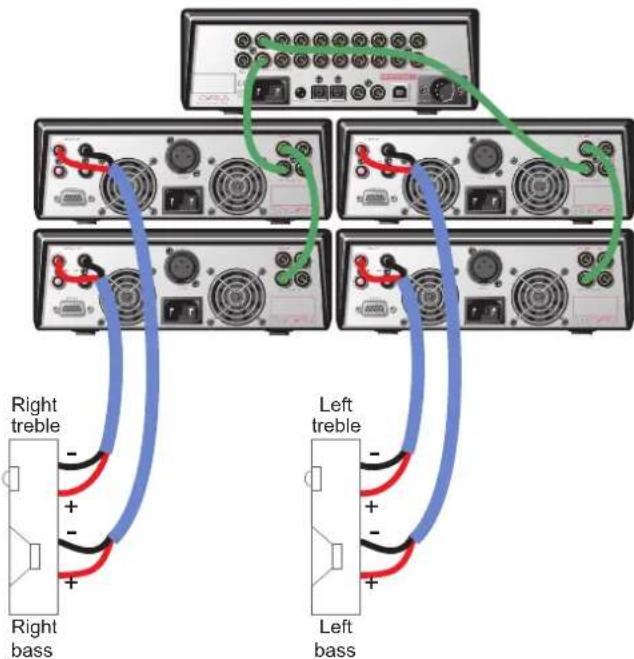
If your pre-amplifier only has a single set of pre outputs, the Chain facility can be used to connect additional Mono X Signature amplifiers to each channel for Bi/Tri-amping. Such a bi-amplified system provides the sonic benefits of totally separate power amplification for the bass and treble units of the loudspeakers.
In the bi-amplified system illustration below, a preamplifier is connected to four Mono X Signature amplifiers - two for the left channel and two for the right channel. Phono input connections are shown.
text_image
Right treble Right bass Left treble Left bassNote: The Chain output is operational whether phono (RCA) or Balanced XLR input connection is made to the Mono X Signature.
Gain Matching
All Cyrus power amplifiers, and all power amplifier stages in Cyrus integrated amplifiers have the same voltage gain characteristics. This means that you can use the Mono X Signature in conjunction with any Cyrus amplifier for bi-amping, etc. without any set-up adjustments being required.
Remote Power Control (MC-BUS, RS232 or 12V Trigger)
The Mono X Signature may be remotely switched to and from Standby (low power standby) using the Cyrus MC-BUS system or one of two industry standard connection systems – RS232 or 12V trigger.
The Cyrus MC-BUS system is recommended for use when amplifiers are installed in a system of Cyrus audio components.
A 12V trigger feed is often used by AV receivers for standby control of power amplifiers, projectors etc in an AV system.
The RS232 interface is found in some CI (custom install) multi-room installations where the system control unit can remotely control the system components including power amplifiers.
Connecting to an MC-BUS equipped Cyrus system
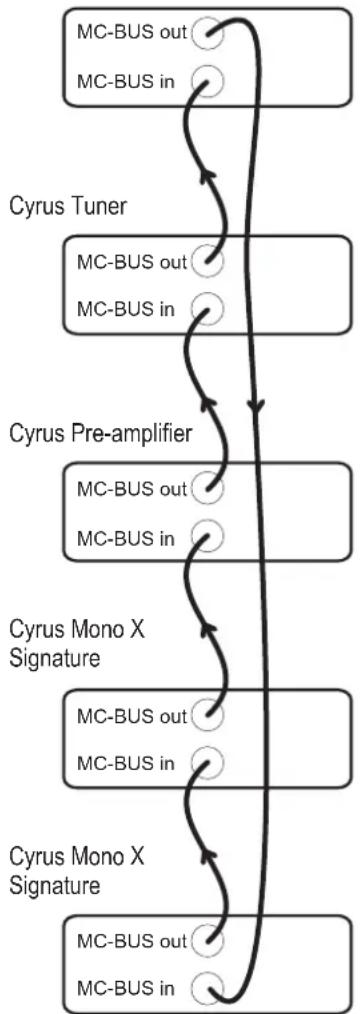
An MC-BUS (Master Control) loop is established by connecting single phono cables from the MC-BUS output of one unit to the MC-BUS input of another in a daisy-chain. Complete the loop by returning the MC-BUS output of the final component to the MC-BUS input of the first (see example system connections below).
Cyrus CD Player
flowchart
graph TD
    A["MC-BUS out"] --> B["MC-BUS in"]
    B --> C["Cyrus Tuner"]
    C --> D["MC-BUS out"]
    D --> E["MC-BUS in"]
    E --> F["Cyrus Pre-amplifier"]
    F --> G["MC-BUS out"]
    G --> H["MC-BUS in"]
    H --> I["Cyrus Mono X Signature"]
    I --> J["MC-BUS out"]
    J --> K["MC-BUS in"]
    K --> L["Cyrus Mono X Signature"]
    L --> M["MC-BUS out"]
    M --> N["MC-BUS in"]
With MC-BUS established you can control the power function of the system from the front panel or remote control of the main Cyrus amplifier or Surround Processor.
Connecting to a 12V trigger equipped system
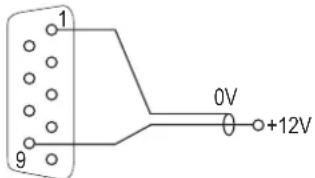
A custom connection cable will be required to set up 12V trigger operation. A retailer should be able to make up a cable of the correct length and with the correct terminations to match the amplifier (9-pin D-type) and the control unit.
The connections required are –
text_image
1 9 0V +12VOnce the cable is available, connect the 9-pin D to the RS232/12V connector ⑨ on the back of the Mono X Signature. Connect the other end of the cable to the AV receiver or other component that is controlling system power.
Connecting to an RS232 equipped system
Your CI installer can obtain full installation and programming instructions for the RS232 interface from Cyrus technical support or from your local Cyrus distributor.
OPERATION
text_image
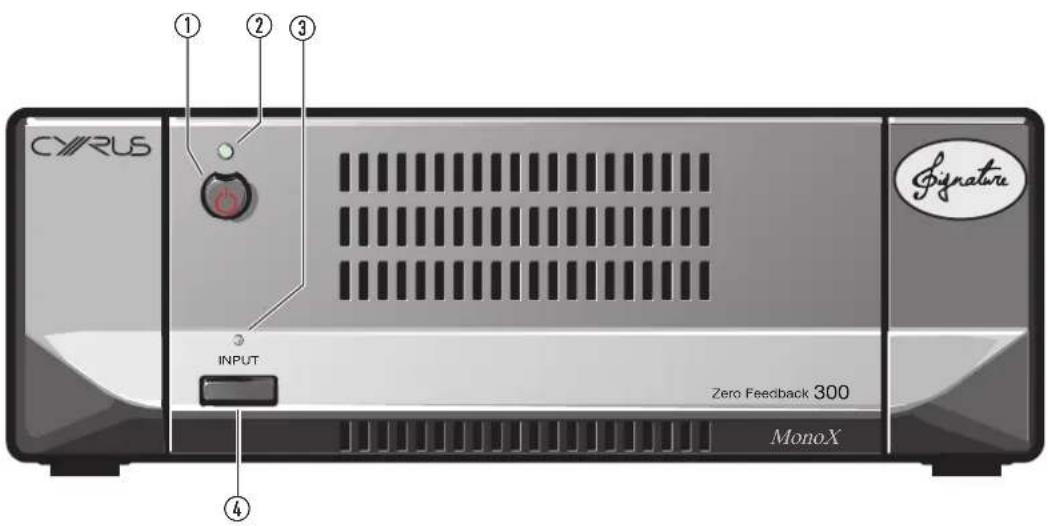
CYRUS ① ② ③ INPUT Zero Feedback 300 MonoX ④ SignatureKey to the front panel drawing
Standby key1
Standby indicator2.
Input indicator3.
Input selector key 4.
Power Control
When power is first applied, the amplifier will initialise, then set to Standby.
Power control from the front panel
Press the STANDBY key ① briefly to switch the amplifier between operational and standby modes. The Standby Indicator ② will glow green when operational or red when set to Standby.
Music sensing automatic power control
Music sense power control can be enabled if required.
To enable or disable Music sense, first set the amplifier to Standby, then press and hold the STANDBY key for two seconds. The Standby Indicator will flash red three times, then change colour to show the status of Music sense – orange when enabled or red when disabled.
When Music sense is enabled, the amplifier will switch on automatically if a music signal is detected from the pre-amplifier, and set to Standby after 10 minutes of silence. The STANDBY key may also be used to switch the amplifier on if required, or to switch the amplifier back to Standby with Music sense enabled (Standby indicator will glow orange).
NOTE: Standby power consumption will be significantly higher when Music sense is enabled.
A 12V trigger, MC-BUS or RS232 'OFF' command cancels the Music sense function.
Input Indicator
The INPUT Indicator ③ will glow red when the output of the Mono X Signature is muted. This occurs for a few seconds following Standby operation or if a temporary overload condition arises. If the INPUT Indicator flashes at any time, refer to the Troubleshooting Guide.
Selecting an Input
The front panel INPUT key ④ selects RCA Phono or Balanced input connection. To change inputs, the amplifier must be switched on. Press and hold the INPUT key ④ until the INPUT indicator ③ changes colour as shown.
| INPUT Indicator colour Input selected | |
| Green Balanced | |
| Orange | RCA Phono |
NOTE: The input setting will be retained when mains power is disconnected.
Cooling
Cooling in use
Due to the substantial power of the Mono X Signature, forced air-cooling is provided via two fans. The fans in the Mono X Signature feature an Intelligent speed controller. When the unit is idling the fans turn off. As the amplifier warms up the fans progressively speed up, reaching maximum speed at maximum temperature. In this way the fan speed is always related to the power output of the unit and fan noise is barely discernible even at low volume levels. Whilst listening to music during quiet passages, the fans may slow down or in some cases stop altogether to avoid encroaching on the listening experience.
Cooling in standby
If the amplifier is set to Standby whilst the case is still hot, the fans will switch in at full speed, cooling the case before setting to Standby. During this period the INPUT indicator will glow red, extinguishing when the cooling cycle is complete.
TROUBLESHOOTING GUIDE
If your Mono X Signature is not operating properly, disconnect the power and check all connections using the notes in this handbook. If problems persist, the checklist below may be helpful.
If you are in doubt, consult your dealer.
| No sound from one or all speakers | |
| Check that the pre-amplifier and the power amplifiers are on.Check that the correct amplifier input is selected. | The standby lights should be green.The INPUT indicator will glow green for balanced input, orange for RCA/phono. |
| Check that the loudspeakers are connected. | The connection at the terminals of the loudspeakers and the Mono X Signature should be checked. |
Your amplifier has a unique fault indication system to help you to diagnose problems. Fault condition messages will be displayed via the Standby and Input/Mute indicators in the event of a system fault.
| INPUT indicator flashing between red and the normal input colour | |
| The amplifier has overheated. The | amplifier will automatically run the fans at full speed until it has cooled to a safe temperature, it will then return to Standby, ready for normal operation. Check to ensure there is adequate ventilation for the amplifier. |
| STANDBY indicator flashing orange/green | |
| The amplifier has been overloaded. | Check that the speaker connections are correctly made with no possibility of a short-circuit. If the problem persists, the speaker impedance may be too low. |
| STANDBY indicator flashing red or red/orange | |
| The amplifier has an internal fault. | Switch off the amplifier, disconnect it from the system and return it for service. |
SPECIFICATIONS
Power Supply
Voltage: As plate on rear of unit
Power Consumption
Standby .... <1W
ON (No Signal) 23W
Maximum, Mono X 300 Signature ....750W
Maximum, Mono X 200 Signature ....525W
EMC & Safety Compliance.....CE
Enclosure
Dimensions (WxHxD) 215 x 75 x 365mm
Weight (Mono X 300 Signature) 6.4Kg
Weight (Mono X 200 Signature) 5.5Kg
Material ....Die cast chassis
Audio Performance (Mono X 300 Signature)
Input Sensitivity (50W 8Ω) RCA ....381mV
Input Sensitivity (50W 8Ω) BAL ....775mV
Input Sensitivity (225W 8Ω) RCA 890mV
Input Sensitivity (225W 8Ω) BAL 1.78V
Input Impedance (RCA) 47kΩ
Input Impedance (BAL) 20kΩ
Output Power (Continuous) 8Ω 225Wrms
THD+N @2/3 full power ..... (20Hz - 20kHz 8Ω) .. <0.05% (1kHz 8Ω) ..... <0.004%
Slew Rate (input filter bypassed) 700v/μS
Frequency Response (-3dB) 0.1Hz-300kHz
S/N Ratio (Ref. 225W / 8Ω) 116dBA
Chain Output (buffered) ......(unity gain) 890mV
(ref. 890mV RCA input, 1.78V Balanced input.)
Audio Performance (Mono X 200 Signature)
Input Sensitivity (50W 8Ω) RCA ....381mV
Input Sensitivity (50W 8Ω) BAL ....775mV
Input Sensitivity (150W 8Ω) RCA 660mV
Input Sensitivity (150W 8Ω) BAL 1.3V
Input Impedance (RCA) 19kΩ
Input Impedance (BAL) 20kΩ
Output Power (Continuous) 8Ω ....150Wrms
THD+N @2/3 full power ..... (20Hz - 20kHz 8Ω) .. <0.05% (1kHz 8Ω) ..... <0.004%
Slew Rate (input filter bypassed) 700v/μS
Frequency Response (-3dB) 0.1Hz-300kHz
S/N Ratio (Ref. 150W / 8Ω) 114dBA
Chain Output (buffered) ......(unity gain) 660mV
(ref. 660mV RCA input, 1.3V Balanced input.)
Cyrus reserves the right to change all specifications without notice. E & OE
WARRANTy
The warranty should be registered on-line within 8 days of purchase.
No Dealer or Distributor may vary the terms of this warranty, which is personal to the original Purchaser and is not transferable.
Please retain the sales receipt as proof of purchase.
Warranty claims must wherever possible be made through the Dealer from whom the equipment was purchased.
This warranty excludes:
Damage caused through neglect, accident, misuse, wear and tear, or • through incorrect installation, adjustment or repair by unauthorised personnel. Any unauthorised servicing will result in loss of warranty.
- Liability for damage or loss occurring in transit to or from the purchaser.
Consequential damage, loss or injury, arising from or in conjunction with this equipment.
Equipment for attention under warranty should be consigned return carriage paid. If returned equipment is found to comply with the published specification, CYRUS reserves the right to raise a charge.
The above conditions do not affect your statutory rights as a consumer.
WEEE
This logo means that this product is not to be disposed of with your household waste. This product should be handed over to a designated collection point to be recycled. Your cooperation in the correct disposal of this product will contribute to the effective usage of natural resources. For more information on collection points, contact your disposal service or local government administration.