
DVN05R20W - Dishwasher BEKO - Free user manual and instructions
Find the device manual for free DVN05R20W BEKO in PDF.


| Brand | Beko |
| Model | DVN05R20W |
| Product Type | Freestanding Dishwasher |
| Capacity | 13 place settings |
| Energy Efficiency Class | A+ |
| Programs | Eco, Intensive, Clean & Shine, Quick & Shine, Mini |
| Water Consumption (Eco program) | 12.9 liters |
| Energy Consumption (Eco program) | 0.937 kWh |
| Noise Level | 49 dB |
| Dimensions (H x W x D) | 845 x 445 x 600 mm |
| Weight | 45 kg |
| Power Supply | 220-240 V, 50 Hz |
| Current | 10 A |
| Water Softener | Adjustable, 5 levels |
| Salt Indicator | Yes |
| Rinse Aid Indicator | Yes |
| Child Lock | Yes |
| Delay Start | Yes |
| Half Load Option | Yes |
| Tablet Detergent Function | Yes |
Frequently Asked Questions - DVN05R20W BEKO
User questions about DVN05R20W BEKO
0 question about this device. Answer the ones you know or ask your own.
Ask a new question about this device
Download the instructions for your Dishwasher in PDF format for free! Find your manual DVN05R20W - BEKO and take your electronic device back in hand. On this page are published all the documents necessary for the use of your device. DVN05R20W by BEKO.
USER MANUAL DVN05R20W BEKO
Operation of the product

Read "Safety Instructions" section first!
text_image
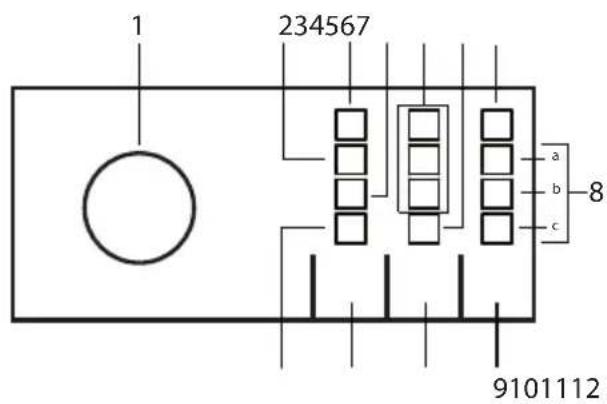
1 234567 a b c 8 9101112- On-Off / Program Selection knob
- Rinse aid ( indicator
- Low salt ( warning indicator
- Half load indicator
- Delay indicator
- Child Lock Indicator
- On/Off Control light
- Program Monitoring Indicator
a) Washing Indicator
b) Drying Indicator
c) Program Ended Indicator - Start / Hold / Cancel key
- Delay function key / Child Lock Key 3 sec
- Half Load function//Tablet detergent function 3 sec
- Tablet detergent indicator
Auxiliary functions
Washing programmes of your dishwasher are designed to obtain the best cleaning effect, considering the type of the soil, soiling degree and properties of the dishes to be washed.
Auxiliary functions are provided in order to enable you to save time, water and energy and to perform a more comfortable washing with conditions specific to you.

Auxiliary functions may cause changes in the programme duration.
Programme Data and Average Consumption Values Table
| Programme number | 1 | 2 | 3 | 4 | 5 |
| Programme name | Eco * Intensive | Clean&Shine Quick&Shine (#) Mini (#) | |||
| Cleaning temperature | 50 °C 70 °C 65 °C | 60 °C 35 °C | |||
| Degree of Soiling | Suitable for washing dishes with normal amount of soil. It is the most efficient program in terms of combined power and water consumption. This is used for assessing the compliance with EU's eco-design directive. | Suitable for heavily soiled dishes, pots and pans. | Daily washing programme for normally soiled dishes. | Daily washing programme for normally soiled dishes in the fastest way. | Suitable for lightly soiled daily dishes that are scraped or pre-cleaned. |
| Medium High Medium Low - Medium Low | |||||
| Prewash | + | + | + | - | - |
| Wash | + | + | + | + | + |
| Dry | + | + | + | + | - |
| Duration (min) | 205 120 120 58 30 | ||||
| Water (l) | 12,9 17,6 16,2 | 11,8 11,8 | |||
| Energy (kWh) | 0,937 1,65 1,38 | 1,2 0,8 | |||
Loading Capacity: 13
The consumption values shown in the table were determined under standard conditions. Differences may therefore occur under practical conditions. * Reference programme for testing institutes. The tests in accordance with EN 50242/60436 must be carried out with a full water softener salt dispenser and a full rinse aid reservoir, and using the test programme. The values given for programmes other than Eco 50°C programme are indicative only. (#) Additional functions might cause changes in programme durations.
Quick Guide
Adjusting the water softening system
Washing, rinsing and drying performance of your dishwasher will improve when the water softening system is adjusted correctly.
To adjust the system, first learn the water hardness in your region and adjust as indicated below.
- Unpack the test strip.
- Open the tap and let the water flow for approx. 1 minute.
- Dip in the test strip into the water for 1 second.
• Take out the strip from the water and shake it. - Wait for 1 minute.
- Make the necessary adjustment according to the test strip.
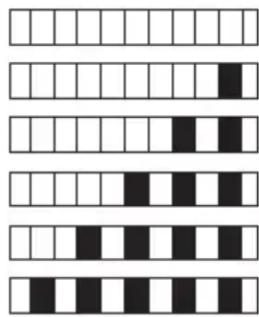
Level 0
Level 1
Level 2
Level 3
Level 4
Level 5
text_image
Sequence of five horizontal bar patterns with alternating black and white squares, resembling a pattern recognition or data visualization.After the determination of the water hardness:
- While the Program Selection Knob is "Off", press and hold the Start / Pause / Cancel key and rotate the Program Selection Knob one step clockwise and keep the Start / Pause / Cancel key pressed for 3 seconds; the machine shall switch to regeneration setting mode after this period.
- The regeneration level in the memory is illuminated for 5 seconds when you enter the regeneration setting mode.
- For setting a new Water Hardness Level, bring the Program Selection Knob to the proper position for the hardness level of your mains water. (See Water Hardness Level Setting Table)
- Press the Start / Pause / Cancel key to record the selected setting in the memory.
- Bring the Program selection knob to "Off" position.
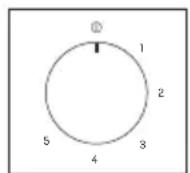
Water hardness level setting table
| Hardness Level | English Hardness °dE | German Hardness °dH | French Hardness °dF | Level of program selection knob * | Water Hardness Level Indicator |
| 0. Level | 0-5 0-4 0-8 | 1 | The Washing light on the panel illuminates. | ||
| 1. Level | 6-9 5-7 9-13 | 1 | |||
| 2. Level | 10-15 8-12 | 14-22 2 | The Drying light on the panel illuminates. | ||
| 3. Level | 16-19 13-15 | 23-27 3 | The End light on the panel illuminates. | ||
| 4. Level | 20-24 16-19 | 28-34 4 | The Washing, Drying and End lights on the panel illuminate. | ||
| 5. Level | 25-62 20-50 | 35-90 5 | The Washing, Drying and End lights on the panel flashes with intervals of 1 second. |
After detecting the water hardness:
- If the hardness level of the water that you use is above 50^ or if you are using well water, than it is recommended to use filter and water purification devices.
- If the hardness level of the water that you use is below 7^ , there is no need to use salt in your dishwasher. In this case, the Salt Indicator light on the control panel of your dishwasher will light continuously.
- If the water hardness is set to level 1, the Salt Indicator will light continuously although it is not necessary to use salt. If you use salt under this condition, salt will not be consumed and the lamp will not illuminate.
When moving, you will need to set the water hardness level of your dishwasher again according to the information above, depending on the water hardness of the place you have moved to. If the water hardness level of your machine is adjusted previously, your machine will display the most recent hardness level adjustment.