
Polifemo Dedalo - Air-conditioner Argoclima - Free user manual and instructions
Find the device manual for free Polifemo Dedalo Argoclima in PDF.


User questions about Polifemo Dedalo Argoclima
0 question about this device. Answer the ones you know or ask your own.
Ask a new question about this device
Download the instructions for your Air-conditioner in PDF format for free! Find your manual Polifemo Dedalo - Argoclima and take your electronic device back in hand. On this page are published all the documents necessary for the use of your device. Polifemo Dedalo by Argoclima.
USER MANUAL Polifemo Dedalo Argoclima
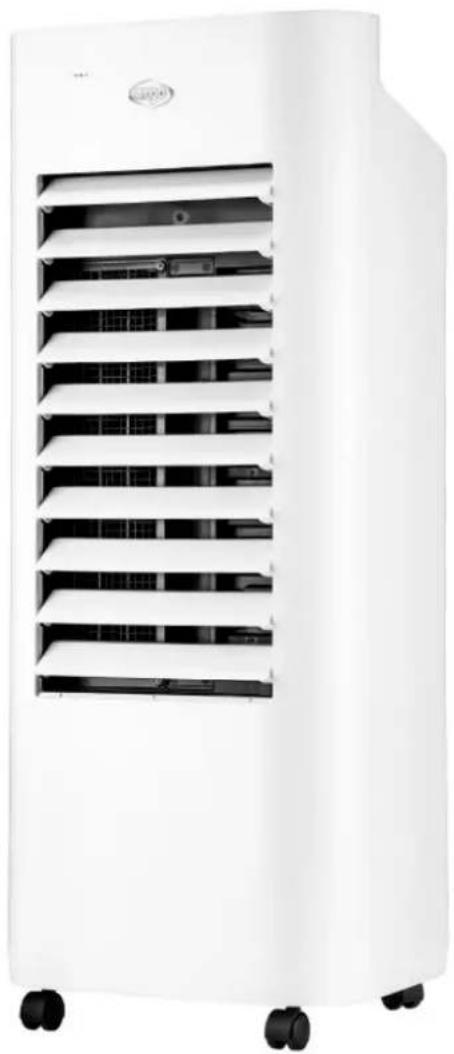
EVAPORATIVE AIR COOLER
POLIFEMO DEDALO
natural_image
White industrial air conditioner unit with multiple ventilation slots and wheels (no visible text or symbols)OPERATING
INSTRUCTIONS
Read the instructions carefully before operating the appliance or carrying out maintenance operations. Observe all the safety instructions; failure to observe the instructions may lead to accidents and/or damage. Keep these instructions in a safe place for future reference.
GENERAL SAFETY INFORMATION
- Only use this appliance as described in this manual. Any other use not recommended by the manufacturer may cause fire, electric shock or injury to people.
- Make sure that the type of mains power complies with the electrical requirements of the appliance (220-240V\~/50 Hz).
- This appliance can be used by children aged from 8 years and above and people with reduced physical, sensory or mental capabilities or lack of experience and knowledge if they have been given supervision or instruction concerning use of the appliance in a safe way and understand the hazards involved.
• Children shall not play with the appliance. - Cleaning and user maintenance shall not be made by children without supervision.
- This product is not a toy. Children should be adequately supervised to ensure that they do not play with the appliance.
- Disconnect the mains power when the appliance is not used or for cleaning operations.
In the event of any problems, switch off the appliance immediately, do not attempt to repair it, and take it to your local After-Sales Service Centre.Do not remove or replace individual parts, as this could affect product safety.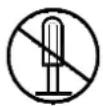 Do not disassemble the appliance! Do not disassemble the appliance! | Do not touch the power cord with wet or damp hands; risk of electric shock.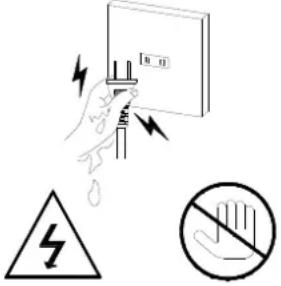 Warning!!! Do not touchRisk of electric shock! Warning!!! Do not touchRisk of electric shock! |
Do not insert objects into the appliance grilles.This could cause leaks, short-circuits and damage to the product.  Warning!!! Do not touchRisk of electric shock! Warning!!! Do not touchRisk of electric shock! | Do not spray flammable substances or pesticides near the product as they could damage it. Prohibited! Prohibited! |
Do not use the appliance if the cord or plug is damaged. Do not attempt to change the power cord yourself. If the power cord is damaged, it must be replaced by the manufacturer, dealer or a similarly qualified person so as to avoid any safety risks.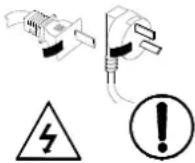 Warning!!! Do not touchRisk of electric shock! Warning!!! Do not touchRisk of electric shock! | Do not bend or stand heavy objects on the power cord. |
| Turn the switch off and unplug before carrying out any maintenance work or moving the appliance. Always unplug from the socket when the appliance is not in use. | To disconnect the appliance, press the OFF button and unplug from the socket. Only pull on the plug. Do not pull the cord. Otherwise the cable may be damaged or leaks, etc. may occur. |
| Do not pour water over the product: risk of short-circuits and damage to the product. | Do not leave the airflow directed towards children for long periods of time: it is not good for their health. |
| When operating the product, do not place the power cord at the air outlet or let the power cord connect the surface of product which is close to the air outlet. | Do not wind the appliance with power cord; otherwise, the insulating coating of power cord will be damaged easily. |
| Do not share the power socket with other electric appliances to prevent overload. The capacity of power socket should be the same with that of plug of electric appliances. Meanwhile, the plug must be inserted into the socket tightly. | After the unit is filled with water, don't tilt or crash it when placing or moving the unit. If it is necessary to move the unit, please move it slowly to avoid overflowing. Tilting the unit during operation is prohibited. If the product is tilted and there's water in it, pull off the power plug immediately. Wait until the unit is completely dry and then you may turn on the unit. |
| Do not place the unit under high temperature or low temperature. In summertime, the water may be deteriorated and cause odor, please add fresh water in time. In wintertime when indoor temperature is below 0°C, please add warm water into the humidifier if you want to use it. After operation, please use a towel to dry the water tank. | 3.Do not permit the area around the air cooler to become damp or wet. If dampness occurs, turn the output of the air cooler down. If the air cooler output volume cannot be turned down, use the air cooler intermittently. Do not allow absorbent materials, such as carpeting, curtains, drapes, or tablecloths, to become damp. |
| Never leave water in the water tank when the appliance is not in use. |
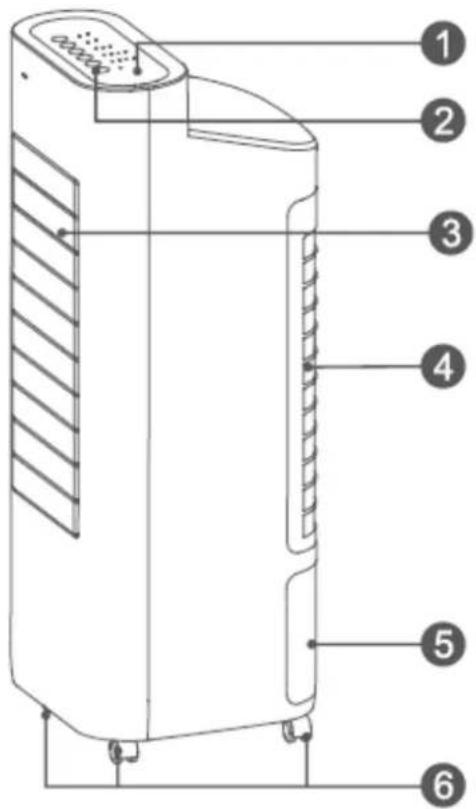
text_image
Technical diagram of a portable air conditioner unit with numbered parts labeled 1 through 6- Control panel
- Buttons on control panel
- Air outlet
-
Dust filter and evaporative panel
-
Water tank
- Multidirectional wheels
HOW TO USE THE APPLIANCE
The appliance does not need to be installed.
Position the unit on a flat, stable surface and connect the power cord to a suitable power socket (220-240 V\~): the appliance can be switched on using the ON/OFF button and you will hear a sound.
When you move it, use the handle on the back. Do not use this cooler in an area with high humidity, rich in dust or with a temperature above 40 °C.
This product can be used either as a fan, with 3 modes (Normal, Natural and Sleep) and 3 fan speed options (low, medium and high), or as a cooler/humidifier: in this case the rear tank should be filled with demineralized water, up to but not exceeding the maximum level as indicated. When the water in the tank falls below the minimum level, marked on the tank, LED Low water on control panel will flash to indicate the leak of water.
The fan takes in air from the room and passes it through the dust filter and the evaporative panel, which is constantly humidified thanks to a system which draws water from the tank and sprays it onto the panel. The incoming hot air makes part of the water contained in the panel evaporate and is therefore cooler when released back into the room, which makes it feel as though the temperature has dropped.
natural_image
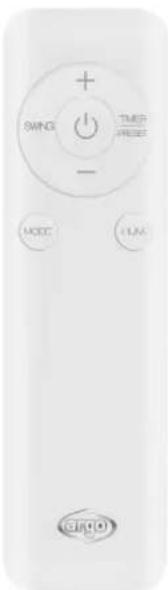
Close-up of a white remote control with buttons and a logo (no readable text or symbols beyond function labels)DISPLAY AND CONTROL PANEL
Press this button on the control panel to turn the unit on or off.
The default operating mode is low ventilation (speed 1) and General ventilation
SPEED BUTTON

When the appliance is on, press the SPEED button to choose the fan speeds which are: high (speed 4), medium (speed 3), low (speed 2), very low (speed 1). Each time the SPEED button is pressed, the fan speed will increase from 1 to 4 in a circularly. The corresponding LED on the control panel will light up at the selected speed. The SPEED function is not present on the remote control
TIMER/PRESET BUTTON

Timer off function: With the unit on, press this button to select the time of appliance turning off, each press of the button allows you to set the shutdown interval from 1 to 15 hours, the LEDs on the control panel will light up based on your selection. Once the selected interval is reached, the unit will turn off automatically. By holding down the Timer / Preset button it is possible to speed up the setting of the Off Timer.
Preset function (On timer): In stand-by mode, press the Timer / Preset button to select the setting of the On timer of the appliance, each time the button is pressed it is possible to set the on interval from 1 to 15 hours, the LEDs on the control panel will light up according to your selection. Once the selected interval is reached, the unit will turn on automatically. By holding down the Timer / Preset button you can speed up the setting of the On timer.
MODE BUTTON

When the unit is on, press this button to select the ventilation mode in the following sequence: General - Natural - Sleep, the corresponding LEDs on the control panel will light up according to the selection made.
- General: The unit operates at a constant ventilation speed
- Natural: The unit works according to the factory settings, the ventilation speed changes automatically.
- Sleep: The ventilation speed decreases every hour until it reaches the minimum ventilation level

L&R SWING BUTTON
With the unit on, press this button to select the horizontal swing from right to left of the air flaps. The corresponding Swing ON or Swing OFF LEDs will be lit on the control panel upon your selection. On the remote control it is indicated with SWING.
HUMIDIFY BUTTON

With the unit turned on, press this button to activate or deactivate the humidification function. If this function is activated, the corresponding LED on the control panel will light up.
Note: Before activating the humidification function, check the water level in the tank, which must be above the water level indicator. If there is not enough water, add it to the tank.
LOW WATER LED
When the water in the tank is not enough to activate the humidification function, the Low Water LED flashes on the control panel. Add water to the tank and activate the humidification function.
HALF LIGHT DISPLAY
When any selection on control panel are made for more than 40 seconds, the LEDs on the display reduce the light. To reactivate them, press any of the buttons on the control panel.
MEMORY FUNCTION
This device is equipped with the Memory function, which allows you to memorize the selected settings after turning off the unit. When the device is turned on, it will work with the previously memorized settings.
AUTO OFF FUNCTION
When the unit works for 15 consecutive hours and no selections are made on the control panel, the device automatically switches off.
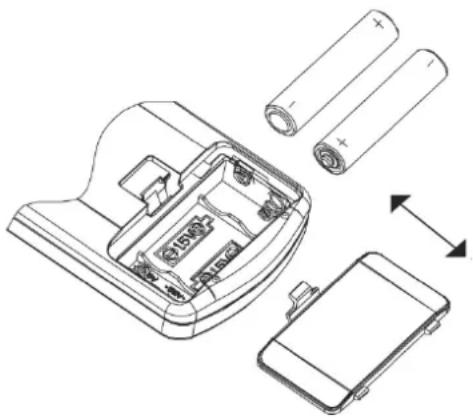
- Slide the cover open in the direction indicated by the arrow.
- Insert the batteries (AAA, LR03, 1,5 V - not provided) into the remote control and make sure the poles match.
- Put the cover back on.
- Point the remote control towards the receiver on the air conditioner.
- The remote control should be positioned within 6 metres from the receiver.
- There must be no obstacles between the remote control and the receiver.
- Do not drop or launch the remote control.
- Do not leave the remote control under strong sunlight or heating devices and other source of heat.
- Remove the batteries from the remote control when the latter is not used for a long time.
- If no sound is heard and the transmission symbol on the display does not flash, the batteries must be replaced.
- If the system resets when the remote control button is pressed, the electrical signal is poor and the batteries must be replaced.
- Flat batteries must be disposed of correctly.
N.B.:
* The image depicts a general remote control, which contains nearly all the function keys. These may be of a slightly different material (depending on the model).
natural_image
Exploded view diagram of a battery pack assembly showing internal components and battery casing (no text or labels)
INFORMATION FOR CORRECT DISPOSAL OF THE PRODUCT IN ACCORDANCE WITH EUROPEAN DIRECTIVE 2006/66/EC and amendments Directive 2013/56/EC
Please replace the battery when its electrical charge has been exhausted: at the end of its useful life, it must not be disposed of together with unsorted waste. It must be must be delivered to appropriate separated waste disposal plants or to dealers that provide a similar service. Separate waste disposal of batteries prevents potential negative effects on the environment and human health resulting from inadequate disposal, and also allows the materials from which it is made to be recovered and recycled in order to achieve significant savings in terms of energy and resources. The separate disposal obligation is underlined by the crossed-out dustbin symbol appearing on the battery. Illegal disposal of the product by the user shall result in the application of administrative sanctions as defined by current regulations.
FILLING THE WATER TANK
THE TANK MUST BE FILLED WITH DEMINERALIZED WATER FOR THE APPLIANCE TO OPERATE IN COOLER/HUMIDIFIER MODE.
The water is inserted directly into the rear tank. Before introducing the water, check that there are no water residues inside the water pump, to prevent its leakage.
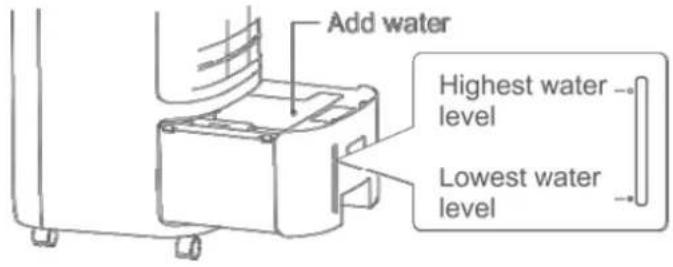
Fill the tank up to the maximum level marked on the water indicator, without exceeding the water level limit, this could cause water leakage.
When using the appliance for first time, remove the cardboard support positioned inside the tank.
text_image
Add water Highest water level Lowest water levelIf you wish to keep the water in the tank below room temperature in order to maximize cooling in warmer months, leave the two synthetic ice packs supplied in the freezer until solid, then add them to the water in the tank.
The ice will absorb heat from the water.
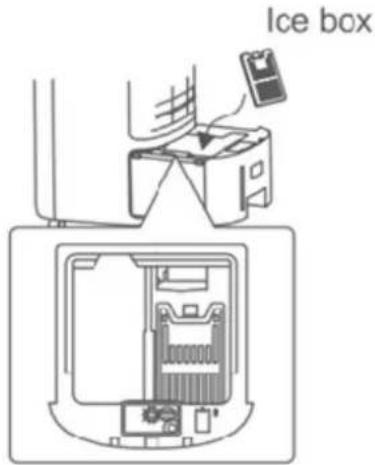
With the unit off, place the ice packs directly in the tank in the position shown in the figure below, inside the tank there is a special space where to place the ice packs. Make sure that the tank can be pulled out normally.
text_image
Ice boxWe recommend continuous use of the ice for optimal cooling capacity.
Ice packs can be used repeatedly.
The first time it is used, you may detect a smell or the water may turn an unusual color: this does not constitute a health risk.
MAINTENANCE AND STORAGE
WARNING: ALWAYS UNPLUG THE APPLIANCE BEFORE CLEANING OR MAINTENANCE PROCEDURES. IMPORTANT: DO NOT SUBMERGE THE PRODUCT IN WATER
Cleaning the outside surface of the appliance
Use a soft cloth to remove any dust from the product.
If this is not enough, use a soft cloth dampened with water and a mild detergent at a temperature not exceeding 50^ C. Let the appliance dry completely before using it.
Do not use corrosive detergents or solvents such as petrol. Do not wash the appliance with water. Do not use oils, chemical substances or other items that may damage the surface to clean it.
Use a vacuum cleaner to remove dust from the air inlet/outlet grilles.
When the appliance is used for a long time, the tank, the tank filter, the honeycomb filter and the dust filter may have accumulated dust, this could affect the air flow and the effect of cooling. It is therefore advisable to clean these parts every two weeks.
Cleaning the dust filter and the honeycomb filter
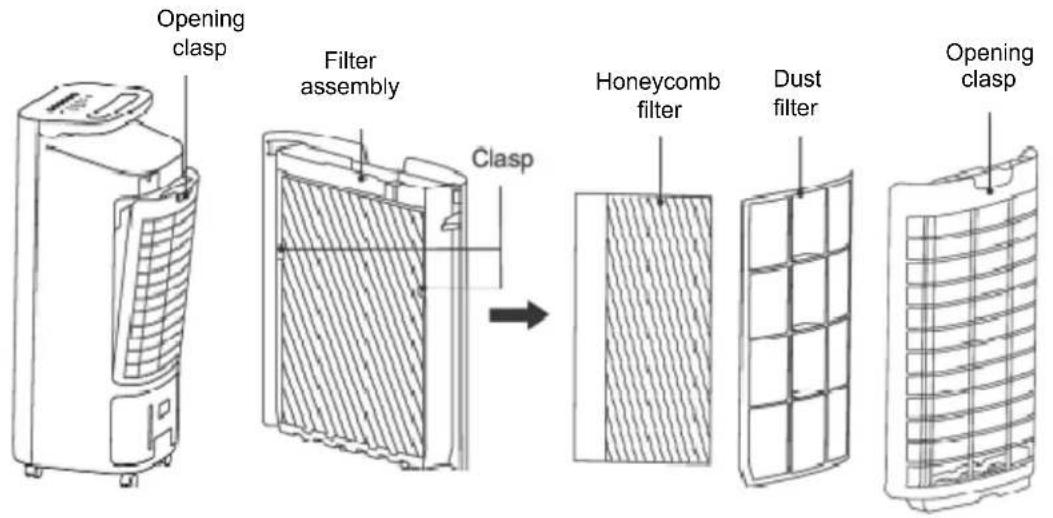
Remove the filter assembly by detaching it from the unit by pressing on the opening hook. Once removed, gently remove the honeycomb filter by sliding it under the hooks, remove the dust filter, always sliding it off the hooks, following the direction of the guides. To assemble again, insert the dust filter in its holder and then insert the honeycomb filter (see Fig. 1)
Make sure all components are perfectly dry and properly installed to avoid damaging them.
text_image
Opening clasp Filter assembly Clasp Honeycomb filter Dust filter Opening clasp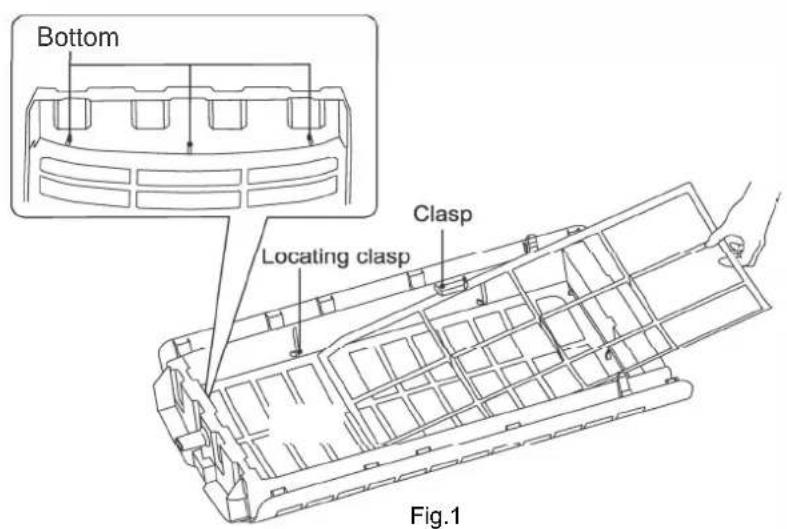
text_image
Bottom Locating clasp Clasp Fig.1Cleaning the tank and the water channel
To clean the water tank, remove it from its seat and clean it thoroughly with a dry cloth. Remove the filter positioned inside the tank, clean it and let it dry before repositioning it.
After removing the tank, carefully clean the water channel with a cloth from any residual water that may have formed.
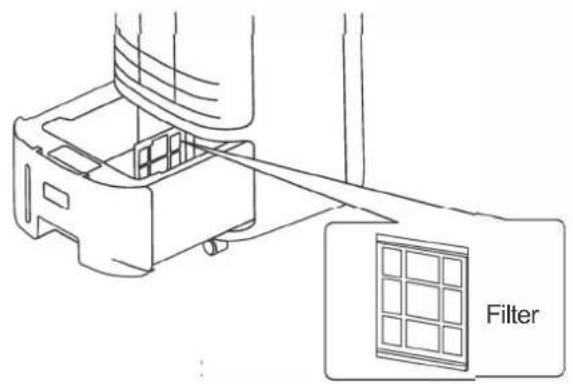
text_image
Filter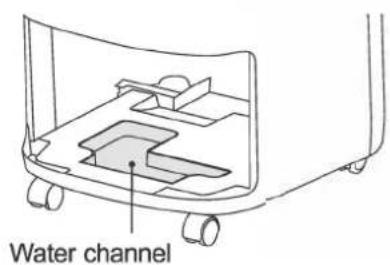
text_image
Water channelSTORAGE
If the appliance is not used for prolonged periods, disconnect the power cord and store the appliance with this manual in its original packaging, in a cool and dry place.
Before packaging, the honeycomb filter and dust-proof filter should be dry, and there is no water in the tank.
POSSIBLE OPERATING PROBLEMS AND SOLUTION
If the appliance has any operating anomalies, consult the table below to resolve any anomalies. If they persist, contact an authorized service center to repair the appliance.
| PROBLEM | POSSIBLE | CAUSE |
| The appliance does not work | The power cord is not connected or is not connected properlyThe appliance is offInternal wiring is loose | Connect it correctlyPut the water in the tankContact a service center |
| It does not humidify / the water pump makes an abnormal sound | There is no water in the tank or the amount of water is below the minimum water levelThe water pump cannot draw waterThe water pump filter is blockedThe hole in the honeycomb filter is blockedThe water pump is damaged or the internal connections are missing | After turning off the unit, add water to the tank up to the maximum level indicatedRepeatedly press the Humidity button on the control panel until the water pump starts drawing water againClean the filterClean the honeycomb filterContact a service center |
| Abnormal sound of the unit | The device is not placed on a stable and flat surfaceThere may be dust residues in the applianceThe air delivery flaps have not been openedProblem with the motor of the air flaps | Place the device on a flat and stable surfaceRemove the honeycomb filter and eliminate the accumulation of dust inside the unitManually open the air delivery flapsContact a service center |
| The 1h, 2h, 4h and 8h indicators flash twice and then go off for 3 seconds | Communication problem between the main board and the display board | Contact a service center |
| The 1h, 2h, 4h and 8h indicators flash four times and then go off for 3 seconds | Malfunction of jumper cup Contact a service center | Contact a service center |
SOLUTION
INFORMATION FOR THE CORRECT DISPOSAL OF THE PRODUCT IN ACCORDANCE WITH EUROPEAN DIRECTIVE 2012/19/EU
This appliance may not be scrapped with domestic waste at the end of its life cycle. We call your attention to the crucial role played by the consumer in the re-use, recycling and other forms of recovery of such waste.
The appliance must be scrapped by a sorted waste disposal centre or by returning it to the retailer (no charge is levied for this service), when you purchase a new equivalent appliance.
Sorted disposal of electric and electronic equipment prevents the negative effects on the environment and human health resulting from improper scrapping, and also allows the materials from which it is made to be recovered and recycled, with significant savings in terms of energy and resources. The sorted disposal requirement is indicated by the crossed waste bin label affixed to the appliance.

improve your life
www.argoclima.com