
ORION PLUS - Air conditioner Argoclima - Free user manual and instructions
Find the device manual for free ORION PLUS Argoclima in PDF.


| Product Type | Portable Air Conditioner |
| Brand | Argoclima |
| Model | ORION PLUS |
| Cooling Capacity | 9000 BTU/h |
| Power Supply | 220-240V ~ 50Hz |
| Power Consumption (Cooling) | 1000 W |
| Air Flow Rate | 300 m³/h |
| Noise Level | 52 dB(A) |
| Dimensions (W x H x D) | 35 x 70 x 35 cm |
| Weight | 22 kg |
| Refrigerant | R290 |
| Functions | Cooling, Dehumidifying, Fan, Timer, Sleep Mode |
| Remote Control | Yes |
| Dehumidification Capacity | 1.0 L/h |
| Timer Range | 1-24 hours |
| Air Filter | Washable mesh filter |
| Maintenance | Clean filter every 2 weeks |
| Safety Features | Auto shut-off, thermal overload protection |
| Spare Parts Available | Remote control, filter, drainage hose |
| Warranty | 2 years |
Frequently Asked Questions - ORION PLUS Argoclima
User questions about ORION PLUS Argoclima
0 question about this device. Answer the ones you know or ask your own.
Ask a new question about this device
Download the instructions for your Air conditioner in PDF format for free! Find your manual ORION PLUS - Argoclima and take your electronic device back in hand. On this page are published all the documents necessary for the use of your device. ORION PLUS by Argoclima.
USER MANUAL ORION PLUS Argoclima
PORTABLE AIR CONDITIONER (LOCAL)
ORION PLUS
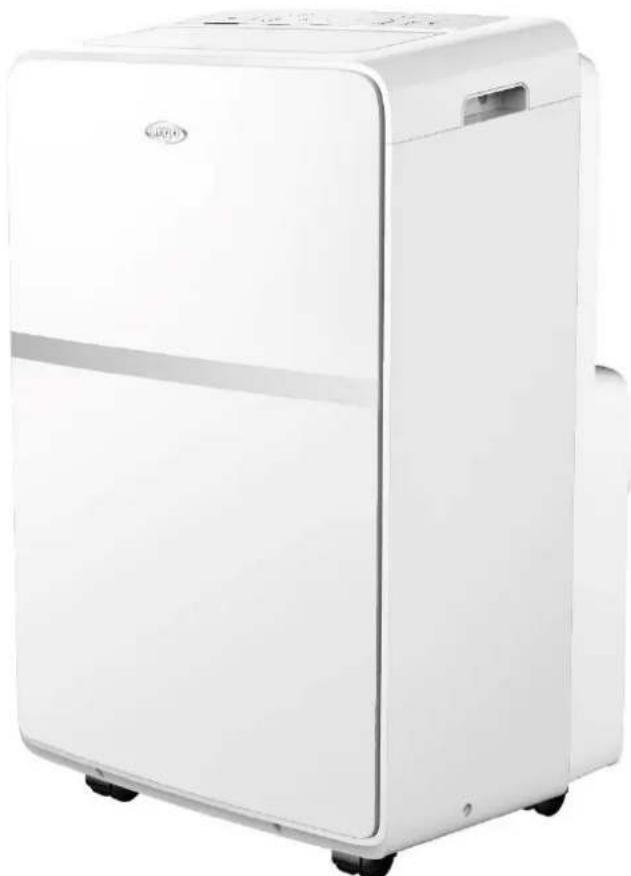
natural_image
White portable air purifier with black wheels and a small door, no visible text or symbolsOPERATING INSTRUCTIONS
Read the instructions carefully before operating the appliance or carrying out maintenance work. Observe all the safety instructions; failure to observe the instructions may lead to accidents and/or damage. Store these instructions in a safe place for future reference.

Appliance filled with flammable gas R290.

Before installing and using the appliance, read the owner's manual.

Before repairing the appliance, read the service manual.
The Refrigerant R290
- To realize the function of the air conditioner unit, a special refrigerant circulates in the system. The refrigerant is the fluoride R290 = 3 GWP (Global warming potential). This refrigerant is flammable and inodorous. It can lead to explosions under certain conditions however the flammability of this refrigerant is very low and it can be ignited only by fire.
- Compared to other common refrigerants, R290 is a non-polluting refrigerant with no harm to the ozonosphere and a no effect upon the greenhouse effect. R290 has very good thermodynamic features which lead to a really high energy efficiency. The units therefore need less filling.
Warning:
Do not try to accelerate the defrosting process or to clean the appliance in different ways other than those recommended by the manufacturer. Should repair be necessary, contact your nearest authorized Argoclima Service Centre. Any repairs carried out by unqualified personnel may be dangerous. The appliance has to be stored in a room that doesn't have any continuously operating ignition sources. (for example: open flames, an operating gas appliance or an operating electric heater.) Do not pierce or burn.
Appliance has to be installed, operated and stored in a room with a floor area larger than 12 m ^2 . For repairs, strictly follow manufacturer's instructions only for appliances filled with R290 flammable gas. Be aware that refrigerants do not have any odour.

natural_image
Three black-and-white warning symbols: a triangular flame, an open book, and an open book with a wrench (no text or labels)GENERAL OPERATING AND SAFETY INSTRUCTIONS
- This appliance is a local air conditioner designed for domestic use.
- Only use this air-conditioner as described in this manual.
- Ensure that the required voltage and frequency (220-240V/50 Hz) match the available power source.
- Fuse style 50CT T 5A H 250V, the electricity passing through the fuse cannot be above 5A.
- This appliance can be used by children aged from 8 years and above and people with reduced physical, sensory or mental capabilities or lack of experience and knowledge if they have been given supervision or instruction concerning use of the appliance in a safe way and understand the hazards involved.
• Children shall not play with the appliance. - Cleaning and user maintenance shall not be made by children without supervision.
- Ensure that the electricity system is able to deliver the operating current required by the air conditioner, in addition to that normally absorbed by other appliances (household appliances, lighting system, etc.). Please refer to the maximum power input data indicated on the air conditioner's data plate.
- Connection to the electricity grid must take place in accordance with current installation standards.
- Ensure that the automatic switches and system protection valves are able to withstand a start-up current of 6A (normally for less than 1 second).
- The system socket must always be fitted with an efficient earth connection.
-
Make sure that the plug is fully inserted. Do not use multiple adapters. Do not touch the plug with wet hands. Make sure that the plug is clean.
-
Do not use the plug as a means by which to start/stop the air conditioner: use the ON/OFF button on the remote control or on the control panel.
- Do not install the air conditioner in rooms where it may receive water splashes (e.g. laundry rooms).
- This air conditioner can be used by children of 8 years of age or older, and by persons with reduced physical, sensory and mental abilities or who lack the necessary know-how and experience to operate it, if under the supervision or instruction of a person responsible for their safety, so that they are fully aware of the attendant risks.
- Before moving or cleaning the device, ensure that it is unplugged from the socket.
- Do not move the air conditioner while it is operating; first turn the appliance off, check for any condensate build-up and empty it if necessary.
- To turn the appliance off, set the remote control to OFF and remove the plug from the socket. Pull on the plug only. Do not pull the cord.
- Do not use the appliance if the cord or plug are damaged. If the power supply cord is damaged, it must be replaced by the manufacturer, dealer or a similarly qualified person so as to avoid any safety risks.
- Keep the unit away from fire, possible fire sources, inflammable or explosive objects.
- Do not leave the unit unattended while it's operating, turn the unit off and unplug it.
- If drainage hose is used, the ambient temperature musnt't be lower than 0^ . It can cause water leakage to the air conditioner.
- Do not splash or pour water on the air conditioner
PRECAUTION!
- Do not insert any objects into the air conditioner: this is very dangerous as the fan turns at high speed.
- Ensure that air circulates freely around the unit. Do not cover the air intake and delivery grilles with drapes or any other means.
WARNING!
- The air conditioner must be positioned at least 50 cm from the wall or any other obstacles, on a flat and stable surface so as to avoid water leaks.
- The air conditioner is fitted with a system for protecting the compressor from overload. This means that the compressor only starts 3 minutes after its previous stoppage.
- Please wait at least 3 minutes before starting the unit. This helps prevent the compressor from being damaged.
WARNING!
In the event of an anomaly, switch the appliance off and unplug it from the socket. Do not dismantle or attempt to repair or modify the product. In the event of a malfunction, contact the service centre directly.
WARNING!
- Do not expose the air conditioner to direct sunlight, as the colour of the materials may change; moreover, the appliance may overheat causing the protection mechanism to intervene and switch the appliance off.
- Do not use insecticides, oils, detergents or spray paints near the appliance; do not use aggressive chemical detergents to clean the casing: this may damage the finish and colour.
- Close all open windows to maximise air conditioning efficiency.
The manufacturer will not be held liable if safety and accident prevention rules are not observed.
DESCRIPTION OF THE APPLIANCE
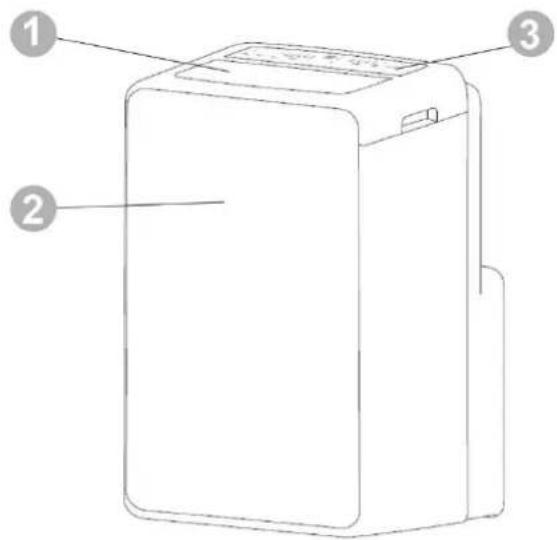
FRONT VIEW
REAR VIEW

1) VERTICAL FINS AND AIR INTAKE
2) FRONT PANEL
3) CONTROL PANEL AND FUNCTION BUTTONS WITHOUT REMOTE CONTROL
4) FILTER
5) AIR INTAKE
6) CORD CABLE CLAMP
7) HANDLE
8) DRAIN HOSE
9) AIR OUTAKE
10) POWER CORD
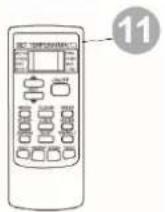
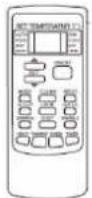
12) REMOTE CONTROL
Min/max operating limits (internal temperature)
Cooling: 16 °C DB / 35 °C DB
Dehumidification: 16 °C DB / 35 °C DB
Cooling mode room temperature adjustment range: 16 °C DB / 32 °C DB
PRE-OPERATING CHECKS AND OPERATIONS
The following space must be maintained to ensure the operating efficiency of the portable air conditioner.

APPLIANCE START-UP
Open the packaging and remove the box from above. Remove the product and the other elements supplied (illustrated in the box below).
LCD remote control
Round fitting for window (1) to be positioned between the end of the tube and the end fitting for the window

End fitting for window, supplied into 2 parts (2)

Drainage pipe

Hose

Window unit kit with plug.
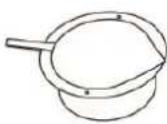
Round fitting for window unit, for positioning between the end of the tube and the window unit itself.

Position the product vertically on a flat and stable surface, as close as possible to a window and at least 50 cm from walls or other nearby obstacles.
USE WITH END FITTING FOR WINDOW
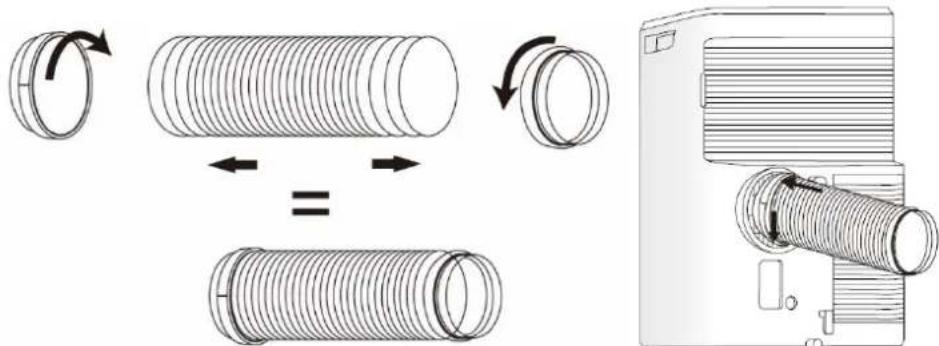
- Connect the flat fitting to the hose, extend the hose as far as necessary for reaching the outside and it connect to the back of the air conditioner.
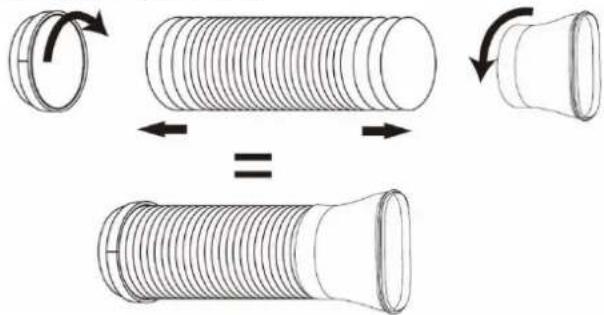
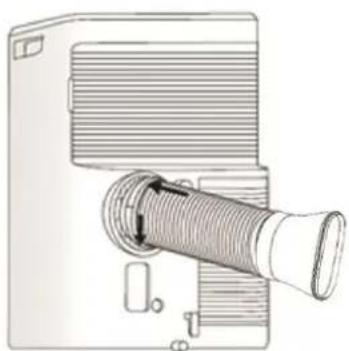
natural_image
Diagram of a portable projector with a coiled cable and ventilation duct (no text or symbols)- Slide the flat fitting downwards into the grooves (A) and secure it with the hook on top (B).
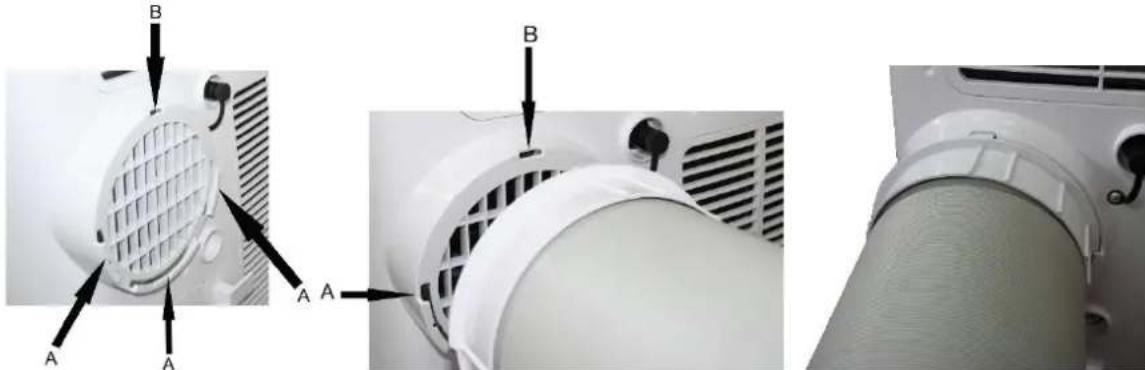
natural_image
Close-up of a white air conditioner fan with labeled parts (A and B), showing internal structure and mounting points (no text or symbols beyond labels)Open the windows and lock one of the two leaves with the handle. Place the end fitting against the fixed leaf of the window, and draw the other leaf towards it
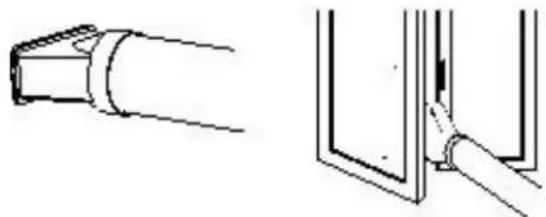
natural_image
Technical line drawing showing a pipe joint and a close-up of a structural detail (no text or symbols)USE WITH WINDOW UNIT KIT
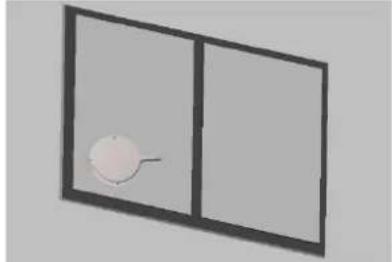
- To make the hole in the glass it is advisable to take the porthole kit accessory to the glazier.

natural_image
Simple line drawing of a two-panel window with a single dot on the left pan (no text or symbols)- Insert the window unit into the window.

natural_image
Simple 3D diagram of a window with a circular object on the left side (no text or symbols)- Insert the round fitting into the retractable flexible pipe and insert the latter with its round fitting into the window unit without the plug..
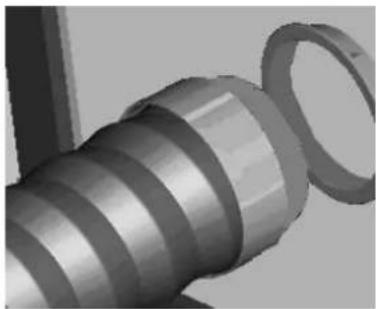
natural_image
Close-up of a mechanical spring component with a looped end (no text or symbols visible)- The outlet must be between 40 cm and 130 cm above the ground. Avoid tight curves or bends in the flexible hose.

- If the air conditioner is not used for prolonged periods, disconnect the pipe and plug the window unit.
natural_image
Simple 3D diagram of a window with a circular object on the left side (no text or symbols)Connect the power cord to a suitable electric socket (220–240 V). Insert the supplied batteries into the remote control and make sure the poles match. Select the desired operating mode from the remote control.
HOW TO USE THE APPLIANCE
This appliance can be used for cooling, dehumidifying and ventilating.
When switching between modes, the fan continues to rotate but the compressor stops: the compressor will start after 3 minutes. This delay protects the compressor from potential damage.

natural_image
Line drawing of a rectangular device connected to a curved pipe (no text or symbols)Cooling, Heating, Fan

natural_image
Line drawing of a rectangular electronic device with a top panel and side ports (no text or symbols)Dehumidifying
THE DISCHARGE TUBE MUST ALWAYS BE CONNECTED to the appliance: the only exception is when the appliance is used solely for dehumidification, in which case it is advisable to let the appliance discharge directly into the environment for maximum efficiency (consult the "Dehumidification Mode" paragraph).
Regularly clean the air filters beneath the easily removable rear grille to keep the air conditioner working efficiently.
OPERATING MODES
1. COOLING MODE (COOL)
- The "Cool" LED on the control panel will turn on.
- The temperature can be adjusted to between 16^ and 32^ .
-
In this mode, each time the ON/OFF button is pressed the unit switches off, the appliance saves the temperature setting and retains this setting when it is switched on again.
-
In this mode, the fan speed can be adjusted and the Timer and SLEEP functions can be set.
- For more silent operation, run the fan at low speed.
2. HEATING MODE (HEAT)
The "Heat" LED on the control panel will turn on.
- The temperature can be adjusted to between 16^ and 32^ .
- In this mode, each time the ON/OFF button is pressed the unit switches off, the appliance saves the temperature setting and retains this setting when it is switched on again.
- In this mode, the fan speed can be adjusted and the Timer and SLEEP functions can be set.
- For more silent operation, run the fan at low speed.
3. DEHUMIDIFICATION MODE (DRY)
- Press the MODE button to select the dehumidification mode.
- The temperature is controlled by the electronic board and cannot be adjusted.
- In this mode, each time the ON/OFF button is pressed the unit switches off, the appliance saves the settings and retains them when it is switched on again.
- The fan speed is set to low and cannot be adjusted.
NOTE
The air conditioner does not cool the room when operating as a dehumidifier.
When the appliance is used as a dehumidifier, the flexible pipe must not be connected.
For maximum dehumidification efficiency, leave the rear discharge attachment free to discharge directly into the environment.
The dehumidification mode is recommended during autumn and winter.
If used during summer, it is best to leave the flexible pipe attached so that the hot air is discharged towards the outside rather than into the room.
During dehumidification, continuous drainage should be implemented (see the next chapter, "HOW TO ELIMINATE CONDENSATE").
4. VENTILATION MODE (FAN ONLY)
- Press the MODE button until the Fan icon appears.
- In this mode, the fan speed can be adjusted.
- The temperature cannot be adjusted.
HOW TO ELIMINATE CONDENSATE
This appliance automatically vaporises condensate in the cooling mode.
When the air conditioner operates in cooling mode, there is no need to drain condensate continuously; only in certain weather conditions with very humid air may it occur that water deposits inside the unit. When its inner tank is full, the air conditioner beeps 8 times and the message "P1" appears on the display to signal that the tank is full and stop the appliance's operation.

natural_image
Diagram of a mechanical or electrical component with a circular grille and rectangular housing, showing no text or symbols.Heating and Cooling
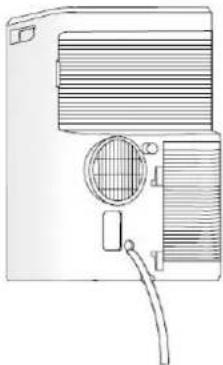
When the unit operates in the cooling mode, ensure that the rubber cap closing the drainage opening on the back of the appliance is properly positioned.
To empty the container, switch the air conditioner off and unplug the cord. Remove the cap from the rear drainage opening and place its end over a normal drain. Ensure that the tube is not twisted or bent. The tube must slope downwards. Re-close the drainage opening with the cap, insert it into the clamp and resume use of the air conditioner.
natural_image
Line drawing of a portable air conditioner unit with ventilation grilles and a handle (no text or symbols)Dehumidification
WARNING!
When using the air conditioner in dehumidification mode, we recommend always ensuring continuous drainage, in order to maximise dehumidification efficiency.
Use the drainage outlet on the appliance. The water can be drained into a drain by simply connecting a tube with 14 mm internal diameter (not supplied).
- Avoid bends in the drainage tube.

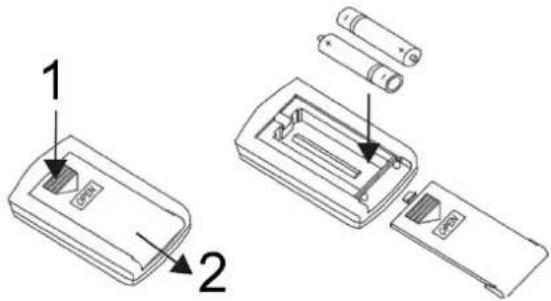
Insert the batteries into the remote control, while respecting the indicated polarities.
Only use type AAA 1.5V batteries.
Remove the batteries if the remote control is not used for a month or
longer.
Do not attempt to recharge the batteries. Replace all batteries at the same time.
Do not throw the batteries into fire: they may explode.

INFORMATION FOR CORRECT DISPOSAL OF THE BATTERIES PURSUANT TO EUROPEAN DIRECTIVE
2006/66/EC
Replace the batteries when depleted. At the end of their working life, batteries must be disposed of separately from unsorted waste. They must be must be delivered to appropriate separated waste disposal plants or to dealers that provide a similar service. Separate waste disposal of batteries prevents potential negative effects on the environment and human health resulting from inadequate disposal, and also allows the materials from which it is made to be recovered and recycled in order to achieve significant savings in terms of energy and resources. The separate disposal obligation is underlined by the crossed-out dustbin symbol appearing on the battery. Illegal disposal of the product by the user is subject to administrative penalties as per current regulations.
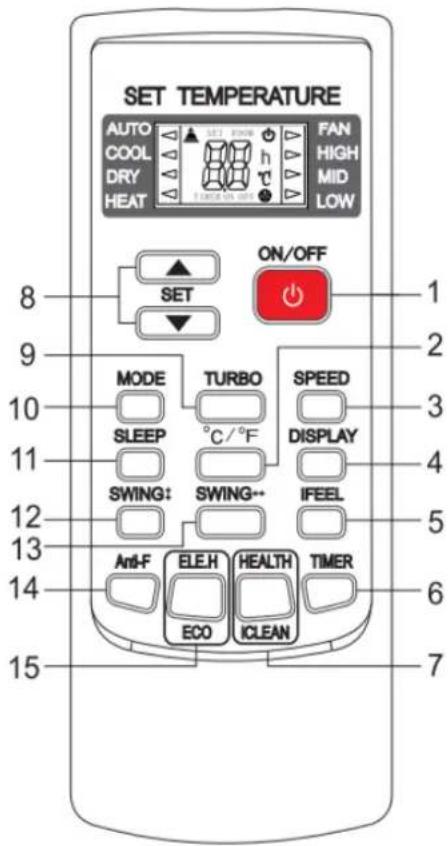
- ON/OFF BUTTON
- °C/°F BUTTON
- FAN SPEED BUTTON
- LIGHT BUTTON
- iFEEL BUTTON
- TIMER BUTTON
- HEALTH/CLEAN BUTTON
- TEMP AND TIMER SETTING
- TURBO BUTTON
- MODE BUTTON
- SLEEP BUTTON
- HORIZONTAL SWING BUTTON
- VERTICAL SWING BUTTON
- ANTI-F BUTTON
- ECO MODE BUTTON

(1) ON/OFFBUTTON
Press this button to switch the unit on or off.
When switched on, the appliance will start functioning based on its last settings (save function).
(2) FILTER RESET
Every 250 hours this led will light up to and It means the air filter should be cleaned. After cleaning press this button to reset the running time.
(3) FAN SPEED ADJUSTMENT BUTTON
Press this button when the appliance is switched on for adjusting the ventilation speed in cooling mode (AUTO), to low (Low), medium (Med) or high (High).

(4) “+” and “-” BUTTON
Press “+” or “-” to regulate the temperature (the unit is 1^ C) and set the time (the unit is 1h). The temperature ranges from 16^ C to 32^ C, and the time ranges from 1h to 24h.
(5) MODE SELECTION BUTTON (MODE)
Press this button to select the various operating modes, according to the following sequence:
In the COOL mode the display lights up. In the DRY and FAN modes the display does not light up.
(6) SLEEP BUTTON
Press this button to activate the Sleep function, which automatically adapts the temperature to changes in body and room temperature throughout the night, so as to optimise comfort when sleeping and minimise consumption.
In cooling mode, the temperature increases by 1 °C in an hour then by 2 °C in two hours, and remains in this setting for the whole period. The Sleep function is not available in the ventilation, dehumidification and auto modes. The indicator light turns on whenever the Sleep function is set.
(8) "TIMER" BUTTON
a. When the air conditioner is turned off, press "TIMER" to set a time to turn on the air conditioner. Press "+" or "-" to set the time, and press "TIMER" again to confirm it.
b. When the air conditioner is turned on, press "TIMER" to set a time to turn off the air conditioner. Press "+" or "-" to set the time, and press "TIMER" again to confirm it.
c. After setting the time, press "TIMER" again to cancel the set time.
Note: After setting the time, press "TIMER" again to confirm it in 5 seconds. Without any operation in 5 seconds, the air conditioner will confirm the time automatically. Press "TIMER" after confirming the time will cancel the set time.
(6) "SWING" BUTTON
Press "SWING" top turn on or off the swing function.
(7) TEMPERATURE AND ERROR DISPLAY
| Problem | Cause | Solution |
| P1 | Tank full of water. | Empty the tank.If the problem persists, contact a service centre. |
The temperature and error display lights up only in the COOL mode. In the DRY and FAN modes the display does not light up.
CARE AND MAINTENANCE
WARNING!
Prior to carrying out any cleaning or maintenance, unplug the unit from the power socket.
natural_image
Diagram of a dual-panel air conditioner unit showing airflow direction (no text or labels)1. Cleaning the air filters
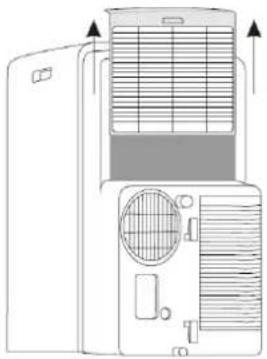
The air filter must be checked at least once every two weeks of operation. Operating with dirty or clogged filters will decrease the effectiveness of the air conditioner and can cause serious problems. To remove the filter, release the rear grille then slide out the filter by gently pulling it sideways.
Use a vacuum cleaner to remove any dust. Should this not be sufficient, wash the filter with lukewarm water and neutral detergent (if necessary), rinse it with cold water then leave it to dry naturally before putting it back in place. After putting the filter back in place, close the grille and resume use of the air conditioner.
2. Cleaning the casing.
Use a soft damp cloth to clean the outer surface of the air conditioner.
Do not use excessively hot water, solvents, petrol or other aggressive chemical compounds, talcum powder and brushes: they may damage the surface or colour of the casing.
Remove any stains using warm water with a little neutral detergent.
Do not pour water onto the air conditioner to clean it: this may damage the internal components or cause a short circuit.

natural_image
Line drawing of hands cutting a grid paper with a circular cutter (no text or symbols)
natural_image
Line drawing of a hand cleaning a large appliance with a cloth (no text or symbols)
3. Storage.
When you do not envisage using the air conditioner for a long time, clean the filters before storing it away. Keep the appliance in a vertical position at all times. Do not place any heavy objects on the top and, if possible, protect the air conditioner with a plastic sheet.
4. Transport.
Preferably keep the air conditioner in the vertical position when transporting it.
Should this not be possible, rest it on its right-hand side; when it reaches its destination, immediately put the appliance in the vertical position and wait at least 4 hours before using it in the cooling mode.

natural_image
Line drawing of a car interior with seat, front panel, and cross symbol (no text or labels)- For complete safety, regularly check the condition of the power cord; should it be damaged through use, contact the Service Centre to replace it.
TIPS FOR MAXIMISING COMFORT AND MINIMISING CONSUMPTION
CHECK that:
- the unit's extraction and delivery grilles are always unobstructed;
- the air filters are always clean: a dirty filter will decrease the passage of air and thus reduce the unit performance;
- the doors and windows are closed, to avoid infiltration of unconditioned air;
- the flexible hose is correctly positioned, without folds or sharp bends;
• the room temperature is above 18 °C for the cooling mode, and above 10 °C for dehumidification mode.
•
REGULATION (EU) No. 517/2014 - F-GAS
The unit contains R290, a natural greenhouse gas with global warming potential (GWP) = 3 - Kg. 0.21 = 0.00063 Tons CO _2 equiv.
Do not release R290 into the atmosphere.

INFORMATION FOR THE CORRECT DISPOSAL OF THE PRODUCT IN ACCORDANCE WITH EUROPEAN DIRECTIVE 2012/19/EU
This appliance may not be scrapped with domestic waste at the end of its life cycle. We call your attention to the crucial role played by the consumer in the re-use, recycling and other forms of recovery of such waste.
The appliance must be scrapped by a sorted waste disposal centre or by returning it to the retailer (no charge is levied for this service), when you purchase a new equivalent appliance.
Sorted disposal of electric and electronic equipment prevents the negative effects on the environment and human health resulting from improper scrapping, and also allows the materials from which it is made to be recovered and recycled, with significant savings in terms of energy and resources.
The sorted disposal requirement is indicated by the crossed waste bin label affixed to the appliance.

improve your life
www.argoclima.com



- PORTABLE AIR CONDITIONER (LOCAL)
- ORION PLUS
- OPERATING INSTRUCTIONS
- The Refrigerant R290
- Warning:
- GENERAL OPERATING AND SAFETY INSTRUCTIONS
- PRECAUTION!
- WARNING!
- DESCRIPTION OF THE APPLIANCE
- PRE-OPERATING CHECKS AND OPERATIONS
- APPLIANCE START-UP
- USE WITH END FITTING FOR WINDOW
- USE WITH WINDOW UNIT KIT
- HOW TO USE THE APPLIANCE
- OPERATING MODES
- COOLING MODE (COOL)
- HEATING MODE (HEAT)
- DEHUMIDIFICATION MODE (DRY)
- NOTE
- VENTILATION MODE (FAN ONLY)
- HOW TO ELIMINATE CONDENSATE
- Heating and Cooling
- INFORMATION FOR CORRECT DISPOSAL OF THE BATTERIES PURSUANT TO EUROPEAN DIRECTIVE
- 2006/66/EC
- ON/OFFBUTTON
- FILTER RESET
- FAN SPEED ADJUSTMENT BUTTON
- “+” and “-” BUTTON
- MODE SELECTION BUTTON (MODE)
- SLEEP BUTTON
- "TIMER" BUTTON
- "SWING" BUTTON
- TEMPERATURE AND ERROR DISPLAY
- CARE AND MAINTENANCE
- Cleaning the air filters
- Cleaning the casing.
- Storage.
- Transport.
- TIPS FOR MAXIMISING COMFORT AND MINIMISING CONSUMPTION
- CHECK that:
- REGULATION (EU) No. 517/2014 - F-GAS
- INFORMATION FOR THE CORRECT DISPOSAL OF THE PRODUCT IN ACCORDANCE WITH EUROPEAN DIRECTIVE 2012/19/EU
Brand : Argoclima
Model : ORION PLUS
Category : Air conditioner