DDA120 - Receiver NuForce - Free user manual and instructions
Find the device manual for free DDA120 NuForce in PDF.


User questions about DDA120 NuForce
0 question about this device. Answer the ones you know or ask your own.
Ask a new question about this device
Download the instructions for your Receiver in PDF format for free! Find your manual DDA120 - NuForce and take your electronic device back in hand. On this page are published all the documents necessary for the use of your device. DDA120 by NuForce.
USER MANUAL DDA120 NuForce
natural_image
Front view of a Nu Force radio device with dual displays (no readable text or symbols beyond branding)FCC STATEMENTS
This device has been tested and found to comply with the limits for a Class B digital device, pursuant to Part 15 of the FCC Rules. These limits are designed to provide reasonable protection against harmful interference in a residential installation.
This equipment generates, uses and can radiate radio frequency energy and, if not installed and used in accordance with the instructions, may cause harmful interference to radio communications. However, there is no guarantee that interference will not occur in a particular installation. If this equipment does cause harmful interference to radio or television reception, which can be determined by turning the equipment off and on, the user is encouraged to try to correct the interference by one of the following measures:
- Reorient or relocate the receiving antenna.
- Increase the separation between the equipment and receiver.
- Connect the equipment into an outlet on a circuit different from that to which the receiver is connected.
- Consult the dealer or an experienced radio/TV technician for help.
SAFETY PRECAUTIONS
Observe the following Safety Precautions when operating the device.
- Only use the accessories that are included in the package.
- Do not expose the device to direct sunlight.
- Do not place the device in a damp condition or high humidity.
- Do not cover or block any ventilation openings of the device. For proper ventilation, make sure there is at least 10cm clearance at the back of the unit.
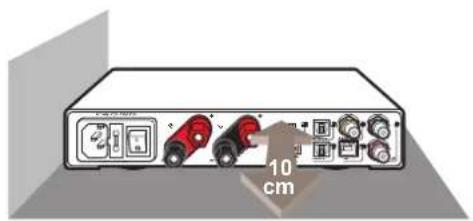
text_image
10 cm- Do not drop the device or subject it to severe impact.
- Do not operate the device during thunderstorms.
- Protect all cables and power cord from being walked on or pinched.
- Keep the device away from water.
- Unplug the power cord before cleaning. Wipe the device with a clean, dry cloth.
- Do not attempt to repair this device yourself.
INTRODUCTION
The DDA-120 integrated power amplifier accepts analog, digital and Bluetooth audio inputs from computers, consumer entertainment and streaming devices without the complexity of an audio/video receiver.
In order to have more input options, the DDA-120 accepts a full compliment of sources - one RCA analog, four digital via one USB, one coaxial, two optical inputs, and one expansion slot for a Bluetooth receiver dongle.
Features
• 176.4kHz input sampling rate
• 3GB/s over-sampling rate for smoother, more natural reproduction
- An on-chip clock reference signal for synchronizing incoming digital audio data -Data re-clocking results in ultra low jitter performance
• 100% linear frequency and phase response (+/- 0.1dB from 20 to 20kHz)
- THD+N = 0.07%
• Signal-to-noise ratio > 95dB A-weighted
• High-quality, audio-grade parts throughout
Product Overview
Front View
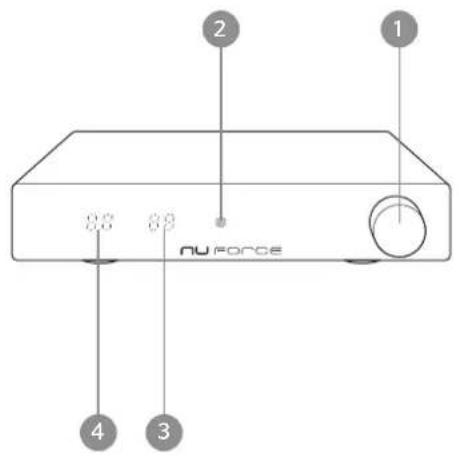
text_image
2 1 0.0 0.0 NU FORCE 4 3- Power On/Off, Volume control, Switch Input
- Reciever
- Volume Display
- Input Source Display
Rear View
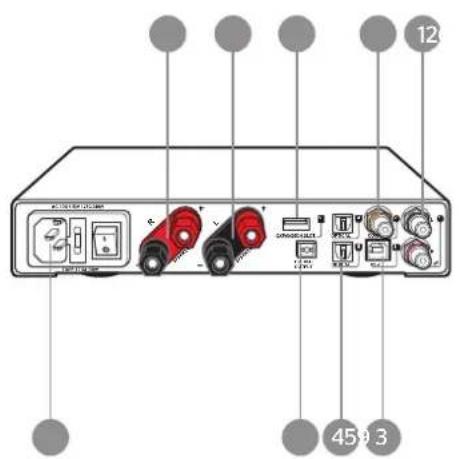
text_image
12 45 9 3- RCA Analog Input (Converted to24-bit/96kHz)
- RCA Digital Coaxial Input (75-Ohm)
- Digital USB2.0 Input (Adaptive mode)
- Digital TOSLINK Input
- Digital TOSLINK Output
- Expansion slot / Bluetooth receiver dongle Input (Digital S/PDIF format)
- Left channel speaker output (5-way binding post)
- Right channel speaker output (5-way binding post)
- AC Inlet
Basic Operating
To Power on/off

ON
ON: Pressing after turning back switch for 15 seconds

5 Sec ...
OFF
OFF: Long pressing for 5 seconds
IMPORTANT!
Speaker Output: Connect the left and right speaker cables to the output terminals. In order to avoid shorting out the DDA-120, before turning on the power, please make sure that the polarity of the speaker cables is properly terminated to the loudspeakers and the DDA-120.
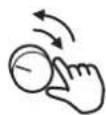
To select the desired input, simply press the Input button it cycles through all 4 inputs sequentially.

INPUT
Input R1 - RCA Analog
Input C2 - Coaxial
Input U3 - Digital USB2.0
Input 04 - Optical Input #4
Input 05 - Optical Input #5
Iuput E6 - Expansion slot for a Bluetooth receiver dongle
□)
□)
Using the Remote Control
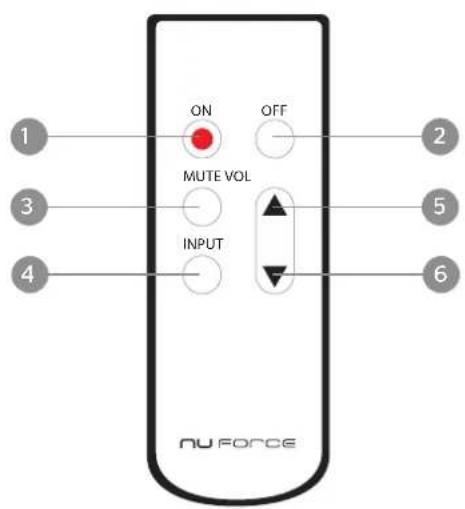
text_image
ON OFF MUTE VOL INPUT NU FORCE- On : turns on the DDA-120
- Off: turns off the DDA-120
- Mute
- Input: cycles through the DDA-120's six inputs
- Vol ▲ : raises the volume
- Vol ▼ : lowers the volume
Dim Mode
In the Dim Mode, when the unit idles for three seconds or more, the front LED turns off.
Note: When the LED is off, the unit is still operating. The LED will turn back on when the remote or knob are being employed.
To Enable Dim Mode:
Press and hold Power On button while pressing the Input button.
SPECIFICATIONS
| Input | (1) x RCA Analog (converted to24-bit/96kHz), (2) x Digital TOSLINK,(1) x RCA Digital Coaxial (75-Ohm), (1) x Digital USB2.0 (adaptive mode),(1) x expansion slot - Bluetooth receiver dongle (digital S/PDIF format) |
| Output (1) x Speaker-level, (1) x Digital TOSLINK(output is pre-volume control & tracks input selection) | |
| Frequency response 20 to 20kHz +/- 0.1dB | |
| THD+N 0.07% @ 15W | |
| SNR > 95 dB A-weighted | |
| USB Input Sampling Rates 44.1, 48, and 96kHz (maximum 96kHz) | |
| S/PDIF Input Sampling Rates 44.1, 48, 88.2, 96, 176.4kHz | |
| Peak Output Power 250W | |
| Bit Resolution 16-24-bits | |
| Dimensions (W x H x D) 9" x 2" x 8.5" | |
Weight 2.64 lb