
A7910 - Pregnant Anker - Free user manual and instructions
Find the device manual for free A7910 Anker in PDF.


| Product Type | Bluetooth Speaker |
| Brand | Anker |
| Model | A7910 |
| Dimensions | 45 × 45 × 45 mm (1.8 × 1.8 × 1.8 in) |
| Weight | 90 ± 5 g (3.2 ± 0.2 oz) |
| Color | Not specified (typically black or white) |
| Battery Play Time | 12 hours |
| Charging Time | 3 hours |
| Input Power | 5V / 0.5A |
| Bluetooth Version | 3.0 |
| Bluetooth Profiles | A2DP, AVRCP |
| NFC | Yes, for easy pairing |
| Speaker Output Power | 3W |
| Audio Input | AUX via Micro USB (included cable) |
| Operating Range | Up to 10 m (33 ft) |
| LED Indicators | Blue (pairing/connected), Red (charging/low battery) |
| Microphone | No |
| Warranty | 18 months from date of purchase |
| Care Instructions | Do not expose to water or liquids; avoid temperatures above 60°C (140°F); clean with a dry cloth |
| Included Accessories | Micro USB to AUX cable, user manual |
| Repair Information | Contact Anker support for service; no user-serviceable parts inside |
Frequently Asked Questions - A7910 Anker
User questions about A7910 Anker
0 question about this device. Answer the ones you know or ask your own.
Ask a new question about this device
Download the instructions for your Pregnant in PDF format for free! Find your manual A7910 - Anker and take your electronic device back in hand. On this page are published all the documents necessary for the use of your device. A7910 by Anker.
USER MANUAL A7910 Anker
- Ring-box size profile fits easily into your pocket, or the small side pocket of your backpack.
- Impressively full sound powered by a powerful 3 watt audio driver.
■ 12 hours of play time significantly outlasts other Bluetooth speakers. - Non-Bluetooth devices enjoy unhampered compatibility with the provided AUX to Micro USB audio cable.
■ NFC compatibility enables easier pairing. - Connects automatically to the last-connected device once powered on.
Specifications
| Product Model A7910 | |
| Bluetooth Standard 3.0 | |
| Product Weight 90 ± 5g / 3.2 | ± 0.2oz |
| Product Size 45 × 45 × 45mm | / 1.8 × 1.8 × 1.8in |
| Play Time 12 hours | |
| Charge Time 3 hours | |
| Input 5V / 0.5A | |
| Operating Range 10m / 33ft | |
| Speaker Output Power 3W | |
| Audio Cable Type AUX to Micro USB audio cable | |
| Supported Bluetooth Profiles A2DP, AVRCP |
Product Model
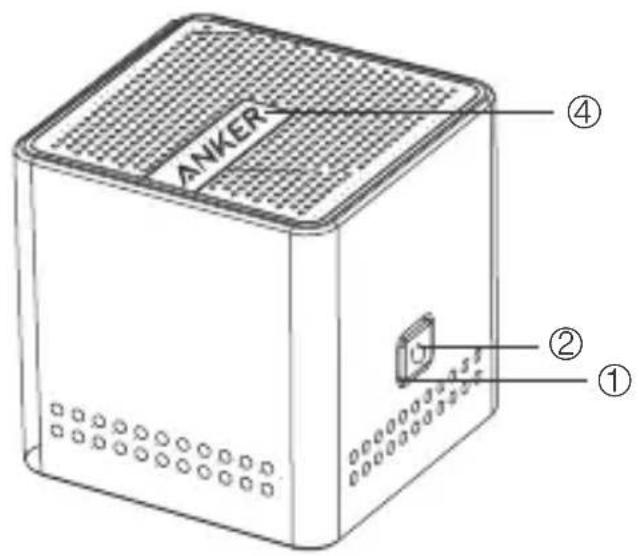
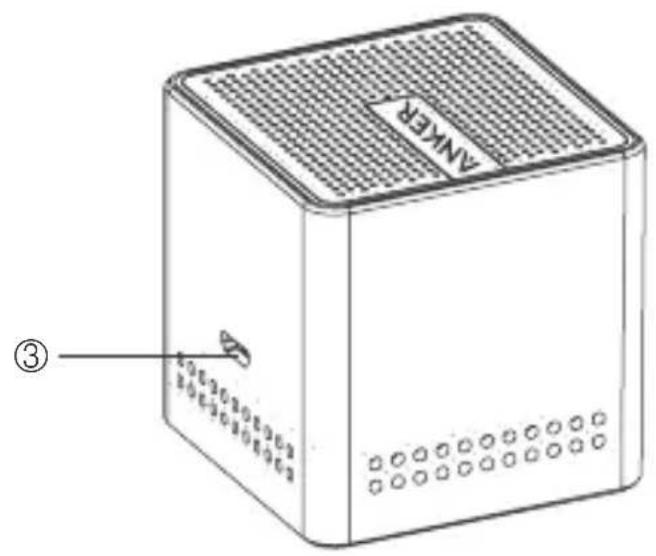
- Power button
- LED indicator
- Micro USB charging & audio 2-in-1 port
- NFC chip location
How to Turn On / Off the Spea er
Press the power button for 3 seconds to turn the speaker on or off.
How to Pair with Your Device
- Press the power button for 3 seconds. The speaker will turn on and automatically enter pairing mode indicated by the flashing blue LED.
- Activate your device's Bluetooth function and search for the device.
- Once the Bluetooth speaker has been detected, select the product name "Anker A7910" to connect. (For devices with Bluetooth versions below 3.0, press "Yes" to confirm pairing. Enter a passkey or PIN code "0000" (4 zeros), then press the "Yes" or "OK" key to finish pairing.)
- When the Bluetooth speaker and your device are successfully paired, the blue LED will go on and remain on while connected.
How to Pair with a NFC-Supported Device
- Press the power button for 3 seconds. The speaker will turn on and the indicator will start flashing blue.
- Enable your device's NFC function.
- Put your device near the NFC chip location.
- Click "Yes" on your device's screen to confirm Bluetooth connection.
- When the Bluetooth speaker and your device are successfully paired, the blue indicator will go on and remain on while connected.
Note: When turning on the speaker, it will automatically connect to the last-connected device (Bluetooth function needs to be enabled). When pairing with an additional device, disable the Bluetooth function on the previous device, the speaker will automatically return to pairing mode. Then, repeat the pairing process.
How to Recharge
When the speaker's battery is low, the speaker will announce "Battery low", and the red battery indicator will flash for about 10 minutes.
- Plug the Micro USB cable into the speaker's Micro USB charging port.
- Insert the remaining end of the USB power wire into (a) a USB AC adapter (not included) connected to a wall socket, or (b) a charging computer USB port. A steady red battery indicator will show that it is charging.
- The red battery indicator will go off when the speaker is fully charged.
LED Indicator Instructions
| LED indicator Meaning | |
| Blue indicator rapidly flashing Pairing mode | |
| Steady blue indicator Connected to a device | |
| Red indicator flashing Low battery | |
| Steady red indicator Charging | |
| Red indicator goes off Fully charged | |
Usage Tips
- Power off the speaker when not in use and before storing.
- The operational range of the speakers may be influenced by obstructions, such as walls, pillars, etc. To ensure a stable connection, we recommend avoiding such obstructions whenever possible and/or shortening the distance during use.
- To protect the long-term performance of the battery, please do not place the speaker in high temperatures above 140^ F/ 60^ C, such as in a hot vehicle or under direct sunlight.
- Do not expose the speaker or any of its supplied parts to water or liquids.
FAQ and Solutions
- Why can't the speaker connect to my device?
a. Check to ensure your device's Bluetooth function is enabled.
b. Make sure your device is within 3ft/1m of the speaker.
c. Delete the pairing record(s) on the speaker or your device.
- Can I use the speaker to play music while charging?
To protect the long-term performance of the battery, it is better to charge it when the speaker is turned off, especially when the battery is low.
- Can I make or answer phone calls through the speaker?
No. The speaker does not feature a built-in microphone.
- Why can't I connect by NFC?
a. Make sure that your device supports NFC functionality.
b. Keep your mobile device close to the NFC chip location of the speaker when attempting to connect.
c. Disable the Bluetooth connection of the speaker to other devices.
Warranty
Our company provides customers with a warranty of 18 MONTHS from the date of purchase.
Contact Us
For any inquiries or comments concerning our products, please send an email to support@ianker.com, and we will respond to you as soon as possible. If there is any quality-related issue with the product, you may request a REPLACEMENT OR REFUND by submitting a request form at www.ianker.com/support.
Statement
- We're only able to provide after-sales service for purchases made directly from Anker. If you purchased through a different retailer, please contact them for any exchange or refund requests.
- Please note that unauthorized reselling of Anker products is prohibited.