WD-14227FD - Washing machine LG - Free user manual and instructions
Find the device manual for free WD-14227FD LG in PDF.


User questions about WD-14227FD LG
0 question about this device. Answer the ones you know or ask your own.
Ask a new question about this device
Download the instructions for your Washing machine in PDF format for free! Find your manual WD-14227FD - LG and take your electronic device back in hand. On this page are published all the documents necessary for the use of your device. WD-14227FD by LG.
USER MANUAL WD-14227FD LG
Thank you for buying a
LG Fully Automatic Washing machine.
Please read your owner's manual carefully, it provides instructions on safe installation, use and maintenance.
Retain it for future reference.
Record the model and serial numbers of your washing machine.
produktmerkmale

natural_image
Line drawing of a flexible hose with connectors (no text or symbols)natural_image
Line drawing of a rectangular electronic device with internal components and mounting points (no text or symbols)text_image
Diagram showing a hand operating a device with labeled ports and a magnified inset showing four ports with arrows pointing to the interior.text_image
Technical diagram illustrating a gasifier installation process with labeled components including gummidichtung and überwurtmutter.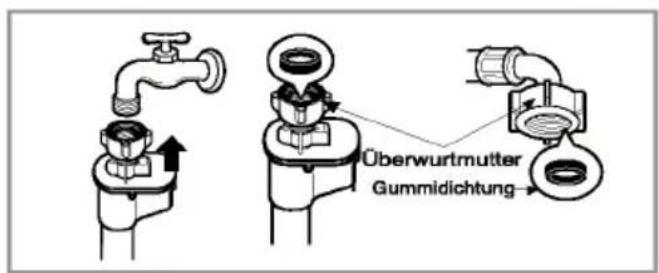
natural_image
Line drawing of a kitchen sink with faucet and handle (no text or symbols)natural_image
Illustration of a single washing machine with top and front panels (no text or symbols)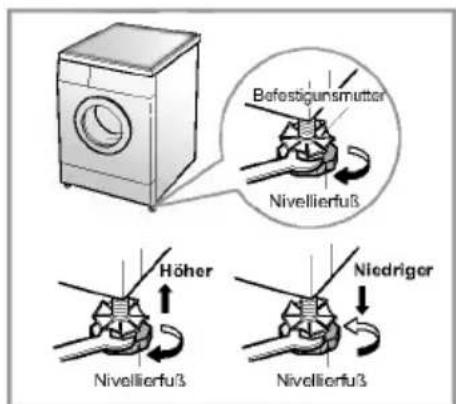
natural_image
Line drawing of a single washing machine with top and front panels (no text or symbols)natural_image
Illustration of a pair of jeans with decorative items and arrows indicating direction (no text or symbols)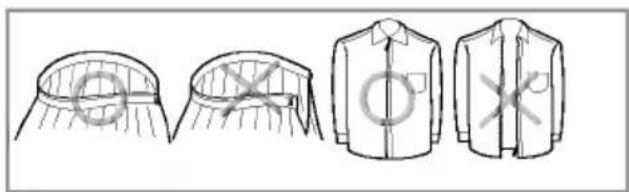
natural_image
Illustration of four different garment designs with checkmark patterns (no text or symbols)
natural_image
Illustration of a hand pouring liquid into a container on a tray (no text or symbols)text_image
Opt.1 Opt.2 → 18:88 Programmenatural_image
Illustration of a faucet with a handle and valve, showing fluid flow direction (no text or symbols)natural_image
Hand inserting a plug into a device (no text or symbols visible)natural_image
Illustration showing a hand holding a small object next to a device, with an arrow indicating process (no text or symbols present)natural_image
Hand inserting a small black object into a cabinet (no text or symbols visible)natural_image
Simple line drawing of a hand holding a ring above a container with a pointer (no text or symbols)text_image
Diagram of a kitchen appliance with labeled parts, showing a fan, bowl, and tool arm.text_image
Diagram of a device with labeled parts, showing a fan, switch, and bowl connection
flege und Wartung
■Waschmittellade
natural_image
Illustration of hands holding a device with a downward arrow indicating action (no text or symbols present)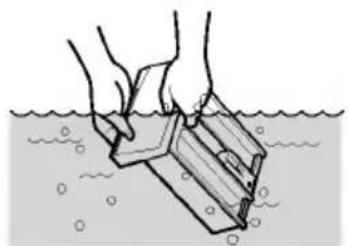
natural_image
Illustration of hands holding a container over water with bubbles (no text or symbols)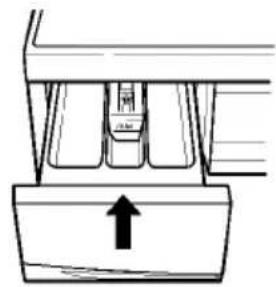
natural_image
Diagram of a mechanical component with an upward arrow indicating direction (no text or symbols present)natural_image
Line drawing of a hand holding a tool near a window (no text or symbols)P flege und Wartung
■ Reinigung
1. Gehäuse
■ Jumbo drum
LG's jumbo drum can wash about 40% more load than conventional washing machines. A bigger drum improves the wash performance.
■ More economical by Intelligent Wash System
Intelligent Wash System detects the amount of load and water temperature, and then determines the optimum water level and washing time to minimize energy and water consumption.
■ Direct Drive System
The advanced Brushless DC motor rotates the Drum directly without belt and pulley.
Child-Lock
The Child-Lock system has been used to prevent children from pressing any button to change the program during operation.
■ Low noise speed control system
By sensing the amount of load and balance, it evenly distributes load to minimize the spinning noise level.
■ Auto Restart
If the washing machine is turned off by a power failure, it will restart automatically from the position it stopped at adjusting accordingly.
■ Water Circulation
Spray detergent solution and water onto the load over and over. Clothes are soaked more quickly and thoroughly during wash cycle. The detergent suds can be removed more easily by the water shower during rinse cycle. The water circulation system uses both water and detergent more efficiently.
■ Safety device (Aqua-Lock)
Auqa Lock System is designed for detecting water leak during operation to prevent water from flooding over the floor.

ontents
Warnings 30
Specification....31
Installation 32
Care before washing 37
Adding detergent 38
Function....39
How to use washer....40
Maintenance....47
Troubleshooting guide....50
Terms of Warranty....53

WARNING!
For your safety, the information in this manual must be followed to minimize the risk of fire or explosion, electric shock, or to prevent property damage, personal injury, or loss of life.
IMPORTANT SAFETY INSTRUCTIONS
WARNING: To reduce the risk of fire, electric shock, or injury to persons when using the washer, follow basic precautions, including the following:
- Before installation, check exterior damages. If it has, do not install.
- Do not install or store the washer where it will be exposed to the weather.
- Do not tamper with controls.
- Do not repair or replace any part of the washer or attempt any servicing unless specifically recommended in the user-maintenance instructions or published user-repair instructions that you understand and have the skills to carry out.
- Keep the area underneath and around your appliances free of combustible materials such as lint, paper, rags, chemicals, etc.
- Close supervision is necessary if this appliance is used by or near children. Do not allow children to play on, with, or inside this or any other appliance.
- Keep small animals away from the appliance.
- Do not leave the washer door open. An open door could entice children to hang on the door or crawl inside the washer.
- Never reach into washer while it is moving. Wait until the drum has completely stopped.
- The laundry process can reduce the flame retardant of fabrics.
-
To avoid such a result, carefully follow the garment manufacturer's wash and care instructions.
-
Do not wash or dry articles that have been cleaned in, washed in, soaked in, or spotted with combustible or explosive substances (such as wax, oil, paint, gasoline, degreasers, dry-cleaning solvents, kerosene, etc.) which may ignite or explode.
- Do not slam the washer door closed or try to force the door open when locked. This could result in damage to the washer.
- When the machine runs high temperature, the front door may be very hot. Don't touch it.
• To minimize the possibility of electric shock, unplug this appliance from the power supply or disconnect the washer at the household distribution panel by removing the fuse or switching off the circuit breaker before attempting any maintenance or cleaning. - When unplugging power cord, do not pull out by grasping the cord. Otherwise, the power cord may be damaged.
- Never attempt to operate this appliance if it is damaged, malfunctioning, partially disassembled, or has missing or broken parts, including a damaged cord or plug.
- Before discarding an old machine unplug it. Render the plug useless. Cut off the cable directly behind the appliance to prevent misuse.
* Do not push down the door excessively, when washer door open. This could topple over the washer.
SAVE THESE INSTRUCTIONS
GROUNDING INSTRUCTIONS
This appliance must be grounded. In the event of malfunction or breakdown, grounding will reduce the risk of electric shock by providing a path of least resistance for electric current. This appliance is equipped with a cord having an equipment-grounding conductor and grounding plug. The plug must be plugged into an appropriate outlet that is properly installed and grounded in accordance with all local codes and ordinance.
- Do not use an adapter or otherwise defeat the grounding plug.
- If you don't have the proper outlet, consult an electrician.
WARNING : Improper connection of the equipment-grounding conductor can result in risk of electric shock. Check with a qualified electrician or serviceman if you are in doubt as to whether the appliance is properly grounded. Do not modify the plug provided with the appliance - if it does not fit the outlet, have a proper outlet installed by a qualified electrician.
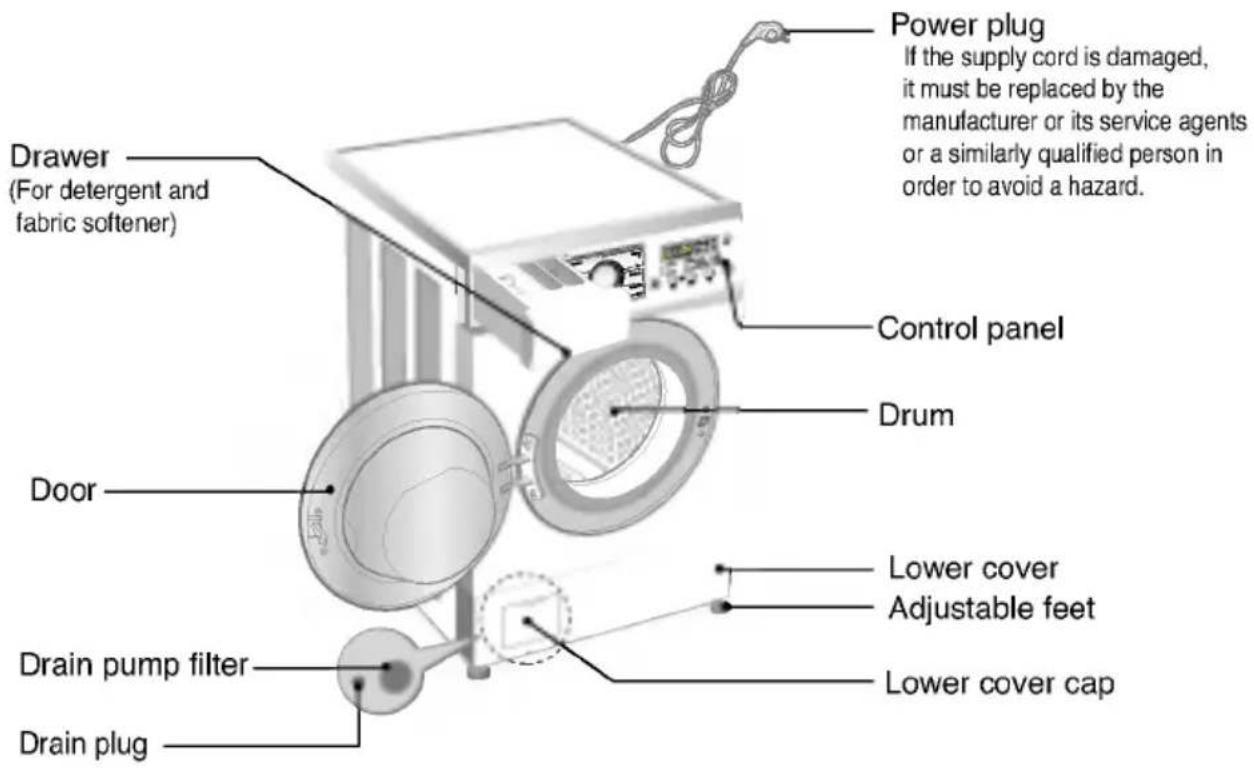
text_image
Power plug If the supply cord is damaged, it must be replaced by the manufacturer or its service agents or a similarly qualified person in order to avoid a hazard. Drawer (For detergent and fabric softener) Control panel Drum Door Lower cover Adjustable feet Drain pump filter Lower cover cap Drain plug■ Name : Front loading washing machine
■ Power supply : 220-240V\~, 50Hz
■ Size : 600mm(W) 600mm(D) 850mm(H)
■ Weight / Max.Watt : 65kg / 2100W
■ Wash capacity : 7kg
■ Water consumption : 49 ℓ (7 ℓ /kg)
■ Permissible water pressure : 0.3-10kgf/ (30-1000kPa)
■ Spin speed : No spin/400/800/1200/1600[WD-16223FD/WD-16226FD] No spin/400/800/1000/1400[WD-14223FD/WD-14226FD]
* The appearance and specifications may be varied without notice to raise the units quality.
■ Accessories
natural_image
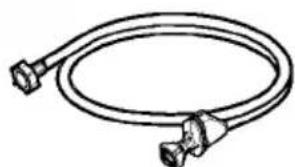
Line drawing of a coiled electrical cable with two connectors (no text or symbols)Inlet hose 1EA
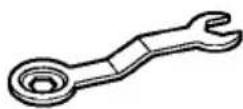
Spanner
Installation
Install or store where it will not be exposed to temperatures below freezing or exposed to the weather. Properly ground washer to conform with all governing codes and ordinances.
The base opening must not be obstructed by carpeting when the washing machine is installed on a carpeted floor.
In countries where there are areas which may be subject to infestation by cockroaches or other vermin, pay particular attention to keeping the appliance and its surroundings in clean condition at all times. Any damage which may be cause by cockroaches or other vermin will not be covered by the appliance guarantee.
■ Transit bolts
The appliance is fitted with transit bolts to prevent internal damage during transport.
- Packing and all transit bolts must be removed before using the washer.
When unpacking the base, be sure to remove the additional packing support in the middle of the base packing.
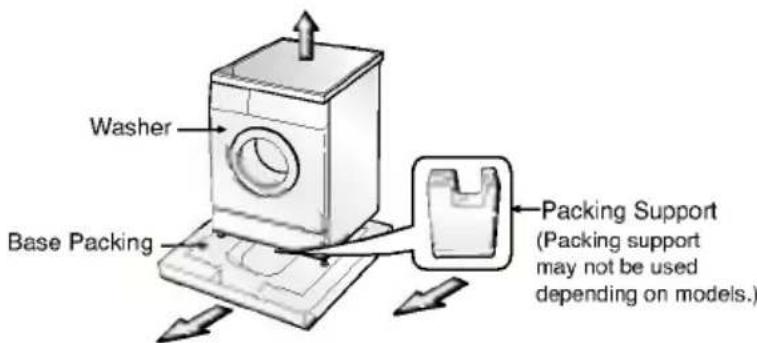
text_image
Washer Base Packing Packing Support (Packing support may not be used depending on models.)■ Removing transit bolts
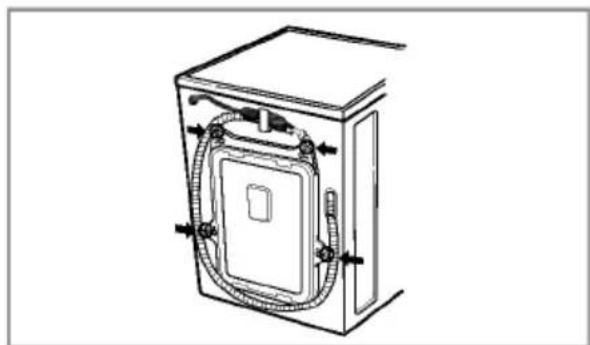
natural_image
Technical line drawing of a rectangular enclosure with internal tubing and mounting brackets (no text or symbols)- To prevent internal damage during transport, the special 4 bolts are locked. Before operating the washer, remove the bolts along with the rubber bungs.
- If they are not removed, it may cause heavy vibration, noise and malfunction.
- Unscrew the 4 bolts with the spanner supplied.
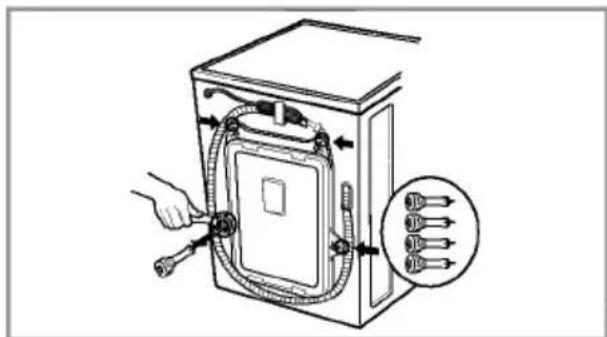
natural_image
Diagram of a device with cable routing and connector, showing hand operating cable (no text or symbols)- Take out the 4 bolts along with the rubber bungs by slightly twisting the bung. Keep the 4 bolts and the spanner for future use.
- Whenever the appliance is transported, the transit bolts must be refitted.
- Close the holes with the caps supplied.
Installation
■ Installation place requirement
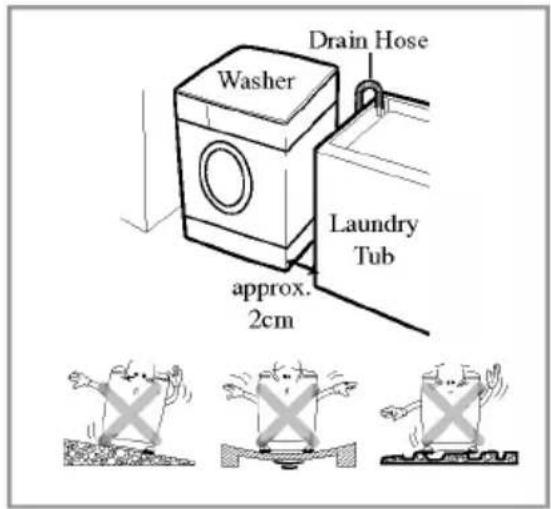
text_image
Washer Drain Hose Laundry Tub approx. 2cmLevel floor :
Allowable slope under entire washer is 1°
Power outlet :
Must be within 1.5 meters of either side of location of washer. Do not overload the outlet with more than one appliance.
Additional Clearance :
For wall, door and floor modeling is required.
(10cm : rear /2cm:right & left side)
Do not place or store laundry products on top of washer at any times.
They can damage the finish or controls.
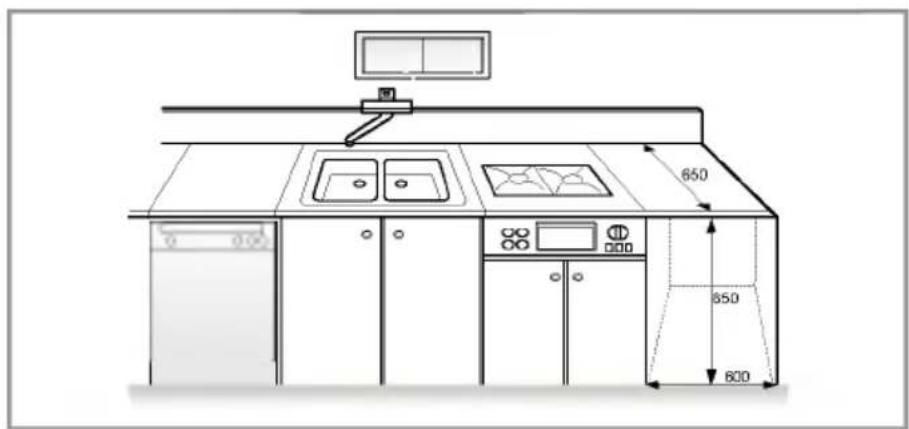
text_image
650 650 600■ Positioning
Install the washer on a flat hard floor.
Make sure that air circulation around the washer is not impeded by carpets, rug etc.
- Before placing the washer on tiles, apply a rubber mat under the feet.
- Never try to correct any unevenness in the floor with pieces of wood, cardboard or similar materials under the washer.
- If it is impossible to avoid positioning the washer next to a gas cooker or coal burning stove, an insulating(85x60cm) covered with aluminum foil on the side facing the cooker or stove, must be inserted between the two appliance.
- The washer must not be installed in rooms where the temperature can drop below 0^ .
- Please ensure that when the washer is installed, it is easily accessible for the engineer in the event of a breakdown.
- With the washer installed adjust all four feet using the transit bolt spanner provided ensuring the appliance is stable, and a clearance of approximately 20mm is left between the top of the washer and the underside of the work-top.
Installation
■ Electrical connection
- Do not use an extension cord or double adapter.
- If the supply cord is damaged, it must be replaced by the manufacturer or its service agents or similarly qualified person in order to avoid a hazard.
- Always unplug the machine and turn off the water supply after use.
- Connect the machine to an earthed socket in accordance with current wiring regulations.
- The appliance must be positioned so that the plug is easily accessible.
• Repairs to the washing machine must only be carried out qualified personnel. Repairs carried out by inexperienced persons may cause injury or serious malfunctioning. Contact your local service center
- Do not install your washing machine in rooms where temperatures below freezing may occur. Frozen hoses may burst under pressure. The reliability of the electronic control unit may be impaired at temperatures below freezing point.
- If the appliance is delivered in the winter months and temperatures are below freezing: Store the washing machine at room temperature for a few hours before putting it into operation.
■ Washing Machine is to be connected to the water mains using new hose-sets and that old hose-sets should not be used.
■ Connecting water supply hose
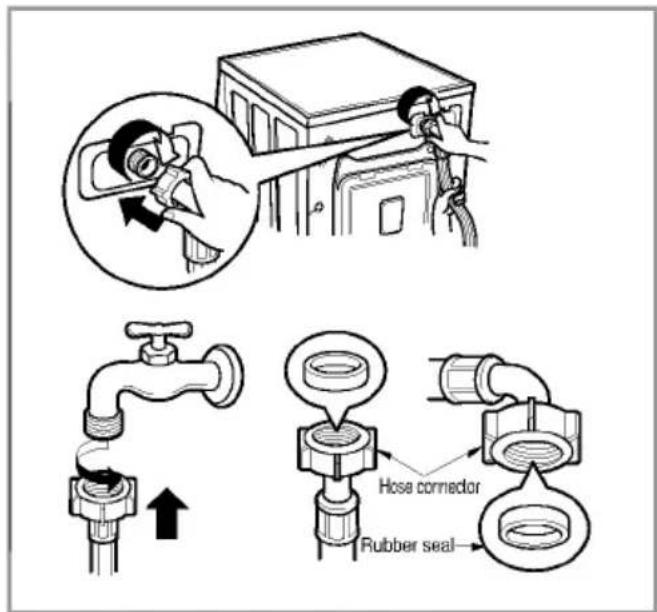
text_image
Diagram illustrating the installation of a hose connector and rubber seal, showing pipe connection and component assembly.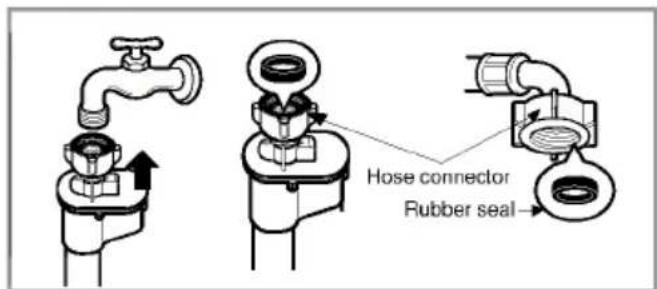
text_image
Hose connector Rubber seal▶ Water supply pressure must be between 30kPa and 1000kPa (0.3\~10kgf/cm²)
▶ Don't strip or crossthread when connecting Inlet hose to the valve.
▶ If the water supply pressure is more than 1000kPa, a decompression device should be installed.
- Two rubber seals are supplied with the water inlet hoses these are in order to prevent water leaks.
- Check water tightness of washing machine connections by turning the tap completely on.
- Periodically check the condition of the hose and replace the hose if necessary.
• Make sure that there is no kink on the hose and that it is not crushed.
Installation
■ Level adjustment
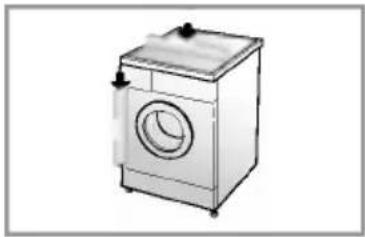
natural_image
Line drawing of a single washing machine with lid and front panel (no text or symbols)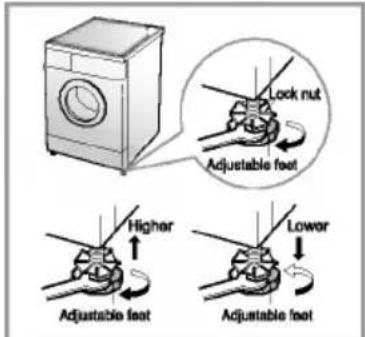
text_image
Lock nut Adjustable foot Higher Lower Adjustable foot Adjustable foot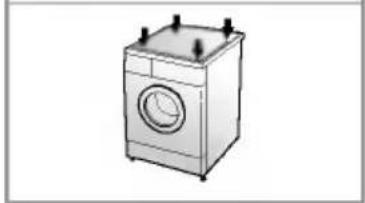
natural_image
Illustration of a single washing machine with front panel and top-mounted buttons (no text or symbols)- Adjusting the washing machine level properly prevents excessive noise and vibration. Install the appliance on a solid and level floor surface, preferably in a corner of the room.
NOTE Timber or suspended type flooring may contribute to excessive vibration or load balance errors.
- If the floor is uneven, adjust the adjustable feet as required. (do not insert pieces of wood etc. under the feet) Make sure that all four feet are stable and resting on the floor and then check that the appliance is perfectly level. (use a spirit level)
* After the washer is level, tighten the lock nuts up towards of the base of the washer. All lock nuts must be tightened.
* Diagonal Check
When pushing down the edges of the washing machine top plate diagonally, the machine should not move up and down at all. (Please, check both of two directions) If machine rocks when pushing the machine top plate diagonally, adjust the feet again.
■ Concrete floors(tile...)
- The installation surface must be clean, dry and level.
• Install washer on a flat hard floor. - Before placing the washer on tiles, apply a rubber mat under the feet.
※ Do not let the feet of the washer get wet. If feet of the washer get wet, slipping may occur.
■ Wooden floors
- Wooden floors are particularly susceptible to vibration.
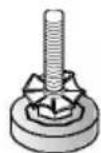
- To prevent vibration we recommend you place rubber cups under each foot, at least 15mm thick under the washer, secured to at least 2 floor beams with screws.
- If possible install the washer in one of the corners of the room, where the floor is more stable.
※ Insert the rubber cups to reduce vibration.
※ You can obtain the rubber cups (p/no.4620ER3001B) from the LG spares dept.
Important!
- Proper placement and levelling of the washer ensure long, regular and reliable operation.
- The washer must be absolutely horizontal and stand firmly in position.
- It must not "Seesaw" across corners under load.
- The installation surface must be clean, free from floor wax and other lubricant coatings.
Rubber Cup


are before washing
■ Caring before washing
1. Care Labels
Look for a care label on your clothes. This will tell you about the fabric content of your garment and how it should be washed.
2. Sorting
To get the best results, Sort clothes into loads that can be washed with the same wash cycle. Water temperature and spin speed and different fabrics need to be washed in different ways. Always sort dark colors from pale colors and whites. Wash separately as dye and lint transfer can occur causing discoloration of white etc. If possible, do not wash heavily soiled items with lightly soiled one.
Soil (Heavy, Normal, Light)
Color (White, Lights, Darks)
Lint (Lint producers, Collectors)
Separate clothes according to amount of soil.
Separate white fabrics from colored fabrics.
Wash lint producers and lint collectors separately.
3. Caring before loading
■ Combine large and small items in a load. Load large items first. Large items should not be more than half the total wash load.
Do not wash single items. This may cause an out-of-balance load. Add one or two similar items.
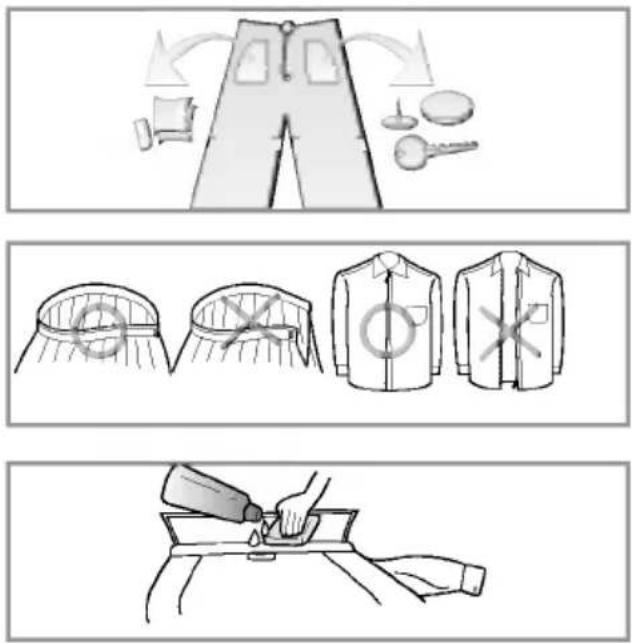
- Check all pockets to make sure that they are empty. Items such as nails, hair clip, matches, pens, coins and keys can damage both your washer and your clothes.
- Close zippers, hooks and strings to make sure that these items don't snag on other clothes.
- Pre treat dirt and stains by brushing a little detergent dissolved in water onto stains like collars and cuffs to help shift dirt.
※ After washing, leave the door ajar so that air can circulate in the drum.
■ Adding detergent and fabric softener
1. The Dispenser Drawer
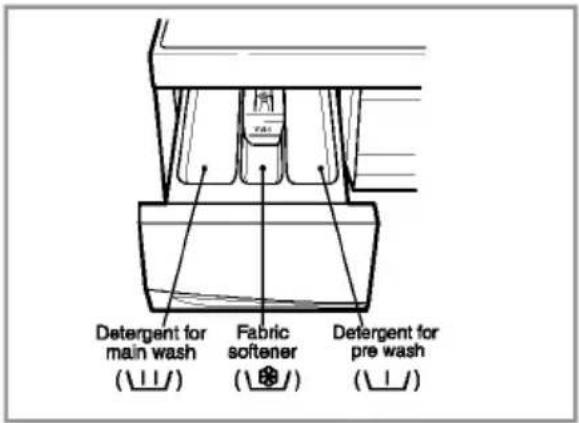
text_image
Detergent for main wash (⊥⊥/) Fabric softener (⊥⊕/) Detergent for pre wash (⊥⊥/)- Main wash only U
• Pre Wash + Main Wash U
2. Adding Fabric Softener
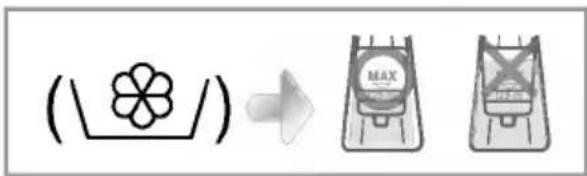
text_image
(\f\/) → MAX MAX- Do not exceed the maximum fill line. Overfilling can cause early dispensing of the fabric softener which could stain clothes.
- Do not leave the fabric softener in the detergent drawer for more than 2 days. (Fabric softener could harden)
- Softener will automatically be added during the last rinse cycle.
- Do not open the drawer when water is supplied.
- Solvents(benzene, etc) are not allowable.
NOTE Do not pour fabric softener directly on the dothes
3. Detergent dosage
- The detergent should be used according to the instruction of the detergent manufacture.
- If too much detergent is used more than the recommended amount, too many suds can occur and this will decrease the washing result or cause heavy load to the motor. (Causing a malfunction)
- Use powder detergent only for the front loading washer.
- Detergent usage may need to be adjusted for water temperature, water hardness, size and soil level of the load. For best results, avoid oversudsing.
\* Tips
• Full load : according to manufacturer's recommendation.
- Part load : 3/4 of the normal amount.
• Minimum load : 1/2 of full load.
- Detergent is flushed from the dispenser at the beginning of the cycle.
■ Recommended courses according to the laundry type
| Program | Fabric Type | Proper Temp. | Option | Maximum Load | Energy in kWh | Time in Minutes |
| Cotton | First check if laundry is machine washable. (white cotton, linen towel and sheets...) | 95°C | Pre Wash Time Save Rinse+ Crease Care | Rating | 2.74 | 165 |
| Color fast gaments (shirts, night dresses, pajamas...)and lightly soiled white cotton(underwear...) | 60°C (30°C, 40°C, 60°C-Eco) | Pre Wash Time Save Rinse+ Crease Care | Rating | 1.09 | 161 | |
| Synthetic | Polyamide, Acrylic, Polyester | 40°C (30°C, 60°C) | Pre Wash Time Save Rinse+ Crease Care | Less than 3.5 kg | 0.45 | 99 |
| Delicate | Delicate laundry easily damaged | 30°C (Cold, 40°C) | Rinse+ Crease Care | Less than 3.0 kg | 0.41 | 63 |
| Wool/Silk | Machine washable woolens with pure new wool or silk only | 30°C (Cold, 40°C) | Rinse+ Crease Care | Less than 2.0 kg | 0.28 | 61 |
| Hand Wash | "Hand Wash" marked delicate and wool laundry | Cold(30°C) | Rinse+ Crease Care | Less than 2.0 kg | 0.03 | 55 |
| Quick 30 | Colored Laundry which is lightly soiled fast. | 30°C | Rinse+ Crease Care | Less than 2.0 kg | 0.35 | 30 |
* Pre Wash : If the laundry is heavily soiled, "Pre Wash" course is recommended. Pre Wash is available in Cotton and Synthetic Program.
* Eco : By selecting Eco function, the water temperature is reduced and washing time is lengthened. So you can economize in your consumption of heating energy.
* Rinse+: Used to introduce an additional rinse, which may assist in removing traces of detergent residue.

ow to use washer

text_image
Synthetic Cotton °C Wool/Silk Eco Delicate Hand Wash Quick 30 Drain Rinse+Spin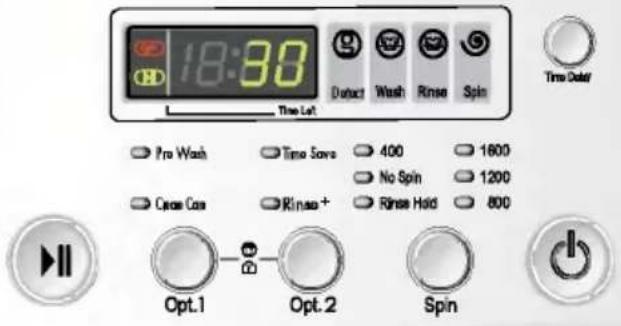
text_image
18:30 Time Left Pro Wash Time Save 400 1600 No Spin 1200 Open Cas Rinase+ Rinase Hold 800 Opt.1 Opt.2 Spin1. Cotton automatically selected upon power on.
- Press the Power(⏻) button to start.
- Press the Start/Pause(▶) button.
-
Initial condition
-
Wash : main wash
- Rinse : 3 times
- Spin :
$$ 1 6 0 0 \mathrm{rpm} $$
$$ [ W D - 1 6 2 2 3 F D / W D - 1 6 2 2 6 F D ] $$
$$ 1 4 0 0 \mathrm{rpm} $$
$$ [ W D - 1 4 2 2 3 F D / W D - 1 4 2 2 6 F D ] $$
- Water temperature : 60°C
- Program : Cotton
2. Manual Selecting
- Press the Power(⏻) button to start.
- Select the conditions which you want to use, by turning the program dial and pressing each button.
For selecting the each conditions, please refer to the page41\~page46
- Press the Start/Pause(▶II) button.
3. Beep on/off
- The beep on/off function can be set by pressing and holding the Opt.2 and Spin button simultaneously.
- The beep on/off function can be set at any time and it is automatically canceled when power failure occur.
Also the beep on/off function works when power is off.

ow to use washer
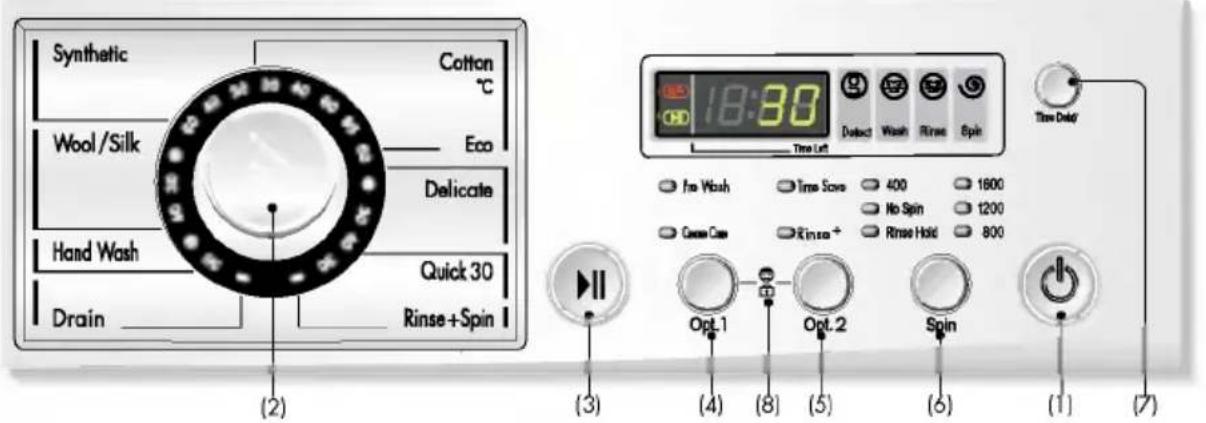
text_image
Synthetic Cotton °C Wool/Silk Eco Delicate Hand Wash Quick 30 Drain Rinse+Spin (2) 18:30 Ductal Wash Rinse Spin Time Left for Wash Time Score 400 1600 No Spin 1200 Close Case Rinse + Rinse Hold 800 Opt.1 Opt.2 Spin (3) (4) (5) (6) (1) (7)(1) Button : Power
(2) Dial : Program
(3) Button : Start/Pause
(4) Button : Option 1
(5) Button : Option 2
(6) Button : Spin
(7) Button : Time Delay
(8) Child Lock
Option
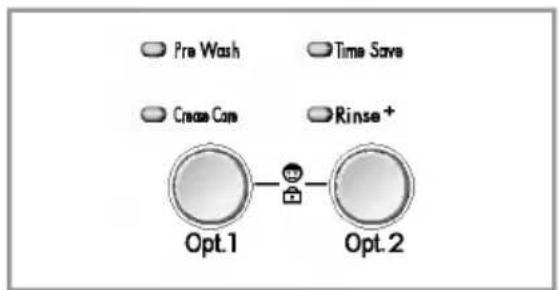
flowchart
graph LR
    A["Pre Wash"] --> B["Opt.1"]
    C["Time Save"] --> D["Opt.2"]
    E["Croach Care"] --> F["Opt.1"]
    G["Rinse+"] --> H["Opt.2"]
- By pressing the Option button, all Option functions may be selected.
- Pre Wash
- Rinse +
- Time Save
- Crease Care
1. Time Save
• This option can be used to reduce the time of a wash program.
- To use this option press the Time Save button once before the wash program is started.
• This option is available with Cotton, Synthetic program.
2. Rinse+
• Used to additional rinse, which may assist in removing traces of detergent residue.
- By selecting Rinse ^+ function, the rinse time and the rinse water are increased.
3. Pre Wash
- If the laundry is heavily soiled, "Pre Wash" course is effective.
- Pre Wash is available in Cotton and Synthetic.
The required lamp will light up for identification.
4. Crease Care
- If you want to prevent crease, select this button with spin speed.

ow to use washer
Spin
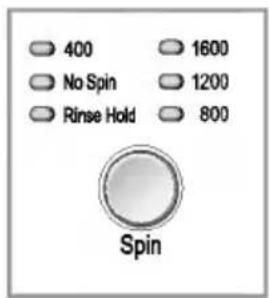
text_image
400 1600 No Spin 1200 Rinse Hold 800 Spin[WD-16223FD/
WD-16226FD]
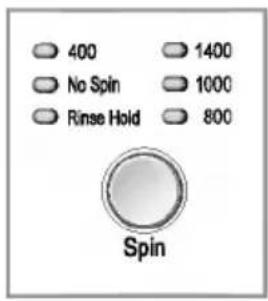
text_image
400 No Spin Rinse Hold 1400 1000 800 Spin[WD-14223FD/
WD-14226FD]
1. Spin selection
- Spin Speed is available according to the program as follows.
- WD-14223FD/WD-14226FD
-Cotton, Quick 30
- Delicate Rinse Hold—No Spin—400—800
-
Synthetic, Wool/Silk, Hand Wash Rinse Hold—No Spin—400—800—1200
-
By pressing the Spin button, the spin speed can be chosen.
- When you want spin only, press the [Spin] button to select the Spin speed.
2. No spin
- If no spin is selected, the washer stops after draining water.
The required lamp will light up for identification.
3. Rinse Hold
- Is selected by pressing the spin button repeatedly this function leaves clothes in the machine; suspended in the water after a rinse without entering into spin.
• To proceed through to a drain or spin, once the rinse hold function is completed using to program dial scroll to the required program. (Spin)
The required lamp will light up for identification.

ow to use washer
Water Temp.
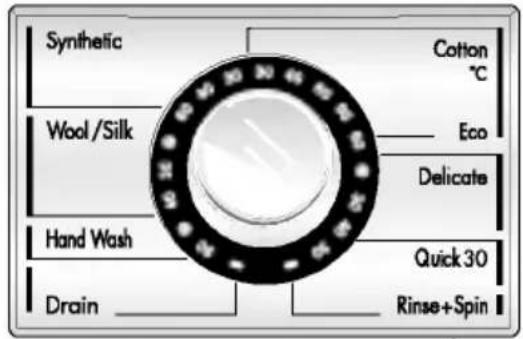
text_image
Synthetic Cotton °C Wool/Silk Eco Delicate Hand Wash Quick 30 Drain Rinse+Spin- By turning the Program Dial, the water temperature can be selected.
- Cold
-30°C / 40°C / 60°C / 95°C
• Water temperature can be selected according to the program.
The required temperature lamp will light up for identification.
For the more detailed information, please refer to the page39.
Child Lock
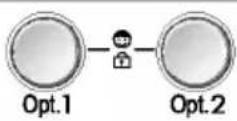
If you choose to lock the buttons on the control assembly to prevent tampering this function may be selected.
1. Child Lock
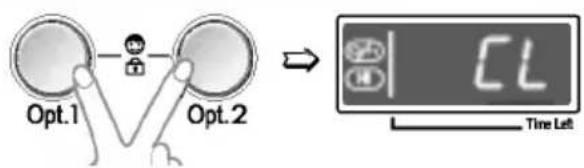
- Child Lock can be set by pressing the Opt. 1 button and Opt. 2 button simultaneously.
flowchart
graph TD
    A["Opt.1"] --> B["Switch"]
    C["Opt.2"] --> B
    B --> D["Display Screen"]
    style A fill:#f9f,stroke:#333
    style C fill:#f9f,stroke:#333
    style D fill:#ccf,stroke:#333
- When child lock is set, all buttons are inoperable except power button.
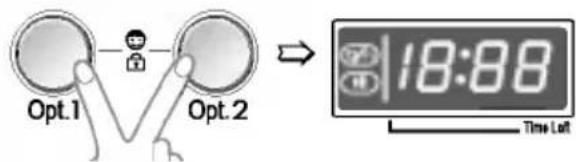
- To deactivate Child Lock system, press Opt. 1 and Opt. 2 button simultaneously again.
text_image
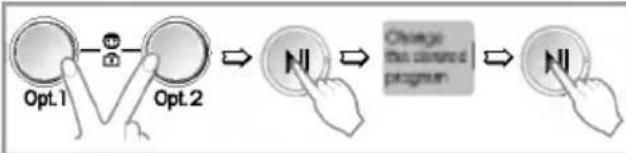
Opt.1 Opt.2 → 18:88 Time Left- To change to the desired program, whilst in child lock mode.
- Press both Opt. 1 and Opt. 2 together once again.
- Press the Start/Pause button.
- Select the desired program and press the Start/Pause button again.
flowchart
graph LR
    A["Opt.1"] --> B["Next Step"]
    B --> C["Change from button"]
    C --> D["Final Action"]
- The child lock can be set at any time and it is automatically canceled when operational errors occur. Also Child Lock works when power is off.
Time Delay
text_image
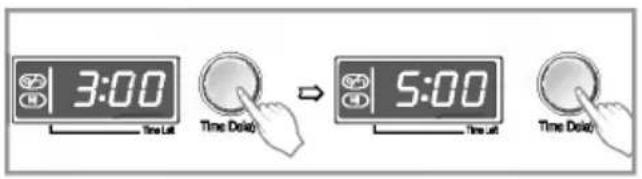
3:00 Time Lat Time Delay 5:00 Time Lat Time Delay1. Time Delay
Preparing washing before starting "Time Delay"
- Turn on the water tap.
- Load laundry and close the door.
- Place the detergent and fabric softener in the drawer.
• How to set "Time Delay"
- Press Power button.
- Turn the Program dial to select the program you require.
- Press Time Delay button and set the desired time.
- Press the Start/Pause button. (":" blinks.)
- If Time Delay button is pressed, "3:00" is displayed. The maximum delayed time is 19:00 hours and the minimum time is 3:00 hours.
• Each pressing of the button advances on time delay by one hour.
- To cancel the time delay, press the Power button.
- Time Delay is ‘expected time’ from the present to the completion of washing cycle or selected process (Wash, Rinse, Spin).
- According to the condition of water supply and temperature, the delayed time and the actual washing time may vary.
Program
text_image
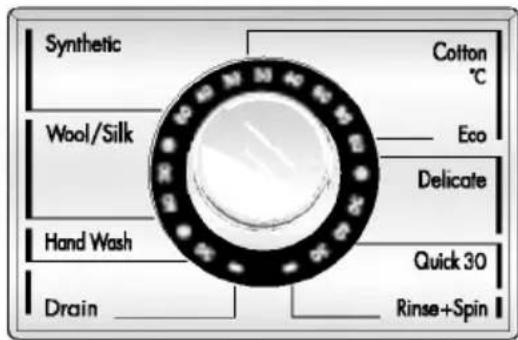
Synthetic Cotton °C Wool/Silk Eco Delicate Hand Wash Quick 30 Drain Rinse+Spin- 8 programs are available according to the laundry type.
- Lamp will light up to indicate selected program.
1. Program
- When Start/Pause button is pressed, the Cotton program is automatically selected.
- By turning the Program dial, the program is selected in order of "Cotton — Delicate— Quick 30 — Rinse+Spin — Drain — Hand Wash— Wool/Silk — Synthetic".
Regarding to the laundry type for each program Please refer to the page39.
2. Course
- Cotton - Delicate - Rinse+Spin
- Quick 30 - Wool/Silk - Drain
- Synthetic - Hand Wash

ow to use washer
Start/Pause

1. Start
- This Start/Pause button is used to start wash cycle or pause the wash cycle.
2. Pause
- If temporary stop of wash cycle is needed, press the Start/Pause button.
- When in Pause, the power is turned off automatically after 4 minutes.
- NB. The door will not open before 1 to 2 minutes when Pause is selected, or at the end of the wash cycle.
3. Detect
- While the "Detect" is shown in the display the machine rotates slowly and detects how many laundries are loaded in the drum. It will take a few seconds.
• Available in Cotton and Synthetic.
Power
1. Power
- Press the Power button to turn power on and off
- To cancel the Time Delay function, if the power button should be pressed.
2. Initial Program
- When the Power button is pressed, the washer is ready for Cotton program. And the other initial conditions as follows.
- So, if you want to advance into the washing cycle without changing the program, just press the Start/Pause button and then the washer will proceed.
Initial program
[WD-14223FD/WD-14226FD]
- Cotton Program / Main wash / Normal Rinse/1400 rpm / 60°C [WD-16223FD/WD-16226FD]
- Cotton Program / Main wash / Normal Rinse/1600 rpm / 60°C

ow to use washer
Display
text_image
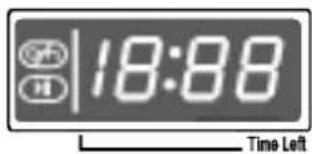
18:88 Time Left1. Special function display
- When child lock is selected, the " [L ] " is displayed.
- When time delay is selected, it shows the remaining times to finish the selected program.
2. Self diagnosis display
- If the machine encounters a fault during operation, the associated fault will be displayed.
“PE” : Water pressure sensing error
“FE”: Problem of overfilling water
“dE”: Door is not closed
"LE": Over load in motor.
“CE”: Over load in motor.
“! E”: Water inlet trouble
"OE": Drainage trouble
"UE": Unbalanced load
“E E ”: Water temperature trouble
"RE": Water leaks.
If these error letters are displayed, please refer to the troubleshooting page50 and follow the guide.
3. Completion of washing
- When washing cycle is completed, "End" is displayed on the "Multi display".
4. Time left
- During washing cycle, the remaining washing time is displayed.
- Recommended program by manufacturer.
※(): WD-14223FD/WD-14226FD
- Cotton 95°C : around 2 hours and 45 minutes
- Cotton 60°C : around 2 hours and 41 minutes
- Synthetic : around 1 hour and 39 minutes
- Delicate : around 1 hour and 3 minutes
- Wool/Silk : around 1 hour and 1 minute
- Hand Wash : around 55 minutes
- Quick 30 : around 30 minutes
- Rinse+ Spin : around 27(24) minutes
- Drain : around 1 minute
- The washing time may vary by the amount of laundry, water pressure, water temperature and other washing conditions.
- If an unbalanced load is detected or if the suds removing program operates, the wash time may be extended. (Max. increasing time is 45 minutes.)

aintenance
* Before cleaning the washer interior, unplug the electrical power cord to avoid electrical shock to avoid electrical shock hazards.
* When disposing of the appliance, cut off the mains cable, and destroy the plug Disable the door lock to prevent young children being trapped inside.
■ The water inlet filter
- "IE" error message will blink on the control panel when water does not enter the detergent drawer.
- If your water is very hard or contains traces of lime deposit, the water inlet filter may become clogged.
It is therefore a good idea to clean it from time to time.
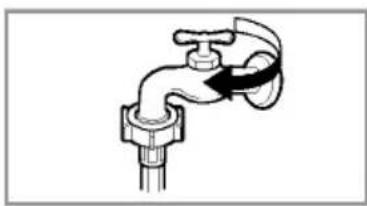
natural_image
Simple line drawing of a faucet with a handle and valve (no text or symbols)- Turn off the water tap.
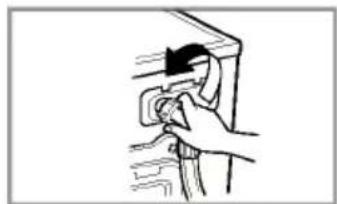
natural_image
Simple line drawing of a hand inserting a plug into a device (no text or symbols)- Unscrew the water inlet hose.
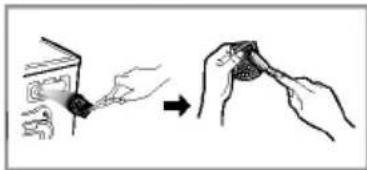
natural_image
Illustration showing a hand holding a small object next to another hand holding a circular object, both without any text or symbols.- Clean the filter using a hard bristle brush.
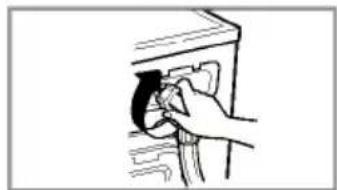
natural_image
Hand inserting a small object into a device (no text or symbols visible)- Tighten up the inlet hose.
■ The drain pump filter
* The drain filter collects threads and small objects left in the laundry. Check regularly that the filter is clean to ensure smooth running of your machine.

CAUTION
First drain using the drain and then open the pump filter to remove whatever any threads or objects.
Be careful when draining if the water is hot.
-
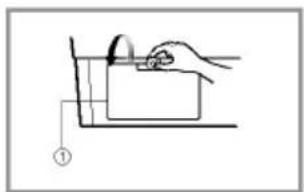
Open the lower cover cap ( ) by using a coin. Turn the drain plug ( ) to pull out the hose.
-
Unplug the drain plug ( ), allowing the water to flow out. At this time use a vessel to prevent water flowing on to the floor. When water does not flow any more, turn the pump filter ( ) open to the left.
-
Remove any foreign material from the pump filter ( ). After cleaning, turn the pump filter ( ) clockwise and insert the drain plug ( ) to the original place. close the lower cover cap.
natural_image
Simple line drawing of a hand holding a tool over a rectangular object, with no text or symbols present.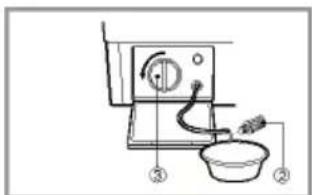
text_image
Diagram of a kitchen appliance with labeled parts, showing a fan, bowl, and tool path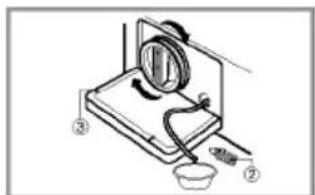
text_image
Diagram of a kitchen appliance with labeled parts and directional arrows indicating motion or movement
aintenance
■ Dispenser drawer
* After a while detergents and fabric softeners leave a deposit in the drawer.
- It should be cleaned from time to time with a jet of running water.
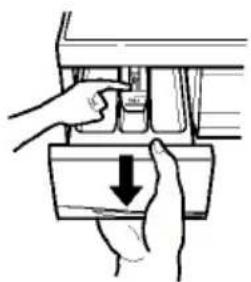
- If necessary it can be removed completely from the machine by pressing the catch downwards and by pulling it out.
• To facilitate cleaning, the upper part of the fabric softener compartment can be removed.
natural_image
Illustration of two hands pressing down on a vehicle's door panel with a downward arrow (no text or symbols)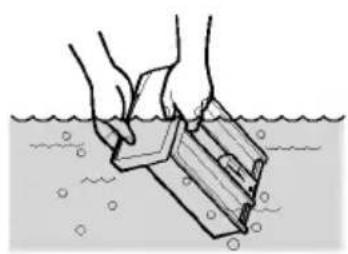
natural_image
Illustration of hands cleaning a submerged object in water (no text or symbols)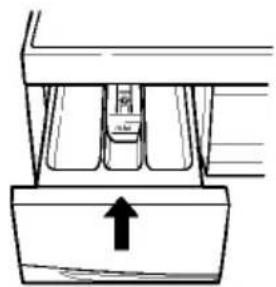
natural_image
Pure mechanical component diagram without any text, numbers, or symbols■ The drawer recess
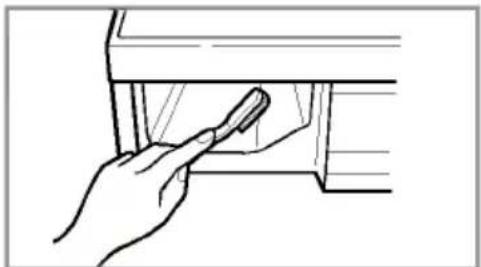
* Detergent can also accumulate inside the recess which should be cleaned occasionally with an old toothbrush.
- Once you have finished cleaning, replace the drawer and run a rinse cycle without laundry.
natural_image
Line drawing of a hand holding a tool near a window (no text or symbols)■ The washing drum
- If you live in a hard water area, limescale may continuously build up in places where it cannot be seen and thus not easily removed.
Over time the build up of scale clogs appliances, and if it is not kept in check these may have to be replaced. - Although the washing drum is made of Stainless steel, specks of rust can be caused by small metal articles (paper clips, safety pins) which have been left in the drum.
• The washing drum should be cleaned from time to time. - If you use descaling agents, dyes or bleaches, make sure they are suitable for washing machine use.
* Descaler may contain chemicals that may damage part of your washing machine.
* Remove any spots with a stainless steel cleaning agent.
* Never use steel wool.

aintenance
■ Cleaning your washer
1. Exterior
Proper care of your washer can extend its life.
The outside of the machine can be cleaned with warm water and a neutral non abrasive household detergent.
Immediately wipe off any spills. Wipe with damp cloth.
Try not to hit surface with sharp objects.
* IMPORTANT: Do not use methylated spirits, diluents or similar products.
2. Interior
Dry around the washer door opening, flexible gasket and door glass.
Run washer through a complete cycle using hot water.
Repeat process if necessary.
NOTE
Remove hard water deposits using only cleaners labeled as washer safe.
■ Cold condition
If the washer is stored in an area where freezing may occur or moved in freezing temperatures, follow these instructions to prevent damage to the washer:
- Turn off water supply tap.
- Disconnect hoses from water supply and drain water from hoses.
- Plug electrical cord into a properly grounded electrical outlet.
- Add 1gallon(3.8L) of nontoxic recreational vehicle(RV) antifreeze into an empty wash drum. Close the door.
- Set spin cycle and let washer spin for 1 minute to drain out all water. Not all of the RV antifreeze will be expelled.
- Unplug electrical power cord, dry the drum interior, and close the door.
- Remove dispenser drawer drain and dry excessive water from the compartments.
- Store washer in an upright position.
- To remove antifreeze from washer after storage, run empty washer through a complete cycle using detergent. Do not add wash load.

roubleshooting guide
* This washing machine is equipped with automatic safety functions which detect and diagnose faults at an early stage and react appropriately
When the machine does not function properly or does not function at all, check the following points before you contact your service provider.
| Symptom | Possible Cause | Solution |
| Rattling and clanking noise | ·Foreign objects such as coins or safety pins maybe in drum or pump. | Stop washer and check drum and drain filter.If noise continues after washer is restarted, call your authorised service centre. |
| Thumping sound | ·Heavy wash loads may produce a thumping sound. This is usually normal. | If sound continues, washer is probably out of balance. Stop and redistribute wash load. |
| Vibrating noise | ·Have all the transit bolts and packing been removed?·Are all the feet resting firmly on the ground? | If not removed during installation. Refer to Installation guide for removing transit bolts.Wash load may be unevenly distributed in drum. Stop washer and rearrange wash load. |
| Water leaks. | ·Fill hoses or drain hose are loose at tap or washer. | Check and tighten hose connections. |
| ·House drain pipes are clogged. | Unclog drain pipe. Contact plumber if necessary. | |
| Oversudsing | Too much detergent or unsuitable detergent may cause excessive foaming which may result in water leaks. | |
| Water does not enter washer or it enters slowly | ·Water supply is not adequate in area.·Water supply tap is not completely open.·Water inlet hose(s) are kinked.·The filter of the inlet hose(s) clogged. | Check another tap in the house.Fully open tap. |
| Straighten hose. Check the filter of the inlet hose. | ||
| Water in the washer does not drain or drains slowly. | ·Drain hose is kinked or clogged.·The drain filter is clogged. | Clean and straighten the drain hose.Clean the drain filter |

roubleshooting guide
| Symptom | Possible Cause | Solution |
| Washer does not start | Electrical power cord may not be plugged in or connection may be loose.House fuse blown, circuit breaker tripped,or a power outage has occurred.Water supply tap is not turned on. | Make sure plug fits tightly in wall outlet.Reset circuit breaker or replace fuse.Do not increase fuse capacity.If problem is a circuit overload, have it corrected by a qualified electrician.Turn on water supply tap. |
| Washer will not spin | * Check that the door is firmly shut. | Close the door and press the Start/Pause button. After pressing the Start/Pause button, it may take a few moments before the clothes washer begins to spin. The door must lock before spin can be achieved. |
| Door does not open | Once started, the door can not be opened for safety reasons.Wait one or two minutes before opening the door to give the electric locking mechanism time to release. | |
| Wash cycle time delayed | The washing time may vary by the amount of laundry, water pressure, water temperature and other usage conditions.If the imbalance is detected or if the suds removing program works, the wash time shall be increased. |
T
roubleshooting guide
| Symptom | Possible Cause | Solution | |
| • Water supply is not adequate in area.• Water supply taps are not completely open.• Water inlet hose(s) are kinked.• The filter of the inlet hose(s) are clogged.• If water leakage occurred in the inlet hose, indicator “ ^A ” will be changed red color. | 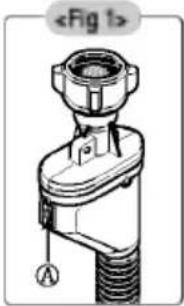 | Check another tap in the house.Fully open tap.Straighten hose(s).Check the filter of the inlet hose.Change the inlet hose. | |
| • Drain hose is kinked or clogged.• The drain filter is clogged. | Clean and straighten the drain hose.Clean the drain filter. | ||
| • Load is too small.• Load is out of balance.• The appliance has an imbalance detection and correction system. If individual heavy articles are loaded (ex. bath mat, bath robe, etc.) this system may stop spinning or even interrupt the spin cycle altogether.• If the laundry is still too wet at the end of the cycle, add smaller articles of laundry to balance the load and repeat the spin cycle. | Add 1 or 2 similar items to help balance the load.Rearrange load to allow proper spinning | ||
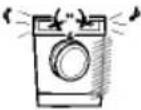 • Is the door opened? • Is the door opened? | Close the door.* If “ _dE ” is not released, call for service. | ||
| Unplug the power plug and call for service. | |||
| • Water overfills due to the faulty water valve. | Close the water tap.Unplug the power plug.Call for service. | ||
| • Water level sensor has malfunctioned. | |||
| • Over load in motor. | |||
| • Over load in motor. | |||
| • Water leaks. | Call for service. | ||
What Is Not Covered:
• Service trips to your home to teach you how to use the product.
- If the product is connected to any voltage other than that shown on the rating plate.
- If the fault is caused by accident, neglect, misuse or Act of God.
- If the fault is caused by factors other than normal domestic use or use in accordance with the owner's manual.
- Provide instruction on use of product or change the set-up of the product.
- If the fault is caused by pests for example, rats or cockroaches etc..
- Noise or vibration that is considered normal for example water drain sound, spin sound, or warming beeps.
- Correcting the installation for example, levelling the product, adjustment of drain.
- Normal maintenance which recommended by the owner's manual.
- Removal of foreign objects / substances from the machine, including the pump and inlet hose filter for example, grit, nails, bra wires, buttons etc.
- Replace fuses in or correct house wiring or correct house plumbing.
- Correction of unauthorized repairs.
- Incidental or consequential damage to personal property caused by possible defects with this appliance.
- If this product is used for commercial purpose, it is not warranted.
(Example : Public places such as public bathroom, lodging house, training center, dormitory)
If the product is installed outside the normal service area, any cost of transportation involved in the repair of the product, or the replacement of a defective part, shall be borne by the owner.
Warranty conditions for washing machine
- The warranty period begins on the purchase date and is valid for 24 months. Begin of warranty period is proven if, the buyer submits purchase receipt together with the warranty card, filled in and signed by the seller. The serial number of the product must agree with the number entered onto the warranty card.
- During the warranty period, we will correct any defects at no cost to you, if it can be proven that these are attributed to manufacturing or material defects.
-
Damages due to incorrect handling, non-compliance with instructions for use and normal wear are not covered by this warranty. Also, the warranty does not cover wear parts or easily broken parts (for example, viewing glass, light bulbs). The buyer is responsible for any damages during transport as well as shipping and packaging costs.
-
We decide whether to make repairs, exchange or replace parts. Exchanged or replaced parts are our property. The original warranty period is not prolonged if a refrigerator is repaired or certain parts are replaced.
- The warranty is nullified if any person intervenes in the apparatus that are not authorised by LG Electronics, if the apparatus is used for commercial purposes.
- Always keep the original packaging, so that if the apparatus requires servicing, it can be transported without damaging it.
- If a repair is covered by this warranty, always contact your dealer or an authorised service centre.
- Further claims are excluded. If parts of these provisions are invalid, they apply in the sense of the wording. The validity of the other provisions is not effected.
Warranty Certificate
For offer a 24-month warranty for this apparatus
During the 24-month warranty period, we will repair your apparatus at no cost to you or make available spare parts to your dealer free, if this apparatus fails due to manufacturing or material defects. Further claims are excluded.
Your warranty conditions on the rear also apply!
Type of apparatus : ____
Serial number :
Name of buyer : ____
Purchase date : ____
Dealer's stamp and signature