
BTH-251BLACK - Headphones DENVER - Free user manual and instructions
Find the device manual for free BTH-251BLACK DENVER in PDF.


User questions about BTH-251BLACK DENVER
0 question about this device. Answer the ones you know or ask your own.
Ask a new question about this device
Download the instructions for your Headphones in PDF format for free! Find your manual BTH-251BLACK - DENVER and take your electronic device back in hand. On this page are published all the documents necessary for the use of your device. BTH-251BLACK by DENVER.
USER MANUAL BTH-251BLACK DENVER
natural_image
Black and white photo of a modern black and white headband headset (no visible text or symbols)INSTRUCTION MANUAL
DENVER BTH-251
facebook.com/denverelectronics
Congratulations with your new Bluetooth headset. Please read this manual before using it to make sure you use it correct.
Warning: Lithium battery inside
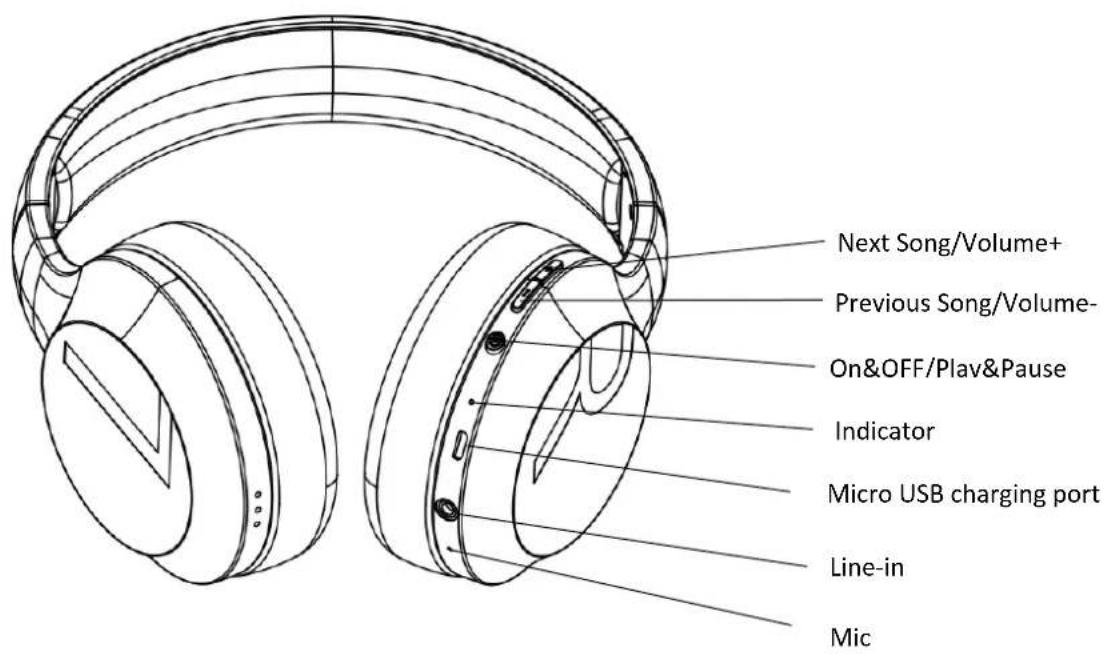
Headset overview
text_image
Next Song/Volume+ Previous Song/Volume- On&OFF/Plav&Pause Indicator Micro USB charging port Line-in MicPairing
- Ensure that your phone or Bluetooth device is switched on.
- To pair the headset that has not been previously paired with a device, please switch on the headset by push and hold power button for approximately 3 seconds., the headset starts in Bluetooth search mode (red/blue light flashes quickly)
- Activate Bluetooth on your phone or Bluetooth device, and set it to search for Bluetooth device.
- Select "BTH-251" from the list of found devices on your phone or Bluetooth devices.
- When Bluetooth is paired successfully, there will be a prompt tone and the blue light flashes only.
Switch On
After unit has been paired (look above), just hold power until the LED lights up and then let go. When it has been paired it will automatically reconnect once turned on.
Switch Off
To switch off, press and hold the Power key about 3 seconds. There is a prompt tone and a red indicating light. If the headset is not connected to a device within 5 minutes, it switches off automatically.
Adjust the Volume
Turn volume up or down by short push on volume +/- key during a calling or while listening to music. When the volume reaches to maximum, there is a warning tone.
Charge the Battery
Please insert the Micro USB end of the included USB cable into the USB micro port charger connector under the right ear-cap of the headphone, and plug the other end into a USB port on your computer or other devices made for USB charging. The indicator light will be red while charging. Once fully charged, the indicator light shows blue. Charge time is approximately 2-3 hours if battery is empty. The fully charged battery has power for up to 6 hours talking and/or music time (and up to 300 hours standby time).
Calls
To answer or end a call, push once on the phone key to answer or reject a call. End a call with a short press on phone key.
Passive model
You can use DENVER BTH-251 as a wired headphone. Simply connect the headset to your MP3 player with 3.5mm audio cable.
Caution:
- Please avoid very high volume for a constant period of time. This may damage your hearing.
- If not used for a long time, make sure to charge it once every 6 months. 3. Battery is built-in and it is not replaceable.
- Please keep the headset away from wet areas. Do not use in rain or moist weather.
- The operating temperature is 5^ to 35^ . Please don't put the headset into fire to avoid battery blast accident.
Please notice - All products are subject to change without any notice. We take reservations for errors and omissions in the manual.
ALL RIGHTS RESERVED, COPYRIGHT DENVER ELECTRONICS A/S
DENVER®
www.denver-electronics.com



Electric and electronic equipment and included batteries contains materials, components and substances that can be hazardous to your health and the environment, if the waste material (discarded electric and electronic equipment and batteries) is not handled correctly.
Electric and electronic equipment and batteries is marked with the crossed out trash can symbol, seen above. This symbol signifies that electric and electronic equipment and batteries should not be disposed of with other household waste, but should be disposed of separately.
As the end user it is important that you submit your used batteries to the appropriate and designated facility. In this manner you make sure that the batteries are recycled in accordance with legislature and will not harm the environment.
All cities have established collection points, where electric and electronic equipment and batteries can either be submitted free of charge at recycling stations and other collection sites, or be collected from the households. Additional information is available at the technical department of your city.
Hereby, Inter Sales A/S declares that the radio equipment type BTH-251 is in compliance with Directive 2014/53/EU. The full text of the EU declaration of conformity is available at the following internet address:
www.denver-electronics.com and then click the search ICON on topline of website. Write model number: BTH-251. Now enter product page, and red directive is found under downloads/other downloads.
Operating Frequency Range: 2402Hz-2480KHz
Max Output Power: 15mW
DENVER ELECTRONICS A/S
Omega 5A, Soeften
DK-8382 Hinnerup
Denmark
www.facebook.com/denverelectronics