
EXTRA POWER DC-11 - Power bank NOKIA - Free user manual and instructions
Find the device manual for free EXTRA POWER DC-11 NOKIA in PDF.


| Product Type | External battery |
| Brand | NOKIA |
| Model | EXTRA POWER DC-11 |
| Internal battery capacity | Approximately 950 mAh |
| Charging input | Compatible Nokia charger (AC-3, AC-4, AC-5, AC-8, DC-4, DC-9) or USB cable CA-100/CA-126 (sold separately) |
| Outputs | 2.0 mm charging connector and micro-USB plug |
| Number of devices chargeable simultaneously | 2 |
| Charging indicator | LED indicator (flashes while charging, stops when fully charged) |
| Power button | Yes |
| Removable battery | No (internal, non-replaceable) |
| Recommended operating temperature | 15°C to 25°C |
| Battery life | Can fully recharge a 950 mAh battery once |
| Maintenance | Keep dry, avoid dust, do not open, clean with a soft, dry cloth |
| Safety | Only use approved Nokia chargers; do not expose to extreme temperatures; do not dispose of in fire |
| Recycling | Do not dispose of with household waste. Return to a WEEE collection point. For more information, visit www.nokia.com/environment |
| Charging cable | Integrated (2.0 mm and micro-USB plugs) |
| Compatibility | Nokia devices with a 2.0 mm connector or devices with a micro-USB plug |
Frequently Asked Questions - EXTRA POWER DC-11 NOKIA
User questions about EXTRA POWER DC-11 NOKIA
0 question about this device. Answer the ones you know or ask your own.
Ask a new question about this device
Download the instructions for your Power bank in PDF format for free! Find your manual EXTRA POWER DC-11 - NOKIA and take your electronic device back in hand. On this page are published all the documents necessary for the use of your device. EXTRA POWER DC-11 by NOKIA.
USER MANUAL EXTRA POWER DC-11 NOKIA
Nokia Extra Power DC-11/DC-11K

© 2008-2010 Nokia. All rights reserved.
Nokia, Nokia Connecting People and the Nokia Original Accessories logo are trademarks or registered trademarks of Nokia Corporation.
Introduction
With the Nokia Extra Power DC-11/DC-11K (hereafter DC-11), you can simultaneously charge the battery in two compatible devices when you have no access to an external power source.
The DC-11 device can be used to charge the battery in a Nokia device that has a 2.0 mm charger connector or a compatible device that has a micro-USB charger connector.
The DC-11 device is meant for partial and occasional charging.
Read this user guide carefully before using the DC-11 device. Also, read the user guide for the device that you charge with the DC-11 device.
This product may contain small parts. Keep them out of the reach of small children.
Get started
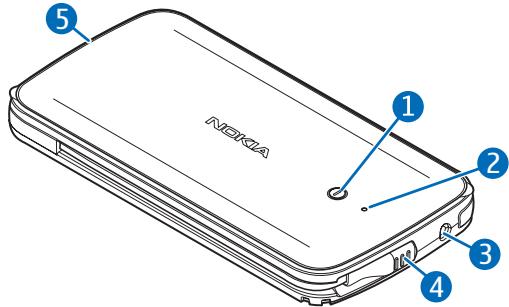
The DC-11 device contains the following parts shown on the title page: power key (1), indicator light (2),
2.0 mm charger connector (3), micro-USB charger plug (4), and 2.0 mm charger plug (5).
Before you can use the DC-11 device to charge the battery in a compatible device, you must charge the DC-11 device.
Charge the DC-11 device
Before charging the DC-11 device, carefully read "Battery and charger information".

Warning: Use only chargers approved by Nokia for use with this particular model.
The use of any other types may invalidate any approval or warranty, and may be dangerous.
When you disconnect the power cord of any accessory, grasp and pull the plug, not the cord.
- Connect a compatible charger to a power source.
- Connect the charger cable to the charger connector on the DC-11 device. The device switches on.
The indicator light flashes during charging. If the light is not displayed, check that the charger is properly connected to the DC-11 device.
- When the DC-11 device is fully charged, the indicator light stops flashing. Disconnect the charger from the DC-11 device, then from the power source.
The DC-11 device can also be charged through a USB port of a compatible PC using the Nokia connectivity cable CA-100 or CA-126 (sold separately). Connect one end of the cable to the charger connector on the DC-11 device and the other end to a USB port on the PC.
While charging the DC-11 device, you can use it to charge the battery in one or two devices. Connect the device or devices to the DC-11 device.
Charge the battery of the other device
You can use the DC-11 device to charge the battery in two devices at the same time.
The fully charged DC-11 device has enough power to fully charge a 950 mAh battery once.
- If the charger plug you want to use is inserted into the end of the DC-11 device, pull the plug out from the recess, and uncoil the charging cable from the side of the device.
- Connect the charger plug to the other device.
- Press the power key of the DC-11 device.
The indicator light flashes during charging. If the light does not flash, check that the other device is properly connected to the DC-11 device. If the light is not displayed,
charge the DC-11 device, and press the power key to switch it on.
If the DC-11 device cannot start charging the other device within about 30 seconds, the DC-11 device switches off.
- Check the charge level from the connected device.
- When the battery in the other device becomes fully charged, the indicator light stops flashing and is continuously shown for about 30 seconds, and the DC-11 device switches off. You can also stop charging and switch off the DC-11 device by pressing and holding the power key for about 5 seconds. The DC-11 device automatically switches off if it becomes discharged.
When you charge the battery of a low-power device such as a Bluetooth headset, the indicator light may continue flashing even after the battery has been fully charged.
- Disconnect the DC-11 device from the other device.
- To carry the DC-11 device with you, insert the charging cable into the side slot, and push the charger plug into the recess.
Battery and charger information
This device has an internal, nonremovable, rechargeable battery. Do not attempt to remove the battery from the device as you may damage the device. This device is intended for use when supplied with power from the following chargers: AC-3, AC-4, AC-5, AC-8, DC-4, and DC-9. The exact charger model number may vary depending on the type of plug. The plug variant is identified by one of the following: E, EB, X, AR, U, A, C, or UB. The battery can be charged and discharged hundreds of times, but it will eventually wear out. Recharge your battery only with Nokia approved chargers designated for this
device. Use of an unapproved charger may present a risk of fire, explosion, leakage, or other hazard.
If a battery is being used for the first time or if the battery has not been used for a prolonged period, it may be necessary to connect the charger, then disconnect and reconnect it to begin charging the battery. If the battery is completely discharged, it may take several minutes before the charging indicator light is displayed.
Unplug the charger from the electrical plug and the device when not in use. Do not leave a fully charged battery
connected to a charger, since overcharging may shorten its lifetime. If left unused, a fully charged battery will lose its charge over time.
Always try to keep the battery between 15^ C and 25^ C ( 59^ F and 77^ F). Extreme temperatures reduce the capacity and lifetime of the battery. A device with a hot or cold battery may not work temporarily. Battery performance is
particularly limited in temperatures well below freezing.
Do not dispose of batteries in a fire as they may explode. Batteries may also explode if damaged.
Never use any charger that is damaged.

Important: Charging capacity is an estimate only and depends on battery age and condition and on temperatures to which battery is exposed.
Care and maintenance
Your device is a product of superior design and craftsmanship and should be treated with care. The following suggestions will help you protect your warranty coverage.
- Keep the device dry. Precipitation, humidity, and all types of liquids or moisture can contain minerals that will corrode electronic circuits. If your
device does get wet, allow it to dry completely.
- Do not use or store the device in dusty, dirty areas. Its moving parts and electronic components can be damaged.
- Do not store the device in hot areas. High temperatures can shorten the life of electronic devices, damage
batteries, and warp or melt certain plastics.
- Do not store the device in cold areas. When the device returns to its normal temperature, moisture can form inside the device and damage electronic circuit boards.
- Do not attempt to open the device.
- Do not drop, knock, or shake the device. Rough handling can break fine mechanics.
- Do not use harsh chemicals, cleaning solvents, or strong detergents to clean the device.
- Do not paint the device. Paint can clog the moving parts and prevent proper operation.
If the product is not working properly, take it to the nearest authorised service facility for service.

Recycle
The crossed-out wheeled-bin symbol on your product, battery, literature, or packaging reminds
you that all electrical and electronic products, batteries, and accumulators must be taken to separate collection at the end of their working life. This requirement applies in the European Union. Do not dispose of these products as unsorted municipal waste. For more environmental information, see the product Eco-Declarations at www.nokia.com/environment.
Always return your used electronic products, batteries, and packaging materials to a dedicated collection point. This way you help prevent uncontrolled waste disposal and promote the recycling of materials. More detailed information is available from the product retailer, local waste authorities, national producer responsibility organisations, or your local Nokia representative. Check how to recycle your Nokia products at www.nokia.com/werecycle, or if browsing on a mobile device, www.nokia.mobi/werecycle.
Brand : NOKIA
Model : EXTRA POWER DC-11
Category : Power bank