2705 Shade - Mobile Phone NOKIA - Free user manual and instructions
Find the device manual for free 2705 Shade NOKIA in PDF.


Pick your language and provide your email: we'll send you a specifically translated version.
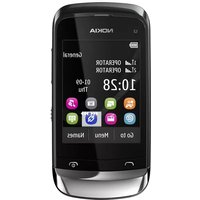
| Type of product | Mobile phone |
| Brand | Nokia |
| Model | 2705 Shade |
| Form factor | Slider |
| Display size | 2.2 inches |
| Display resolution | 240 x 320 pixels |
| Rear camera resolution | 2.0 megapixels |
| Battery type | Lithium-Ion (Li-Ion) |
| Battery capacity | 1020 mAh |
| Talk time | Up to 5 hours |
| Standby time | Up to 300 hours |
| Connectivity | Bluetooth, USB |
| Memory card slot | MicroSD |
| Dimensions (H x W x D) | 101 x 46 x 16 mm |
| Weight | 100 g |
| Power adapter | AC adapter included |
| Audio features | Music player, FM radio |
| Vibration alert | Yes |
| Speakerphone | Yes |
| Cleaning | Use a soft, dry cloth to clean the phone. Avoid water and solvents. |
| Safety | Avoid exposing the device to high temperatures or magnetic fields. |
| Spare parts and repairability | Battery and SIM card are replaceable. Other repairs should be done by qualified service personnel. |
| General information | Includes user manual in PDF format. |
Frequently Asked Questions - 2705 Shade NOKIA
How do I insert a SIM card into the Nokia 2705 Shade?
Turn off the phone and remove the back cover. Slide the SIM card into the slot with the gold contacts facing down, then replace the battery and cover.
What type of memory card does this phone support?
The device supports MicroSD cards for external storage, allowing you to expand the memory for photos and music.
How can I perform a factory reset?
Go to the settings menu, select 'Restore Factory Settings', and confirm. This will erase all personal data, so make a backup first.
How do I extend the battery life?
Reduce screen brightness, close unused applications, turn off Bluetooth and Wi-Fi when not in use, and avoid using the phone in extreme temperatures.
How do I transfer music to the phone?
Connect the phone to a computer via USB, then copy music files to the memory card. You can also use Bluetooth to send audio files from another device.
Does the Nokia 2705 Shade support Bluetooth?
Yes, the phone features Bluetooth connectivity, allowing you to connect wireless headsets and transfer files with other compatible devices.
How can I update the software on my device?
Check for updates by visiting the Nokia support website or using a PC suite. The manual provides instructions for keeping the firmware current.
How should I clean my phone?
Use a soft, dry cloth to wipe the exterior. Do not use water, cleaning agents, or abrasive materials to avoid damaging the surface.
Is the battery removable?
Yes, the phone has a removable battery that can be replaced by detaching the back cover and lifting the battery out.
Can I use this phone abroad?
This phone is designed for CDMA networks and may not work on GSM networks. Check with your carrier for international roaming compatibility.
User questions about 2705 Shade NOKIA
0 question about this device. Answer the ones you know or ask your own.
Ask a new question about this device
No questions yet. Be the first to ask one.
Download the instructions for your Mobile Phone in PDF format for free! Find your manual 2705 Shade - NOKIA and take your electronic device back in hand. On this page are published all the documents necessary for the use of your device. 2705 Shade by NOKIA.
USER MANUAL 2705 Shade NOKIA


Manual assistant
Powered by Anthropic
Waiting for your message
Product information
Brand : NOKIA
Model : 2705 Shade
Category : Mobile Phone