
FS1610 - Fan BLACK & DECKER - Free user manual and instructions
Find the device manual for free FS1610 BLACK & DECKER in PDF.


| Product type | Pedestal fan |
| Brand | Black & Decker |
| Model | FS1610 |
| Power supply | 220-240 V ~ 50 Hz |
| Power | 60 W |
| Weight | 6.61 kg |
| Number of speeds | 4 (Low, Medium, High, Impulse) |
| Oscillation | Yes, can be turned on/off |
| Timer | 1 / 2 / 4 / 8 hours |
| Remote control | Yes, with AAA batteries (2×) |
| Height adjustment | Yes, by tightening screw |
| Tilt | Yes, manually adjustable |
| Double insulation | Yes (class II) |
| Intended use | Indoor domestic, air circulation |
| Maintenance | Clean with damp cloth; grille and blade washable with soapy water |
| Warranty | 24 months |
| Spare parts | Grilles, blade, base, pole, remote control, screws |
Frequently Asked Questions - FS1610 BLACK & DECKER
User questions about FS1610 BLACK & DECKER
0 question about this device. Answer the ones you know or ask your own.
Ask a new question about this device
Download the instructions for your Fan in PDF format for free! Find your manual FS1610 - BLACK & DECKER and take your electronic device back in hand. On this page are published all the documents necessary for the use of your device. FS1610 by BLACK & DECKER.
USER MANUAL FS1610 BLACK & DECKER
natural_image
Line drawing of a standard 16-inch electric fan with a display stand and a small handheld device on the side (no text or symbols)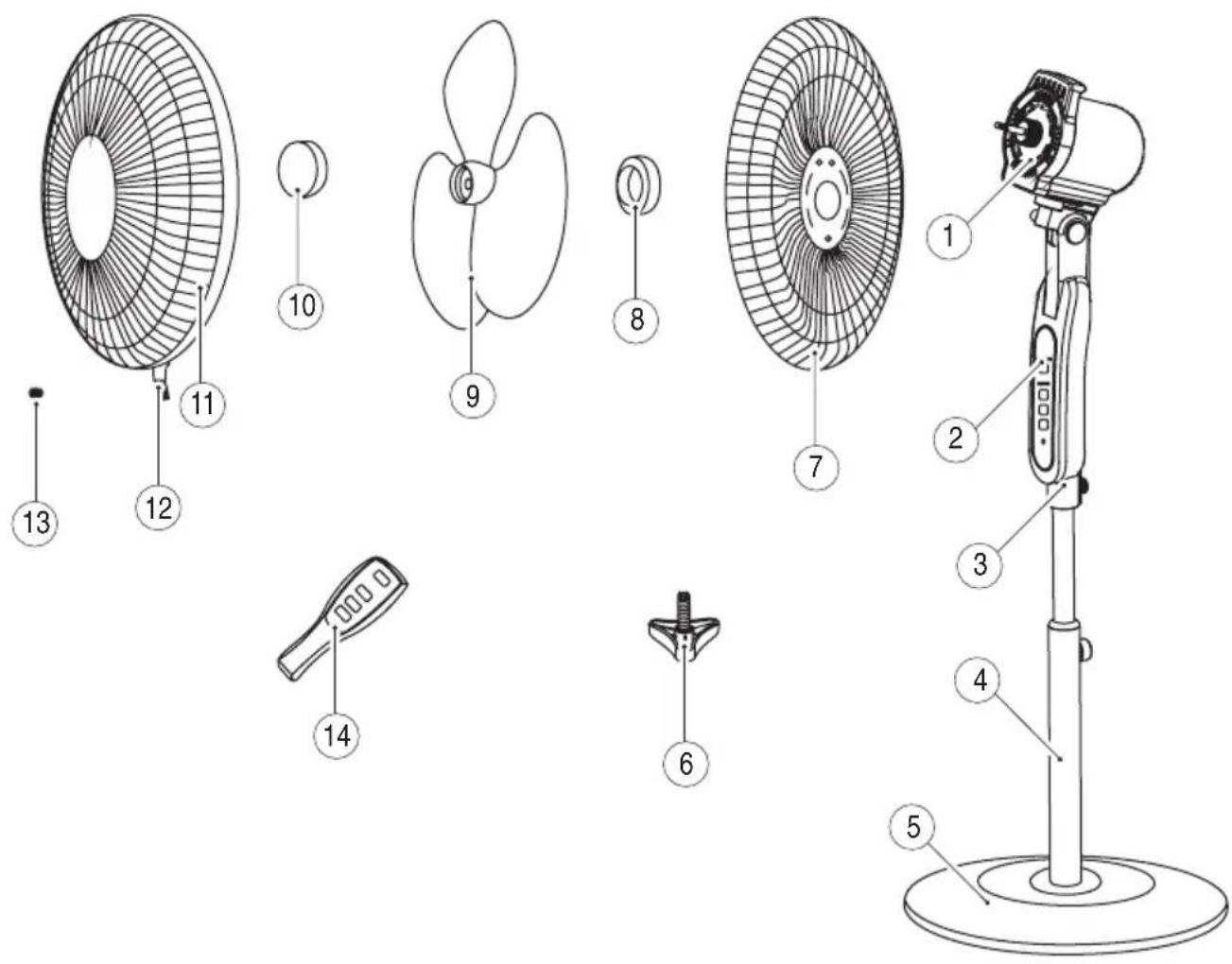
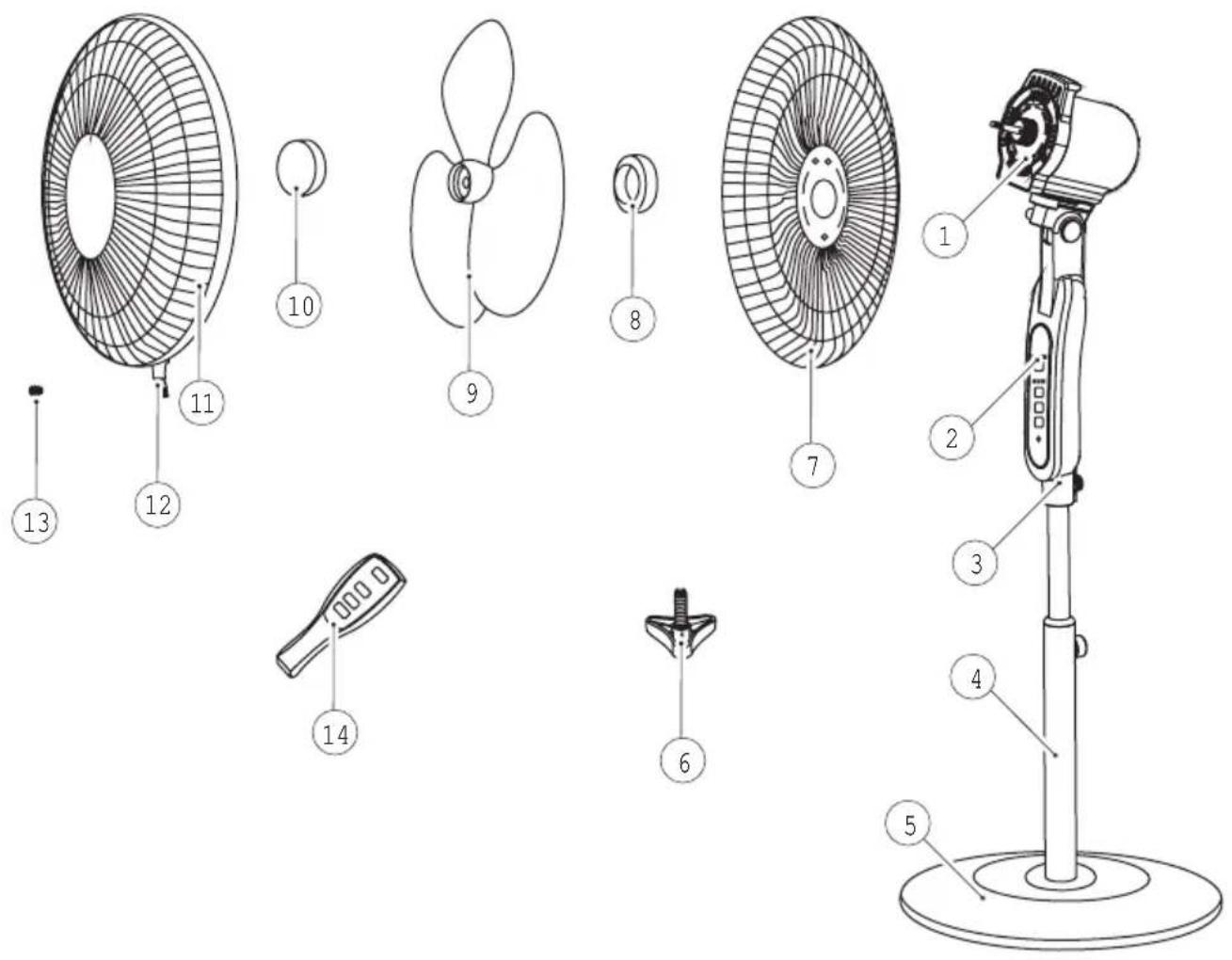
Parts Identification
1 Fan head
2 Control panel
3 Fan unit
4 Support tube
5 Base
6 Base screw
7 Rear guard
8 Guard nut
9 Fan blade
10 Blade cap
11 Front guard
12 Bottom clip
13 Guard screw
14 Remote Control
Intended use
Your Black & Decker fan has been designed for circulating air. This product is intended for household use only. Remove all the parts from the packaging material and keep them safe. Ensure that you have all the parts as identified in the part identification list, if anything is missing get in touch with your nearest Black & Decker service agent for assistance.

Read this entire manual carefully before using the appliance.
Safety instructions
Warning! When using mains-powered appliances, basic safety precautions, including the following, should always be followed to reduce the risk of fire, electric shock, personal injury and material damage.
- The intended use is described in this manual. The use of any accessory or attachment or the performance of any operation with this appliance other than those recommended in this instruction manual may present a risk of personal injury.
- Retain this manual for future reference.
Using your appliance
- Make sure that the appliance is switched off before connecting to or disconnecting from the power supply.
• Always take care when using the appliance. - Never pull the power supply cord to disconnect the plug from the socket.
- Keep the power supply cord away from heat, oil and sharp edges.
-
When using an extension cord with your appliance, make sure the extension cord is correctly wire & rated for its use.
-
Do not allow the cord set to hang over bench tops.
- Do not use the appliance outdoors.
- Do not operate the appliance if your hands are wet. Do not operate the appliance if you are barefoot.
- Guide the power supply cord neatly so it does not hang over the edge of a worktop and cannot be caught accidentally or tripped over.
• The product must not be immersed in liquid. - Do not operate this unit in tropical climates or in areas where the temperature exceeds 40^ C.
• Always route the cord carefully to avoid a tripping hazard.
Warning! Do not cover the back of the fan with curtains or other obstructions.
Warning! Keep loose clothing, hair, jewellery etc. away from moving parts.
Safety of others
- This appliance is not intended for use by persons (including children) with reduced physical, sensory or mental capabilities, or lack of experience and knowledge, unless they have been given supervision or instruction concerning use of the appliance by a person responsible for their safety.
- Children should be supervised to ensure that they do not play with the appliance.
- Do not allow children or any person unfamiliar with these instructions to use the appliance.
- Do not allow children or animals to come near the work area or to touch the appliance or power supply cord. Close supervision is necessary when the appliance is used near children.
ENGLISH
- Children should not be left unattended while the fan is in use.
- It is not recommended that this product is used by children.
- Never leave the appliance unattended when in use.
After use
- Switch off and remove the plug from the socket before leaving the appliance unattended and before changing, cleaning or inspecting any parts of the appliance.
- When not in use, the appliance should be stored in a dry place. Children should not have access to stored appliances.
Inspection and repairs
- Switch off the appliance before cleaning, changing accessories or approaching parts which move in use.
- Always allow the motor to stop turning before removing any cover or accessory
- Before use, check the appliance for damaged or defective parts. Check for breakage of parts, damage to switches and any other conditions that may affect its operation.
- Do not use the appliance if any part is damaged or defective.
- Have any damaged or defective parts repaired or replaced by an authorised repair agent.
- Before use, check the power supply cord for signs of damage, ageing and wear.
- Do not use the appliance if the power supply cord or mains plug is damaged or defective.
- If the power supply cord or mains plug is damaged or defective it must be repaired by an authorised repair agent in order to avoid a hazard. Do not cut the power supply cord and do not attempt to repair it yourself.
- Never attempt to remove or replace any parts other than those specified in this manual.
- Do not attempt to repair the appliance. Take it to your nearest Black & Decker owned or authorised Service Centre for repair.
- Ensure that he fan is switched off and disconnected from the mains supply before removing the guard.
Electrical safety
Before use check that the mains voltage corresponds to the voltage on the rating plate.

This appliance is double insulated in accordance with EN 60335; therefore no earth wire is required.
- To avoid the risk of electric shock, do not immerse the cord, plug or motor unit in water or other liquid.
- Check that the supply voltage shown on the rating plate of the appliance matches that of your electrical system. Any connection error will invalidate the guarantee.
Mains plug replacement
If a new mains plug needs to be fitted:
- Safely dispose of the old plug.
- Connect the brown lead to the live terminal of the new plug.
- Connect the blue lead to the neutral terminal.
- If the product is class I (earthed), connect the green / yellow lead to the earth terminal.
Warning! If your product is class II double insulated (only 2 wires in the cord set), no connection is to be made to the earth terminal.
Follow the fitting instructions supplied with good quality plugs
Any replacement fuse must be of the same rating as the original fuse supplied with the product.
Assembly
Make sure your fan is switched off before connecting to or disconnecting from power supply. Ensure that the voltage rating on the base plate corresponds to the main voltage at your home.
Remove all packaging from the parts of the fan.
Warning! Never use the fan without the guard in place or if the guard is damaged.
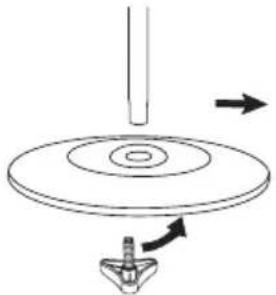
Assembling the base and stand
- Remove the screw from the support tube by turning it anti-clockwise.
- Place the support tube into the base. Re-insert the screw into the support tube from underneath. Tighten the screw by turning it clockwise.
natural_image
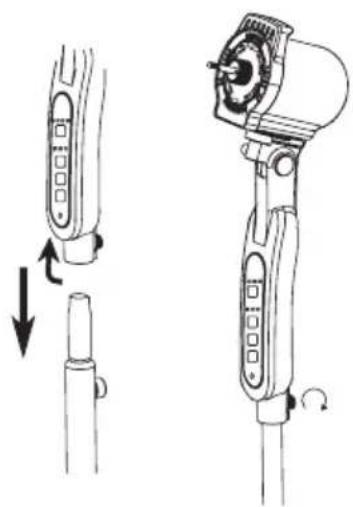
Diagram of a mechanical device with a rotating disk and a base, showing directional arrows (no text or symbols)Fitting the fan to the stand
- Remove the screw from the bottom of the fan unit by turning it anti-clockwise.
- Place the fan unit onto the top of the support tube. Re-insert the screw into the fan unit. Tighten the screw by turning it clockwise.
natural_image
Technical line drawing of a handheld device with two views: top shows a cylindrical component, bottom shows a cylindrical part with a handle (no text or symbols)Fitting the fan blade and guard
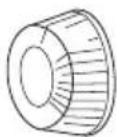
- Remove the blade cap from the motor shaft by turning it clockwise.
- Remove the guard nut from the motor shaft by turning it anti-clockwise.
- Place the rear guard by positioning it on the location pins on the fan head. (ensure that the rear guard is in the correct orientation)
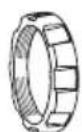
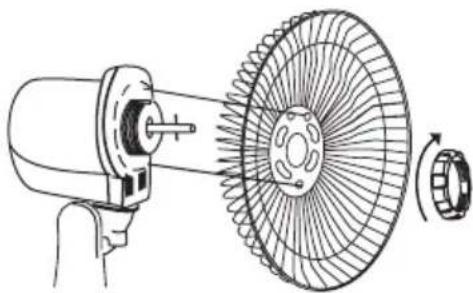
natural_image
Technical line drawing of a mechanical fan assembly with a rotating wheel and motor (no text or symbols)- Secure the guard on to the fan head by re-fitting the guard nut. Tighten the guard nut by turning it clockwise.
- Place the fan blade onto the motor shaft.
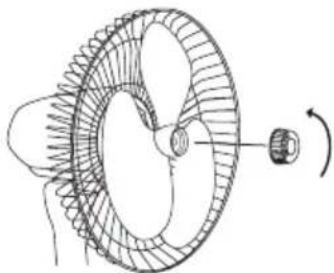
natural_image
Diagram of a mechanical gear or turbine component with rotational motion indicated by an arrow (no text or labels)ENGLISH
- Secure the fan blade on to the motor shaft by re-fitting the blade cap. Tighten the blade cap by turning it anti-clockwise.
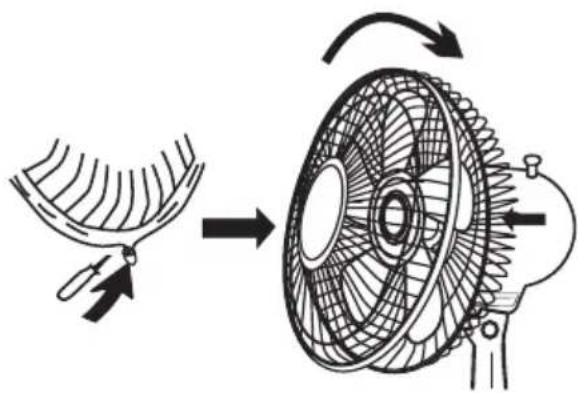
- Place the front guard onto the rear guard by positioning the top clip on the uppermost part of the rear guard. Push the top clip down and press the rim of the front guard onto the rear guard ensuring a tight fit all the way round.
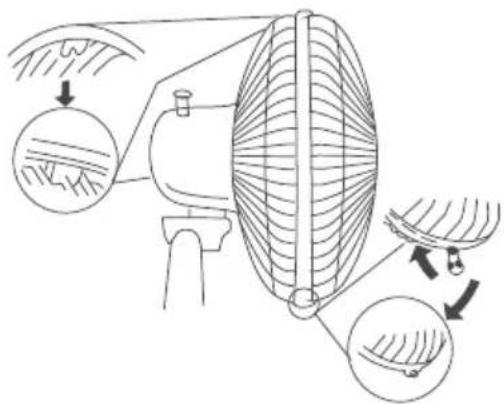
- Close the bottom clip. Tighten the bottom clip screw by turning it clockwise.
natural_image
Diagram of a fan blade being processed into a motor, showing internal structure and rotation (no text or labels)Use
Warning! Never use the fan without the guard in place or if the guard is damaged.
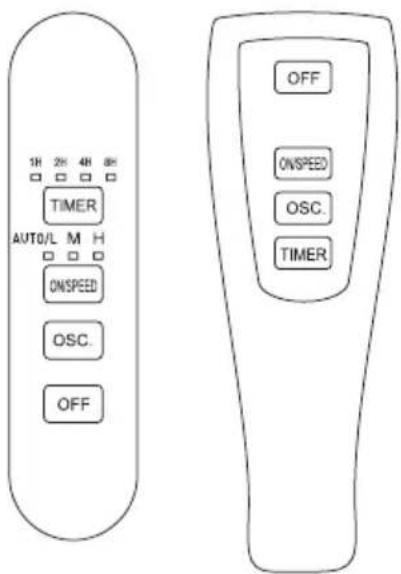
Note: All controls can be operated from the fan unit or from the remote control.
Switching on and off
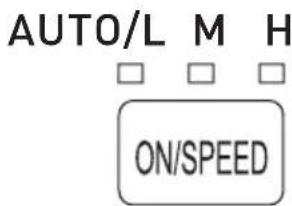
Your Fan has four speed control to keep the desired air flow through your room.
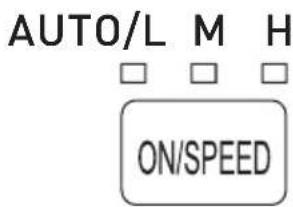
| Symbol | Speed | Press |
| M | Medium | 1 |
| H | High | 2 |
| AUTO/L | Pulse | 3 |
| AUTO/L | Low | 4 |
Button
tin me tin
- To switch on, press the ON/SPEED button the required number of times to set the desired speed. The fan will start.
• To switch off, press the OFF button.
Oscillation
The fan can oscillate when in use to circulate air around a greater area.
- Press the oscillation button to start oscillation.
OSC.
- Press the oscillation button to stop oscillation.
Timer
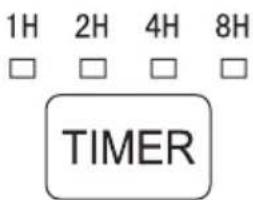
The timer can be used to set the running time of the fan.
| Runtime | Press |
| 1 Hour 1 time | |
| 2 Hours 2 times | |
| 4 Hours 3 times | |
| 8 Hours 4 times |
- To switch on, press the ON/SPEED button the required number of times to set the desired speed. The fan will start.
- Press the timer button the required number of times to set the run time. The fan will automatically stop when the run time is reached.
Adjusting the angle of the fan
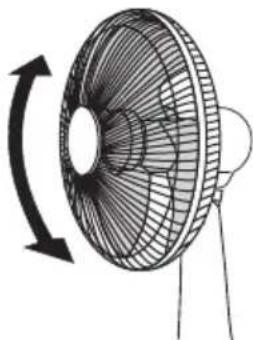
The angle of the fan can be adjusted up and down.
- Tilt the head of the fan to the desired angle.
natural_image
Line drawing of a desktop fan with an arrow indicating rotational direction (no text or symbols)Adjusting the height of the fan
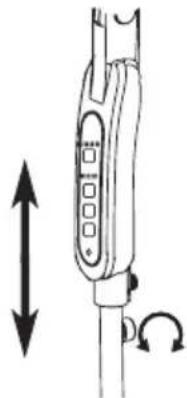
- Loosen the screw at the top of the support button tube by turning it anti-clockwise.
- Lift the fan to the desired height.
- Tighten the screw at the top of the support tube by turning it clockwise.
natural_image
Diagram of a vertical device with bidirectional arrows indicating movement or force (no text or symbols)Remote control
Please insert 2 'AAA' size batteries into the remote as per the marking in the remote cavity.
- To fit the batteries, remove the cover from the rear of the remote control.
- Insert 2 ‘AAA’ sized batteries following the markings in the cavity. (+ for positive and – for negative)
• Re-fit the battery cover.
ENGLISH
Note: Always point the LED on your remote towards the fan when you are operating the fan with the remote control.
With normal use, the batteries should last for about six months, when the remote no longer operates the fan, replace the batteries with new ones.
Maintenance
Your Black & Decker fan has been designed to operate over a long period of time with a minimum of maintenance. Continuous satisfactory operation depends upon proper care and regular cleaning.
Warning! Before performing any maintenance or cleaning of the fan, disconnect the appliance from the power supply.
Cleaning
The main housing should be cleaned with a clean damp cloth only.
The guard and fan blade can be removed from the appliance and washed in warm soapy water. Rinse with clean water and dry thoroughly with a dry soft cloth.
Note: Do not use abrasives or chemical cleaners on any part of this appliance.
- Do not allow the filters to get wet.
- Do not wash any part of this appliance in a dishwasher.
- Ventilation slots should be cleaned occasionally with a clean, dry paint brush.
Technical data
| Voltage 220 – 240Volts | |
| Supply | 50Hz |
| Power input 60W | |
| Weight | 6.61kg |
Protecting the environment
arate collection. This product must not be disposed of with normal household waste.
Should you find one day that your Black & Decker product needs replacement, or if it is of no further use to you, do not dispose of it with other household waste. Make this product available for separate collection.
- Black & Decker provides a facility for recycling Black & Decker products once they have reached the end of their working life. This service is provided free of charge. To take advantage of this service please return your product to any authorised repair agent who will collect them on our behalf.
- You can check the location of your nearest authorised repair agent by contacting your local Black & Decker office at the address indicated in this manual. Alternatively, a list of authorized Black & Decker repair agents and full details of our after-sales service and contact are available on the Internet at: www.2helpU.com.
Guarantee
Black & Decker is confident of the quality of its products and offers an outstanding guarantee.
This guarantee statement is in addition to and in no way prejudices your statutory rights.
The guarantee is valid within the territories of the Member States of the European Union and the European Free Trade Area.
If a Black & Decker product becomes defective due to faulty materials, workmanship or lack of conformity, within 24 months from the date of purchase, Black & Decker guarantees to replace defective parts, repair products subjected to fair wear and tear or replace such products to ensure minimum inconvenience to the customer unless:
The product has been used for trade, professional or hire purposes;
The product has been subjected to misuse or neglect;
The product has sustained damage through foreign objects, substances or accidents;
Repairs have been attempted by persons other than authorised repair agents or Black & Decker service staff.
To claim on the guarantee, you will need to submit proof of purchase to the seller or an authorised repair agent. You can check the location of your nearest authorised repair agent by contacting your local Black & Decker office at the address indicated in this manual.
Alternatively, a list of authorised Black & Decker repair agents and full details of our after-sales service and contacts are available on the Internet at: www.2helpU.com.
تعريف الأجزاء
8 صもうة شبكة الحماية
9 شفرة المروحة
10 غطاء الشفرة
natural_image
Technical line drawing of a mechanical device with two views: top shows a cylindrical component, bottom shows a cylindrical part with a handle (no text or symbols)natural_image
Technical line drawing of a mechanical device with a fan and rotating wheel (no text or symbols)natural_image
Diagram of a mechanical gear or turbine component with rotational motion indicator (no text or labels)ARABIC
natural_image
Diagram of a mechanical device with a rotating shaft and base, showing directional arrows (no text or symbols)natural_image
Diagram of a fan blade being processed into a motor, showing internal blades and fan structure (no text or labels)الاستخدام
natural_image
Line drawing of a desktop fan with a rotating blade and side blades (no text or symbols)ضبط ارتفاع المروحة
OSC.
natural_image
Diagram of a medical or surgical device with bidirectional arrows indicating movement (no text or symbols)natural_image
Diagram of a mechanical device with a rotating disk and a base, showing directional arrows (no text or symbols)natural_image
Diagram of a hand tool with two views: left shows a cylindrical object being adjusted, right shows a mechanical device with a circular head and handle (no text or symbols)natural_image
Technical line drawing of a mechanical fan assembly with a rotating wheel and base mount (no text or symbols)natural_image
Diagram of a mechanical gear or turbine component with rotational motion indicated by an arrow (no text or labels)natural_image
Diagram of a fan blade system with meshing and structural components, showing feed direction (no text or labels)Utilisation
natural_image
Line drawing of a fan with a rotating arrow indicating rotation (no text or symbols)natural_image
Diagram of a medical or laboratory device with bidirectional arrows indicating movement (no text or symbols)Télécommande
Names & Addresses for Black & Decker Service Concessionaries
ALGERIA: SARL Outillage Corporation, After Sale Service Center-08, Rue Mohamed Boudiaf - Cheraga, Algiers, Algeria, Tel: +213 21 375131, Fax: +213-0-369667. AZERBAIJAN: Kontakt - NN LLC, M.Qashqay 43, Baku, Azerbaijan Az1000. Tel: +994 12 4082050, Fax: +994 12 4117090. BAHRAIN: Alfouz Services Co. WLL., P.O. Box 26562, Tubli, Manama, Tel: +973-17783562/17879987, Fax: +973-17783479. Kewalram & Sons Co. WLL P.O. Box 84, Manama, Kingdom of Bahrain, Tel: +973-17213110/17210617/17210619, Fax: +973-17213211/17210627. BANGLADESH: Ultra Corporation, 8, Kushol Centre, Uttara, Dhaka 1230. Tel: +880-2-8922144, Fax: +880-2-8951339. EGYPT: Anasia Egypt for Trading S.A.E, P.O. Box 2443, 9, Mostafa Refaat Street, Sheraton Heliopolis 11361, Cairo, Tel: +202-22684159, Fax: +202-22684169. ETHIOPIA: Seif Sherif Trade PLC -Arada Sub City, Kebele 01-02, Global Insurance Bldg., 2nd Flr. Room 43, P.O.Box 2525, Addis Ababa, Ethiopia, Tel: 00-251-11-1563968/1563969, Fax: 00-251-11-1558009. INDIA: Gryphon Appliances Ltd., D-6/4, Okhla Industrial Area, Phase-I, New Delhi-110020, Tel: +91-11-4673111, Fax: +91-11-46731111. JORDAN: Bashiti Hardware, 93 King Abdullah 2nd St., Opp ELBA House, P.O. Box 3005, Tel: +962-6-5349098 ext.11, Fax: +962-6-5330731. KENYA: Leading Concepts, P.O. Box: 40877-00100, Nairobi, Kenya. Tel: +254 20 690 5000, Fax: +254 20 690 5111. KUWAIT: Al Omar Technical Co., P.O. Box 4062, Safat 13041, Kuwait, Tel: 00965-24848595/24840039, Fax: 00965-24845652. The Sultan Centre, P.O. Box 26567-13126 Safat, Kuwait, Tel: 00965-24343155 Etn. 432, Fax: 00965-24319071. LEBANON: Aces Service Centre, P.O. Box 90-102, Nahr El Mot, Seaside Highway, Pharaon Building, Beirut. Tel: 00961-1-898989, Fax: 00961-1-245880. LIBYA: Homeworld Co., Building No.5, Senidal St., Amr Ibn Elaas Road, Benghazi, Libya. Tel: 00218-61-9094183. Service Center1 - Benghazi: Tel: +218-061-3383994, Fax: +218-092-7640688, Service Center2 - Tripoli: Tel: +218-021-3606430, Fax: +218-092-6514813. MALTA: John G Cassar Ltd. 36-Victory Street, Qormi QRM 06, Malta. Tel: +356-21493251, Fax: +356-21483231. MAURITIUS: J.M. Goupille & Co. Ltd., Rogers Industrial Park 1, Riche Terre, Mauritius, Tel: +230 206 9450/+230 207 1700, Fax: +230 206 9474/+230 248 3188. MOROCCO: UATS 26 Rue Ennarjisse, Hay Erraihan, Beausejour - Hay Hassani-Casablanca, Morocco. Tel: +212 522945114, Fax: +212 522942442. NEPAL: Universal Electrocom, Tripureshwor, Kathmandu, Nepal. Tel: +977-1-4265191. NIGERIA: Dana Electronics Ltd. (Lagos) 116/ 120, Apapa Oshodi Express Way, Isolo, Lagos, Nigeria. Tel: +234-17431818/+234-8037767774/+234-8057445477. (Abuja) 18, A.E. Ekukinam Street, Off Obsfemi Awolowo Road, Utako, Abuja, Nigeria. Tel: +234-8032276101/+234-8037767774. (Kano) 9A - Mai Malari Road, Bompai, Kano, Nigeria. Tel: +234-8053294947/+234-8037767774. OMAN: Oman Marketing & Service Co. (Omasco), P.O. Box 2734, Behind Honda Showroom, Wattayah, Oman, Tel: +968-24560232/24560255, Fax: +968-24560993. Oman Marketing & Service Co. (Omasco), Al Ohi, Sohar, Oman, Tel: +968-26846379, Fax: +968-26846379. Oman Marketing & Service Co. (Omasco) - Sanaya, Salalah, Oman, Tel: 00968-23212290, Fax: +968-23210936. PAKISTAN: Ammar Service & Spares - 60-Bank Arcade, Serai Road, Karachi, Pakistan, Tel: 0092-21-32426905, Fax: 0092-21-32427214. PHILIPPINES: 476 J. P. Rizal St., cor Kakarong St. Brgy Olympia, Makati City, Tel: +632 403-5698. QATAR: Al Muftah Service Centre - Al Wakrah Road, P.O. Box 875, Doha, Qatar. Tel: 00974-4650880/4650110/4446868, Fax: 00974-4441415/4662599. SAUDI ARABIA: (Al Khobar) Al-Suwaiket Catering & Trading Co., P.O.Box 4228, King A.Aziz Street, Al Khobar, Tel: +966-3-8591088, Fax: +966-3-8595648. Fawaz Ebrahim Al Zayani Trading Est. P.O. Box 76026, Al Khobar #31952, Tel: +966-3-8140914, Fax: +966-3-8140824. (Jeddah) Banaja Trading Co. Ltd, P.O. Box 366, Jeddah-21411, Tel: +966-2-6511111, Fax: +966-2-6503668. (Riyadh) Banaja Trading Co. Ltd, P.O. Box 566, Riyadh-11421, Tel: 00966-1-4124444, Fax: +966-1-4033378. SOUTH AFRICA: Trevco Power Tool Service 14 Steenbok Street, Koedoespoort, 0186, Pretoria, South Africa, Tel: +27-86-1873826, Fax: +27-86-5001771. SRI LANKA: Delmege Construction Products (Pvt) Ltd., No 101 Vinayalankara Mawatha, Colombo-10, Sri Lanka, Tel: +94-11-2693361-7, Service hotline: +94-77-2211111. TUNISIA: Société Tunisienne De Manutention - Rue de la Physique, Nouvelle Zone Industrielle de Ben Arous-2013 Tunisie, Tel: +216-71-386102/380620, Fax: +216-71380412 ext 216. UGANDA: Anisuma Investment and Services Ltd., J R complex, Ware House No.5, Plot No 101, 3rd Street Industrial Area, Jinja Road, Kampala, Tel: +256-414237106. UAE: (Abu Dhabi) Light House Electrical, P.O. Box 120, Abu Dhabi, Tel: +971-2-6726131, Fax: +971-2-6720667. (Al Ain) Zillion Equipment and Spare Parts Trading LLC, P.O. Box 19740, Opp. Bin Sadal/Trimix Redymix Sanaiya, Al Ain. Tel: +971-3-7216690, Fax:+971-3-7216103 (Dubai) Black & Decker (Overseas) GmbH, P.O. Box 5420, Dubai, Tel: +971-4-8127400/8127406, Fax: +971-4-2822765. (Musaffah) Light House Electrical, P.O. Box 120, Abu Dhabi, Tel: +971-2-5548315, Fax: +971-2-5540461. (Sharjah) Mc Coy Middle East LLC, P.O. Box 25793 Sharjah, Tel: +971-6-5395931, Fax: +971-6-5395932. (Ras Al Khaimah) Mc Coy Middle East LLC, P.O.Box 10584,Ras Al Khaimah,Tel:+971-7-2277095,Fax:+971-7-2277096.YEMEN:(Aden) Muala St.,Tel:+967 2 222670,Fax:+967 2 222670.(Sana'a) Middle East Trad.Co.Ltd.,P.O.Box 12363,Hayel Street,Sana'a.Tel:+967-1-204201,Fax:+967-1-204204.(Taiz) Middle East Trading Co.(METCO),5th Flr.Hayel Saeed Anam Bldg,Al-Mugamma St.Taiz,Yemen,Tel:+967-4-213455,Fax:+967-4-219869


- Parts Identification
- Intended use
- Safety instructions
- Using your appliance
- Safety of others
- ENGLISH
- After use
- Inspection and repairs
- Electrical safety
- Mains plug replacement
- Assembly
- Assembling the base and stand
- Fitting the fan to the stand
- Fitting the fan blade and guard
- Use
- Switching on and off
- Oscillation
- Timer
- Adjusting the angle of the fan
- Adjusting the height of the fan
- Remote control
- Maintenance
- Cleaning
- Protecting the environment
- Guarantee
- ARABIC
- ضبط ارتفاع المروحة
- OSC.
- Utilisation
- Télécommande
- Names & Addresses for Black & Decker Service Concessionaries
Brand : BLACK & DECKER
Model : FS1610
Category : Fan