
360° Indoor Camera - Camera BOSCH - Free user manual and instructions
Find the device manual for free 360° Indoor Camera BOSCH in PDF.


| Product Type | Indoor Security Camera |
| Brand | Bosch |
| Model | 360° Indoor Camera |
| Field of View | 360° pan, 90° tilt |
| Video Resolution | 1920 x 1080 pixels (Full HD) |
| Night Vision | Up to 10 meters with IR LEDs |
| Two-Way Audio | Built-in microphone and speaker |
| Motion Detection | Adjustable sensitivity and zones |
| Connectivity | Wi-Fi 802.11 b/g/n, 2.4 GHz |
| Power Supply | 5V DC, 1A via micro USB (adapter included) |
| Dimensions (W x H x D) | 120 x 120 x 150 mm |
| Weight | 250 g |
| Storage | MicroSD card up to 128 GB (not included) |
| Cloud Storage | Supported via Bosch Cloud (subscription required) |
| App Compatibility | Bosch Smart Home (iOS/Android) |
| Voice Assistant | Amazon Alexa, Google Assistant |
| Installation | Indoor, tabletop or ceiling mount |
| Operating Temperature | 0°C to 40°C |
| Privacy Mode | Physical lens cover or digital shut-off |
| Warranty | 2 years |
Frequently Asked Questions - 360° Indoor Camera BOSCH
User questions about 360° Indoor Camera BOSCH
0 question about this device. Answer the ones you know or ask your own.
Ask a new question about this device
Download the instructions for your Camera in PDF format for free! Find your manual 360° Indoor Camera - BOSCH and take your electronic device back in hand. On this page are published all the documents necessary for the use of your device. 360° Indoor Camera by BOSCH.
USER MANUAL 360° Indoor Camera BOSCH
natural_image
White Bosch 3D camera tower with black head and sensor grille, no visible text or symbols on the device itself.360° Indoor Camera
Instruction Manual
INHALTSVERZEICHNIS
1.0 PRODUCT DESCRIPTION......4
1.1 Intended use 4
2.0 BOX CONTENTS....5
3.0 GENERAL INFORMATION AND DANGERS....6
3.1 Legend 6
3.2 Legal notice 6
3.3 Safety instructions 6
4.0 INDICATORS AND CONTROL....7
4.1 Product overview 7
5.0 INITIAL CONFIGURATION....8
5.1 Check the Wi-fi availability 9
5.2 360° Indoor Camera installation 10
5.3 Power the 360^ Indoor Camera 11
5.4 Configuration of the 360° Indoor Camera 12
6.0 HELP AND TROUBLESHOOTING......14
7.0 360° INDOOR CAMERA OPERATION .....15
8.0 MAINTENANCE AND CARE ....16
9.0 PRODUCT DETAILS 16
9.1 Technical data 16
9.2 Declaration of conformity 17
9.3 Faults in radio operation 17
9.4 Open-Source-Software 17
9.5 Environmental protection and product disposal 18
10.0 FURTHER INFORMATIONS....18
Dear customer,
Congratulations with the purchase of your Bosch Smart Home 360° Indoor Camera. It will help you to make your home more secure and smarter. Integrated motion sensors detect motion to automatically record events.
With the Bosch Smart Camera App you can access the recordings and live images from anywhere. You will always know whether everything is in order in your home. Further your privacy is always secure due to the retractable camera lens.
We hope you enjoy your new product, the Bosch Smart Home Team
1.0 PRODUCT DESCRIPTION
The 360° indoor camera by Bosch Smart Home is a camera connected via Wi-Fi and controllable via smartphone app.
The camera records relevant events and notifies you on your smartphone.
With the intelligent indoor camera by Bosch Smart Home, you can look into any corner of a room from anywhere at any time.
The 360^ indoor camera is equipped with the following functions and components:
▶ 360° detection range with motorisedrotating lens
▶ 360° motion detection and automatic alignment with movements
▶ Retractable lens to ensure your privacy
▶ Selectable sensitivity of motion detection
▶ Pre-installed micro SD-HC card stores up to 200 events
▶ Recordings in full HD image quality
▶ Night vision with automatic IR illumination
▶ Microphone and speaker for two-way communication
1.1 Intended use
The product is intended for indoor use in residential buildings. It should only be used together with original Bosch Smart Home components.
▶ Please make sure you strictly follow the safety and installation instructions in this document as well as in the Bosch Smart Camera App
▶ Please note the details in the Technical Data (see section Technical Data).
- Avoid dust, moisture and sunlight.
Do not open or modify the product in any way. Any other use to that described in this user manual or in the Bosch Smart Home App shall be deemed as contrary to the intended purpose. No liability is accepted for any consequential damage.
2.0 BOX CONTENTS

natural_image
Illustration of a Bosch air conditioner unit (no text or symbols on body)360° Indoor Camera User manuals

natural_image
Simple line drawing of a rectangular device connected to a plug, no text or symbols presentPower cable


natural_image
Pure mechanical component diagram without any text, numbers, or symbols

natural_image
Pure mechanical component diagram without any text, numbers, or symbols3 country specific adapters
A micro SD-HC card (min. 8 GB) is pre-installed but can be exchanged (video on the card will be lost in case of exchange).
3.0 GENERAL INFORMATION AND DANGERS
Please read the manual carefully before using the camera. Keep the manual for later reference.
If you let other persons use the device, please also give them this manual.
3.1 Legend

Warning!
This alerts you to danger.

Info!
Indicates important information.
3.2 Legal notice

Privacy
The Bosch Smart Home 360° Indoor Camera has been developed for use indoors. You are responsible for ensuring that the camera and related services are used lawfully and in compliance with the statutory requirements applicable at the place of use. In particular, laws in your country may stipulate permissible purposes of use, installation locations, selection of image details and the storage period of the video sequences. If required, inform all persons, employees or third parties who live in the monitored premises and areas or who are present there for a significant period of time of the specific circumstances and the use of the visual security solution in an appropriate manner and obtain any consent that may be necessary.

Security
By using the Bosch Smart Home 360° Indoor Camera you agree not to rely on the device and its services for life safety or critical purposes. Mobile notifications are provided for informational purposes only. If necessary, an emergency call must always be made by you. Bosch Smart Home GmbH cannot be held liable for missing or incorrect notifications or event registrations.
3.3 Safety instructions

Please do not open the 360° Indoor Camera. The product does not contain any user replaceable parts. The camera should not be dismantled. In case of fault, please contact our customer service team. Please observe the intended use.

Please use only original parts and the accessories supplied. Please do not paint the 360° Indoor Camera.

The device may only be connected to an easily accessible mains socket. In case of danger, the mains plug must be pulled out of the socket.

The device is not a toy. Do not let children play with it. Do not leave packaging material lying around carelessly. Plastic film and small parts can become a dangerous toy for children.

Always lay cables in such a way that they do not endanger people and pets.

No liability is accepted for damage to property or personal injury caused by improper handling or failure to observe the hazard information. In such cases all warranty claims are void! No liability is assumed for consequential damage.
4.0 INDICATORS AND CONTROL
4.1 Product overview

Front Back

| Pos. Description Explanation | |
| 1 Wide angle lens | Covers a horizontal viewing angle of 120 degrees, through rotation 360^ |
| 2 Microphone – | |
| 3 Light ring Displays the status of the camera | |
| 4 Motion detector | 3 motion detectors have 360 degree coverage and allow motion sensing outside the viewing angle of the camera |
| 5 SD card slot | Main storage medium, micro SD-HC card is pre-installed (min. 8 GB) |
| 6 Power supply input – | |
| 7 Speaker mesh Covers loudspeaker | |
| 8 Reset hole | Resets all settings, deletes all recordings, removes camera from system |
Please first download the Bosch Smart Camera App. You need the app to install and con figure the 360° Indoor Camera. Make sure you have installed a connection to the internet as well as Wi-fi. Please have the Wi-fi password available. Make sure your smart phone is connected to the Wi-fi network you want to use for the camera.

For assistance with installing your 360°
Indoor Camera, you may also refer to the explanatory video on our website:
www.bosch-smarthome.com/installation
5.1 Check the Wi-fi availability

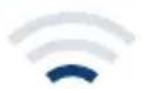
The 360° Indoor Camera needs a stable and sufficiently strong Wi-fi connection.

natural_image
Smartphone icon with Wi-Fi signal symbol on screen (no text or numbers)Please choose the location where you like to position your 360° Indoor Camera and check first the strength of the Wi-fi-signal at this location, using your smart phone.
| 3G/4G | × |
 | × |
 | × |
 | √ |
 | √ |
The table below indicates if the Wi-fi connection strength is sufficient for use in combination with the 360° Indoor Camera.
5.2 360° Indoor Camera installation
When positioning your 360° Indoor Camera, please note the following:
▶ Position the indoor camera on a flat, level surface.
▶ Direct the motion sensor below the Bosch logo towards the center of the room.
▶ Preferably the indoor camera observes the area you want to monitor, you better avoid having the indoor camera looking at windows.
The 360° Indoor Camera is not suitable for outdoor use.

natural_image
Simple line drawing of a house with a tree and a water bottle, no text or symbols present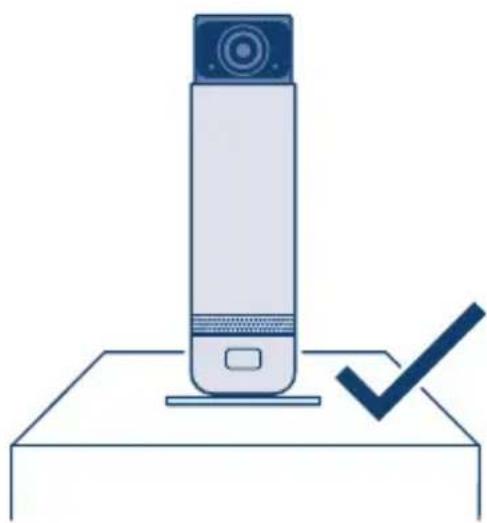
natural_image
Illustration of a cylindrical device with a blue top and a checkmark on a base (no text or symbols)
natural_image
Illustration of a mobile phone with a cross symbol on its screen, positioned on an inclined plane (no text or symbols present)
natural_image
Illustration of a cylindrical device with a blue X symbol and a circular top, mounted on a stand (no text or symbols present)5.3 Power the 360° Indoor Camera

Select the appropriate plug and attach the plug to the power adapter.
Connect the 360° Indoor Camera via the power cable to the socket.
The 360° Indoor Camera is now powered and ready for use. It will now boot and prepare itself for configuration. When the camera is ready to connect to the Wi-fi the light ring blinks green.
5.4 Configuration of the 360° Indoor Camera

natural_image
Icon of a smartphone displaying a plus sign with a white cross, no text or symbols present.How to configure the indoor camera:
Please start the app and login with your Bosch ID or register, if you do not yet have a Bosch ID. In the Bosch Smart Camera App overview screen, please select "Add Camera". Follow the steps indicated in the app.
Once you have completed all the necessary entries, the app generates a QR code. Hold it approx. 10 - 20 cm away from the camera lens.
To configure the 360° Indoor Camera you need to make sure your phone is connected to the same Wi-fi network you want to connect the device to. If your router support two frequency bands (2.4 GHz and 5 GHz), select the 2.4 GHz band with your smart phone.
Please don't close or switch the app during commissioning.
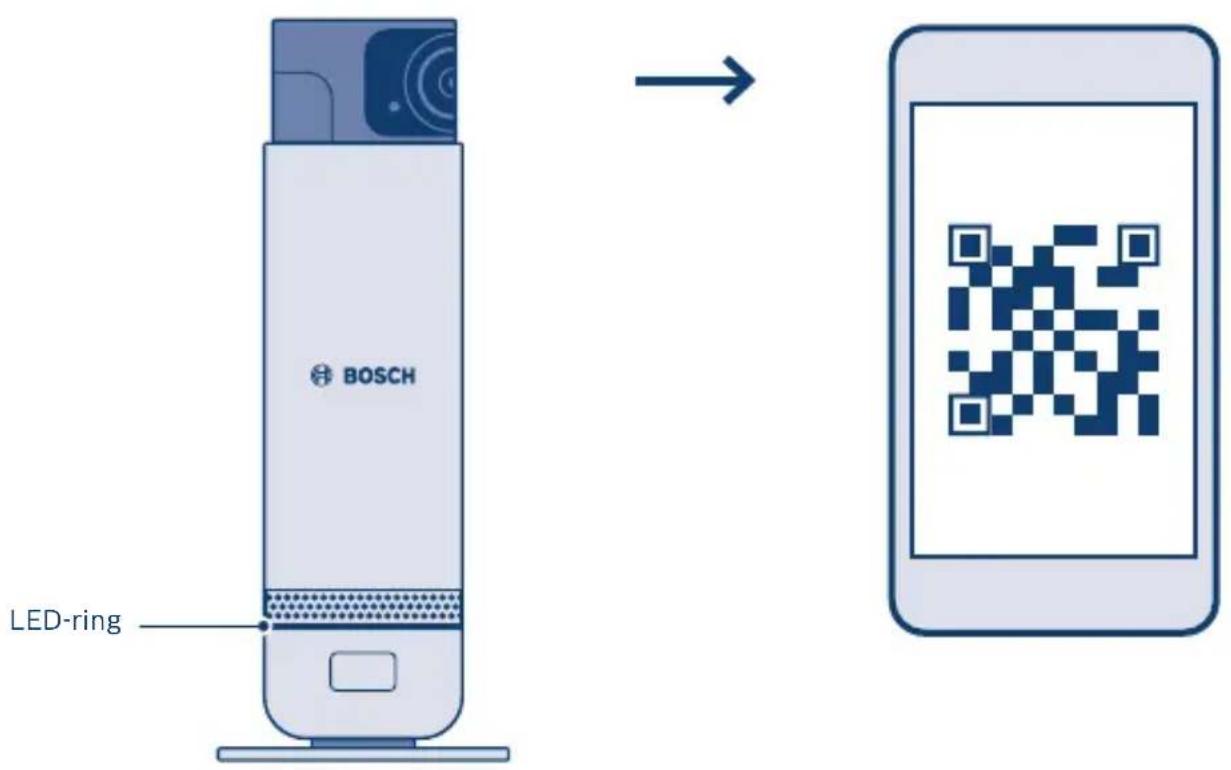
When the camera recognized the QR code, you will hear a beep. The camera now begins its initialisation routine during which the LED ring will change to different colours. At the end of the routine it will light up blue for approx. 1 min and the camera is displayed in the app. It is now ready for use.
The LED ring always flashes blue while you are streaming videos.
6.0 HELP AND TROUBLESHOOTING
| Error Error indicator Measure | ||
| LED off during initial configuration | LED off | Please check the power supply connection to your camera. After configuration the LED is off during normal operation, if the camera does not transmit video. |
| Generic boot error | LED blinks red P | Power off your camera, wait 30 seconds and then power up again. |
| Connection to Wi-fi failed | LED blinks alternating red and green | Check the strength of the Wi-fi signal (on the camera and on your smartphone). Check in your router whether DHCP is active and connecting new devices is allowed (MAC address filter). Tap previous in the app, re-enter the Wi-fi password, create new QR code and show QR code to the camera. If this error is observed with a camera which was previously working normally, check your Wi-fi router. |
| Connection to cloud service failed | LED blinks alternating red and blue | Check the internet connection of your router. |

More detailed information, like how to reset your camera to factory defaults, you can find in the help section of the smartphone app and the online FAQs at www.bosch-smarthome.com/service
7.0 360° INDOOR CAMERA OPERATION
natural_image
Icon of a smartphone displaying a video camera symbol (no text or numbers present)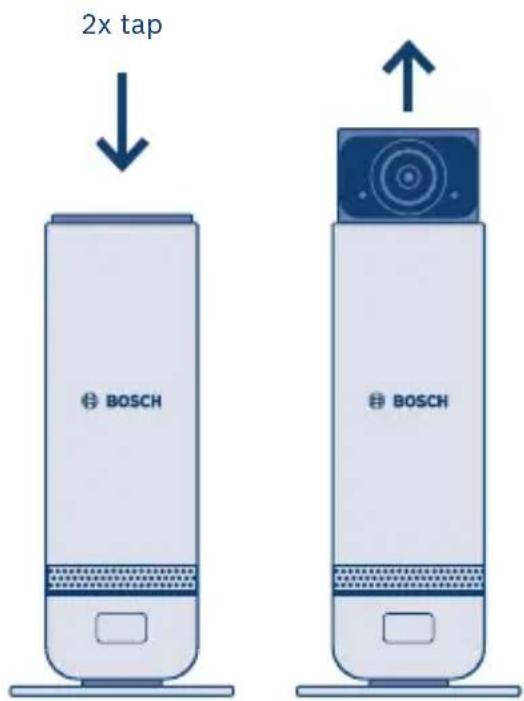
The camera is operated and controlled via the Bosch Smart Camera App.
More details on all functionality and option you can find in the help section of the smartphone app and in the online FAQs at
www.bosch-smarthome.com/service
Tap the camera head twice to easily switch the camera on and off without the app, the camera head then extends or retracts again.
8.0 MAINTENANCE AND CARE
The product is maintenance-free. Clean the device with a dry linen cloth, which may be slightly moistened in case of heavy soiling. Do not use solvent-
based cleaning agents for cleaning. Make sure that no moisture gets inside the device.
9.0 PRODUCT DETAILS
9.1 Technical data
| Device type name SVI-1609-5 | |
| Resolution 1920 x 1080 (1080p) | |
| Horizontal viewing angle 120° | |
| Wi-fi IEEE 802.11b/g/n, 2,4 GHz | |
| Wi-fi free field range 80 m | |
| Max. transmitting capacity 20 dBm | |
| Dimensions (H x W x D) 182 mm x 72 mm (ø) | |
| Power Supply 5 VDC, inclusive adapter | |
| Current consumption max. 6 W | |
| Weight 396 g | |
| Operational temperature 0 °C to +40 °C | |
| Software class Class A | |
| Dimensions packaging 272 x 103 x 182 mm | |
| Country of origin China |
9.2 Declaration of conformity
Hereby, Robert Bosch Smart Home GmbH declares that the radio equipment type Bosch Smart Home 360° Indoor Camera is in compliance with Directive 2014/53/EU.
The full text of the EU declaration of conformity is available at the following internet address:
www.bosch-smarthome.com/conformity

9.3 Faults in radio operation
Faults in radio operation (e.g. due to electric motors or defective electrical devices) cannot be ruled out. The radio range inside buildings may differ greatly from the radio range in free-field conditions. Apart from the transmission power and the receiver characteristics, environmental influences such as humidity and structural characteristics may also influence radio operation.
9.4 Open-Source-Software
This Bosch Smart Home product uses open-source software. The license information for the open-source software used depends on the software version of your device or smartphone app. New software versions are regularly available for your product.
Information on the current software version and the open source software used can be found in the smartphone app in the respective settings area.
Information about the licenses and the source code of the open-source software can also be found at: www.bosch-smarthome.com/open-source-software
9.5 Environmental protection and product disposal
Electrical and electronic equipment that is no longer usable and defective or used batteries must be separated from other waste and recycled in an environmentally friendly manner (European Directive on waste electrical and electronic equipment).
To dispose of old electrical and electronic equipment or batteries, use your country-specific return and collection systems.

10.0 FURTHER INFORMATIONS
You can find more detailed information on operating and maintaining the 360° Indoor Camera in the online FAQs at
www.bosch-smarthome.com/service
You will also find all contact details on the rear side of this document.

Sale and transfer
Before you transfer or sell your device, delete your personal information. To do this, reset the device to its factory settings (see online FAQs).
Robert Bosch Smart Home GmbH
00808 1011 151* (United Kingdom) and 1800 200 724* (Ireland)
*Freephone service
Mo-Fr 7am-8pm
Sat/Sun 8am-6pm
service@bosch-smarthome.com
10/2019 8-750-000-038 V004
- 360° Indoor Camera
- INHALTSVERZEICHNIS
- PRODUCT DESCRIPTION
- Intended use
- BOX CONTENTS
- GENERAL INFORMATION AND DANGERS
- Legend
- Legal notice
- Safety instructions
- Check the Wi-fi availability
- 360° Indoor Camera installation
- When positioning your 360° Indoor Camera, please note the following:
- The 360° Indoor Camera is not suitable for outdoor use.
- Power the 360° Indoor Camera
- Configuration of the 360° Indoor Camera
- How to configure the indoor camera:
- HELP AND TROUBLESHOOTING
- 360° INDOOR CAMERA OPERATION
- MAINTENANCE AND CARE
- PRODUCT DETAILS
- Technical data
- Declaration of conformity
- Faults in radio operation
- Open-Source-Software
- Environmental protection and product disposal
- FURTHER INFORMATIONS
- Sale and transfer
Brand : BOSCH
Model : 360° Indoor Camera
Category : Camera