
WIRELESS GPS MODULE LD-1W - Wireless GPS Module NOKIA - Free user manual and instructions
Find the device manual for free WIRELESS GPS MODULE LD-1W NOKIA in PDF.


| Product type | Wireless GPS module |
| Brand | Nokia |
| Model | LD-1W |
| Power supply | Rechargeable battery BL-5C; compatible chargers: AC-1, ACP-8, ACP-9, ACP-12, LCH-8, LCH-9, LCH-12 |
| Connectivity | Bluetooth |
| Bluetooth range | Approximately 10 meters without obstruction |
| Pairing code | 0000 |
| Number of possible pairings | Up to 8 compatible phones |
| Light indicators | Red/green (battery and charging), blue (Bluetooth active), white (position fixed) |
| Start-up time | Approximately 1 minute in optimal conditions |
| Recommended use | Outdoors for optimal GPS reception |
| External antenna | Male MCX connector, 3 V voltage |
| Care and cleaning | Do not use harsh chemicals; do not paint; protect from dust and moisture |
| Safety | Use only Nokia approved batteries and chargers; do not short-circuit; avoid extreme temperatures |
| Spare parts and repairability | Replaceable battery; no user-serviceable parts; refer to an authorized service center |
| General information | Bluetooth technology; GPS accuracy up to 25 meters; night mode available |
Frequently Asked Questions - WIRELESS GPS MODULE LD-1W NOKIA
User questions about WIRELESS GPS MODULE LD-1W NOKIA
0 question about this device. Answer the ones you know or ask your own.
Ask a new question about this device
Download the instructions for your Wireless GPS Module in PDF format for free! Find your manual WIRELESS GPS MODULE LD-1W - NOKIA and take your electronic device back in hand. On this page are published all the documents necessary for the use of your device. WIRELESS GPS MODULE LD-1W by NOKIA.
USER MANUAL WIRELESS GPS MODULE LD-1W NOKIA
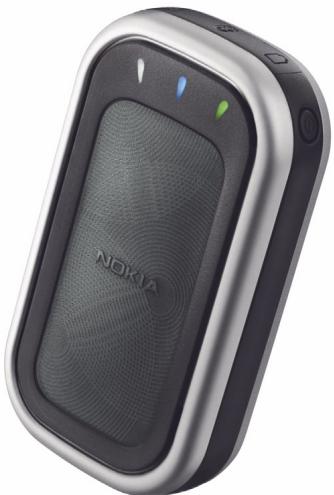
User Guide for the Nokia Wireless GPS Module (LD-1W)
natural_image
Exterior view of a Nokia 100 smartphone (no visible text or symbols beyond branding)9236274
Issue 1
DECLARATION OF CONFORMITY
We, NOKIA CORPORATION, declare under our sole responsibility that the product LD-1W is in conformity with the provisions of the following Council Directive: 1999/5/EC.
A copy of the Declaration of Conformity can be found from
http://www.nokia.com/phones/declaration_of_conformity/.
C€ 0560
Copyright © 2004 Nokia. All rights reserved.
Reproduction, transfer, distribution or storage of part or all of the contents in this document in any form without the prior written permission of Nokia is prohibited.
Nokia is a registered trademark of Nokia Corporation. Other product and company names mentioned herein may be trademarks or tradenames of their respective owners.
Bluetooth is a registered trademark of Bluetooth SIG, Inc.
Nokia operates a policy of continuous development. Nokia reserves the right to make changes and improvements to any of the products described in this document without prior notice.
Under no circumstances shall Nokia be responsible for any loss of data or income or any special, incidental, consequential or indirect damages howsoever caused.
The contents of this document are provided "as is". Except as required by applicable law, no warranties of any kind, either express or implied, including, but not limited to, the implied warranties of merchantability and fitness for a particular purpose, are made in relation to the accuracy, reliability or contents of this document. Nokia reserves the right to revise this document or withdraw it at any time without prior notice.
The availability of particular products may vary by region. Please check with the Nokia dealer nearest to you.
Export Controls
This device may contain commodities, technology or software subject to export laws and regulations from the US and other countries. Diversion contrary to law is prohibited.
9236274/Issue 1 EN
Contents
For your safety 4
- Introduction...... 5
Global Positioning System 5
- Get started 7
GPS module parts 7
Batteries and chargers 8
Install the battery 9
Charge the battery.... 10
Protective case 11
- Basic use.... 12
Switch the GPS module on and off 12
Connect with Bluetooth wireless technology 12
Bluetooth connection passcode.... 13
Pair the GPS module with a compatible phone 13
Use the GPS module with several paired phones 13
Disconnect the GPS module.... 14
Check the GPS module status in the night mode 14
Reset the GPS module.... 14
External antenna 15
Troubleshooting 15
- Battery information.... 16
Care and maintenance 18
For your safety
Read these simple guidelines. Breaking the rules may be dangerous or illegal. Further detailed information is given in this user guide.

INTERFERENCE
All wireless devices may be susceptible to interference, which could affect performance.

BATTERIES AND CHARGERS
Use only approved batteries and chargers. Do not connect incompatible products.

CONNECTING TO OTHER DEVICES
When connecting to any other device, read its user guide for detailed safety instructions. Do not connect incompatible products.

QUALIFIED SERVICE
Only qualified personnel may repair this device.
1. Introduction
With the Nokia Wireless GPS Module, you can determine your current position and direction easily. The GPS module is a battery-operated device that uses Bluetooth wireless technology to communicate positioning information to compatible mobile phones, PCs, PDAs, and other devices.
Read this user guide carefully before using the GPS module. Check also http://www.nokia.com/support or your local Nokia Web site for the latest version of this guide, additional information, downloads, and services related to your Nokia product.
■ Global Positioning System
The Global Positioning System (GPS) is a worldwide satellite-based radio navigation system.
A GPS terminal can calculate its location to an accuracy of 25 meters. The accuracy depends on the number of satellites, the signals of which the GPS module receives. In optimal conditions, the accuracy may be within a few meters.
The antenna of the GPS module is located under the Nokia logo, and it should face upwards. Some car windshields and windows may contain metal, which may block or weaken the satellite signals.
If you stand still, GPS cannot detect which way you are facing, because it determines your direction on the basis of your movement.

Note: The Global Positioning System
The Global Positioning System (GPS) is operated by the United States government, which is solely responsible for accuracy and maintenance of the system. The accuracy of location data can be
affected by adjustments to GPS satellites made by the United States government and is subject to change with the United States Department of Defense civil GPS policy and the Federal Radionavigation Plan. Accuracy can also be affected by poor satellite geometry.
Availability and quality of GPS signals may be affected by buildings and natural obstacles, as well as weather conditions. The GPS receiver should only be used outdoors to allow reception of GPS signals.
Therefore, GPS should not be used for precise location measurement, and you should never rely solely on location data from the GPS receiver. This GPS receiver does not support location of the phone by emergency operators.
2. Get started
Your device may contain small parts. Keep them out of reach of small children.
Before you can start using the GPS module, you must:
• Install a compatible software application on the phone.
- Charge the battery of the GPS module fully.
- Pair the compatible phone with the GPS module.
Some Nokia phone models, such as the Nokia 9500 Communicator, have a location privacy setting. To provide GPS location data to software applications, select Tools → Control panel → Extras → Location privacy → Verification policy → Accept all.
■ GPS module parts
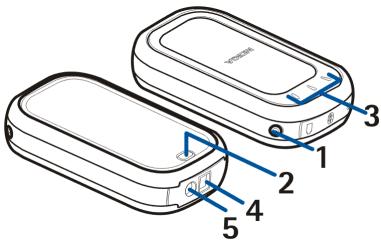
The GPS module contains the following parts:
1 - Power key: Switches the GPS module on and off, or resets the Bluetooth connectivity settings of the GPS module.
2 - Release button: Unlocks the back cover.
3 - Indicator lights: Display the current status of the GPS module. Red or green indicates the status of the battery and charging, or indicates that the module is being reset. Blue indicates that the Bluetooth connection is active. White
indicates that the GPS module is receiving satellite data and is able to determine its position.
4 - Connector for a compatible charger
5 - Connector for an external antenna
text_image
Diagram of two electronic devices with numbered labels pointing to internal components■ Batteries and chargers
The GPS module has a removable and rechargeable BL-5C battery. For availability of approved batteries and chargers, check with your local dealer.
Check the model number of any charger before using it with this product. The following chargers are intended for use with the GPS module: AC-1, ACP-8, ACP-9, ACP-12, LCH-8, LCH-9, LCH-12.

Warning! Use only batteries and chargers approved by Nokia for use with this particular device. The use of any other types will invalidate any approval or warranty, and may be dangerous.
When you disconnect the power cord of any enhancement, grasp and pull the plug, not the cord.
Install the battery
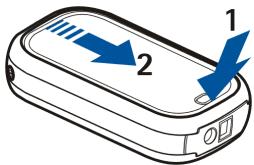
- To open the back cover of the GPS module, press the release button (1), and slide the cover away from the device (2).
text_image
Diagram of a mobile phone with labeled arrows indicating directional flow or movement, numbered 1 and 2.- Insert the battery (3).
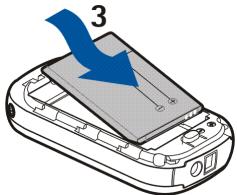
text_image
3- Close the back cover (4), and slide it in the direction of the arrow (5) until it locks into place.
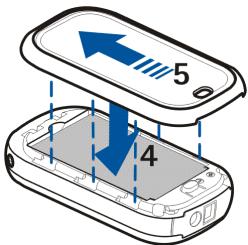
text_image
5 4Charge the battery
- Plug the charger into its connector on the GPS module. See GPS module parts on page 7.
- Connect the charger to a power outlet. During charging, the green or red indicator light blinks, depending on whether the GPS module is on (green) or off (red).
- When the battery is fully charged and the power is on, the green light is displayed continuously. When the battery is fully charged and the power is off, the red light stops blinking. Disconnect the charger from the power outlet and the GPS module.
When the battery is running out of power, the red indicator light on the GPS module starts blinking every 15 seconds. Recharge the battery.
■ Protective case
Place the GPS module in the protective case with the Nokia logo facing upwards. This helps protect the GPS module from accidental knocks, dust, and splashes of water.
To carry the GPS module around your neck, fasten the neck strap to the protective case as shown in the following picture:
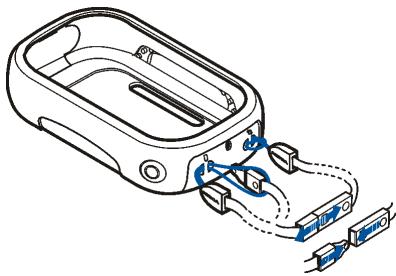
natural_image
Diagram of a device with attached cable and connector (no text or symbols)3. Basic use
The GPS module should only be used outdoors to allow reception of GPS signals. GPS should not be used for precise location measurement, and you should never rely solely on location data from the GPS module. Virtually all digital cartography is always inaccurate and incomplete to some extent. Never rely solely on the cartography provided for use with this device.
The use of this GPS module requires your mobile phone to be switched on. Do not switch on your mobile phone where it may cause interference or danger.
■ Switch the GPS module on and off
To switch the GPS module on or off, press the power key for one second.
When you turn on the GPS module, it takes some time for the device to position itself, depending on how long the GPS module has been turned off, and how well it can receive the satellite signals. The start-up time is also longer if the battery has been removed. In optimal conditions, start-up takes about one minute.
■ Connect with Bluetooth wireless technology
There may be restrictions on using Bluetooth technology in some locations. Check with your local authorities or service provider.
Refer to the user guide of your phone for a more detailed description of Bluetooth wireless technology.
Bluetooth connection passcode
You need a passcode for pairing the GPS module with a compatible device using Bluetooth connectivity. The passcode is 0000.
Pair the GPS module with a compatible phone
Before you can use the GPS module, you must pair it with a compatible phone. With some GPS applications, you can pair and connect from the application without using the Bluetooth menu of your phone. See the user guide of the GPS application.
To pair the GPS module from the Bluetooth menu:
- Make sure the phone and the GPS module are switched on.
- Switch Bluetooth on, and set the phone to search for Bluetooth devices as instructed in the user guide of the phone.
- Select the GPS module (Nokia LD-1W) from the list of found devices.
- Enter the Bluetooth passcode 0000 to pair the GPS module with the phone.
- Start using the GPS application.
Use the GPS module with several paired phones
You can pair the GPS module with up to eight compatible phones, but you can connect it to only one at a time. The eighth pairing is replaced when a new device is paired with the GPS module.
If you want to remove the existing pairings, you can reset the GPS module. See Reset the GPS module on page 14.
Disconnect the GPS module
To disconnect the GPS module, do one of the following:
- Disconnect the GPS module from the application you used to establish the connection.
- Switch off the GPS module.
- Disconnect the GPS module from the Bluetooth menu of the phone.
■ Check the GPS module status in the night mode
In some applications, you can set the GPS module into the night mode from the mobile phone. In the night mode, the indicator lights are only lit if the GPS module cannot determine its position, or the Bluetooth connection is lost.
To check the GPS module status in the night mode, press the power key quickly, and the indicator lights appear briefly.
■ Reset the GPS module
To reset the GPS module, press the power key for 10 seconds. During resetting, the green and red indicator lights blink alternately.
■ External antenna
You can use an external antenna with a male MCX connector and an input voltage of 3 V. Plug the external antenna into its connector on the GPS module. See GPS module parts on page 7.
Troubleshooting
If you cannot connect the GPS module to a compatible phone, proceed as follows:
- Make sure the Bluetooth feature is activated on the compatible phone.
• Make sure the GPS module is switched on and paired with a compatible phone.
• Make sure you ended the previous Bluetooth connection from the phone. - Check that the GPS module is within 10 meters of the phone and that there are no obstructions or electronic devices between the two.
4. Battery information
Your Nokia Wireless GPS Module is powered by a rechargeable battery. The full performance of a new battery is achieved only after two or three complete charge and discharge cycles. The battery can be charged and discharged hundreds of times, but it will eventually wear out. When the talk and standby times are noticeably shorter than normal, buy a new battery. Use only Nokia approved batteries, and recharge batteries only with Nokia approved chargers designated for this.
Unplug the charger from the electrical plug and the device when not in use. Do not leave the battery connected to a charger. Overcharging may shorten its lifetime. If left unused, a fully charged battery will lose its charge over time. Temperature extremes can affect the ability of your battery to charge.
Use the battery only for its intended purpose. Never use any charger or battery that is damaged.
Do not short-circuit the battery. Accidental short-circuiting can occur when a metallic object, such as a coin, a clip or a pen, causes direct connection of the positive (+) and negative (-) terminals of the battery (these look like metal strips on the battery). This might happen, for example, when you carry a spare battery in your pocket or purse. Short-circuiting the terminals may damage the battery or the connecting object.
Leaving the battery in hot or cold places, such as in a closed car in summer or winter conditions, will reduce the capacity and lifetime of the battery. Always try
to keep the battery between 15°C and 25°C (59°F and 77°F). A device with a hot or cold battery may not work temporarily, even when the battery is fully charged.
Battery performance is particularly limited in temperatures well below freezing.
Do not dispose of batteries in a fire! Dispose of batteries according to local regulations. Please recycle when possible. Do not dispose as household waste.
Care and maintenance
Your Nokia Wireless GPS Module is a product of superior design and craftsmanship and should be treated with care. The suggestions below will help you protect any warranty coverage:
- Do not use or store the GPS module in dusty, dirty areas. Its moving parts and electronic components can be damaged.
- Do not store the GPS module in hot areas. High temperatures can shorten the life of electronic devices, damage batteries, and warp or melt certain plastics.
- Do not store the GPS module in cold areas. When it warms up to its normal temperature, moisture can form inside, which may damage electronic circuit boards.
- Do not attempt to open the GPS module other than as instructed in this guide.
- Do not drop, knock or shake the GPS module. Rough handling can break internal circuit boards and fine mechanics.
- Do not use harsh chemicals, cleaning solvents, or strong detergents to clean the GPS module.
- Do not paint the GPS module. Paint can clog the moving parts and prevent proper operation.
If the GPS module is not working properly, take it to your nearest authorised service facility for service.