Forza Metallo Wireless - Earphones V-Moda - Free user manual and instructions
Find the device manual for free Forza Metallo Wireless V-Moda in PDF.


User questions about Forza Metallo Wireless V-Moda
0 question about this device. Answer the ones you know or ask your own.
Ask a new question about this device
Download the instructions for your Earphones in PDF format for free! Find your manual Forza Metallo Wireless - V-Moda and take your electronic device back in hand. On this page are published all the documents necessary for the use of your device. Forza Metallo Wireless by V-Moda.
USER MANUAL Forza Metallo Wireless V-Moda
FORZA METALLO WIRELESS
USER'S MANUAL

REGISTER NOW AT
V-MODA.com/Register

BEWARE OF FAKES
CAUTION
If serial number on the product, on manual cover or bottom of packaging is missing or defaced, please return to retailer immediately.
IMMORTAL
LIFE
PROGRAM
1YR
WARRANTY
english
To acquire a printable version of this manual, please visit V-MODA.com/Manuals
español
Enjoy your music responsibly. According to the American Speech-Language-Hearing Association, “listening to headphones at high volumes for extended periods of time can directly result in lifelong hearing loss”. At V-MODA, we are dedicated to providing an enjoyable listening experience, but we also care greatly about your personal health and safety. We recommend that you listen to your headphones at comfortable volume levels for reasonable periods of time.
How to enjoy your music responsibly
- Turn down the volume. A good point of reference is half volume
- Limit listening time. Give your hearing a “time out”
Be aware of your surroundings and listen responsibly.
Caution around children. Keep out of reach of children, the parts included with this product can be a choking hazard. This product is not intended for children under 7 years of age.
WELCOME
Welcome to V-MODA, the music lifestyle. We sincerely hope you enjoy our headphones, the pinnacle of sound and quality design. With the essence of music at the foundation of all we do, we have precisely engineered our headphones to provide an enjoyable and natural sound signature, which invokes the sense of listening to your music live. Play Hard. Rock Harder.
Package Contents
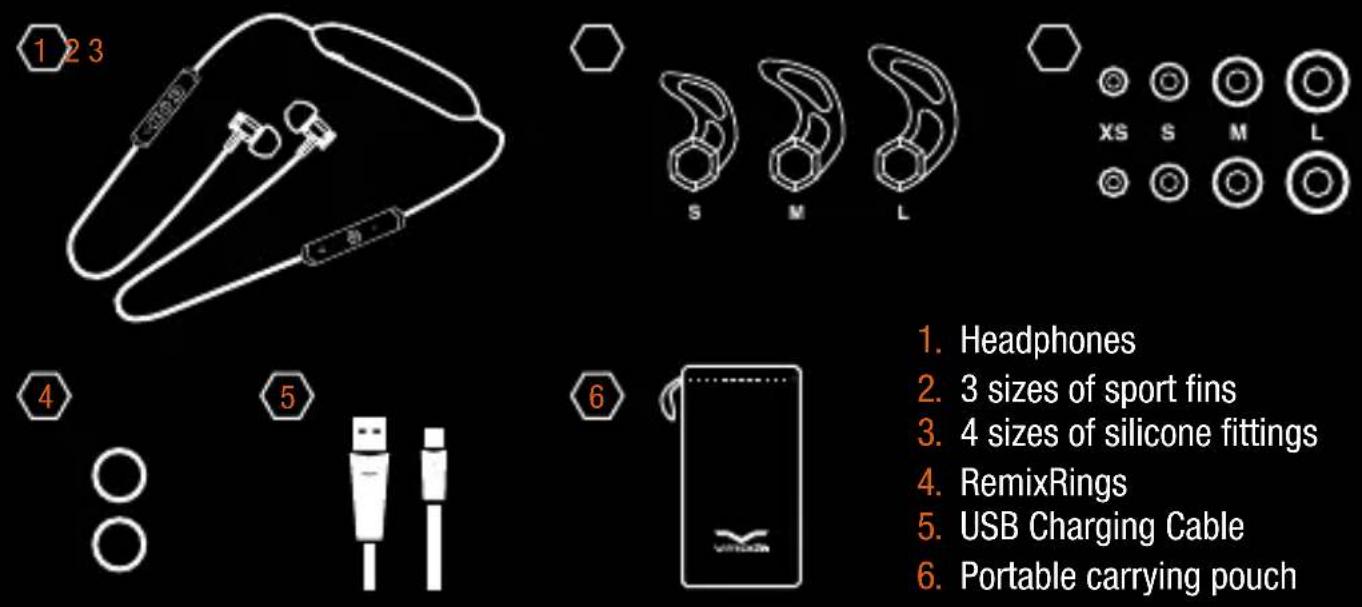
- Headphones
- 3 sizes of sport fins
- 4 sizes of silicone fittings
- RemixRings
- USB Charging Cable
- Portable carrying pouch
USING YOUR HEADPHONES
- Slide silicone fitting onto earbud

natural_image
Pure mechanical diagram showing a lever mechanism with arrows indicating direction (no text or symbols)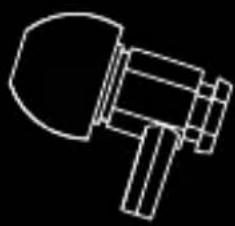
natural_image
Simple line drawing of a hammer (no text or symbols)- Insert earbud in corresponding ear canal ("L" into left ear, "R" into right ear)
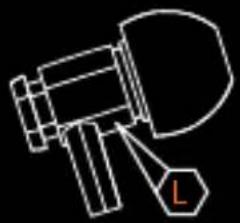
natural_image
Simple line drawing of a megaphone with a labeled tag (no text or symbols)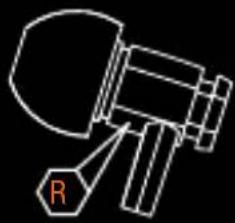
natural_image
Simple line drawing of a mechanical device with a labeled component 'R' (no text or symbols beyond the label)- Verify the earbud is inserted all the way into your ear, creating a snug fit (similar to an earplug) to ensure highest sound quality and comfort
-
If the earbud does not feel 100% comfortable and inserted into your ear, try swapping the fittings with one of the other three sizes included and match the fittings size in both ears
-
Wear headphones with the titanium headband on your neck to ensure headphones stay put during strenuous activity thanks to TrapLock ergonomics
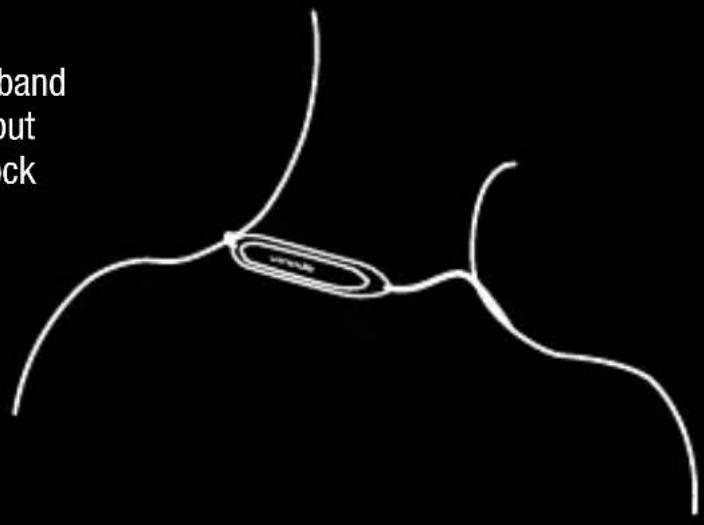
text_image
band out ckPROTECTING YOUR HEADPHONES
- Forza Metallo Wireless are sweat and weather resistant; they are not intended for use while swimming
• Use provided carrying case while idle - Keep headphones clean and free of debris
text_image
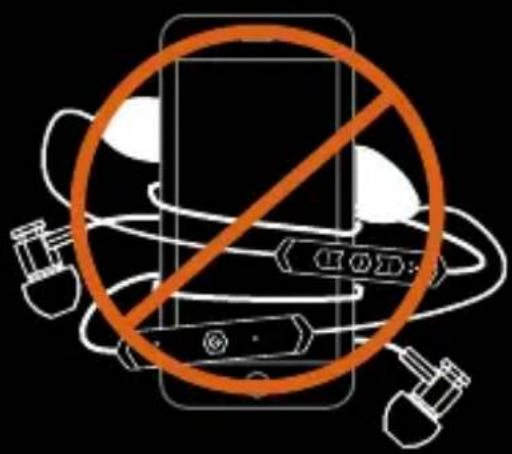
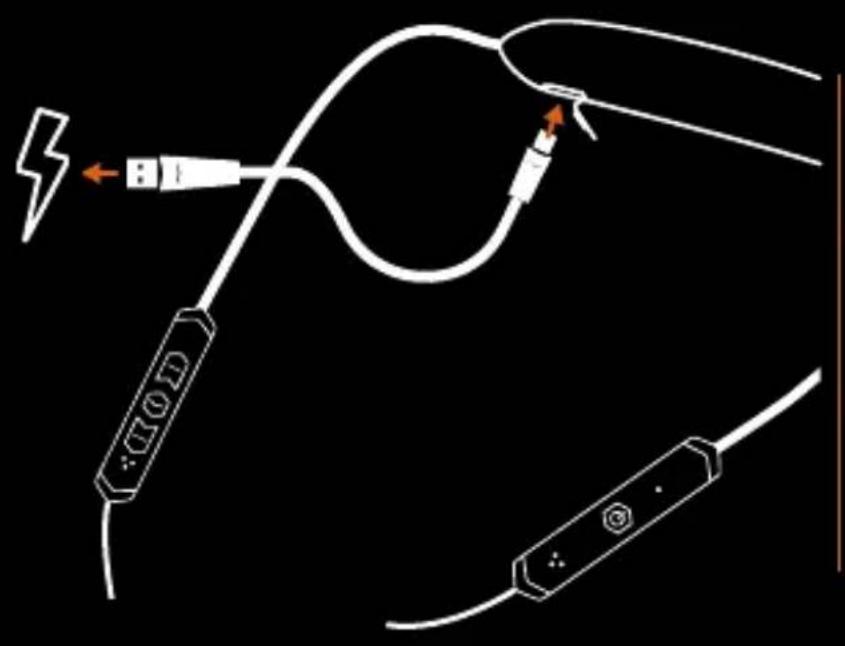
Safety warning symbol with smartphone crossed out, indicating no protection or disapprovalForza Metallo Wireless feature a built-in lithium-ion rechargeable battery. Fully charge your headphones for 1 hour before using them for the first time. Note that headphones are equipped with Micro-USB charging cable. Do not use any other type of charging cables to charge the headphones.
text_image
Diagram showing cable connections with labeled components including a lightning bolt and USB port, likely illustrating a wireless device or signal path.- Fading orange LED = charging
- White LED = fully charged
- Still orange LED + low battery tone every 3 minutes = low battery
TURNING ON/OFF YOUR HEADPHONES – BATTERY STATUS
When turning on your headphones, the orange LED indicates the battery level.
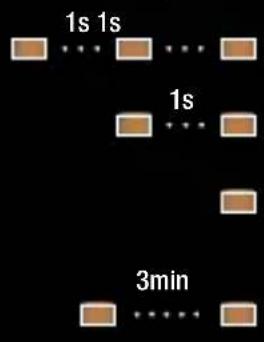
- Press the ⏻ button to turn on the headphones. Power on tone plays, headband vibrates and the orange LED flashes a number of times based on the battery level:
• Battery 100-81 %: orange LED flashes 4 times
text_image
1s 1s 1s 3min• Battery 80-61%: orange LED flashes 3 times
• Battery 60-41%: orange LED flashes twice
- Battery <40%: orange LED flashes once
- Low battery: still orange LED + low battery tone plays every 3 minutes
- Press the ⏻ button to turn off the headphones. Power off tone plays, headphone vibrates and LED turns off.
PRODUCT OVERVIEW
text_image
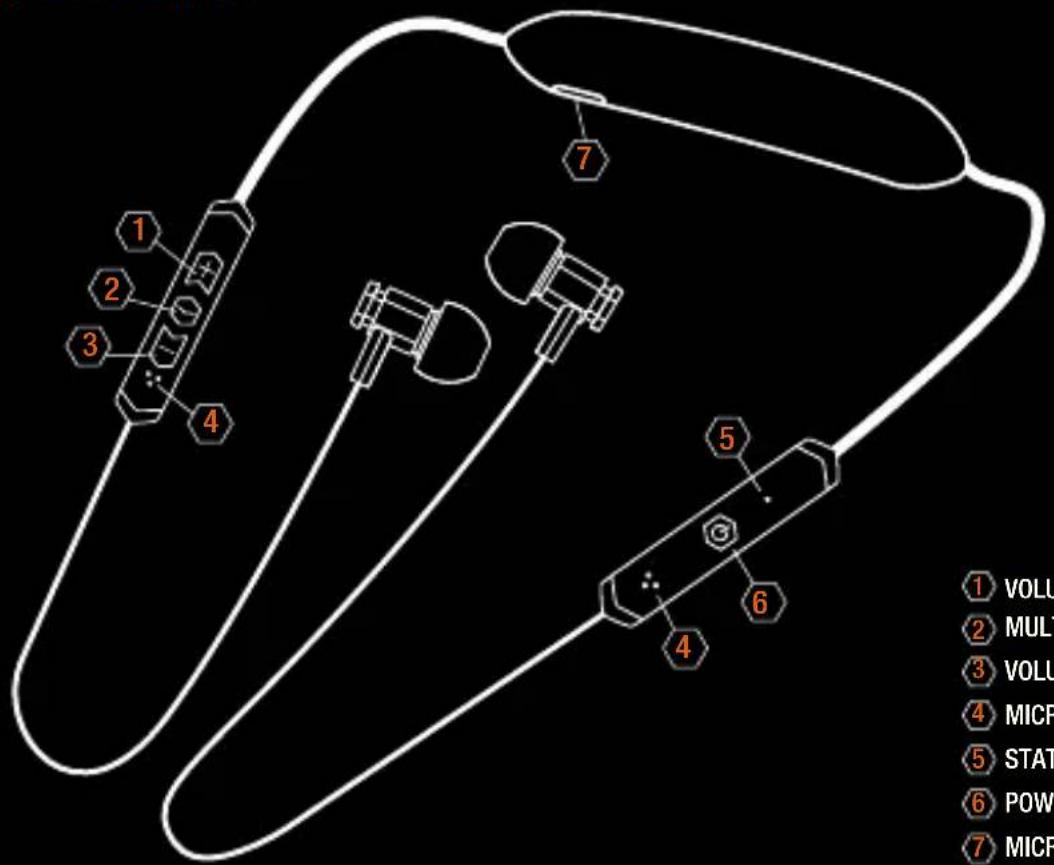
1 VOLUME 2 MULT 3 VOLUME 4 MICR 5 STAT 6 POW 7 MICR① VOLUME UP
2 MULTIFUNCTION
3 VOLUME DOWN
4 MICROPHONES
5 STATUS LED
6 POWER ON/OFF / PAIRING
7 MICRO-USB PORT
PAIRING AND CONNECTING WITH A NEW BLUETOOTH DEVICE
When pairing with one, two or more Bluetooth devices, perform the following pairing procedure every time you pair a new device.
- Press the ⏻ button to turn on the headphones.
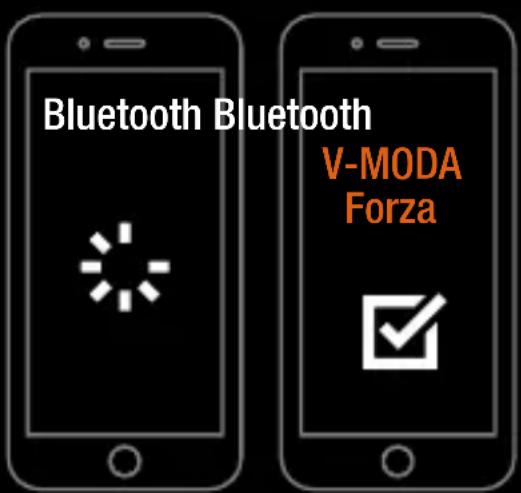
Power on tone plays, headband vibrates, battery level orange LED flashes, then white LED flashes twice every second and pairing tone plays. Your headphones are in pairing mode. - Check your Bluetooth device and connect your headphones. Once "V-MODA Forza" appears in the "new/available Bluetooth devices" section of your phone/Bluetooth device, select it to begin pairing. If passkey input is required on the display of a Bluetooth device, type "0000".
- Ready to rock. When the Bluetooth connection is established, connected tone plays and white LED on your headphones stays lit.
text_image
Bluetooth Bluetooth V-MODA ForzaCONNECTING WITH A PAIRED BLUETOOTH DEVICE
When pairing with one, two or more Bluetooth devices, perform the following procedure every time you connect your headphones with an already paired device.
- Press the ⏻ button to turn on your headphones. Power on tone plays, headband vibrates, battery level orange LED flashes a number of times based on the battery level.
- Ready to rock. When the Bluetooth connection is established, connected tone plays and white LED on the headphones stays lit.
If device does not auto connect, go to Bluetooth settings and select "V-MODA Forza".
ONE HEADPHONE, TWO AUDIO DEVICES
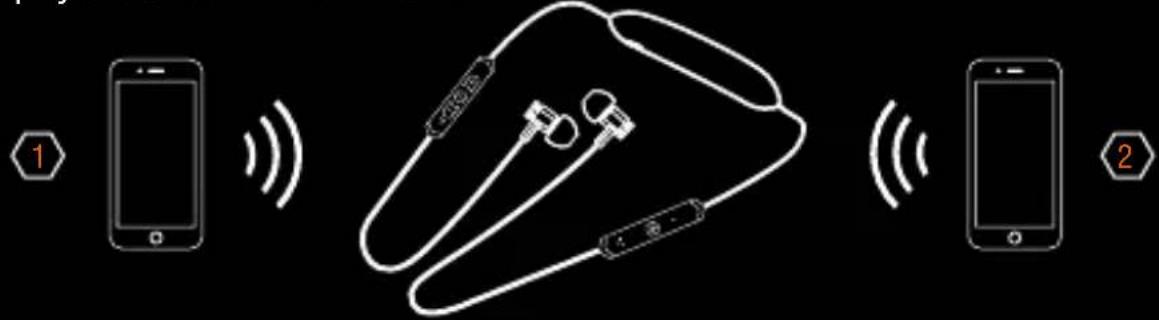
The headphones can be connected with two audio devices at the same time and play alternatively from both audio devices.
- Bluetooth connect your headphones and audio player 1 following the instructions on page 11
- Press and hold ⏻ button for 3 seconds. Pairing tone plays, white LED flashes twice every second. Headphones are in pairing mode and you can connect audio player 2.
- Shift the audio player from 1 to 2 by controlling the play/pause buttons on the audio players
- The button on the headphones will control only play/pause of the playing audio player
If device does not auto switch using control buttons, go to Bluetooth settings on the device you want to play and select "V-MODA Forza".
text_image
Diagram showing wireless connections between a smartphone and two devices, with labeled parts 1 and 2.LISTENING TO MUSIC


Start playback on the paired/plugged device and adjust the volume with the + and - buttons on the headphones

12 SEC

MAX
Press and hold + for up to 12 seconds to reach max volume

12 SEC

MIN
Press and hold — for up to 12 seconds to reach min volume
text_image
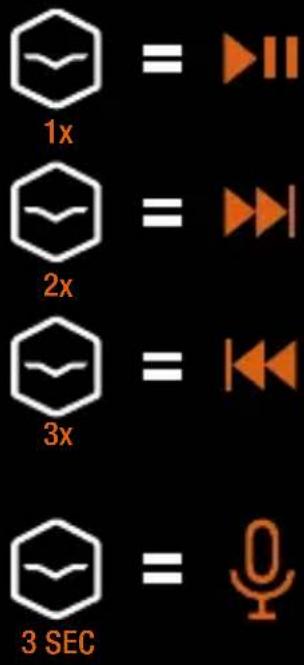
1x = ▶II 2x = ▶I 3x = ◀◀ 3 SEC = ○Press \~ once to play and pause
Press twice for next track
Press 3 times for previous track
Press and hold \~ for 3 seconds to summon Voice Assistant such as Siri/OK Google
Track controls may vary based on device and settings.
MAKING A CALL / RECEIVING A CALL
ANSWER A CALL
text_image
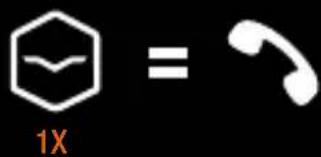
1X =Press once to answer (music pauses automatically)
REFUSE / HANG UP
text_image
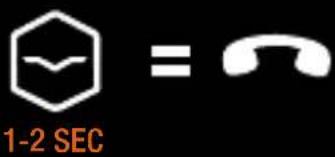
1-2 SEC =To refuse an incoming call or to hang up an existing call, press and hold 📋 for 2 seconds, then release
CALL ON HOLD
text_image
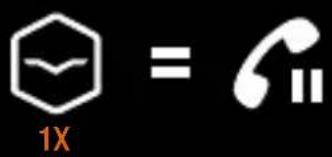
1X = ⅢPress once to put the ongoing call on hold and connect to the second incoming call; long press for 2 seconds to connect the second call and hang up the first call; short press twice to refuse a second call while attending one
OTHER USEFUL FUNCTIONS
CLEAR THE PAIRED DEVICES HISTORY


HOLD 3sec
To clear the paired devices history press and hold + and - for 3 seconds; white and orange LEDs flash alternatively twice
VOICE ASSISTANT CONTROL

When the headphones are paired with a Voice Assistant enabled device, press and hold 📋 for 3 seconds to summon Voice Assistant such as Siri/OK Google
STAND BY MODE

If no device is paired with the headphones in 2 minutes, white LED flashes once every 3 seconds for standby mode; to resume the headphones simply press and hold ⏻ button for 3 seconds: white LED will flash twice every second for searching mode
CONNECTION OUT OF RANGE
If the audio device is outside the connection range “Out of range” tone plays until the device automatically connects when back within the connecting range; if no device to be connected is detected in 2 minutes, headphones will switch to standby mode
USING YOUR SPORT FINS
To provide additional stability when you run or workout, please use the included sport fins, featuring ActiveFlex technology. Sport fins come in three different sizes: try them out and choose the ones with the best fit for your ears.
- Wrap sport fin around earbud making sure to match the corresponding one (“L” earbud with “L” sport fin, “R” earbud with “R” sport fin)
- Insert earbud in corresponding ear canal ("L" into left ear, "R" into right ear)
- Once the earbud is inserted, twist the sport fin and adjust it to rest comfortably in the bowl of your ear; the upper part of the fin fits just under your ear ridge
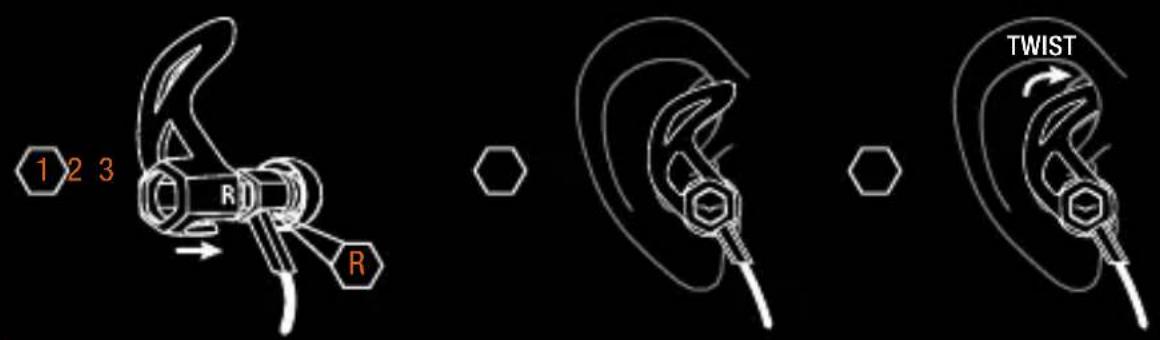
text_image
1 2 3 R R TWISTNOTE
When you want to use sport fins you need to remove RemixRings if present on earbuds
USING YOUR 3D PRINTED CUSTOM CAPS
With the 3D printed custom caps you can revolutionize your in-ear headphones and forge your own personal relic which will be 3D sculpted in Italy and 3D printed in NYC.
- Install RemixRings to ensure that 3D printed custom caps are stable
- Slide 3D printed custom caps onto earbud until the cap reaches the cable creating a snug fit
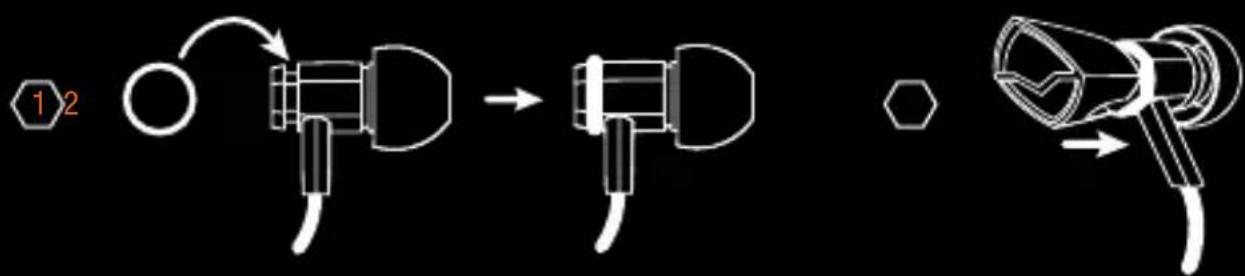
flowchart
graph TD
    A["Step 1: Circular component"] --> B["Step 2: Curved component"]
    B --> C["Final state: Hexagon"]
TROUBLESHOOTING
If you are experiencing trouble with your headphones, please refer to the troubleshooting guidelines below. If the problem persists, please contact the V-MODA Six Star Service at V-MODA.com/Support, support@v-moda.com or 1.888.VMODA.LA.
| TROUBLE SUGGESTIONS | |
| Pairing process trouble | Make sure headphones are not connected to the charger and they are powered onTurn off the headphones and turn them on againRemember to turn on theBluetoothfeature on your deviceTurn off theBluetoothfeature on any other device which has been previously pairedReset paired devices history by pressing and holding Volume + and Volume - for 3 secondsTry to pair with another device to make sure that both the headphones and yourBluetoothdevice are working properlyGo to Bluetooth settings and select “V-MODA Forza” |
| TROUBLE | SUGGESTIONS |
| Receiving no audio or low quality audio from a audio source | - Check the battery- Check the pairing- Make sure the audio source is playing- Make sure the volume on the device is not muted or turned down- Reboot the source/device- Turn off the headphones and turn them on again- Reset paired devices history of the headphones- Try streaming from another device or select another track- Move the device and headphones closer (max 33 feet or 10m)- Keep away from any possible interference (wireless routers, other Bluetooth devices, microwaves etc.)- Close any applications on your device that are not in use and disable Wi-Fi |
| Audio and video do not match | Try streaming from another device or select another track. Due to technology limitations, there may be a delay from some sources or applications |
| No audio | - Make sure the audio device is playing and is Bluetooth connected to the headphones- Reboot the source/device- Turn off the headphones and turn them on again |
| TROUBLE SUGGESTIONS | |
| Lack of or excessive bass or treble | Turn off any audio enhancement features on audio device.Ensure proper fitting is being used. |
| One earphone is quieter than the other | Remove silicone fitting and briskly blow into the earpiece (it is possible there is debris inside housing, lodging sound driver in place).NOTE: do not put your mouth around the earbuds. |
| Distorted sound | Check to make sure the problem is not with the audio device or the file you are listening to. Ensure the EQ settings on the device are set properly. Make sure proper fitting is being used which provides a snug fit (similar to that of an earplug) and that the driver is pointing directly towards the ear canal. |
| Headphones will not charge | - Make sure the charging cable and source are functioning properly- Make sure both USB plugs are firmly connected into their sockets- Disconnect and reconnect the USB charging cable- If charging with your computer, make sure the USB port is powered and remember to plug in your computer |
CAUTION
The operation temperature of devices is between -10^ (14°F) to 45^ (113°F). The battery will not work properly if temperature is beyond that range.

natural_image
Orange background with a white stylized emblem featuring a hand holding a document (no text or symbols)For more support please contact V-MODA's
Six Star Service V-MODA.com/Support
REPLACEMENT ACCESSORIES
Replacement silicone fittings, sport earhooks, sport fins and carrying case may be ordered at V-MODA.com.
CLEANING YOUR HEADPHONES
To keep your headphones clean, periodically remove the silicone fittings and wash them with a mild detergent and water. Do not forget to rinse and dry them before putting the fittings back on earbuds. Make also sure to wipe earpiece with a dry cloth or equivalent.
NOTE ON STATIC ELECTRICITY
In particularly dry air conditions, mild tingling may be felt on your ears. This is a result of static electricity accumulated in the body, and not a malfunction of the headphones. Wearing clothes made from natural materials can minimize the effect.
POWER AND FREQUENCY
Power Transmission: Bluetooth EDR Mode (8DPSK): -1.30dBm
Frequency Band(s): 2.402GHz\~2.480GHz
Limited Warranty
For a period of one (1) year from the date of retail purchase by the original end-use purchaser, V-MODA warrants that this product is free from any defects in manufacturing, materials and workmanship, under the following conditions:
- V-MODA will repair or replace the product within a reasonable period of time and free of charge for one (1) year from the date of retail purchase by the original end-use purchaser
- Product must be purchased from a V-MODA authorized reseller and delivered to you in new condition, in original packaging. This warranty does not cover products purchased open box, sold as-is, sold by private party resale or any other third party purchases from unauthorized resellers
-
This Limited Warranty does not cover defects resulting from cosmetic damage, acts of God, misuse, accidents, commercial use, unauthorized alteration or modification of the product, improper connection, improper use or attempted repair by unauthorized distributors or resellers
-
This warranty is void if the label bearing the serial number has been removed or defaced
- To obtain service under this limited warranty, visit V-MODA.com/Warranty to fill out the online warranty form and obtain further information
• To acquire a printable version of this warranty, please visit V-MODA.com/Warranty - For other customer service inquiries, please e-mail support@V-MODA.com. You may also call 1.888.VMODA.LA Monday through Friday, 9:00 am to 5:00 pm (Pacific Standard Time)
- This limited warranty gives you specific legal rights, and you also may have other rights that vary from State to State or Country to Country. Some places do not allow limitations on implied warranties or the exclusion or limitation of incidental or consequential damages, so the above limitations or exclusions may not apply to you
V-MODA Immortal Life Program - Lifetime 50% discount
We do not judge. If you abuse your headphones crowdsurfing, stage diving, spelunking or otherwise, the V-MODA Immortal Life Program has your back.
All we ask is that you send the headphones (or what's left of them) to us and we will email you a 50% off VIP Code towards a comparable product from V-MODA.com.
Visit V-MODA.com/Immortal for information on the lifetime 50% discount. Visit V-MODA.com/Support, e-mail support@V-MODA.com or call 1.888.VMODA.LA, Monday through Friday, 9:00am to 5:00pm (Pacific Standard Time), for information on how to get your 50% off VIP Code.
COMPLIANCES
NOTE: This device complies with Part 15 of FCC Rules. Operation is subject to the following two conditions: (1) This device may not cause harmful interference, and (2) This device must accept any interference received, including interference that may cause undesired operation.
NOTE: This equipment has been tested and found to comply with the limits for a Class B digital device, pursuant to Part 15 of the FCC Rules. These limits are designed to provide reasonable protection against harmful interference in a residential installation. This equipment generates, uses, and can radiate radio frequency energy and, if not installed and used in accordance with the instructions, may cause harmful interference to radio communications.
However, this is no guarantee that interference will not occur in a particular installation. If this equipment does cause harmful interference to radio or television reception, which can be determined by turning the equipment off and on, you are encouraged to try to correct the interference by one or more of the following measures:
• Reorient or relocate the receiving antenna
- Increase the separation between the equipment and receiver
- Connect the equipment to an outlet on a different circuit than the one to which the receiver is connected
- Consult the dealer or an experienced radio/TV technician for help
Changes or modifications not expressly approved by V-MODA could void the user's authority to operate this equipment.
This device complies with Industry Canada license exempt RSS standard(s).
Operation is subject to the following two conditions: (1) this device may not cause harmful interference, and (2) this device must accept any interference received, including interference that may cause undesired operation.

V-MODA LLC hereby declares that this product is in compliance with the essential requirements and other relevant provisions of Directive 2014/53/EU and all other applicable EU directive requirements. The complete declaration of conformity can be found at V-MODA.com/COMPLIANCE.
IMMORTAL LIFE PROGRAM
1YR WARRANTY
CAUTION
If serial number on the product, on manual cover or bottom of packaging is missing or defaced, please return to retailer immediately.

Milano Design
©2017 V-MODA. All rights reserved.
V, V-MODA, FORZA METALLO are registered trademarks of V-MODA, LLC.
Product design and packaging are patented or patent pending.
The Bluetooth® word mark and logos are registered trademarks owned by Bluetooth SIG, Inc. and any use of such marks by V-MODA is under license.
Other trademarks and trade names are those of their respective owners.
V-MODA LLC
5100 S. Eastern Ave. Los Angeles, CA 90040





text_image
ICASA TA-2017/2229 APPROVEDPLEASE DO NOT RETURN TO RETAILER
For any issues relating to your V-MODA product, please contact our Six Star Service directly.
visit
V-MODA.com/SUPPORT
support@V-MODA.com

@VMODASixStar
skype
V-MODASixStar
call
1.888.VMODALA

v·moda
$$
$$
ACTIVATE YOUR WARRANTY
AND
50% IMMORTAL LIFE PROGRAM
REGISTER NOW
AT
V-MODA.com/Register

IMMORTAL
LIFE
PROGRAM