WhiteShark MixPro - Rollerblades Sublue - Free user manual and instructions
Find the device manual for free WhiteShark MixPro Sublue in PDF.


User questions about WhiteShark MixPro Sublue
0 question about this device. Answer the ones you know or ask your own.
Ask a new question about this device
Download the instructions for your Rollerblades in PDF format for free! Find your manual WhiteShark MixPro - Sublue and take your electronic device back in hand. On this page are published all the documents necessary for the use of your device. WhiteShark MixPro by Sublue.
USER MANUAL WhiteShark MixPro Sublue
WhiteShark™ MixPro USER MANUAL
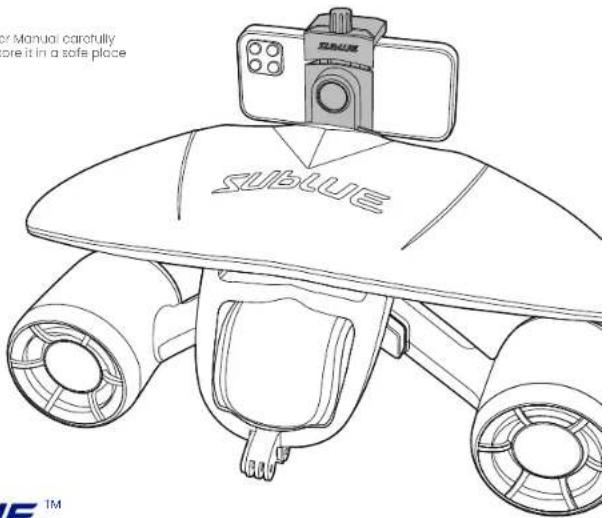
Please read this User Manual carefully before using and store it in a sofa place
VII
text_image
or Manual carefully ore it in a sofa place sublueSUBLUE Tianjin (Headquarters)
ADD. No.1, Quanzhou Road Zhongguancun
science and tech.Fork.Binhai Hanji.HAN
E-mail support@sublue.com
Web www.sublue.com
The final right of Interpretation belongs to Sublue
SUBLUE™
Recommendations and Support
1 Recommendations
When using this product for the first time, please read this user manual carefully for product information and instructions.
② Support
The users may obtain support and services of product issue, user manual, instruction video, etc. via the following methods.
Website: http://www.sublue.com
Email: support@sublue.com
China:
Service Hotline: 400-806-2688

Staff Support

SUBUE Official
WiaChol
The United States:
Service Hotline: +1 855 206 8698
Email: support.us@sublue.com
Other regions:
Please contact your dealer for support.
Information of General
Regional Agent
Warning

Warning Notice

This product cannot be used as a life-saving device.

Be sure to read the user manual carefully before use, and be familiar with all operating methods and precautions.

Ensure that there is a companion care within a certain distance during use.

This product is not recommended for minors under 8 years old.

Before use, fully inspect the product to confirm that the battery is in good condition and the power is full. Confirm that the dual propellers and other functions are normal.

Before use, fully understand the water area. Ensure that you are swimming or diving in an appropriate area with agreement of the water area management.

Always pay attention to the surrounding water area during use to ensure no danger of collision by boats or swimmers.

To ensure safety, in all circumstances, users should either wear a life jacket or be equipped with life-saving equipment.

Be sure to remove the battery from the product before transporting or carrying by air, and store the battery separately according to relevant regulations.

Do not put your fingers into the propeller in any circumstances. Do not attach clothes or other objects to the propeller.

Do not wear loose clothing or devices that could be sucked into the propeller by the water.

Wear a swimming cap during use, and pay special attention to anyone with long hair around you to avoid twisting hair or clothes into the propeller.

Pay attention to remaining power when using this product to ensure a safe return.

Do not let your face or mask to the rear of the propeller directly.

① Fully charge the battery before use.
Do not drink alcohol or take medication before or during use.
3 Try to use this product in open areas to avoid danger caused by propeller entanglement with objects such as algae, ropes, nets, shells, and sands.
4 Never replace the battery in water. Be sure to replace it in a dry environment with the device and your hands dry.
5 To protect the life of thrusters, do not operate it continuously more than 30s in the air. In any abnormal cases (such as a burning smell), immediately release the switch to stop the machine and remove the battery carefully.
Do not use this product directly on the beach to avoid sand, shells or other debris into the propeller.
The surface of the product shall not be in contact with volatile or acidic substances such as gasoline, rubber water, or sharp objects.
Do not place heavy objects on the product.
Do not throw the battery into fire.
When the product is not in use, keep it away from direct sunlight. High temperature can damage the battery and cause explosion or leakage.
Do not use this product beyond the limit depth (40m)
12 Ensure sufficient lighting in dark water or when diving at night.
This product is not suitable for water mixed with sand or with similar physical properties.
14 Do not use the product in the case of malfunction.
Factors such as location, temperature, depth, and water flow under different conditions can affect the buoyancy of this product. If the product is released at this time, it may sink.
16 Be sure to take out the product from water when not using it.
17 Non authorized after-sales service person must not repair. If the repair is incorrect, the product may leak, damage, fire or electric shock.
Contents
Overview 1
Product Introduction 1
Product Features 1
List of Items 3
Name of Components 4
Preparation before first use 5
Check Items 5
Check Battery and Charge 5
Read User Manual 6
Start 6
Operation Instructions 6
Operation 6
Indicator Lights Description 8
Correct Use 9
Correct Grip and Hold Posture 9
Turning in Water 10
Rising and Sinking 10
Read and understand the user manual and all other safety instructions before using this product.

Installation and Use of Accessories 10
Floater 10
Waterproof mobile phone case holder 12
Wear and emergency release the safety leash 13
Battery 14
Battery Introduction 14
Battery Charging 15
Battery Replacement 15
Battery Storage and Maintenance 16
Maintenance 17
Cleaning after Use 17
Storage 18
Troubleshootings 18
Appendix 20
Symbol Explanation: * Note (Detailed explanation)
warning
©2019-SUBBLE Copyright
Overview
① Product Introduction
MixPro is a new underwater scooter of Subtle for diving, swimming and water lovers all over the world. It inherits the advantages of Whiteshark Mix and its compact body contains excellent skills. The two sides are equipped with the self-developed propeller propulsion system, which is balanced and efficient. The two speeds can be switched freely. Even if you are a swimming beginner, MixPro can make you as a superstar. In addition, it is equipped with a waterproof mobile phone case holder, that is convenient to take your phone underwater to shoot the scenery and sporting moments.
② Product Features
- Compact and Portable It is about 60% lighter than traditional DPVs, and its compact body is convenient for travel.
- Easy Operation Press the bottoms on both sides to start. One-side release will stop the product, making it easy to swim underwater.
- Dual Speed Switch between high and low speeds at any time to enjoy underwater experiences from free swimming to top speed swimming.
- Long Endurance MixPro uses an advanced DC brushless motor and technology to realize better performance and longer durability.
- Removable Floater Mounting the removable floater, the whole machine realizes positive buoyancy* and automatically floats up after releasing.
- Extensions There is an action camera mount under the front end of the product, and a waterproof mobile phone case holder is provided for you to take the phone into underwater shooting.
- Quick Replacement of Battery
By the unique patent technology of battery sealing, users can replace the battery quickly within 5s and ensures a reliable sealing.
* The positive buoyancy realized by the main body and floater can only exist in the condition of sea water and the user does not dear other negative buoyancy objects (such as counterweight, underwater camera, lighting device, etc.). The product buoyancy varies and even becomes negative according to different water environment, additional mounting and exceeding normal depth.
③ List of Items
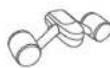


Underwater Scooter ×1 Floater ×1 Adapter + Cable ×1

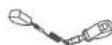

Lithium-ion Battery ×1 Safety Leash ×1 Mounting Screw ×1


Waterproof Mobile Phone Case Holder + Mobile Phone Safety Leash ×1
Instructions ×3

- Before use, check carefully whether the package includes the above items. If any items are missing, please contact Sublue or your dealer.
- Check to see if the product is damaged.
- This product package does not include waterproof mobile phone case and mobile phone.
④ Name of Components
- Thruster Cylinder
- Protective Cover
3 Floater - Action camera mount
- Handle
- Start Button
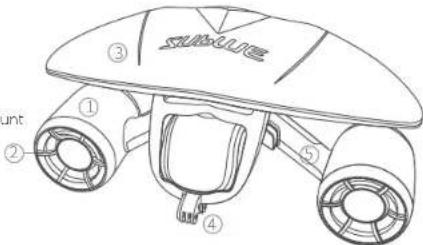
text_image
SunLife ③ ① ② ④ ⑤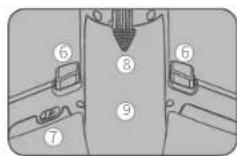
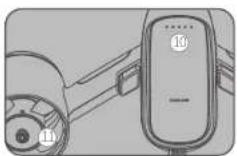
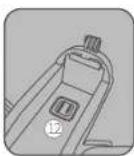
- Safety Lock
- Battery Cover
-
Battery Compartment
-
Battery Indicator
- Propeller
- Sealing Pad
Preparation before first use
1 Check Items
- Checking product appearance
After unpacking, check carefully whether the shell is broken, the protective cover has fallen off, the propeller blade has been damaged, the battery back cover cannot be opened, the battery is swollen or is leaking, the battery sealing pad has been damaged, or other conditions that could seriously affect product use.
- Checking function
Check whether the left and right start buttons are stuck or broken, and after starting check whether the left and right propellers are running normally.
If you find any of the above problems, please do not use the product and contact Sublue after-sales service center or your authorized after-sales organization. Do not run the product for more than 30s in the air.
② Check battery power and charge
Connect the charger to the AC supply (100-240 V\~AC, 50/60 Hz)

flowchart
graph LR
    A["Device"] --> B["AdopterBattery"]
    B --> C["Socket"]
When charging, make sure that the positive and negative signs of the charging plug match those of the battery.
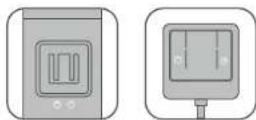
3 Reading the User Manual
Before use, please read this user manual carefully and be familiar with all the operation and precautions.
4 Start
Take your MixPro to explore the underwater world now.
Before use, you should be familiar with product performance in an absolutely safe water environment and fully master its operations.
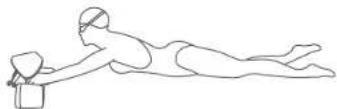
Operation Instructions
Operation
text_image
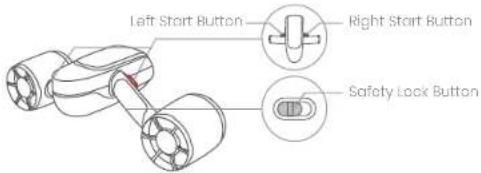
Left Start Button Right Start Button Safety Lock Button| Item | Instructions | RemarksPhoto | |
| Power on | Press and hold the left start button for 3 seconds. The product will be on after the indicator light turns on |  | The start speed is "low" by default. |
| Operating | With the product turned on, press the left and right start buttons at the same time to operate it |  | LED indicator is always on |
| Speed switch | 1. Press the left and right start buttons at the same time to run the product2. Quickly tap on the right button twice and then hold it | 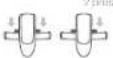 | The twice tap interval is about 0.5s.Switch between high and low speed. |
| Stop operating (standby) | Release the left and right start buttons at the same time, or release a start button on either side to stop operating |  | Enters standby mode, and LED indicator flashes |
| Lock | Turn the safety lock to the position of lock sign |  | |
| Power off | The product will automatically shut down without any operation in 10 minutes | LED lights turn off |
If you don't use or carry the product, it is recommended that lock and keep it safe, to prevent from accidentally operating due to squeezing the start button, causing personal injury or damage to the product.
② Indicator Lights Description
The MixPro body contains LED indicators showing device status and battery. Their location and definitions are as follows.
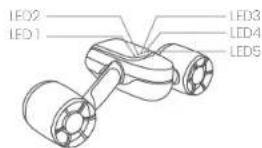
○ Indicates that the LED lights are flashing regularly
○ Indicates that the LED lights are always on
● Indicates that the LED lights are off
- Check Battery Power
| Battery Indicator Lights | ||||
| LED1 LED2 LED3 LED4 LED5 Remaining Battery | ||||
| ○ | ○ | ○ | ○ | 70%-100% |
| ○ | ○ | ○ | ○ | 50%-70% |
| ○ | ○ | ○ | 30%-50% | |
| ○ | ○ | 20%-30% | ||
| ○ | Below 20% | |||
As the use of the product, the indicator lights go off in turn from the right side of the product. Please pay attention to the battery changes and ensure a safe return..
- Indicator lights Description
| Colorful gradient LED lights flashing | Power on | ||
| All LED lights off | Power off | ||
| LED lights breathing flashing | Standby | Low speed: purpleHigh speed: orange | |
| LED lights always on | Operating | Low speed: purpleHigh speed: orange | |
| LED lights heartbeat flashing once | Low battery Alarm | The indicator lights in red | |
| LED lamp quickly heartbeat flashing three times | Very low battery level alarm | The indicator lights in red |
Correct Use
You should be familiar with the product in a safe water environment and fully master the operations before using.
1 Correct Grip and Hold Posture
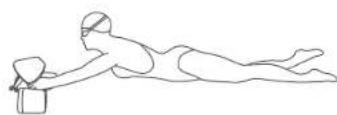

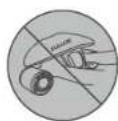
② Turning in Water
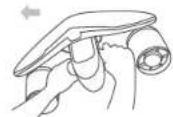
Turn left Turn right
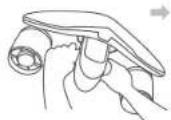
③ Rising and Sinking
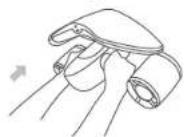
Rising Sinking
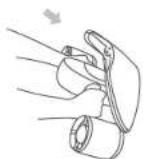
If you have not learned diving or being professionally trained for diving, do not use the product to sink or rise quickly to prevent injury.
Install and Use of Accessories
1 Floater
The product includes a floater, realizing positive buoyancy and automatically rising after release. You can select floater based on the actual situation.
i
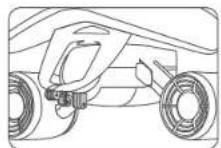
Align the floater mounting point with that of the product body
2
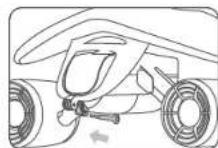
Insert the screw (which does not need to be tightened, just insert it)
③
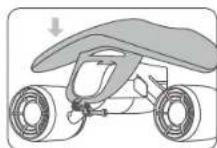
Press the floater down to the product body so that the sucking cup attracts on the product body.
4
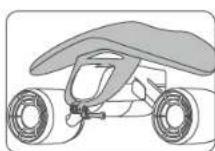
Tighten the screw and the floater is assembled.
* The positive buoyancy realized by the main body and floor, can only exist in the condition of sea water and the user does not add other negative buoyancy objects (such as counterweight, underwater camera, lighting device, etc.). The product buoyancy varies and even becomes negative according to different water environment, additional mounting and exceeding normal depth.

The limit depth of the floater is within 5 meters.
② Waterproof Mobile Phone Case Holder
The product includes a mobile phone waterproof case holder, used with phone cases, allowing phones to shoot photos underwater. The holder can be installed or not according to your needs.
- Rotate the holder right or left to the horizontal position.
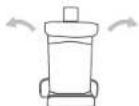
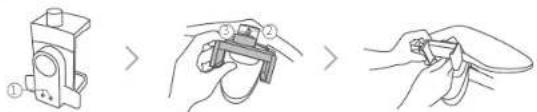
- Align the two limit bumps ① of the case holder to ② the back spacing hole of the floater. Then insert the screw ③; tighten it by hand or a screwdriver (as shown below).
text_image
Diagram showing three-step steps of a mechanical clamp or bracketing process, with numbered instructions and directional arrows.- Turn the knob nut of the holder ④ counterclockwise to open the clip to a proper position. Insert the waterproof case with the mobile phone, then tighten the nut ④ clockwise to tight the holder.

natural_image
Diagram showing two views of a flyfly with labeled parts, no text or symbols present- According to your shooting needs, rotate the holder to the horizontal or vertical state.
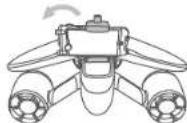
- Finally, connect the waterproof mobile phone case to the floater with the phone case safety leash ⑤.

-
The waterproof case holder can not keep the phone sealed under water. Therefore, ensure that your mobile phone has independent and reliable sealing protection before use, and follow the corresponding instructions.
-
Use appropriate force while tightening the nut. Excessive force may damage the waterproof case or phone, causing trouble and loss.
* The waterproof mobile phone case holder must be used with the floater and is purchased separately.
3 Wear and Emergency Release the Safety Leash
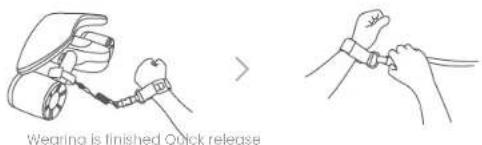
The product includes a safety leash. One side of the safety leash is connected to the handle and the other side is connected to the wrist of the same side. The safety leash can be used to prevent the product from losing due to water flow or other reasons.
text_image
Wearing is finished Quick releaseWhile wearing the safety leash, in order to protect your personal safety in case of emergency, the device can be separated from you by quick release.
Battery
1 Battery Introduction
The battery is a high-performance lithium-ion battery with a capacity of 11,000 mAh, designed specifically for the Sublue™ MixPro underwater scooter. It features high-performance cells that provide sufficient power for the MixPro.
- The battery must be charged with the dedicated charger of MixPro. Sublue is not responsible for any consequences of charging through chargers not provided by the official MixPro product (including other model of Sublue products).
- The MixPro is powered by a lithium-ion battery, so be sure to fully charge the battery before first use.
- If the five indicator lights are red and flashing continuously while the product is switched on, it shows the battery is low. Charge it in time.
- It takes about 2 hours to fully charge the battery.
② Battery Charging
Connect the charger to the AC supply (100-240V AC, 50/60Hz).

flowchart
graph LR
    A["Device"] --> B["Adapter Battery"]
    B --> C["Socket"]
When charging, make sure that the positive and negative signs of the charging plug match those of the battery.
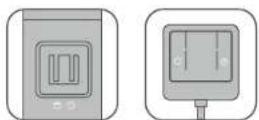
3 Battery Replacement
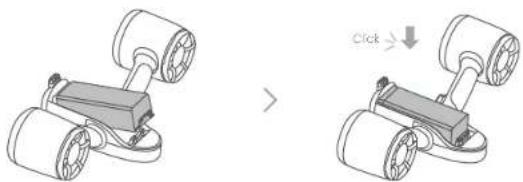
When the battery is secured correctly, buckling sound can be heard a click. Confirm the battery is installed securely.
natural_image
Two 3D illustrations of a robotic vehicle with wheels and a lock, showing a change in motion (no text or symbols)Before installation of battery After installation of battery
④ Battery Storage and Maintenance
When the product is not in use, please take out the battery and store it separately.
The best storage conditions for the battery are 0–25°C, 60 ± 25% RH humidity, and remaining power at 30%-50%. It should be separately stored in a coal and ventilated place.
Do not leave the battery in places exposed to direct sunlight or high temperatures (such as near microwaves or ovens), because it may overheat and potentially explode.
4 Do not throw the battery into fire, otherwise it may catch fire or explode.
Do not charge the battery near fire or heat.
6 Do not drop, squeeze or puncture the battery as this may cause internal short circuiting and overheating.
7 Do not disassemble or modify the battery. Unauthorized modification may cause leakage or explosion.
⑧ Keep the battery out of the reach of children.
⑨ Do not charge the battery below 0°C.
When the battery is used below 0^ C, the battery power will decrease sharply, resulting in a sharp decrease in the running time.
For safety, the battery should be kept at low power during transportation. Discharge it beforehand to 30%.
② Do not use damaged batteries.
③ If electrolyte enters your eyes after battery leakage, do not wipe it. Wash it with water, and consult a doctor immediately. If not handled in time, eyes will be hurt.
4 If stored for a long time, check the battery power at least every 3 months and charge it to 60%.
Maintenance
① Cleaning after Use
After each use, MixPro should be completely immersed in fresh water for 30 minutes to prevent residue from seawater or foreign objects. Also pay attention to the following points.
* The battery must be installed before cleaning.
* Use fresh water.
* Inverse in water for more than 20 minutes.
* Do not add chemical cleaners such as laundry detergents or cleaning agent to the water.
* When the Mix Pro is immersed in water, some bubbles may emerge from holes of body. This is normal.
2 Press both bottoms so that the MixPro runs half in air and half in water for 3 seconds. Repeat 5-10 times.
* To prevent the water splashing on your body, keep the propeller outlet to the bottom of the container.
MixPro has a large thrust force in water, use low speed, and slightly lift it up to the water surface for easier control.
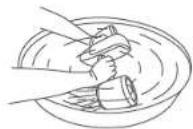
3 Shake fully and clean the MixPro body to remove any foreign matter attached to it.
4 Wipe the surface of the machine body with a clean soft cloth, and make sure that there is no water around the machine body and battery. Put them in a cool and ventilated place to dry naturally.
* Do not use a hair dryer or blower.
② Storage
If you are not going to use the product for a long time, please store the MixPro and battery separately. Follow the rules below:
1 Ensure that the product is stored in a cool and ventilated place, above 0°C and below 50°C.
Do not store it in areas with poor ventilation or humidity above 65%.
③ Do not store it in direct sunlight.
4 Keep it away from heat, fire, and children's reach.
⑤ Keep it away from devices that may generate strong magnetic fields.
6 Take out the product at least once a month and run it for about 10 seconds to prevent corrosion caused by changes of the storage environment.
Troubleshootings
| Fault Solution | |
| Unable to start | 1. Make sure that the battery is fully charged2. Check whether the product can be power on3. Check whether the battery indicator lights are on4. Check whether the propeller can be rotated5. Contact Sublue or an authorized service center |
| Propeller stuck orabnormally running | 1. Remove the battery2. Check whether the propeller is entangled by foreign objects3. Follow the instructions of the “Cleaning after use” in “Maintenance”4. Contact Sublue or an authorized service center |
| LED lights abnormal | 1. Make sure that the battery is fully charged2. Contact Sublue or an authorized service center |
| Battery contact is dirty | 1. Check for damage around the battery contacts2. Check the product's sealing pad for damage or protrusions3. If the stain is slight, clean it with a dry cloth and try applying vaseline on the battery contacts.4. Contact Sublue or an authorized service center |
| Speed levels cannot be changed normally | 1. Check whether the buttons are stuck2. Contact Sublue or an authorized service center |
| Damaged or swollen battery | Contact Sublue or an authorized service center |
| Abnormal battery charging | Contact Sublue or an authorized service center |
| Battery back cover is installed abnormally or cannot be removed | 1. Check whether the battery is installed correctly2. Check whether the battery is swollen3. Check whether the triangle button can be pressed and released normally4. Contact Sublue or an authorized service center |
Appendix
Specification
| Device | |
| Size | L485 mm × W230 mm × H230 mm |
| Weight | 3550 g /7.83 lb (including battery and floater) |
| Operating Depth | 40 m (131 ft) |
| Speed Grades* | high 1.8 m/s (4.03 mph); low 1.2 m/s (2.68 mph) |
| Endurance | up to 60mins for normal use*(Up to 20mins for high speed and 30mins for low speed for continuous use*) |
| Extensions | support to carry action camera, floater, and waterproof mobile phone case holder |
| Operating Temperature | 0-35°C |
| Storage Temperature | 0-45°C |
| Battery | |
| Capacity | 11000 mAh |
| Rated Voltage | 11.1 V |
| Weight | 890 g (1.96 lb) |
| Power | 122.1 Wh |
| Charging Temperature | 5-40°C |
| Maximum Charging Power | 100 w |
| Charging Time | <2 hours |
| Waterproof Mobile Phone Case Holder | |
| Dimensions | L52 mm × W72 mm × Hi05 mm |
| Holding Range | 68 mm-118 mm |
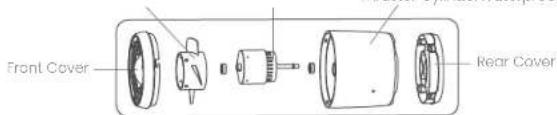
Thruster CylinderWaterproof MotorPropeller
text_image
Front Cover Rear Cover| Motor Parameters | |
| Rated Voltage | 12.6 V |
| Power | 300 W |
| Motor Grade | B continuous operation |
| Maximum RPM | 3400 RPM |
| Adapter | |
| Input Voltage | 100-240 V-AC 50/60 Hz |
| Output Voltage | 12.6 V |
| Output Current | 6 A |
| Charging Indication Charging: red; Fully charged: green | |
* The speed grade is the test value and is affected by various factors such as users, temperature, depth, water current, extensions, user's clothing and equipment, and so on.
* The normal use time is the average value of the maximum time that the user can operate the device according to the general use (discontinuous operating) when the device is fully charged.
* Continuous use time is the average value of the maximum time that the user can operate the device continuously at each speed when the device is fully charged.
Names and Contents of Harmful Substances in Products
| Harmful substance | ||||||||||
| Pb | Hg | Cd | Cr8 (VI) | PBB | PEDE | DIBP | DEHP | EBP | DBP | |
| Circuit board assembly | 0 | 0 | 0 | 0 | 0 | 0 | 0 | 0 | 0 | 0 |
| Plastic (glue) ports | 0 | 0 | 0 | 0 | 0 | 0 | 0 | 0 | 0 | 0 |
| Metal ports | 0 | 0 | 0 | 0 | 0 | 0 | 0 | 0 | 0 | 0 |
| Power cord | 0 | 0 | 0 | 0 | 0 | 0 | 0 | 0 | 0 | 0 |
| Adapter | 0 | 0 | 0 | 0 | 0 | 0 | 0 | 0 | 0 | 0 |
| Charging seat | 0 | 0 | 0 | 0 | 0 | 0 | 0 | 0 | 0 | 0 |
| Battery | 0 | 0 | 0 | 0 | 0 | 0 | 0 | 0 | 0 | 0 |
| Other accessories | 0 | 0 | 0 | 0 | 0 | 0 | 0 | 0 | 0 | 0 |
| This form is prepared according to SJ/T 11364.O: Indicates that the content of the harmful substance in all homogeneous materials of the component is below the limit as specified in GB/T 26572;X: indicates that the content of the harmful substance in at least one uniform material of the component exceeds the limit specified in GB/126572Note: This product uses environmentally protection design concepts to effectively control harmful substances. The harmful substances indicated by "X" cannot be replaced, mainly due to technological development limitation. | ||||||||||
Environmental Protection Service Time:
This mark refers to the time limit (ten years). Within this period, the harmful substances contained in the electrical and electronic products will not leak or abrupt changes under normal use. It will not cause serious pollution, bodily injury, or damage to property.

Tips for exhaust gas recovery:
In order to better protect the earth, when users no longer need the product or the products service life comes to the end, please comply with the national laws and regulations on disposal of waste electrical and electronic products and hand it over to the local manufacturers with approved qualifications for recycling.
SUBLUE Technical Support
http://service.sublue.com


This equipment has been tested and found to comply with the limits for a Class B digital device, pursuant to part 15 of the FCC Rules. These limits are designed to provide reasonable protection against harmful interference in a residential installation. This equipment generates, uses and can radiate radio frequency energy and, if not installed and used in accordance with the instructions, may cause harmful interference to radio communications. However, there is no guarantee that interference will not occur in a particular installation. If this equipment does cause harmful interference to radio or television reception, which can be determined by turning the equipment off and on, the user is encouraged to try to correct the interference by one or more of the following measures:
- Reorient or relocate the receiving antenna.
- Increase the separation between the equipment and receiver.
- Connect the equipment into an outlet on a circuit different from that to which the receiver is connected.
- Consult the dealer or an experienced radio/TV technician for help.
The information, photos and instructions contained in this user manual are owned by Sublue. Unauthorized reproduction and distribution are strictly prohibited. In addition, Sublue reserves the right to change any information in this manual.
Update of this manual will not be noticed.
You may find the latest version of this user manual in the "Service Support" of Sublue official website.
If you have any questions or suggestions about the user manual, please contact us by the email below.
support@sublue.com