
CCN-VH101 - Uncategorized Comprehensive - Free user manual and instructions
Find the device manual for free CCN-VH101 Comprehensive in PDF.


| Product Type | VGA to HDMI Converter with Audio |
| Brand | Comprehensive |
| Model | CCN-VH101 |
| Input Video | VGA (Analog, 0.5-1.0 V p-p) |
| Input Audio | R/L Analog Audio (Stereo) |
| Output Video | HDMI 1.2a |
| Supported Resolutions | 640x480, 800x600, 1024x768, 1280x720, 1280x768, 1280x960, 1280x1024 (all at 60/75 Hz) |
| Video Bandwidth | 165MHz / 1.65 Gbps per channel (6.75 Gbps total) |
| Color Depth | 8-bit per channel (24-bit total) |
| Power Supply | External 5V DC @ 2A |
| Power Consumption | 5W (max) |
| Dimensions (W x H x D) | 88 mm x 25.5 mm x 68 mm |
| Weight | 0.68 kg |
| Operating Temperature | 0 to 70 °C |
| Operating Humidity | 10% to 85% RH (non-condensing) |
| Storage Temperature | -10 to 80 °C |
| Storage Humidity | 5% to 95% RH (non-condensing) |
| Regulatory Approvals | FCC, CE |
| Package Contents | Main unit, 5V DC power supply, User manual |
| Warranty | 2 Years Parts and Labor |
| Installation | Plug and play, no settings required |
| Main Features | Converts VGA + analog audio to HDMI; supports up to 1280x1024 |
Frequently Asked Questions - CCN-VH101 Comprehensive
User questions about CCN-VH101 Comprehensive
0 question about this device. Answer the ones you know or ask your own.
Ask a new question about this device
Download the instructions for your Uncategorized in PDF format for free! Find your manual CCN-VH101 - Comprehensive and take your electronic device back in hand. On this page are published all the documents necessary for the use of your device. CCN-VH101 by Comprehensive.
USER MANUAL CCN-VH101 Comprehensive
VGA +R/L Audio to HDMI Converter
Model No.: CCN-VH101

Comprehensive® Cable and Connectivity Company
Dear customer
Thank you for purchasing this product. For optimum performance and safety, please read these instructions carefully before connecting, operating or adjusting this product. Please keep this manual for future reference.
1.0 INTRODUCTION
This kind of the Converter is a VGA video converter. It converts VGA input into HDMI and allows PC users to enjoy their larger image on TV. The conversion is along with the R/L audio.
It offers solutions for digital entertainment center, HDTV retail and show site, HDTV, STB, DVD and Projector factory, noise space and security concerns, data center control, information distribution, conference room presentation, school and corporate training environments.
1.1 FEATURES
This HDMI converter has many features that enable it to perform in a superior manner. Among those features you will find:
- Easy to Use: Install in seconds, no need of setting.
- Conversion: It could convert PC's VGA video and R/L audio into complete HDMI.
● Supports highest video resolution 1280x1024.
● Supports 165MHz/1.65Gbps per channel (6.75Gbps all channel) bandwidth.
● Supports 8bit per channel (24bit all channel) deep color.
2.0 SPECIFICATIONS
| Signal Inputs/Output | |
| Input Video Signal | 0.5-1.0 volts p-p |
| Input DDC Signal | 5 volts p-p (TTL) |
| Output Video | HDMI 1.2a |
| VGA Resolution | 640x480 60Hz 75Hz800x600 60Hz 75Hz1024x768 60Hz 75Hz1280x720 60Hz 75Hz1280x768 60Hz 75Hz1280x960 60Hz 75Hz1280x1024 60Hz 75Hz |
| Operating Frequency | |
| Vertical Frequency Range | 50/60Hz |
| Video Amplifier Bandwidth | 1.65Gpbs/165MHz |
| Mechanical | |
| Size(W-H-D) 88mmW x 25.5mmH x 68mmD | |
| Weight(Net) | 0.68kgs |
| Warranty | |
| Limited Warranty | 2 Years Parts and Labor |
| Environmental | |
| Operating Temperature | 0 ☒ to +70☒ |
| Operating Humidity | 10% to 85 % RH (no condensation) |
| Storage Temperature | -10☒ to +80☒ |
| Storage Humidity | 5% to 95 % RH (no condensation) |
| Power Requirement | |
| External Power Supply | 5V DC@2A |
| Power consumption (Max) | 5W |
| Regulatory Approvals | |
| Converter Unit | FCC,CE, |
| Power Supply | CE,FCC |
| Accessories Adapter | |
| AC Power Adapter | US standard, UK standard and so on |
| User Manual | |
Note: Specifications are subject to change without notice.
3.0 PACKAGE CONTENTS
Before attempting to use this unit, please check the packaging and make sure the following items are contained in the shipping carton:
Main unit.
5V DC Power Supply
User's Manual
4.0 PANEL DESCRIPTIONS
Please study the panel drawings below and become familiar with the signal input(s), output(s) and power requirements.
INPUT
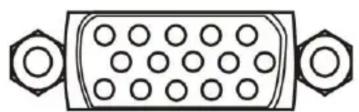
natural_image
Pure electrical connector diagram without any text, numbers, or symbolsVGA

R/L

OUTPUT
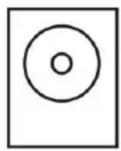
DC/5V

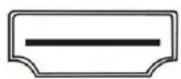
HDMI
5.0 CONNECTION AND OPERATION
Before installation, please make sure all devices you wish to connect have been turned off.
1) Connect the VGA video and R/L audio from computer to this product. (Input cables are optional)
2) Connect the HDMI output from this product to the TV which has HDMI input.
3) Connect the VGA and R/L audio output of this product to the computer's monitor and speaker if necessary.
4) Insert the DC side of 5v power supply into this product and then connect the AC side of the power supply into the wall outlet.
5) Power on the computer and TV, choose the input of TV to its HDMI channel.
6) The image does not need to be adjusted. This Converter will position it automatically.
Attention: Insert / Extract cable gently.

55 Ruta Ct. South Hackensack, NJ 07606
Toll Free: 800 526-0242
Email:
sales@comprehensivecable.com
customerservice@comprehensivecable.com
www.comprehensivecable.com
Brand : Comprehensive
Model : CCN-VH101
Category : Uncategorized